How much does an ASP.NET WebForms to Core migration cost?
The choice rests on three numbers: the minutes lost every day (4,459 euros a year each with 38 users), the years of life required and the risk of a system nobody knows.


An electrical supplies distributor in Emilia, 52 employees and 31 million euros in revenue, has a portal for orders, price lists and availability written in ASP.NET WebForms in 2011. 38 people use it: 14 inside the company and 24 agents and customers who log in from outside. It runs on .NET Framework 4.8, on a 2016 Windows server, with a SQL Server database. The developer who wrote it moved to another job three years ago, and every change is now made by a consultant who asks for more and more time to work out where to put their hands. The managing director has one question: is it worth doing the migration from ASP.NET WebForms to Core, or do we keep it running as it is?
Two answers circulate, both uncomfortable. The first says WebForms is finished and everything must be rewritten: said by those who sell rewrite projects. The second says it has worked for fifteen years so don't touch it: said by those who don't want to spend or don't want to decide. The truth is less convenient. WebForms cannot be "ported" to ASP.NET Core because Core has no equivalent of Page, ViewState and server controls. So it is replacement, not conversion. But replacing does not mean doing everything at once, and above all it does not mean doing it now.
The decision rests on three numbers no quote writes down: how many minutes each user loses every day because of the portal's limits, how many years it still has to serve, and what the risk is worth of a system nobody knows any more. With the Emilia case, which is composed and not a real client, you will see how to measure them in a week. The result: at five years the cheapest road is to secure WebForms on .NET Framework 4.8, from the sixth year migrating by modules wins, and the break-even is at 5.2 years.
You will find the signs that say the portal is at risk, an inventory of what it really contains, the four roads with their costs, the bill at one, three, five and eight years, how to replace one area at a time with an ASP.NET Core shell placed next to WebForms through YARP, a comparison between an .aspx page and its Razor Pages replacement, the session, authentication and ViewState problems that blow up estimates, and the mistakes I have seen repeated in twenty-six years of projects.
An honest premise. I have been writing software since 1999, I built a multi-tenant legal management system and I also sell this kind of work, so I know which side my interest is on. The case is composed, the assumptions are written one by one, and the result includes the case where migrating does not pay, neither with me nor with anyone else. Advice that does not tell you when not to spend is worth little.
When do you need to migrate from WebForms to ASP.NET Core?
A WebForms portal in good shape is not a problem to solve right away. The problem is the set of conditions around it, and there are seven signs. With three or more we are in the zone where the risk starts to cost more than the change.
1. The portal runs only on Windows and IIS, and nobody wants to touch the server
.NET Framework 4.8 is supported by Microsoft as long as the Windows version it runs on is supported, but it gets no new features. The concrete risk is not that it stops, it is that the server becomes an object nobody dares update. In our case the server dates from 2016 and has a single external administrator.
2. Development is possible only with old tools
WebForms projects open in Visual Studio and are published with the old project format. Modern libraries, from built-in dependency injection to packages released only for modern .NET, do not arrive. Every year the number of things the portal cannot use grows.
3. One person knows the portal, or nobody does
This is the most serious sign and the least discussed. Two hundred and fourteen pages, written over twelve years by three different people, with logic in the code-behind and in stored procedures, are knowledge that lives in one head. If it goes, the company does not lose the software, it loses the ability to change the way it sells.
4. ViewState and postbacks make pages slow
A price list grid with 2,000 rows carrying a 1.8 MB ViewState is a problem of the model and not of a page. Agents on the move, with a weak connection, wait nine seconds to see a price. This can be measured, and it is the first number to take.
5. Third-party libraries are stuck or at end of life
Commercial controls for grids, charts and reports, old versions of components for PDFs and for sending mail. Some vendors still support the WebForms versions, others do not. What matters is knowing which ones are yours and which version they are on.
6. Integrations are all workarounds
The link with the accounting system, with the carrier, with the system of a large retail customer: each is a CSV file, a nightly job or an old-style web service. When a customer asks for real-time data, the portal cannot provide it. This is where the cost of "doing nothing" turns into a lost order.
7. It does not fit the phone and cannot be automated
Agents use the phone. A WebForms page designed for a 1,280 pixel screen is used by pinching the screen. And there is no interface another program can call, so no connection is built without copying logic.
In the Emilia case the real signs are five out of seven: the frozen server, the person who is no longer there, the heavy ViewState, the patched-up integrations and the phone. With a result like this the question is not whether to think about it, but what to do and when. For the general horizon of the cost of an old program, the guide to the cost of legacy software shows how to do the bill for the generic case.
What is really inside your WebForms portal?
Before choosing a road you need an inventory, because the price of any solution depends on what is inside, and those who decide usually describe only what they see. A WebForms application contains six kinds of things, and each is replaced in a different way.
- Pages and user controls: the
.aspxand.ascxfiles with their code-behind. Screens are redesigned, the code-behind is read to understand what it decides. - ViewState and postbacks: the way the page remembers its state. It is not carried over, it is replaced with an explicit model.
- Data access:
SqlDataSource, DataSets, queries scattered in the code-behind, sometimes logic inside stored procedures. - Modules and handlers:
Global.asax,HttpModule,HttpHandlerfor downloads, PDFs and integration calls. - Authentication and session: the old membership provider, cookies in the .NET Framework format, session state.
- Rules: customer discounts, credit blocks, rounding, reserved stock. They are the real asset and they are written only in the code.
In the Emilia case the inventory, done by reading the project in three days, gives these numbers.
| Item | Quantity | What it means for the cost |
|---|---|---|
| .aspx pages | 214 | 61 used every day, 88 once a month, 65 never: these last are not migrated |
| .ascx user controls | 63 | Almost all reduce to a dozen reusable components |
| Grids with ViewState above 500 KB | 17 | These are the slow pages: orders, price lists, availability |
| Reports and printouts | 41 | 12 are documents for customers and must be redone with care |
| HttpHandlers and modules | 9 | PDF downloads, exports, two calls used by other systems |
| Procedures and views in the database | 118 | 31 contain logic the code takes for granted |
| Third-party commercial controls | 5 | Two have a Core version, three do not |
| Integrations | 6 | Accounting, carrier, a customer's EDI, supplier price lists, newsletter, signature |
| Automated tests | 0 | Behaviour must be captured before touching it |
The most important row is the one on unused pages: 65 out of 214. A third of the portal does not exist in the bill, because nobody has opened it for months. This alone lowers the quote of a rewrite more than any negotiation.
Can you convert a WebForms application to ASP.NET Core?
No, and it is worth saying right away because it is the source of almost all wrong estimates. There is no tool that takes a WebForms project and produces a working Core project. There are analysis tools that indicate what must change, and libraries that let the two worlds coexist during the replacement, but converting the pages is writing work.
The reason is technical. In WebForms the page is an object with a life cycle (Init, Load, control events, PreRender) that keeps state in a hidden field and sends it back to the server at every click. In ASP.NET Core there is nothing similar: the request is an action that receives data and returns a response, and state is handled by whoever writes the code. The change is not one of syntax but of model.
The model closest for those who like components and events is Blazor, which keeps the idea of a control with its state and events but solves it differently: the code runs on the server connected through a continuous connection, or in the browser. For a portal with many data entry forms it can be a sensible choice. For a portal with consultation pages and price lists, where speed and indexing matter, Razor Pages or MVC are almost always simpler and faster.
| If your portal is mostly... | The natural destination | Why |
|---|---|---|
| Consultation, price lists, product sheets, searches | Razor Pages | One page, one model, little state. Fast and simple to test |
| Data entry with rich forms | Blazor | Components with events, similar to how you reason in WebForms |
| Services for other programs and the phone | Minimal APIs | No page, only clear contracts |
| A bit of everything | Razor Pages plus APIs, Blazor where needed | One area at a time, with the best choice in each |
For the Emilia case the choice is Razor Pages for consultation and price lists (the majority) and Blazor for order entry, where the forms are rich. But the point is not the technology, it is the order: the choice is made area by area, not once and for all.
How much does the migration from ASP.NET WebForms to Core cost compared with not doing it?
To answer you need four roads compared, with the same assumptions. Here the model is in euros and can be redone with your numbers. The assumptions of the case are these.
- Average cost of a development day: 420 euros. 220 working days a year and 32 euros an hour for the cost of an internal user.
- Users: 38. Every minute lost per day for each of them is worth 38 × 220 ÷ 60 × 32 = 4,459 euros a year.
- A portal outage (each time a working day is blocked for four hours) is worth 4 × 38 × 32 = 4,864 euros each.
- Risk of lost knowledge and of an environment that cannot be rebuilt: estimated at 6,000 euros a year if nothing is done, 1,500 if it is secured, 600 after the migration.
Road 0: do nothing
No start-up cost. Every year: 24 days of maintenance (10,080 euros), 5,400 euros of server and licences, 8 minutes lost per user per day (35,672 euros), one outage (4,864 euros) and 6,000 euros of risk. Total: 62,013 euros a year. The point is that this road is not free: it is the most expensive of those that last.
Road A: update and secure WebForms
You stay on .NET Framework 4.8: packages are updated, dead dependencies removed, ViewState taken off the 17 slow grids, tests written on the 30 critical rules, the server moved to a machine that can be rebuilt with a script, the database brought under control. 40 days, 16,800 euros. Annual cost afterwards: 24 days (10,080), 4,200 of server, 6 minutes lost (26,754), half an outage (2,432), risk 1,500. Total 44,964 euros a year.
Road B: replace one area at a time with ASP.NET Core
A Core shell is placed next to the portal, the database stays shared and one area at a time moves from old to new. 367 days, 154,140 euros, plus 20 days of double maintenance, 8,400 euros, because for a period two systems are kept alive. Annual cost at steady state: 14 days (5,880), 1,800 of hosting, 2 minutes lost (8,918), no outage, risk 600. Total 17,197 euros a year.
Road C: rewrite everything and replace in one go
470 days, 197,400 euros, plus 26.7 days of double maintenance (11,200 euros), because the rewrite takes longer before going live. The annual cost at steady state is the same as road B, 17,197 euros, but the risk of arriving later than planned is higher, because no product in use proves the work one piece at a time.
| Road | Start-up cost | Double maintenance | Annual cost at steady state |
|---|---|---|---|
| 0. Do nothing | 0 | 0 | 62,013 |
| A. Update WebForms | 16,800 | 0 | 44,964 |
| B. Migrate by modules to Core | 154,140 | 8,400 | 17,197 |
| C. Rewrite everything | 197,400 | 11,200 | 17,197 |
For the full picture of the path, from diagnosis to plan, the page on legacy software modernization describes it step by step.
Before reading the bill by years, a note on method: the 367 days of road B are not a number shot from the hip. They are the sum of six pieces: 25 for data and rules, 30 for the shell and authentication, 240 for the areas, 40 for integrations, 20 for going live and 12 for switching off the old one. If you cannot write the six pieces of your quote, you cannot judge it.
After how many years does migrating WebForms to Core pay?
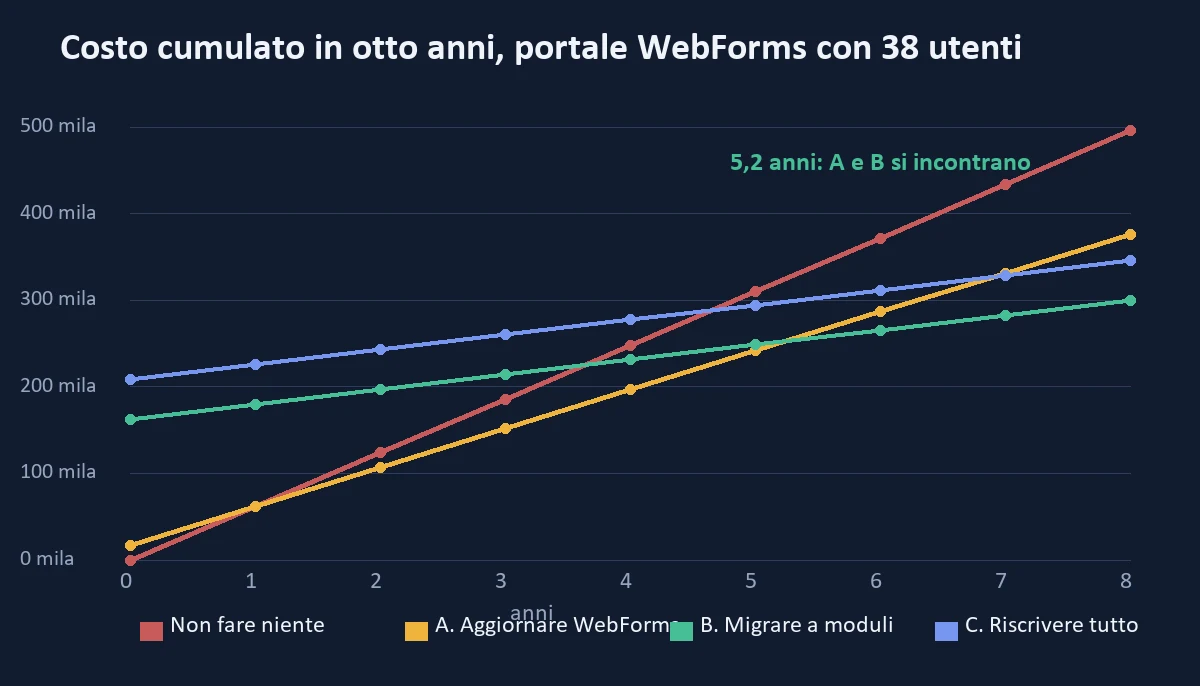
The right question is not "how much does it cost" but "how much does it cost in total, for the years the portal has to serve". Adding start-up cost, double maintenance and annual cost, the cumulative bill for the four roads is this.
| Horizon | 0. Nothing | A. Update | B. Modules with Core | C. Rewrite |
|---|---|---|---|---|
| 1 year | 62,013 | 61,764 | 179,737 | 225,797 |
| 3 years | 186,039 | 151,692 | 214,131 | 260,191 |
| 5 years | 310,065 | 241,620 | 248,525 | 294,585 |
| 8 years | 496,104 | 376,512 | 300,116 | 346,176 |
Read the table in three steps. First: doing nothing never wins, not even in the first year, because updating costs 16,800 euros and saves 17,049 euros in a year. Second: at one and three years road A is the cheapest, at five years A and B are practically equal (241,620 against 248,525), and from the sixth year migrating by modules pulls ahead: at eight years it costs 300,116 euros against 376,512, so 76,396 euros less. Third: road C, the rewrite, never wins, because it has the same annual cost as B but starts higher and arrives later.
The break-even points, calculated on the same assumptions, are three.
- Updating against doing nothing: pays back in 0.99 years, that is twelve months. It is the only intervention whose convenience depends on nothing.
- Migrating against doing nothing: pays back in 3.6 years.
- Migrating against updating: pays back in 5.2 years. If the portal must serve less than five years, you update and that is it. If it must serve eight or ten, you migrate.
The chart below shows the four lines: the curves of B and C start much higher but grow more slowly.
What moves the break-even
The number 5.2 is not a law, it is the result of those assumptions. Changing one at a time, this is what happens.
| If this changes... | The break-even between updating and migrating becomes |
|---|---|
| Users drop from 38 to 12 | 10.5 years |
| Users rise from 38 to 60 | 3.7 years |
| The risk of lost knowledge is worth zero | 5.4 years |
| The migration costs 480 days instead of 367 | 7.0 years |
| After the migration 4 minutes are still lost instead of 2 | 7.7 years |
The observation that matters: the number of users weighs more than the rest. A portal used by twelve people is not migrated for convenience, it is updated. A portal used by sixty people, with agents opening it every day, is migrated even at a short horizon. And the second: if the minutes lost after the migration do not really go down, the whole bill falls, so the number to defend in the project is this one, not the days.
How do you migrate WebForms to Core without stopping the portal?
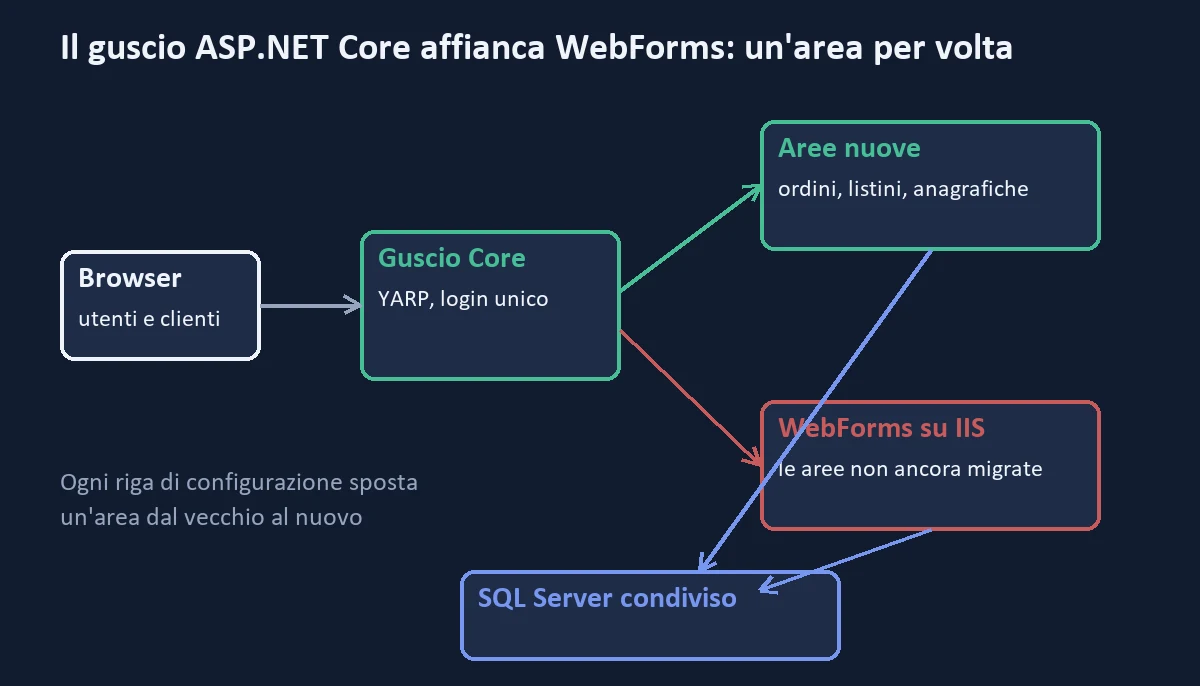
The method is called strangler fig: the new is built around the old, one area at a time, until the old is no longer needed and is switched off. In the .NET world it has two official tools. The first is YARP, a reverse proxy written by Microsoft for ASP.NET Core, which sits in front of the portal and decides, for each address, whether the request goes to the new or to the old. The second is System.Web adapters, a library that lets new code read things that used to live in HttpContext, such as the session, and talk to the old application. For the general principle, the guide to the Strangler Fig pattern explains the logic; here we see how it applies to WebForms.
The architecture is this.
1. The Core shell in front of the old
An ASP.NET Core project is created that becomes the entry point: users keep opening the same address. The shell serves the areas already migrated and forwards everything else to the WebForms portal, which keeps running on IIS where it is today. The shell's startup program, in its smallest form, is this.
using Yarp.ReverseProxy.Forwarder;

var builder = WebApplication.CreateBuilder(args);

builder.Services.AddRazorPages();
builder.Services.AddHttpForwarder();
builder.Services.AddSystemWebAdapters();

var app = builder.Build();

app.UseStaticFiles();
app.UseRouting();
app.UseAuthentication();
app.UseAuthorization();
app.UseSystemWebAdapters();

// Areas already migrated answer from the new.
app.MapRazorPages();

// Everything else goes to the WebForms portal, at the lowest priority.
var vecchio = builder.Configuration["PortaleVecchio:Url"]!;
app.MapForwarder("/{**catchall}", vecchio)
   .Add(b => ((RouteEndpointBuilder)b).Order = int.MaxValue);

app.Run();
The detail that counts is the order: the addresses of the new have precedence, and the old receives only what the new does not know. Each migrated area is a page added to the new, with nothing else to touch: the old stops receiving those requests by itself. If the new area has a defect, removing the page sends the requests back to the old in a few minutes.
2. The database stays shared
The database is not copied and no synchronisation is built. Old and new read and write the same tables, which is the reason the move can be done one area at a time. The price is a rule of discipline: while an area is in the old, only the old writes it. When it moves to the new, only the new. Writes from both sides on the same table are the most frequent cause of corrupted data.
3. There must be only one user login
The user must not log in twice. The shell handles authentication and passes the identity to the old in a way the old understands, usually with a shared cookie protected by a common key. It is the part that needs the most attention, and wrong estimates are born here, under a simple title: "unify access".
4. The session is carried over, but carefully
If the old keeps the cart or the search filters in session, the new must be able to read them. The System.Web adapters library allows sharing the session between the two, but every object must be serializable. In practice, session data must be reduced to a few simple values before starting: a cart identifier, not the whole cart object.
5. The order of the areas
You start from low-risk areas that show visible value, not from the most important ones. A good order, in the Emilia case, is this: product sheets and search (consultation, no writes), price lists and prices, availability, orders and cart, agents area, invoicing and shutdown. Consultations go first because they prove the shell holds, and because they are also the slowest pages.
| Month | Area | What you get |
|---|---|---|
| 1-2 | Shell, single login, inventory and tests on the rules | The portal is unchanged, but now an area can be moved |
| 3-4 | Search and product sheets | The slowest pages drop from 9 to under 1 second |
| 5-6 | Price lists and prices | Agents see the price at the first click, even from the phone |
| 7-8 | Availability and stock | Real-time data for the large retail customer |
| 9-12 | Orders and cart | The most complex area, with a week of parallel run on two pilot users |
| 13-14 | Agents area, remaining integrations | The last reason to keep the old is removed |
| 15 | WebForms shutdown | The server is removed along with the risk it carried |
For a portal of this size fifteen months are needed, and every month three things change for the users. The difference with the rewrite is not the duration, it is that from the third month every area that goes out is already in use, and every mistake costs a page and not the portal.
How do you replace a WebForms page with Razor Pages?
A concrete example helps to see where the work is. This is a customer's price list page, in the form found in a 2011 project.
// Listini.aspx.cs
public partial class Listini : System.Web.UI.Page
{
    protected void Page_Load(object sender, EventArgs e)
    {
        if (!IsPostBack)
        {
            ddlFamiglia.DataSource = Famiglie.Elenco();
            ddlFamiglia.DataBind();
            Carica();
        }
    }

    protected void ddlFamiglia_SelectedIndexChanged(object sender, EventArgs e)
    {
        Carica();
    }

    private void Carica()
    {
        var cliente = (int)Session["ClienteId"];
        var righe = Listino.Righe(cliente, ddlFamiglia.SelectedValue);
        foreach (var r in righe)
            r.Prezzo = r.Prezzo * (1 - ScontoCliente(cliente, r.Famiglia));
        gvListino.DataSource = righe;
        gvListino.DataBind();
    }
}
You can see four things that are not carried over as they are. The first is IsPostBack: the page reloads by itself at every change of the drop-down and relies on ViewState to remember the choices. The second is Session["ClienteId"]: session state, which in the new will be an authenticated identity. The third is DataBind(): the grid receives the data and keeps a copy in ViewState, which is the reason for the megabytes. The fourth is the only one that must not be lost: the line with the customer discount, that is, the rule.
The same page in Razor Pages is this.
// Pages/Listini.cshtml.cs
public class ListiniModel : PageModel
{
    private readonly IListinoService _listini;

    public ListiniModel(IListinoService listini) => _listini = listini;

    [BindProperty(SupportsGet = true)]
    public string? Famiglia { get; set; }

    public IReadOnlyList<string> Famiglie { get; private set; } = [];
    public IReadOnlyList<RigaListino> Righe { get; private set; } = [];

    public async Task OnGetAsync(CancellationToken ct)
    {
        var cliente = User.GetClienteId();
        Famiglie = await _listini.FamiglieAsync(ct);
        Righe = await _listini.RigheAsync(cliente, Famiglia, ct);
    }
}
Three things have changed. The drop-down becomes an address parameter, so the page can be bookmarked and sent to a colleague. The session disappears: the customer comes from the identity, not from a hidden value. And the discount has left the page: it lives in IListinoService, where it can be tested. This last move is the real gain, because today the rule is discovered only by opening the page.
The rule, in its test form, is this.
[Fact]
public async Task Il_prezzo_applica_lo_sconto_del_cliente_sulla_famiglia()
{
    var servizio = Fabbrica.ListinoConSconto(cliente: 1042, famiglia: "CAVI", sconto: 0.12m);

    var righe = await servizio.RigheAsync(1042, "CAVI", CancellationToken.None);

    Assert.All(righe, r => Assert.Equal(Math.Round(r.PrezzoListino * 0.88m, 2), r.Prezzo));
}
A test like this costs half an hour and lasts as long as the portal. Writing it before rewriting the page is the difference between migrating and hoping you have migrated. And its value grows with each area: after ten areas, the portal has ten sets of proven rules that did not exist before.
What are the problems that blow up estimates?
The pages are not the hard part. Five things around the pages are, which are rarely found in quotes and which, if ignored, double the time.
Authentication with the old provider
Portals of those years use the ASP.NET membership provider, with a users table and a password with a particular hash format. ASP.NET Core uses a different format. The solution that does not force anyone to reset their password is to recognise the old format at login and rewrite the hash in the new format at the first successful login. In our case it is a week of work, tests included. Without the procedure, on the day of the switch 38 people ask for a new password.
ViewState hidden in the rules
You sometimes discover that a page works because a value came through ViewState and not from the database. The value is no longer there in the new, and the page behaves differently without giving errors. The defence is only one: behaviour tests are written first, on the old, and run again on the new.
Stored procedures with logic inside
In 31 procedures out of 118 there is a decision the code takes for granted: a discount that depends on the day, a block if the customer is overdrawn. They are not rewritten first. They are left where they are and called from the new, and extracted later, when a test protects them. Changing the page and the procedure together is the fastest way to no longer know which of the two broke what.
Third-party commercial controls
Two of the five controls in the case have a Core version, three do not. For the three, substitutes are needed: a different library for grids, one for charts, a PDF generator. Each replacement costs 5 to 12 days and changes the look of the pages. You decide which to replace at the beginning, not when the page is already rewritten.
Hosting and publishing
The old portal runs on IIS. The new can run on IIS, in a container or on a managed service. The choice changes the annual cost (1,800 euros in the case) and must be made early, because it determines how each area is published. Putting the new on the same server as the old is the quickest way to start, but it is worth deciding at once where it will end up, so as not to pay twice. To see what you gain by moving to ASP.NET Core, it is worth rereading what changed with the .NET Core 3.0 release, and for publishing the interfaces the shell exposes, the guide to publishing REST APIs.
The sum of these five things, in the Emilia case, is worth about 70 days out of 367. A quote that does not list them by name is a quote that is hiding them.
How do you decide in a week?
The path I use with a client is always the same, and it takes five working days.
Day 1: the horizon in years
One question to the director: for how many years do you plan to use this portal? Not "until it works", but a number. Ten years and three years are two different projects. If the answer is three, everything else gets simpler: you update and that is all.
Day 2: counting the minutes
You sit for an hour next to six users, between internal staff and agents, and note every time they wait, work around, retype or phone for data the portal does not give. You time it. The number that comes out, in minutes per user per day, is worth 4,459 euros a year for every minute with 38 users. It is the most underestimated number of the project, and it is usually the highest.
Day 3: the inventory
The aim is the table seen above. You count the pages, check which are used from the server logs (not from what people say), measure the ViewState of the grids and list controls, integrations and procedures with logic. It costs three days if you start from zero and one if the logs already exist.
Day 4: the rules
You extract the business rules from the code-behind and the procedures, write them in plain language with a numeric example for each, and have them read by the people who work with them. The rules nobody recognises are the most valuable or the most wrong, and in both cases they must be discovered now and not on the day of acceptance.
Day 5: the bill and the decision
With horizon, minutes, inventory and rules you fill in the comparison of the four roads. If the break-even between updating and migrating falls after the horizon, you update. If it falls before, you migrate, and you choose the first module.
At the end you have four things you did not have before: a horizon, a figure for lost minutes, a list of rules and a value for the risk. With these the discussion is no longer "WebForms yes or no", but "which road reduces cost and risk in the coming years". For those who have also considered starting from scratch with custom software, the bill with the quote items is in how much custom management software costs, and to choose between rewriting and cleaning up see rewrite or refactor legacy software.
Which mistakes repeat in the migration from WebForms?
In twenty-six years of projects the same mistakes come back. I list eight, with the way to avoid them.
- Starting from the most important page. You start from a consultation page, which tests the shell at little risk.
- Writing the new without tests on the old. If you do not know what the old does, you do not know whether the new does it.
- Copying the database "to be safe". Two copies of the same data diverge within a week.
- Migrating pages nobody uses. They are 30% of the bill and zero of the value.
- Underestimating login. On the day 38 people cannot get in, no other success counts.
- Carrying over ViewState. Rebuilding it in another form means carrying the problem along. You design the state that is really needed.
- Using a single big release. Each area goes out on its own, at a quiet time, with the possibility of going back in a few minutes.
- Not measuring the gain. If you do not measure the minutes lost before and after, you cannot show the project worked, neither to yourself nor to whoever pays.
One more mistake, less technical: deciding from the title of an article. This one too, included, shows a composed case. Your portal has another curve, and the only way to know is to put your numbers in the table.
What would the Emilia company do today?
Back to the distributor. The director had a question and a consultant who asks for more and more time. With the bill in hand they would have seen that "doing nothing" costs 62,013 euros a year, that updating WebForms pays back in twelve months, and that migrating by modules pays back against updating in 5.2 years.
They would have decided in two steps. Right away, 40 days: take ViewState off the 17 slow grids, write the tests on the 30 critical rules, move the server to a machine that can be rebuilt and replace the three controls with no future. It costs 16,800 euros, pays back in a year and removes the most urgent risk. In parallel, the Core shell and the first area, search and product sheets, because they are the slowest pages and the ones agents open most. With that area in production, the decision on the rest is taken with minutes recovered measured and not estimated.
The full migration, 154,140 euros plus double maintenance, becomes the right choice if the company plans to keep the portal for eight years or more, if customers ask for real-time data, or if the consultant stops earlier than expected. It is not the right choice if the reason is "WebForms is old": that reason, alone, is not a number.
In any case they would have decided with a number and not with a salesperson's charm, and they would still have the right road open in two years. That is the difference, and it is worth more than the outcome.
If you have a WebForms portal and want to know which zone your company falls in, the path starts from the page on legacy software modernization, which also includes the cases where the answer is to touch nothing. If the starting point is a .NET Framework application of another kind, the guide to the migration from .NET Framework to .NET 10 does the same bill, and if the program is written in Delphi there is the Delphi to .NET migration. And if you need someone to look at the numbers with you, there is software consulting.
In five lines. Count how many of the seven signs apply to your portal and for how many years nobody has known it. Measure the minutes lost each day per user: they are worth 4,459 euros a year each with thirty-eight users. Take ViewState off the slow pages before anything else. Extract the rules from the code-behind and the procedures before talking to any supplier. Update WebForms where needed, and replace one area at a time with a Core shell where the number of users and the horizon justify it.
If the program to modernise is a business application written in Visual Basic 6, the cost at one, three, five and eight years, with the COM bridge to replace one module at a time, is in VB6 to .NET migration.
Frequently asked questions
For a portal with 38 users and 214 pages, replacing one area at a time with ASP.NET Core costs about 154,140 euros (367 days), plus 8,400 of double maintenance. Rewriting everything costs 197,400 euros. Updating and securing WebForms costs 16,800 euros (40 days).
No: Core has no Page, ViewState or server controls, so there is no automatic conversion. You replace page by page with Razor Pages, MVC or Blazor, with an ASP.NET Core shell and YARP placed next to the old portal during the transition.
At three years updating costs less (151,692 euros against 214,131), at five years they are even (241,620 against 248,525) and at eight years migrating costs 300,116 euros against 376,512. The break-even is at 5.2 years in the case described and depends mostly on the number of users.
With the strangler fig: an ASP.NET Core shell with YARP sits in front of the portal, the database stays shared and one area at a time moves from old to new. In the case described it takes 15 months, and each area goes live on its own.
You do not carry it over: you design the state that is really needed. Before migrating it is worth taking it off the slow grids, because in a real case it weighs even 1.8 MB, and writing behaviour tests on the old to run again on the new.
Five: authentication with the old membership provider, ViewState hidden in the rules, stored procedures with logic inside, commercial controls with no Core version and hosting choices. In the case described they are worth about 70 days out of 367.
Leave your details in the form below