When should you use Dapper instead of Entity Framework Core?
In systems that last they run together on the same connection: Entity Framework Core for commands, Dapper for the reads the profiler flags as slow.


Marta is the tech lead at a logistics company. The order report in their internal system, the one the warehouse manager opens every morning, takes nine seconds to load. She opened the SQL Server profiler and found a single query sent by Entity Framework Core: 1,900 lines of SQL, seven joins, and a result of more than three thousand rows for one order. The oldest developer on the team said the sentence you hear in every company: "Drop the ORM and write the query by hand." Another one answered that with Dapper everything runs ten times faster.
Both of them are partly right, and both risk throwing away months of work. Dapper is a small library, a few thousand lines long, that does one thing: it runs a SQL query you write and turns the rows into C# objects. It does not generate SQL, it does not track changes, it does not manage migrations. Entity Framework Core does all of that, and pays for it with memory, complexity and, when it is misused, speed.
In this guide you will find what Dapper is and how it really works, how the code differs from Entity Framework Core, how to use it in a .NET 10 project, when it is faster and when the difference is negligible, how to read data from several tables, how to write without opening the door to SQL injection, how to use both tools in the same project, which mistakes keep repeating and how to test it all. At the end there is a five-line rule to decide on your own.
I have been writing software since 1999, and when I teach data access I always see the same scene: the choice between the two tools is made out of sympathy, not measurement. Here we make it with a concrete case, an order portal on SQL Server, and with numbers you can check with your own profiler. If you need the big picture on Entity Framework Core first, I wrote a guide to Entity Framework Core for data access.
What is Dapper and what does it actually do in C#?
Dapper is a micro-ORM for .NET: a library that adds extension methods to IDbConnection to run hand-written SQL queries and map the rows to C# objects. It does not generate SQL, it does not track changes and it does not create the database.
Where it comes from and why it exists
Dapper was born inside Stack Overflow, where the team (Marc Gravell and Sam Saffron among the best known names) had a precise problem: enormous database traffic and no room for superfluous layers. The library is open source, it installs as a NuGet package and you can read its code in an afternoon. That matters more than it seems. When something goes wrong, you can understand what the library is doing without reading a framework of hundreds of thousands of lines.
The name "micro-ORM" describes the split of duties well. A full ORM such as Entity Framework Core does three things: it builds the query from a C# expression, it runs it, and it remembers what you loaded so it can later write only the differences. Dapper knows only the second half of the first job and none of the others. It takes your SQL text, runs it with the parameters you give it and reads the result column by column.
What it does and what it does not do
- It runs SQL you wrote:
Query<T>,QueryFirstOrDefault<T>,QuerySingle<T>,Execute,ExecuteScalarandQueryMultiplefor several result sets in a single round trip. - It maps columns to properties by name, with no configuration file, and caches the mapping code after the first execution.
- It passes parameters through an anonymous object, so there is no string concatenation.
- It does not track changes: if you modify an object, nobody writes the UPDATE for you.
- It does not create or migrate the schema: you manage tables with scripts or a separate tool.
- It does not translate LINQ: you write the filter in SQL.
That is why people say Dapper "stays out of your way". The program that uses it sees a connection, a piece of text and a list of objects. On SQL Server, PostgreSQL, MySQL, SQLite or Oracle it works the same way, because it sits on the standard ADO.NET interface that every provider implements. If today you use SqlConnection, SqlCommand and a while (reader.Read()) loop to fill your objects, Dapper is that loop written once and written well.
A four-line example makes the idea concrete. The OrderLine class has the properties Id, Code and Quantity. The query returns the lines of one order.
await using var connection = new SqlConnection(connectionString);
var lines = await connection.QueryAsync<OrderLine>(
    "SELECT Id, Code, Quantity FROM OrderLines WHERE OrderId = @orderId",
    new { orderId });
That is the whole method. The connection opens itself if it was closed, the parameter travels separately from the text and the result is a sequence of ready objects. The rest of this guide starts here.
Dapper vs Entity Framework Core: what changes in your code?
With Entity Framework Core you describe what you want in C# and let the library produce the SQL; with Dapper you write the SQL and the library only hands you the objects. The difference is where you put your knowledge of the database.
The same problem, two roads
Take the most common request in an order portal: the unfulfilled orders of a customer, with the customer name and the total. In Entity Framework Core you write it in LINQ: context.Orders.Where(o => o.CustomerId == id && !o.Fulfilled).Select(o => new OrderDto(o.Id, o.Customer.Name, o.Total)). The compiler checks property names, renaming a field propagates through refactoring and the query changes together with the model. With Dapper you write SQL text with an explicit join: no compile-time check, but you know exactly what goes to the database, line by line.
What you gain and what you lose
Entity Framework Core gives you type checking, LINQ translation, change tracking, schema migrations, global filters (useful for soft delete and for multi-customer systems) and concurrency handling with version tokens. Dapper gives you direct execution, predictable memory use and the freedom to use all the SQL your database speaks: window functions, temporary tables, MERGE, hints, recursive queries. With Entity Framework Core some of these can be done with a bit of work; with Dapper you write them as you would in a SQL client.
- Writing: Entity Framework Core computes the INSERTs, the UPDATEs and the dependency order by itself with a single
SaveChangesAsync. In Dapper you write every command and you decide the order. - Reading: LINQ reads well while the query is simple. When you need a window function or a recursive query, SQL is clearer than any chain of expressions.
- Switching database: Entity Framework Core partly hides the differences between providers. With Dapper the SQL is your database's SQL, and changing it means rewriting queries.
- Learning curve: you learn Dapper in an hour if you know SQL. Entity Framework Core takes weeks to use well, even though you can start using it on day one.
There is no absolute winner. There is only the comparison on your workload. An internal system with hundreds of tables and complex writes benefits from tracking. A report that reads ten thousand rows and throws them into a grid gains nothing from it and pays its cost. We discuss the numbers in the section on speed.
One last note on maintenance, the one nobody puts in comparisons. With Entity Framework Core a renamed column breaks the build in exactly the right places. With Dapper the same renamed column breaks the running program, and only when someone passes through the affected line of code. So if you choose Dapper, put tests on your queries from day one. We cover that later.
How do you install and use Dapper in a .NET 10 project?
You add the Dapper NuGet package and the database provider (for SQL Server Microsoft.Data.SqlClient), then call the extension methods on an open connection. In an ASP.NET Core project the connection is created per request and closed right away.
The bare minimum
From the command line two packages are enough: dotnet add package Dapper and dotnet add package Microsoft.Data.SqlClient. The connection string lives in appsettings.json as it does for Entity Framework Core. The place where habits change is connection handling: with Entity Framework Core the context owns it and you never see it, with Dapper you create it yourself.
The cleanest solution is a small factory registered in the dependency injection container. An IConnectionFactory interface with a Create() method that returns a new SqlConnection using the string read from configuration. Each repository receives it in its constructor and opens a connection inside the method that needs one, with await using. The ADO.NET connection pool reuses the physical channels, so opening and closing a connection per operation costs very little.
A read repository
The pattern that works in production is one repository per feature area, with methods that return read-only objects (records) shaped for that screen. A record PendingOrder(int Id, string Customer, decimal Total, DateTime Date) and a query written to fill it. No domain entities, no navigation properties: the shape of the answer is whatever the consumer needs.
public async Task<IReadOnlyList<PendingOrder>> GetPendingOrders(int customerId)
{
    const string sql = @"
        SELECT o.Id, c.Name AS Customer, o.Total, o.Date
        FROM Orders o
        JOIN Customers c ON c.Id = o.CustomerId
        WHERE o.CustomerId = @customerId AND o.Fulfilled = 0
        ORDER BY o.Date DESC";
    await using var connection = factory.Create();
    return (await connection.QueryAsync<PendingOrder>(sql, new { customerId })).AsList();
}
Mapping between columns and properties
Dapper maps by name, ignoring case. If the database uses underscores (order_date) and your classes use OrderDate, you set DefaultTypeMap.MatchNamesWithUnderscores = true once at startup. For records with a constructor Dapper picks the constructor whose parameters match the columns, so the types must agree: a decimal column mapped to a double parameter gives a clear error on the first run.
For lists of values in an IN clause you pass a collection: WHERE Id IN @ids with new { ids = new[] { 4, 9, 12 } }, and Dapper expands the list into separate parameters. For stored procedures you pass commandType: CommandType.StoredProcedure. For output parameters there is DynamicParameters. With these four things you cover ninety-five percent of the operations in a portal.
One method choice before closing. Keep the SQL text in constants next to the method that uses it, not in resource files far away: whoever reads the method must see query and parameters on the same screen, because that is where bugs get found.
Writing your first query with Dapper takes ten minutes. Deciding where to keep it, how to test it and when to leave it to Entity Framework Core takes a method, and that method is learned on real cases. If you want to see it applied to a project with your own data, the next step is to ask for it.
Is Dapper really faster than Entity Framework Core?
Yes, on reads of many rows with simple queries, but the gap is small compared with database time and it almost always disappears when Entity Framework Core is used well. The two tools produce almost the same SQL. What changes is the work that happens after the rows arrive.
Where time is really lost
A request to an order portal goes through four stages: building the query, the trip to the database and its execution, the transfer of rows, and the creation of objects. The database works in the second stage, and there Dapper and Entity Framework Core are level, because they send the same SQL. The differences sit in the first and the fourth. Entity Framework Core has to translate the LINQ expression (there is a cache for repeated queries, so the cost is paid once) and, in the default configuration, it registers every entity it reads in the change tracker, which keeps a copy of every value to compare at save time. Dapper does neither.
The three adjustments that close most of the gap
AsNoTracking()on reads: it switches the tracker off. For a list of fifty thousand rows to display and not to modify, this is the biggest difference, because it removes the copy of every value.- Projection with
Selectinto a DTO: it brings back from the database only the columns you use, not the whole entity with twenty fields. - Compiled queries with
EF.CompileAsyncQuery: for queries called thousands of times per second they remove the translation cost.
With these three measures, on simple reads the distance between the two tools shrinks to a fraction of what you read in comparisons from four years ago, when the versions were slower and tracking was on by default even for reports. When you measure, use your database and your data: BenchmarkDotNet for isolated tests and the SQL Server profiler to see what really travels.
Where the difference remains, and matters
It remains in workloads that materialize many rows: exports, reports with tens of thousands of rows, imports, services that read and answer in a heartbeat. There every object saved per row is multiplied by the number of requests. It also remains in queries with several collections: an Include over three collections can produce a Cartesian product, where an order with 40 lines, 15 shipments and 6 attachments comes back as 3,600 rows, unless you use AsSplitQuery(). With Dapper the same operation is three small queries of your choice, for a total of 61 rows.
The rule for daily work: do not give up Entity Framework Core for a speed you have not measured. First measure the slowest query in your system, fix the ordinary defects (tracking, useless columns, N+1), and if the time is still over budget, move that query, just one, to Dapper.
How do you read data from multiple tables with Dapper?
You write an explicit join and use multi-mapping: Dapper fills several objects from one row and splitOn says which column starts the second. For one-to-many relationships you use a helper dictionary or QueryMultiple.
Multi-mapping: an order with its customer
The most frequent case is an object with a property that points to another one. The query returns the order columns followed by the customer columns, and splitOn: "CustomerId" tells Dapper that from that column onward the values go into the second object. The point that trips everyone is the split column: the default is Id, so if your table has a different key you get an empty customer with no error at all. When an object comes back with every property at zero, the first check is there.
var orders = await connection.QueryAsync<Order, Customer, Order>(
    "SELECT o.Id, o.Date, o.Total, c.Id AS CustomerId, c.Name " +
    "FROM Orders o JOIN Customers c ON c.Id = o.CustomerId WHERE o.Fulfilled = 0",
    (order, customer) => { order.Customer = customer; return order; },
    splitOn: "CustomerId");
One-to-many: an order with its lines
With a collection, multi-mapping produces one row for every order line, and the order repeats. You solve it with a dictionary: the first time you meet the order you store it, the following times you add the line to the one already stored, and at the end you take the dictionary values. It works, but for a single collection QueryMultiple is clearer: two SELECTs in one round trip, headers first and lines after, then you join them in memory by grouping on the identifier.
The second road is the one that gives fewer surprises in production. Two small indexed queries cost less than a join that duplicates the wide order columns on every line, and there is no risk of a Cartesian product when the collections become two or three.
Other helpers you will use often
- Table-valued parameters: to pass thousands of identifiers to SQL Server you pass a
DataTablewithAsTableValuedParameter, instead of anINlist that at some point exceeds the parameter limits. QueryFirstOrDefaultandQuerySingle: the first tolerates zero or more rows, the second throws an exception unless there is exactly one row. Choose based on what your business rule considers an error.- Unbuffered reads: with
buffered: falserows arrive one at a time as you consume them, which helps with huge exports, as long as you keep the connection open until the end.
With Entity Framework Core the same operations are written with Include, and it is shorter. The right choice depends on who will read that code two years from now: if the team is used to SQL, the explicit join is the most readable form.
How do you write safely with Dapper: transactions and parameters?
Always pass values as parameters, never concatenated into the SQL text, and group writes into a transaction opened on the connection. Dapper keeps no state: you manage the transaction and pass it to every command.
There is only one way to avoid SQL injection
The @customerId parameter travels to the database separately from the text: the value is never interpreted as SQL. It is the same protection you get with SqlCommand and with Entity Framework Core. The typical mistake is building the string with interpolation: $"... WHERE Name = '{name}'". One apostrophe in a customer name is enough to break the query, and a purpose-built text is enough for someone to write a command inside it. There is one common exception: table and column names cannot be parameterized. If a user-chosen sort order goes into the query (ORDER BY), compare the column name with a list of allowed values that you wrote, and insert it only if it matches.
Writing several commands in one transaction
For a write that touches several tables (the order header, the lines, the stock movement) you open the connection, start the transaction and pass it to each ExecuteAsync through the transaction parameter. If one command fails, the exception leaves the try block and the Rollback cancels everything. If you reach the end, Commit.
await using var connection = factory.Create();
await connection.OpenAsync();
await using var transaction = await connection.BeginTransactionAsync();
var id = await connection.ExecuteScalarAsync<int>(
    "INSERT INTO Orders (CustomerId, Total) OUTPUT INSERTED.Id VALUES (@CustomerId, @Total)",
    order, transaction);
await connection.ExecuteAsync(
    "INSERT INTO OrderLines (OrderId, Code, Quantity) VALUES (@id, @Code, @Quantity)",
    order.Lines.Select(l => new { id, l.Code, l.Quantity }), transaction);
await transaction.CommitAsync();
Look at the second call: if you pass a collection as the parameter, Dapper runs the command once for every element, inside the same transaction. For thousands of rows that means thousands of round trips, so for massive imports you use SqlBulkCopy or a table-valued parameter.
What you have to add yourself
Entity Framework Core gives you concurrency control with version columns. In Dapper you write it in the SQL: UPDATE ... WHERE Id = @id AND Version = @version, and if ExecuteAsync returns zero modified rows, someone else changed the record and you throw an exception of your own. The same goes for creation and modification dates, soft delete and audit: no automatic mechanism inserts them, so you put them in one place, in the write methods, and not in scattered queries.
Transactions, parameters and concurrency control are the point where an order portal stops being an exercise. Whoever sets them up properly once does not repeat the same mistakes on the next project. You can ask how we work on these topics in the classroom.
Can you use Dapper and Entity Framework Core together?
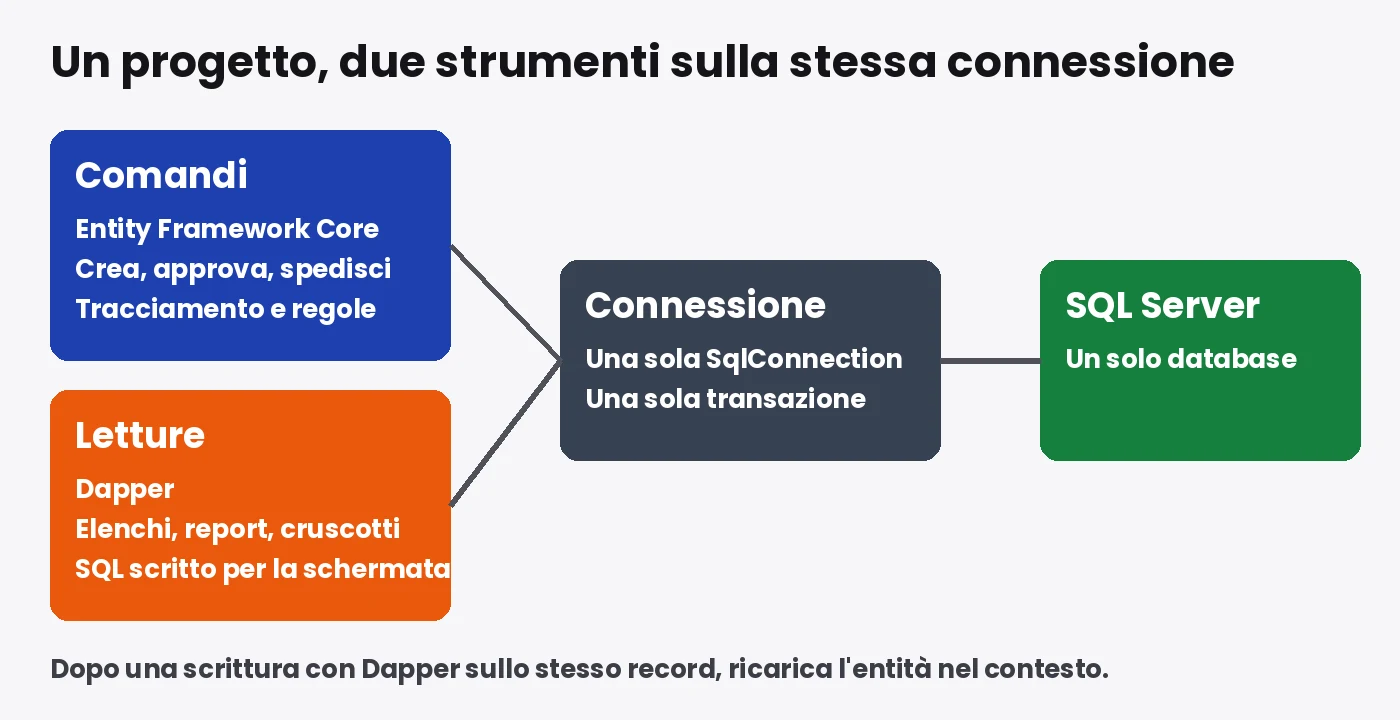
Yes, and it is the most common choice in systems that last: Entity Framework Core for writes and ordinary screens, Dapper for reports and heavy reads. The two tools can share the same connection and the same transaction.
How to share the connection
The Entity Framework Core context exposes the underlying ADO.NET connection with context.Database.GetDbConnection(). Dapper works on top of it without opening another. If you have an Entity Framework Core transaction in progress, you get it with context.Database.CurrentTransaction.GetDbTransaction() and pass it to the Dapper commands: everything happens inside the same atomic block. This lets you, for example, save the order with Entity Framework Core and call a Dapper query that computes the total with a window function, all before the commit.
An architecture that holds: separate writes and reads
The cleanest split follows the principle many know as CQRS in its light version. The command side (create order, approve, ship) uses Entity Framework Core with the domain entities, because that is where you need tracking, validation and rules. The query side (lists, reports, dashboards) uses Dapper with read-only records and SQL written for the screen. You need neither two databases nor a message bus: a Queries folder for reads and a Commands folder for writes are enough. If you are interested in how the idea ties into the domain model, you will find it in Domain Driven Design and how it works, and how to organize the layers in Clean Architecture in C#.
The limits of coexistence
- The tracker does not see Dapper writes. If you modify a row with Dapper and the context had already loaded it, the context keeps the old value. After a Dapper write on the same record, reload the entity or use a new context.
- Migrations only know the model. If Dapper reads a view or a table that is not in the Entity Framework Core model, you manage it with a separate script and keep it under version control with everything else.
- Two ways of doing things cost you in training. Write in a team rules file where one is used and where the other is, and repeat it in code reviews.
The result, in the projects I follow, is that Entity Framework Core covers most of the code and Dapper appears in a dozen places, the ones the profiler pointed at. The rest of the system stays readable for people who do not know SQL by heart.
When should you choose Dapper and when stay on Entity Framework Core?
Dapper fits when SQL is the heart of the problem: reports, massive reads, existing databases with awkward schemas. Entity Framework Core fits when the heart is the domain model and writing. The average project uses both.
Dapper first
- Reports and dashboards with long queries, window functions, temporary tables and views that no LINQ expresses readably.
- An existing database with hundreds of stored procedures and a schema that ignores conventions: mapping everything into a model costs more than calling the procedures.
- Read-only services called thousands of times per minute, where every allocation is paid for.
- Imports and exports of large numbers of rows, with unbuffered reads and bulk writes.
- The team knows SQL well and has no time to learn the pitfalls of tracking.
Entity Framework Core first
- Applications with many writes and rules on the model: tracking computes the differences and the update order for you.
- A schema that is born with the code: migrations keep database and classes aligned, with the history in the repository.
- Several customers in the same database, where global filters prevent the mistake of forgetting a clause in a query. There is more in the guide to multi-tenant applications in .NET.
- A team that changes often: the compiler flags the points broken by a model change, and newcomers become productive in a few days.
A rule in five lines
Start with Entity Framework Core. Turn on query logging and watch the slow ones in production. Apply AsNoTracking, projection and split queries first. If a query is still over budget, rewrite it in Dapper, just that one. Document in the repository why that query lives outside the model, in one line above the method.
There is one last situation, the systems to modernize. If you inherit an application with plain ADO.NET and DataSet objects scattered across a hundred screens, moving to Dapper is a shorter and safer step than jumping straight to Entity Framework Core: the queries stay the ones the customer knows, the repetitive reading code disappears, and the object model arrives one area at a time. It is the same small-steps reasoning I use in migrations, for example when moving from ASP.NET WebForms to Core.
What are the most common Dapper mistakes?
The most frequent mistakes are six: SELECT *, a wrong splitOn, queries without tests, connections held open too long, use of dynamic and SQL scattered across the whole project. None of them is a defect of the library. They are the consequence of not having the compiler as a safety net.
The mistakes that break the program
SELECT *in repositories. Add a column to the table and a record with a constructor stops matching; remove a column and the property comes back as zero. Always list the columns you need.splitOnleft at its default. The second object of the join comes back empty with no error, and the screen shows "customer: none" for orders that do have a customer.- Types that do not match. A
datetimecolumn read into aDateOnlyor adecimalinto afloatgives runtime errors. Dates arrive with an unspecifiedKind: decide a convention (UTC in the database) and apply it in a single type handler. - Enums stored as numbers. It works until someone reorders the enum. Store the text or write the numeric values explicitly in the definition.
The mistakes that eat resources
- A connection held open too long. With
buffered: falseor a long transaction the connection stays busy; a pool of one hundred connections is exhausted by one hundred slow requests. Open late, close early. - Queries in a loop. It is the usual N+1, hidden in a repository: two hundred orders, two hundred queries for the customers. Fix it with a single query using
INand a dictionary in memory. - Huge parameter lists. An
INlist with five thousand elements becomes five thousand parameters; SQL Server has a ceiling of about two thousand one hundred parameters per command. Pass a table-valued parameter.
The organizational mistake
The worst one shows up in no profiler: SQL written in twenty different files, inside controllers, services, Blazor components. Three months later nobody knows where to change the rule about fulfilled orders. The remedy is a clear boundary: SQL lives only in the classes of the Queries and Commands folders, every query has a name that says what it answers, and the rest of the program calls those methods. It takes a bit of discipline, and it pays it back at the first schema change.
One last flaw concerns Query<dynamic>. It lets you write fewer classes and takes away the compiler exactly where you need it most: a wrong field name becomes an exception in production. Use typed records, even for reports, even throwaway ones.
How do you test code that uses Dapper?
With integration tests on a real database: queries are SQL, and a fake database proves nothing about SQL. Use a container with SQL Server started by the test, minimal data and a schema created from the project scripts.
Why mocks do not help here
A Dapper repository is a thin layer between your code and the database. If you replace it with a fake object, you verify that your code calls the right method, not that the query works. The defects that hurt are elsewhere: a renamed column, a type mismatch, a wrong splitOn, a missing index. You find them only by running the query against a real schema.
A test structure that holds
- Start SQL Server in a container at the beginning of the test session. The Testcontainers library for .NET does it in a few lines and shuts it down at the end.
- Apply the schema scripts. If you also use Entity Framework Core, migrations create the tables and the Dapper tests read them.
- For each test, insert the minimal data with a helper method and empty the tables at the end.
- Call the repository and compare the result, column by column, with what you expect.
- Add a test for every query that returns objects with relationships: that is where
splitOnand dictionaries break.
Ten tests of this kind cover a repository with ten queries and run in a few seconds once the container is up. The cost is an hour of setup the first time, and it pays back at the first schema change, when red tests point to every query to fix before a user does.
What you test with unit tests
The business rules around the query: total calculation, status choice, validation. This code does not depend on the database and is tested in memory, in milliseconds. Separating reads, writes and rules makes tests simple to write and fast to run. It is the same principle behind a well-made layered architecture, and if you want to see how it applies to a whole project, the guide to the main design patterns in C# has the examples.
A repository with its tests on a real database changes how you face the next schema change. You learn it by doing it with someone who has already done it in production. If you want to do it on your own code, write to us.
Dapper.AOT and .NET 10: what changes in 2026?
Dapper runs on .NET 10 without adaptation, and Dapper.AOT is a separate package that generates the mapping code at compile time to cut runtime costs and work with Native AOT compilation. Before adopting it, check the release status.
What Dapper.AOT does
Classic Dapper builds the mapping code the first time it sees a query, using reflection and generating IL at runtime. Dapper.AOT moves that work to compile time with source generators and C# interceptors: calls to Dapper methods are replaced by code written by the compiler for that specific query and that type. There are two advantages. Startup is faster, because there is nothing to build on the first request. And the application can be compiled with Native AOT, which does not allow runtime code generation. A bonus: analyzers report missing parameters and mismatched columns during the build, which is part of the safety net Dapper was missing.
When it is worth a look
- Serverless functions and containers that start often: every cold start costs less.
- Command-line tools and small services compiled with Native AOT.
- Projects with many queries where compiler warnings save you from regressions.
For an ASP.NET Core portal that runs for days without stopping, faster startup matters little, and the main benefit becomes the compile-time warnings. Before adopting it in production, open the package page on NuGet and read the release status and the compatibility notes: it is an evolving project, and what holds today may change.
Entity Framework Core 10 is not standing still
.NET 10 is a long-term support (LTS) release that shipped in November 2025, and it brings Entity Framework Core 10 with it. The query translation engine improves with every version, bulk updates with ExecuteUpdate and ExecuteDelete avoid loading entities just to change them, and SqlQuery<T> lets you run hand-written SQL that returns types that are not entities. This means many of the cases where people once switched to Dapper are now solved by staying inside Entity Framework Core, with hand-written SQL for the piece that needs it. The question shifts. It is no longer "ORM or micro-ORM" but "how much of my application needs to see the SQL".
If your solution is still on .NET Framework, the picture changes. Dapper works there too, and it is often the cheapest way to remove old ADO.NET code before a migration. For the cost of that move, see the analysis of the migration from WebForms to Core, with the multi-year calculation.
Marta did not remove the ORM. She opened the profiler, found the seven-join query, rewrote it in Entity Framework Core with a projection and two split queries, and moved only the warehouse report to Dapper, the one that reads twelve thousand rows and drops them into a grid. The report now answers in under a second. The senior colleague got his hand-written query, the other got his Dapper, and the rest of the portal stayed as it was, with migrations, tests and the compiler on its side.
If you want to reach the point where you make choices like these on your own, learning to read an execution plan, to decide where you need the model and where you need the SQL, to design the data access of a system that has to last, in the C# course by Sviluppatore Migliore we work on real projects with my direct feedback, in recorded and live lessons that fit around your job. Bring your slowest query: we will open it together.
Frequently asked questions
Dapper is an open source micro-ORM for .NET: it adds extension methods to IDbConnection to run hand-written SQL and map rows to C# objects. It does not generate SQL, track changes or manage schema migrations.
On reads of many rows yes, but the gap shrinks a lot with AsNoTracking, DTO projections and compiled queries. Database time stays the same because the SQL sent is similar. Measure with BenchmarkDotNet and the profiler.
When SQL is the heart of the problem: reports with window functions, large reads, stored procedures on existing databases, imports and exports. For complex writes, migrations and global filters, Entity Framework Core fits better.
Yes. Share the connection with Database.GetDbConnection() and the transaction with CurrentTransaction.GetDbTransaction(). The common split: Entity Framework Core for commands, Dapper for heavy reads. Reload the entity after a Dapper write.
Only if you pass values as parameters (new { id }) and never concatenate strings into the SQL text. Table and column names cannot be parameterized: compare them to a list of allowed values you wrote yourself.
With integration tests on a real database, for example SQL Server in a container started with Testcontainers. Mocks prove nothing about SQL. Business rules around the query are tested in memory with unit tests.
A separate package that generates Dapper's mapping code at compile time using source generators and interceptors, lowering startup cost and enabling Native AOT. Check the version status on NuGet before adopting it.
Leave your details in the form below