What is dependency injection in C# and how do you use it in .NET 10?
The practical gain is code you can test without a database and change by editing a single line.

Giacomo has worked for eight months at a software house in Brescia. His first serious assignment is a change to the discount calculation of an order management system, and the class he has to touch has a constructor with nine lines of new: a SQL Server connection, a mail client, an event log written to a file. Giacomo adds the rule in twenty minutes. Then he tries to write the test and stops for an hour, because to run that class you need a real database, a reachable mail server and a folder you can write to.
The senior colleague walks behind his desk, looks at the screen and says a single sentence: "You are missing dependency injection". Giacomo knows the name. He has read it three times in three different tutorials and each time closed the page feeling that he understood the definition and nothing else. The problem lies in the definition, which sounds harder than it is. Dependency injection fits in one line: a class does not create the objects it needs, it receives them from outside.
In .NET that "outside" has a precise name, the dependency container built into the framework, and you already use it every time you write builder.Services.Add... in Program.cs. This guide starts from Giacomo's scene and takes you to code that holds up in production: what it really means, how the .NET 10 container works, the difference between transient, scoped and singleton, the scoped-inside-singleton error you will meet sooner or later, multiple implementations and keyed services, settings, tests, the most frequent mistakes, where to put registrations in a layered project and when you need an external container.
I have been writing software since 1999, and in class dependency injection is the topic where I see the sharpest jump between people who write code that works today and people who write code that can still be changed two years from now. The examples use C# with ASP.NET Core on .NET 10. If you want the bigger picture of the layers this technique fits into, it is in Clean Architecture in C#.
What is dependency injection in C# and what is it for?
Dependency injection is a technique where a class receives the objects it needs from outside, usually through its constructor, instead of creating them itself with new. It lets you replace one part of the system without touching the others.
The same service, before and after
Here is Giacomo's class reduced to the bone. In the first version the class builds the connection and the mail client on its own. In the corrected version it asks for them in the constructor, through interfaces, which are contracts that say what can be done without saying how.
// Before: the class decides by itself who to talk to
public class ScontiServizio
{
    private readonly OrdiniRepository _ordini = new OrdiniRepository("Server=prod;...");
    private readonly SmtpClient _posta = new SmtpClient("smtp.azienda.it");
}

// After: the class declares what it needs
public class ScontiServizio(IOrdiniRepository ordini, INotificatore notificatore)
{
    public async Task ApplicaAsync(int ordineId) { /* uses ordini and notificatore */ }
}
The second version does not know whether data comes from SQL Server, from a file or from an in-memory list. It does not know whether the notification goes out by mail or by message. It only knows that someone will hand it something that honors those two contracts.
Why swapping parts matters
There are three concrete benefits, and you see all of them in the first month of work on a management system. The first is testing: in the test you pass a fake repository that returns three fixed orders, and the discount rule is verified in ten milliseconds, with no database. The second is changing implementation: if the company moves from the internal SMTP server to a cloud mail service, you write a new class that honors INotificatore and change one registration line, while the rest of the code stays as it is. The third is per-environment configuration: in development the notification writes to the console, in production it really sends the message, and the choice lives in one place.
Three names for three different things
In articles you find three terms mixed together. The dependency inversion principle is the fifth SOLID principle: high-level modules depend on abstractions, not on details. Inversion of control (IoC) describes the fact that object creation moves from your class to a caller or a framework. Dependency injection is the concrete technique that implements the first two: the constructor declares, the container delivers. For the basics of interfaces, the material this whole story is made of, there is a refresher in interfaces and abstract classes in C#.
How does the built-in dependency container work in .NET 10?
The built-in container, in the Microsoft.Extensions.DependencyInjection package, is a table that maps a requested type, usually an interface, to the concrete type to create. You fill it in Program.cs through builder.Services, and it is consulted every time the framework builds a controller, a handler or a service.
Registering: telling the container what exists
A registration has three ingredients: the type someone will ask for, the concrete type to create and the lifetime, which we cover in the next section. The method is called AddTransient, AddScoped or AddSingleton depending on the latter. A minimal ASP.NET Core application already has dozens of registrations made by the framework (logging, configuration, environment), and yours join the same table.
var builder = WebApplication.CreateBuilder(args);

builder.Services.AddScoped<IOrdiniRepository, OrdiniRepository>();
builder.Services.AddScoped<INotificatore, NotificatorePosta>();
builder.Services.AddScoped<ScontiServizio>();

var app = builder.Build();
Resolving: the constructor asks, the container delivers
When a request that involves ScontiServizio arrives, the container looks at its constructor, sees that IOrdiniRepository and INotificatore are needed, creates them in turn (looking at their constructors, and so on) and delivers the finished object. The result is a graph of objects built on its own, of any depth. If a class has several constructors, the container picks the one with the most parameters it can satisfy. C# 12 primary constructors, the ones with parameters next to the class name, remove a lot of noise and are the form you find in this guide's examples.
What happens when a registration is missing
Forgetting a line in Program.cs is the most common beginner mistake. The symptom is an InvalidOperationException with text like "Unable to resolve service for type 'IOrdiniRepository' while attempting to activate 'ScontiServizio'". The message is readable and says two useful things: the missing type and the class that asked for it. The detail to remember is when it appears: by default the exception arrives at the first request that uses that class, not at startup. So an application can start without errors, work for hours, and fail only when someone opens the rarely used screen for the first time. Later we will see how to bring the error forward to startup.
One last note for people coming from other frameworks: the .NET container uses no attributes on classes and no XML configuration files. Everything is explicit C# code, and that has a practical effect. Press F12 on a registration and you land on the concrete class, with no magic to chase.
Transient, scoped or singleton: which lifetime should you choose?
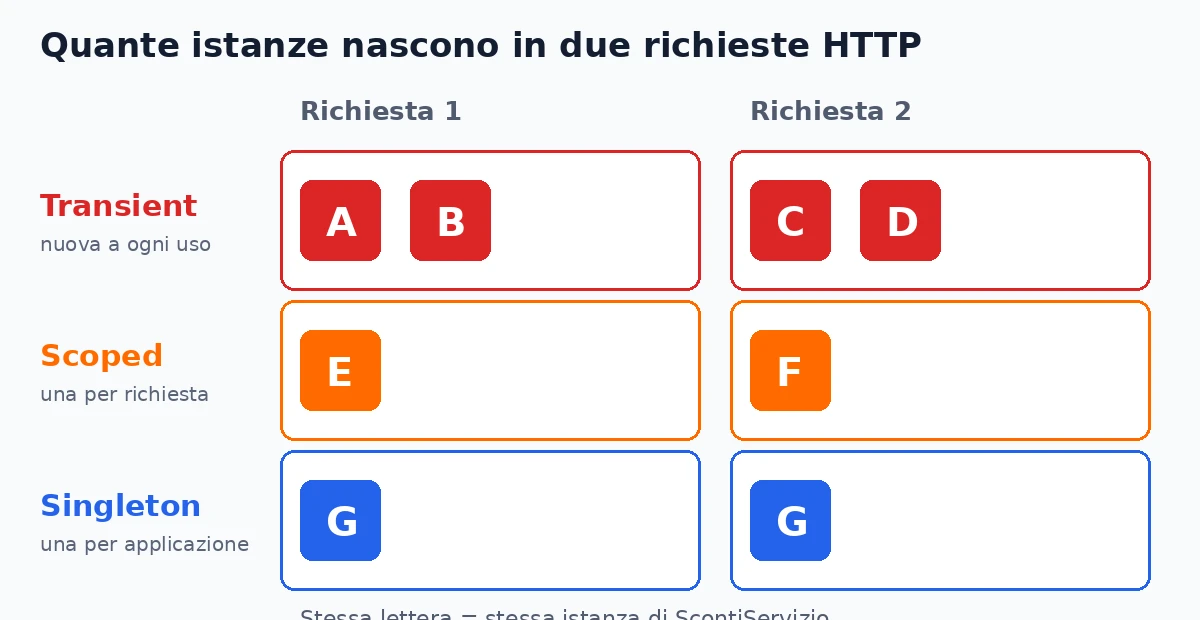
A transient service is created anew on every request to the container, a scoped one once per scope (in ASP.NET Core, once per HTTP request), a singleton once for the whole life of the application. The choice depends on two questions: does the service hold state, and is that state shared among several users?
Transient: light objects with no state
A transient service is born and dies with whoever uses it. It is the right choice for calculators, validators, formatters: classes with no fields that change over time, where creating a new instance costs a few bytes. The flaw appears when a transient holds heavy resources, for example an object that opens files, and is created fifty times in one request. In that case move up to scoped.
Scoped: the lifetime of the request
In a web application scoped coincides with the request. All classes involved in the same request receive the same instance, and at the end it is disposed. It is the lifetime of the Entity Framework Core DbContext, and not by chance: the context tracks the changes of a single unit of work, and that unit coincides with the request. The current user, the shopping cart and anything tied to "who is doing this operation right now" lives here too.
Singleton: one instance for everyone
The singleton lives as long as the process, and all users share it at the same time. It suits an in-memory cache, a client that should be reused, TimeProvider.System. The golden rule is one: a singleton must be safe when two threads use it together. A List<T> field modified by two simultaneous requests is a data corruption that shows up once a month, and you never reproduce it when you need to.
Three questions to decide
- Does the class have fields that change after construction? If not, transient is fine.
- Does that state belong to a single request or operation? If so, scoped.
- Is it shared among everyone and protected for concurrent use? Only then, singleton.
Scoped outside a web request
Background services (BackgroundService) are singletons by nature, and they have no request. To use a scoped service you create a scope by hand with IServiceScopeFactory, inside a using block, on every round of work.
using var ambito = _fabbrica.CreateScope();
var ordini = ambito.ServiceProvider.GetRequiredService<IOrdiniRepository>();
await ordini.ElaboraCodaAsync(stoppingToken);Why do you get "Cannot consume scoped service from singleton"?
The error appears when a singleton service receives a scoped service in its constructor. The singleton lives as long as the application, the scoped one should die with the request: the container refuses the pairing because it would keep the scoped service alive forever. The problem has a technical name, captive dependency.
Why letting it through would be dangerous
Imagine an in-memory price list cache registered as a singleton, which receives in its constructor a repository built on a DbContext. On the first request the repository and its context are created and stay tied to the cache. From the second request on, all users share the same context: the data read goes stale, change tracking piles up without end and two simultaneous requests use the same object, which was not designed for threads. The exceptions that come out have odd messages, such as "A second operation was started on this context instance", and do not point to the cause.
How to find it before production
The ASP.NET Core generic host enables two checks in the development environment, ValidateScopes and ValidateOnBuild. The first produces the error in the title the moment a singleton asks for a scoped service. The second checks at startup that every registered service can be built, and brings forward the missing registrations seen earlier. In production they are off to save startup time, which explains the classic surprise: the code works on the laptop and breaks in test or in production. You can switch them on everywhere with one line.
builder.Host.UseDefaultServiceProvider(opzioni =>
{
    opzioni.ValidateScopes = true;
    opzioni.ValidateOnBuild = true;
});
The cost is a startup that is a few tens of milliseconds slower in an average application, a low price compared with a captive dependency discovered on Friday evening.
How to really fix it
There are three ways, in order of preference. The first is to rethink the consumer's lifetime: if the class uses request data, it probably should not have been a singleton. The second is to inject IServiceScopeFactory and create a short scope every time the scoped service is needed, as in the background service of the previous section. The third, for Entity Framework Core only, is to register IDbContextFactory<T>, which hands out a new context on every call and is designed exactly for long-lived services and for Blazor Server. The shortcut to avoid is turning everything into scoped to make the error disappear: you lose the cache and hide the wrong design.
How do you register several implementations of the same interface?
There are three tools: register several types for the same interface and ask for IEnumerable<T> to get them all, use the keyed services introduced in .NET 8, or write a factory by hand. If you ask for the bare interface, the last registration wins. That last detail is the source of many silent bugs.
All implementations together with IEnumerable
The typical case is a set of rules applied in sequence: quantity discount, customer discount, seasonal promotion. Each is a class that honors IRegolaSconto, all registered with AddScoped. The service that computes the price asks for an IEnumerable<IRegolaSconto> in its constructor and receives all of them, in registration order. Adding a new rule means writing a class and one line in Program.cs, without touching the calculation. It is the strategy pattern, and in management systems whose commercial rules change every quarter it saves hours of work.
Keyed services
When implementations are not used all together but chosen one at a time, for example two payment providers, .NET 8 introduced keyed services. You register them with AddKeyedScoped<IPagamenti, PagamentiStripe>("stripe") and ask for them in the constructor with the [FromKeyedServices("stripe")] attribute. Before this feature you wrote a factory with a dictionary, and it was easy to get wrong. One piece of advice I repeat in class: the key should not be a string written in ten different places. Put it in a constant or an enumeration, otherwise renaming becomes a text search.
TryAdd, decoration and open generics
The TryAddScoped family registers the service only if there is no other registration for that type. They serve people who write libraries, because they leave the application free to replace the default behavior. The built-in container cannot decorate a service, that is wrap it in another one that adds behavior such as timing logs. You get it with a lambda registration, where you build the decorator by hand passing it the original, or with the Scrutor library, which I cover in the last section. Finally, for generic classes such as IRepository<T> a single registration with open types is enough: AddScoped(typeof(IRepository<>), typeof(Repository<>)). From that moment anyone asking for IRepository<Cliente> gets the right version.
How do you read settings with IOptions, IOptionsSnapshot and IOptionsMonitor?
The options pattern binds a section of appsettings.json to a class and delivers it as IOptions<T> (read once), IOptionsSnapshot<T> (reread on every request) or IOptionsMonitor<T> (with change notification, usable inside singletons). That way you stop passing raw configuration and magic strings everywhere.
Binding with validation at startup
For each group of settings you write a small class, for example PostaOpzioni with server, port and sender, and bind it to the file section. The part many skip is validation: with ValidateDataAnnotations and ValidateOnStart the application refuses to start if the port is zero or the server is empty. A configuration error discovered at deploy time, with a clear message, costs a minute. The same error discovered at the first Monday email costs an hour and a phone call.
builder.Services.AddOptions<PostaOpzioni>()
    .Bind(builder.Configuration.GetSection("Posta"))
    .ValidateDataAnnotations()
    .ValidateOnStart();
Which of the three interfaces to choose
IOptions<T>is a singleton: it reads values at startup and does not read them again. It fits everything that only changes with a restart.IOptionsSnapshot<T>is scoped: on every request it rereads the file. It serves when you want to change a value, for example a discount threshold, without restarting. It cannot be injected into a singleton, because of the rule in the previous section.IOptionsMonitor<T>is a singleton that always knows the current value and notifies subscribers when it changes. It is the choice for background services and for singletons that must react to a change.
Where secrets live
Passwords and keys do not belong in appsettings.json under version control. In development you use user secrets, in production environment variables or a store such as Azure Key Vault. The nice thing about the options pattern is that the class stays the same: only the configuration provider changes, and the code that reads PostaOpzioni does not notice.
How do you test code that uses dependency injection?
In unit tests you create the class with new, passing test doubles to the constructor in place of the real dependencies, with no container at all. In integration tests you use WebApplicationFactory and replace registrations with ConfigureTestServices. The container serves the application, not unit tests.
The unit test: no container, just the constructor
Back to Giacomo. The discount rule depends on a repository and a clock, because some promotions only apply in certain months. In the test he creates a fake repository, written by hand in five lines or generated with a library such as NSubstitute, and a FakeTimeProvider from the Microsoft.Extensions.TimeProvider.Testing package with the date set to December 15. The service is built with those two things, and the test checks that the Christmas promotion applies. No network, no database, an execution time of a few milliseconds. If you want the full picture of writing tests in .NET, there is testing code in .NET with xUnit.
This example also shows why it pays to inject TimeProvider, introduced in .NET 8, instead of calling DateTime.Now inside the class. A clock you do not control makes tests fragile: they pass on Tuesday and break at the end of the month.
The integration test: replacing one piece of the real system
To exercise a real endpoint, WebApplicationFactory<Program> starts the application in memory. The ConfigureTestServices method lets you replace a single registration, typically the one that talks to the outside world: the mail notifier becomes a fake that stores messages in a list, and the test checks that after calling the endpoint the expected message is in the list. To make the Program class visible to the test project, in projects with top-level statements you add public partial class Program { } at the bottom of the file.
var fabbrica = new WebApplicationFactory<Program>().WithWebHostBuilder(b =>
    b.ConfigureTestServices(s => s.AddSingleton<INotificatore, NotificatoreFinto>()));
When the test is hard, the class has a problem
A test that needs ten doubles to configure is almost always a signal about the code, not about the test. A class with eight dependencies does too many things, and knows too many. The remedy is not a more powerful container: it is splitting the class in two, each with three dependencies and a clear responsibility.
Which dependency injection mistakes show up most in real projects?
The mistakes I meet most often are five: the service locator, the constructor with eight parameters, new HttpClient() inside methods, the DbContext in a singleton and using scoped services after the request has ended. All of them can be recognized by their symptom, and all have a fix of a few lines.
The service locator: asking for the container instead of the service
It happens when a class receives IServiceProvider and inside methods calls GetService<IOrdiniRepository>(). The code works, but the real dependencies disappear from the constructor and become invisible: to know what the class uses you must read every line. Tests get harder, because you have to build a whole container. The legitimate exception is the scope factory seen in background services, which is a dedicated service and not a generic locator.
The eight-parameter constructor
The container makes adding a parameter so easy that nobody notices when the class has become a heap. From five dependencies up, stop and see whether two groups of parameters form a class of their own. It is the same reasoning used in projects with heavy commercial rules, where the single "Orders" service became four smaller services.
HttpClient created by hand
Writing new HttpClient() in a method called a thousand times a minute exhausts the server's network connections, because each instance leaves a socket open for a while. The opposite extreme, a static HttpClient, does not respect DNS changes. The solution lives in the container: AddHttpClient registers a factory that manages connections, and a typed client receives its HttpClient already configured with base address and headers. It is also where the resilience described in Polly in .NET plugs in.
Scoped used after the request has ended
A method launches a job with Task.Run and returns the response to the user. The job keeps using the request's DbContext, but the request is over and the context has been disposed: an intermittent ObjectDisposedException arrives, because it depends on the job's speed. For jobs that outlive the request you need a queue and a background service with its own scope, not a task fired into the void.
How does dependency injection work in minimal APIs, controllers and Blazor?
Every ASP.NET Core entry point receives services in its own way: controllers and Razor Pages through the constructor, minimal APIs through the handler's parameters, Blazor components with the @inject directive. The container is the same, what changes is where you query it and, in Blazor, how long scoped lasts.
Minimal APIs and controllers
In minimal APIs you just declare the service as a handler parameter. The framework recognizes types registered in the container and delivers them with no attributes, while the other parameters are read from route, query or body. The [FromServices] attribute is needed only in the rare ambiguous cases.
app.MapPost("/ordini/{id}/sconto", async (int id, ScontiServizio sconti) =>
{
    await sconti.ApplicaAsync(id);
    return Results.NoContent();
});
In controllers the normal way is the constructor. If a service is needed by a single action, for example a PDF generator used by one endpoint, the [FromServices] attribute on the action parameter avoids loading that dependency in all the other calls of the controller.
Blazor: scoped lasts as long as the connection
In a Blazor component you write @inject IOrdiniRepository Ordini at the top of the file. The surprise is in the duration. In Blazor Server there is no request for every user action: there is a circuit, the SignalR connection that lasts as long as the tab stays open. A scoped service therefore lives for the whole session, and a scoped DbContext piles up changes and stale data for hours. The fix is IDbContextFactory<T>, which creates a short context for each operation. In Blazor WebAssembly it goes the other way: the browser is the only user, and scoped behaves like a singleton. The comparison between execution modes is in Blazor in production.
A practical consequence for people working on portals with several technologies in the same solution: the same service class can run in an API, in a Blazor component and in a background service, with three different lifetimes. Writing services with no hidden state, and declaring dependencies in the constructor, is the only defense that holds in all three cases.
Where do you put registrations in a layered project?
Each project of the solution exposes an extension method, for example AddInfrastruttura, that registers its own services. The startup project calls them in a row and Program.cs stays at twenty lines. The startup project is the only one that knows all the others.
One extension method per project
In a layered management system there are typically four projects: domain, application, infrastructure and web. The infrastructure project holds the repositories, data access and integrations, and knows how to build them. So it is the one that offers the method that registers them, and the web project calls it without knowing which classes are inside.
public static class InfrastrutturaExtensions
{
    public static IServiceCollection AddInfrastruttura(
        this IServiceCollection servizi, IConfiguration configurazione)
    {
        servizi.AddDbContext<GestionaleContext>(o =>
            o.UseSqlServer(configurazione.GetConnectionString("Gestionale")));
        servizi.AddScoped<IOrdiniRepository, OrdiniRepository>();
        return servizi;
    }
}
The composition point
In the literature it is called the composition root: the one place where abstractions are wired to concrete classes. The domain does not know a container exists, or that SQL Server exists. This rule has a huge practical effect: you can replace the whole infrastructure with a fake one in tests, and you can change the database without opening the domain project. It is the reason dependency injection appears in every guide to layered architecture, starting with Clean Architecture in C#.
Data access and CQRS
The extension method is also where you decide how data tools coexist. If you use Entity Framework Core for commands and Dapper for reads, this is where you register the context as scoped and a connection factory for queries, as I explained in Dapper or Entity Framework Core. If you separate commands and queries with dedicated handlers, handler registration lives here, and the advantage of keeping everything in one place is that each added handler costs one line. If you want to judge when the separation is worth the work, there is CQRS and when it pays off.
Do you need an external container like Autofac or Scrutor?
Almost never. The built-in container covers the great majority of projects, and external libraries are needed for only three things: decorating services in a chain, registering classes by convention by scanning assemblies, organizing registrations in modules. For the first two Scrutor is enough, and it builds on the built-in container.
What the .NET container really lacks
The built-in container is deliberately minimal. It knows nothing about property injection, child containers, decorators and method interception. Since version 8 it no longer lacks selection by key. For most management systems the gaps go unnoticed: after years of work on even large systems, the only one I have seen hurt is decoration, used to add caching and timing logs around a service without modifying it.
Scrutor: scanning and decoration
Scrutor is a small library that adds two things to the built-in container. The first is scanning: one line registers all the classes of an assembly ending in "Repository" on the matching interface. The second is Decorate, which wraps an existing registration in another one. With twenty repositories the first saves twenty lines of Program.cs, but mind the price: registrations can no longer be read one by one, and a naming mistake is found with a code search.
A criterion to decide in five minutes
Before adding a library, write the problem on a sheet of paper in one sentence. "I have twenty repositories to register one by one" is solved by a scan of ten lines written by you, which the team reads without effort. "I need to add a timing log around thirty services" justifies Scrutor. "I need separate modules for four products that share the core" opens the discussion about Autofac. If you cannot write the sentence, the library solves nothing: it adds one more thing to learn for the next developer who joins the project.
Autofac and performance
Autofac replaces the built-in container and adds modules, named scopes and property injection. It makes sense when you inherit a project already built on it, or when you need those modules in a solution with dozens of components. In every other case, the cost of one more dependency in the project outweighs the benefit. On performance, resolving a service costs microseconds, negligible next to a SQL Server query: if the profiler tells you the container is a problem, almost always the real problem is that you are resolving services inside a loop.
Giacomo removed the nine new calls from the constructor, wrote two interfaces of three methods and put two lines in Program.cs. The test for the discount rule runs in eight milliseconds. The senior colleague said nothing, but the next day he handed him the shipping class, which had the same flaw and four years of dust on it.
If you want to reach the point where you design code like this on your own, picking the right lifetime, writing services you can test without a database and organizing the registrations of a solution that has to last, in the C# course by Sviluppatore Migliore we work on real projects with my direct feedback, in recorded and live lessons that fit around your job. Bring the class with the longest constructor you have: we will take it apart together.
Frequently asked questions
It is a technique where a class receives the objects it needs from outside, usually in its constructor, instead of creating them with new. In .NET a built-in container does the job, configured in Program.cs. In practice you get code you can test without a database and change by touching one line.
Transient creates a new instance on every request to the container, scoped one per scope (in ASP.NET Core, one per HTTP request), singleton a single one for the whole application. To choose, look at state: none, transient; tied to a request, scoped; shared and thread-safe, singleton.
Because a singleton received a scoped service in its constructor, which would stay alive forever. Fix it by making the consumer scoped, creating a short scope with IServiceScopeFactory or, for Entity Framework Core, using IDbContextFactory. Turning on ValidateScopes catches it in development.
Almost never. The built-in .NET 10 container covers most projects, including keyed services. Scrutor adds assembly scanning and decorators on top of it. Autofac makes sense for complex modules or inherited projects.
In unit tests you create the class with new and pass test doubles to the constructor, with no container. In integration tests you use WebApplicationFactory and replace external services with ConfigureTestServices. For time, inject TimeProvider.
IOptions reads values once at startup. IOptionsSnapshot rereads them on every request and is scoped. IOptionsMonitor reports changes and works inside singletons. If configuration only changes with a restart, IOptions is enough.
Leave your details in the form below