What is the number that decides whether document management software will actually help you?
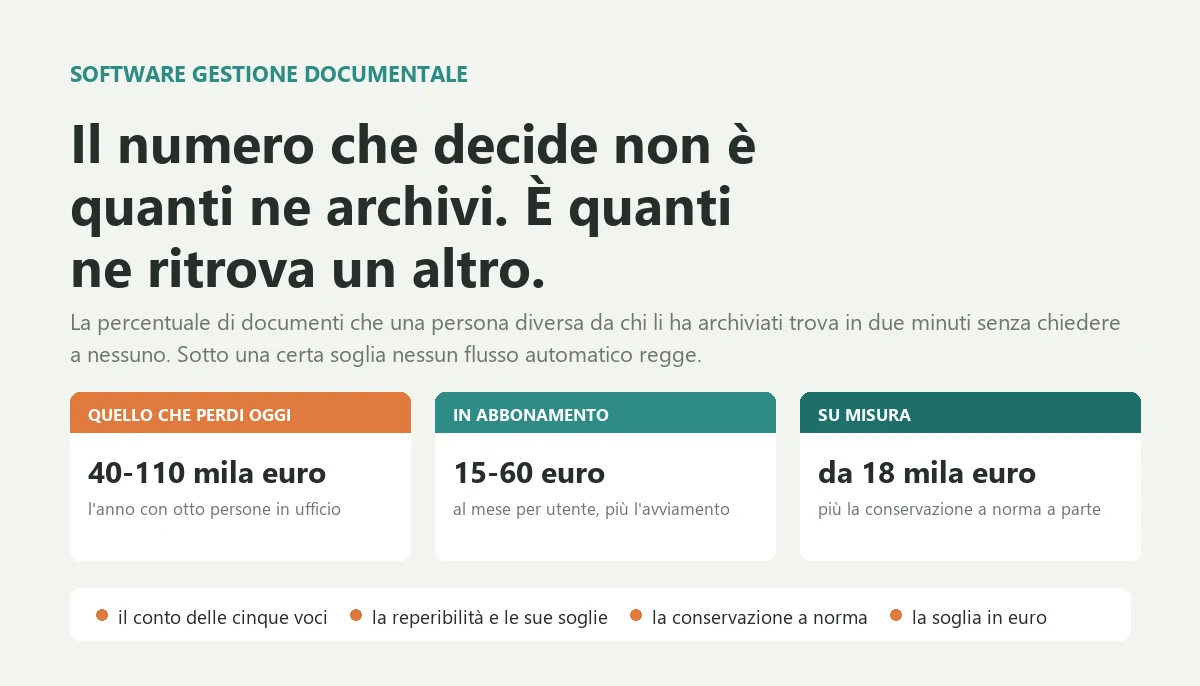
The numbers: an ungoverned archive costs between forty and one hundred and ten thousand euros a year in a company with two to three million in revenue and eight people working on documents, counting search time, documents redone, off site storage and chasing. A subscription product costs between fifteen and sixty euros per user per month plus implementation, configuring the Microsoft stack you probably already own costs five to twenty five thousand euros, a custom system starts at eighteen thousand euros, and legally compliant preservation is almost always billed separately. The practical threshold between the two routes sits around twenty thousand euros a year of total spend.
Below sixty per cent retrievability no automated flow survives: it stalls at the first missing document and people go back to email. The first release that works is always the same: five document types with their attributes, filing from wherever documents actually arrive, content search switched on, the last three years loaded, and the old folder read only from a stated date.

A dispute comes in over a 2023 delivery. You need the signed acceptance report. Sales says they have it, the engineer says he emailed it, accounting looks through the shared drive, and after two and a half hours of three people the document turns up in the mailbox of a colleague who no longer works here. Nobody records that episode anywhere. The following week it happens again with a certificate of conformity.
If you recognise that scene, this article gives you the real cost of an archive you cannot search, the single number that decides whether document management software will genuinely help you or become one more folder nobody uses, the three different things that quotes all call by the same name, what the law actually requires and what a vendor is merely selling you, the real price bands between a subscription product and a custom system, and the threshold in euros where the arithmetic flips.
I have been writing software for twenty six years and I have seen document handling from the inside in very different places: law firms with eight hundred open matters, mechanical and electrical contractors with acceptance reports scattered across vans, manufacturers with datasheets and calibration certificates to produce during audits, engineering offices with four versions of the same drawing and none of them the right one. I also built and sold a multi tenant legal platform that lived on documents, so I have dealt with this problem as the person who has to solve it, not only as the person describing it.
The thing I have learned, and that no vendor mentions during the demo, is this: in an archive the number that matters is not how many documents you put in, it is the percentage of documents that somebody other than the person who filed them can retrieve alone in two minutes. If that number is low, everything you build on top of it, approval flows, expiry tracking, digital signatures, does not solve the problem: it moves the problem inside software you are now paying for.
What document management software actually is, and why a shared folder is not one
Document management software is the system that knows four things a network folder does not: where each document is and in which version, who created it and who has seen it, which customer or matter or job it belongs to, and when it expires or has to be renewed. It exists to answer one question, over and over: the document I need right now, where is it, and am I sure this is the current one?
The market sells it under several names, and the confusion helps the seller. The international acronym is DMS, document management system, and in its broader form ECM. You will also hear records management, digital archiving, electronic document management. These overlap only partly, and working out which one you need is already half the negotiation.
The difference between having a document and finding it
A shared network folder, or a cloud sync service, solves exactly one problem: the document sits somewhere several people can reach. That is a real gain, and it is why a great many companies get this far and stop. But the folder knows nothing about what it contains.
It cannot answer any of these: which is the latest good version of this contract; who changed the datasheet last month and why; which documents relate to a given customer regardless of who saved them and where; which certificates expire in the next ninety days; who opened that personnel folder and when; whether this document is still valid or has been superseded.
That is not a flaw in the folder. A file system organises by location, while work needs organising by meaning. A document belongs to a customer, a matter, a type and a period, and three different people need it for three different reasons. A folder tree forces you to pick a single criterion, so whoever is searching has to guess which criterion was in the head of whoever filed it. The twelve point naming convention someone wrote and pinned to the wall exists precisely for this reason, and it is the clearest signal that the problem is real and was tackled with the only tool available.
The three kinds of company that go looking, and what each is really after
Companies with an obligation. Anyone who has to produce documents for a regulator, a certified customer or an audit: quality management systems, public sector suppliers, product certification, professional firms. Here a document is not only there to work with, it is there to prove something. The cost of not finding it is not lost time, it is a non conformity, a lost tender, a penalty.
Companies with a flow. Places where a document triggers something: the supplier invoice that must be approved by whoever ordered before it can be paid, the quote that moves from engineering to sales, the order that becomes a job. Here the value is not the archive, it is the chain of steps. It is the same pattern I described writing about job costing software, and document management often enters a company through exactly that door.
Companies with a memory. Places where the value is in the history: maintenance firms that need to know what was done to that plant in 2019, engineering offices with twenty years of drawings, anyone whose products live a long time. Here the problem is not today's document, it is that the document from eight years ago exists but nobody knows where it is or whether it is the right one.
How far a network folder gets you, and where it breaks
The shared folder is not the enemy, and anyone telling you to throw it out immediately is selling something. It works well up to a precise point, and that point announces itself with four signals.
First: the fastest way to find a document is to ask a specific person. Second: several copies of the same document exist in different places and nobody can say which is the good one. Third: when someone leaves, a piece of the archive leaves with them because it only ever lived in their mailbox. Fourth: there is a document you know you have but that nobody can produce within the day.
The folder breaks not because of the number of files but because of the number of people writing into it and the years that pass. Two people filing and three years of history is fine. Nine people and twelve years is already broken, and no software will fix it until those nine people file the same way.
The real cost: what an archive you cannot search is costing you today
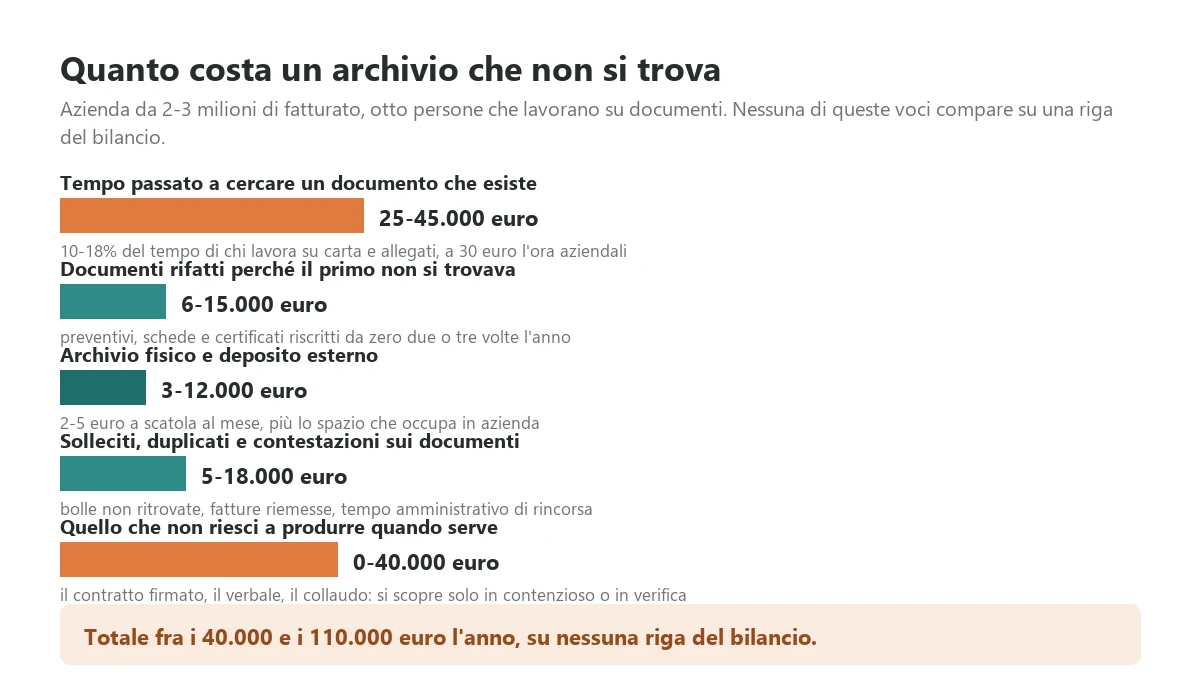
Before you look at any product, do this calculation. It serves two purposes: it tells you whether the problem is worth the money, and it puts a number in your hand for the moment a vendor asks what budget you had in mind. There are five items and you can estimate them in an afternoon with accounting and with whoever handles documents all day.
The five items that sit outside the accounts
Time spent looking for a document that exists. This is the largest item and the most invisible, because it is never anybody's job: it is inside everybody's job. In an office without a governed archive, searching for documents and attachments accounts for between ten and eighteen per cent of the time of the people who work on them. With eight people spending half their day among contracts, delivery notes and certificates, at a fully loaded thirty euros an hour, that is between twenty five and forty five thousand euros a year. The worst part is not the cost: it is that a search interrupts two people rather than one, because it almost always ends in a question to a colleague.
Documents redone because the first one could not be found. The quote rewritten from scratch, the datasheet rebuilt, the report already written two years ago for a similar customer and never found again. In a services or contracting business this typically runs between six and fifteen thousand euros a year of technical time, and it has a side effect nobody counts: both versions of that document now exist, so next time the problem will be worse.
Physical storage and off site archiving. Binders, shelving, the room that could be an office, and for anyone with a large back catalogue the off site depot, which in Italy runs between two and five euros per box per month with retrieval billed separately. Three to twelve thousand euros a year in a mid sized company, and what hurts is not the figure: retrieval takes a day, so in practice that material is not consultable and nobody consults it.
Chasing, duplicates and disputes. The signed delivery note the customer says never arrived, the invoice to reissue, the contract to send again, the administrative time spent chasing. Five to eighteen thousand euros a year, spent on activity that produces nothing downstream.
What you cannot produce when it matters. This is the item that is worth zero for years and then worth everything at once: the signed contract missing during a dispute, the acceptance report absent during an audit, the proof of delivery that is not there. You cannot put a forecast in the accounts, but this is the item that makes companies buy the system once it has happened. Where it has happened, the figure is counted in tens of thousands of euros, and nobody forgets it.
How to run the numbers on your own company
You do not need a consultant and you do not need a week. Take twenty documents at random from the last three years, of different types: a supplier invoice, a customer contract, a signed delivery note, a certificate, a report, a datasheet, a CV, an engagement letter. Not twenty documents chosen by whoever does the filing: twenty picked at random from a list.
Then ask somebody who did not file them to find them, giving two minutes each and forbidding them to ask for help. Count how many they find. That percentage is your retrievability, and it is the most important number in this article. In companies that have never measured it, it almost always lands between forty and seventy per cent, and the first reaction is to say the sample was unlucky.
The rest of the calculation is desk work: honest estimates of search hours from the people who do it, the off site storage invoice, the number of credit notes and reissued documents last year, and a question to whoever handles quality or legal about how many times in the past three years you failed to produce a document within the deadline requested. In a company with two to three million in revenue and eight people working on documents, the first four items typically total between forty and one hundred and ten thousand euros a year. That is the number to hold when the quote arrives.
Retrievability: the number that decides whether the project makes sense
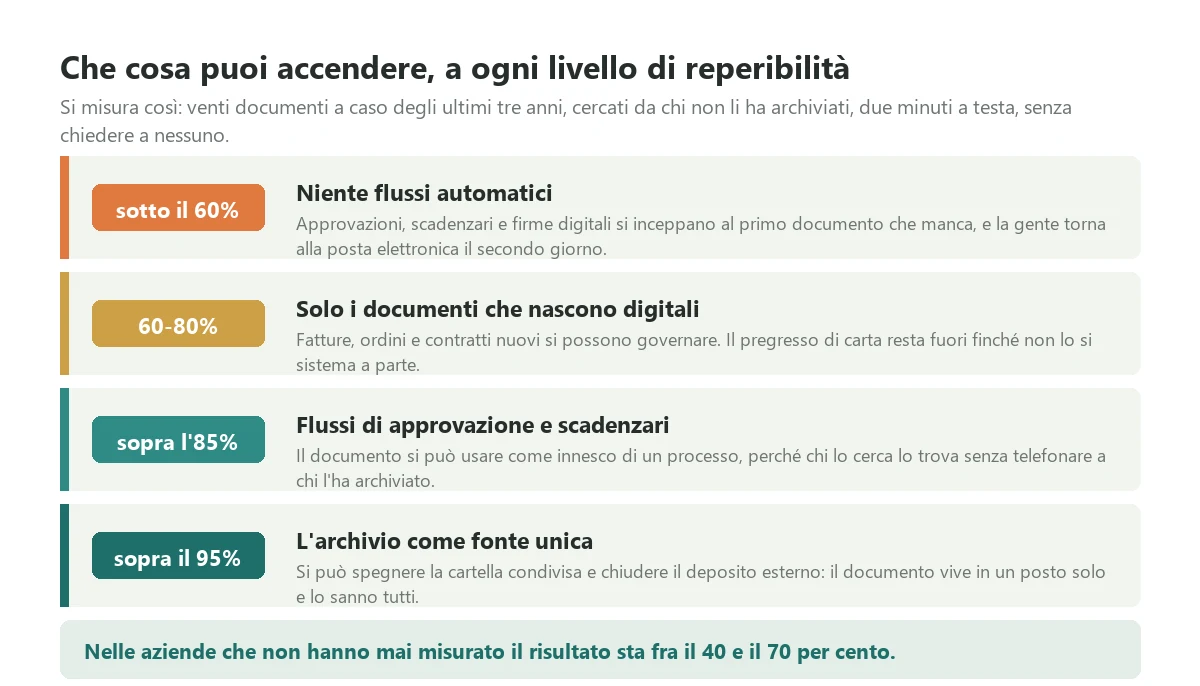
I put retrievability at the centre of this article for a precise reason: it is the only number that determines which functions you will actually be able to use. It is not a consultant's metric, it is a practical constraint. Below a certain level some functions simply do not work, however much you paid for them, because they stall every time the needed document fails to surface.
How to measure it properly
Retrievability is not how many documents you have loaded, and it is not the percentage of paper digitised. Those are reporting numbers, and they keep rising while the situation gets worse, because filing badly is faster than filing well.
The proper measurement has three conditions, and all three are necessary. First, the searcher must be someone other than the person who filed, because the person who files always finds, and that is exactly the problem. Second, there is a time limit of two minutes, because a document that takes twenty minutes to find is, in practice, not found: people give up. Third, no asking anyone, because the call to a colleague is the thing we are trying to eliminate.
Twenty documents are enough for a first measurement, and the exercise costs forty minutes of two people. The value is not the number itself: it is that people stop arguing once they have seen it. I have watched owners convinced their archive was fine change their mind in half an hour, and I have watched companies about to sign a thirty thousand euro contract discover they had a rules problem, not a software problem.
The thresholds, and what each one unlocks
Below sixty per cent there is no point switching on any automated flow. Approvals, expiry tracking, integrated signatures: everything stalls at the first missing document, and people are back on email by the second day, because they have a deadline and the new system is working against them. I have seen more projects die this way than from any technical limitation.
Between sixty and eighty you can govern what is born digital, meaning invoices, orders and new contracts, while the paper back catalogue stays outside until it is tackled as a project of its own with its own budget. This is the most common situation, and it is a good one to be in: this is where you start.
Above eighty five a document becomes a reliable trigger, so approvals with deadlines, contract and certificate expiry tracking and automated checks all start to make sense. Above ninety five you can switch off the shared folder and close the off site depot, because the document lives in one place and everybody knows it. That last threshold is the one that genuinely repays the investment, and it is also the only one that releases the cost of physical storage.
The four things that push it down
Filing that costs too much. This is the first cause and it outweighs all the others combined. I deal with it in the next section because it deserves half the project on its own.
A taxonomy invented by people who do not search. Categories decided at a desk by the manager rather than by the people who look for documents every day. If the labels are ambiguous, two people file the same document in two different places, and the system becomes harder than the network folder it replaced.
Search that only works if you already know. A search engine that finds by file name or reference number is useless to someone who only remembers that it was the Bianchi account, last spring, about a disputed delivery. Search has to work on content and on fragments, and for scanned documents that means text recognition running across everything, not only on new arrivals.
A back catalogue loaded without attributes. Twenty thousand files tipped into the system with the folder structure they already had. Now they are in there, and they still cannot be found: you have bought a program that reproduces the problem with a search engine slower than your file explorer.
The part that decides everything: how a document gets into the system
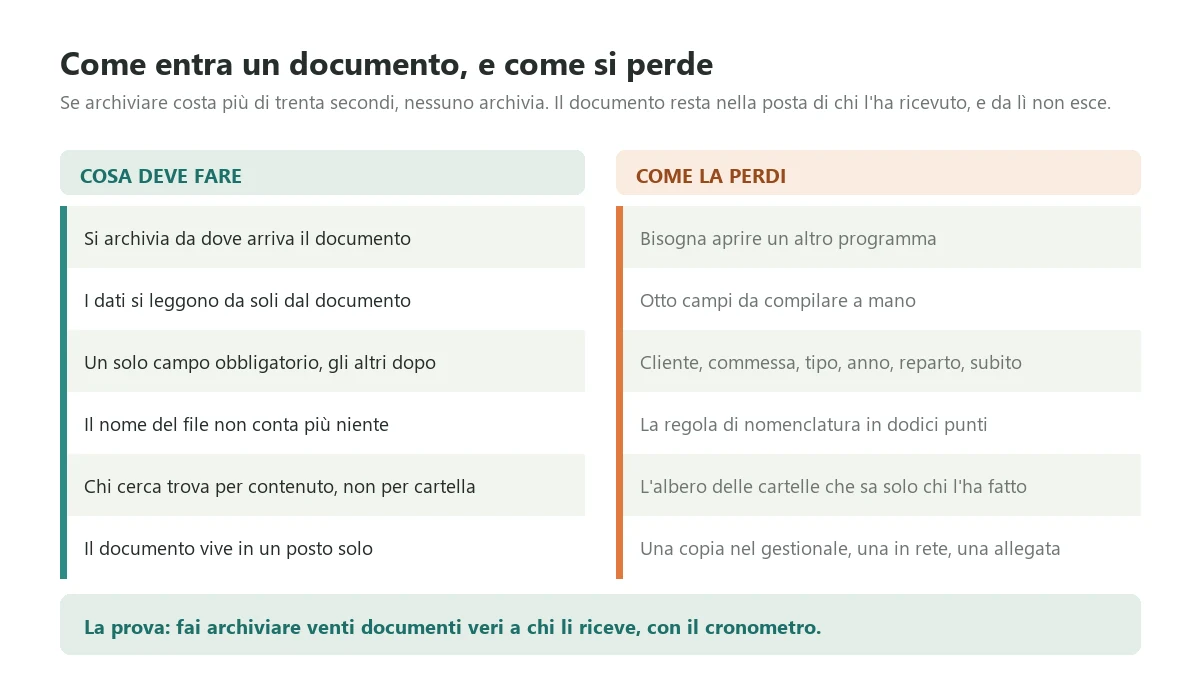
This is where everything is decided, and it is not the part demos are about. The rule is brutal and admits no exceptions: if filing a document costs the person receiving it more than thirty seconds, that document will not be filed. It will stay in their mailbox, which is exactly where we started, except that now you are paying a subscription.
The six conditions that make filing workable
You file from wherever the document arrives. If ninety per cent of documents arrive by email, filing happens from email, in one gesture. If you have to save the attachment to disk, open another program, find the matter and upload it, you have already lost: that is four operations for a document worth one.
The data reads itself. Supplier, number, date and amount on an invoice are not typed in 2026: they are extracted from the document and confirmed at a glance. On structured electronic invoices this is trivial because the document is already data. On scans you need decent recognition, which today works well on recurring forms and still needs a human check on irregular ones.
One mandatory field. At the point of entry you ask for the bare minimum, usually the subject: customer, supplier or matter. Everything else is added later or inferred. Every extra mandatory field is one more reason to postpone, and postponing means not filing.
The file name stops mattering. If a document is found by content and attributes after entry, the naming convention becomes pointless and should be explicitly abolished, otherwise people keep obeying it and keep wasting time on it.
Searchers find without knowing where. Search starts from meaning: customer, type, period, words contained. The folder structure, if it still exists, is a detail of how files are stored, not how people work.
A document lives in one place. No copy in the ERP, copy on the drive and copy attached to a message. Every copy is a future version that will diverge, and the moment you accept the second copy is the moment the project started to fail.
The test to run before you sign
Ask the vendor for a trial with your real documents, not with the demo set, and use a stopwatch. Take twenty documents exactly as they arrive, including the crooked scan, the photo of a delivery note taken on a phone by a fitter, the message with three attachments of which two are signature images. Have them filed by the person who will do it every day, not by whoever is best with computers.
Then look at two numbers: average seconds per document, and how many of the twenty required a non obvious decision about where they belong. Above thirty seconds on average you have a setup problem, and it needs solving before signature, not after. If more than two out of twenty raised a classification doubt, the problem is in the categories and no software fixes it: an hour of work with the three people who search for those documents fixes it.
Filing, legal preservation and workflow: three different things
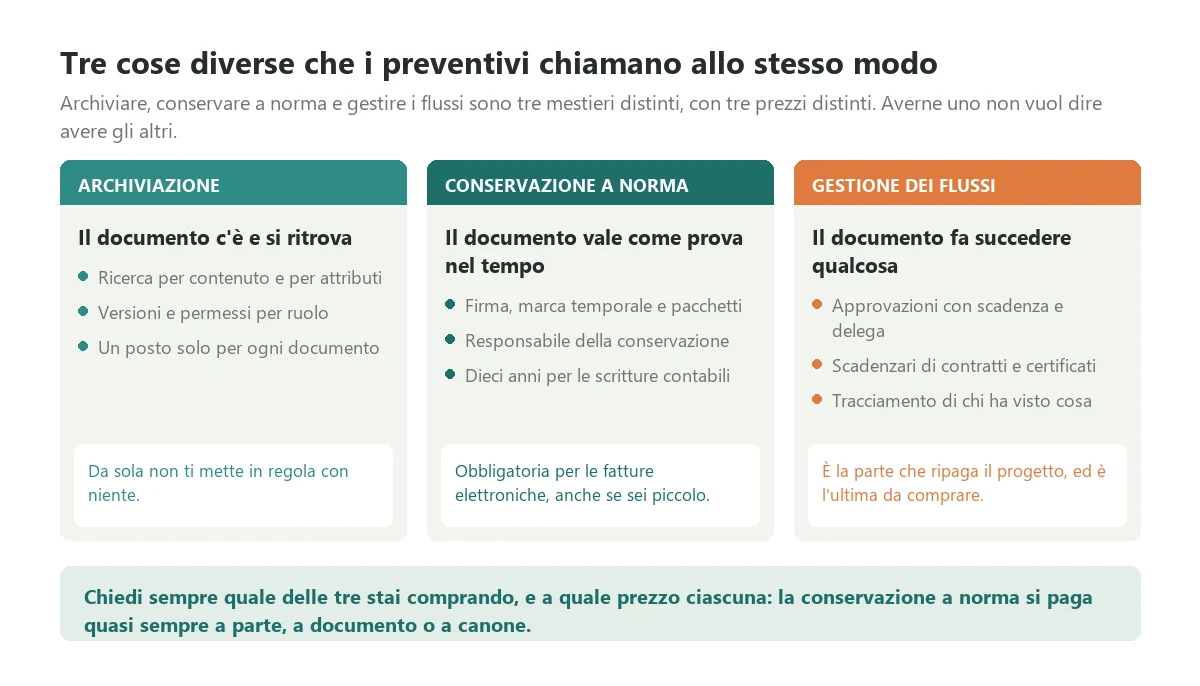
This is the section that saves the most money, because it dismantles the ambiguity that inflated quotes are built on. There are three different trades here, with three different prices, and catalogues call all of them document management. Having one does not mean having the others.
Filing: the document is there and can be found
This is the base: search by content and attributes, versions, role based permissions, one place per document. It is the part that addresses the five cost items above, and it is always where you start. On its own it puts you in compliance with nothing, and that point is worth clarifying with the vendor before signature, because the word archiving is used commercially to mean something quite different.
Legally compliant preservation: the document holds up as evidence over time
This is a regulated trade, not a software feature. In Italy the framework is the AgID guidelines on electronic documents, in force since 1 January 2022, which replaced the older substitute preservation decrees. In practice the document must be signed and time stamped, closed into archival packages with their indexes, and entrusted to a preservation officer, a role the company holds internally while delegating the service to an external preservation provider. If you operate elsewhere in the EU the mechanics differ, but the question to ask your accountant is the same one.
What actually binds an Italian SME: electronic invoices must be preserved to the standard, full stop, and that applies even if you are small and even if your accountant issues them for you. Civil law requires accounting records to be kept for ten years under article 2220 of the Italian civil code, and tax deadlines follow the assessment periods. This is not a grey area: if the only copy of your electronic invoice is the file downloaded from a portal and dropped into a folder, you are not compliant, and the fact that nothing has happened so far is not an argument.
What it costs: preservation is almost always bought separately, as an annual fee or by volume. The bands I see with mid sized clients run from a few hundred euros a year for those preserving only the tax cycle to a few thousand for those also preserving contracts, reports and personnel records. The question to put to the vendor is blunt: is preservation included or separate, who is the provider, and what happens to my archival packages if I change supplier tomorrow. On that last one, insist on the answer in writing.
Workflow: the document makes something happen
This is the part that repays the project and the last part to buy. Accounts payable routing that sends the supplier invoice for approval to whoever ordered, with a deadline and a delegate for holidays. Expiry tracking for contracts, insurance, certificates and calibrations. Audit trails of who saw what, which in some sectors is a requirement rather than a convenience.
The value here is high but entirely dependent on the retrievability discussed above: an approval flow built on an archive at fifty per cent produces a jam a week and gets bypassed within a month. That is why the right order is filing, then preservation if you are obliged, then workflow. Anyone selling you all three at once has either worked out that you are in a hurry or never run an implementation.
Subscription product, the Microsoft stack or a custom system: where the threshold sits
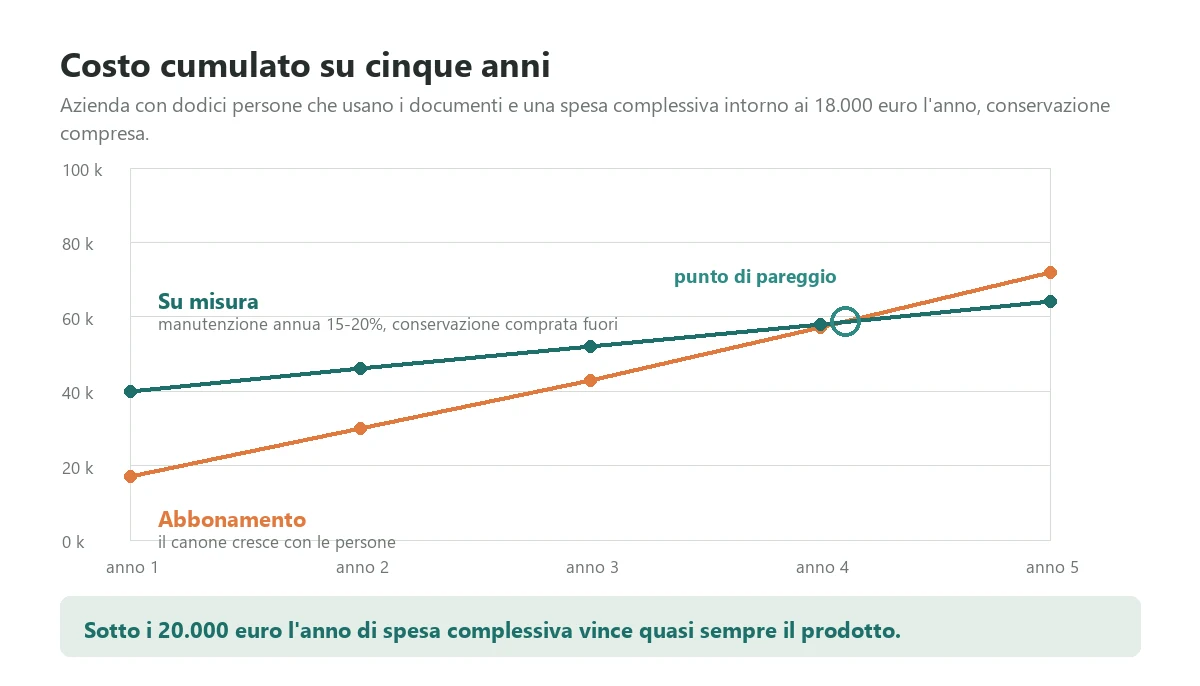
There are three routes, and the third is the one I recommend least often, which is odd given that it is the one I sell. Here they are with the numbers.
The specialised subscription product
Document management products for mid sized companies run between fifteen and sixty euros per user per month, with implementation between three and twenty thousand euros depending on how much configuration and how much back catalogue you put in. Legal preservation is nearly always separate. For a company with twelve people using documents, the first year typically lands between ten and twenty five thousand euros all in.
It is the right choice for most companies, and that comes from someone who builds custom software. If your documents are ordinary documents, meaning invoices, contracts, delivery notes and certificates, paying somebody to rebuild an archive from scratch is waste. Products in this space have been mature for years and the hard part is not the software, it is the implementation.
The Microsoft stack you may already own
If you already have Microsoft 365 with SharePoint, you have already paid for a document platform that a great many companies use at ten per cent of its capability. It is not a ready made DMS: it is an engine on which the setup has to be built, meaning document types, attributes, search views and permissions, with preservation and often text recognition added alongside. The real cost is between five and twenty five thousand euros of configuration done by someone who knows how, with no extra licence fees if you already hold the licences.
It is the most underrated route and the best value for anyone already inside the Microsoft ecosystem with ordinary requirements. It is also where the worst outcomes happen, when the configuration is done by somebody who reproduces the folder tree inside SharePoint and calls the job finished.
The custom system
This starts between eighteen and forty thousand euros for the core and rises from forty to a hundred thousand where there are complex flows, deep ERP integration and sector specific requirements. It makes sense in three cases and no others: when the document flow is a competitive advantage rather than a cost, as in a firm whose service is made of documents; when the documents sit inside a process no standard product represents; and when document handling has to live inside an application your users must not leave, in which case it is built as part of that application rather than as a separate system. It is the reasoning I set out writing about custom software development, and it holds here too: you choose for the process, not for the archive.
Where the threshold sits
The practical threshold is around twenty thousand euros a year of total spend, counting subscriptions, implementation spread over three years, preservation and the hours still being spent by hand. Below it, the product or the stack you already own wins almost every time. Above it, custom starts to pay back, typically just after year four, but only if the process justifies it: cumulative cost is not the only criterion, because a custom system that reproduces a standard product is waste even when the five year arithmetic works out.
Integration with the ERP: who owns the document
Document integrations nearly always fail at the same point, and it is the same point as every other integration: two systems both believe they are where the document lives, and six months later there are two archives that have diverged. The boundary has to be settled beforehand, in a one hour meeting, and written down.
The three rules that hold the boundary
Master data is born in the ERP. Customers, suppliers, jobs and items are created where they have always been created. The document system reads them and never writes them. If the document system lets people create a new customer, within a year you have two customer lists and neither is the good one.
The document lives in the document system. The ERP holds no copies: it holds a reference. This is the rule that meets the most resistance, because every ERP has its own attachment feature and using it feels convenient at first. It is the shortest road to three copies.
Tax data stays in the ERP. Number, date, amount and posting of an invoice belong to the ERP. The document system keeps a copy for search, and in a conflict it always loses. Knowing in advance who loses conflicts is half the integration work.
What to ask on the technical side
Ask three things and weigh the answers. First: is there a documented and accessible programming interface, or is integration done by writing into watched folders. The second approach works, I still use it in certain cases, but you need to know beforehand because it determines how reliable the link is.
Second: can every document be exported, with its attributes, in a readable format and at no charge. If the answer is vague, you are buying a prison. An archive is a ten year investment and the vendor you have today may not be there in five: the exit is negotiated on the way in, not on the way out.
Third: what happens when the link is down for two days. An integration that loses documents when the network fails is an integration to rebuild, and it is a defect you only discover in production if you do not ask first. These are the same questions worth asking whenever you touch systems that have to last, as I describe writing about legacy software modernization.
How to choose document management software in two weeks
Choosing a document system can take eight months and produce an archive full of quotes that later cannot be found, which would at least be funny. Here is how to close it in two weeks with three vendors.
Week one is spent inside your company, not on the phone
Run the retrievability test on twenty documents. Do the five item calculation. Write, on a single page, the five document types that actually matter, because in every company it is five or six types that cover ninety per cent of the volume: the rest is a long tail and must not drive the decision. For each one note who produces it, who searches for it, how often, and whether it carries a preservation obligation.
Then settle one thing before you speak to anybody: whether your problem is filing, preservation or workflow. If you do not decide, the vendor will decide for you based on what they sell, and it will be an honest answer to the wrong question.
Week two you call three vendors and ask all of them the same thing
Three is enough, and they should be different in kind: a specialised product for your sector, a partner working on the Microsoft stack if you already own it, and a custom assessment if the process justifies it. Ask all three for the same five things.
One, the timed trial with your twenty real documents, run by the person who will actually do the filing. Two, a quote with three separate lines: filing, preservation, workflow. Three, the cost of the back catalogue, stated separately, with the method by which it will be loaded. Four, the exit clause: full export, with attributes, at no cost. Five, two references from companies of your size in your sector, to be phoned, with the right question: how many months before everyone actually used it.
A vendor who answers all five within a week is a serious vendor even if they cost more. A vendor who sends a one line quote with a round number is telling you, without meaning to, that you will discover the implementation cost later.
The three things to sort out before buying anything
There are three pieces of work that cost nothing in licences and that, if skipped, make any software pointless. In order of importance.
Decide the five document types and who owns each. Not a forty entry taxonomy: five types, each with an owner. The owner decides what it is called, which attributes it carries and who can see it. Without an owner per type, the rules survive until the first ambiguous case and then everyone does as they please, inside the software exactly as they did outside it.
Close the escape routes. If after go live it is still possible to save a document to the network folder, somebody will, and in six months you will have two archives. The old folder goes read only on a stated date, announced in advance, with one named person to handle exceptions. This is an organisational decision worth more than any feature, and it has to be taken before signature, not after go live.
Separate the back catalogue from current work. The back catalogue is a project of its own, with its own budget and priority, and it should almost never be loaded in full. The rule that works is both time based and selective: the last three years go in with attributes, older material goes in only if somebody looks for it at least once a year, and the very old stays where it is until it is needed. Anyone proposing to digitise twenty years of binders before you start is proposing to spend the budget on the part with the lowest return.
One more thing, which is a decision rather than a task: settle what you do about email. In most mid sized companies the real archive is the mailbox of three or four people, and while that remains true no document system truly works. You do not need to archive all email, you need a rule about which messages count as company records, and you need filing those to cost one gesture.
Where to start
A document management system is not an IT project, it is a rules project, and rules projects succeed when they start small and honest. The first release that works is almost always this: the five document types with their attributes, filing from wherever documents actually arrive, content search switched on, current work and the last three years loaded, and the old folder read only from a date written on the calendar. Nothing else.
With that scope you are live in a few weeks with a product, in two or three months if you build custom, and from then on you can rerun the retrievability test every quarter on twenty randomly picked documents. If it rises, the project is working. If it does not, the problem is in the rules or at the point of entry, and no extra feature will fix it. Everything else, approval flows, expiry tracking, signatures, preservation beyond the legal minimum, gets built on an archive you can trust, and costs less because by then you know what you actually need.
If you are running these numbers now and want to know which side of the threshold you are on before spending anything, send me two pages: your five document types and how they enter the company today, plus the two numbers from the test, retrievability on twenty documents and the total of the five cost items. In half an hour I will tell you whether yours is a product problem, a configuration problem with what you already own, or a custom one, and where it is a rules problem I will say so too, because a client who buys the wrong thing comes back angry. You can get in touch here to run the numbers together.
Frequently asked questions
There are three routes with three different economics. A specialised subscription product runs between fifteen and sixty euros per user per month, with implementation between three and twenty thousand euros covering configuration, document types, back catalogue loading and training: for a company with twelve people using documents the first year typically lands between ten and twenty five thousand euros. Configuring Microsoft 365 with SharePoint, if you already hold the licences, costs between five and twenty five thousand euros of setup alone with no additional subscription, and it is the most underrated route. A custom system starts between eighteen and forty thousand euros for the core and rises from forty to a hundred thousand with complex flows and deep integrations. On top of any of these sits legally compliant preservation, which is nearly always bought separately, as an annual fee or by volume.
It is the percentage of documents that somebody other than the person who filed them can find alone in two minutes, without asking anyone for help. It is not how many documents you have loaded and it is not the percentage of paper digitised: those numbers keep rising even as the situation gets worse, because filing badly is faster than filing well. You measure it in forty minutes: pull twenty documents at random from the last three years, of different types, not chosen by whoever does the filing, and ask a colleague who did not file them to find each one in two minutes with no help. All three conditions are necessary, because the person who files always finds, and the call to a colleague is precisely what we are trying to eliminate. In companies that have never measured it, the result almost always lands between forty and seventy per cent.
In Italy, yes, for electronic invoices, and it applies even if you are small and even if your accountant issues them for you. The framework is the AgID guidelines on electronic documents, in force since 1 January 2022, which replaced the older substitute preservation decrees: the document must be signed and time stamped, closed into archival packages with their indexes and entrusted to a preservation officer, a role the company holds internally while delegating the service to an external provider. Civil law requires accounting records to be kept for ten years under article 2220 of the Italian civil code. If the only copy of your electronic invoice is a file downloaded from a portal and dropped into a folder, you are not compliant. Do not confuse the three trades: filing, legal preservation and workflow are distinct, with distinct prices, and having one does not mean having the others.
For most companies one of the first two, and that comes from someone who builds custom software: if your documents are ordinary documents, meaning invoices, contracts, delivery notes and certificates, paying somebody to rebuild an archive from scratch is waste, because products in this space have been mature for years and the hard part is the implementation, not the software. If you already have Microsoft 365 with SharePoint you have already paid for a document platform that most companies use at ten per cent of its capability, and configuring it properly costs less than buying a new product. Custom makes sense in three cases only: when the document flow is a competitive advantage rather than a cost, when documents sit inside a process no standard product represents, and when document handling has to live inside an application your users must not leave. The practical threshold sits around twenty thousand euros a year of total spend.
Nearly always at the same point, and it is not the choice of product: they fail because filing costs too much for the person receiving the document. The rule admits no exceptions: if filing costs more than thirty seconds, the document will not be filed, it will stay in the recipient's mailbox, and you will be paying a subscription for the problem you already had. Six conditions make filing workable: you file from wherever the document arrives, usually email; the data reads itself from the document instead of being typed; there is one mandatory field at entry; the file name stops mattering; searchers find by content rather than by folder; and the document lives in exactly one place. The second cause is a taxonomy decided by people who do not search for documents, which makes the system harder than the network folder it replaced.
Almost never, and it is the single biggest source of wasted budget. The back catalogue is a project of its own with its own priority, and the rule that works is both time based and selective: the last three years go in with their attributes, older material goes in only if somebody looks for it at least once a year, and the very old stays where it is until it is needed. Anyone proposing to digitise twenty years of binders before you start is proposing to spend the budget on the part with the lowest return. Watch the method too: twenty thousand files tipped into the system with the folder structure they already had is not an archive, it is the same problem with a search engine slower than your file explorer. A back catalogue without attributes cannot be found, and loading it that way pushes retrievability down rather than up.
Week one is spent inside your company rather than on the phone: run the retrievability test on twenty documents, do the five item cost calculation, and write on a single page the five document types that cover ninety per cent of your volume, with who produces each and who searches for it. Then settle one thing before speaking to anybody: whether your problem is filing, preservation or workflow, because if you do not decide, the vendor will decide based on what they sell. Week two you call three vendors of different kinds and ask all of them the same five things: the timed trial with your twenty real documents run by the person who will actually file, a quote with filing, preservation and workflow on three separate lines, the back catalogue cost stated separately, an exit clause with full export at no charge, and two references from companies of your size to phone.
Leave your details in the form below