What happens to .NET 8 and .NET 9 on 10 November 2026 and what should I do?


The IT manager of a window manufacturer in northern Italy gets an automatic antivirus email on Tuesday morning: "Unsupported runtime detected on 4 servers". They run the production management system, written three years ago on .NET 8 by a software house that now works for other clients. The system works perfectly. Nobody touched anything. Yet from that day every flaw found in the runtime stays open, because Microsoft stopped fixing them.
On 10 November 2026 .NET 8 and .NET 9 leave support together. If you have an application on either, you have a deadline and not an emergency. This guide explains what really happens that day, which systems to check first, what moving to .NET 10 costs and how to organize it in weeks instead of months. After 10 November 2026 applications on .NET 8 and .NET 9 keep running but receive no more security fixes or official support, and the sensible path is migrating to .NET 10, supported until November 2028.
If your application is even older, start from the migration from .NET Framework to .NET 10, because the maths is different there.
When does support for .NET 8 and .NET 9 end, and what does it mean?
Support for .NET 8 and .NET 9 ends on 10 November 2026: from that date Microsoft publishes no more security fixes, runtime updates or technical support for either version. Installed applications keep running with no block or warning on screen.
.NET 8 is a long-term support (LTS) release shipped on 14 November 2023 with 36 months of support. .NET 9, shipped on 12 November 2024, is a standard-term release whose support was extended to 24 months. The two dates coincide, and 10 November is also Patch Tuesday, so each version may get one last update if a critical issue is known.
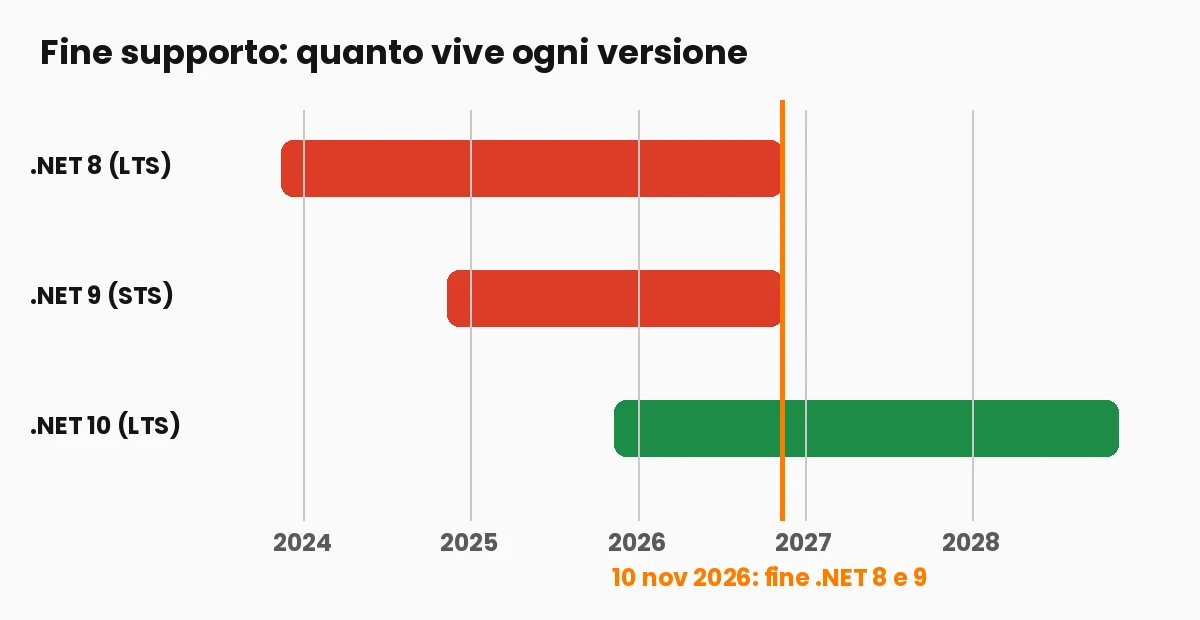
What "out of support" means in practice
Vulnerabilities found after the date stay unfixed, you cannot open a support case on that runtime, and the tools around it start treating the versions as obsolete: a future Visual Studio 2022 update will flag the .NET 8 and .NET 9 components as unsupported. Nothing stops, no licence expires, but the exposure grows every month, because attackers know the dates.
Why "it works" is not enough: the real risk of a runtime without fixes
An out-of-support runtime accumulates unpatched vulnerabilities: the application behaves as before, but every flaw found after 10 November 2026 stays open, and the risk falls on whoever hosts the service. For a company this is also about liability, not just technology.
The reasoning of those who postpone is always the same: it has run for three years, it is not on the internet, the data is not sensitive. Each sentence expires. Today the system sits behind an internal network; tomorrow someone opens a customer portal. Employee records, customer registries and price lists fall under GDPR even if nobody calls them sensitive, and cyber insurance questionnaires already ask whether systems run on supported software.
The arithmetic
Three days of partial downtime for a twenty-person company easily cost 15,000-25,000 euro in lost production and outside help, against 3,000-9,000 euro for an orderly migration of a medium solution (rough estimates). Waiting does not remove the work, it moves it: each year adds packages to update and a wider version gap.
How to find in half an hour which of your systems run .NET 8 or .NET 9
To find .NET 8 and .NET 9 applications, search the project files for the TargetFramework line (net8.0 or net9.0), check installed runtimes on servers with dotnet --list-runtimes and inspect container images. The inventory takes half an hour per repository and an hour per group of servers.
# PowerShell, in the folder that holds all repositories
Get-ChildItem -Recurse -Include *.csproj,Directory.Build.props |
  Select-String -Pattern "net8\.0|net9\.0" |
  Select-Object Path, Line

# On every server
dotnet --list-runtimes
In container files look for FROM mcr.microsoft.com/dotnet/aspnet:8.0; for managed hosting, check the stack version in the provider panel. Write everything in a sheet with four columns: application, version, owner, criticality. With that sheet you are halfway through the plan.
How to move from .NET 8 or .NET 9 to .NET 10 step by step
Moving to .NET 10 means changing TargetFramework to net10.0, updating NuGet packages, rebuilding, running the tests and updating the runtime and publishing pipeline on the servers. For a medium solution with automated tests it takes two to five days.
The six steps in order: install the .NET 10 SDK and pin it with a global.json; change the target framework in every project (or once in Directory.Build.props); update packages; build and fix obsolete-API warnings; run the full test suite; update runtime and pipeline in staging first, then production. Microsoft's Upgrade Assistant gives you a starting list but does not replace testing with real data.
<PropertyGroup>
  <TargetFramework>net10.0</TargetFramework>
</PropertyGroup>
What can break and how to prepare
The same things break almost every time: NuGet packages not yet compatible, APIs marked obsolete, changed behavior in serialization and data access, and hosting configuration stuck on an old version. All of them show up in staging, if you have one.
Read the official .NET 10 breaking changes page filtered by the components you use (typically ASP.NET Core, Entity Framework Core and System.Text.Json). Run dotnet list package --outdated and --deprecated to find stale dependencies. Compare the timing of your five heaviest queries before and after, as described in Entity Framework Core and slow queries. A solution with integration tests migrates calmly; without them, the migration is the moment to write at least one test per critical flow.
How much does migrating from .NET 8 or .NET 9 to .NET 10 cost?
Migrating costs 1,800-3,600 euro for a small solution, 3,600-9,000 for a medium one and 9,000-24,000 for a large one, at a reference rate of 600 euro a day. These are order-of-magnitude estimates: tests and dependencies decide the real figure.
| Size | Person-days | Indicative cost at 600 euro/day | What weighs |
|---|---|---|---|
| Small, one or two projects | 3-6 | 1,800-3,600 euro | Packages and testing |
| Medium, five to ten projects | 6-15 | 3,600-9,000 euro | Dependencies, queries, pipeline |
| Large, services and integrations | 15-40 | 9,000-24,000 euro | Integrations, missing tests, environments |
Three factors push the estimate up: no automated tests (two to four extra days of manual testing), abandoned third-party libraries and hand-made deployments. Clean layers, small projects and an automatic pipeline push it down. For the broader view of what existing software costs you, read what legacy software really costs.
Why choose .NET 10 and not stop at .NET 9 or wait for .NET 11
The right choice for a company is .NET 10: a long-term release supported until November 2028, while .NET 9 is already at the end of the line and standard-term releases live shorter. Moving to a standard release means repeating the migration in two years.
Microsoft ships a new version every November: even numbers (6, 8, 10) are LTS with three years of support, odd numbers are standard with two. A sensible rhythm is one migration every two to three years, from LTS to LTS. .NET 9 users are one version away and often finish in two days. Waiting for .NET 11, a standard release, to skip .NET 10 only leaves the application without fixes in the meantime. Details of what .NET 10 brings are in what's new in .NET 10.
How to check that the third-party software you use is ready
For software you did not write, the check is a written question to the vendor: which .NET version the product runs on, when it moves to .NET 10 and with which contractual date. Microsoft itself recommends asking the vendor for a .NET 10 build.
Ask four things: current .NET version including components on your servers, the date of the .NET 10 release, whether the upgrade is included in the fee, and what happens to your data and customizations. If the vendor no longer exists, have an external team take over the code, rewrite it piece by piece with the Strangler Fig method, or isolate it in a protected network with a replacement date. In new contracts add one line: the vendor commits to keeping the application on a supported .NET version for the whole engagement.
Pipelines, containers and Visual Studio: tools to update with the code
Three tools must be updated with the code: the build pipeline (.NET 10 SDK), container images (aspnet:10.0) and Visual Studio, which will flag .NET 8 and .NET 9 components as unsupported. Forget one and the migration looks finished while production still runs the old version.
The classic half-migration: code targets net10.0, the pipeline builds with the old SDK and fails on Friday night, or the production server only has the previous runtime and the application will not start. Point the pipeline at the SDK in global.json, change both container images (build and runtime) to the 10.0 series, check the stack setting of your hosting service, and at the end run dotnet --list-runtimes on production. One minute of verification avoids a week of illusion.
A thirty-day plan to finish the migration without upending the work
A realistic thirty-day plan has four weekly steps: inventory, migrate the least critical application as a trial, migrate the rest in order of risk, then verify and document. The first application finds the problems that will repeat in the others.
Week one: build the sheet and sort by exposure (internet-facing first) and importance. Week two: migrate the simplest application end to end and write down every snag; that two-page document is the project's treasure. Weeks three and four: the rest, staging first, a few days with real data, then production in a quiet slot, keeping the old package ready for a quick rollback. Put three dates in the infrastructure calendar: 10 November 2026, November 2028 and a reminder six months before the next deadline.
How to present the migration to management with a one-page calculation
Management gets three numbers: migration cost, yearly cost of exposure if postponed, and the date after which a customer or insurer can challenge the system. A one-page calculation beats twenty slides of technology.
Line one: the migration costs, say, 6,000 euro in ten person-days. Line two: the risk, a probability times its cost, with the real weight in the tail, a rare event that stops the company for a week. Line three: redoing the same work in two years with dependencies even further behind. If the budget is tight, propose two stages: internet-facing applications in the first two weeks, internal ones next quarter with the missing tests. For the overall picture of business software costs, read how much custom software costs.
The most common mistakes in .NET 10 migrations
The five most common mistakes are migrating without an inventory, changing the framework without updating the pipeline, postponing testing on real data, ignoring compiler warnings and having no way back to the previous version. None needs rare skills, only a checklist.
Filter the obsolete-API warnings during migration and fix them: they are the exact list of what breaks in the next version. Keep the old package and database copies, write the three commands to roll back and try them once in staging, because an untested rollback is a hope, not a plan. Change one thing at a time: version first, then, in separate projects, architecture and data access. To decide between fixing and rebuilding, see rewrite or refactor legacy software.
Questions I get most often about the end of support for .NET 8 and .NET 9
Five questions recur: whether the application stops working, whether migrating is mandatory, whether you can stay on .NET 9, how much it costs and what happens to third-party software. The answers are no, in practice yes, not advisable, a few thousand euro and it depends on the vendor.
No law imposes a .NET version, but security rules and contracts (GDPR, NIS2, insurance clauses) ask for updated software, and an unsupported runtime is hard to defend. I have seen companies postpone until a large customer sends a security questionnaire saying "all systems use supported software": from then on the migration is a commercial negotiation with a deadline set by someone else. Your step for Monday: open the main repository, search for net8.0 and net9.0 and write down how many projects you find. Multiply by half a day and you have the first honest estimate.
The IT manager of the window manufacturer opened the sheet that same Tuesday. Four servers, three applications, one forgotten for two years. The management system moved to .NET 10 in six days, with one integration test written for each important flow, and for the first time the company knows what it is worth to keep its software in step with deadlines.
If your deadline is the same, in the Software Architect course by Sviluppatore Migliore you learn when to migrate, how to estimate the cost and how to keep an application healthy over the years, working on real cases with my direct feedback, in recorded lessons and live sessions that fit your work. Bring your application: we look at it together.
Does your company need custom software or AI in the team?
We design and build custom software, modernize legacy systems and train your developers to work with AI. Tell us the problem: you get a concrete answer within one working day.
Frequently asked questions
On 10 November 2026, for both. .NET 8 is a long-term release shipped in November 2023, .NET 9 a standard-term release shipped in November 2024 with support extended to 24 months. After that date there are no more security fixes or official support.
No. Installed applications keep running, since the runtime has no time lock. They just stop receiving fixes: every vulnerability found after the date stays open and the risk grows month after month.
At a reference rate of 600 euro a day, about 1,800-3,600 euro for a small solution, 3,600-9,000 euro for a medium one and 9,000-24,000 euro for a large one. Automated tests and third-party dependencies make the difference.
Until November 2028. It is a long-term support (LTS) release shipped in November 2025 and the destination Microsoft recommends for anyone on .NET 8 or .NET 9 today.
Search for net8.0 and net9.0 in the project files of your repositories, run dotnet --list-runtimes on every server and check container images and the version setting of your hosting service. An inventory takes about half an hour per repository.
It is not advisable: .NET 9 has the same deadline as .NET 8, so it would be left without support on 10 November 2026. Moving from .NET 9 to .NET 10 is among the easiest upgrades and often takes two days.
Ask the vendor in writing which version the product runs on, when a .NET 10 release will ship and whether the upgrade is included in the fee. If the vendor no longer exists, have an external team take over the code or isolate the application and set a replacement date.
Leave your details in the form below