How much does migrating from .NET Framework to .NET 10 cost?
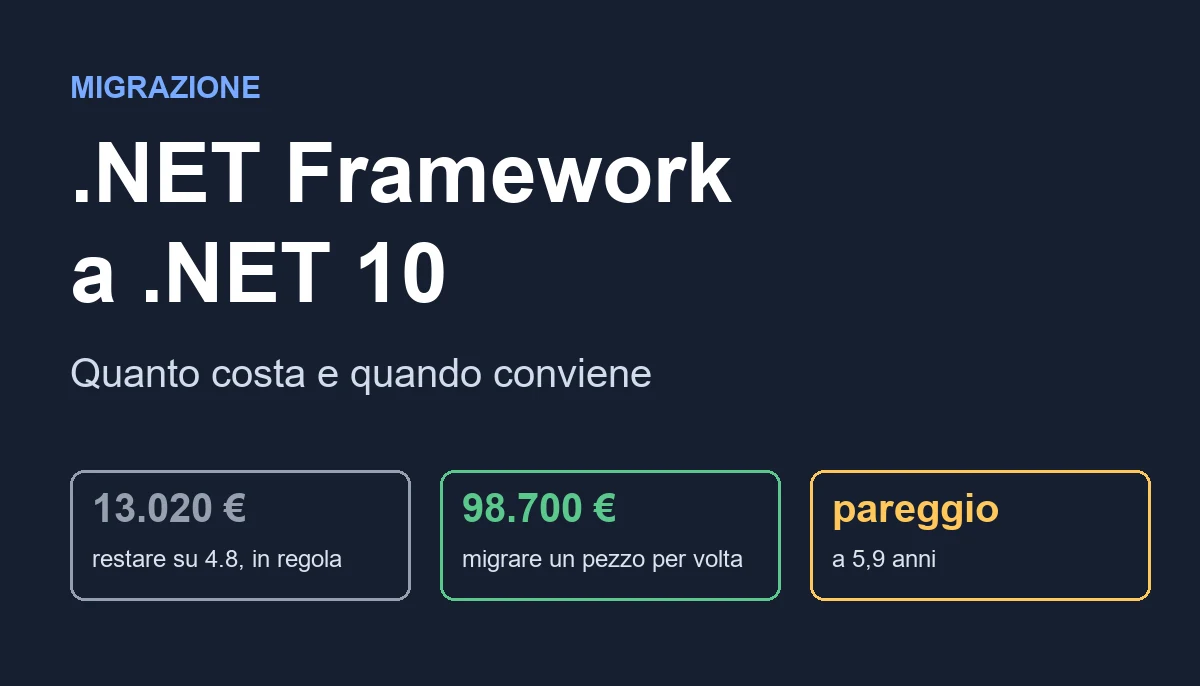
The choice rests on three numbers: the developers working on it (19,376 euros a year saved with three), the years of life required and the cost of an outage.

A plumbing components distributor in the province of Bergamo, 140 employees and 48 million euros in revenue, takes orders from 900 resellers through a web portal. It was written in 2014 in ASP.NET MVC 5 on .NET Framework 4.8: fourteen projects, about 310,000 lines of C#, Entity Framework 6, a WCF service to the ERP, a Windows service that syncs price lists every night and delivery notes printed with Crystal Reports. It runs on two Windows Server 2016 machines with IIS. It is maintained by three developers: one in-house and two external.
The IT manager has read in three different articles that .NET Framework is over, that Windows Server 2016 leaves support in January 2027 and that new libraries no longer support it. The owner has a single question: how much does the migration from .NET Framework to .NET 10 cost, and can it be postponed by a few years?
The honest answer has two halves. The first: .NET Framework 4.8 is not "over". Microsoft supports it as long as the Windows it runs on is supported, so the portal does not stop working the day something expires. The second: every year of waiting has a cost that only shows up if you measure it, and in the Bergamo case it is worth 29,580 euros. With this figure and with four assumptions written down one by one you reach a result that surprises those who expect the usual advice to migrate everything: it is worth migrating one piece at a time for 98,700 euros, but the break-even compared with staying where you are sits at 5.9 years, and in some cases never arrives.
You will see what "end of support" really means in 2026, how to take an inventory of a solution in a week, what moves to .NET 10 without touching a line and what does not, the four roads with their costs, the bill at one, three, five, eight and ten years, the code to migrate one area at a time with a proxy and to make the two worlds coexist, the tests that protect the calculations, the behavior differences that make totals go wrong, the role of artificial intelligence and the mistakes that keep repeating.
A premise. I have been writing software since 1999 and I also do this work, so I know which side my interest is on. The case is composed, the assumptions are declared and the result includes the road where you spend nothing. This article is part of a series on the modernization of legacy software: if you want the general picture, start from there.
Is .NET Framework really over in 2026?
No. But the phrase "it is supported" hides three different dates, and confusing them leads to wrong decisions in both directions.
What Microsoft says
.NET Framework 4.8 and 4.8.1 are components of Windows. Their support follows the lifecycle of the operating system that contains them. There is no end date of their own. As long as a supported version of Windows that includes them exists, they receive security fixes. No new features, though: .NET Framework is in maintenance and nothing else.
The opposite side is modern .NET. .NET 10 came out in November 2025 and is a long-term support (LTS) release: three years, until November 2028. Versions 8 and 9 both end on November 10, 2026, that is in a few days. If someone proposes migrating to .NET 8 or .NET 9 today, the proposal is already old.
The dates that really matter
For the Bergamo portal it does not matter when a runtime dies. What matters is when what surrounds it dies.
- Windows Server 2016: extended support ends in January 2027. From that moment no security fixes, unless you pay for extended updates.
- SQL Server 2016: support ended in July 2026. If the database underneath is this one, the problem is already here.
- Windows Server 2019: support until January 2029. Windows Server 2022 until October 2031. On these, .NET Framework 4.8 keeps receiving fixes.
- Third-party libraries: many new versions come out only for modern .NET. The old ones stay as they are, with the vulnerabilities discovered in the meantime.
So the real deadline is not the runtime. It is the operating system and the database, which you will have to change anyway. And the moment you change the machine is the cheapest moment to ask yourself whether the program must stay on the same runtime.
What staying costs you
Staying on .NET Framework 4.8 on a supported Windows is not a crime or an immediate risk. It costs in three ways, all measurable.
- Development friction. Slow builds, packages that do not update, tools that do not work with the old project files, manual releases. In the Bergamo case it is 18 days a year per developer.
- Infrastructure. Licensed Windows, IIS, large virtual machines. On .NET 10 in Linux containers the same load costs less than half.
- People. Those who can write modern C# prefer to work on modern .NET. Finding a developer for a 2014 MVC 5 costs more every year.
If you already know the story, this is the same pattern I describe in the real cost of legacy software: the biggest item is never the one that shows up on the invoice.
What is inside your .NET Framework solution?
Before choosing a road you need an inventory. It takes two or three days, and it is done by reading the files, not by interviewing people. The goal is a table with one row per project and five columns: type, dependencies, what it uses that does not exist in modern .NET, who uses it, how much it is worth.
Project types and what happens to each
In the Bergamo portal the fourteen projects divide like this.
- Class libraries (5 projects): models, data access, pricing rules, utilities, integration with the ERP. They are the easy case. If they do not use Windows-specific APIs or
System.Web, they move to .NET with few changes. - MVC 5 web application (1 project): the heart of the work. Controllers, Razor views, filters, script bundles. It is ported to ASP.NET Core, but not automatically:
Global.asax,Web.config, HTTP modules and filters have different equivalents. - Web API 2 API (1 project): used by the app for the sales reps. Same story as MVC, plus the difference between the old
HttpResponseMessageand the new result model. - WCF service (1 project): it is the interface to the ERP. WCF does not exist in modern .NET. CoreWCF exists, a community library backed by Microsoft, which accepts the same contracts.
- Windows service (1 project): the nightly sync. It becomes a Worker Service, and the domain code stays almost identical.
- Crystal reports (3 projects with 41 reports): the most painful point. The component for modern .NET does not exist in the form needed.
- Tests (2 projects): 212 tests, of which 160 on pricing rules. They are worth gold.
The three questions for each project
For each row of the inventory you answer three questions.
- Does it use APIs that exist only in .NET Framework?
System.Web,System.Configuration,System.Drawingon Windows,AppDomainfor plugins,Remoting,BinaryFormatter. You search with a text search and with Microsoft's analysis tool. - Does it depend on NuGet packages that have no version for modern .NET? If so, which replacement exists and how much it costs to change it.
- Who calls it? A project called by four others is migrated first, and first as a shared library. A project at the top, which calls nothing, is migrated last.
The tools that already exist
Microsoft offers the Upgrade Assistant, an extension and a command-line tool that analyzes the solution and produces a report: which projects convert, which packages must be updated, which APIs no longer exist. You use it read-only, for the analysis. As a conversion tool it does the mechanical work well (the project file, the references) and leaves the rest to you. The historical Portability Analyzer has been absorbed into it.
On the Bergamo portal the analysis found 1,940 points to touch. 61% are references to System.Web in the MVC project alone. Another 280 are in two libraries that use HttpContext.Current to read the user, a bad habit you find in almost every solution of those years.
What moves without touching anything and what does not
A practical rule, to get oriented before the analysis.
- Moves almost for free: calculation libraries, models, domain logic, data access with Entity Framework 6 (which also runs on modern .NET from version 6.3), Dapper, most packages with a
netstandard2.0version. - Moves with work: ASP.NET MVC and Web API, configuration, authentication, Windows services, WinForms and WPF (which port well, but remain Windows-only; if you are interested in the desktop side, the WPF guide explains the base to reason from).
- Does not move: server-side WCF (replaced with CoreWCF or with APIs), Remoting, Web Forms (which has an article of its own: migration from ASP.NET WebForms to Core), Crystal reports in the current format, every 32-bit COM component without a 64-bit version.
Which roads exist and how much do they cost?
There are four real roads. The others are variants. The daily rate is 420 euros and the days are those I expect for the Bergamo portal after the inventory. The full model has a single annual running cost for each road, and you find it after the list.
A. Stay on .NET Framework 4.8, in good order
Thirty-one days, 13,020 euros. The runtime is not changed. You fix the things that make the portal risky: sources in version control with a pipeline that builds and releases on its own, a development environment that can be rebuilt in an hour, NuGet packages brought to the latest compatible version, the machine moved from Windows Server 2016 to a supported system, the database updated. The first tests are written on the rules that have none today.
It does not reduce the annual running cost: the friction stays and so does the Windows infrastructure. It reduces risk, and this does not show up in euros until the risk materializes.
B. Upgrade everything in one block
The plan says 190 days. I add the 45% overrun, which is what I see on big-bang migrations without a safety net of tests, and I arrive at 276 days: 115,710 euros in twelve months. A branch is created, the whole solution is converted and brought to production in a single release. In the meantime the old portal keeps being modified by resellers, orders and the sales department, and everything that changes on the old branch must be redone on the new one.
The 45% is my most debatable assumption, and I kept it in view: if the estimate is exact, with no overrun this road costs 79,800 euros and breaks even with A in 4.4 years; with a 60% overrun it costs 127,680 euros and breaks even in 6.9. The ranking changes, and that is why the model declares it.
C. Migrate one piece at a time
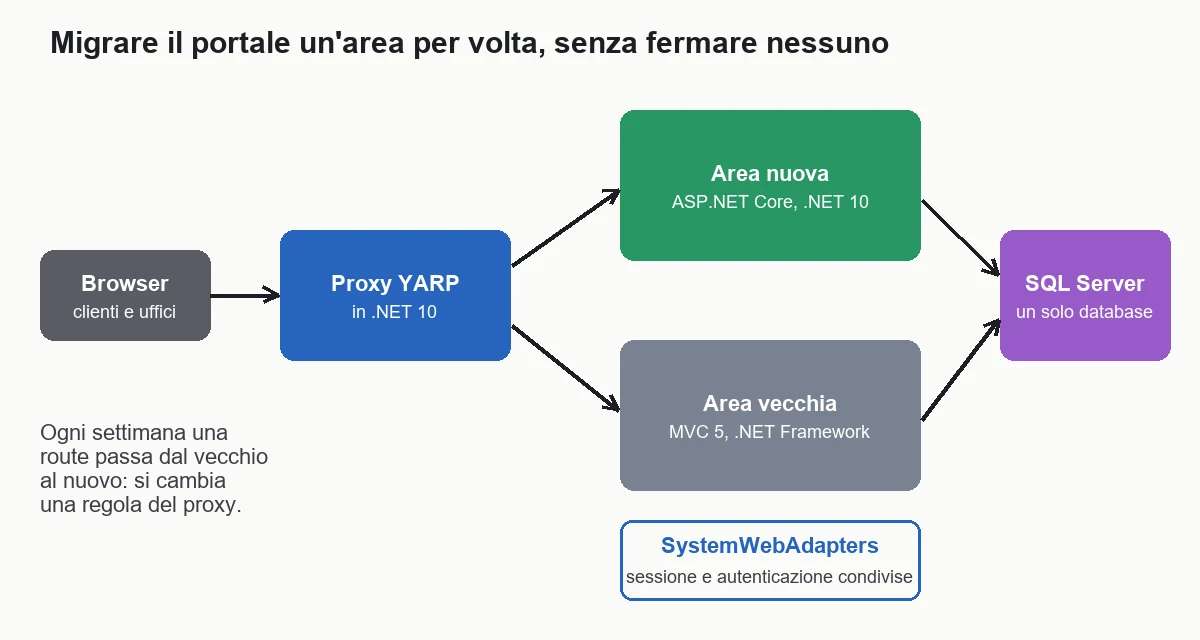
Two hundred thirty-five days, 98,700 euros in eighteen months. A .NET 10 proxy is put in front of the portal, one area at a time is ported (the catalog, then the cart, then the orders) and one proxy rule is changed to move that area from the old to the new. Users never see a cutover. Underneath, a single SQL Server database. It is the application of the strangler fig pattern to the case of a .NET Framework solution.
It costs less than B because it has no fixed overrun: each area goes out when it is ready, you measure and correct the estimate of the next one. And because it starts from the tests.
D. Rewrite
Five hundred sixty days, 235,200 euros in thirty months. You start again from zero with a new architecture. It makes sense when the old system is so tangled that it cannot be split, or when the business model changes. For the Bergamo portal there is no reason, and the comparison with C shows it: same end result, more than double the spend. The full reasoning is in rewrite or refactor legacy software.
The model in five assumptions
- The daily rate is 420 euros, both for the migration work and for what is lost in friction.
- The friction is worth 54 days a year (three developers, 18 days each) that is 22,680 euros. It is slow builds, blocked packages, manual releases, tools that do not work.
- The infrastructure costs 6,900 euros a year on Windows, and 3,400 on .NET 10 in Linux containers.
- After the migration 30% of the friction remains: it does not disappear, it shrinks.
- Staying on .NET Framework, the annual cost is 29,580 euros (22,680 plus 6,900). After the migration it drops to 10,204 euros (6,804 plus 3,400). The saving is 19,376 euros a year.
These are small numbers on purpose. There is no hundred-thousand-euro outage and there are no penalties. If in your case a portal outage costs a lot, the model changes, and you see it further on.
After how many years is it worth migrating from .NET Framework to .NET 10?
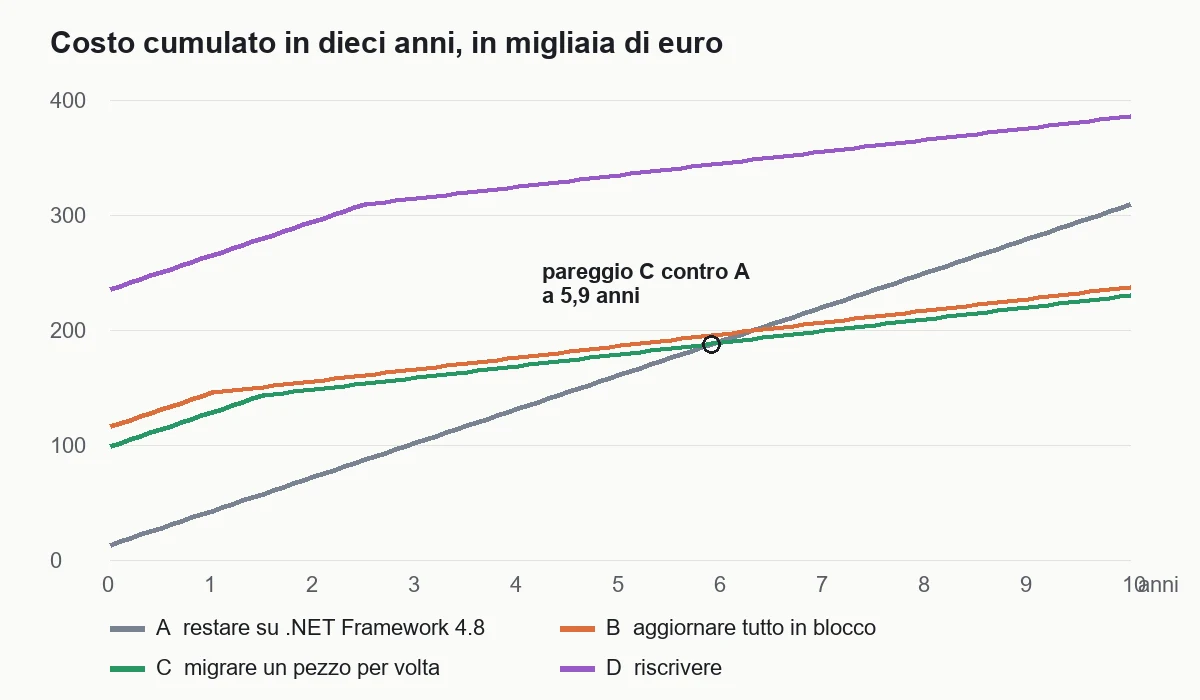
The cumulative cost is the sum of what you spend to change and what you keep paying every year. The four roads, plus "do nothing", at one, three, five, eight and ten years.
| Years | Do nothing | A. Stay in good order | B. In one block | C. One piece at a time | D. Rewrite |
|---|---|---|---|---|---|
| 1 | €29,580 | €42,600 | €145,290 | €128,280 | €264,780 |
| 3 | €88,740 | €101,760 | €165,698 | €158,376 | €314,252 |
| 5 | €147,900 | €160,920 | €186,106 | €178,784 | €334,660 |
| 8 | €236,640 | €249,660 | €216,718 | €209,396 | €365,272 |
| 10 | €295,800 | €308,820 | €237,126 | €229,804 | €385,680 |
What the numbers say
- Under five years it is better not to migrate. Whoever stays on 4.8 spends less in euros: at three years 88,740 against 158,376. Here the most honest advice is not to spend.
- The break-even sits between 5.9 and 6.6 years. Road C breaks even with A at 5.9 years and with doing nothing at 6.6. B breaks even with A at 6.3. Beyond that point every year adds 19,376 euros of advantage.
- At eight years C costs 27,244 euros less than standing still (209,396 against 236,640), and at ten it costs 65,996 euros less.
- The rewrite never breaks even with C. At steady state they cost the same, but D starts 136,500 euros higher.
- Putting things in order (A) does not pay back in euros. It costs 13,020 euros and does not change the annual cost. It is justified by risk: if in three years the server breaks and nobody knows how to rebuild it, those 13,020 euros are the lowest price you will pay.
The message for the owner in Bergamo is this. If he plans to keep the portal five years or less, he spends the 13,020 euros of A and moves on. If he plans to still have it in ten, C is the choice, and it is better to start early, because the saving of 19,376 euros a year starts only when the first area is in production.
What moves the break-even
The break-even between C and A, in the base case, is 5.9 years. Changing one assumption at a time:
- Developers drop from three to one: the friction is worth 18 days and the break-even rises to 11.2 years. With a single developer it is almost never worth it.
- Developers rise from three to six: the friction is 108 days and the break-even drops to 3.9 years.
- After the migration 50% of the friction remains instead of 30%: the break-even rises to 7.3 years.
- Road C costs 300 days instead of 235: break-even at 7.3 years. With 180 days it drops to 4.7.
- The infrastructure does not cost less (6,900 even after): break-even at 6.9 years.
- An outage or an incident that costs 20,000 euros a year to those who stay: break-even at 3.7 years.
Two numbers weigh more than all: how many developers work on the portal and how much an outage costs. They are also the two you can measure without a consultant.
How do you migrate .NET Framework without stopping the company?
Road C works in four moves. First the solution is prepared, then what is shared is ported, then the proxy is put in front, finally one area at a time is moved.
Move 1: port the shared libraries to multiple targets
Class libraries are not converted: they are compiled for both worlds. A project file in the modern format can have several target frameworks at the same time. The same code produces a DLL for .NET Framework 4.8, which the old portal keeps using, and one for .NET 10, which the new one will use.
<Project Sdk="Microsoft.NET.Sdk">
  <PropertyGroup>
    <TargetFrameworks>net48;net10.0</TargetFrameworks>
    <LangVersion>latest</LangVersion>
    <Nullable>disable</Nullable>
    <RootNamespace>Idraulica.Prezzi</RootNamespace>
  </PropertyGroup>

  <ItemGroup Condition="'$(TargetFramework)' == 'net48'">
    <Reference Include="System.Configuration" />
  </ItemGroup>
</Project>
Two details that save days. The first: keep Nullable off in the shared library, because turning it on in a 2014 codebase produces thousands of warnings that hide the real ones. It is turned on project by project, once the migration is done. The second: for common settings (language version, analysis rules, security packages) use a single file at the root, Directory.Build.props, instead of repeating them in fourteen projects.
<Project>
  <PropertyGroup>
    <LangVersion>latest</LangVersion>
    <TreatWarningsAsErrors>false</TreatWarningsAsErrors>
    <ImplicitUsings>disable</ImplicitUsings>
    <Deterministic>true</Deterministic>
  </PropertyGroup>
</Project>
The modern project file format (the "SDK-style" one) also serves packages: NuGet references live in the file with PackageReference, no longer in a separate packages.config. You can convert even a project that stays on .NET Framework. It is a safe step at almost zero cost: you do it first, on the old portal, even before deciding the road.
If the library uses System.Web to read the user or the session, the line HttpContext.Current does not compile on .NET 10. It is solved with an interface, IContestoUtente, which has two implementations: one in the old portal and one in the new. The domain code talks to the interface and does not know where it runs.
Move 2: behavior tests, before touching the rest
The 212 existing tests are not enough: they cover prices and not printouts, syncs, rounding of invoice totals. Before moving anything you write the characterization tests. A characterization test does not say what the code should do: it records what it does today. You take 400 real cases from past orders, have the old system calculate them and save the result in a file. Then the same file is verified by the new system.
using System;
using System.Collections.Generic;
using System.Globalization;
using System.IO;
using System.Linq;
using Xunit;

namespace Idraulica.Prezzi.Test
{
    public static class CalcolatorePrezzi
    {
        public static decimal Calcola(decimal listino, int quantita)
        {
            decimal sconto = quantita >= 100 ? 0.12m : quantita >= 20 ? 0.06m : 0m;
            return Math.Round(listino * quantita * (1 - sconto), 2, MidpointRounding.AwayFromZero);
        }
    }

    public static class CasiStorici
    {
        public static IEnumerable<object[]> Righe()
        {
            foreach (string riga in File.ReadLines("casi-storici.csv").Skip(1))
            {
                string[] c = riga.Split(';');
                yield return new object[]
                {
                    decimal.Parse(c[0], CultureInfo.InvariantCulture),
                    int.Parse(c[1], CultureInfo.InvariantCulture),
                    decimal.Parse(c[2], CultureInfo.InvariantCulture)
                };
            }
        }
    }

    public class CalcoloPrezzoTests
    {
        [Theory]
        [MemberData(nameof(CasiStorici.Righe), MemberType = typeof(CasiStorici))]
        public void Il_prezzo_e_identico_a_quello_del_sistema_vecchio(decimal listino, int quantita, decimal atteso)
        {
            Assert.Equal(atteso, CalcolatorePrezzi.Calcola(listino, quantita));
        }
    }
}
The test project also uses net48;net10.0 and the same casi-storici.csv file, copied to the output folder. The same test runs twice: on the old and on the new. If the results match, it passes. If they do not, you have a precise list of what changed, before a reseller discovers it.
The case file is produced once, with the old system, and is never touched again. If a case changes because the rule is wrong, it is decided with someone who knows the company and written in a log, not silently corrected.
Move 3: the proxy in front of the old portal
Now the piece that makes the difference. You create an ASP.NET Core application on .NET 10 and put it in front of the old one. Users always point to the same address. Everything the new one does not know, the new one forwards to the old one. This is done by YARP, the reverse proxy Microsoft publishes for .NET.
var builder = WebApplication.CreateBuilder(args);

builder.Services.AddControllersWithViews();
builder.Services.AddHttpForwarder();

var app = builder.Build();

app.UseStaticFiles();
app.UseRouting();

// Le aree già migrate rispondono qui.
app.MapControllerRoute(
    name: "catalogo",
    pattern: "catalogo/{action=Index}/{id?}",
    defaults: new { controller = "Catalogo" });

// Tutto il resto va al portale vecchio, con priorità minima.
string vecchio = app.Configuration["PortaleVecchio:Url"]!;
app.MapForwarder("/{**catch-all}", vecchio)
   .Add(static endpoint => ((RouteEndpointBuilder)endpoint).Order = int.MaxValue);

app.Run();
The line that counts is the last one: a "catch-all" route with the lowest possible order. The routes of the new one win, the others pass to the old one. To move the cart area you just add a route and take the traffic off the old one. It can be done in an afternoon, and it can be undone with one line.
Move 4: shared session and authentication
The point where projects get stuck is the user. If the user enters from the old one and passes to the new one, he must stay logged in and with the same cart. For this Microsoft publishes a library, Microsoft.AspNetCore.SystemWebAdapters: in the new one it exposes HttpContext.Session and the identity by reading them from the old one through a call protected by a shared key. In the old one you add the corresponding package and an endpoint.
A few things to know before starting.
- The shared key is a secret: it lives in a secrets manager, not in a configuration file in the repository.
- The session is serialized between the two worlds, so the objects put in session must be simple. Those that contain complex references must be reduced to identifiers. Of the 38 session keys of the Bergamo portal, 6 contained whole objects.
- The cost of the "bridge" is one extra call per request in the new areas that read the session. With the load of a B2B portal it is negligible, but it must be measured.
- At the end, when the last area has moved, the bridge is removed and the old one is shut down.
A cleaner alternative, when possible, is to eliminate the shared session: if the cart lives in the database and not in the session, the new and the old read the same table and do not need to exchange anything. It is the first job I would do of all, because it simplifies everything else.
The order of the areas
You start where the risk is low and the gain is visible.
- A read-only page (the catalog, the product pages). If something goes wrong, no order is lost.
- The areas that change often (the cart, the promotions), because there the friction is recovered immediately.
- Orders and payments, with the full characterization tests.
- The administrative area, which has few users and a lot of logic.
- Printouts and reports, last, because they depend on Crystal.
Each area goes out alone, with its week of proof in production. In the Bergamo plan there are six areas in eighteen months, about three months per area, including the time in which the area runs on both.
What changes in the code when you move to .NET 10?
The mechanical part is done by the tool. The part that requires judgment is a list of behavior differences, and it is better to know them beforehand.
Web.config, Global.asax and HTTP modules
They no longer exist. Configuration moves to appsettings.json and environment variables, read with IConfiguration. The custom sections of Web.config become options classes. The Global.asax events (start, error, begin request) become code in Program.cs and middleware. An HTTP module is a middleware. An action filter remains a filter, with a different interface.
The rule: do not translate line by line. List what each module does, then decide whether it is still needed. In the Bergamo portal, seven modules out of eleven had been left there since the days of Windows 2008.
Entity Framework 6 and Entity Framework Core
Entity Framework 6 runs on modern .NET from version 6.3. So the data layer is not rewritten on day one and you can keep it while you move the rest. The move to Entity Framework Core is a second project, with a value of its own: faster queries, better SQL Server support, explicit loading.
The differences that do damage are three.
- No .edmx files. The graphical model does not exist in Core. The code is generated from the database once and then maintained by hand.
- Lazy loading is not on by default. The code that read
ordine.Righewithout noticing that a query started now finds an empty list. You search for navigation properties and decide: explicit loading withIncludeor lazy loading proxies. - Some LINQ queries behave differently. Grouping, subqueries and string conversions sometimes produce different SQL. The characterization tests catch these cases.
For a general comparison of the two approaches, you find the explanation in Entity Framework Core to access data.
WCF becomes CoreWCF
The service to the ERP exposes WCF contracts, with [ServiceContract] and [OperationContract], to clients you cannot touch. CoreWCF accepts the same contracts and the same SOAP format, and the client does not notice the change. It is the right choice when the counterpart is third-party software. When instead you can also modify the client, it is replaced with an HTTP API with JSON: less code and more tools.
The Windows service becomes a Worker Service
The nightly price list sync is a Windows service. In modern .NET it is written as a background service with the generic host and it is still installed as a Windows service, or run in a container.
using System;
using System.Threading;
using System.Threading.Tasks;
using Microsoft.Extensions.DependencyInjection;
using Microsoft.Extensions.Hosting;
using Microsoft.Extensions.Logging;

var builder = Host.CreateApplicationBuilder(args);

builder.Services.AddWindowsService(opzioni => opzioni.ServiceName = "SincronizzazioneListini");
builder.Services.AddHostedService<SincronizzatoreListini>();

builder.Build().Run();

public sealed class SincronizzatoreListini : BackgroundService
{
    private readonly ILogger<SincronizzatoreListini> _log;

    public SincronizzatoreListini(ILogger<SincronizzatoreListini> log)
    {
        _log = log;
    }

    protected override async Task ExecuteAsync(CancellationToken arresto)
    {
        using var timer = new PeriodicTimer(TimeSpan.FromHours(24));
        do
        {
            try
            {
                _log.LogInformation("Sincronizzazione listini avviata");
                await SincronizzaAsync(arresto);
            }
            catch (Exception errore) when (errore is not OperationCanceledException)
            {
                _log.LogError(errore, "Sincronizzazione listini fallita");
            }
        }
        while (await timer.WaitForNextTickAsync(arresto));
    }

    private static Task SincronizzaAsync(CancellationToken arresto) => Task.CompletedTask;
}
The package needed is Microsoft.Extensions.Hosting.WindowsServices. The body of SincronizzaAsync is the domain library you already had, it does not change. The real difference is in error handling: a Windows service that dies at midnight and nobody notices is one of the most frequent causes of wrong price lists the next morning, so here the error goes into the log and into a notification.
The Crystal reports
This is the point that blows up the estimate. For the 41 reports there are four ways, all with a cost: keep a small separate process on .NET Framework that generates the PDFs and that the new one calls over HTTP; replace Crystal with a PDF generator for .NET; rewrite the reports as HTML pages with PDF printing; buy the vendor's version for modern .NET, where it exists. In the Bergamo plan I chose the separate process for the first two years: it is 15 days, and the reports migrate one at a time at the end, when the rest has moved.
The behavior differences that falsify totals
Here the compiler does not help you. The code compiles, runs, and gives a different result. The four I have met most often:
- Floating-point strings. .NET Core 3.0 and later print the shortest number that gives back exactly the same value.
(0.1 + 0.2).ToString()gives0.30000000000000004, where .NET Framework gave0.3. If someone compares strings, writes files or builds keys withdoublevalues, the result changes. Amounts go indecimalanyway. - String comparison and search. On Linux .NET uses the ICU library.
"a\r\nb".IndexOf("\n")with the current culture can return -1 instead of 2. UseStringComparison.Ordinalwhen searching for a technical character, and put the sorting of Italian lists under test. - Culture and date and number format. The thousands separator, the short date format and the month names depend on the culture and on the ICU data. A portal that prints "1.234,50" must be able to keep doing it: always pass the
it-ITculture explicitly and check it with a test. - Serialization.
BinaryFormatterwas removed: whoever used it to save objects in session, in cache or on disk has data that the new one cannot read. You read it once with the old one and rewrite it as JSON. The default JSON serializer changed from Newtonsoft toSystem.Text.Json, with different rules on property names, null values and dates.
Three more that cost less but must be watched: time zones (on Linux the identifiers are the IANA ones, like Europe/Rome, and not the Windows ones), file path handling (upper and lower case matter) and HttpClient, which must be created with a factory and not on every call.
A test for each of these, written on the old one and rerun on the new one, is worth more than ten meetings.
What can artificial intelligence do in a .NET migration?
It can do a lot of the boring work and almost none of the work that decides whether the project succeeds. You need to tell the two apart.
Where it helps
- Reading code. Summarizing in Italian what a 900-line controller does, finding all the points where
HttpContext.Currentis read, listing the HTTP modules and their dependencies. Work of hours, done in minutes. - Mechanical translations. Converting a
Web.configfile toappsettings.json, an MVC 5 Razor view to a Core one, a filter to a middleware. The result must be read, not pasted. - Writing tests. Given a method, proposing the edge cases. It generates the characterization test well, if you give it the real data.
- Documentation. The log of rules that nobody had written.
Where it cannot be trusted
- Behavior differences. An assistant translates the code plausibly and does not know that
Roundhas a specific rounding rule in your context. It is an error that compiles. - Architecture decisions. Which area to migrate first, whether to keep WCF, whether to remove the session. They are judgments that depend on the company, not on the code.
- Security. Authentication, authorization and secrets management are not delegated without a careful reading.
How I kept it out of the bill
In the model I did not discount a single euro for artificial intelligence: the 235 days of road C are what I expect with today's tools. Where I have seen it work, the saving is in the inventory and in the tests, not in writing code, and it is a gain that is measured when the project is finished. Whoever promises to migrate automatically with artificial intelligence promises the same thing that the automatic conversion of VB6 promised in 2008: a program that compiles and that nobody understands. For the comparison with that case there is the guide to the migration from VB6 to .NET.
Which mistakes repeat in migrations to modern .NET?
I have seen seven repeat with few variations.
- Starting from the rewrite. You decide to "redo everything properly" and after fourteen months you have half a new portal and an old portal that has changed in the meantime. The comparison is in rewrite or refactor.
- Upgrading .NET and the architecture at the same time. If you move to .NET 10 and at the same time split into microservices, you no longer know whether an error comes from the runtime or from the new structure. First you change the runtime, then you decide whether the structure must change.
- Migrating to a version about to expire. Today .NET 8 and .NET 9 end on November 10, 2026. You migrate to .NET 10, or you jump to 12 when it will be LTS.
- Writing the tests afterwards. Without characterization tests you cannot say whether the new one does what the old one did. After moving it, it is too late.
- Leaving reports and printouts for last without estimating them. It is the point that breaks the budget. You estimate it first, even if you execute it last.
- Forgetting the infrastructure. Release pipeline, monitoring, error log, backups. The new portal in containers requires a way to release and to see what happens, and if it is not there it is built halfway through the project, in a hurry.
- Not measuring the gain. If you do not count the friction days before and after, you cannot say whether the project paid. You measure build time, release frequency and support days.
Another, less technical: deciding from the title of an article. This too shows a composed case. Your portal has another curve, and the only way to know it is to put your numbers in the table.
When is it not worth migrating from .NET Framework?
There are four situations in which I advise not to migrate, and I say them first.
- A program about to be replaced. If a new ERP arrives within two years, every euro in migration is lost. You put it in good order (road A) and that is all.
- A single developer who touches it a few times a year. With a friction of 18 days the break-even is at 11.2 years. A setup like this does not pay back.
- A Windows program that stays on Windows. A WinForms application running on the office PCs has no infrastructure cost to bring down. It can be ported to .NET 10 to get modern tools, but it is not a deadline. The idea of taking it to more platforms is another project, with another bill.
- A system nobody modifies. If the code has not changed in three years, the friction is zero and the only cost is the machine. It is moved to a supported server and left where it is.
In all four, road A, the 13,020 euro one, is the right answer. Advice that does not say when not to spend is worth little.
How do you decide in a week?
The decision work does not require a project. It requires five days.
- Day 1: the inventory. Fourteen rows, five columns. With the Upgrade Assistant read-only.
- Day 2: the three questions per project and the list of what does not move: WCF, reports, 32-bit components.
- Day 3: the four numbers. How many developers work on the portal, how many days they lose in friction, how much the infrastructure costs, how much a one-week outage would cost.
- Day 4: the bill. The table at one, three, five, eight and ten years with your values, and the break-even point.
- Day 5: the decision and the first step. A single page, with the chosen road, the first area to migrate and the test that protects it.
At the end you must be able to answer three questions without looking at your notes: how much it costs to stay, how much it costs to move and after how many years it pays. If you cannot answer, the week is not over.
If you want someone to look at the numbers with you, we talk about it in the software consulting. If you are looking for the broader picture, with the cases in which the answer is to touch nothing, there is the page on the modernization of legacy software.
What would the Bergamo company do today?
With three developers, a portal that changes every week and a machine that leaves support in January, the company does three things, in this order.
- By December, the first steps of A: sources in version control, automatic release, updated packages, move to Windows Server 2022 and to the supported database. They are needed in any case and are already inside the 235 days of C.
- From January, the characterization tests and the conversion of the project files to the modern format, on the whole old portal. They are the two steps that cost little and cut the risk of everything else.
- From February, road C with the catalog as the first area. The proxy in front, the cart as the second. Review of the numbers after the first area: if the actual days are higher than planned, the break-even moves and is recalculated.
It is 98,700 euros in eighteen months. At steady state the portal costs 19,376 euros a year less, and from the sixth year the bill comes out even. It is not an investment that pays back quickly. It is the right answer if the portal must live another ten years, and if it must not, the 13,020 euros are enough.
In five lines. Measure the friction days before talking to any vendor. Put the environment in order: sources, release, packages, supported server. Write tests on the behavior of the old one with real cases. Migrate one area at a time with a proxy in front, starting from a read-only page. If the portal must live less than five years, do not migrate. For other situations, the bill to do is the same and you find it for Delphi, for WebForms and for VB6, and the overall picture is on the page about the modernization of legacy software. If you are also evaluating how much to spend on infrastructure after the move, the guide to how to save with Azure shows where costs are recovered.
Frequently asked questions
For an MVC 5 portal with three developers, migrating one area at a time costs about 98,700 euros (235 days, eighteen months). Updating everything in one block costs 115,710 euros with the expected overrun, rewriting 235,200 and staying compliant 13,020.
No. It follows the Windows lifecycle, so it gets fixes as long as a supported Windows that includes it exists. What expires is Windows Server 2016 (January 2027), SQL Server 2016 (July 2026), and .NET 8 and 9 on 10 November 2026.
In the case described, break-even between migrating one area at a time and staying compliant is at 5.9 years (6.6 against doing nothing). It drops to 3.9 years with six developers and to 3.7 if an outage costs 20,000 euros a year; it rises to 11.2 with one developer.
With a YARP proxy in ASP.NET Core in front of the old portal and one area at a time: shared libraries are compiled for net48 and net10.0, session and authentication are shared with SystemWebAdapters and a single database serves both.
Four: how double numbers are printed, string comparison with ICU, culture and date and number formats, and serialization (BinaryFormatter removed, different JSON). You write characterization tests on the old system and run them again on the new one.
When the program will be replaced within two years, when only one developer touches it (break-even at 11.2 years), when it is a Windows application that stays on Windows or when the code has not changed in years. There, 13,020 euros of tidying up is enough.
Leave your details in the form below