How much does it cost to replace Access with a management system?
The choice rests on three numbers: the rules hidden in VBA, the minutes lost every day (1,056 euros a year each) and the years of life required.

A window and door maker near Vicenza, 28 employees and 9 million in revenue, runs quotes, orders and deliveries on an Access database written in 2015 by a clerk who has since moved to purchasing. Nine people use it every day. The file weighs 1.4 GB, the Access limit is 2 GB, and it grows by 220 MB a year. On Monday morning it got corrupted for the third time in twelve months, and the owner asked two things: can it be replaced, and what does it cost.
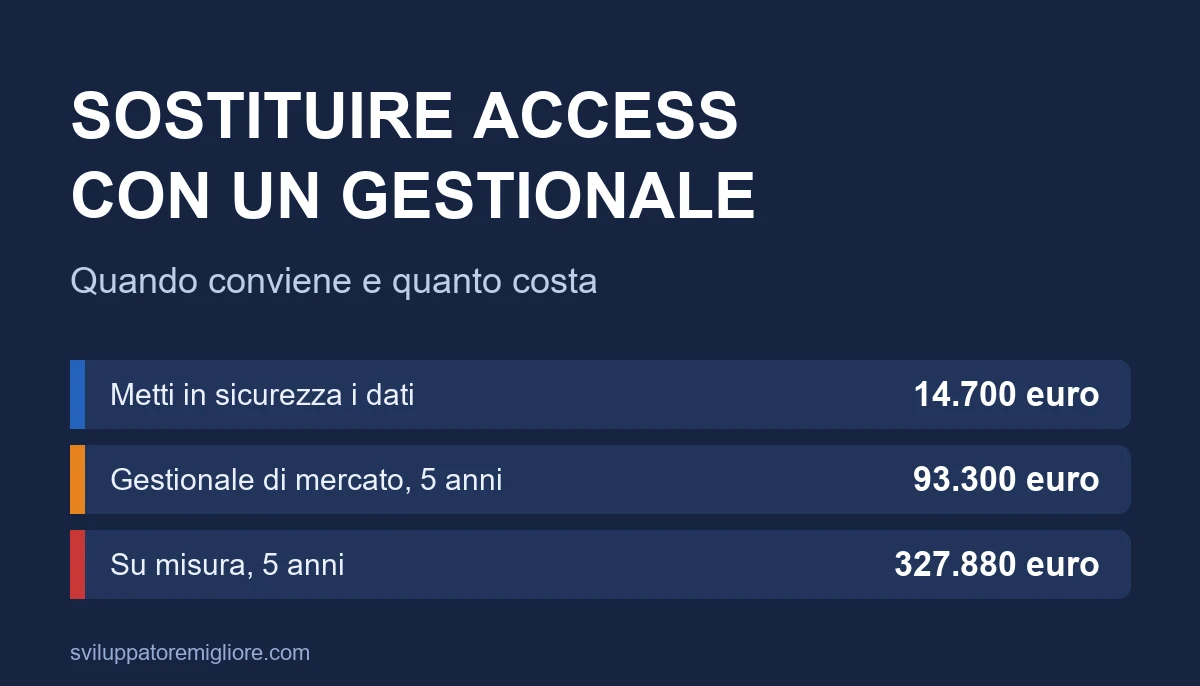
This article answers anyone searching to replace Access with a management system who wants a number before talking to a salesperson. For a company of that size there are three roads, costing 14,700 euros (make Access safe by moving the data to SQL Server), 93,300 euros over five years (an off-the-shelf system) or 327,880 euros over five years (custom software). The gap is wide and says something few people will tell you: for nine users, custom software is almost never the answer.
The decision rests on three numbers that no quote writes down: how many business rules live inside the VBA code, how many minutes each user loses every day working around the system's limits, and how many years the solution has to last. With the Vicenza case you will see how to measure all three in a week.
You will find the seven signs that Access is no longer enough, an inventory of what an Access file really contains, the three roads with their costs, the five and eight year bill, an eight week migration plan that does not stop the company, a C# program that compares old and new data row by row, and the mistakes I have seen repeated in twenty-six years of migrations.
An honest preface. I have built custom software since 1999 and I created and sold a multi-tenant legal management system, so I know which side my interest is on. The Vicenza case is composite and not a real client, the assumptions are written one by one, and the result includes the cases where buying from me or from any other programmer does not pay. Advice that does not tell you when not to spend is worth little.
When does Access stop being enough?
Access is not a toy. It is an excellent tool for a department with three or four users and a simple data structure, and many companies live well with it for ten years. Problems start when the database becomes the company's operating system without anyone deciding it. There are seven signs, and with three or more we are in the zone where the risk exceeds the cost of change.
1. The file is approaching 2 GB
An Access file has a fixed limit of 2 GB. It is not advice, it is a wall: when you hit it, the program stops writing. In Vicenza 648 MB are left and the file grows by 220 MB a year, so the wall is about three years away. Part of the growth can be avoided, for example by moving attachments out of the file, but almost always it only postpones the problem by a year.
2. The file gets corrupted
Access shares a single file among several users over the network. If a computer goes to sleep, the VPN drops or a shared folder hiccups during a write, the file can be left in an inconsistent state. "Compact and repair" fixes many cases, not all. Three corruptions in twelve months, as in Vicenza, indicate a structural cause and not bad luck.
3. Users block each other
When two people open the same record, or a long query locks a table, the rest of the office waits. Above ten concurrent users it becomes a daily problem, and below that it depends on how the code is written. The symptom is always the same: "don't open it now, I am doing the invoice".
4. The rules sit in VBA and one person knows them
The discount for long-standing customers, the rounding the accountant wants, the check that stops delivery to customers with unpaid invoices: often these rules exist only as lines of code inside forms. The person who wrote them barely remembers. If that person leaves, the company loses the knowledge of its own business.
5. Nobody knows who changed what
Access has no log of user actions and no real roles. Whoever opens the file can do almost anything. For a company with an auditor, a demanding customer or simply a mistake to reconstruct, the lack of traces is a risk paid dearly the day it matters.
6. Access from outside is a stunt
An Access file on the local network works well inside the office. As soon as someone works from home, from a site or from another office, you resort to remote desktop, VPN or copies of the file, each with its own way of breaking. Companies that get here already have three makeshift solutions and none really good.
7. Platform support is narrowing
Access is part of Office, and support for Office 2021, the last one-off purchase version with Access, ended on 13 October 2026. Those using Access through a Microsoft 365 subscription keep receiving updates, but many companies still run old versions, sometimes mixing 32 and 64 bit, with components that are no longer updated. It does not mean Access stops working tomorrow. It means the environment around it ages, and every new computer or Windows update is a small bet.
In Vicenza five signs out of seven are real: the file near the limit, the corruptions, user blocking, rules in VBA and the lack of traces. With a result like that the question is not whether to change, but how to do it spending the right amount.
What is really inside your Access file?
Before choosing a road you need an inventory, because the price of any solution depends on what is inside and the owner can usually describe only what he sees. An Access file contains five kinds of things, and each is replaced differently.
- Tables: the real data, the part you cannot lose. They move to a real database.
- Queries: saved questions, from the simplest to the most complex. Many are disguised reports, others contain calculation rules.
- Forms: the screens users type and read data with. They are rebuilt or replaced.
- Reports: the printouts, meaning quotes, order confirmations, delivery notes. They are what the end customer sees.
- Macros and VBA code: the logic. It is the most dangerous part, because it is invisible and because that is where the rules live.
In the Vicenza case the inventory, done by reading the file for three days, gives these numbers.
| Item | Count | What it means for cost |
|---|---|---|
| Tables | 41 | To move to SQL Server, 9 of them with data problems (duplicates, free-text fields) |
| Queries | 63 | 22 are disguised reports, 14 contain calculation rules to rewrite |
| Forms | 38 | 11 used every day, 19 once a month, 8 never |
| Reports | 21 | 6 are customer documents, to redo with the current look |
| Macros | 9 | Import and export automation, to replace |
| Lines of VBA | 14,200 | All to be read: they hold the hidden rules |
The figure that weighs most is not in the table, it is in the last row. Out of 14,200 lines of code, careful reading found 17 business rules written nowhere else: discounts, blocks, roundings, a delivery time calculation that accounts for suppliers' holidays. Those 17 rules are the real asset of the file, and whichever road you choose they must be extracted, written down in plain words and checked with the people who work with them.
A good way to estimate the work is to count what is used. The 8 forms never opened and the 19 opened once a month are not rebuilt in the first round. You decide with the users which are truly needed. The saving is surprising: in many migrations 30-40% of the file has been useless for years and is carried along out of fear.
For a reference on how inventory relates to cost, the same logic applies to any old system, and the guide to the cost of legacy software applies it to the general case.
What are the three roads, and what do they buy?
The options are not "Access yes" or "Access no". There are three, each with a different cost, duration and risk.
Road 1: move the data to SQL Server and keep Access as the front end
The data leaves the file and goes into a real database, in the cloud or on a company server. Access stays as the program users work with, linked to the remote tables. The 2 GB limit, the corruptions and most of the blocking are solved at once, because the database now handles access properly. Users and roles can be added, and the Access file becomes a light "shell" you can rebuild at leisure.
The work costs 35 days: 8 for data migration, 12 to relink tables and rewrite the slowest queries, 10 to fix the VBA that depends on Access functions, 5 for testing. At 420 euros a day that is 14,700 euros. The yearly cost is 4,920 euros, 10 days of maintenance plus 720 euros of cloud database.
The limit is that Access stays. The rules stay in VBA, the dependence on the person who knows them stays, and Office support follows its own rules. It is a bridge, not a destination, and it should be said before signing.
Road 2: an off-the-shelf management system
A ready product for your sector, configured and adapted. For window and door makers there are several: they are paid as a monthly fee per user and have the advantage of being maintained by a supplier with hundreds of customers. The reference case is a fee of 95 euros a month per user, so 10,260 euros a year for nine users.
Start-up costs 40 days (configuration, data import, training), that is 16,800 euros, plus about 12 days a year of adaptations and support, 5,040 euros. The yearly total is 15,300 euros. Over five years it is 93,300 euros.
The limit is that the product imposes its way of working. Where your process is standard it is excellent. Where it differs, every deviation is paid in workarounds: sheets, notes, double entry. It is the cost almost no quote writes, and we measure it in the section on lost minutes.
Road 3: custom management software
Software written for you. In the Vicenza case, with nine modules, the estimate is 420 days, that is 176,400 euros: 255 for the modules, 38 for analysis, 38 for testing, 26 for project management, 12 for training and start-up, and 51 of margin for the unexpected. The yearly running cost is 30,296 euros, 18% of the base plus 2,400 euros of hosting. Over five years it is 327,880 euros.
The advantage is that the system does exactly what your company does, and no workaround is needed. The drawback is in the numbers: for nine users it is a sum that rarely pays back. For the detail of how to read a quote of this kind, and why two offers for the same work can differ fivefold, see the guide to how much custom management software costs. The full development path is on the custom software page.
A summary comparison, with the same assumptions for the three roads.
| Make Access safe | Off-the-shelf system | Custom | |
|---|---|---|---|
| Start-up cost | 14,700 euros | 16,800 euros | 176,400 euros |
| Fixed yearly cost | 4,920 euros | 15,300 euros | 30,296 euros |
| Time to go live | 6-8 weeks | 8-12 weeks | 9-12 months |
| Rules in VBA | Stay in VBA | To reproduce in the product | Rewritten in new code |
| Dependence on one person | Stays high | Moves to the supplier | Reduced with documentation and tests |
| When it makes sense | You need time or the budget is limited | Standard sector processes | The process is your edge |
What the alternative really costs: the five and eight year bill
The start-up price tells you little. After five or eight years what weighs is the running cost, and an item no quote writes: the minutes each user loses every day because the system does not do what is needed.
To put them in euros three numbers are enough: 9 users, 220 working days and a company hourly cost of 32 euros. Each minute lost every day by each user is therefore worth 9 x 220 / 60 x 32 = 1,056 euros a year. How many minutes are there in the Vicenza case?
- Today, with Access as it is: 15 minutes a day per user, between waiting, reopening after blocks and data retyped in Excel. That is 15,840 euros a year. Plus three half-day stoppages a year for corruptions: 3 x 4 hours x 9 users x 32 euros = 3,456 euros. In all, 19,296 euros a year of cost that appears in no balance sheet.
- With data on SQL Server: 8 minutes remain, because interface limits and double typing remain, but the stoppages disappear. That is 8,448 euros a year.
- With the off-the-shelf system: 5 minutes, for the cases the product does not cover. That is 5,280 euros a year.
- With custom: zero, by assumption.
The minutes are estimates, and should be replaced with real measures (below I explain how). But the structure of the bill holds: start-up cost, fixed yearly cost and cost of lost minutes added over a chosen horizon.
| Horizon | Do nothing | Data on SQL Server | Off-the-shelf | Custom |
|---|---|---|---|---|
| 1 year | 19,296 euros | 28,068 euros | 37,380 euros | 206,696 euros |
| 3 years | 57,888 euros | 54,804 euros | 78,540 euros | 267,288 euros |
| 5 years | 96,480 euros | 81,540 euros | 119,700 euros | 327,880 euros |
| 8 years | 154,368 euros | 121,644 euros | 181,440 euros | 418,768 euros |
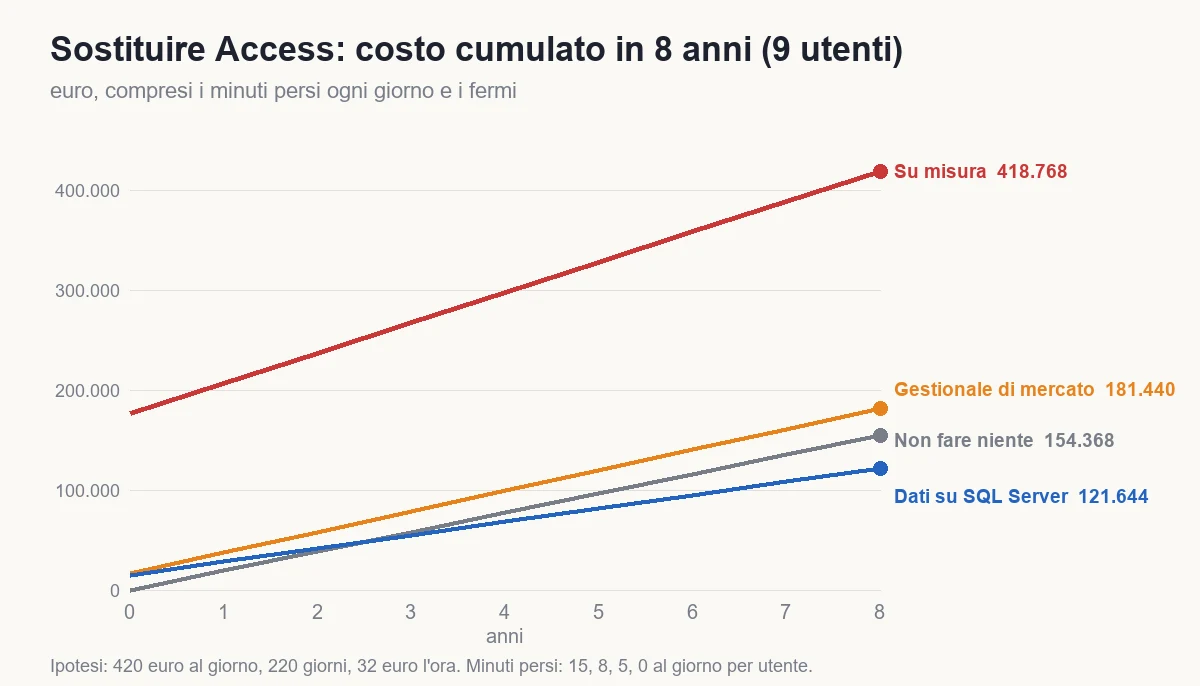
The result is less obvious than a salesperson would like. For nine users the cheapest road is moving the data and keeping Access, and already at three years it costs less than "doing nothing". The off-the-shelf system costs 38,000 euros more over five years but removes the dependence on the code of a former employee. Custom costs almost triple, and to pay back it would need a company where each user loses 44 minutes a day at five years, or 33 at eight, against the product's 5. Such a case exists, but it is not yours if your system must handle quotes, orders and deliveries the way a thousand other companies do.
Mind the limit of the bill: "doing nothing" has an expiry date. The Access file reaches 2 GB in about three years, and from then on the choice is no longer economic but forced, at the worst possible moment, with the company at a standstill. A migration done in a hurry, with a supplier chosen in three days, costs 30 to 50% more than one done with time.
The bill changes drastically above twenty users. With 25 users the weight of lost minutes grows almost threefold and custom starts to pay back in three to five years, as shown by the case in the guide to the cost of custom management software. The threshold is not a rule of computing: it is a ratio between the number of people who suffer the limit and the cost of building the system.
How to decide: three questions and a rule
The bill gives an order of magnitude. The decision is made with three questions, in the order that reduces risk.
Question 1: how many years must it last?
If the answer is "I don't know", that is already information: you are deciding without a horizon. Write three numbers, minimum, probable and maximum. A company expecting to move, be sold or change model within three years has no reason to build anything. A company that will exist in ten years with the same way of working has reason to consider a system of its own.
Question 2: is the process standard or yours?
A simple test: write the ten most important rules of the company, the ones that do damage if wrong. If eight out of ten are found in a sector product, the off-the-shelf system serves you. If only three out of ten match, and the other seven are the reason customers choose you, then your edge is in the rules and custom software protects them. For the Vicenza window makers the answer is six out of ten: the delivery time calculation with suppliers and the discounts for long-standing installers are the company's own, the rest is standard.
Question 3: where do the rules live today?
If they are written in a document or in the heads of managers, they can be carried into any system. If they are in VBA and only there, the first expense is not the new system but extracting the rules, and that is done in any case. There is no road without this step, and it is best done before talking to suppliers.
The rule
| Situation | Road |
|---|---|
| Under 5 lost minutes a day, standard processes, horizon over 5 years | Off-the-shelf system |
| You need time, the budget is short or the right supplier is not there yet | Data on SQL Server, then decide calmly |
| More than 20 users and a process that is truly yours | Custom, in phases |
| Process partly yours and partly standard | Market product for the standard part, custom module for yours |
| Horizon under 3 years | Data on SQL Server and nothing else |
For Vicenza the advice is in two steps: move the data to SQL Server now, with 14,700 euros, to remove the corruption risk and the 2 GB wall, and over the following six months evaluate the market product with a trial on real data. Custom, for the delivery times alone, is decided only if the product cannot cover it.
If the choice falls on building, how you choose who writes it weighs as much as the choice itself: you will find the questions in the guide to how to choose a software house.
How to migrate without stopping the company: the eight week plan
Whichever road you choose, data migration follows the same scheme. The goal is not to be fast but never to touch the work of the people using the system. The Vicenza plan is eight weeks, and it can be shortened only by cutting the verification, which is the last thing to cut.
- Weeks 1-2, inventory and rules: reading the file, listing tables, queries, forms and reports, extracting rules from VBA, interviewing the users. The result is a ten page document signed by the manager.
- Week 3, data cleaning: duplicates, free-text fields, inconsistent codes. The customer takes the decisions, the supplier does the cleaning. In Vicenza 9 tables out of 41 have problems and 1,800 records must be merged.
- Weeks 4-5, construction: target database, import, relinking the interface or configuring the product, rewriting the rules. In parallel, a test environment with a copy of the real data.
- Week 6, reconciliation: automatic comparison between old and new, row by row and total by total (the program is in the next section). No data goes through unless it matches.
- Week 7, parallel run: for five working days data is entered in both the old and new system, by two pilot users. Differences are fixed the same evening.
- Week 8, switch and caution: the switch happens on a Friday afternoon, the old file stays read-only for at least three months, and for two weeks one person is dedicated to user questions.
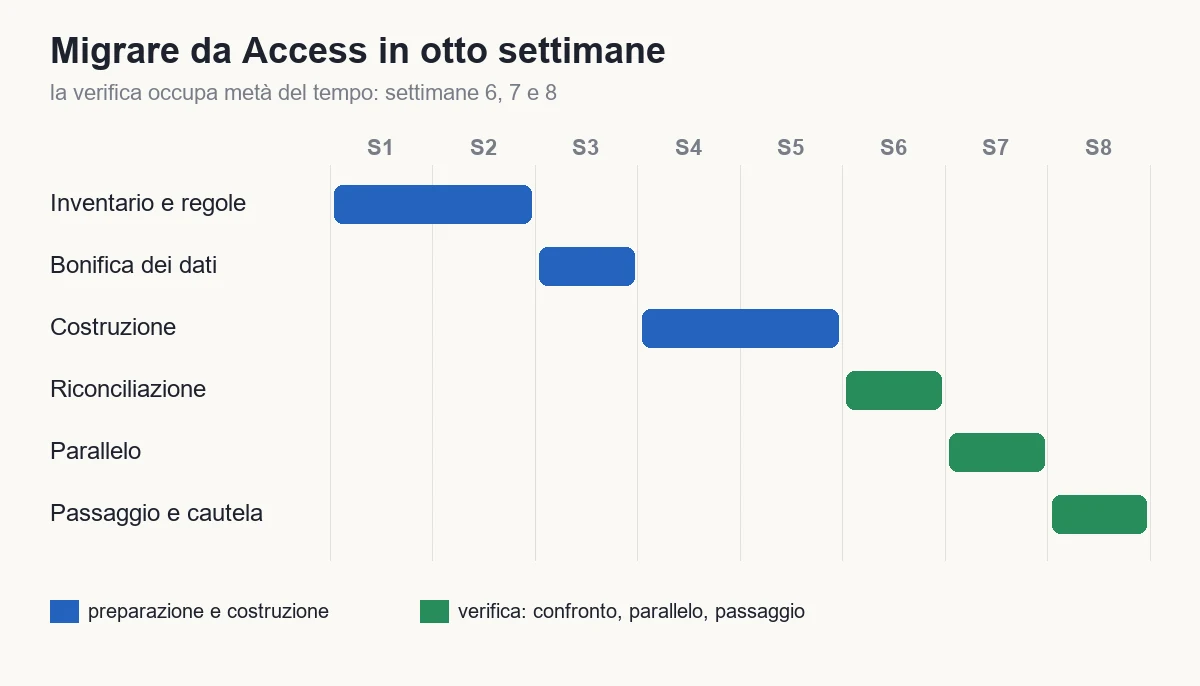
The rule I have always kept: verification takes half the time. In the plan, weeks 6, 7 and 8 are all checking. Whoever cuts the plan to four weeks does it by removing verification, and the cost comes back as an error in production: a wrong invoice, a lost order, a customer calling.
Two choices never to skip. The first is the parallel run: it is scary because it doubles the work for a week, but it is the only way to discover the rules nobody remembered. The second is the old file in read-only mode: it costs nothing and lets you answer "what was it a year ago" without rebuilding anything.
If data also comes from machines or production lines, the matter is broader and goes through integration with factory systems: a concrete example is the SCADA and MES integration with .NET and OPC UA.
How to check that the data went across correctly: a reconciliation program
Reconciliation is the step most often done "by eye", and where problems are born that surface three months later. The principle is simple: for each table, the row count and the sum of a numeric column must be identical in the old and new database. If they are not, something was lost or duplicated.
The program below is a C# console with two packages: System.Data.OleDb, to read the Access file (it needs Microsoft's ACE engine installed on the computer, in 64 bit if the program is 64 bit), and Microsoft.Data.SqlClient for SQL Server. It compares the tables you indicate and prints the differences.
using System.Data.Common;
using System.Data.OleDb;
using Microsoft.Data.SqlClient;

// Tables and columns to compare: trusted names, written by us, never taken from a user.
var controlli = new[]
{
    new Controllo("[Clienti]", "[IdCliente]"),
    new Controllo("[Ordini]", "[Totale]"),
    new Controllo("[Righe Ordine]", "[Quantita]"),
    new Controllo("[Consegne]", "[IdConsegna]"),
};

var accessConn = args[0]; // Provider=Microsoft.ACE.OLEDB.12.0;Data Source=C:\dati\gestione.accdb
var sqlConn = args[1];

await using var access = new OleDbConnection(accessConn);
await using var sql = new SqlConnection(sqlConn);
await access.OpenAsync();
await sql.OpenAsync();

var errori = 0;
foreach (var c in controlli)
{
    var vecchio = await ContaAsync(access, c);
    var nuovo = await ContaAsync(sql, c);
    var uguali = vecchio == nuovo;
    if (!uguali) errori++;
    Console.WriteLine($"{c.Tabella,-18} righe {vecchio.Righe,8} / {nuovo.Righe,8}   somma {vecchio.Somma,14:N2} / {nuovo.Somma,14:N2}   {(uguali ? "OK" : "DIVERSO")}");
}

return errori == 0 ? 0 : 1;

static async Task<(long Righe, decimal Somma)> ContaAsync(DbConnection cn, Controllo c)
{
    await using var cmd = cn.CreateCommand();
    cmd.CommandText = $"SELECT COUNT(*), SUM({c.Colonna}) FROM {c.Tabella}";
    await using var r = await cmd.ExecuteReaderAsync();
    await r.ReadAsync();
    var somma = r.IsDBNull(1) ? 0m : Convert.ToDecimal(r.GetValue(1));
    return (Convert.ToInt64(r.GetValue(0)), Math.Round(somma, 2));
}

record Controllo(string Tabella, string Colonna);
The program returns 0 if everything matches and 1 otherwise, so it can be placed in a release procedure that stops by itself. On the Vicenza test file the first run printed one difference: the order lines table had 212 fewer rows in the new database. They were rows with an empty article code, which the import rule silently discarded. Without the comparison, 212 order lines would have vanished for good.
That check has a limit worth knowing: it compares totals and counts, not the content of every field. For the most delicate data, such as customer records and amounts, add a field by field comparison on a sample, for example the 500 most recent rows and 500 random ones. The sum of a column does not notice two errors that cancel out.
The rules hidden in VBA: how to extract them
This is the part that decides whether the migration succeeds. An Access application is not a set of tables: it is a set of tables and behaviors, and the behaviors live in the code. Moving the data without the rules produces a system that seems to work and gives wrong numbers.
The method I use has four steps, and in Vicenza it took three days of work.
1. Export all the code as text
The VBA code of an Access file can be exported to text files, one per module and form. From that moment it is readable, searchable and comparable like any code. You search for the words that signal a decision: If, Select Case, IIf, user messages (MsgBox) and blocks (Cancel = True).
2. Classify every decision
Each condition found goes into one of three categories: business rule (the discount, the block, the calculation), interface rule (the field that hides, the color) and remedy for a limit (the check that stops Access from locking up). The first must be carried over. The second are decided for the new system. The third usually disappear, and that is one of the benefits of the operation.
3. Write each rule as a sentence and an example
For instance: "Customers with more than three years of seniority and at least 40,000 euros of orders a year get a 6% discount on PVC windows, promotions excluded. Example: order of 10,000 euros, discount 600 euros". A sentence and a case with numbers are what then allow you to write a test, and to have the rule read by the person who really knows it.
4. Have it confirmed by the people who work
The 17 Vicenza rules were read aloud to sales, the warehouse and administration. Four were corrected: the code did one thing, but the practice had changed years ago and nobody had touched the code. It is the most valuable result of the inventory: the rules in the code are often different from the ones the company believes it has.
The bonus of the operation is the test. Every rule written with its example becomes an automatic test, which from then on protects the new system from every future change. The same method applies to any old desktop application: you will find it applied in the guide to migrating Windows Forms and in the one on the move from VB6 to .NET, where the language is a close relative of VBA.
Which mistakes have I seen most often?
Migrations from Access go wrong in a few ways, always the same. I write them down because avoiding them is worth more than any technical choice.
Trusting "the supplier will handle it". An off-the-shelf system does not know your 17 rules. If you do not write them first, the product consultant configures what you tell him, and the forgotten rules surface in the first three months as errors. The rules document is yours, not the supplier's.
Migrating everything, including what is not needed. The 8 forms never opened and the support tables from 2017 do not go into the new system. Every element carried along costs days of testing and increases the surface for problems. Ask the users what they really use.
Forgetting the reports. Users say "system" but think of documents: the quote with its look, the order confirmation with the logo and terms. If the new system does not produce a quote equal or better, it will feel like a step back even if everything else works. The 6 customer documents are in Vicenza 20% of the interface work.
Skipping the parallel run for speed. It is the strongest temptation. The parallel run costs a week of double entry for two people, 80 hours of work, about 2,560 euros. The errors it finds cost a multiple of that, and arrive when customers see them.
Switching off the old system on switch day. The old file must stay readable for months. At the first question from the accountant about an order from two years ago, or from a customer disputing a delivery note, having the old system saves hours of reconstruction.
Leaving management to the employee who wrote Access. Often he is the person most motivated to "fix it in house", and also the risk you are trying to eliminate. He can take part in the inventory, where his knowledge is valuable, but responsibility for the new system must sit somewhere that does not depend on one person.
Not planning training. Nine people used to one interface for ten years do not move to another in an afternoon. In Vicenza the 12 days of training and start-up are 3% of the cost and determine adoption: a beautiful system nobody uses is a fixed cost.
How do you decide in a week?
The choice does not need a project. It needs five days of work by an internal person and a conversation with someone who can advise you.
- Day 1: horizon and signs. Write how many years the system must last and count how many of the seven signs apply to your file. Also measure the file size and its growth over the last year.
- Day 2: the inventory. List tables, queries, forms, reports and macros. For each form, write who uses it and how often. Set aside the ones never used.
- Day 3: the rules. Export the VBA code and count the lines. Look for decisions and write the first ten rules with one example each.
- Day 4: lost minutes. For each user, three observations on different days: how much time is lost waiting, reopening, retyping. Multiply by 220 days and the hourly cost.
- Day 5: the comparison. With these numbers, ask for one offer to secure the data and two for the market product, on the same list of modules. Enter the values in the model and read the three scenarios.
The first step is always small and reversible. If the file is near the limit or gets corrupted, it is moving the data, which takes 6-8 weeks and closes no door. If the processes are standard, it is trying the market product on a copy of the data, with three users for two weeks. If the process is truly yours, it is a three week prototype on the one module no product covers.
By the end of the week you have four things you did not have before: a number of years, a list of rules, a figure for lost minutes and a comparison between offers on the same items. With these, the discussion is no longer "which costs less", but "which reduces risk and cost in the coming years".
What would the Vicenza company do today?
Back to the window makers. The owner had three questions and a file that kept corrupting. With the bill in hand he would have seen that "doing nothing" costs 19,296 euros a year in lost time and stoppages, that the 2 GB wall arrives in three years, and that full custom software at 176,400 euros does not pay back with nine users.
He would then have decided in two steps. Now, 14,700 euros to move the data to SQL Server: the risk of losing a Monday's work and the 2 GB wall disappear, and meanwhile the 17 rules are extracted into a document. In the following six months, a trial of an off-the-shelf system on a copy of the data, with one precise question: does it cover at least eight rules out of ten? If yes, over five years he saves against custom and gets rid of the dependence on one person's code. If not, he writes a single module, the delivery times, and uses the product for the rest.
In either case he would have decided with a number and not with a salesperson's charm, and would still have the right road open in two years. That is the difference, and it is worth more than the outcome.
If you have an Access file and want to know where your company falls, the path starts from custom software, which also covers the cases where the answer is not to build. If your problem is broader and concerns an old system you wonder whether to redo, the guide to rewriting or refactoring legacy software does the same bill. If the starting point is a spreadsheet and not a database, the guide to when to replace Excel with a management system has the criteria. And if you need someone to look at the numbers with you, there is software consulting.
In five lines. Count how many of the seven signs apply to your file and see how far you are from 2 GB. Extract the rules from VBA before talking to any supplier, because they are the asset you cannot lose. Measure the minutes lost every day per user: with nine users each is worth 1,056 euros a year. If you need time, move the data to SQL Server for 14,700 euros and decide calmly. Build custom only where the process is yours and users are more than twenty.
Frequently asked questions
For a company with 9 users, moving the data to SQL Server and keeping Access as the interface costs about 14,700 euros (35 days). An off-the-shelf system costs 16,800 euros to start plus 15,300 a year, 93,300 euros over five years. Custom costs 176,400 euros to start, 327,880 over five years.
When three or more of these signs apply: the file nears the 2 GB limit, it gets corrupted, users block each other, the rules live only in VBA code, there is no trace of who changes what, access from outside the office is a makeshift, the Office environment is aging.
With nine users almost never. To pay back over five years against a market product it would take 44 lost minutes a day per user, 33 at eight years. Above twenty users and with a truly own process, the bill changes.
Eight weeks in the case described: two of inventory and rules, one of data cleaning, two of construction, one of reconciliation, one of parallel run and one for the switch. Verification takes half the time and is not shortened.
By comparing, for each table, the row count and the sum of a numeric column between the old and new database, with an automatic program. In the case described it found 212 order lines silently discarded by the import rule.
They must be extracted before choosing a supplier: export the code as text, classify each decision, write each rule as a sentence with an example and have it confirmed by the people who work. In the case described there were 17, and four differed from current practice.
Leave your details in the form below