How much does migrating from SQL Server to Azure SQL cost?

The owner of a window-frame company near Padua calls because the management system is slow on Monday mornings. I ask where the database runs. It is on a server under a desk in the warehouse, a 2016 Dell with SQL Server 2016 Standard, and the last verified backup dates from "when the technician came, maybe March". The technician has retired. The backup disk is the same disk as the data, split into two folders.
Migrating SQL Server to Azure SQL pays off when the database is under 500 gigabytes, uses few server-level features and nobody in the company has time to look after backups and updates: for a medium database the project costs about 6,000-15,000 euro and the monthly fee runs from 15 to 300-400 euro, against an on-premises total that almost always exceeds 25,000 euro over five years. This guide explains where a SQL Server database can really go, what breaks in the move, what it costs to run and what the project costs. For the whole application, start from how to migrate an application from .NET Framework.
Why now
An out-of-support SQL Server version is not a visible failure: it is a risk that grows quietly, because Microsoft no longer ships security fixes while your system keeps working as if nothing happened. Extended support for SQL Server 2012 ended in July 2022, for 2014 in July 2024 and for 2016 on 14 July 2026. If your server is one of these, it has been running without fixes for some time. The cost of waiting is described in how much custom software costs.
Four destinations
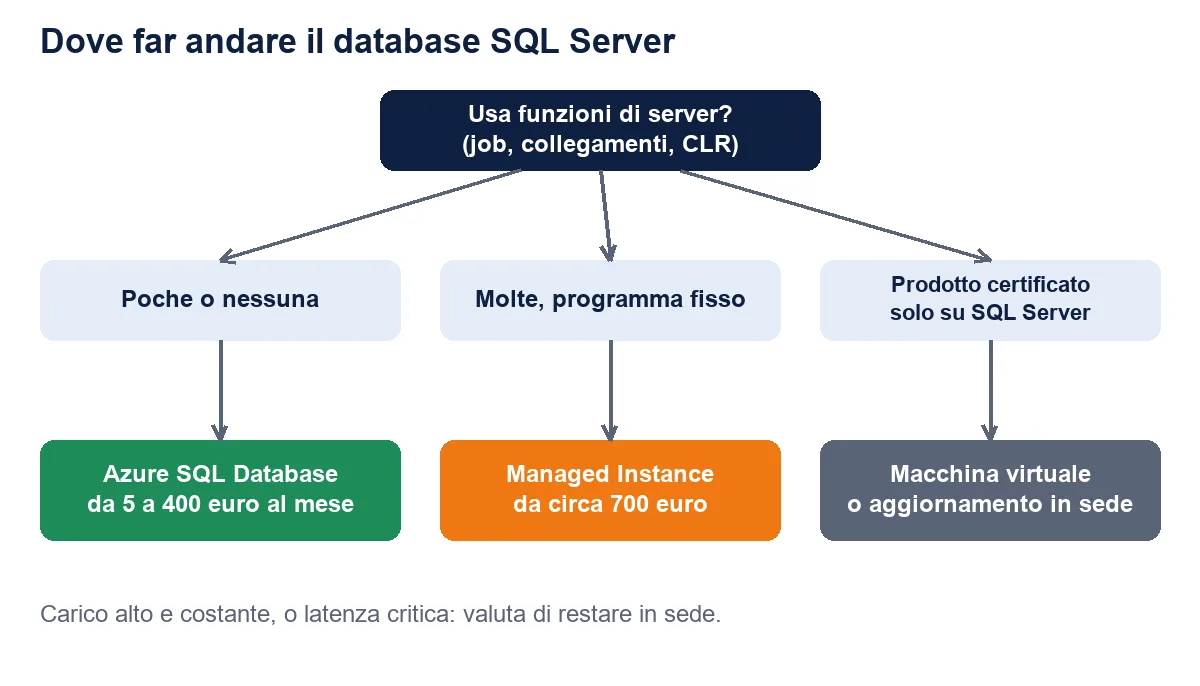
"Azure SQL" is three products plus a fourth path that is simply your old SQL Server on a cloud virtual machine: Azure SQL Database, Azure SQL Managed Instance and SQL Server on a virtual machine, chosen by how many server features your database really uses.
| Destination | Compatibility | Monthly cost | Fits when |
|---|---|---|---|
| Azure SQL Database | High, not total | 5 to 400 euro | One database, few server features |
| Managed Instance | Almost total | from about 700 euro | Several databases, scheduled jobs, cross-database queries |
| SQL Server on a VM | Total | 300 to 900 euro | Third-party products certified only on real SQL Server |
| Upgrade on premises | Total | Fixed cost | High constant load, minimum latency, legal constraints |
What breaks, and the latency trap
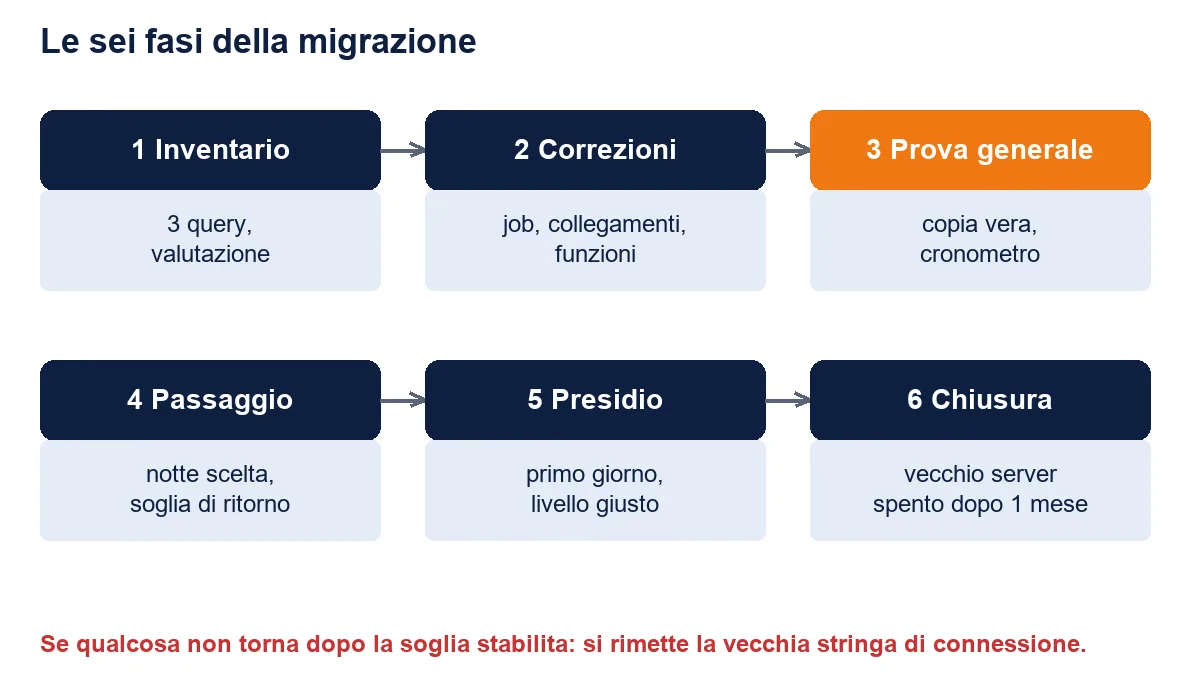
Almost everything that breaks sits in five places: SQL Agent jobs, cross-database queries, linked servers, compiled CLR functions and operating-system commands run from the database. Three read-only queries on msdb, sys.sql_expression_dependencies and sys.servers give you the inventory in an hour.
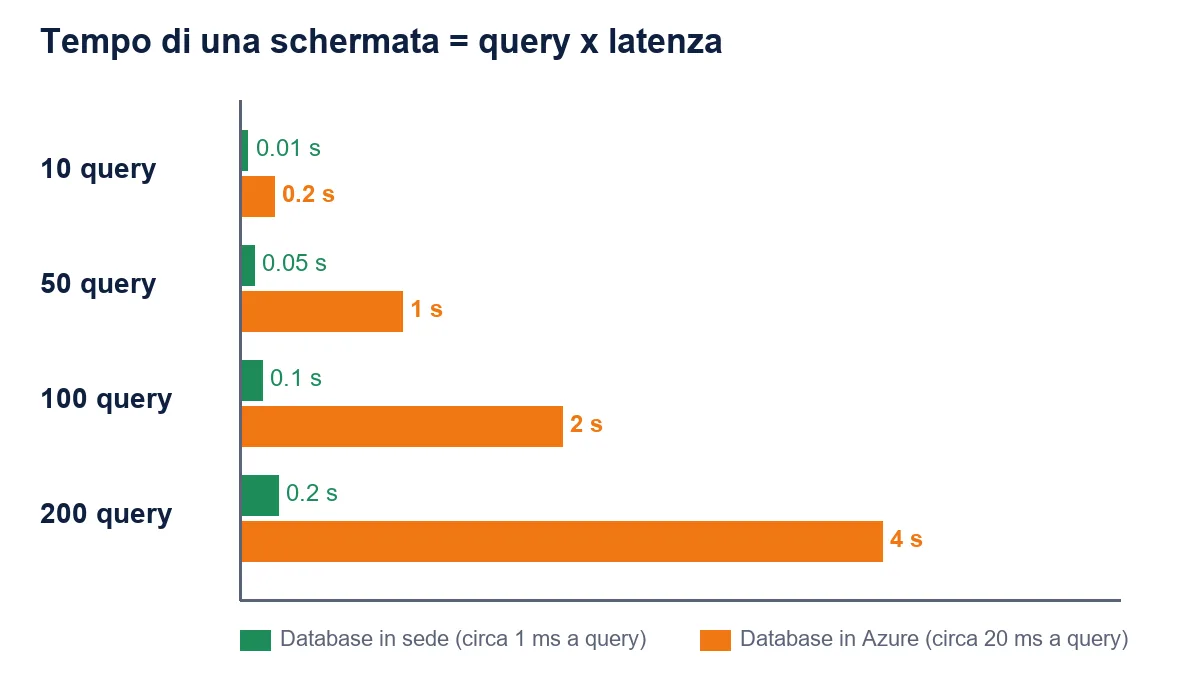
The problem that surprises companies most is latency: a program making a hundred small queries per screen takes 100 milliseconds with a nearby database and two and a half seconds at 25 milliseconds of distance. Measure queries per screen before deciding, and configure retry on transient failures: in EF Core it is one line, EnableRetryOnFailure. See finding slow queries in EF Core.
What it costs
A management-system database for fifteen to twenty users costs between 15 and 150 euro a month in Azure SQL Database, rising to 300-400 euro only with a high constant load. Three levers cut the bill: a one- or three-year reservation, the hybrid benefit for licences you already own and the auto-pause of the serverless tier.
The migration project for a database up to 200 GB costs 6,000-15,000 euro at 600 euro a day, in two to five weeks, and half of the time goes into compatibility and testing. Over five years an on-premises database costs 25,500-33,000 euro once server, licence, backup and administrator hours are added up, against 11,500-25,000 euro for Azure SQL Database including the project. It does not pay off with a high constant load, with a program that cannot be fixed and makes hundreds of queries per screen, or with a vendor that supports only on-premises SQL Server.
The method
The method that lets you sleep is always the same: copy the database, run a full rehearsal against real data, compare results, then fix the night of the switch with a written plan to go back. No migration I have seen failed for a technical limit. They failed because the rehearsal was skipped. Keep the old database untouched for at least one month, until a full accounting close has passed without problems.
For the wider path, including the application, the legacy software modernization path starts from the inventory and ends in a staged plan. Related reading: publishing applications without stress and serverless architecture.
Your step for Monday
Run SELECT @@VERSION and compare it with the end-of-support dates, run the three inventory queries, ask when a backup was last restored as a test, and enter database size and user count in the Azure calculator. If the monthly figure is low and the queries come back almost empty, you have a project of a few weeks. If a backup does not restore, you have found the first thing to fix, wherever the database will live.
Does your company need custom software or AI in the team?
We design and build custom software, modernize legacy systems and train your developers to work with AI. Tell us the problem: you get a concrete answer within one working day.
Frequently asked questions
For fifteen to twenty users, 15 to 150 euro a month, up to 300-400 with a high constant load.
For a database up to 200 GB, 6,000 to 15,000 euro at 600 euro a day, in two to five weeks.
SQL Agent jobs, cross-database queries, linked servers, CLR functions and OS commands run from the database.
It can, because of latency: a program making a hundred queries per screen goes from 100 milliseconds to over two seconds. Measure first.
Yes: rehearsal on a copy, switch on a chosen night and a written rollback plan.
With a high constant load, an unfixable program making hundreds of queries per screen, or a vendor supporting only on-premises SQL Server.
At least one month, until a full accounting close has passed without problems.
Leave your details in the form below