What is the number that decides how to migrate from Access?
Above 60 percent it is enough to move the data to SQL Server; between 30 and 60 percent you proceed in steps; below 30 percent the problem is the process. In a 35-person window manufacturer, at 27 percent, the step-by-step path cost about 24,900 euros over three years, against 52,400 euros for doing nothing.


The management system of a made-to-measure window and door manufacturer, 35 people, lives in an Access file born in 2012. It was written by a surveyor with a passion for computers, who now works elsewhere and answers the phone when he has time. Three times a year the file gets corrupted, for half a day nobody can issue a quote, and with every restore someone loses the last hour of changes.
The question reaches the company with a 30,000 euro quote to "rewrite everything". The owner asks whether it is really needed. The honest answer is that it depends on a number almost nobody has measured, and that in this case it leads to a path costing about 25,000 euros over three years, not 52,000.
This article tells you when an Access migration is necessary and when it is just an expense, what each path costs, in what order things are done and which choices (data types above all) make the difference between a quiet weekend and three months of trouble.
You will find the cost of keeping Access as it is, the number that decides the path, a comparison of five options with costs in euros, the C# code to take inventory and to move the data, the type conversion table, the ninety-day cutover plan and the mistakes I see most often.
A premise. Since 1999 I have designed software for companies, almost always in .NET, and I have met dozens of Access applications that kept an entire company running. Some should be kept, others replaced, almost none thrown away in one go. I do not have to sell you a rewrite: I recommend it only when the numbers ask for it.
The case I use throughout is a typical company, built from orders of magnitude and industry averages. It is not a client, it is a method: you redo it with your own numbers in an afternoon.
Why is Access still everywhere, and when does it stop holding up?
Access is everywhere because it does something no other tool did so quickly: in two weeks one sharp person, with no programmers, builds an application with a database, forms, reports and a bit of automation. It costs almost nothing, it is already in the Office licence and it solves today's problem.
The trouble is that today's problem becomes tomorrow's process. The file grows, users go from two to fourteen, someone wants to open it from home, and what was a notebook becomes the nervous system of the company.
The limits that really matter are six.
- Two gigabytes per file. It is a technical ceiling of the format. When you reach it, the file stops accepting data. You work around it by splitting into several files, and that multiplies the problems.
- The database is a shared file. Every user opens the same file on a network folder. If the network drops in the middle of a write, the file gets damaged. It is not bad luck: it is how it works.
- Few simultaneous users. The declared number is high, the one that holds in practice is 10 to 20 people, and it drops a lot if someone works over VPN or Wi-Fi.
- No real data security. Since the 2007 format Access no longer has user-level security. Whoever opens the file sees everything, and whoever has the forms can read the tables.
- No web version. The forms only work on Windows with Office. No tablets, no browser, no access for the accountant or the sales agent without installing something.
- One person who understands it. The VBA code and the queries are handwritten by whoever made them, with no tests and no documentation. When that person leaves, the system becomes a black box.
Then there is the calendar. According to the Microsoft calendar, the perpetual-licence versions of Office leave support one after the other: 2016 and 2019 expired in October 2025, 2021 on 13 October 2026, a few days ago. Access as a product does not disappear, because it stays in Microsoft 365, but whoever uses it on an unsupported version stops receiving security fixes.
That said, a warning I repeat often: Access is not "wrong". It is a tool for few users and simple processes, used beyond its purpose. The useful question is not "is Access old?", but "what does it cost me, every year, that it is Access?".
What does the typical company look like and which numbers does it start from?
The typical company makes made-to-measure windows and doors for private customers and building contractors. It has 35 people, 14 of whom work on the management system every day: sales, technical office, production, warehouse and administration. The system is an Access application split into two files, as it is when it was done well: one with the forms (the "front end") on each computer, one with the tables (the "back end") on a server.
Here are the numbers, the ones you gather in half a day with an inventory and a few questions to the people.
| Measure | Value | How to gather it |
|---|---|---|
| Active users | 14, of whom 3 over VPN | List of the people who open the file every day |
| Data file size | 1.4 GB out of a 2 GB limit | File properties, after a compact |
| Tables | 112 | Inventory (code below) |
| Forms and reports | 74 forms, 58 reports | List of front-end objects |
| VBA code | about 11,000 lines | Export of the modules |
| Stops for a damaged file | 3 a year, about 4 hours each, 14 people involved | People's memory and the log of calls to the consultant |
| Work done outside Access, in Excel | about 6 hours a week in total, 3 people | Ask "what do you do in the spreadsheet after printing?" |
| On-call consultant | 6 hours a month at 70 euros | Invoices of the last year |
| Hourly cost of a person in the company | 28 euros | Labour cost divided by hours worked |
| Cost of a development day | 480 euros | Reference rate |
Two notes on the numbers. The first: the line almost everyone forgets is the work in Excel. When people say "the system does everything", it usually means it does everything except the hard part, which is solved by hand with a spreadsheet attached to an email.
The second: a 1.4 GB file out of 2 is not "far from the limit". An archive that grows by 150 MB a year gets there in four years, but performance and corruption problems start much earlier, already beyond 70 percent.
What does it cost to keep Access as it is?
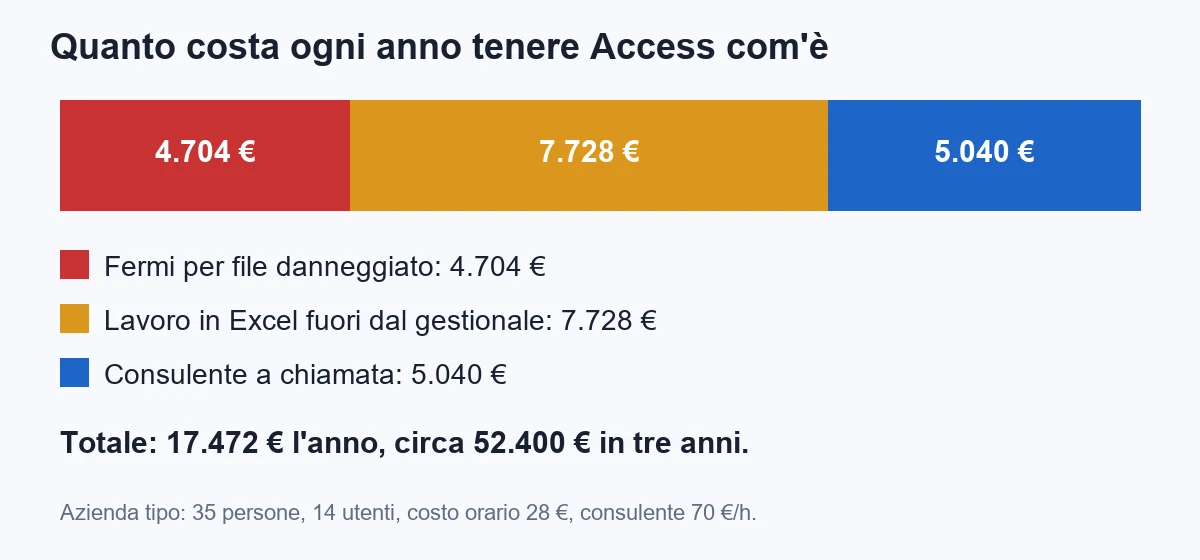
Keeping a system is not free: the cost is there, but it sits in items nobody invoices. For the typical company there are three.
- The stops. Three times a year, 14 people idle for about 4 hours: 3 times 14 times 4 times 28 euros makes 4,704 euros. This does not include late deliveries or the customer who changes supplier.
- The work outside Access. Six hours a week for 46 weeks is 276 hours: at 28 euros that makes 7,728 euros. These are people copying data from a form to a spreadsheet, recalculating a price with the variants and putting the result back into another form.
- The consultant. Six hours a month at 70 euros makes 420 euros, that is 5,040 euros a year to keep up what is there, without adding anything.
The total is 17,472 euros a year, about 52,400 euros over three years. It is the price of not deciding, and it is the figure against which you compare any migration quote. A 30,000 euro quote that removes the whole problem is a good deal. One that removes a third of it is not.
On purpose I left out the heaviest items, the hardest to estimate.
- The risk of losing data: a backup that was never tested by restoring is worth zero.
- The single-person risk: if the consultant stops, the cost is not 5,040 euros, it is the company at a standstill for weeks.
- The inability to do what you need: customer portal, app for installers on site, integration with the profile supplier. With Access you cannot, and nobody budgets for it because nobody asks any more.
If you want one exercise to do today, take a sheet, write these three items with your numbers and add them up. Three phone calls and an hour of work.
What is the number that decides which path to take?
People split into two camps. Those who say "Access is the problem, let's throw it away". And those who say "it works, why change". They are both right and wrong, because they mix two different problems.
The first problem is the container: the shared file, the 2 GB limit, corruption, the lack of a serious backup, the impossibility of working from outside. It is solved by moving the data to a real database, and it costs little.
The second problem is the process: the way the company works, with rules the program does not know and people apply by hand. It is not solved by moving data. It is solved by writing those rules into the software, and it costs more.
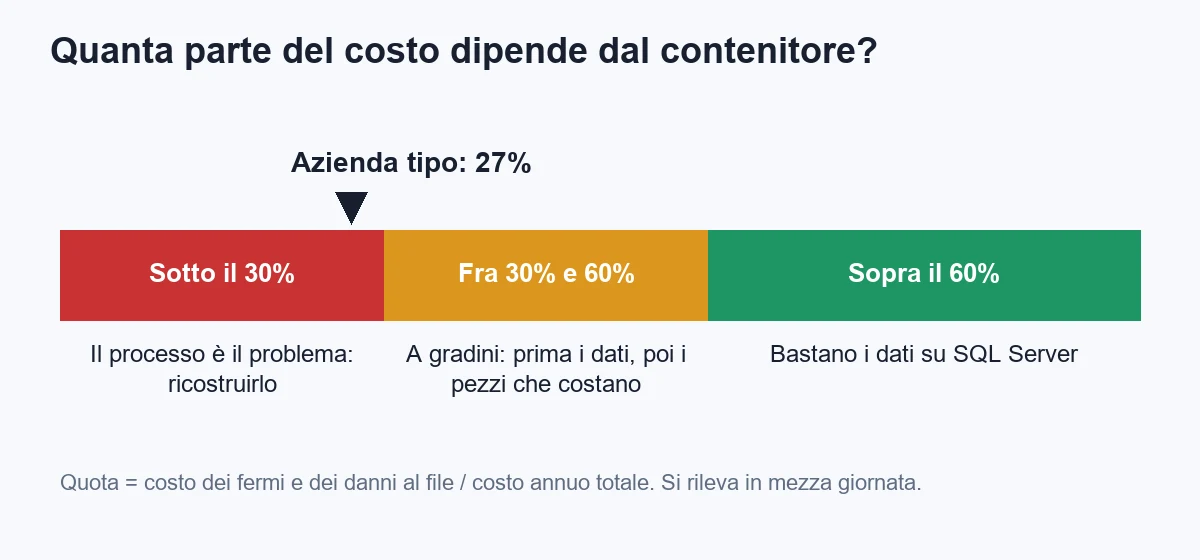
The number that decides is the share of yearly cost that depends on the container. In the typical company the stops for a damaged file are worth 4,704 euros out of 17,472, that is 27 percent. The rest, the work in Excel and the consultant, depends on the process and on the single person.
The rule I use:
- Above 60 percent: the problem is the container. Move the tables to SQL Server or Azure SQL, keep the Access forms, and you have solved most of what costs you. About 3,840 euros.
- Between 30 and 60 percent: you need a step-by-step path. Data first, then the pieces of process that cost the most, one at a time.
- Below 30 percent: the container is a detail. Moving the data does not change the bill. The job is rebuilding the process, and it makes sense to evaluate a new system too.
The typical company is at 27 percent, so on the edge between "in steps" and "rebuild". The conclusion is not what either the rewrite fans or the "leave it as it is" camp expected: the container should be fixed right away because it is cheap and removes the stops, but it is not enough alone. The value is in the piece done in Excel today.
One more check, which takes twenty minutes. List the ten things people do with Access and mark each with a letter: C if the problem is the file (slowness, locks, access from outside), P if the problem is the rule (calculation, control, handover between departments), S if the problem is that only one person knows how it works. If you have more P and S than C, you already know where you will spend.
Which paths exist, and what do they cost over three years?
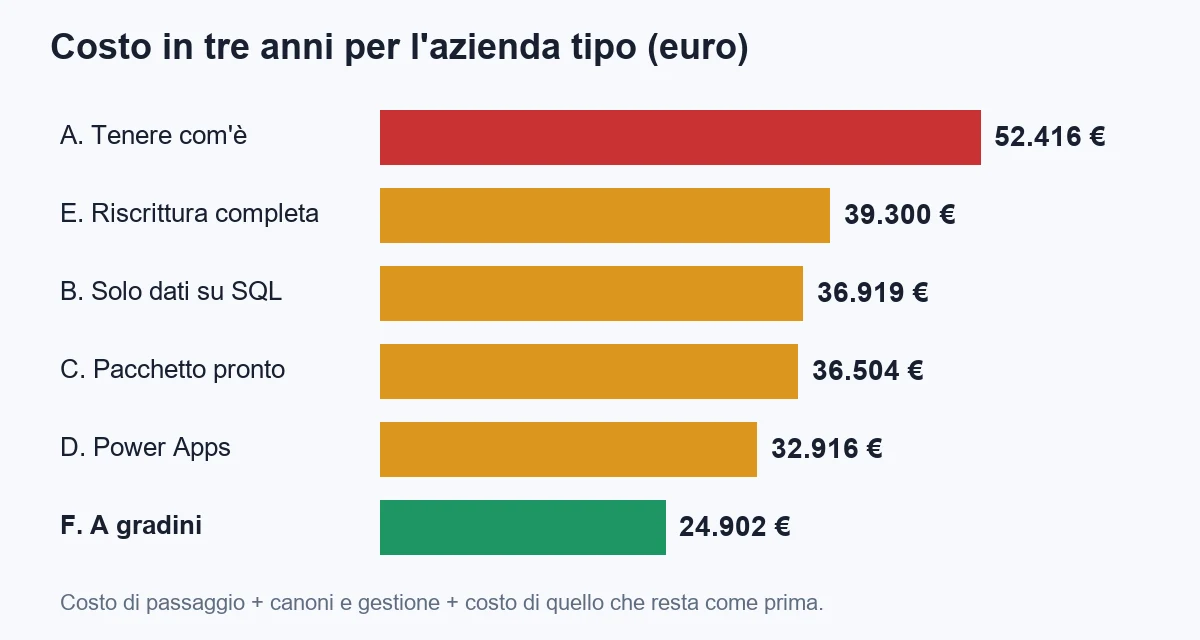
There are five paths, plus doing nothing. The prices are orders of magnitude I have at hand, to be checked with a quote. The calculation is always the same: cost of the switch, fees for three years, and the cost of what stays as before.
| Path | What is done | Cost of the switch | Fees and operations in 3 years | Cost that remains in 3 years | Total in 3 years |
|---|---|---|---|---|---|
| A. Keep as is | Nothing | 0 | consultant 15,120 | stops 14,112 + Excel 23,184 | about 52,400 |
| B. Only data to SQL | Tables on Azure SQL, Access forms linked | 3,840 (8 days) | hosting 151 + reduced consultant 5,040 | stops 4,704 + Excel 23,184 | about 36,900 |
| C. Off-the-shelf package | Market management system, data import | 5,760 (12 days) | licences 19,152 | Excel 11,592 (variants stay manual) | about 36,500 |
| D. Power Apps and Dataverse | Low-code application on the data | 12,000 (25 days) | licences 10,080 + reduced consultant 5,040 | Excel 5,796 | about 32,900 |
| E. Full rewrite | Custom web application, all at once | 29,760 (62 days) | hosting 900 + maintenance 8,640 | 0 | about 39,300 |
| F. Step by step | Data to SQL, then a web module for the costliest process | 12,480 (26 days) | hosting 360 + reduced consultant 5,040 | stops 4,704 + Excel 2,318 | about 24,900 |
How to read the table. The cheapest path over three years is F, the most expensive for the same result is E, and A is the one that looks free and costs more than all.
Why does F beat E, which on paper solves everything? Two reasons. The first: in E you pay up front 62 days of work to rewrite the 40 forms nobody uses more than once a month too. The second: in E you get nothing for six to eight months, while in F the first result (no more stops) arrives after three weeks.
Why does F beat C, the package? Because the package removes the stops and the consultant, but the window variants, which are the reason the company has its own system, stay manual in Excel. If your company does things in a standard way (accounting, simple warehouse, invoicing), the package wins, and it is right that it wins.
And D, Power Apps? It makes sense when people are already inside Microsoft 365 and the process is a form with a flow. It breaks when the calculation rules get complex, because low-code formulas are not tested and are not read like code. In a company with variant-based quotes I would use it for accessory modules, not for the core.
Three warnings on the numbers.
- The package and Power Apps licences change often: the 38 and 20 euros per user per month I used are orders of magnitude, not a price list.
- In E I did not include the start-up cost of the new processes, nor training. They are real in all paths and grow with the change.
- The stops in B and F are not zero but one a year: leaving the forms in Access on an old computer and a laptop on VPN still produces some problems, much less serious because the data is no longer in the file.
How do you take inventory of what is inside Access?
Before choosing a path, and before asking for a quote, you need an inventory. A quote without an inventory is a bet: whoever makes it either covers themselves with a huge margin, or underestimates and presents the bill halfway through.
The inventory answers six questions: which tables exist and how big they are, which have a primary key, which problematic field types they contain (attachments, multi-value fields, hyperlinks), which queries are really in use, how much VBA code there is and where, and who uses what.
For the tables you can start from a small C# program. It reads the file with the Access OLE DB provider and prints name, row count and columns of every table. It needs the Access database engine installed on the machine, in the same architecture (64 bit with 64 bit) as the program.
using System.Data;
using System.Data.OleDb;

var percorso = args[0];
var connessione = $"Provider=Microsoft.ACE.OLEDB.16.0;Data Source={percorso};Mode=Read";

using var db = new OleDbConnection(connessione);
db.Open();

var tabelle = db.GetSchema("Tables", new[] { null, null, null, "TABLE" });

foreach (DataRow riga in tabelle.Rows)
{
    var nome = (string)riga["TABLE_NAME"];
    if (nome.StartsWith("MSys", StringComparison.OrdinalIgnoreCase)) continue;

    using var conta = new OleDbCommand($"SELECT COUNT(*) FROM [{nome}]", db);
    var righe = Convert.ToInt64(conta.ExecuteScalar());

    var colonne = db.GetSchema("Columns", new[] { null, null, nome, null });
    var tipiDifficili = colonne.Rows.Cast<DataRow>()
        .Count(c => (int)c["DATA_TYPE"] is 130 or 128 or 205);

    Console.WriteLine($"{nome};{righe};{colonne.Rows.Count};{tipiDifficili}");
}
The output is a semicolon-separated list you open in Excel. Sort it by row count: the first ten tables are almost always 95 percent of the data, and they are the ones to try the migration on first.
The program opens the file read-only, so you can run it on a copy without risk. I repeat it because it is the first step of everything: you always work on a copy, never on the file in use.
For the VBA code only one thing matters at the start: the quantity and where it concentrates. Export the modules (in Access there is an export command in the code editor) and count lines per module. In the typical company the 11,000 lines split like this:
| Type of code | Lines | What it does | Where it ends up |
|---|---|---|---|
| Opening and closing forms, messages | about 3,200 | Navigation, alerts, default values | Stays in Access, or disappears with the new forms |
| Price and variant calculations | about 2,600 | The core: measures, discounts, surcharges, price lists per customer | Becomes tested C# code, and is rewritten first |
| Printing and exports (PDF, Excel, email) | about 2,100 | Quotes, orders, labels | New templates, often simpler |
| Checks and consistency rules | about 1,700 | "You cannot confirm the order without a delivery date" | Database constraints and C# code |
| Dead code | about 1,400 | Functions never called, old experiments | Deleted |
The figure that matters is the second line: 2,600 lines out of 11,000 hold the value of the company. 24 percent of the code does 90 percent of the work that matters. The other three quarters get moved, simplified or thrown away.
How do you move the data to SQL Server without losing it?
This is the step that costs least and returns most, and it is the one many skip to go straight to the rewrite. It is called "upsizing": the tables leave the file and go into a real database, while the forms stay as before, linked to the new database.
In practice the target database is Azure SQL or a SQL Server in the company. For the typical company's 1.4 GB the Basic tier of Azure SQL is enough, which costs about 4.20 euros a month and goes up to 2 GB. When the data grows you move to a higher tier without changing the program.
The real work is not copying rows. It is translating data types, because Access and SQL Server do not speak the same language. Here is the conversion table I use.
| Access type | SQL Server type | The trap |
|---|---|---|
| Short text | nvarchar(n), same length | Do not leave nvarchar(max) everywhere: it slows down indexes |
| Long text (Memo) | nvarchar(max) | In Memos with history ("Append only" fields) the history does not come along |
| Integer number | smallint or int | "Long Integer" is an int, not a bigint |
| Decimal number | decimal(p,s), never float | Float on prices makes cents disappear |
| Currency | decimal(19,4) | Access rounds one way, SQL another: compare the totals |
| Date/time | datetime2, or date if there is no time | Empty dates in Access are NULL, wrong ones (30/12/1899) are times without a date |
| Yes/No | bit NOT NULL DEFAULT 0 | A Yes/No with NULL shows "#Deleted" in the forms |
| AutoNumber | int IDENTITY | After loading the counter must be realigned, otherwise new records collide with old ones |
| Attachment | Separate table with varbinary(max), or better files in storage | There is no direct equivalent: it must be decided by hand |
| Multi-value field | Link table | It "looks" like a field but it is two tables: to be rewritten |
| Hyperlink | nvarchar(2000) | Access stores the text and the address separated by a hash sign |
Two rules repay the time spent learning them.
The first: every table must have a primary key and a version column. Access, linked to SQL Server, needs a rowversion column to understand whether a record was changed by someone else. Without it, simultaneous edits give strange errors, or worse overwrite each other.
CREATE TABLE dbo.Ordine
(
    OrdineId       int IDENTITY(1,1) NOT NULL CONSTRAINT PK_Ordine PRIMARY KEY,
    ClienteId      int           NOT NULL,
    DataOrdine     date          NOT NULL,
    Confermato     bit           NOT NULL CONSTRAINT DF_Ordine_Confermato DEFAULT 0,
    Totale         decimal(19,4) NOT NULL,
    Note           nvarchar(max) NULL,
    VersioneRiga   rowversion    NOT NULL
);
The second: totals are compared before and after, table by table. Counting rows is not enough. You sum the numeric fields and compare the two sums, otherwise a different rounding goes unnoticed for six months.
To move the data you can use the SQL Server import tool, but on large tables I prefer a controlled load from a program, because it lets me write the comparison in the same step. Here is the core, with SqlBulkCopy.
using System.Data;
using System.Data.OleDb;
using Microsoft.Data.SqlClient;

static async Task CopiaTabellaAsync(
    string percorsoAccess, string connessioneSql, string tabella)
{
    var origine = $"Provider=Microsoft.ACE.OLEDB.16.0;Data Source={percorsoAccess};Mode=Read";

    await using var sql = new SqlConnection(connessioneSql);
    await sql.OpenAsync();

    using var access = new OleDbConnection(origine);
    access.Open();

    // le colonne si elencano, anche in un programma di passaggio
    using var schema = access.GetSchema("Columns", new[] { null, null, tabella, null });
    var elenco = string.Join(", ", schema.Rows.Cast<DataRow>()
        .OrderBy(c => (long)c["ORDINAL_POSITION"])
        .Select(c => $"[{c["COLUMN_NAME"]}]"));

    using var comando = new OleDbCommand($"SELECT {elenco} FROM [{tabella}]", access);
    using var lettore = comando.ExecuteReader();

    using var copia = new SqlBulkCopy(sql)
    {
        DestinationTableName = $"dbo.{tabella}",
        BatchSize = 5000,
        BulkCopyTimeout = 600,
        EnableStreaming = true
    };

    // le colonne si mappano per nome, così l'ordine dei campi non conta
    for (var i = 0; i < lettore.FieldCount; i++)
        copia.ColumnMappings.Add(lettore.GetName(i), lettore.GetName(i));

    await copia.WriteToServerAsync(lettore);
}
After the copy, the comparison of totals:
SELECT COUNT(*)            AS Righe,
       SUM(Totale)         AS SommaTotale,
       MIN(DataOrdine)     AS PrimaData,
       MAX(DataOrdine)     AS UltimaData
FROM dbo.Ordine;
The same query runs in Access on the original table. If the four values match, you move to the next table. If one does not, you stop and find out why: almost always it is a date in 1899, a NULL in a Yes/No or a rounding.
Then the tables are linked to Access with an ODBC driver, and the forms, which point to the same names as before, keep working. There are five things to check on the forms: queries that use VBA functions inside the WHERE clause (they become very slow because they bring all the data to the computer), forms with subforms on large tables, calculated fields, filters on dates and temporary tables created on the fly.
The result after the step: the file with the forms weighs a few MB, the tables are on a server with automatic backups and point-in-time restore, and the stops for a damaged file drop almost to zero. For the typical company the step costs 8 days: three for the inventory and design, two for the conversion, two for the slow forms, one for the comparison and the switch.
How do you take the logic that matters out of Access?
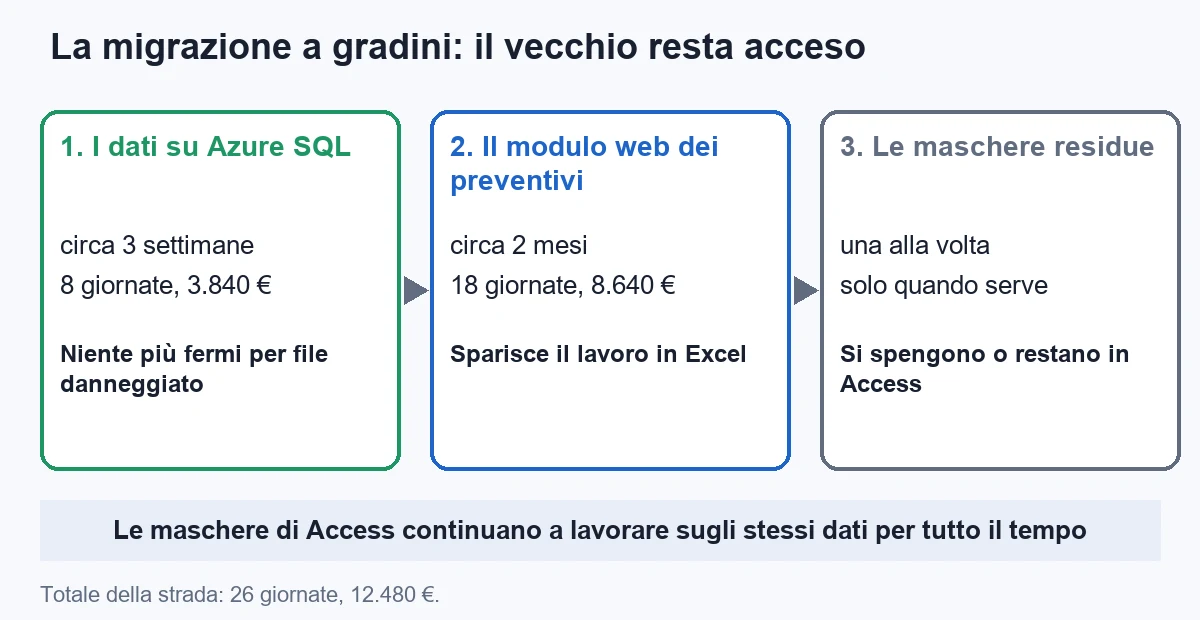
Once the data is on SQL, the logic can be moved piece by piece. This is the part that usually goes wrong: you take an application that works and rebuild it all at once, with a "launch" in eight months. I call it the project that never ends, because in the meantime the old system changes and the new one has to chase it.
The way that works is another, and it is called the strangler pattern: the new piece grows next to the old one and replaces it one function at a time, until the old one is no longer needed or switches off on its own. The old system keeps working the whole time.
You proceed with three rules.
- You choose the piece that costs the most, not the easiest. In the typical company it is the quote with variants, because that is where the 276 hours a year of Excel end up. The master data, which is easy, can stay in Access for another three years.
- The new piece talks to the same database. That is why the first step is the data on SQL: the old forms and the new module read the same tables, so there is no synchronisation to invent.
- The calculation rule is written once, with tests. Before rewriting the 2,600 lines of prices, you collect 150 real quotes, with the total the company confirmed to the customer, and use them as proof: the new code must return the same totals to the cent.
The last rule is the one that changes everything. A price calculation in VBA lives inside a form, cannot be tried on its own and nobody knows what happens when a line changes. If you write it in C# as a pure function, you test it in a second against the 150 cases.
public sealed record RigaPreventivo(
    decimal LarghezzaMm, decimal AltezzaMm, string Profilo, string Vetro, int Quantita);

public sealed class CalcolatorePreventivo(IListino listino)
{
    public decimal Calcola(RigaPreventivo riga, decimal scontoCliente)
    {
        var metriQuadri = riga.LarghezzaMm * riga.AltezzaMm / 1_000_000m;

        // il listino fissa un minimo fatturabile: sotto 0,5 mq si paga 0,5 mq
        var fatturabili = Math.Max(metriQuadri, 0.5m);

        var prezzoBase = fatturabili * listino.PrezzoMetroQuadro(riga.Profilo);
        var vetro      = fatturabili * listino.PrezzoVetro(riga.Vetro);
        var lordo      = (prezzoBase + vetro) * riga.Quantita;

        return Math.Round(lordo * (1 - scontoCliente), 2, MidpointRounding.AwayFromZero);
    }
}
Two details worth the time. The use of decimal and not double: on money the difference shows at the cent. And the explicit rounding: Access rounds a .5 value to the nearest even number, C# does the same by default, and the company had always rounded up. A difference like this is only found with test cases: in an archive of 150 quotes it makes a handful fail, and without that comparison you find it at the customer.
The new module does not have to be a work of art. For a company of this size a web application is enough (ASP.NET Core with Blazor, or simple Razor pages) with sign-in through the company login, hosted on Azure with scale to zero, at a cost of about 10 euros a month with the database included. The new forms are designed with the people who will use them, watching how they work, not copying the old ones.
The cost of the second step for the typical company is 18 days, that is 8,640 euros: 4 for collecting the cases and the calculation, 8 for the pages, 3 for the printing of the quote, 3 for the handover with the people. Added to the 8 of the first step, these are the 26 days of path F, 12,480 euros.
What changes for security, permissions and backups?
Here the advantage over Access is clear and costs nothing more. With the data on SQL, four things change.
- Real roles. Administration sees the costs, sales does not. The permission lives in the database and not in the form, so nobody bypasses it by opening the table.
- Automatic backups and point-in-time restore. Azure SQL saves on its own and lets you go back to a precise moment of the last days. The "restore" of Access was the copy of the file from the night before, when there was one.
- A trace of who did what. With a column for the author and the date, or with the database history features, you know who changed the price of an order. In Access, usually, you do not.
- Access from outside without opening the network. Whoever works from home no longer opens a shared folder over VPN: they use a web application with sign-in, and the database is not reachable from the Internet.
Then there is a point that, in small companies, shifts decisions: the European regulation on personal data. An Access file with private customers' records, copied to a USB stick or attached to an email, is a breach waiting to happen. With the data on a server with tracked access, you have an answer if a customer asks where their data is or if an inspection asks how it is protected.
An observation on cost, which my cloud rule imposes: all this is obtained with the cheapest tier of Azure SQL. In my own infrastructure I merged nine small databases into a single one at 4.20 euros a month, each in a separate schema. If you have several small applications, you do not need many databases: you need one well-organised database.
How do you do the switch without stopping the company?
The data switch takes a weekend, but the preparation takes a month. The plan I propose for the first step, the one common to almost all paths, is ninety days at most.
- Days 1-10: inventory and safety copy. The inventory program, the list of users, the copy of the file on a disk that is not the server's. You try to open it.
- Days 11-20: test database. You create the tables on SQL with the right types and load the data of a copy. You compare totals, table by table.
- Days 21-30: the forms on the copy. You link the tables and try every form, with two people from the company working for a day as usual. You note the slow and the broken forms.
- Days 31-40: fixing the forms. Slow queries become database views, filters are rewritten, multi-value fields become link tables.
- Days 41-45: dress rehearsal. You repeat the whole switch from scratch, with timings, on a fresh copy. What went wrong the first time must not go wrong the second.
- Friday evening of day 46: the real switch. You lock the old file as read-only, load the data, compare totals, link the tables and update the front end on the computers. On Monday morning people open the same icon as always.
- Days 47-90: observation. The old file stays read-only and is not deleted. For three months, if something does not add up, you can compare with the original. If all is quiet, you archive it.
The rollback plan costs very little: as long as the old file exists and nobody wrote to it after Friday evening, going back means reactivating it. That is why you never delete the old file right away, and why the switch is done at the weekend and not mid-month, when invoices are closed.
A note on people, which weighs more than the code. Before the switch, ask the four people who use the system most to describe "the thing that makes me lose the most time". Half the time it is not what you had in mind, and it is often the easiest to fix. A visible result in the first month is worth more than a presentation.
Which mistakes to avoid in an Access migration?
The mistakes I see most often, and that cost the most, are eight.
- Starting from the rewrite. You start from "let's build a new application" without knowing what is inside the old one. The quote is a blind estimate, and the bill arrives halfway through.
- Working on the real file. Every test, every conversion is done on a copy. One mistake on the original and you lose years of data.
- Using float for money. Cents disappear in groups, silently. Use
decimaleverywhere. - Forgetting the version column. Forms linked to SQL give write errors and overlapping saves, and nobody understands why.
- Translating every query one by one. Many of the 41 saved queries are no longer needed. If you do not know who uses them, you do not translate them: you wait for someone to ask.
- Moving everything together. Data, forms, reports and rules in a single "launch". If something goes wrong, you do not know which piece it was.
- Not writing the test cases. Without the 150 quotes with the right total, the new price rule is an act of faith, and you will discover it wrong at the customer.
- Switching off the old system too early. The original file stays read-only for at least three months. It costs negligible disk space and saves you from end-of-quarter surprises.
One rule sums them up: you change one thing at a time and you can always go back. A migration project without a way back at every step is not a project, it is a bet.
When is it better to leave Access where it is?
It happens often, and it is good news. There are three situations in which spending to migrate does not pay, and I tell you openly.
- Few users and small data. An application for three people, with a file under 200 MB, a tested daily backup and a simple process. Here the yearly cost is close to zero: fix the backup and that is all.
- A process about to disappear. If the company has decided to move to a package in twelve months, it is not worth investing in the old one. A little care (backup, compact, access) is enough to get there.
- The cost of the problem is below the cost of the solution over three years. If the stops are worth 300 euros a year and nobody works in Excel afterwards, a 3,840 euro migration does not pay back.
In each of these cases there is a minimum worth doing anyway, and it costs a few hours: a daily copy on a different disk with a restore test every three months, the split into front end and back end if it is not there already, the scheduled compact and a written list of who uses what. It is 8 to 10 hours of work, and it removes the worst risk.
If the problem is not Access but the fact that everything goes through one person, the answer is not software: it is putting in writing what exists and having a second person read the document. It takes a month, and it is worth more than any technology.
If you got this far, you probably have a migration quote in mind, or a file that scares you. Before deciding, take your numbers: users, file size, stops per year, hours of Excel per week, hours of the consultant. Half a day, and you know whether your problem is the container or the process.
If you want a second look at your case, write to me. And when the right solution is a business application built around the way you work, let's talk about custom software. If your problem is an even older application, I cover it in the guide to migrating from VB6 to .NET and in the one on migrating Windows Forms. On cloud costs, there is how to reduce Azure App Service costs.
Frequently asked questions
When the file has more than 10 users, exceeds 70 percent of the 2 GB limit, gets damaged more than once a year, or when part of the work is done by hand in Excel because the program cannot do it. With few users, small data and a tested backup, it is usually better to leave it where it is.
For a file of about 1.4 GB with 112 tables and 14 users, moving only the data to Azure SQL costs about 8 days of work, that is 3,840 euros at 480 euros a day, plus about 4.20 euros a month for the database. A full rewrite in .NET costs about 62 days, 29,760 euros.
Yes, and it is the first step I recommend. The tables go to Azure SQL or SQL Server and the Access forms stay linked. This removes the stops for a damaged file and the 2 GB limit, but not the work done by hand outside the program.
Attachments, multi-value fields, Memo fields with history, empty dates that become 30/12/1899 and Yes/No fields with null values. You also need a primary key and a rowversion column in every table, otherwise forms linked to SQL give write errors.
The data switch is prepared in about 45 days and executed over a weekend, with another 45 days of observation. A web module that replaces part of the process usually takes another two months. A full rewrite is measured in six to eight months.
Access remains included in Microsoft 365. The perpetual-licence versions 2016 and 2019 left support in October 2025 and 2021 on 13 October 2026, so those who use them no longer receive security fixes.
Leave your details in the form below