What is the number that decides whether AI pays off in a company?
Below 40 hours a generic assistant is enough; between 40 and 150 hours a system on the company's data pays off; above 150 hours it makes sense to integrate it into the management software. In a company of 40 people with 12 in the office and 6,000,000 euros of revenue, repeated text work cost about 132,720 euros a year, 2.2 per cent of revenue, and about 61,572 could be recovered with three steps costing 42,800 euros in the first year and about 15,600 in the years after.


It's nine o'clock on a Monday in November, and in a 40-person company that makes and distributes components, the office is facing three things: sixty-two emails that came in over the weekend, a pile of PDF delivery notes to retype into the ERP, and a customer asking which warranty terms they signed in the 2022 contract.
None of these three jobs takes high-level intelligence. They take patience: reading, searching, retyping, rewriting. And they are exactly the jobs a language model does well today, at a fraction of the cost of an hour of a person's time.
This article tells you where artificial intelligence for business really pays off, what it costs, which number in your company decides whether it is worth it, and which job to start with. With the math done, not with promises.
You will find what the term means once you leave the slide decks, how much repetitive text work costs every year, the number that separates a subscription from a project, the six jobs where AI pays off, how a system that works on your documents operates (with a piece of code), three cost levels, what to do with confidential data, the mistakes I see most often, and a ninety-day plan.
An honest premise. I have been building software for companies since 1999, and for a few years I have also been building systems that use language models inside real processes. I built LegalDesk, a program for law firms where confidentiality is the baseline rule: I know what it means to send documents to an external service, and I know when it should not be done.
I don't sell a model and I have no product to push on you. I tell you what works, what doesn't and what it costs.
The case I use throughout the article is a typical company, built from orders of magnitude and industry averages: 40 people, 12 of them in the office (administration, purchasing, sales, support), 6,000,000 euros in revenue and an ERP that works but can't read a PDF. It is not a client, it is a method. You can redo it with your own numbers in an afternoon.
What does artificial intelligence for business really mean, and what doesn't it mean?
For a company, artificial intelligence almost always means one thing: a language model that reads a text and produces another one. A summary, an answer, a table extracted from a document, a draft email.
Everything else, from image recognition to sales forecasting, exists and is useful, but it is another story with other costs and other timelines. Text work is where most small and mid-sized companies find their first return, because text is the material an office works with.
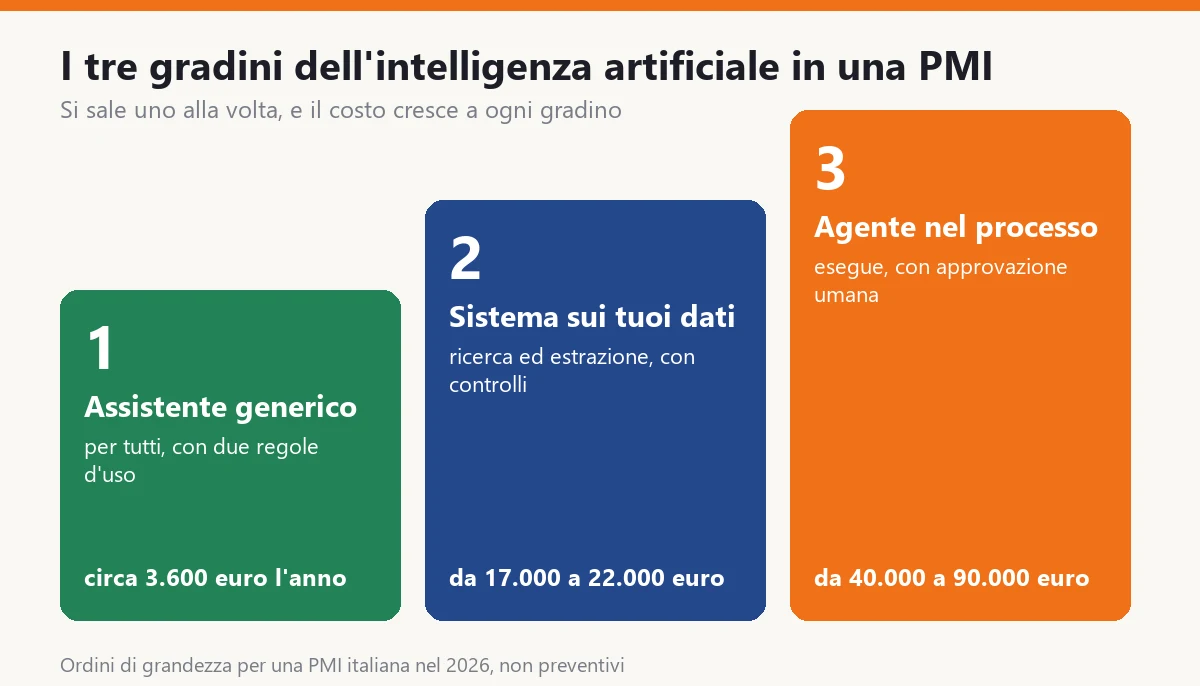
It helps to tell apart three things that get mixed up in conversations.
- The generic assistant. A tool that each person opens in the browser and types a request into. It doesn't know your company: it knows what it has read around the web and what you tell it. It costs a few tens of euros per person per month.
- The system on your data. A model connected to your documents (contracts, price lists, manuals, emails, delivery notes) that answers by citing the source or extracts the fields you need. Here you build something, and you pay once for the project and then for usage.
- The agent inside the process. A system that doesn't just answer but acts: it reads the incoming order, checks the warehouse, prepares the confirmation and queues it for a person to approve. It requires an ERP with clean interfaces and clear rules.
These are three steps. You climb one at a time, and cost and risk grow with each step. Almost all the companies I see fail because they jump to the third, or they stop at the first and say AI is useless.
What it is not: it is not a brain that understands your trade, it is not a substitute for whoever decides, and it is not free. A language model is wrong with confidence, and the job of whoever builds a serious system is to catch that before the customer does.
This sentence alone avoids half the mistakes we will see later: AI prepares, a person decides.
Why do many companies try it and see no results?
The script is almost always the same. An owner sees a demo, buys twenty subscriptions, sends everyone an email, and two months later three people use the tool and seventeen don't.
It's not the people's fault. There are four recurring causes, and none of them is about technology.
The first: nobody picked a job. Telling people to use AI is like telling them to use Excel. It only works for those who already have a problem in mind. Those who don't open the tool, type a curious question, get a mediocre answer and never come back.
The second: the tool doesn't know the company. If you ask a generic assistant which warranty terms you signed with a customer, it makes up a plausible answer. It does so with the same confidence with which it answers well. That is the cause of the cases where a wrong answer ends up in an email to the customer.
The third: nobody measures. Without a number before and one after, the initiative lives on impressions. The enthusiastic say it works, the skeptics say it's useless, and the owner decides based on who spoke last.
The fourth: the data is a mess. A system that answers on your contracts only works if the contracts are in one place, in a readable format and with a sensible name. In many small companies, documents live in network folders, on three people's desktops and in the mailbox of someone who left in 2021.
The method I propose starts from the opposite end: you pick one job, you measure how many hours it costs today, you decide which step solves it, and you measure again after a month.
The rest of the article is this method, with the numbers.
How much does repetitive text work cost every year?
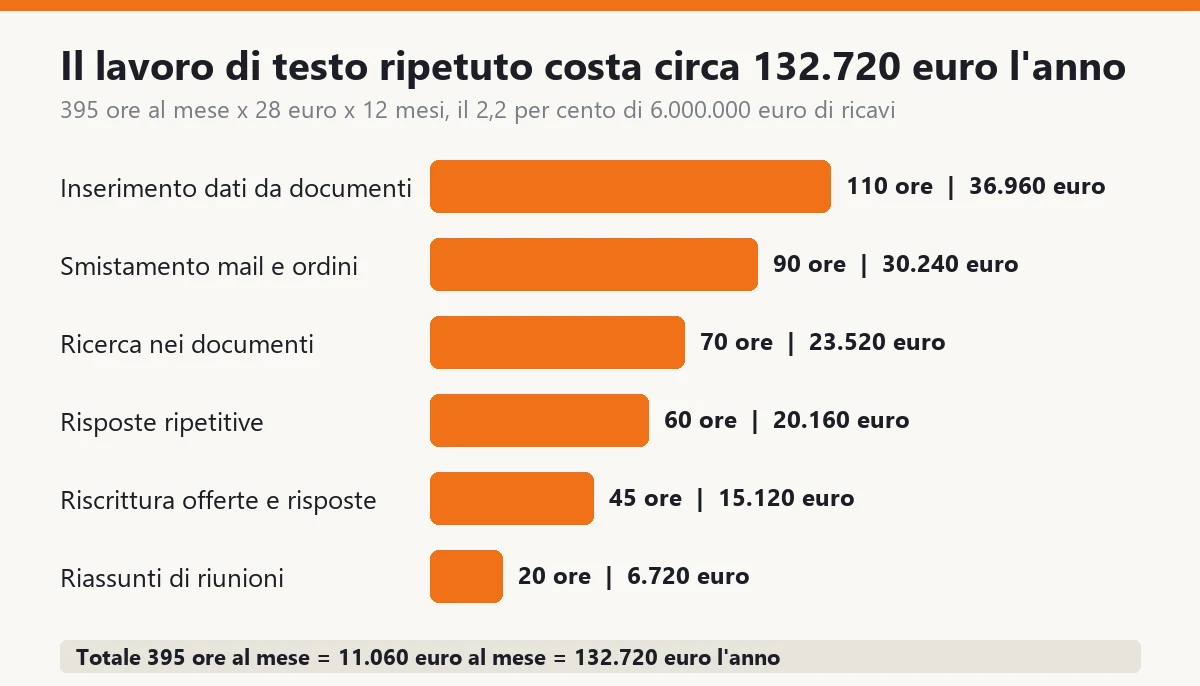
The cost of repetitive text work is calculated with six lines. For our typical company, with 12 people in the office, the total is about 395 hours a month, which at 28 euros an hour of full cost makes 11,060 euros a month and about 132,720 euros a year, 2.2 percent of revenue.
| Job | What is done today | Hours per month |
|---|---|---|
| Manual data entry from documents | Delivery notes, supplier invoices and data sheets in PDF retyped into the ERP | 110 |
| Sorting incoming emails and orders | Reading, understanding what it's about, passing it to the right person | 90 |
| Searching documents | Contracts, tenders, manuals, old emails to answer a question | 70 |
| Repetitive answers | The same twenty questions from customers and colleagues, every week | 60 |
| Rewriting offers and replies | Adapting an existing text to a new customer | 45 |
| Meeting and call summaries | Writing the minutes and the action items | 20 |
| Total | 395 hours a month × 28 euros × 12 months | 395 |
A few notes, because every line is a choice and you need to be able to challenge it.
- The 110 hours of data entry are the easiest line to measure. Take a month of delivery notes and invoices, count the documents and multiply by the minutes it takes to retype one. Four minutes for 1,650 documents makes 110 hours.
- The 90 hours of sorting are the most underestimated line, because nobody logs them. Every email read, understood and passed on costs a minute and a half. With 60 emails per working day, that's exactly that number.
- The 70 hours of searching are spent looking for information the company owns but can't find. Five people, one hour a week each: the math is quick.
- The 60 hours of repetitive answers cover questions whose answer you already know: when the delivery arrives, what the code is, how returns work, what the price list says.
- The 45 hours of rewriting are the time spent adapting an offer or a technical answer to a new customer starting from an old text.
- The 20 hours of summaries are few, but they are the easiest to recover and the most visible.
The 28 euros an hour is the full cost of an office worker: salary, contributions, workstation, share of overhead. If it's different in your company, change that number and everything else adjusts.
Before reading on, redo this table with your own numbers. You don't need perfect data: you need orders of magnitude, and an hour with the people who do those jobs. If the total comes out under 1 percent of revenue, you don't have a problem that AI solves in an interesting way. Above 2, almost certainly you do.
Careful: this is not the saving. It is the cost of the work today. The saving is a part of it, and it is the part to estimate honestly.
What is the number that decides whether AI is worth it?
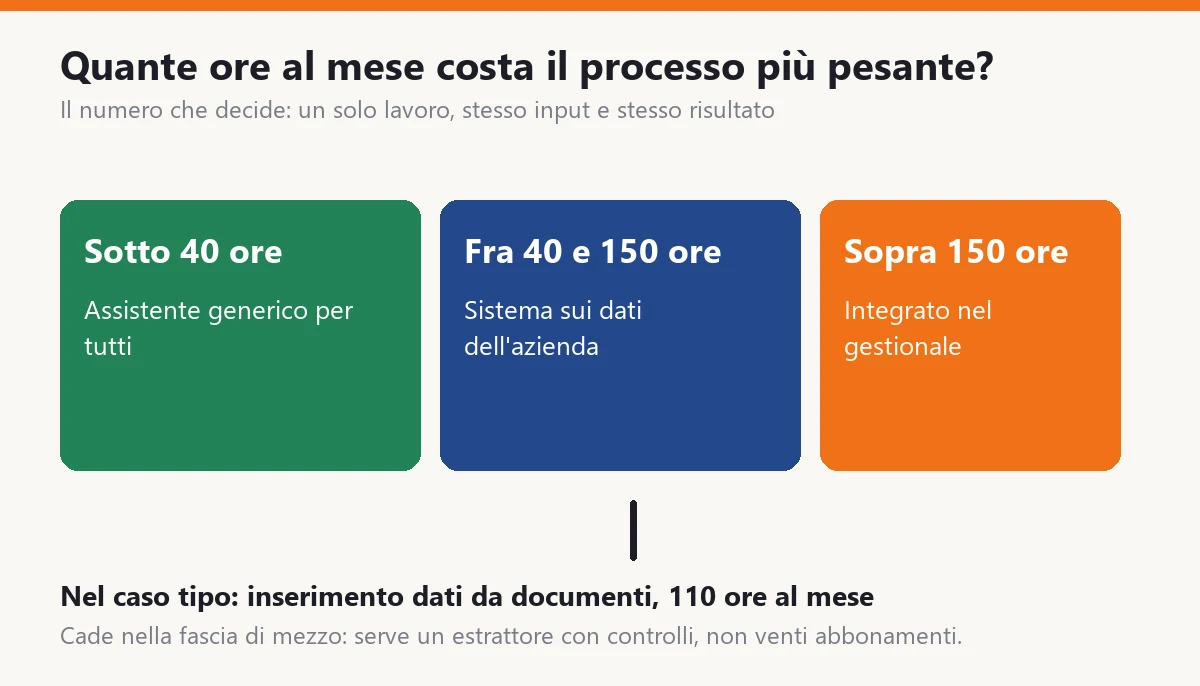
The deciding number is not how many people you have and not how much you spend on software. It is how many hours a month your single heaviest process costs, meaning a job with the same kind of input and the same kind of result.
The reason is simple. A custom system pays for itself when it is used many times for the same job. A hundred small different tasks, even if together they weigh more, never pay back a project, because each one costs as much to build.
The thresholds I use, for text processes in a small or mid-sized company:
- Under 40 hours a month per process. A generic assistant, given to everyone, with two written usage rules, is enough. A project would cost more than it recovers.
- Between 40 and 150 hours. A system on your data pays off: a search that answers by citing the documents, or a field extractor for PDFs. It pays back in about a year.
- Above 150 hours. It makes sense to integrate the process into the ERP, with human approval and a log of everything the system has done.
In our case the heaviest process is data entry from documents: 110 hours a month. It falls in the middle band. So the answer is not to buy twenty subscriptions, and not to rebuild the ERP either: it is an extractor that reads delivery notes and invoices and hands them to the person already filled in.
There are two cases where the threshold moves.
If an error is expensive (a contract, an invoice, a safety datum), the hours to recover matter less than the checking time. The system still gets built with human approval, and the band gets higher.
If the documents are very varied (every supplier uses a different format, dozens of languages, dirty scans), the cost goes up and the threshold goes with it. Before deciding, test fifty real documents and count how many the system reads correctly. Under 80 percent, either you prepare the data or you wait.
This number takes an hour to calculate, and it tells you which side you are on before you talk to any vendor.
What are the six jobs where AI really pays off?
They are the six in the table. For each one I tell you what the system does, how much of the time you can realistically recover, and what is needed for it to work.
1. Data entry from documents (recoverable: about 55 percent). The system reads the PDF of a delivery note or invoice, extracts supplier, number, date, lines, quantities, and proposes them already filled in. The person checks and confirms. The time doesn't go to zero, because the check remains, but it drops from four minutes to about a minute and a half per document. You need a clear list of fields and an archive of real examples.
2. Sorting emails and orders (about 40 percent). The system reads the email, classifies it (order, complaint, quote request, reminder), proposes the person to pass it to and prepares a draft reply. It doesn't answer on its own. The recovery is smaller because many emails still need a person, but the initial reading disappears.
3. Searching documents (about 50 percent). You ask in plain language: what warranty terms does the customer Rossi have? The system finds the contract passages that answer it, shows them with file name and page, and writes the summary. If it can't find anything, it says so. This is the case where the source matters more than the answer.
4. Repetitive answers (about 40 percent). The twenty questions that come back every week get answered by an assistant that draws on price lists, data sheets and procedures. The person sees a draft and sends it, edits it or discards it. Over time the drafts improve, because every correction becomes an example.
5. Rewriting offers and replies (about 35 percent). This is the generic assistant's job: you start from a text you already have, ask for it to be adapted to a new customer and reread it. The gain is modest for each text, but it is spread across everyone.
6. Meeting and call summaries (about 60 percent). A transcript, a summary, a list of actions with the name of whoever took them. The easiest job and the one that convinces the skeptics, because you see the result in ten seconds.
The percentages are not promises. They are cautious averages of what I see recovered when the system is well built and actually used. In a company where nobody has time to check the drafts, the recovery drops by half.
With these percentages, in our typical company the 395 hours become about 183 hours a month recovered, that is 5,131 euros a month and about 61,572 euros a year. It is not 100 percent of the cost, and it shouldn't be: it is the part worth taking.
How does a system that works on company documents operate?
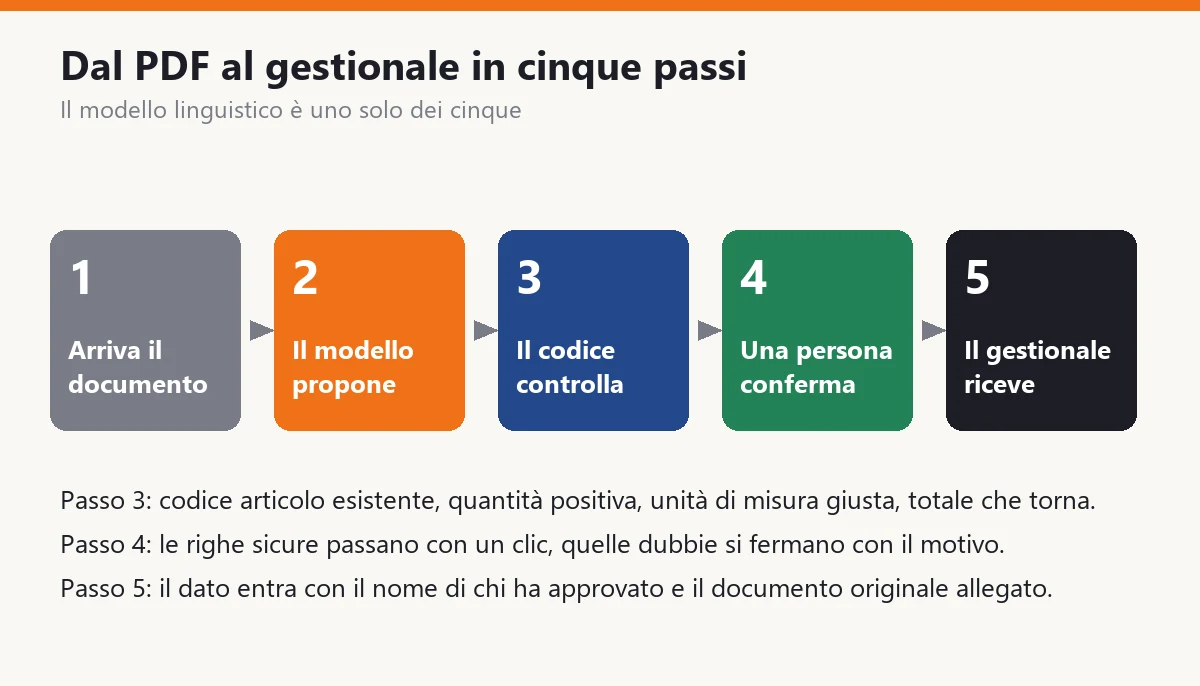
A serious system is not a chat. It is a chain of steps, and the language model is only one of the five.
- The document arrives. By email, from a folder or from an upload. The system logs it with date, origin and an identifier.
- The model proposes. It reads the document text and returns the requested fields in a rigid format, with a confidence level for each.
- The code checks. The model doesn't get the last word: the code verifies that the item code exists, that the quantity is positive, that the unit of measure matches the master data and that the total adds up.
- A person confirms. The confident lines go through with one click, the doubtful ones stop with the reason written out. The person's time goes where it is needed.
- The ERP receives. The data goes in with the name of whoever approved it and the original document attached, so nobody has to take anyone's word for it.
Step three is what separates a serious system from a demo. Here is how you write it, in C#, without tying yourself to any model vendor.
public sealed record RigaDdt(string Codice, decimal Quantita, string Unita);

public sealed record EsitoEstrazione(
    IReadOnlyList<RigaDdt> Righe,
    IReadOnlyList<string> Problemi)
{
    public bool DaRivedere => Problemi.Count > 0;
}

public interface IModelloLinguaggio
{
    Task<string> RispondiAsync(string istruzioni, string testo, CancellationToken ct);
}

public sealed class EstrattoreDdt
{
    private const string Istruzioni =
        "Extract the lines of the document. Reply with JSON only: " +
        "[{\"codice\":\"...\",\"quantita\":0,\"unita\":\"...\"}]. " +
        "If a field is missing, use null. Do not invent codes.";

    private readonly IModelloLinguaggio _modello;
    private readonly ISet<string> _codiciValidi;

    public EstrattoreDdt(IModelloLinguaggio modello, ISet<string> codiciValidi)
    {
        _modello = modello;
        _codiciValidi = codiciValidi;
    }

    public async Task<EsitoEstrazione> EstraiAsync(string testo, CancellationToken ct)
    {
        var json = await _modello.RispondiAsync(Istruzioni, testo, ct);
        var problemi = new List<string>();
        var righe = new List<RigaDdt>();

        try
        {
            var grezze = System.Text.Json.JsonSerializer
                .Deserialize<List<RigaGrezza>>(json) ?? new();

            foreach (var g in grezze)
            {
                if (g.Codice is null || !_codiciValidi.Contains(g.Codice))
                    problemi.Add($"Unknown code: {g.Codice ?? "(empty)"}");
                else if (g.Quantita is null or <= 0)
                    problemi.Add($"Invalid quantity for {g.Codice}");
                else
                    righe.Add(new RigaDdt(g.Codice, g.Quantita.Value, g.Unita ?? "pz"));
            }
        }
        catch (System.Text.Json.JsonException)
        {
            problemi.Add("Model response not readable");
        }

        return new EsitoEstrazione(righe, problemi);
    }

    private sealed record RigaGrezza(string? Codice, decimal? Quantita, string? Unita);
}
A few lines, and the whole philosophy is in there: the model proposes, the code discards whatever doesn't add up, and every problem ends up in a list a person will read. If the model's response is not valid JSON, the system doesn't crash: it flags the document for review.
Notice the line with the instructions: it says not to invent codes. That is not enough. A model can invent them anyway, which is why the check against the master data lives in the code and not in the instructions.
The system for searching documents follows the same pattern, with one extra step at the start. The documents are split into pieces, each piece becomes a number that represents its meaning (a numeric representation that lets you find texts similar to a question), and when a question comes in the system retrieves the closest pieces and hands them to the model, asking it to answer using only those.
If you want the technical detail, I wrote about it in AI, memory and RAG in software development and about reducing errors in AI hallucinations and how to fix them. One idea matters here: the answer must always carry its source with it. Without a source you can't check it, and without checking you can't use it in a company.
How much does AI cost for a small business?
Costs fall into three levels, like the steps. They are orders of magnitude for an Italian small business in 2026 and not quotes: they change with the vendor, the quality of the documents and the level of control required.
| Level | What you buy | First year | Following years |
|---|---|---|---|
| Generic assistant for everyone | Subscriptions for 12 people, two usage rules and one hour of training | about 3,600 euros | about 3,600 euros |
| Search and answers on your documents | 3 to 5 week project, model usage, document cleanup | about 17,000 euros | about 5,100 euros |
| Data extraction from documents with checks | 5 to 8 week project, check rules, ERP connection | about 22,200 euros | about 6,900 euros |
| Agent inside the process | 3 to 6 month project, interfaces, log, approvals | from 40,000 to 90,000 euros | about 15% a year |
The costs of the following years include model usage and about 15 percent for maintenance, meaning the time of whoever fixes the rules when a format changes or a new supplier shows up.
The line that surprises people most is maintenance. A system that reads documents is not a finished object: suppliers change their forms, models get updated, check rules evolve. Whoever sells it to you as "install and forget" has never kept a system running.
The cost of model usage, on the other hand, is almost always small. For 1,650 documents a month, with texts of a few pages, consumption is worth a few tens of euros a month depending on the model you choose. The real cost is the project and the time of whoever checks.
In what order should you start, and when does it pay back?
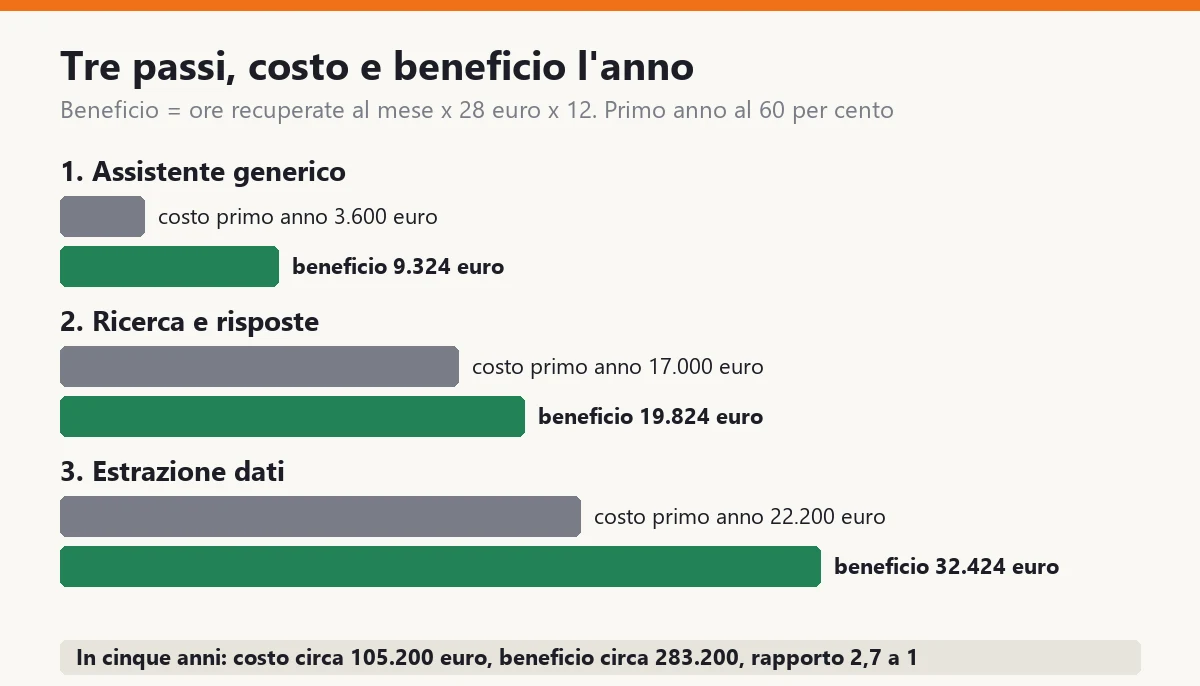
Starting from the top step is the most expensive mistake. You start from the lowest one that covers a real job, and you climb only when the number justifies it. In our case there are three steps.
| Step | Jobs covered | Hours recovered per month | Benefit per year | First-year cost |
|---|---|---|---|---|
| 1. Generic assistant | Rewriting offers, meeting summaries | 27.75 | 9,324 euros | 3,600 euros |
| 2. Search and answers on documents | Searching documents, repetitive answers | 59 | 19,824 euros | 17,000 euros |
| 3. Data extraction | Data entry from documents, sorting emails and orders | 96.5 | 32,424 euros | 22,200 euros |
| Total | 183.25 | 61,572 euros | 42,800 euros |
The benefit calculation is always the same: hours recovered per month × 28 euros × 12 months. For example, step three is worth 96.5 hours × 28 × 12 = 32,424 euros.
The first year doesn't deliver at one hundred percent, and pretending otherwise is dishonest. The system starts mid-year, people learn, the rules get corrected. I assume that in the first year you recover 60 percent of the benefit, about 36,943 euros.
- First year: cost about 42,800 euros, benefit about 36,943. A slight loss, about 5,900 euros.
- From the second year: cost about 15,600 euros, benefit 61,572. A surplus of about 46,000 euros a year.
- Over five years: cost about 105,200 euros, benefit about 283,200. A surplus of about 178,000 euros.
The ratio of benefit to cost over five years is about 2.7 to 1. It is not miraculous, and that is why you can believe it. And it holds even if the real recovery is half of the estimate: in that case the five-year benefit is about 141,600 euros against 105,200 of cost, still in the black.
The missing step is the fourth, the agent inside the process. With 183 hours recovered and a single process weighing 110 hours, it makes no sense: it would cost from 40,000 to 90,000 euros to recover hours that step three already recovers. The agent starts to pay off when a single process goes over 150 hours a month and the ERP has clean interfaces.
The practical rule: each step pays for itself before the next one starts. If after three months step one hasn't recovered what it claimed, step two doesn't start.
Who builds it: a vendor, an in-house person or a consultant?
The question comes right after the costs, and the answer depends on who maintains the system a year from now, not on who kicks it off.
A ready-made product for a specific job (for example reading invoices) is the right choice when your document is standard. You buy it, configure it and pay a subscription. The limit is that it doesn't know your check rules and doesn't connect well to your codes.
An in-house person works if you already have someone who knows the ERP and wants to learn. They build step one and step two quickly. The risk is that the system depends on them: if they leave, nobody knows why a rule is there.
A consultant or a software house is needed when the job touches the ERP, permissions and error control, that is step three. Here the experience of someone who has already seen a wrong document reach production counts. Always ask three things: is the code yours, are the check rules written somewhere you can read, and does the system still work if you change the model.
The criterion I use to choose is just one: who loses out if the system gets it wrong? If the answer is only you, ask for measurable guarantees (the share of corrections, the log, a test on real documents) before signing.
How does Monday morning change after the three steps?
Let's go back to nine o'clock on that Monday in November, with the company a year in.
The sixty-two weekend emails are already classified: twenty-two orders, eight quote requests, eleven reminders, the rest general messages. Next to each one there is a proposed person and a draft reply. Whoever opens the inbox starts by deciding, not by reading.
The PDF delivery notes were read overnight. Sixty lines out of seventy are ready and go through with one click. Ten have a written reason: a code that doesn't exist, a quantity of zero, a strange unit of measure. The person looks at them for a quarter of an hour.
The customer asking about the warranty terms gets an answer in two minutes. The assistant found the 2022 contract, pointed to the page and prepared the summary. The salesperson rereads it, checks the cited page and sends it.
None of these gestures is spectacular. The difference is that the office reaches noon with the routine work done and with hours for what it had always put off: calling back a customer who hasn't ordered in three months, cleaning up the supplier master data, preparing the offer for a tender.
That is the real gain, and it doesn't show up in the cost table: the hours recovered don't turn into cuts, but into work that wasn't getting done before. If you want to put it in numbers, 183 hours a month is more than one and a quarter full-time people moving from retyping to selling and checking.
What happens to confidential and personal data?
This is the question that should come first and always arrives last. A company holds contracts, price lists, customer records, employee data. Sending them to an external service is a decision, not a technical detail.
Let me say one thing up front: I am not a lawyer, and the legal side needs to be checked with your privacy consultant. I tell you what I ask every vendor, because these are the questions that separate a suitable service from one that isn't.
- Where is the data processed? In which country and by which company. For the personal data of European citizens, European regulation sets limits on transfers outside the Union, and the answer must be written in the contract.
- Does my data train the model? For professional services the correct answer is no, and it is written in the terms. For free or consumer services it often isn't.
- How long is it kept? Some services keep requests for an abuse-monitoring period. Ask how long, and whether it can be set to zero.
- Who can read it? Inside the vendor, and inside your company. A system on documents must respect the permissions you already have: if a colleague can't open a customer's contract, they must not be able to get its summary by a back door.
- Can I leave? If you change vendor, can your data and your indexes be exported in an open format? If the answer is no, you are locked in.
There is also a risk almost nobody looks at, and it is already in your company: undeclared use. If you don't provide a tool, people use a personal one. They paste an email with a customer's data into a free service because they are in a hurry. They don't do it out of malice: they do it because it works.
The best countermeasure is not a ban, which nobody follows. It is an approved tool, as easy as the personal one, with two rules written on half a page: what can be pasted, what can't, and who to ask when in doubt.
For truly sensitive data (health, judicial, trade secrets) there is a different route: a model running on your own servers or in a dedicated environment, with no outbound connection. It costs more and delivers lower quality, but for some jobs it is the only one allowed. You decide after seeing which data the job needs, not before.
What does the system do when it gets it wrong?
It will be wrong. It is not a question of if, but of how often and what happens next. A well-built system assumes the error and makes it cheap.
The errors I run into are of four types.
- Invention. The model produces a plausible datum that is not in the document: a code, a date, a clause. It is the most dangerous error because you can't see it. You counter it with checks in the code (does the code exist? is the date in the document?) and with answers that cite the source.
- Omission. The model reads six lines out of seven. You counter it by comparing totals: if the sum of the lines doesn't match the document total, the document needs review.
- The odd document. A crooked scan, a new form, an unexpected language. You counter it with a confidence level and a threshold: below the threshold the document goes to a person without trying.
- Drift. The system works well for six months, then a supplier changes its form and quality drops without anyone noticing. You counter it by measuring: every month you look at the share of documents people had to correct.
That last measure is the one I use as a health indicator. If the share of lines corrected by people rises above double the value of the first months, something has changed and you look at it right away.
The principle for all cases is this: every action of the system must be reversible and every decision must carry a person's name. If the system puts a line in the ERP, you can see who approved it and from which document; if the line is wrong, you fix it and the error becomes an example to improve the rules.
With these rules the worst outcome is an hour of correction. Without them, the worst outcome is a wrong invoice the customer finds before you do.
Which mistakes should you avoid, and how do you start in ninety days?
The mistakes I see most often, and that cost the most, are eight.
- Starting from the tool, not the job. The right question is not which AI to buy, but which job costs the most hours every month.
- Measuring by feel. Without hours before and after you don't know if it works. Two sheets are enough: the hours of the job today and the hours a month from now.
- Buying the demo, not the case. A demo with documents chosen by the vendor always works. Ask to try fifty of yours, including the worst ones, and count how many are read correctly.
- Taking the person out of the check. Full automation is an expensive temptation. In the first months every result goes through a person; when the share of corrections stays low for a long time, you loosen the check only on the high-confidence lines.
- Messy data. A document search system makes a messy archive worse instead of fixing it: it finds the wrong version with great confidence. First you decide which version is the valid one.
- Depending on a single model vendor. Prices and quality change every few months. The sample code above has an interface between your system and the model, precisely so you can switch without rewriting.
- Forgetting training. Two hours for the twelve people in the office, and half an hour a month to share the cases that work. The difference between those who use the tool and those who ignore it is almost always here.
- Not writing the usage rules. Half a page: what can be pasted, what can't, who checks the drafts.
And here is a ninety-day plan, which I have seen work.
- Days 1-10: the hours. Fill in the table of the six jobs with the people who do them. One hour per person, one sheet. The result is the deciding number.
- Days 11-20: the assistant. Give everyone the generic assistant, write the usage rules and run two hours of training with examples from real work. Measure the hours of rewriting and summaries.
- Days 21-35: the test on your documents. Take fifty real documents for the heaviest job and try them with two approaches. Count the correct readings. If they are under 80 percent, prepare the data before spending.
- Days 36-60: the first system. Build the one that sits in the right band, with checks in the code, approval by a person and a log. In production on a single flow.
- Days 61-75: the measurement. Redo the count of hours and the share of corrections. Compare with the estimate: if it recovers less than half, understand why before going further.
- Days 76-90: the second step or the pause. If the first system met the estimate, start the next one. If not, fix it, and don't add anything.
After ninety days you have a real number, yours, and you can decide with it. That is far more than most companies that claim to use AI have.
What if the number says it's not your problem?
It happens, and it is good news. If the heaviest process costs less than 40 hours a month and the total of repetitive text work is under 1 percent of revenue, a project doesn't pay back, and a generic assistant for the people who want one is enough.
In that case the bottleneck, if there is one, is almost always elsewhere.
If the documents are few but customers complain about timing, the problem is in the process, not in the reading: a well-made order form and a person who answers emails are worth more than a model.
If the ERP doesn't have its data in order (duplicate master records, codes that change from one department to another), AI doesn't repair them: it exposes them. In that case you start with the data, which is less glamorous and more profitable work.
If the costly job is not text but decisions (prices, production priorities, supplier selection), you need rules and numbers, not a language model. A well-made spreadsheet beats a brilliant assistant.
And there is one case where software is not the answer even with ugly numbers: when the office is overloaded because you earn too little margin on each order. That is a price list problem, and the back-office hours are only the thermometer.
If you made it this far, you probably have your own Monday in November in mind. Before looking at any demo, take a month of emails, delivery notes and requests and count how many minutes each one takes. Then multiply by the documents and by the 28 euros.
If a single process goes over 40 hours a month, if the total goes over 2 percent of revenue, or if your office spends more than a day a week retyping, you already have your answer. The rest is a project, not a product choice.
If you want a second pair of eyes on your case, get in touch and we'll look at your numbers together.
And when the right solution is a system built around the way you work, with your documents and your own check rules, write to me and we'll see whether custom software makes sense for you.
For the pieces around it, a document management system is what puts in order the archive that AI has to read from, and a CRM is where the replies to customers end up. If you work in manufacturing, I covered it in AI agents and MCP in manufacturing. For either of the first two, contact me.
Frequently asked questions
For a small company it almost always means a language model that reads one text and produces another: a summary, an answer, the fields extracted from a document, the draft of an email. It has three steps: the generic assistant each person uses in the browser, the system connected to the company's documents, and the agent that carries out steps inside a process with human approval. You climb one step at a time, because cost and risk grow with each one.
A generic assistant for 12 people costs about 3,600 euros a year. A system on the company's documents costs between 14,000 and 18,000 euros as a project plus 3,000-5,000 euros a year for use and maintenance. An agent integrated into the management software costs from 40,000 to 90,000 euros and about 15 per cent a year. These are orders of magnitude and not quotes: they change with the quality of the documents and the level of control required.
With a single number: the hours a month the single heaviest process costs, meaning one job with the same kind of input and the same result. Below 40 hours a generic assistant is enough, between 40 and 150 hours a system on the company's data pays off, above 150 hours it makes sense to integrate it into the management software. You do the sum by multiplying hours, hourly cost and months, and redo it after a month of use.
Yes, and with confidence. You protect yourself with checks written in code, which verify for example that an item code exists and that quantities add up, with answers that always cite their source, with a confidence level below which the document goes to a person, and with human approval on the actions that matter. Every action must be reversible and carry the name of whoever approved it.
It depends on the service and the contract. Ask where the data is processed, whether it trains the model, how long it is kept, who can read it and whether you can export it. For truly sensitive data there is the option of a model run on your own servers or in a dedicated environment. I'm not a lawyer: the legal side should be checked with your privacy consultant.
From the job, not the tool. In the first ten days you measure the hours of the six repeated text jobs (data entry, sorting, search, replies, rewriting, summaries), then you give everyone a generic assistant with two written rules, test the heaviest job on fifty real documents and only then build the first system. Each step pays for itself before the next one.
Leave your details in the form below