What is the number that decides whether you need Azure Cosmos DB?
Above 90 percent Cosmos DB is a sensible choice; between 60 and 90 percent you use it only for part of the data; below 60 percent a relational database is better. In a 60-person maintenance company at 94 percent, the load cost about 19 euros a month in serverless, against 1,095 euros for the "to be safe" configuration.

A 60-person building maintenance company decides to rebuild its technicians' app. The head of IT reads that modern applications "use Azure Cosmos DB" and asks for a quote. A proposal arrives with two regions, ten thousand units of throughput "to be safe" and an expected bill of about 1,100 euros a month for a database that today weighs 32 GB.
The same load, configured for what it actually needs, costs about 19 euros a month. Under certain conditions even less than 2. The difference is not in the product: it lies in five decisions that no quote explains to you.
This article tells you what Azure Cosmos DB is, when it pays off in a small or medium company and when it is just a monthly cost with a nice name, how to calculate the spend starting from your own numbers and which choices (the partition key above all) cannot be fixed afterwards.
You will find the definition without jargon, the number that decides whether you need it, the three ways to pay with the figures in euros, the C# code for a client that holds up in production, the five consistency levels, the honest comparison with Azure SQL, the mistakes I see most often and a sixty-day plan to try it without risk.
A premise. Since 1999 I have designed software for companies, almost always in .NET, and for years my rule on the cloud has been a single one: spend the minimum that holds the load. In my own infrastructure I merged nine databases into one that costs 4.20 euros a month. I have no interest in selling you Cosmos DB: I recommend it only when the numbers ask for it.
The case I use throughout the article is a typical company, built with orders of magnitude and sector averages: 60 people, 38 field technicians with a tablet, 900 customer plants with one sensor each, a customer portal. It is not a client, it is a method. You redo it with your own numbers in an afternoon.
What is Azure Cosmos DB, explained without jargon?
Azure Cosmos DB is a database managed by Microsoft that stores documents instead of rows. A document is a block of data in JSON format: a technician's job with its checklist, the materials used and the photos, all together, in one piece.
In a traditional database (SQL Server, Azure SQL, PostgreSQL) the same job is spread over five tables and you put it back together with joins. Here you save it and read it back whole, by key, in a few milliseconds.
Three characteristics make it different from a database you install yourself.
- You pay for operations, not for a machine. There is no server to size: every read and every write has a cost measured in "request units" (RU), and the bill depends on how many you consume.
- It distributes data on its own. The database splits documents into partitions, based on a key you choose, and moves them across machines as they grow. This lets it scale almost without limit, and forces you to choose that key well.
- It replicates around the world with one click. You can keep copies of the data in several regions and let all of them write. It is the feature that justifies the name and also the one that makes bills go up.
It exists in several "modes" depending on the language you query it with: the main one is for documents (called NoSQL, with a SQL-like language), but there are also compatibility layers for MongoDB, Cassandra, Gremlin for graphs, Table and PostgreSQL. In this article I talk about the main one, the one you meet in 90 percent of .NET projects.
The package to use is Microsoft.Azure.Cosmos, the official SDK. There is also a provider for Entity Framework Core (Microsoft.EntityFrameworkCore.Cosmos), handy for those who already have an EF model, but with limits we will see.
One last definition, which avoids a common misunderstanding: Cosmos DB is not "a faster SQL Server". It is a database made for a different kind of access, and if you use it like a relational database you lose the advantages and pay the disadvantages.
What is the number that decides whether you need Cosmos DB?
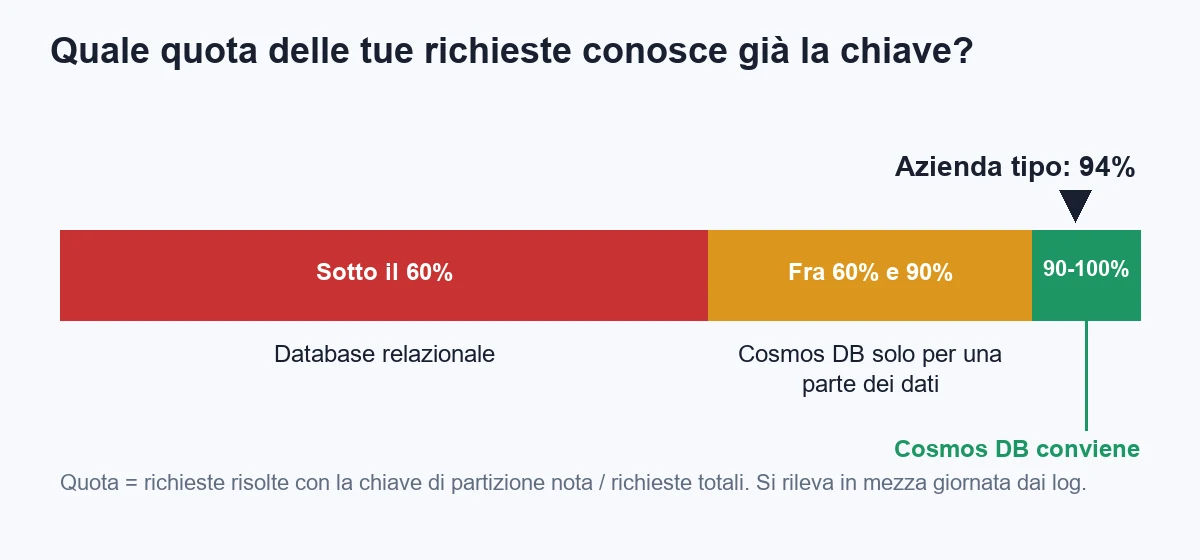
The number that decides is not the volume of data and it is not the number of users. It is the share of requests your software resolves already knowing the key.
An example. When the customer portal shows the status of plant 417, the request already contains everything needed: the customer and the plant. The database goes and fetches that document and that is all. This is a read by key, and in Cosmos DB it costs about 1 RU for each kilobyte read, which is almost nothing.
When instead a manager asks for "all unfinished jobs of the month, by technician, with the margin", the request has no key: it has to look everywhere. This is a cross-partition query, and it costs much more, because the database has to run it on every partition.
The rule I use is this:
- Above 90 percent of requests with a known key: Cosmos DB is a sensible choice.
- Between 60 and 90 percent: use it only for the part of the data with this profile (events, session, catalog) and keep the rest on a relational database.
- Below 60 percent: choose a relational database. With Cosmos DB you would spend your time fighting the model.
In the typical company the calculation is simple. Every day there are about 400,000 reads by key (plant status, latest events, job record) and about 30,000 search and report queries. The share is 400,000 divided by 430,000, that is 93 percent, which I round to 94 percent counting writes too, since they always have the key.
The second check is the shape of the data. Cosmos DB works well when the document is "self-contained": the job carries its checklist and materials, and you always read them together. It works badly when you have many relationships between entities that are read in ever-changing combinations (customers, orders, price lists, discounts, agents). There the join is your friend, and Cosmos DB does not really have one.
The third check is who can maintain it. A request-unit database is "read" in a different way: you have to watch how many RU each operation costs, notice a query that goes from 3 to 300, fix the key. If nobody in the company takes care of that, the risk is a bill that rises silently.
If the three checks say yes, the rest of the article is for you. If they say no, you have already saved a project.
What does the typical company look like and which numbers does it start from?
The typical company maintains air conditioning systems for apartment blocks and small factories. It has 60 people, 38 of whom are technicians with a tablet. It manages 900 plants, each with a sensor that sends a reading every 30 minutes. It has a portal where customers see status and history.
Today everything sits in an eleven-year-old SQL Server business application, which is struggling: the sensor readings have filled a table of 190 million rows and the portal slows down every time a report starts. The team is evaluating Cosmos DB for the "events and plant status" part.
Here are the numbers, the ones you collect in half a day from database statistics and request logs.
| Measure | Value | How to collect it |
|---|---|---|
| Writes per day | about 43,000 (42,000 sensor events, 1,000 job updates) | 900 sensors times 48 readings a day, plus the job log |
| Document size | about 2 KB | Average over sample documents |
| Reads by key per day | about 400,000 | Portal and technician app logs |
| Search and report queries per day | about 30,000 | Query log |
| Share of requests with a known key | about 94 percent | The deciding number |
| Data kept | 32 GB at steady state (events kept 12 months) | Current size plus the expiry rule |
| Cost of a development day | 480 euros | Reference rate |
Two notes on the numbers. The first: the 190 million rows are today's real problem, but also an opportunity, because sensor events are the perfect case for Cosmos DB. They are written once, read by plant, and expire after a year.
The second: not everything should move. Master data, contracts, invoices and price lists stay on SQL, where joins and transactions are at home. The typical mistake is deciding that "the new database" replaces the old one. Almost never is that the case.
How do you pay for Cosmos DB: what are request units?
Every operation costs a certain number of request units, or RU. It is an internal currency that mixes processor, memory and disk. You do not need to understand how it is calculated: you need to know the orders of magnitude.
- Reading a 1 KB document by key: 1 RU. For 2 KB: about 2 RU.
- Writing a 1 KB document with default indexing: about 5 RU. For 2 KB: about 10.
- A query on a single partition, filtering on indexed fields with few results: 3 to 30 RU.
- A query that crosses all partitions, with many results: hundreds or thousands of RU.
The point to fix in mind is that the cost depends on how you ask, not on how much data you have. A read by key costs 1 RU even with a billion documents. A badly written query can cost 2,000 RU even with a million.
Every SDK response tells you how much it cost. It is the first habit to acquire: look at that number during development, as you look at the execution plan in SQL.
When the load exceeds the purchased capacity, Cosmos DB answers with error 429, "too many requests", and the time to wait. The SDK retries on its own, but if the wave is long the requests fail. It is not a fault: it is the database telling you that you bought too little.
The bill has two items. RU (pay-per-use or reserved) and the space used, which costs a few cents per GB a month. For the typical company the space is worth about 7 euros a month at 32 GB. The rest depends on how you buy RU.
How much does Cosmos DB cost in the three ways to pay?
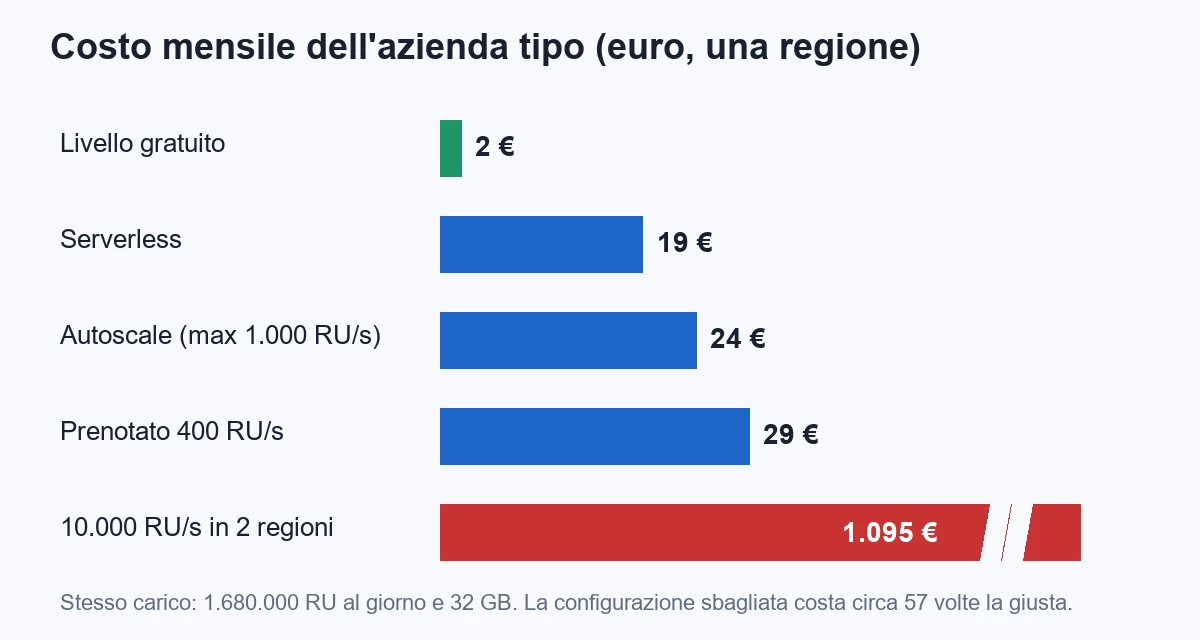
There are three ways to buy capacity, plus a shortcut. Prices are orders of magnitude for one European region, the ones I had at hand while writing. Before deciding, redo the calculation with the Azure calculator.
| Mode | How it works | Indicative price | When it pays off |
|---|---|---|---|
| Serverless | You pay only for the RU consumed | about 0.23 euros per million RU | Low or spiky load, development, new applications |
| Provisioned throughput (manual) | You buy a fixed amount of RU per second | about 5.40 euros a month per 100 RU/s | Stable, predictable load |
| Autoscale | You choose a maximum, the database scales between 10 and 100 percent | about 8.10 euros a month per 100 RU/s of maximum, but paying only for what is used | Load that varies during the day |
| Free tier | The first 1,000 RU/s and 25 GB at no cost, one account per subscription | 0 euros up to the limit | First project of an Azure subscription |
The calculation for the typical company, step by step. The RU per day are: 43,000 writes at 10 RU make 430,000; 400,000 reads at 2 RU make 800,000; 30,000 queries at 15 RU make 450,000. The total is 1,680,000 RU a day, about 50 million a month.
Now the four roads.
- Serverless: 50 million RU at 0.23 euros per million make 11.60 euros, plus 7.40 euros of space. Total about 19 euros a month.
- Provisioned throughput: the sensible minimum is 400 RU/s, that is 21.60 euros, plus 7.40 of space. Total about 29 euros a month. You also pay at night, when nobody is there.
- Autoscale with a maximum of 1,000 RU/s: at night it stays at 10 percent, by day it goes up. With an average of 200 RU/s paid, about 16 euros plus 7.40 of space. Total about 24 euros a month.
- Free tier: 400 provisioned RU/s all fall within the free 1,000. Of the 32 GB, 25 are included and 7 are paid, about 1.60 euros. Total about 2 euros a month.
Now the case from the opening proposal. Ten thousand provisioned RU/s make 100 times 5.40, that is 540 euros a month. Replicated in two regions they double: 1,080 euros. With the space duplicated you reach about 1,095 euros a month, that is 13,140 euros a year for a load that needed 228.
The ratio is about 57 to 1. It is not the supplier's mistake: nobody got a calculation wrong, they put the safety margin where it costs the most. In Cosmos DB the margin is bought in RU, and RU are paid every hour.
Three warnings on the calculation.
- Serverless has a peak ceiling per container (a few thousand RU/s): for a load that grows tenfold it is better to move to provisioned or autoscale.
- The free tier cannot be combined with serverless and applies to one account per subscription. If your subscription already has one, you will not get it.
- Backup, outbound traffic from the region and extra features (for example writing in several regions) have separate costs, which for the typical company are worth a few euros but in other cases are not.
How do you choose the partition key, the only decision you cannot correct?
When you create a container (the equivalent of a table) you must indicate the partition key: a field of the document, for example /plantId. Cosmos DB groups all documents with the same value into a logical partition and distributes them across machines.
This choice decides three things: how much queries cost, how well the load is distributed and how high you can go. And it cannot be changed: to use another one you have to create a new container and copy everything.
The constraints to know are few.
- A logical partition can hold up to 20 GB. If a key collects more data, you have a problem with no solution.
- Each physical partition holds about 10,000 RU/s. If all the traffic falls on one key, the rest of the purchased capacity is useless.
- A document can weigh at most 2 MB. It is not a place for files: PDFs and photos go on blob storage, and in the document you put the reference.
A good key has three qualities: many different values (high cardinality), an evenly distributed load and presence in most requests.
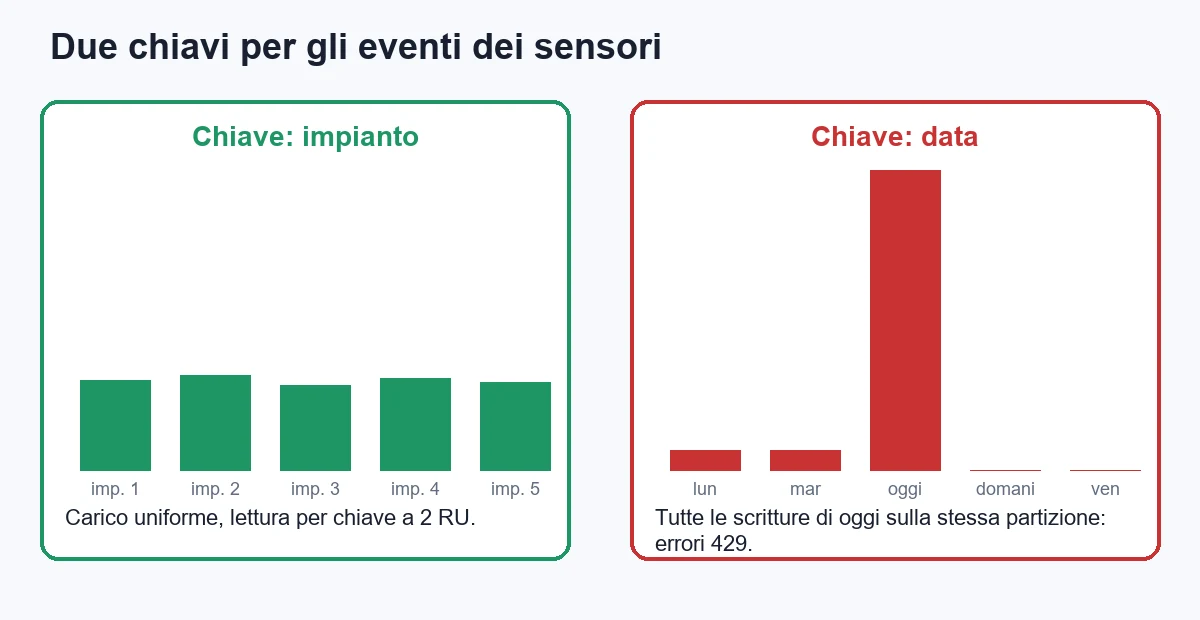
For the sensor events there are two candidates. The date seems natural, because reports are by period. But all of today's writes fall on the same value: a single partition receives 42,000 writes and the others sleep. It is the flaw called a hot partition, and it shows up as a rain of 429 while the database "has free capacity".
The plant identifier is the right choice. There are 900 values, each one receives 48 writes a day, each logical partition takes up about 35 MB a year, almost nothing compared with the limit. And the portal, when it shows plant 417, already has the key.
The trap is that at 32 GB the mistake does not show. At your scale there is a single physical partition, so even a wrong key works and cross-partition queries cost little. The bill arrives when the data grows tenfold and the same queries touch ten partitions.
That is why the test to do before starting is on the page of your most important product: write down the ten most frequent requests and for each one note which field you already know. If there is no field common to the majority, you have a sign that the model is not suitable.
For cases where a single key is not enough there are hierarchical keys: up to three levels, for example customer and then plant. They are useful when a single customer could exceed 20 GB, or to split the load of a multi-customer application better.
How do you model a document: embed or reference?
In SQL you normalize: every piece of information lives in one place and you rebuild it with joins. In Cosmos DB you reason the opposite way: a document contains what you read together.
The criterion I use is simple. Embed (inside the same document) when the parts have the same life, are read together and are limited in number. Reference (with an identifier) when the parts have a life of their own, grow without limit or change often.
A job is a good document to embed: the checklist, the materials used and the notes are born and die with it. The customer's master data, instead, is referenced, because it changes over time and a thousand other documents use it.
Here is the job document as I would model it, with the key chosen above.
public sealed class Intervento
{
    public string Id { get; set; } = Guid.NewGuid().ToString("N");
    public string ClienteId { get; set; } = "";     // partition key
    public string ImpiantoId { get; set; } = "";
    public string Tecnico { get; set; } = "";
    public string Stato { get; set; } = "aperto";
    public DateTime Data { get; set; }
    public decimal Importo { get; set; }
    public List<VoceChecklist> Checklist { get; set; } = new();
    public List<MaterialeUsato> Materiali { get; set; } = new();
}

public sealed class VoceChecklist
{
    public string Descrizione { get; set; } = "";
    public bool Esito { get; set; }
}

public sealed class MaterialeUsato
{
    public string Codice { get; set; } = "";
    public decimal Quantita { get; set; }
}
You will notice the photos are not there: they live on blob storage, and the document carries only the address. A document that grows out of control (endless notes, a history of every change) is the second classic mistake after the wrong key.
Another rule: no joins between containers. They do not exist. If you need the customer's name in the list, you copy it into the document at write time. Yes, it is duplication, and yes, if the customer changes name you have to decide whether to update old jobs. Usually the answer is no: the job from three years ago carries the name it had then, which is also the right thing from a legal point of view.
How do you write C# code for Cosmos DB without getting hurt?
Four rules are worth more than any library.
- One client for the whole application.
CosmosClientis designed to live as long as the process. Creating one per request exhausts connections and raises latency and costs. - Identity credentials, not keys. With
DefaultAzureCredentialthe application authenticates with its managed identity and there is no secret in the code to protect. - Reads by key wherever possible.
ReadItemAsynccosts about 1 RU per KB, a query with the same result costs three times as much. - Watch the RU in development. Every response has
RequestCharge: write it in the test log.
First the client registration, in Program.cs.
using Azure.Identity;
using Microsoft.Azure.Cosmos;

builder.Services.AddSingleton(sp =>
{
    var cfg = sp.GetRequiredService<IConfiguration>();

    return new CosmosClient(
        cfg["Cosmos:Endpoint"],
        new DefaultAzureCredential(),
        new CosmosClientOptions
        {
            ConnectionMode = ConnectionMode.Direct,
            SerializerOptions = new CosmosSerializationOptions
            {
                PropertyNamingPolicy = CosmosPropertyNamingPolicy.CamelCase
            },
            MaxRetryAttemptsOnRateLimitedRequests = 5,
            MaxRetryWaitTimeOnRateLimitedRequests = TimeSpan.FromSeconds(10)
        });
});

builder.Services.AddSingleton<InterventiRepository>();
The camelCase naming policy is there because Cosmos DB wants the id field in lowercase. With this setting the Id property is written the right way.
Then the repository with the four operations that really matter: read by key, create, update with concurrency control and find a technician's open jobs.
using System.Net;
using Microsoft.Azure.Cosmos;

public sealed class InterventiRepository(CosmosClient client, ILogger<InterventiRepository> log)
{
    private readonly Container _c = client.GetContainer("manutenzione", "interventi");

    public async Task<Intervento?> LeggiAsync(string clienteId, string id, CancellationToken ct)
    {
        try
        {
            var r = await _c.ReadItemAsync<Intervento>(id, new PartitionKey(clienteId), cancellationToken: ct);
            log.LogDebug("Read {Id}: {Ru} RU", id, r.RequestCharge);
            return r.Resource;
        }
        catch (CosmosException ex) when (ex.StatusCode == HttpStatusCode.NotFound)
        {
            return null;
        }
    }

    public async Task CreaAsync(Intervento i, CancellationToken ct)
    {
        var r = await _c.CreateItemAsync(i, new PartitionKey(i.ClienteId), cancellationToken: ct);
        log.LogDebug("Create {Id}: {Ru} RU", i.Id, r.RequestCharge);
    }

    public async Task<bool> AggiornaAsync(Intervento i, string etag, CancellationToken ct)
    {
        try
        {
            await _c.ReplaceItemAsync(i, i.Id, new PartitionKey(i.ClienteId),
                new ItemRequestOptions { IfMatchEtag = etag }, ct);
            return true;
        }
        catch (CosmosException ex) when (ex.StatusCode == HttpStatusCode.PreconditionFailed)
        {
            return false; // someone else changed it in the meantime
        }
    }

    public async Task<List<Intervento>> AperteDelTecnicoAsync(string clienteId, string tecnico, CancellationToken ct)
    {
        var query = new QueryDefinition(
                "SELECT c.id, c.clienteId, c.impiantoId, c.data, c.stato, c.importo " +
                "FROM c WHERE c.tecnico = @tecnico AND c.stato = 'aperto' ORDER BY c.data DESC")
            .WithParameter("@tecnico", tecnico);

        var opzioni = new QueryRequestOptions
        {
            PartitionKey = new PartitionKey(clienteId),
            MaxItemCount = 50
        };

        var risultati = new List<Intervento>();
        double ru = 0;

        using var it = _c.GetItemQueryIterator<Intervento>(query, requestOptions: opzioni);
        while (it.HasMoreResults)
        {
            var pagina = await it.ReadNextAsync(ct);
            ru += pagina.RequestCharge;
            risultati.AddRange(pagina);
        }

        log.LogDebug("Open jobs of {Tecnico}: {N} results, {Ru} RU", tecnico, risultati.Count, ru);
        return risultati;
    }
}
Three details that save money.
- The query lists its columns. There is no
SELECT *: returning only the fields you need reduces the response and, in some cases, the RU as well. It is the same discipline needed in SQL. - The partition key is in the options. Without
PartitionKeythe query runs on all partitions. With the filter in the clause but not in the options, sometimes the database figures it out by itself, sometimes it does not: do not gamble. - The ETag prevents overwrites. Two technicians editing the same job: the second gets a 412 error and can reread. Without it, the last one writes and the first one's work disappears.
To create it all from the command line with the free tier (one account per subscription), three commands are enough.
az cosmosdb create -n cosmos-manutenzione -g rg-manutenzione \
  --enable-free-tier true --default-consistency-level Session \
  --locations regionName=westeurope failoverPriority=0

az cosmosdb sql database create -a cosmos-manutenzione -g rg-manutenzione \
  -n manutenzione --throughput 400

az cosmosdb sql container create -a cosmos-manutenzione -g rg-manutenzione \
  -d manutenzione -n interventi -p /clienteId
For local development you do not need an Azure account: Microsoft offers an emulator that runs in a container. You test the code, watch the RU and spend nothing.
A word on Entity Framework. The Cosmos DB provider works and for a team used to EF it is a good starting point. But it hides exactly the information you need, namely how much each operation costs, and the generated queries can cross all partitions without warning you. I use it for small applications; where cost matters, I prefer the direct SDK.
Which consistency level to choose among the five available?
When data is copied in several places, you have to decide how "fresh" a read is. Cosmos DB offers five levels, from the strictest to the fastest.
| Level | What it guarantees | When I use it |
|---|---|---|
| Strong | You always read the latest write, in any region | Almost never: it costs latency and is not available in every configuration |
| Bounded staleness | The maximum delay has a limit you choose | Financial data replicated across several regions |
| Session (default) | Whoever writes always reads what they wrote | The right choice for 90 percent of applications |
| Consistent prefix | Updates arrive in order, never out of sequence | Event streams to be read in order |
| Eventual | Sooner or later data converges, with no guarantee on order | Counters, "likes", non-critical data |
The session level is the default for a reason: the technician who closes a job and reloads the record must see the closing, but does not care whether a colleague in another region sees it half a second later. It covers almost every case, costs the same as the others and requires no deliberation.
Strong has a hidden price: every write must be confirmed by the other regions before answering, and on reads you pay double the RU. If you think about it "to be sure", first ask yourself which concrete error you are avoiding.
The rule: start from session. Change only if a concrete case requires it, and write in the project which one.
Do you really need replication in several regions?
It is the most advertised feature and the one most often bought without need. Before adding a region, there are three questions.
- Are your users really on several continents? The typical company works in Lombardy and Veneto. One European region serves everyone with 10 to 20 milliseconds of latency. A second region in Singapore would change nothing for anyone.
- How much does an hour of downtime cost? A single region has a stated availability of 99.99 percent, about 52 minutes of downtime a year. With several regions it rises to 99.999 percent, about 5 minutes. For a maintenance app, the difference is worth a few hundred euros a year. Doubling the bill costs eight thousand.
- Do you have a legal obligation on where data lives? With the personal data of European citizens, replicating outside the Union opens a compliance problem that the latency saving does not repay.
Every added region multiplies the cost of RU and space. With a single region, for the typical company, the spend is 19 euros. With two it is about 38, and if you enable writes in several regions the price of RU goes up by a further 25 percent or so.
My position is this: start with one region, enable availability zones if the extra price is acceptable (they protect against the failure of a data center without the cost of a second region) and add regions only when a number justifies it.
How do you protect Cosmos DB without complicating your life?
A database open to the Internet with a key in a configuration file is, unfortunately, the most common setup I come across. The useful protections are four and take an afternoon.
- Turn off access keys. Cosmos DB supports access control with Microsoft Entra ID: the application uses its managed identity and you can switch off key authentication. If a key does not exist, it cannot leak into a repository.
- Give least privilege. The read role for whoever reads, the write role for whoever writes. The customer portal does not need to delete.
- Close the network. Limit access to the addresses or the virtual network of the application. A managed database has no reason to answer the rest of the Internet.
- Do not store data you do not need. A document with tax code, phone and address that no screen uses is a risk with no return. Expiry rules (TTL) delete by themselves what has served its purpose.
The expiry rule is also a cost lever, and for the sensors it is the most important one: with a 12-month expiry on the events container, the oldest documents disappear and space stops growing. Without it, at two years you would have 64 GB and double the space to pay for.
TTL is set on the container (a value in seconds) and works without consuming deletion RU that you pay for: the database uses spare capacity. One line of configuration worth more than a code optimization.
How do you keep spending under control over time?
The danger of Cosmos DB is not the starting price. It is drift: a new query that costs ten times more, an added field that makes the index grow, a Monday report that crosses all partitions. At the end of the month the bill is different and nobody knows why.
Five habits that prevent almost everything.
- A spending alert. Set a budget with thresholds at 50, 80 and 100 percent. It costs nothing and warns you before it is too late.
- A chart of RU consumed. Azure Monitor metrics show RU by container and by partition. Look at the busiest partition: if it is triple the others, you have an unbalanced key.
- The 429 rate. A few 429s that the SDK retries without anyone noticing are normal. A growing share says you bought too little or that there is a hot partition.
- The indexing policy. By default Cosmos DB indexes every field of every document, which is why a 2 KB write costs 10 RU. If you know which fields you filter on, exclude the others and halve the cost of writes. For the sensors, where you filter only by plant and date, it is a concrete saving.
- A quarterly review. Every three months you look at spending, the ten most expensive operations and the type of capacity bought. The serverless that pays off today may stop paying off when the load stabilizes.
An example on indexing. With the index on all fields, writing the event costs about 10 RU. Indexing only plantId and date, it drops to about 6. The 42,000 writes a day go from 420,000 to 252,000 RU. That is 5 million fewer RU a month, about 1.15 euros. It looks small, but it is an hour of work for a saving that repeats every month and grows with volume.
Cosmos DB, Azure SQL, PostgreSQL: which to choose for the typical company?
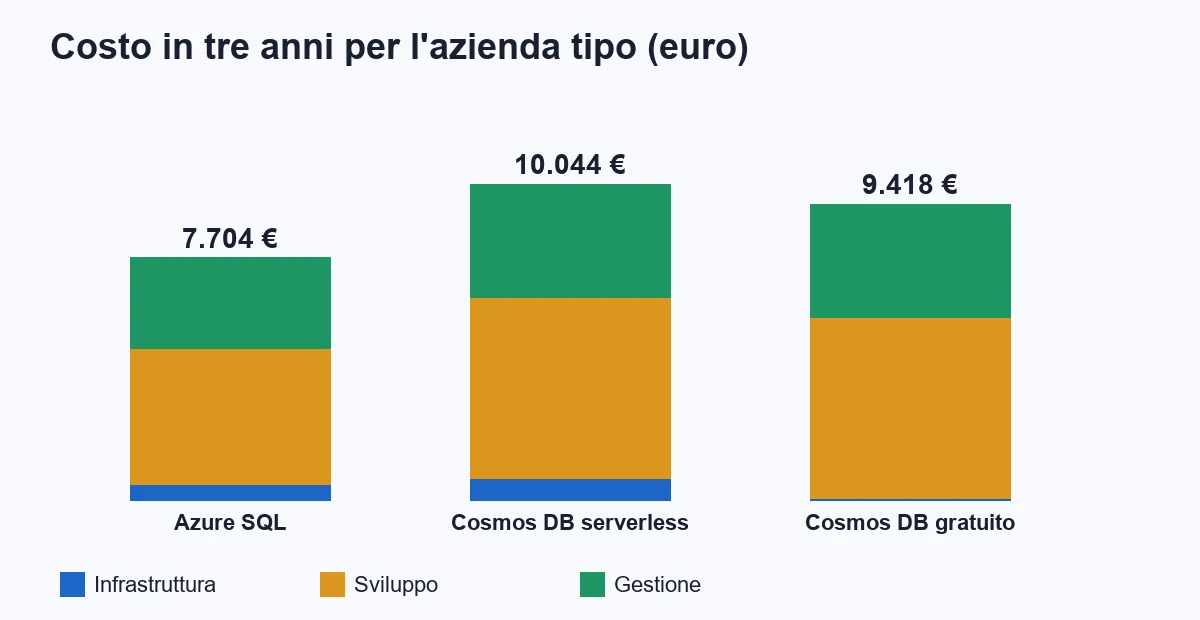
The honest comparison starts from one question: for this load, how much does each road really cost over three years, counting the work too?
Starting assumptions: the "events and plant status" part is new, and each of the three roads covers it. Work is at 480 euros a day. The day estimates are those of a team that knows the tool.
| Item | Azure SQL (S0, about 14 euros a month) | Cosmos DB serverless (about 19 euros a month) | Cosmos DB free tier (about 2 euros a month) |
|---|---|---|---|
| Infrastructure over 3 years | 504 euros | 684 euros | 58 euros |
| Initial development | 9 days, 4,320 euros | 12 days, 5,760 euros | 12 days, 5,760 euros |
| Operations (days over 3 years) | 6 days, 2,880 euros | 7.5 days, 3,600 euros | 7.5 days, 3,600 euros |
| Total over 3 years | about 7,700 euros | about 10,000 euros | about 9,400 euros |
The result must be stated clearly: for this load, at this scale, Azure SQL costs less. About 2,300 euros over three years, because the team already knows it and because Cosmos DB requires more modeling work.
So why did I choose this example? Because the real calculation is not made only today. There are three things the table does not show.
- Growth. With 900 sensors becoming 9,000, the load grows tenfold. On Cosmos DB the RU grow linearly and there is no migration to do. On SQL you move to a much higher price tier, or start splitting tables by hand.
- The shape of the data. If the sensors become three types, then ten, each with its own fields, in SQL every type is a schema change, in Cosmos DB it is one more field in the document.
- Irregular load. If the sensors send data in bursts (after a network outage the readings of three hours arrive at once), a provisioned database struggles and Cosmos DB in serverless or with autoscale absorbs it.
If none of these three things is in your foreseeable future, the best choice is the database your team knows. It is a boring answer, and often the right one.
One last alternative worth a line: PostgreSQL with JSON columns covers many "document" cases well, costs like a relational database and is queried with SQL. For those with mixed data (partly relational, partly document) it is often the best compromise, and it should not be excluded just because it is "not NoSQL".
Which mistakes to avoid when adopting Cosmos DB?
The mistakes I see most often, and that cost the most, are eight.
- Using it as if it were SQL. Small documents, one per table, linked by identifiers and put together with several calls. You lose speed and double the cost.
- Choosing the key for the reports. The key is chosen for the requests you make most often, not for Monday morning's. The report is solved another way.
- Reserving out of fear. Ten thousand RU/s "to be safe" are 540 euros a month. Start with serverless or autoscale, measure for a month, then decide.
- Ignoring 429s. Retried in silence, they hide an application at its limit. Until the day the limit is exceeded for a whole hour.
- Creating a client for every request. I see it in one application out of two. The client is heavy to create and must be reused.
- Documents that grow without limit. An array collecting every change for years will sooner or later reach 2 MB. Put a cap on it, or move it to a separate container.
- Replicating in several regions "because it is there". Doubling the bill is guaranteed, the benefit often is not.
- Having no plan to reload the data. A container with the wrong key is recreated and recopied. If you have not tried the procedure beforehand, you will try it at the worst moment.
One rule sums them all up: in Cosmos DB every modeling choice has a monthly price. Unlike a server, where a bad idea costs you time, here it costs you money for every hour it stays in production. That is why it is a database that rewards whoever measures.
How do you try it in sixty days, without risk?
You do not need to decide right away. You can try Cosmos DB on one part of the system, at almost zero cost, and stop if the numbers do not add up. The plan I propose:
- Days 1-5: the numbers. Fill in the typical company table with your data. The result is the share of requests with a known key and the RU per day. If the share is under 60 percent, stop here and you have saved.
- Days 6-10: the perimeter. Choose a single area with the right profile: events, sessions, catalog, notifications. Never customer master data or accounting.
- Days 11-15: key and model. Write down the ten most frequent requests, choose the key, design the documents. Have a second person review it: it is the decision that cannot be corrected.
- Days 16-30: the prototype on the emulator. Code like the above, test data, RU log. Goal: every frequent operation under 10 RU.
- Days 31-40: the real account, serverless or free. Load a month of real data. Check spending, 429s and partitions.
- Days 41-55: double writing. For two weeks the application writes to both databases and reads from the old one. An automatic comparison flags differences. If something does not add up, you find out before the customers do.
- Days 56-60: the decision. Move reads to Cosmos DB for 10 percent of users, then for all, or switch the prototype off. In both cases you have real data and not opinions.
The cost of this trial, for the typical company, is 12 days of work, that is 5,760 euros, plus an infrastructure that over the two months is worth less than 5 euros. If the answer is no, you spent the price of a wrong quote and found out in two months instead of two years.
At the end of the period it is also worth deciding the safety limits: a budget cap, someone in charge of the quarterly review and a plan to go back. Going back costs little as long as the old database is still on and updated: switching it off too early is the mistake that makes a trial irreversible.
And if the number says Cosmos DB is not your problem?
It happens often, and it is good news. If less than 60 percent of your requests know the key, if the data is full of relationships, if the load is that of a business application with a few hundred users, Cosmos DB is not for you. A well-kept relational database costs less and your team knows it.
If the problem is a table of 190 million rows slowing everything down, check the indexes, the table partitioning and the archiving of old data first. Often a weekend of work pushes the problem back three years, at a fraction of the cost.
If cloud cost is your problem, the discussion is another one and is solved first with the basics: scale to zero what is not needed, merge small databases into one, close forgotten resources. I talk about it in how to reduce Azure App Service costs and, for a small company, in Azure for Italian SMEs: reduce costs and scale without a cloud team.
If you have read this far, you probably have in mind a quote with more zeros than necessary. Before signing, take your numbers: writes and reads per day, document size, share of requests with a known key, regions really needed. Half a day of work, and you know whether you are talking about 19 euros or 1,095.
If you want a second look at your case, write to me. And when the right solution is a business application built around the way you work, with a data store chosen for your numbers and not for the fashion of the moment, let's talk about custom software.
Frequently asked questions
It is a database managed by Microsoft that stores JSON documents and spreads them across partitions based on a key you choose. You pay in request units (RU), that is, by the operations you run, and it can replicate data to several regions. It is not a faster SQL Server: it is built for a different kind of access, the one by key.
It depends on the billing mode. For a load of 1.7 million RU a day and 32 GB, orders of magnitude: about 2 euros a month with the free tier, 19 in serverless, 24 in autoscale, 29 with 400 RU/s of provisioned throughput. The same application with 10,000 RU/s in two regions costs about 1,095 euros a month.
When more than 90 percent of requests already know the partition key, documents are self-contained and the load grows or is irregular. Below 60 percent of requests with a known key, or with many relationships between entities, a relational database costs less and your team already knows it.
It is the document field Cosmos DB uses to spread data across machines. It decides how much queries cost and how well the load is balanced, and it cannot be changed later: to use another one you have to create a new container and copy everything. A wrong key, such as the date, concentrates traffic on one partition.
Start from session, which is the default: whoever writes always reads what they wrote, and the cost is the same as the others. Strong doubles the RU on reads and raises latency. Change only if a concrete case requires it.
Rarely. A European region serves Italian users well with 10 to 20 milliseconds of latency and a stated availability of 99.99 percent. Every added region multiplies the cost, so you add one only when a number (distant users, cost of downtime, legal obligations) justifies it.
Leave your details in the form below