

If you have been working with Microsoft technologies for a long time, you are unlikely to be familiar with Team Foundation Service (TFS); However, it is possible that you have never heard of Git. In this article I'll tell you why you should use these two tools together and what benefits you're missing out on by not doing so.
What is Team Foundation Server (TFS)
TFS is a server for managing the software life cycle starting from the collection of requirements, moving on to code development, testing, up to the commissioning of the functionality into production, and then continuing with maintenance.
The real advantage of this product is that it allows you to connect all these phases, giving visibility, for each event that occurs regarding a functionality, of the sequences of operations that occurred on it and that led to that precise state.
Let me explain with an example. Imagine a bug in production. With TFS you can easily trace the requirement to which that bug refers and thus arrive at the piece of code originally developed to implement it, including all possible changes. Not only that: you can find out if the same bug has already appeared in the past (regression) and the tests (automatic or otherwise) that were performed to verify it. In short, by knowing the entire history of the functionality and the bug, the developer has all the tools available to quickly identify the malfunction and correct it with the peace of mind of not introducing other bugs during the fix. Once the code has been updated, TFS can notify testers that a new release of the software including the corrected anomaly is ready to be subjected to quality testing and subsequently released into production if the tests are successful.

Between 2018 and 2019, TFS changed its name becoming Azure DevOps Service in the Cloud version, and Azure DevOps Server 2019 in the On-Premises version.
What is Team Foundation Version Control (TFVC)
The first version of TFS released in 2006, introduced a new source code versioning management tool developed specifically for this product: Team Foundation Version Control. TFVC is the product that effectively replaced what was the Microsoft tool for managing source code up to that point: Source Safe.
TFVC could be used without the other TFS services, but it achieved the greatest advantages if integrated with the latter. Why? I'll tell you right away. Thanks to the integration of TFS, TFVC can be extended with plugins (checkin policy) that refuse to check in your local code on the server if certain requirements have not been met. For example, TFVC can block the checkin if the developer has not associated the requirement that that code implements with the checkin: in this way there is a guarantee that each requirement or bug is related to the history of source code modifications.
Today TFVC is no longer the only possible choice as a source control system for use with Azure DevOps. In fact, native Git support was introduced in TFS 2013.
What is Git
Git is the most popular source code versioning server and was born by Linus Torvalds, the creator of Linux.
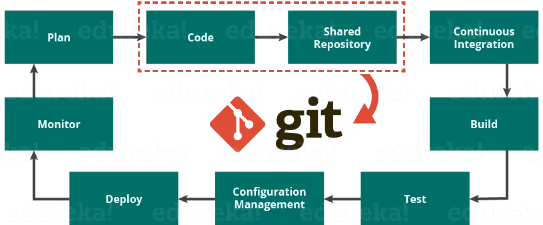
It is the most widely used system of all and is the basis of all the major cloud source code hosting services. In fact, Git owes its popularity (also) to GitHub, hosting of software projects that has always paid particular attention to open source initiatives. GitHub is used by the largest companies on the planet such as Google, Microsoft Apple, Nasa, Facebook and Twitter and was acquired in 2018 by Microsoft: this is a clear sign of how Microsoft focuses on open source.
The differences between TFVC and Git
Most other code versioning tools on the market, including TFVC synchronize local code contained in a folder with the server. Code versions are created only on the server.
What differentiates Git from all the others is that code versioning takes place locally; the remote server is used only to synchronize and integrate the local repositories, managing any conflicts. If you are curious, you will notice that every directory on your PC that contains a Git repository includes a ".git" directory: here you will find all the historicized files of the changes and the metadata to reconstruct the situation at every moment of the project's life. Precisely because of this peculiarity of the existence of a local repository, the terminology of Git is very different from that of TFVC (and other similar products). In fact TFVC has a vocabulary in which there are two main operations:
- The check out takes the latest version of the source code on the server and updates the local code, managing any changes and notifying possible conflicts
- The check in takes the changes made to the local code and sends the changes to the server which - in the absence of conflicts - are historicized generating what is called a change set
Git has broader vocabulary. The changes are versioned locally through an operation called “commit” which generates a unique identifier of the change set of the modification. Through this identifier (whose format is a hash) it will be possible to refer to and find the set of changes both locally and on the server (subject to synchronization).
Every time we want to synchronize the local repositories with the remote one we must perform an operation of "push". In a dual manner, the operation "pull” transfers remote changesets not present in the local one, updating the working directory with the current situation. During the operation ofpush"Git is very restrictive because it proactively blocks the operation if your code is not aligned with everything on the server.
Why use Git?
The Git terminology is certainly less usual than what we have been used to in the past, and at first glance it may seem more complex, generating an initial feeling of confusion.
Once the first hurdle has been overcome, Git offers countless advantages. For example, if you develop a project or part of it completely independently and need a repository to keep the history of your changes, using Git and its local repository allows you to maintain all the advantages of a versioning system for your code without installing a remote server or purchasing hosting, thus saving on infrastructure.
In this scenario what do I do for backups?
Simple: if you already use remote disk services like Dropbox or Google Drive, just add your folder under the control of these services and your code will be safe. In fact, I remind you that a Git repository, including the configuration and the entire history of changes, is entirely contained in your project directory.
Let's continue with the advantages.
Having a local repository allows you to carry out all the tests you need without stress and with the peace of mind that - if the final result does not satisfy you - you can return to the previous state with a few simple steps just as if you had a time machine in your hand.

Imagine you need to do a complex merge or partial recovery of a portion of changes made previously or simply want to try a Git command. The only care you need to take is not to push the changes to the remote server - if you have one - until you are sure of the changes. In all other cases, operations performed locally are easily recoverable.
In other scenarios (spikes, refactoring tests, exploratory code...) you may need to create a branch locally and subsequently decide whether and when to create it remotely on the server. In fact, you could decide to promote the code by consolidating the changes on the main branch and delete the created branch without leaving any trace on the server or you could delete the branch locally without any consolidation operation because you decided that the exploration of the code you attempted did not lead to any significant results.
Ultimately Git is a product with a higher initial learning curve but extremely powerful. Once learned in depth and its facets are known, it allows you to perform very powerful operations as well as having detailed and timely control of the present and past state of your repository.
The advantages of Git in continuous deployment scenarios
As we have seen, TFVC must be connected to a server to work. Otherwise Git does not require a remote server and can be used as a local source code versioning server.
There is actually another big advantage of Git: you can synchronize a local repository with multiple remote servers.
Although at first glance this may seem like an unusual feature, it is very convenient in continuous release environments. Imagine that you have a remote source code development repository that you use to develop and integrate project features. Now imagine that you also have a second remote repository used only for deployments. Why?
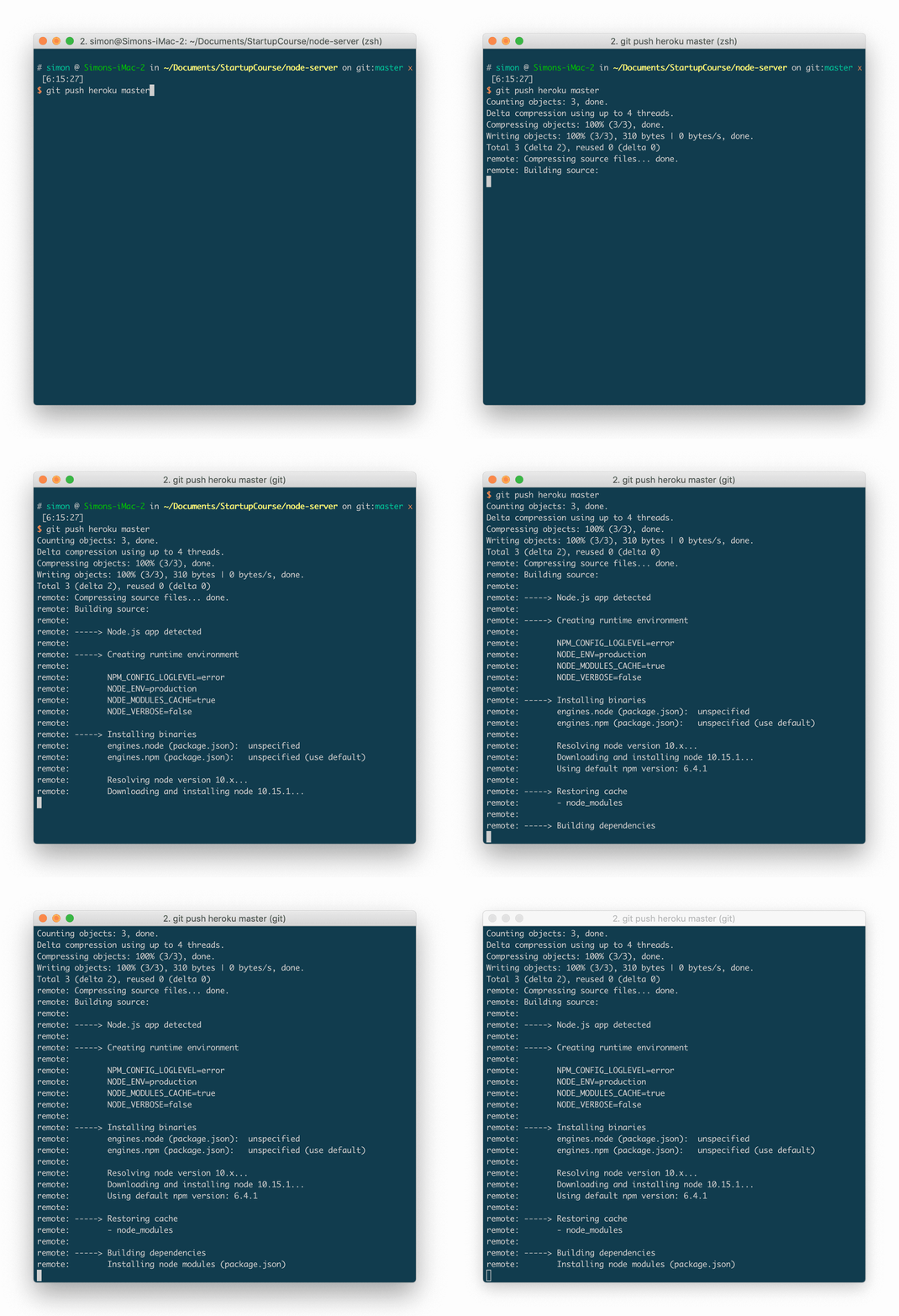
Whenever a version of the code is ready to be released in an environment (pre-production or production), the developer pushes it to the second remote git server which triggers a trigger. An automatic procedure for deploying the code contained on this remote server is connected to the fryer.
Result?
You have a remote server for the daily development of the code on which developers can freely store their changes and a second server which will be updated only when you want to launch a new deployment process. Nice right?
I'll tell you more, many cloud computing hosting services work exactly with this mechanism: Heroku is one example but there are many others.
Do you need to learn all the features of Git?
I told you about some features of Git and some scenarios you can cover with this tool.
Do all developers need this level of control? Above all, is it necessary to deal with this complexity at all times?
No, often the average developer on your team will only have to perform the operations he did with TFVC (checkin and checkout on the server), leaving the need to perform particular operations to occasional cases.
In addition to being very powerful, Git has another great advantage: it is extremely configurable. For example, Git provides an alias command that allows you to create custom commands for you and your team. Aliases are generally used to give simple and easily remembered names for complex operations formed by a chain of single commands, or for operations that the developer performs in his routine and wants to recall very quickly.
Let me explain with an example.
Imagine you have a team that has always used TFVC and you want to migrate them to Git. You can create aliases to let developers use the same commands they would use with TFVC making the transition less traumatizing. As? Simply create an alias called "checkin" which will sequentially call the Git commands "commit" and "push" or a "checkout" command which will call the "pull" command.
Easy right?
As you can see, Git is so chameleon-like that it is powerful and complex only when needed and simple during your daily routine.
Git and Visual Studio
I told you about how to use aliases to make Git more familiar to those coming from TFVC. It's very likely that the developers on your team already use Visual Studio. In this case there is good news for you: you don't need to create any alias. Team Explorer is the Visual Studio extension for connecting to a source code versioning system. If you've used TFVC in the past with Visual Studio you already know it.
Team Explorer is perfectly compatible with Git and allows you to take advantage of all the features of the daily use of this tool. Furthermore, Team Explorer tries to make the experience of using TFVC and Git as similar as possible by helping and making migration natural thanks to aliases.
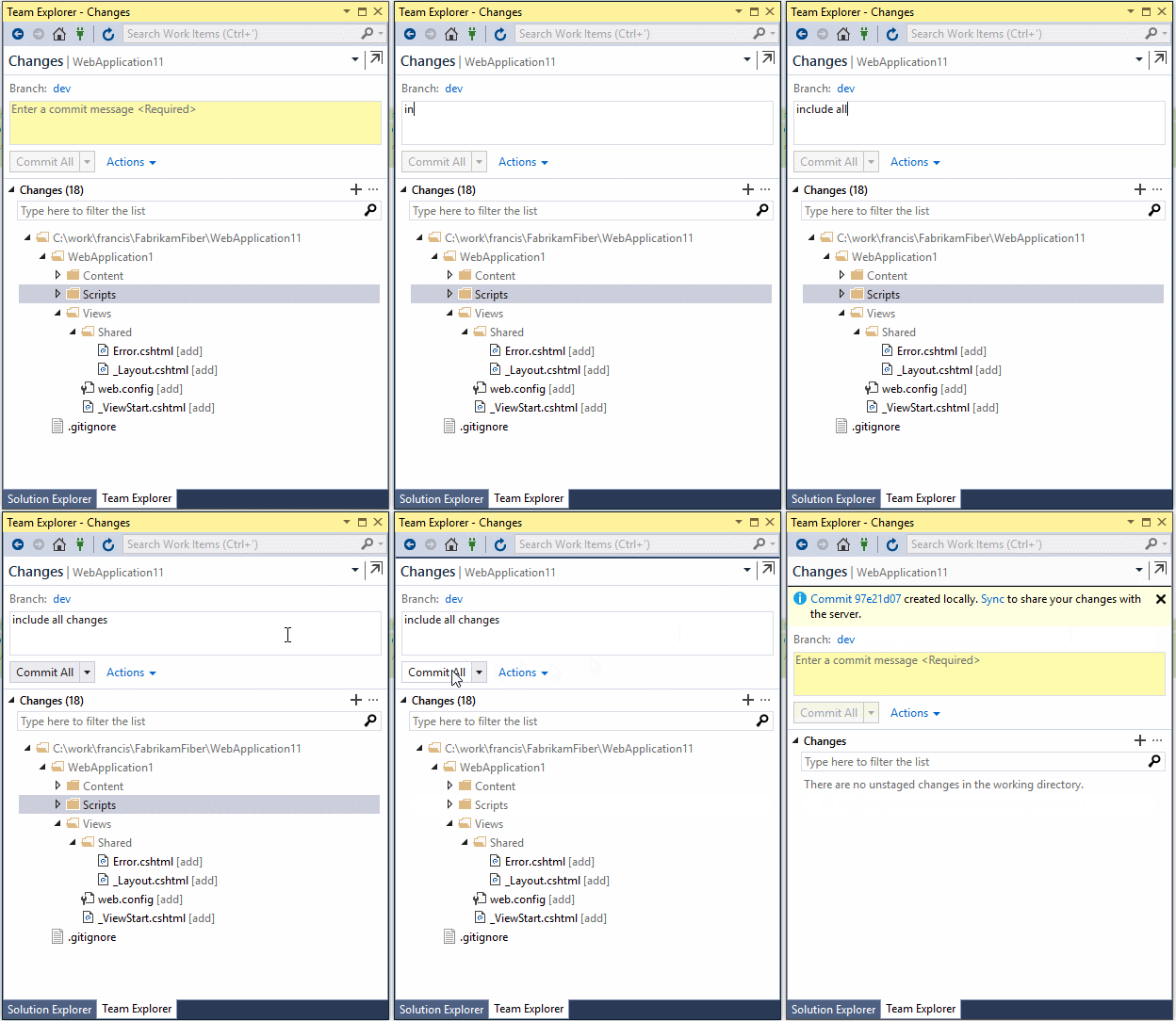
What do I do if I need Git features not present in Team Explorer? Don't worry, you can always switch to the command line to perform more complex operations or where greater command granularity is needed.
Once the command line operations are completed, all the changes made will be visible from Visual Studio and Team Explorer.
Again I showed you how we can use Git with a simple tool like Team Explorer that developers are used to and taking advantage of Git's advanced features only when needed.
When to choose Team Foundation Version Control or Git?
We have seen that Git is much more powerful and versatile than other similar tools, but despite a greater underlying complexity we have the tools to use it in a similar way to how we are used to with TFVC. Put in these terms, one wonders whether it still makes sense to continue using TFVC today.
In general, no, but there are some scenarios that need to be carefully evaluated.
If we have a multi-year project with which we use TFVC, perhaps based on a development process consolidated over the years and which largely uses customized checkin policies, then it makes sense to maintain TFVC.
In addition, it is convenient to maintain TFVC if we have projects that we modify very rarely and on which we only do some small maintenance operations without evolving.
The situation changes if we plan to start a new project. In this case it might be worth taking the opportunity to use git, perhaps using a pilot project to get acquainted with this new tool.
When changing technology there is always an initial cost for developers. Although I have shown you how to lower this cost, even the transition to Git does not escape this rule; Git not only introduces a new technology, but potentially also a new development methodology.
In fact, it must be kept in mind that Git, being a newer product than the others, is also more suitable to be used for practices
Development and organization of team tasks consolidated in recent years. An example of this is the "feature branch": it is a technique that requires a new branch to be created starting from the main one, for each new feature that needs to be developed. At the end of feature development, the workflow requires the developer to make a “pull request” (PR). A PR is a code review request by a team member who, in case of positive validation of the code in terms of design and adherence to the team guidelines, will conclude the feature development process with the merge onto the main branch of the project, integrating with the rest of the developed features and creating a new version ready for a possible integration test.
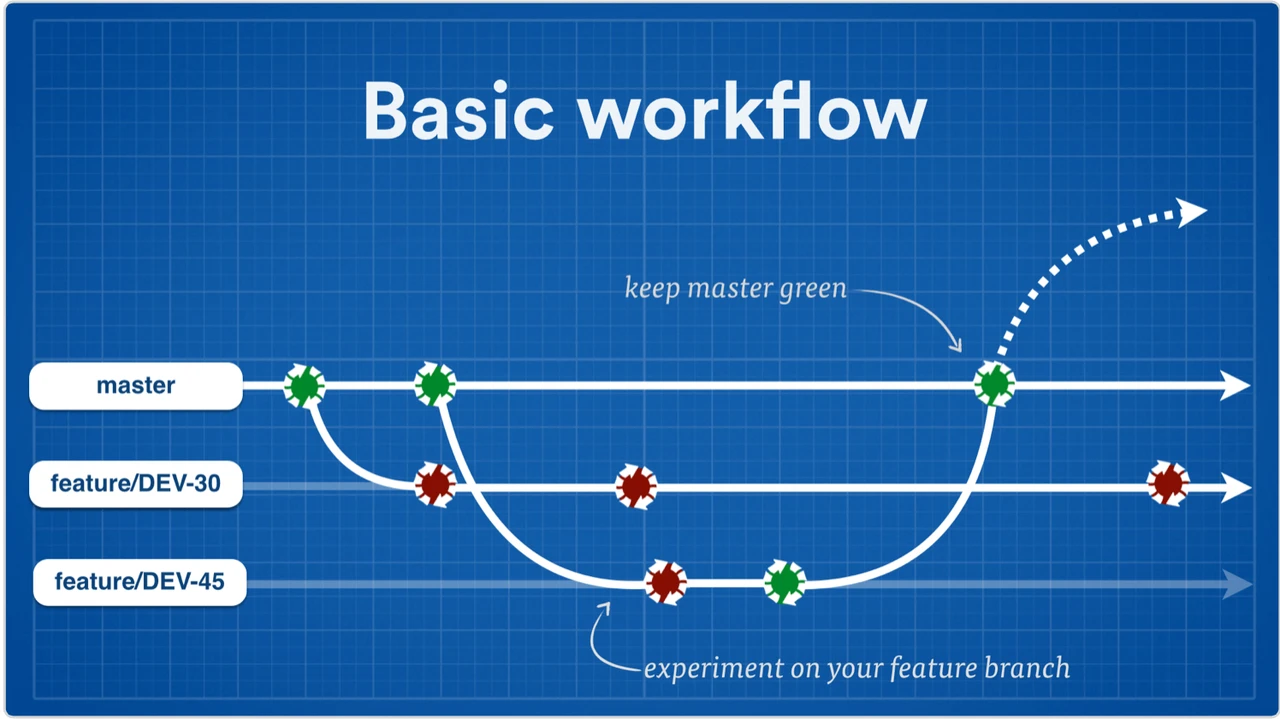
I want to point out that with TFVC it is not possible to exploit the pull request mechanism, unlike what is possible using Azure DevOps with Git.
Ultimately, the advice is to use git in all cases outside of the legacy scenarios described above. It is important to consider the widespread diffusion of Git also and above all in areas outside the Microsoft world. In fact, consider that for developers who are entering or have recently entered the working world, Git has become the de facto standard tool for code versioning.
Do you know what that means?
If you have to find new resources for your team, from today it will be increasingly easier to find and hire new developers who know this technology and it will be increasingly complex (and expensive) to find as many for TFVC.
In our courses, as in the projects we develop every day, we use Git as a basic tool for versioning and code distribution. A solid project with controllable costs and a team that works in an organized and stress-free way comes from development methodology and the tools used for this purpose are a crucial choice. Precisely for this reason, if you want to know how to integrate Git with Azure DevOps into your everyday projects and within your team, contact us now to participate in the Project Management course.
Hurry because we only block a few days every year for selected companies, because first of all we are developers working on real projects.
Leave your details in the form below