What are the most important new features in C# 14?
C# 14, released with .NET 10, introduces several features that improve daily developer productivity:
- field keyword: eliminates explicit backing fields in properties with custom logic, reducing boilerplate by 30-40% in property-heavy classes
- Extension members: allows defining properties and operators as extensions, not just methods, to extend third-party types naturally
- Extended nameof: enables referencing private members in reflection and test contexts, eliminating hardcoded strings in tests
- Implicit index access in collection initializers with end-relative indices
- Pattern matching improvements on lists and sequences, with end-element capture
- Null-conditional assignment with simplified syntax for nullable object chains
- Improved overload resolution for async lambdas and target-typed expressions
The feature with the best effort/benefit ratio for most teams is the field keyword, which can be adopted incrementally without risk and without modifying the semantics of existing code.


Every new version of C# carries an implicit promise.
The promise of letting you write code more clearly, more quickly and, above all, with less mental friction.
Not all new features carry the same weight.
Some genuinely change the way you think. Others make no noise, but save you time every single day.
And that is precisely where the difference lies between an interesting release and a useful one.
C# 14 falls into this second category.
It does not arrive to turn everything upside down. It arrives to clear away a series of annoyances that, over time, have become almost normal.
Those small frictions that look negligible in a single file, but that in a living codebase, with people, reviews, deadlines and maintenance, turn into unnecessary weight.
This article has a precise goal. To help you understand which features of C# 14 truly deserve attention if you work on real projects, with a real team and with concrete responsibilities.
You will not find a dry list of features. You will find a reasoned reading, useful for deciding what to adopt, when to do it and with what priority.
Because the point is not to learn new syntax just to say you are up to date. The point is to understand whether that new feature helps you write more readable code, reduce errors, streamline reviews and grow the project without increasing chaos.
That is the criterion that matters when code is not an exercise, but an asset that must hold up over time.
It is also worth keeping in mind an aspect that is often overlooked.
The features that arrive in C# are not the result of sudden inspiration.
Behind them lie long discussions, public feedback, trials, corrections and comparisons involving an enormous community.
This means that, very often, behind a small new feature hides a recurring problem that thousands of developers have genuinely encountered.
For those working in mature .NET environments, the topic is even more delicate.
In many Italian teams the question is never "can I use this new feature?". The real question is "does it make sense to introduce it without creating friction in the group, without breaking healthy habits and without increasing risk on the codebase?".
C# 14 seems written with exactly this sensitivity in mind.
Many of the most interesting new features can be introduced gradually, without invasive rewrites and without turning the upgrade into a parallel project.
If you are looking for a guide that helps you make sensible choices, and not just chase the latest trend, you are in the right place.
Because keeping up to date only makes sense when it makes you more solid, clearer and faster. Not when it adds more complexity dressed up as innovation.
The field keyword in C# 14: no more explicit backing fields in properties
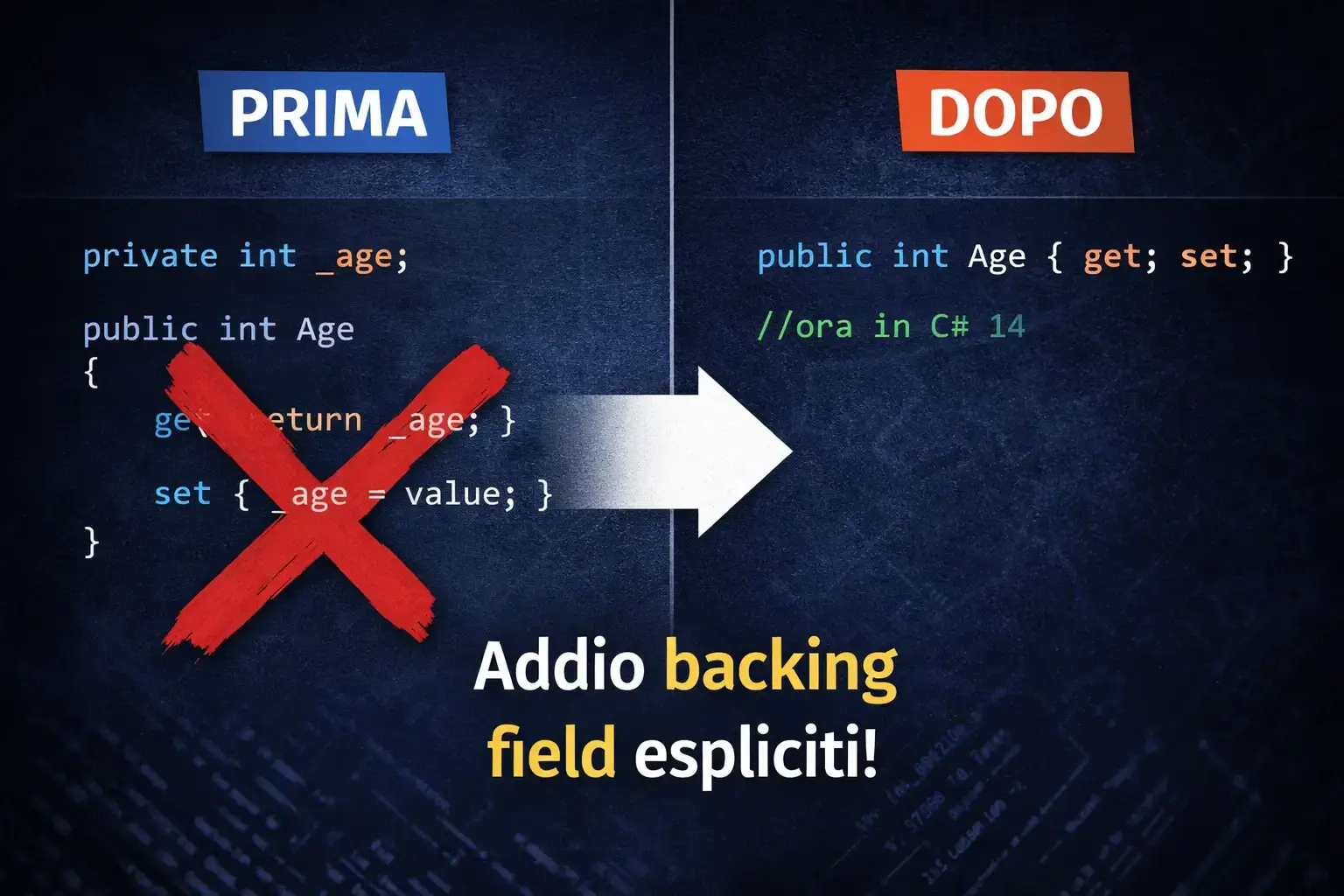
If there is one new feature in C# 14 that many developers will start using almost immediately, it is this one.
Not because it is flashy. Not because it makes an impression in a demo. But because it touches one of the most repetitive points in everyday code and lightens it without unnecessary side effects.
For years, every time a property required even a minimum of logic in the getter or setter, you were forced to also declare a dedicated private field.
It was a normal mechanism, certainly, but also a repetitive one.
In classes rich with properties, especially in enterprise projects, this translated into longer files, more scattered and less readable.
It was not real complexity. It was just clutter.
More private fields mean more names to manage, more possibilities for inconsistency, more attention required during reviews.
A wrong reference, a minor difference in a name or a moment of inattention in the setter was enough to introduce a subtle bug. Not serious on paper, but annoying enough to steal time as the project grows.
The problem was not merely aesthetic. In practice, the traditional approach with backing fields generated three types of recurring issues:
- More visual noise in the file, with private field declarations that added no real semantic value.
- Greater chance of trivial mistakes, such as assignments to the wrong field or minor differences in names.
- Slower code reviews, because the reader must follow the link between the property and the private field.
With C# 14, the field keyword arrives, allowing you to refer directly to the compiler-generated field inside the property.
In practice, you keep the advantage of a property with custom logic, but without having to manually declare the corresponding backing field.
The code stays more compact, the property's responsibility is all right there in front of your eyes and reading becomes more natural.
This changes little for those who look at the language only on the surface.
It changes a great deal, however, for those who spend their days inside real classes, with dozens of properties, validation rules, initial values and state checks.
In these contexts, cutting noise means seeing what matters more quickly. And when you see better, you make fewer mistakes.
There is also a less obvious, but very important, advantage.
There are two ways of constructing a software design: one way is to make it so simple that there are obviously no deficiencies, and the other way is to make it so complicated that there are no obvious deficiencies.Tony Hoare - computer scientist (1934 - 2026)
When a property contains all of its logic in the same place, understanding is more immediate even for those who arrive later.
There is no need to jump up and down in the file to understand which field is involved, where it gets its value and whether the validation is consistent.
Reading gets shorter.
And in serious projects, shortening reading time is a concrete form of productivity.
Naturally, there is a rule to know.
field is a contextual keyword, so it behaves as a special word only inside getters and setters.
In the rest of the code, if you have a variable or member with that name, behavior stays normal.
If, however, ambiguous cases exist in the class, the compiler signals them.
This is good news, because it prevents silent surprises and lets you act immediately.
The beauty of this new feature lies exactly here.
The benefit is immediate, the risk is low and adoption can be gradual.
You do not need to stop the team to migrate everything. You just need to introduce it when you touch a property, when you are already improving a class or when you have in front of you a piece of code you know you want to make clearer.
It is one of those new features that does not require an evangelization effort. It earns appreciation on its own, because it genuinely lightens the work.
Another aspect of great interest to those working on concrete applications concerns compatibility with tools already present in the project.
If you use Entity Framework Core, the most popular serialization components or libraries that observe code through reflection, the general behavior does not change.
From the running program's perspective, the generated field remains a private field.
The public contract of the property is not altered, and this greatly reduces concerns during the adoption phase.
The only real concern involves libraries that look for private fields using very strict naming conventions.
In those cases it is wise to do a targeted check, because the name generated internally by the compiler does not follow the most common manual conventions.
Nothing dramatic, but the usual rule applies: test on a real case first, then extend the choice to the rest of the project.
There is also a useful detail that often falls to the background. The field keyword works well with property initialization.
This means you can handle the initial value and control logic in the same declaration, without constructors written only to set a starting value. The result is more collected code, more readable and closer to the original intention.
If we were to sum up the value of this new feature in a single idea, it would be this: less unnecessary structure, more genuine clarity.
And that is exactly what you need when you want to grow a codebase without turning it into a place where every change costs more than it should.
At this point the question is not whether C# 14 improves your code. The question is: are you really writing code that holds up over time, or are you just making things work today?
If you want to take the leap and start writing C# in a structured, readable and professional way, take a look at the C# Course.
It is designed to take you beyond syntax and make you think like a developer who builds software, not just code.
Extension members in C# 14: properties and operators as extensions of existing types
Extension methods have been part of the language for years and, in many .NET projects, are now a constant presence.
They have made many calls more natural, they have supported the entire LINQ approach and they have allowed enriching types that could not be modified directly.
Yet they had a limitation that almost everyone has encountered sooner or later: you could add methods, but not properties or operators.
It might seem like a detail. In reality it is not at all.
When a piece of information reads like a characteristic of the type, forcing the code to express it as a method makes everything less natural.
It is not just a matter of style. It is a matter of consistency between what the code does and how it tells the story.
A property read as a method often immediately gives the feeling of a workaround.
With C# 14 this limitation is finally overcome.
Now you can extend existing types with properties and operators as well, using a dedicated block that organizes these elements in an orderly way.
The biggest advantage, beyond the syntax, is that the interface of your code becomes more expressive.
Types seem to better speak the language of the domain in which you are using them, even when you cannot modify their original definition.
In enterprise projects, this possibility opens up very useful scenarios.
In particular, extension members solve three very common situations in real projects:
- Extending types from external libraries without having to modify them or create additional wrappers.
- Adding computed properties that make sense in the application domain but not in the original class.
- Keeping architecture layers separate, preventing the domain model from acquiring responsibilities belonging to other layers.
Think of types from an external library, sealed classes you cannot modify, or shared components you prefer not to alter so as not to introduce unwanted dependencies.
Before, you had to choose between methods with longer names than necessary, additional wrappers or readability compromises. Now you have a cleaner path.
The benefit is felt most strongly when you want to enrich a type in a specific layer of the application.
For example, in the presentation layer, the application layer, or a specialized area of the domain.
Instead of loading the original class with responsibilities that do not belong to it, you can add exactly what is needed where it is needed.
This keeps boundaries sharper, which is an enormous advantage as the project grows and the number of people increases.
This new feature is also interesting because it brings the code closer to the language the team uses when thinking.
A property read as a property is more immediate.
An operator defined where it makes sense is more natural. And when code seems to speak the same language as the business concepts, comprehension accelerates.
It may seem like a nuance, but it is one of those details that change the quality of reviews and the speed with which new developers find their bearings.
It should also be said that this feature does not force anyone to rewrite the past.
Traditional extension methods remain valid.
They continue to work and continue to make sense in many cases. This is a good thing, because it avoids forced migrations and gives the team the freedom to adopt the new style where it brings a real advantage.
Extension operators: extending operator semantics on third-party types
Here the discussion becomes even more interesting, especially for those working with rich models and domain concepts that deserve to be treated as genuine elements of the project's language. In many codebases there are types representing quantities, amounts, measurements or states. They often come from shared libraries or external packages, so you cannot modify them freely.
Before C# 14, if you wanted to make the way these types were combined or compared more natural, you would have been forced to invent lateral solutions. Static methods, service classes, wrappers, internal conventions. All possible roads, of course, but none truly elegant.
To better understand the difference, it can be useful to compare the solutions developers have used until now with the approach introduced by C# 14:
| Approach | How it works | Main limitations |
|---|---|---|
| Static utility methods | Logic defined in a separate class | Code becomes less natural to read |
| Wrappers or service classes | The type is encapsulated in a new structure | Increases architectural complexity |
| Internal conventions | The team defines implicit rules for common operations | The meaning is not explicit in the code |
| Extension operators (C# 14) | The operator is defined as an extension of the type | More natural code, closer to the domain |
With extension operators, you can add meaning without polluting the original type.
This is valuable when you want to keep a typès identity separate from the logic that only makes sense in a specific context.
In practice, you can keep the source clean and, at the same time, offer your code a more natural form, more closely aligned with the problem you are solving.
The real value is not just technical. It is conceptual.
It lets you model better, with less noise and with greater precision. And when the model improves, the surrounding code also tends to become more readable.
Coexistence with traditional extension methods
Here a mature choice is needed.
Classic extension methods are not going away, and it would make no sense to treat them as if they were suddenly outdated.
The point is not to replace everything. The point is to avoid an inconsistent codebase where each developer uses a different style based on personal taste.
The smartest thing to do is establish a simple internal rule.
For example, use the new style when it genuinely adds clarity, especially for extended properties, and leave traditional methods where they already exist and are well understood by the team. This way you avoid unnecessary revolutions and introduce change where it brings concrete benefit.
It is also a matter of technical leadership. A team does not need more syntactic freedom if that freedom generates disorder.
It needs clear conventions that make code more predictable. If you adopt this new feature with discernment, you can gain expressiveness without increasing noise. And that is exactly the right direction.
Extended nameof in C# 14: safe refactoring on private members
Those who have really worked with tests, reflection-based checks or messages built from member names know the problem well.
Strings written by hand seem harmless as long as everything stays still. But as soon as you rename a member, those strings become silent landmines.
They do not complain right away. They stay there, still, waiting for the worst moment to make you lose time.
The weak point is always the same. When the name of a field, method or property is written as plain text, it stops being truly under the compiler's control.
It becomes an isolated value that refactoring does not fully protect. And in a living project, where names change to improve clarity and consistency, this creates unnecessary friction.
The nameof keyword was born precisely to solve this problem. And it has done it well.
But until now there was an annoying barrier: members not accessible in the current context remained out of reach.
In practice, this means that in many tests you were still forced to use manual strings exactly in the points where you would have wanted the highest level of safety.
The change becomes clearer if we compare the behavior of nameof before and after C# 14:
| Situation | Before C# 14 | With C# 14 |
|---|---|---|
| Reference to public members | Supported | Supported |
| Reference to private members in other contexts | Not allowed | Allowed to obtain the name |
| Reliability during refactoring | Limited in some tests and tools | Safer and more consistent |
| Use in unit tests | Often requires manual strings | Can use nameof |
With C# 14 this limitation is reduced in a very useful way.
Now you can refer to members that would not normally be accessible, at least when the goal is to obtain their name.
Not the value, not access to the content, but the name.
It seems like a small difference. In reality it is enormous for the quality of refactoring.
The advantage is simple to understand.
Programs must be written for people to read, and only incidentally for machines to execute.Donald Knuth - computer scientist and mathematician (1938 - living)
If you rename a private field, even the references built with nameof are updated by development tools. This allows you to keep tests, messages and checks aligned without leaving disconnected strings scattered throughout the project.
It is one of those improvements that makes no noise, but saves you from an entire class of annoying errors.
In unit tests, for example, this new feature has a very concrete impact.
When verifying error messages, log details or behaviors that reference an internal name, having a robust reference is far safer than relying on hand-written text.
And when working in a team where refactoring is frequent, this safety becomes even more precious.
There are also other contexts where the benefit is felt.
Validation systems that build detailed messages. Traces that annotate the use of certain members. Control mechanisms that reconstruct the path of a change.
In all these cases, reducing the number of fragile strings means making the project more resistant to change.
It is important to clarify one point, because misunderstandings often arise here.
The new behavior of nameof does not weaken encapsulation.
It does not allow you to read or write private values from outside. It only allows you to obtain the name safely.
This is a substantial difference, and it is also the reason why this new feature is useful without being dangerous.
In practical terms, this is one of those features that do a mature codebase good.
They do not make you write more code. They make you write less fragile code.
And when the project grows, this is a form of quality far more important than it might seem at first.
The point is not knowing nameof. The point is whether you are building code that holds up when everything changes.
Because that is where the difference shows: between those who write code that works today and those who build code that keeps working six months from now.
If you want to stop chasing invisible bugs and start working with genuinely solid code, the C# Course gives you a clear method for doing so.
Implicit index access in collection initializers: end-relative indices at initialization time
This is a smaller new feature, but not for that reason irrelevant. In fact, sometimes it is precisely the smallest new features that improve the fluidity of the language at the points where you were previously forced to break your train of thought into two steps.
And that is exactly what happens here.
Before C# 14, if you wanted to initialize a sequence and immediately assign a value to the beginning and one to the end, you often had to choose between two inelegant options.
Either you wrote a longer structure than necessary, or you initialized and then corrected afterward, with separate assignments.
The result worked, but lost immediacy. The intention was split across two different points in the code.
Now you can express that same intention in a single block.
If the first element has a particular meaning and the last has another, you can declare it right away during initialization. This makes very common cases more readable, where the beginning and end of the data structure have a precise role.
Here are some concrete cases where this possibility makes the code clearer:
- Buffers or communication structures where the first element represents the header and the last the final check.
- Configuration arrays where the first value is the default and the last represents the fallback.
- Data structures with sentinels where the elements at the extremes have a special role.
The real advantage lies not in the syntax itself, but in the consistency it restores.
The language finally allows you to express both the start and the end of the sequence in the same place. And when code tells a complete structure in a single glance, maintenance improves.
Here again, we are not talking about a revolution. But we are talking about a small inconsistency removed. And in the long run, a language that removes inconsistencies makes daily work more straightforward.
That is what makes the difference.
Pattern matching and list pattern improvements in C# 14: complete matching on sequences

In recent years pattern matching has become one of the most interesting points of C#. Not so much out of fashion, but because it has made more readable situations that once required longer, more scattered and more fragile conditional blocks.
When used well, it lets you express an intention with less noise and with a structure that is easier to follow.
With C# 14, work on this front continues, especially regarding sequences. The most evident improvement concerns the ability to reason better also about the final elements of a list.
Before, you could work very well with the beginning of the sequence and its central part, but the ending required more attention and, in certain cases, less natural steps.
Now the language is more uniform. You can describe declaratively a structure that has significant opening elements, a variable central part and an ending with a precise role.
This makes clearer some cases that, in real code, are by no means rare.
Think of message parsing, handling structured commands, or formats where the last element has a meaning as important as the first.
The strong point of this improvement is that it reduces the risk of trivial errors. When working manually with explicit indices, especially toward the end of a sequence, it is easy to introduce small positional mistakes.
Nothing dramatic. But enough to make you lose time in pointless diagnosis. A more expressive language helps precisely to reduce this type of stumble.
There is also another less visible improvement, but very useful for those who use pattern matching in a more advanced way.
Exhaustiveness analysis on generic types is more precise.
In the past the compiler tended to be more cautious than necessary and in some cases asked for additional branches even when the logical coverage was already sufficient. This generated defensive code not always useful and warnings that ended up cluttering the reading.
With C# 14 the behavior is more refined.
The compiler better understands when the genuinely possible cases are already covered. The practical benefit is cleaner code and more useful feedback when something is genuinely missing.
For those working with richer models or with approaches that simulate unions of possible cases, this is a concrete improvement.
The value of this section is, after all, right here.
C# is not adding complexity for the sake of seeming more sophisticated. It is trying to make simpler the expression of situations that genuinely exist in code.
And when a new feature manages to remove unnecessary steps without making reading more opaque, it deserves attention.
Null-conditional assignment in C# 14: safe assignment on nullable object chains
Many developers know well the relief brought by the conditional access operator when it was introduced.
Reading a chain of potentially absent objects became much simpler. No more ladders of nested checks to reach a deep value.
Code became shorter and more readable.
There was, however, an obvious inconsistency.
You could read safely, but not assign with the same naturalness. As soon as you wanted to modify a value deep in a chain of objects that might be absent, you went back to explicit checks.
It was not the end of the world, but it broke the fluidity of the language precisely at a point where continuity would have been precious.
The difference between the previous behavior and the one introduced by C# 14 is clearer when we put them side by side:
| Operation | Before C# 14 | With C# 14 |
|---|---|---|
| Reading on nullable chain | Possible with conditional access | Possible |
| Assignment on nullable chain | Requires explicit checks | Supported directly |
| Amount of code | More | More compact |
| Readability | More fragmented | More linear |
C# 14 steps in here, and does so in a way many had been waiting for.
Now you can assign along a conditional chain, knowing that the operation will only occur if the entire necessary chain actually exists.
If an intermediate point is missing, the assignment is not executed and no exception is thrown.
The benefit is immediate especially in code that works with configurations, nested options, composite structures or models where some branches exist only under certain conditions.
In these cases code tends to fill up with repetitive checks that may be correct, but weigh down the reading and obscure the intention.
This new feature restores continuity.
It lets you say what you want to update without having to write out the whole recitation of intermediate checks every time. And when code tells the objective more clearly, maintenance also improves.
There is also a practical aspect not to underestimate.
In real projects, data structures are not always clean and complete. There are optional configurations, settings active only in certain cases, branches created on demand.
In all these scenarios, being able to assign safely reduces the number of repeated steps and makes changes less laborious.
Here too the greatest advantage lies not so much in the theoretical idea, as in the daily savings.
Fewer unnecessary lines.
Fewer chances of forgetting a check.
More immediacy.
It is one of those new features that, once used well, makes you wonder why it was not already like this before.
Overload resolution and target-typed expressions in C# 14: fewer explicit casts, smarter compiler
Not all new features are obvious.
Some work in the background, but improve the quality of code in a way that is perceived over time.
Such is the case with improvements to call resolution and context-guided expressions.
In many situations, especially when there are multiple variants of the same method or when the expected type is clear from the point where you are, the compiler can now better interpret the intention.
This means fewer explicit conversions written only to guide it and less support code that exists solely to avoid ambiguity.
In practice, the improvement concerns above all the way the compiler interprets context:
| Situation | Previous behavior | Behavior in C# 14 |
|---|---|---|
| Overloaded methods | Sometimes requires explicit casts | The compiler better infers the type |
| Object creation | Often need to specify the full type | Context guides the choice |
| Required code | More verbose | More compact |
The advantage is not just stylistic.
Every time you remove a superfluous cast or a redundant specification, you bring the code closer to the problem you are solving.
And code closer to the intention is easier to read, explain and defend in review.
In projects with many calls to overloaded methods, this greater precision helps avoid some forms of friction that, taken individually, seem small.
But summed together, they become a continuous cost.
The idea is not to leave everything to the compiler blindly. The idea is to make you write less accessory structure when the context already speaks clearly.
As always, the right criterion remains one: use the simplification when it genuinely improves clarity.
If a more explicit choice helps the team understand better, it is perfectly fine to keep it.
But where code can become more natural without losing precision, C# 14 gives you concrete help.
Tooling and IDE in C# 14: Roslyn, analyzers and development tool support
A language new feature is truly worthwhile only when the tools you use every day accompany it well. Otherwise it remains interesting on paper, but uncomfortable in practice.
Fortunately, one of the strong points of the .NET ecosystem is precisely this: when a release arrives mature, it usually also arrives with concrete support in development tools.
In the case of C# 14, this matters a great deal.
The most useful new features, such as field or extension members, give their best when the environment helps you recognize them, suggest them and apply them safely.
And it is exactly here that the compiler and connected tools make the difference.
Visual Studio 2022 and VS Code
Those working with Visual Studio find broad and immediate support.
Correct coloring, completion, conversion suggestions and more aware refactoring tools help introduce new features without having to force them manually at every point in the project.
This has a very important practical effect.
It lowers the adoption threshold.
When a new function is well recognized by the environment, the team experiments with it more willingly, understands it sooner and integrates it with less friction.
It is not just convenience. It is a learning accelerator.
Those who work with VS Code also find consistent support, and this is useful in groups where different tools coexist.
What really matters is not having the perfect editor.
It is avoiding a new feature becoming a source of misalignment between those using different environments.
From this point of view, coverage is good enough to allow for a calm adoption.
Roslyn Analyzers and new rules for C# 14
Here lies one of the most concrete advantages for teams.
Analyzers do not just serve to flag errors. They serve to guide code toward a shared standard, to surface delicate cases and to suggest improvements when the context allows.
In the case of C# 14, the warnings related to field are particularly useful because they intercept the points where there might be ambiguity.
This makes the upgrade much safer. You do not have to rely on intuition or team memory. You have an automatic check that helps you find the points to review.
Likewise, conversion suggestions can become an intelligent way to introduce new features without imposing a full migration.
This is a much healthier path compared to large rewrites, because it lets you improve where the compiler sees a real benefit and contained risk.
Hot Reload and compatibility with C# 14
For those working with rapid test cycles, compatibility with hot reloading still matters.
Knowing that many of these new features behave well during development helps you use them without changing established operational habits.
This does not mean everything is modifiable in every circumstance.
Some limitations remain, and that is normal.
But the overall picture is solid enough not to turn adoption into an operational nuisance.
And that is precisely the point.
A good upgrade must not only bring new functions. It must also respect the real workflow of the team.
When it does, the likelihood that those new features will genuinely be adopted increases greatly.
If your goal is not just to read about C# 14, but to use it well in projects that matter, this is the moment when structured guidance can make the difference.
Understanding a feature is useful.
Knowing how to introduce it into the right code, at the right time and with a team-oriented approach is worth much more.
How to upgrade existing projects to C# 14: risks, compatibility and a safe procedure

Upgrading a project to a new version of the language is almost never a purely technical matter.
It is a matter of trust.
Trust in the compiler, in the tools, in the team's maturity and in the project's ability to absorb change without producing unnecessary side effects.
The good news is that C# 14, overall, lends itself well to a prudent and progressive adoption.
Many new features are additive.
They do not change the meaning of code that already works. They do not require aggressive rewrites. They do not force you to turn the upgrade into a parallel worksite.
The most delicate point concerns above all the field keyword.
If in your codebase there are already elements with that name in sensitive contexts, the compiler may interpret some situations differently.
Fortunately you are not left alone.
The tools signal ambiguous cases and let you intervene precisely.
The healthiest way to tackle the upgrade is simple.
First, isolate the work in a dedicated branch.
Then update the project, run the build, read the relevant warnings carefully and resolve the doubtful cases.
Only after that does it make sense to extend the verification with tests and a targeted check of the system's most critical areas.
This procedure is not spectacular, but it is the one that genuinely reduces risk.
And when you work on software that must remain stable, discipline always beats enthusiasm.
Compatibility with existing NuGet packages
In most cases, packages already present will continue to work without problems.
The language in which you write your code and the compatibility of packages are not the same thing.
This means you can update the way you write without automatically breaking what you already use as a dependency.
The real caution concerns components that generate code.
If they produce constructs that conflict with the new rules, it is wise to verify that they are updated.
But here too a simple and healthy rule applies: do not go to production until you have tested the most sensitive points with real cases.
The strategy for teams on LTS versions
Many teams work with stable versions and more cautious upgrade cycles.
It is an understandable choice, often the right one too. In these contexts the question is not whether to chase every new feature as soon as it comes out.
The question is how to prepare well, without arriving unprepared when the moment for the upgrade becomes genuinely convenient.
The best strategy is to start getting to know the new features before adopting them at scale.
Do targeted tests, introduce the safest functions in the right places, understand how the team reacts and define internal guidelines.
This way, when you decide to make the full step, you will not be improvising.
You will simply be consolidating a familiarity already built up.
Enterprise adoption strategy for C# 14: what to adopt now and what to plan for
The real difference between a mature team and one that chases new features is not the speed of its updates.
It is my firm conviction that the ease and reliability with which we can understand a program depend critically on the simplicity of the relationship between the program and the computation process.Edsger W. Dijkstra - computer scientist (1930 - 2002)
It lies in the criteria it uses to choose.
Not everything that is available needs to be used right away. And not everything that is new needs to be postponed out of fear.
The key is understanding which new feature produces immediate value, which requires team agreement and which it is better to let emerge over time.
This is the type of reasoning that separates a sensible update from sterile enthusiasm.
Because code is not modernized to seem modern. It is improved to become clearer, more stable and easier to maintain.
Immediate adoption: the field keyword
If you had to choose one single new feature to introduce almost immediately, the choice would land here.
The benefit is easy to explain, the visual impact is immediate and the risk, if you follow the compiler's warnings, remains very contained.
The best thing is to adopt it in an organic way.
When you touch a class, when you improve a property, when you already have the file open for a useful change. There is no need to create a major parallel initiative.
Just introduce it where it genuinely improves readability.
This approach has a double advantage.
It lets you collect benefits early and, at the same time, avoids the resistance that often arises when the team perceives a new feature as a theoretical imposition.
Planned adoption: extension members
Here the discussion changes.
Extension members can greatly improve the expressiveness of code, but they also have a stronger impact on the style of the codebase.
For this reason they require a shared decision.
Without a clear rule, the risk is ending up with a project where different approaches coexist without a recognizable reason.
The smartest choice is to first define a convention.
Establish when to use them, where it makes sense to introduce them and where it is instead better to stay with the style already in place.
This way, the new feature becomes an improvement to the codès architecture, not a source of fragmentation.
Contextual adoption: pattern matching and null-conditional assignment
These new features can be introduced with more freedom, because they almost never require a separate strategy.
Their value emerges when the context makes them natural.
If you are already writing code that works on sequences, or if you have in front of you a chain of checks that can be lightened, then it makes sense to use them.
The caution here is not technical. It is cultural.
If the team has very different experience levels, some more compact forms of writing might be less immediate for those with less familiarity with the language.
It is not a reason to avoid them. It is a reason to introduce them carefully and with a brief internal share when needed.
The principle remains the same. Do not adopt everything at once. Adopt well what truly helps you.
That is what protects the project while making it evolve.
C# 14 and performance: what really changes in the generated code and in productivity
When a new version of C# comes out, one of the most frequent questions concerns performance.
It is a legitimate question, but it is often asked the wrong way. To answer it well, you need to distinguish two different planes.
When talking about performance in a new version of the language, it is useful to clearly distinguish two aspects:
- Runtime code performance, meaning how fast the program executes and how many resources it consumes.
- Development productivity, meaning how quickly the team can write, understand and maintain the code.
On the first plane, C# 14 should not be read as a release born to squeeze out spectacular performance gains.
Some improvements may reduce unnecessary conversions or make code in specific points more linear, but the heart of this version lies elsewhere.
It is not a race for records. It is a cleanup of the language.
On the second plane, however, the advantage is very concrete.
More readable code is reviewed better. A more visible intention produces fewer errors. A more compact structure accelerates changes.
And all of this, in the long run, has a real impact on the cost of software.
The field keyword, for example, does not magically transform the performance of an application.
But it reduces noise and the possibility of error.
Extension members do not make the program suddenly faster, but they make the internal interface of the code more natural.
And this, in a project that lives for years, matters a great deal.
If you are looking for clear performance improvements, the path remains the one it has always been: measure, profile, identify the hot spots and intervene methodically.
No language new feature can replace this work.
But a more orderly language can make that work simpler to do and easier to maintain over time.
And perhaps this is the right way to read C# 14. Not as a promise of technical miracles, but as an improvement of the daily craft.
In a serious team, this is worth a great deal.
The truth is that the problem is not C# 14. The problem is how you make decisions about the code you write every day.
Without a method, every new version is just one more thing to learn.
With the right method, on the other hand, it becomes a competitive advantage.
If you want to build that method and stop improvising, the C# Course gives you a concrete guide, step by step.
C# 14 in the context of .NET evolution: where the language is heading
To truly understand the meaning of C# 14, it is worth looking at it as part of a broader journey.
In recent years the language has followed a fairly clear direction.
Each version has sought to remove a little friction, to make intention more explicit and to reduce forms of code that exist only to satisfy a syntactic ceremony.
First came greater attention to safety and reference management.
Then strong work on data modeling. Then further improvements aimed at clarity and efficiency in more complex cases.
C# 14 fits well into this trajectory. It does not try to impress. It tries to refine.
The message that emerges is fairly clear.
The goal is not to complicate the language in pursuit of niche sophistications. The goal is to allow those who write code to focus better on the problem and less on the scaffolding.
This is an important signal, especially for those building software that must remain readable and solid over time.
Looking ahead, this direction is likely to continue.
Ever more attention to expressiveness, ever less tolerance for unnecessary noise, ever more tools for modeling real cases with less effort.
For those working in .NET, this is good news. It means that investing in mastery of the language is not a short-term tactical choice.
It is a choice that keeps paying off.
C# 14 in AI and LLM projects: how the new features improve code with Semantic Kernel and MCP
In recent times many .NET projects have begun to incorporate components based on language models, content retrieval systems and tools that communicate with intelligent services.
In these contexts the quality of support code matters a great deal, because around the model there is always a significant amount of configuration, orchestration, validation and state management.
Here some C# 14 new features prove particularly useful.
Extension members, for example, allow enriching types coming from external libraries without having to bend them or surround them with additional structures.
When building internal tools, plugin helpers or support logic, this possibility makes the code more natural and closer to the domain you are modeling.
The field keyword helps instead with the management of properties with logic, typical of clients that encapsulate addresses, wait times, default models or configuration criteria.
In all these cases, being able to manage the value more compactly reduces noise and makes the behavior clearer.
Conditional assignment also fits well into this picture.
In systems where some connections are born only when needed and where certain parts of the configuration may be present or absent, being able to update nested structures more readably is a concrete advantage.
The point is not that C# 14 is a version "for artificial intelligence".
The point is that, in projects where complexity grows quickly and where support code risks becoming scattered, every improvement in clarity is felt more strongly.
And that is why it is worth reading it through this lens as well.
Frequently asked questions about C# 14 and .NET 10

Here we collect the questions that come up most often when a team evaluates whether to introduce C# 14 seriously, without trends and without fear:
- Can I use C# 14 on an existing .NET 8 LTS project?In many cases yes, at least for some new features that do not depend directly on components of more recent systems. This means you can start getting comfortable with certain functions even before a full transition.Caution, however, remains important. Not all new features have the same requirements.For this reason it is worth verifying case by case, especially if the project uses code-generating tools or components that are very sensitive to the version of the environment.
- How does C# 14 behave with nullable reference types?Overall the behavior remains consistent. Annotations continue to be respected and the compiler's analysis continues to play its role.This is important because it avoids a very annoying side effect: introducing a language new feature that worsens trust in the checks the team has already adopted.In practice, if you have already invested in careful nullability management, C# 14 does not force you to take steps backward.
- Do C# 14 extension members work with interfaces?Yes, and this is one of the reasons why they can become truly interesting.Adding properties or support behaviors to types that implement a certain interface, without touching their definition, opens up very useful possibilities in modular, well-separated projects.The point to remember is that you are not changing the original contract.You are enriching the use of that contract in your context. And, done with discernment, this is a strong advantage.
- How do I handle C# 14 and legacy analyzers in my CI/CD?The safest path is to update the build environment of the pipeline before entrusting it with code that uses the new functions.This way warnings are intercepted immediately in the same context in which the project will be checked and distributed.For the most sensitive checks, such as those related to
field, it can make sense to raise the severity level.Not to punish the team, but to avoid an ambiguous situation going unnoticed.The other checks can be managed gradually, maintaining the balance between quality and operational sustainability.
If you have made it this far, you are not just looking for a list of new features. You are looking for a way to use them with discernment and bring real impact to your projects.
And it is here that the difference between information and training becomes decisive. Reading a release is useful.
Turning it into a concrete advantage is much more so.
At this point it should be clear to you: the problem is not C# 14.
The problem is how you are writing code today.
You can know all the features, read articles, watch videos. But without a method, you will keep doing the same things. Just with different tools.
And the result, in the end, does not change: code that works... until something changes.
Refactoring that gets postponed. Time that is wasted on avoidable problems.
Then there are developers who work differently.
They write less unnecessary code. They refactor without hesitation. They build systems that hold up over time.
Not because they are smarter.
Because they have a method.
And if you want to make that leap, you do not need another feature.
You need a guide.
The C# Course was born for exactly this: moving from "I know how to write code" to "I know how to build software".
It is not theory. It is how you start working really well.
Now you have two choices.
You can close this page and continue as before. Or take a step that, a few months from now, will make you say: "ok, this is where everything changed".
Frequently asked questions
Yes, C# 14 is the default language version for .NET 10. You can use some features on .NET 8 or .NET 9 by explicitly setting LangVersion to 14 in your .csproj file, but some capabilities depend on new runtime APIs available only in .NET 10. For a full C# 14 migration, upgrading the runtime is recommended.
Yes, the field keyword generates a standard backing field at runtime level. It is invisible to serialization frameworks that work via reflection or source generators. System.Text.Json, Newtonsoft.Json, and Entity Framework Core handle it correctly without modifications. The field keyword is a compiler feature, not a runtime one.
No, extension members are an expansion of the same feature. Traditional extension methods continue to work and are not deprecated. The new extension block syntax allows defining properties and operators as extensions, which was previously impossible. Both styles are compatible within the same project.
In C# 14, nameof can reference members that would not normally be accessible in the current context, including private members of other classes. In previous versions, nameof required the member to be accessible based on standard visibility rules. This is particularly useful in unit tests where you want to reference a private member name without using hardcoded strings.
The main risk is the breaking change on the field keyword: if your code has variables or fields named 'field' inside getters or setters, the compiler will interpret them as the new keyword. In most cases the compiler emits an explicit warning. The remaining features are additive and do not break existing code. It is recommended to perform the upgrade in a dedicated branch, check all Roslyn compiler warnings, and test thoroughly before merging.
Add LangVersion set to 14 in your .csproj file, or use the value latest to always follow the latest stable version. If the project targets .NET 10, C# 14 is already the default and no additional configuration is needed. For projects targeting .NET 8 or .NET 9, some features may not be available due to runtime API dependencies.
The safest approach is to update the build SDK in the CI/CD pipeline before bringing changes to main, so that C# 14 warnings are caught on the same build environment you use locally. Add WarningsAsErrors for the CS0009 warning in your .csproj to ensure the field keyword breaking change is caught at build time before merging. For third-party analyzers not yet updated for C# 14, temporarily lower their severity while waiting for vendor updates.
Leave your details in the form below