Erp ecommerce integration
Build your software around the way your business works. Start with your processes, data and integrations, then define the first result to deliver.
Discuss your project- Free initial call
- Written scope before development
- Your source code
You have sold three units you do not have. The online shop showed them available, the warehouse ran out at eleven in the morning, and the phone call to the customer is yours to make. If that has happened to you even once, the problem is not the ERP and it is not the e-commerce: it is what sits, or fails to sit, between them.
This article gives you the real arithmetic of an ERP to e-commerce integration. The four flows that have to work and what breaks in each of them. The three possible routes with the prices actually paid, including the line item that never makes it into a quote. The eight questions to put in writing before asking for an offer, because a supplier who quotes you a price without having asked them is guessing. And the four numbers that tell you, without argument, whether the integration you already have is holding up.
I have been building software for twenty six years, and a good half of that time was spent on the border between two systems that had to talk to each other: business systems and warehouses, plants and factory floor systems, platforms exchanging data with banks and customers. The place where projects almost always fail is not inside one system, it is in the space between two.
One thing up front, because everything else follows from it: an integration is not a data transfer, it is a permanent agreement between two systems that were designed without knowing about each other. A transfer happens once and ends. An agreement has to be written down, enforced and watched every day, for years. Whoever treats it as a transfer pays the difference in lost orders, and pays it in instalments.
Why an ERP and an e-commerce cannot talk to each other on their own
They look like two systems dealing with the same things: products, prices, customers, orders. In reality they look at the same objects from two different worlds, and the words they use only appear to coincide.
The ERP thinks in item codes, units of measure, batches, tax rates, physical warehouses, price lists tied to individual customers and payment terms. It is a system built to close a set of accounts: its obsession is bookkeeping consistency, and for that it is willing to be slow and rigid.
The e-commerce thinks in product pages, variants, photographs, copy, navigation categories, carts, coupons and browsing sessions. It is a system built to make people buy: its obsession is response time and the freedom to change a shop window in five minutes, and for that it is willing to be approximate about data.
Both obsessions are legitimate, and they are opposites. The integration is the place where somebody has to decide which of the two wins, field by field. If you do not make that decision, the two pieces of software make it for you, and they make it badly.
The identity problem: what counts as "the same product"
It is the first question and the most expensive one to get wrong, because you discover the mistake two years later when eighty thousand rows of history are already hanging off it.
Take a shirt in three sizes and four colours. In the online shop that is almost always twelve distinct sellable things, each with its own stock level and barcode, gathered under a single page with a photograph and some copy. In the ERP they can be twelve separate item codes, or one item with two variant dimensions, or, and this happens more often than you would think, a single item where size and colour are glued inside the description because fifteen years ago nobody needed to tell them apart.
That third case is the trap. As long as you only sold over the counter, the shop assistant read the description and understood. An online shop does not read descriptions: it needs a stable identifier to know whether the unit it is selling exists or not. And if that identifier does not exist in the ERP, the integration cannot invent it: somebody has to fix the item master before a single line of code gets written.
The rule I use: the identifier that holds the two worlds together must exist in the ERP, be unique, never change, and contain nothing that can change. No codes embedding the supplier, the year or the department, because the supplier changes and the code does not. If no such identifier exists, creating one is the first job of the project, and it comes before everything else.
The three differences that look like details and are not
VAT. The ERP almost always works on net prices and applies the rate on the invoice. The online shop, selling to consumers in Europe, has to display prices inclusive of VAT. Between the two there is a rounding step, and rounding does not commute: rounding the net and then applying the rate gives a different answer from applying the rate and then rounding. On one order it is a cent. On ten thousand orders it is a reconciliation line the accountant cannot close, and somebody will spend three days working out why.
Units of measure. The ERP sells cable by the metre and packs of twenty five. The online shop sells pieces. If the conversion factor is not written down somewhere explicit, it ends up in the integration code as a hard coded number, and the day the pack becomes thirty nobody remembers.
Decimals. The ERP keeps prices to four decimal places, the shop to two. It is a harmless detail until you multiply by a quantity: four units at 3.3325 come to 13.33, but four units at 3.33 come to 13.32. One cent, again, and again on every line.
The decision worth half the project: who owns each field
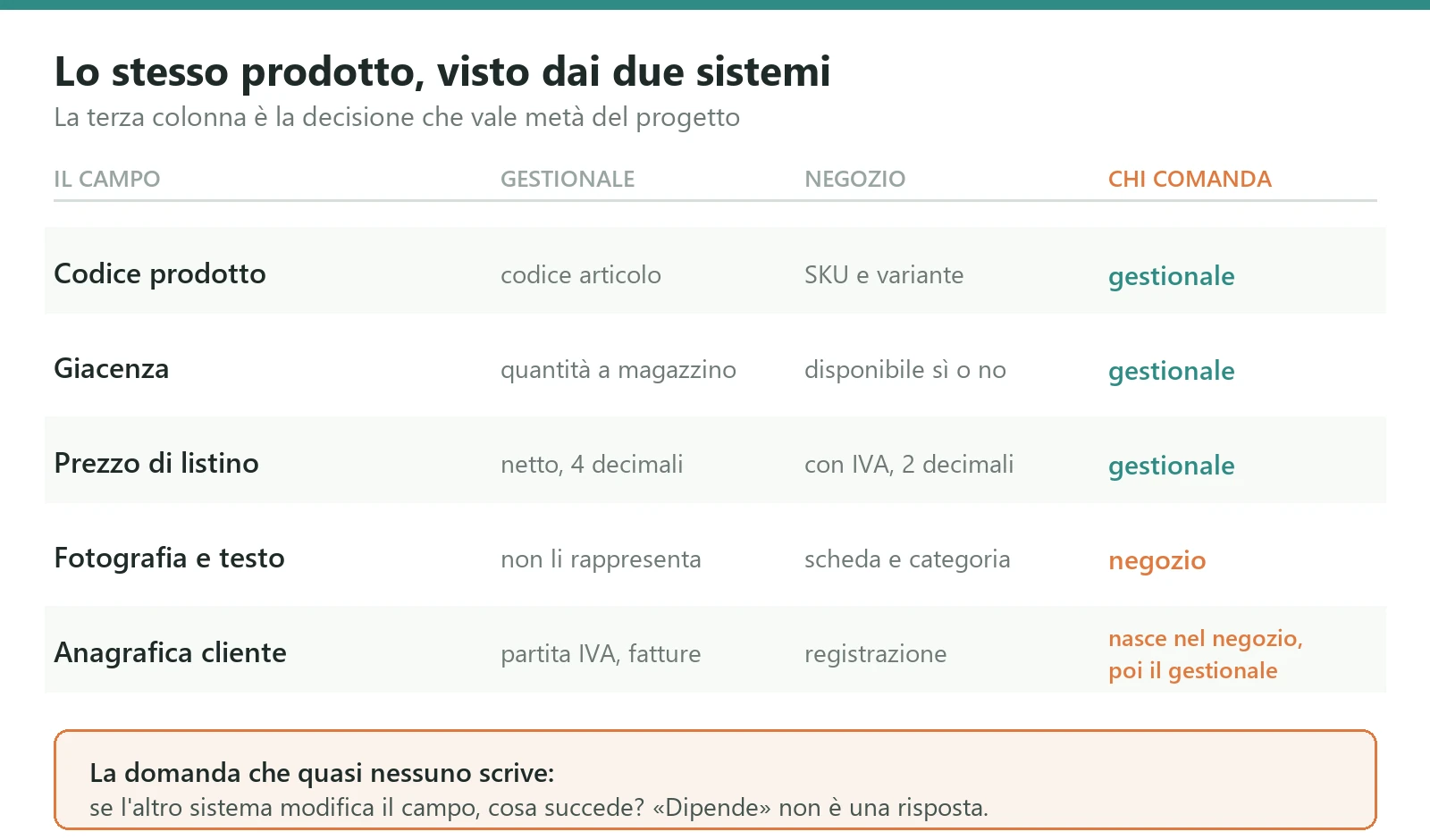
Before choosing a technology, before asking for a quote, take a sheet of paper and draw a table with three columns: the field, the system that owns it, what happens if the other one changes it.
The product code is owned by the ERP. Stock is owned by the ERP. The list price is owned by the ERP. The photograph, the sales copy, the navigation category and the keywords are owned by the shop, because they are things the ERP cannot even represent. The customer record is the interesting one: it is born in the shop, because that is where the customer registers, but from the moment it has a VAT number and an invoice attached to it the ERP owns it, and every later change has to travel back.
The column almost nobody fills in is the third one, and without it the table is useless. If an operator corrects a price directly in the online shop, what happens? There are two acceptable answers: the change is overwritten at the next sync and whoever made it knows that, or the change is technically impossible because the field is locked. The unacceptable answer, which is the one found in most installations, is "it depends", because "it depends" means that sometimes one side wins and sometimes the other, and nobody can tell any more which price is the right one.
This table is also the document that saves you the most money at quotation time: a supplier who receives it filled in gives you a serious quote, and one who receives it filled in and still gives you a generic quote has just qualified themselves.
The four flows that have to work: stock, master data, orders, documents
Every ERP to e-commerce integration, whatever the brands involved, is made of four flows. They have different directions, different frequencies and different ways of breaking, and treating them as one thing is the first design mistake.
1. Stock: from the ERP to the shop, the most delicate of all
It travels in one direction and concerns a single number per item, so it looks like the simplest. It is the opposite: it is the one that generates the angry phone calls, because it is the only one that shows up directly in front of the customer.
The quantity you send to the shop is almost never the quantity the ERP has in the warehouse. It is the sellable availability, and to compute it you have to subtract what is already committed to unfulfilled orders, exclude the warehouses that do not serve the online channel, decide whether to count goods inbound from suppliers, and take off any safety buffer. Each of those four subtractions is a business decision, not a technical one, and it has to be made by whoever answers for revenue.
The question that closes the flow is what happens when availability reaches zero. Does the product disappear from the catalogue, stay visible as out of stock, or accept the order as a pre-order? Those are three different behaviours with three different consequences for how the page ranks, and they need deciding per product family, not for the whole catalogue.
2. Master data and prices: from the ERP to the shop, but not all of it
The typical mistake here is excess zeal: everything the ERP holds gets pushed to the shop, and you end up with a shop window full of technical items, spare parts, packaging and service lines that were never meant to be sold.
You need an explicit switch in the ERP, a field saying "this item is sold online", and you need that field to be the only criterion. The alternatives I usually find, filtering by product category or by the presence of a photograph, work until somebody creates a new category, and then they stop without warning.
On prices, the complication is price lists. A company selling both to shops and to consumers has different lists, customer specific discounts and special terms, and the online shop represents only one of them. If tomorrow you also want a reserved area for resellers with their own prices, the way you wrote this flow decides whether that is a week of work or two months. It is worth accounting for now even if you are not doing it now.
3. Orders: from the shop to the ERP, where no line may be lost
This is the flow where a mistake cannot be recovered by reading the data again later, because the data is a fact that happened exactly once: somebody paid.
The moment the order crosses into the ERP has to be chosen rather than inherited. Sending it as soon as the cart is confirmed fills the ERP with orders that will never be paid. Sending it only once payment has cleared is cleaner but delays logistics on slow payments, and with an advance bank transfer that can mean two days. The reasonable choice in most cases is to send it at confirmation with an explicit payment status, and let the ERP decide when it can ship.
Then there is the tax side, which is the source of half the blocked orders. A consumer needs a tax identifier if they want an invoice, a business customer needs the electronic invoicing address, a foreign customer needs different rules again. If the online shop does not collect these at the right moment, the order lands in the ERP and stops there, and somebody has to make a phone call. The right place to solve that is the checkout page, not the integration.
4. Documents and statuses: from the ERP to the shop, the flow that cuts phone calls
When the warehouse packs the parcel, when the carrier picks it up, when the invoice is issued, the customer has to see it in their account without calling anybody.
This is the flow usually postponed to phase two, and there is logic in that because it does not block sales. It does, however, have the most immediate and most easily measured economic effect of the four: every status the customer can see for themselves is a call that does not reach the switchboard. On a shop doing fifty orders a day that is several hours of work a week, every week.
Why you sell what you do not have: the exposure window
The case in the opening, three units sold and not available, is not bad luck. It is arithmetic, and it is predictable with a calculation that takes two minutes.
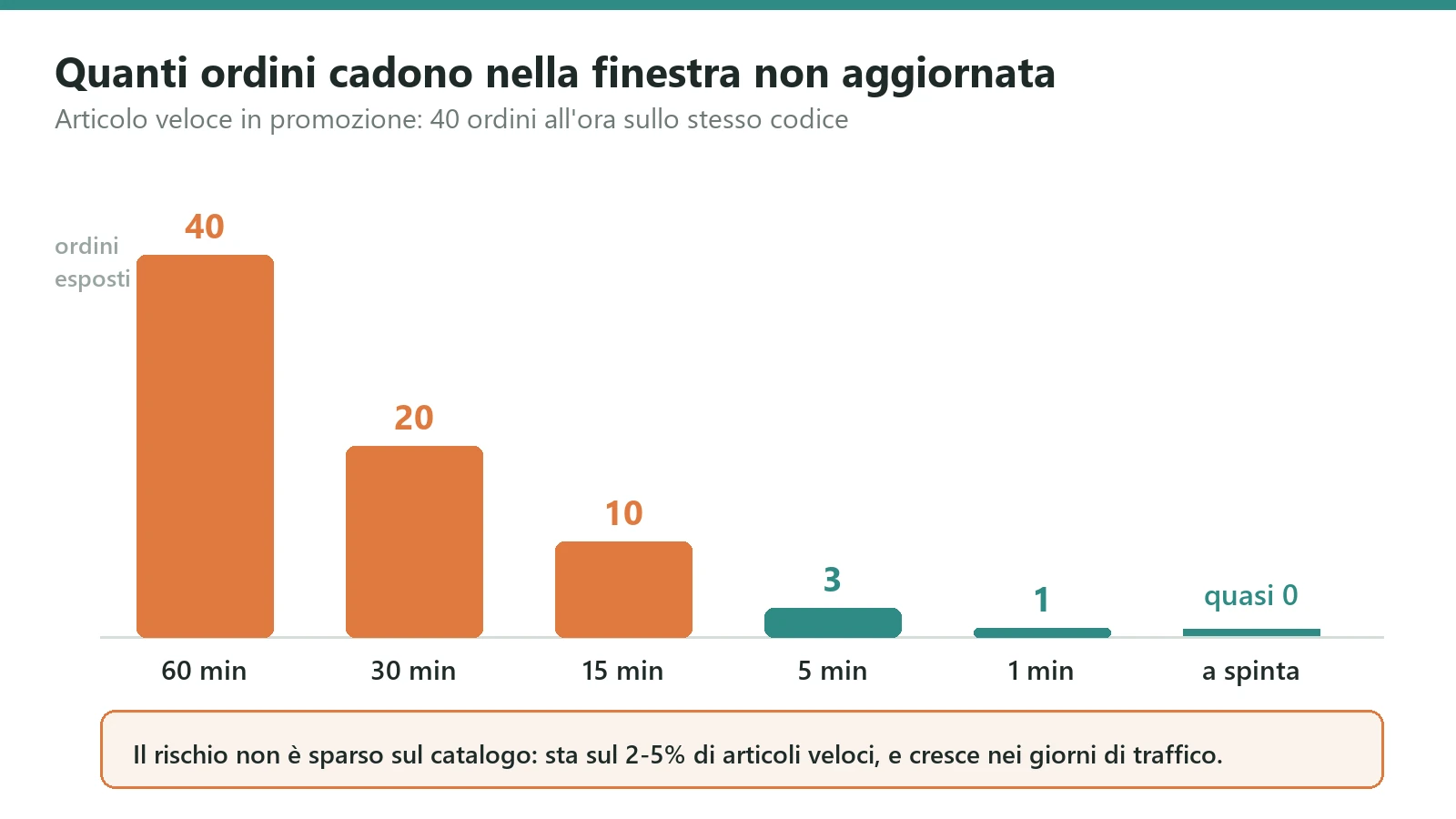
If stock is synchronised every fifteen minutes, there is a fifteen minute window in which the shop is showing an old number. If somebody clears the shelf inside that window, you sell goods that are not there. How often that happens depends only on how fast that item moves.
An item selling ten units a day will never cause you trouble: the probability that two orders land in the same window on the last remaining unit is negligible. The exact same mechanism, on a promoted item selling forty units an hour, produces ten orders per window, and once real availability drops below ten the oversell is certain. The risk is not spread across the catalogue: it is concentrated on a few fast items, and it grows precisely on the days when you have the most traffic.
That observation has a practical consequence that saves real money: you do not need to make the whole catalogue synchronise instantly. You need to make the fast tail instant, and in most catalogues that is between two and five per cent of the items.
The three defences, in order of what they cost
Push instead of poll. Instead of asking the ERP every fifteen minutes how things stand, you make the ERP announce every stock movement at the moment it happens. The window drops from fifteen minutes to a few seconds. Technically it is the best solution and it costs little, on one condition: that the ERP is capable of announcing anything at all. Modern systems have a way of doing it, older ones often do not, and then you fall back on reading the movements table frequently, which is less elegant and works anyway.
The safety buffer. You declare two units fewer than you really have. It costs nothing to implement and it loses you sales when few units remain, so it has to be applied per rotation class rather than across the board: a buffer on fast items, where it genuinely protects you, no buffer on the slow tail, where it would only lose you the last unit of every size.
Reservation at the cart. The unit is set aside the moment it enters a cart and released if the order is not completed within a set time. It is the most effective defence and also the most expensive, because it needs shared state between the two systems and an expiry mechanism that has to be watched. It makes sense when unit values are high or the items are unique, as in second hand or collectibles, where selling the same object twice is not an inconvenience but a refund.
In most projects the right combination is the first plus the second applied properly. The third gets added later, and only if the numbers say it is needed.
The three routes, with the prices actually paid
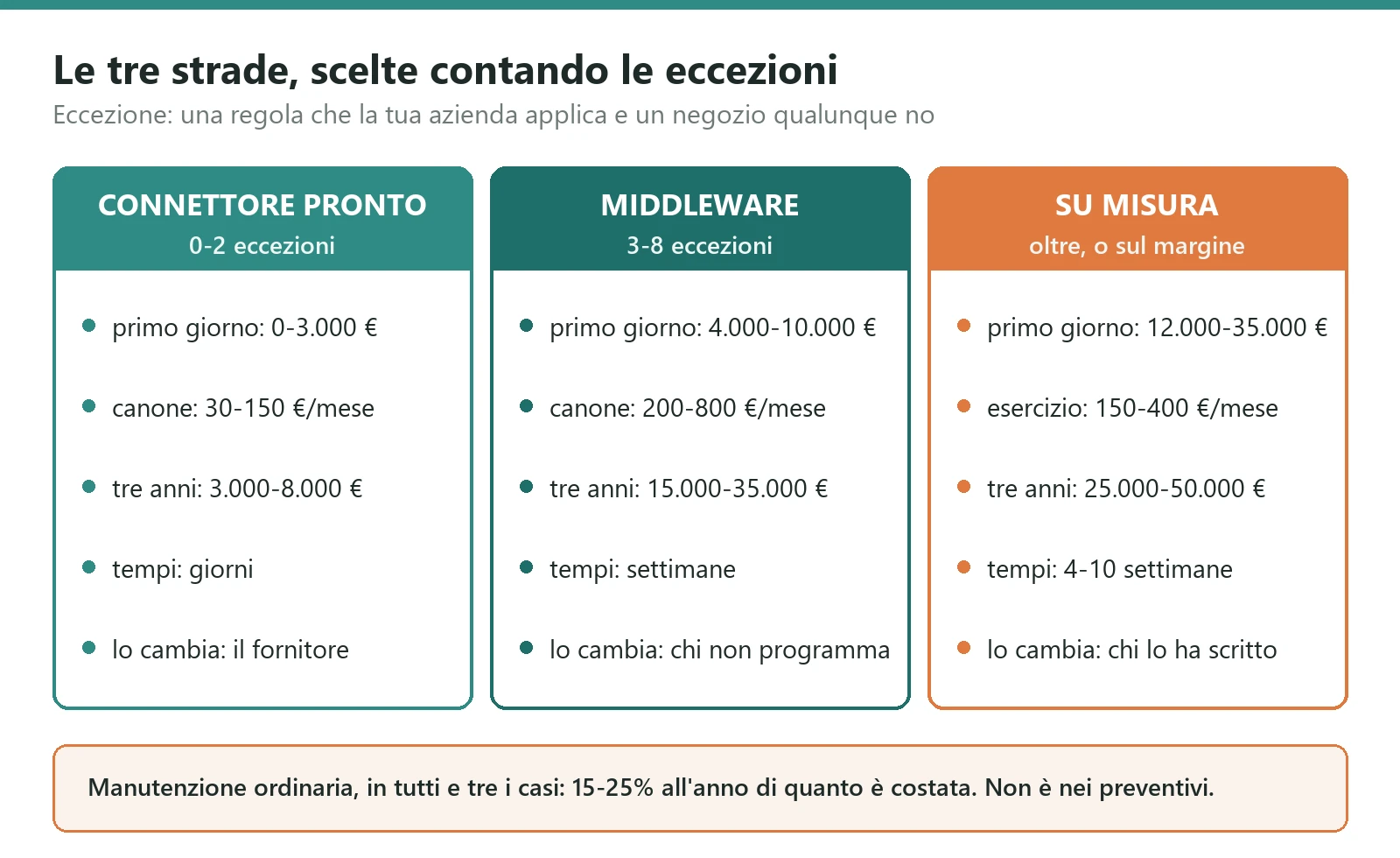
There are three options. None is best in the abstract: there is the one that fits how many exceptions your company has, and exceptions are counted before choosing.
The ready made connector
It already exists, you install it, configure it, and it works. It applies to common pairings: the most widely sold business systems have modules for the most widely used shop platforms, and the market offers extensions covering the frequent combinations.
The typical cost is between zero and three thousand euros to activate, plus a subscription of thirty to a hundred and fifty euros a month. Lead times are days, not weeks.
There is one condition and it is not negotiable: you have to accept the data model the connector has decided on. If your way of handling variants happens to match, you are fine and you have spent the minimum possible. If you have a rule of your own, say a discount that steps with quantity or an availability that has to consider two warehouses with different priorities, the connector cannot do it and will not learn. At that point the choice is to change the business process to fit the connector, which is sometimes the right answer, or to change route.
The middleware
An intermediate tool where flows are drawn rather than programmed: you connect the two systems, map the fields, set the transformations.
The typical cost is four to ten thousand euros of setup, plus a subscription between two hundred and eight hundred euros a month that almost always grows with the number of operations. Lead times are a few weeks.
It is the right choice when there are more than two systems to connect, and that happens more often than it seems: ERP, shop, a marketplace, the carrier, the email platform. The real advantage is that a change to the mapping can be made by somebody who does not program. The disadvantage, which you feel in year three, is that the operating logic of your company ends up inside a tool that is not yours, in a format you cannot take away, and the subscription grows exactly when you do.
The custom integration
Code written for you, running where you decide, doing exactly what is needed.
The typical cost of a serious first version is between twelve and thirty five thousand euros, over four to ten weeks, plus a running cost between one hundred and fifty and four hundred euros a month covering infrastructure and monitoring. The range is wide because it depends almost entirely on one thing: how civilised the ERP is about exposing its data. A system with a documented interface sits at the low end. A system you can only read by going into its tables sits at the high end, and there are cases where the most expensive part of the project is working out what those tables mean.
It makes sense when the rules are yours and the rules are your margin. If the way you compute availability or apply discounts is part of how you make money, that logic cannot live in a generic tool, because a generic tool forces you to become generic.
The rule for choosing, in three lines
Count the exceptions: the rules your company applies that an ordinary shop would not.
Zero to two exceptions, ready made connector, and resist the temptation to do more. Three to eight exceptions, or more than two systems to connect, middleware. More than eight, or fewer but touching the margin directly, custom integration.
There is one case where this rule does not apply, and it is the ERP that cannot be connected in any reasonable way because it is old and closed. There the question is no longer which integration to build: it is whether keeping that system alive still makes sense.
What it really costs, including the line nobody quotes
The price you see in an offer is the cost of reaching day one. The cost of the project is a different thing, and you see it across three years.
Over three years, a ready made connector lands between three and eight thousand euros all in. A middleware lands between fifteen and thirty five thousand, and the variability is almost entirely in the subscription growing with volume. A custom integration lands between twenty five and fifty thousand, with the large part concentrated at the start and running costs that then stay flat.
Put another way: on day one custom costs four to ten times the connector, over three years three to six times, and over five years the distance keeps closing because a connector subscription never stops while development finishes. That is not an argument for going custom: it is an argument for not deciding on the first figure alone.
The line missing from every quote I have seen
An integration has to be kept alive, and keeping it alive costs between fifteen and twenty five per cent a year of what it cost to build. If you spent twenty thousand euros, routine maintenance is three to five thousand a year. These are not faults: they are the jobs the environment imposes on you without asking.
Shop platforms change their interfaces constantly and retire old versions with a few months of notice. The ERP gets updated and something moves. A carrier changes. A new tax rule arrives. A marketplace is added. The catalogue doubles and what worked with five thousand items no longer works with twelve thousand.
The practical consequence is that an integration without a declared annual budget and without a person answering for it is a project that has already failed, it just does not know yet. The moment it finds out is always the same one: the busiest week of the year.
The two costs you do not pay to the supplier
The first is cleaning up the item master. In most real projects it is the longest part and you pay it in your own people's hours, not on an invoice: duplicate codes, items without a barcode, descriptions holding information that should be fields, prices never updated. A serious supplier tells you at the start; one who just wants to close tells you it will sort itself out along the way. It does not sort itself out along the way.
The second is your people's time during the switch. For a few weeks, warehouse and administration will work with two systems to check instead of one, and that time has to be budgeted when choosing the time of year for the work. You do not do it in November.
Synchronisation is not a transfer: the five rules that decide whether it holds
This part is technical and it is here because it is what separates an integration that lasts from one that has to be rebuilt after eighteen months. If somebody else is doing the work, these are the five things to ask about at quotation time: the answers tell you who you are dealing with better than any presentation.
1. The same message twice must do no harm
Networks lose responses. A system receives an order, saves it, and while it is answering "done" the connection drops: the sender does not know whether it arrived and retries. If the receiver is not prepared, two identical orders appear in the warehouse and somebody ships two parcels.
The defence is trivial and belongs there from day one: every message carries a stable identifier decided by the sender, and the receiver keeps a uniqueness constraint on that identifier. The second arrival is not processed, it is recognised.
public sealed record OrdineInArrivo(
    string IdEsterno, string Cliente, decimal Totale, DateTime QuandoUtc);

public enum Esito { Registrato, GiaVisto }

public static async Task<Esito> RegistraAsync(
    DbConnection db, OrdineInArrivo ordine, CancellationToken ct)
{
    // The uniqueness constraint on IdEsterno lives in the database: it is
    // the database that stops two concurrent arrivals creating two orders.
    const string sql = """
        INSERT INTO OrdiniRicevuti (IdEsterno, Cliente, Totale, QuandoUtc)
        VALUES (@IdEsterno, @Cliente, @Totale, @QuandoUtc)
        """;

    try
    {
        await using var cmd = db.CreateCommand();
        cmd.CommandText = sql;
        Aggiungi(cmd, "@IdEsterno", ordine.IdEsterno);
        Aggiungi(cmd, "@Cliente", ordine.Cliente);
        Aggiungi(cmd, "@Totale", ordine.Totale);
        Aggiungi(cmd, "@QuandoUtc", ordine.QuandoUtc);
        await cmd.ExecuteNonQueryAsync(ct);
        return Esito.Registrato;
    }
    catch (DbException e) when (ViolaUnicita(e))
    {
        // Not an error: the network retried. Answer ok.
        return Esito.GiaVisto;
    }
}
The line that matters is the last one. A duplicate arrival is not an error to report, it is how networks normally behave, and it should be answered with an ok. Integrations that fill an inbox with alerts for this reason end up with nobody reading alerts at all, and that is how the real ones go unnoticed.
2. You do not call the other system while the customer is paying
The temptation, when an order is confirmed, is to send it to the ERP straight away and wait for confirmation. That is the mistake that brings the shop down every time the ERP is slow, and it is the worst possible case: the customer has paid and is looking at an error page.
What you do instead is write the order into a queue in the same transaction that saves it, and answer the customer immediately. A separate process takes from the queue and delivers to the ERP, retrying at growing intervals, and whatever fails after a certain number of attempts lands in a rejects bin that a person looks at every day.
The property you buy with this structure is the one that really counts: the ERP can be down for three hours, for an upgrade or a fault, and the shop keeps selling. When it comes back, the queue drains on its own in the right order. Without this structure, every ERP outage is a sales outage.
3. Message order matters, but only within the same object
If two stock updates arrive for the same item, first twelve and then eight, and they are processed the wrong way round, the shop stays at twelve and sells what is not there.
Guaranteeing a global order across all messages would cost you the ability to work in parallel, which is exactly what you need on peak days. The solution is to guarantee order only where it matters, that is within a single item: the item code becomes the partition key, so different items proceed in parallel while the same item always proceeds in sequence. Alternatively every message carries an increasing version number and the receiver discards anything older than what it already has.
4. The nightly reconciliation: the safety net almost nobody installs
However well built, a system exchanging messages continuously will eventually drift on something. A message rejected for an unexpected format, a change made by hand, an update that went wrong.
You need a nightly job comparing the two systems item by item and producing the list of differences. The important rule is that the job must not correct anything silently: it has to say what does not add up. An integration that quietly fixes itself hides the underlying problem, and the gap grows under the carpet until it becomes a conversation with the accountant.
In practice: the nightly report arrives by email, when there are no differences it is a single line, and whoever receives it learns to worry when they see two.
5. The log: thirty seconds to answer an angry customer
Every exchange has to be recorded with an identifier tying it to all the other steps of the same order, with the time, the payload and the outcome. It takes space and feels excessive until the call comes in about order 4821 which the customer says they placed and you say you never received.
With the log, the answer takes thirty seconds and comes with a precise timestamp. Without it, half a day goes into cross checking the two systems, and you still never find out what really happened.
The eight questions to write down before asking for a quote
This is the specification on one page. You do not need a forty page document and you do not need a consultant to write it: you need eight answers, and whoever has written them buys far better than whoever has not.
One. Who owns each field. The table from the first section: field, owning system, what happens if the other one changes it. It is question number one because every other question depends on it.
Two. What a sellable product is. What it is called in the ERP, what it is called in the shop, who creates it first, and what happens when a new one appears: does it publish itself or does it need approval.
Three. How availability is computed. Which warehouses count, whether committed stock is subtracted, whether inbound goods count, how much safety buffer and on which items, and what the shop does when availability is zero.
Four. Which price the customer sees. Which price list, VAT included or excluded and with what rounding, how shop promotions behave against ERP discounts, and who wins when the two disagree.
Five. The order lifecycle. When it crosses to the ERP, with which statuses, what happens on a failed payment, a cancellation, a return, a partial shipment. Returns are the part forgotten in ninety per cent of cases and the part that generates credit notes.
Six. Tax data. What the shop collects for a consumer, for a business, for a foreign customer, and what happens when something is missing: does the order stop, go through with somebody calling, or become impossible to place.
Seven. The real numbers. How many items, how many orders on the worst day of the year rather than the average day, how many stock movements an hour at peak. An integration holding fifty orders a day and one holding five hundred in the peak hour of Black Friday are not the same job, and these numbers set the price.
Eight. What happens when the other side does not answer. How long things accumulate, who gets told and how, after how long you stop retrying, and who looks at the rejects. This is the question that separates suppliers who have already done this work from those about to do it for the first time at your expense.
If you send these eight answers to three suppliers and get back three quotes within twenty per cent of each other, you have bought well. If the spread is two hundred per cent, the three are reading three different jobs, and the first thing to do is work out why before looking at prices.
The four mistakes I have seen cost the most
Synchronising everything every night
It is the first thing that comes to mind and it works beautifully with three thousand items. At eighty thousand items the nightly job starts at midnight and finishes at six, occupies the ERP all night, and the day something goes wrong halfway leaves the two systems in a state nobody can describe.
The right thing is to send only what changed, leaning on a last modified timestamp or the movements table, and keep the full comparison as a read only nightly check. The result is that the nightly job takes minutes, and differences get reported rather than rewritten.
Leaving two owners on the same field
The price can be changed in the ERP and also in the shop. Nobody has decided who wins. For a few months nothing happens, then somebody runs a promotion by editing the shop, the nightly sync overwrites it, the next day they do it again, and in the meantime thirty customers have bought at a price nobody intended.
There is no technical solution to this problem, because it is not a technical problem. You decide who owns the field, you lock it where it is not owned, and you give whoever runs promotions a tool in the right system. The locked field is the part that annoys people and it is the part that fixes it.
Nobody watching when it breaks
The integration stopped working on the eleventh of the month. It was noticed on the twenty second, because a customer called. Eleven days of frozen stock levels and orders piling up somewhere.
The flaw here is not in the code: it is that the monitoring, where it exists, says the service is up. A service that is up and doing no work looks healthy. The right check watches the work, not the process: how many messages have I delivered in the last hour, and if it is zero at a time when it should not be, somebody gets told. It is the difference between asking "is the engine running" and asking "have we moved".
Treating it as a project that ends
It goes live, it gets signed off, the project closes, the supplier waves goodbye. There is no owner, no annual budget, nobody reading the reports. Eight months later the shop platform retires the interface version you were using, and the discovery happens in the worst possible way.
An integration is a piece of infrastructure, like connectivity or backups. It needs a name, a number of hours a month and a report somebody reads. Something producing value every day has to be maintained, not consumed.
How you tell whether it works: four numbers, not a feeling
"It is fine" and "it plays up now and then" are not measurements and let you decide nothing. These four numbers do, they all come from data you already have, and they fit in a half page weekly report.
Median stock alignment delay. How long passes between the movement in the warehouse and the updated number in the shop. Under five minutes on fast items is a good target. Look at the median rather than the mean, because the mean is dirtied by one outlier and points you the wrong way.
Percentage of orders left behind. How many orders took more than fifteen minutes to reach the ERP. Above half a per cent there is something to look at: usually it is the queue piling up in a specific time band, and this figure tells you which one.
Nightly reconciliation gap. How many items have different stock between the two systems. The target is zero and it should be insisted on: a single one, repeated three nights running, is always the beginning of something.
Oversells per thousand orders. How many times you sold goods that were not there. It is the number the customer sees, so it is the one that matters most, and under two per thousand the integration is doing its job.
If none of these four numbers exists in your company, it is not that the integration is doing badly: it is that nobody knows, and the first thing to do is not to change it but to start measuring it. Measuring costs a few days of work and changes the tone of every conversation that follows, including the ones with the supplier.
Where to start without stopping the shop
If you are reading this with a shop that already sells and an ERP that already runs, the order of the work matters as much as the work. This is the one I follow.
The read only report first. Two or three days of work for a program that reads both systems and produces the list of differences: items present in one and not the other, differing stock, differing prices, duplicate codes. It writes nothing, so it can break nothing. It serves two purposes: knowing how bad the situation is, and having a starting number to compare with the later one. In half the cases this report also changes the project, because it shows the problem was not where everyone thought.
Then stock, in one direction only. It is the flow with the most immediate return and the lowest risk, because it goes from the ERP to the shop and touches nothing accounting related. When it works, oversells collapse and you have bought credit for the rest of the work.
Then orders, in shadow mode first. For a week the integration receives the real orders and records them without delivering them to the ERP, while people carry on working as before. At the end of the week you compare what it would have done with what was done by hand. The differences are the list of cases nobody told you about, and there always are some.
Then the rest, and only if needed. Documents, shipping statuses, returns. They reduce phone calls and improve the experience, but none of them loses you a sale if it is still missing for another month.
What you do not start with is invoicing, which is the most delicate part fiscally and the least urgent to automate, and anything writing to both systems at once. You always start from the flow that is already broken and visible from outside, not from the flow that is most elegant to build.
The point, in short
Connecting an ERP and an e-commerce is not a technology problem: the technologies are all there and they are mature. It is a problem of decisions made or not made, and the decisions are always the same four: who owns each field, what a product is, how availability is computed, what happens when the other system does not answer.
Whoever makes those four decisions before choosing the tool buys well whatever tool they choose. Whoever postpones them ends up having the software make them, and it will make them in whatever way is most convenient for itself rather than for the company.
The choice between ready made connector, middleware and custom is made by counting exceptions, not by looking at prices: if your rules are everybody's rules, pay as little as possible and move on; if your rules are your margin, do not put them inside a tool that is not yours.
And the last thing, which is the one I see skipped most often: an integration does not end the day it goes live. It costs twenty per cent a year to stay alive, it needs a name answering for it and four numbers looked at once a week. Without those you do not have an integration: you have something that is working until it stops.
A concrete next step
Discuss your project
Describe the process you want to improve and the systems you use. Together we will clarify priorities, constraints and the first result to verify.