How are exceptions handled in C# in enterprise applications?
try-catch block is not enough and, if abused for flow control, severely degrades performance.The key lies in technically isolating failures by creating custom domain exceptions and adopting a structured logging mechanism that records the full error context rather than just a text line.
However, there is a tragic (and widespread) error in using the
throw keyword that irreparably destroys the precious Stack Trace. Want to find out if your code hides this invisible vulnerability? Discover the golden rules in this article 👇.

Every application you build will eventually fail. It is not a matter of "if", but of "when".
Unreachable databases, missing files, network timeouts, unpredictable responses from third-party APIs: these are the norm in the real world of enterprise software development.
Yet, when it comes to exception handling in C#, most developers simply wrap their code in a `try-catch` block and hope for the best.
The real difference between an amateur application that holds up only under ideal conditions and an enterprise-grade system lies precisely in how these anomalies are governed.
Exceptions are not a nuisance to sweep under the rug of a useless log. They are the language your system uses to ask for help.
If you choose to ignore exceptions, or worse, if you catch them while silencing their message intentionally, you are programming blind.
In this article we will not limit ourselves to academic theory. We will see how to transform the basic try-catch mechanism into a solid architecture, protecting your code and managing unpredictable errors in production.
What are exceptions in C# and why is handling them important
An unhandled exception causes your application to terminate abruptly. If you are writing a small internal tool, that may be acceptable, but in high-traffic web scenarios or mission-critical systems it is simply unforgivable.
Imagine what happens when a user input generates a NullReferenceException inside an accounting calculation chain. The runtime attempts to propagate the error up the call stack, frantically searching for a catch block to take ownership of it.
If none is found, execution stops. The thread dies. Unconfirmed data is lost.
The .NET framework provides a fundamental base object, the Exception class. When this class, or one of its derived types, is thrown, it carries two critical pieces of information:
- The Message, which describes the error in technical language for humans.
- The StackTrace, a perfect micro-script that retraces the exact execution hierarchy all the way down to the precise line that failed.
Ignoring this informational potential, or worse "swallowing" it (catching without doing anything), is equivalent to disconnecting the monitors of an intensive care patient because the alarm sound is bothering you.
Using try, catch and finally to handle exceptions
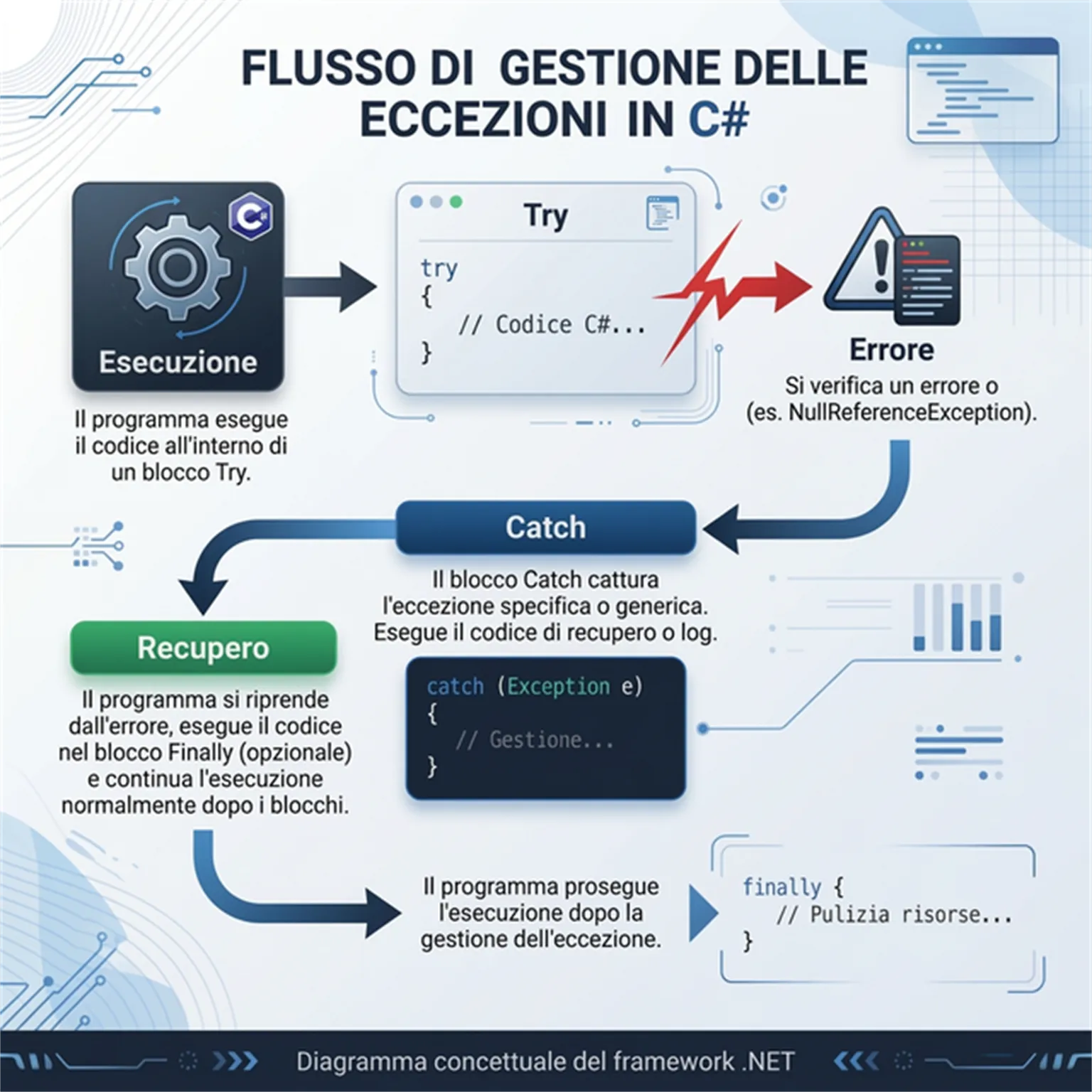
You are not here to learn basic syntax. You are here to understand when and how to use the three main actors of error handling.
Blindly using try-catch blocks everywhere makes your code incredibly tedious to read, introducing unnecessary cyclomatic complexity. If a method deliberately fails on a null parameter, throw an exception and let it propagate to a higher level that has enough context to resolve it!
Your catch block should almost never be generic unless it is at the very outermost boundary (such as in Web API middleware or AppDomain unhandled event handlers).
try
{
    var stream = File.OpenRead("important_data.xml");
    return _parser.Process(stream);
}
catch (FileNotFoundException ex)
{
    _logger.LogWarning("The file is not yet available. We will retry later.");
    return null;
}
finally
{
    // Executed regardless of success or failure.
    _logger.LogDebug("I/O lock release completed.");
}
The finally block is vital when you work with resources that implement IDisposable or when you handle network connections (if you are not using using clauses).
Its guaranteed execution ensures that the system does not leave dangling database connections, does not keep files locked for reading, and maintains a clean state for subsequent iterations. Even the Garbage Collector's memory allocator will thank you if you close streams inside finally blocks.
The essential thing in software architecture is to establish a perimeter. If the "Database" layer fails, it should emit a specific Repository exception rather than vomiting a raw SqlException directly at the UI layer. But we will cover this in the next concept: custom exceptions.
How to create custom exceptions in C#
The runtime provides a wide set of system exceptions: InvalidOperationException, ArgumentException, and so on. But none of these express the intent of your business domain.
What happens when a user tries to complete a purchase and their card is blacklisted? Throwing a generic Exception will force you to resort to string comparisons to understand "which" type of exception it is — a terrible architectural mistake.
The Master move is to define domain-specific exceptions:
public class PaymentRejectedException : Exception
{
    public string TransactionId { get; }

    public PaymentRejectedException(string message, string transactionId)
        : base(message)
    {
        TransactionId = transactionId;
    }
}
In this way, you cleanly separate the conceptual problem from the technical one.
This paradigm shift means starting to think in terms of Domain-Driven Design (DDD). When exceptions communicate concepts from your domain (e.g., `EmptyCartException`, `InsufficientFundsException`) the code becomes self-documenting.
The caller at the Web API layer or graphical interface (WPF, Blazor) knows exactly how to react only when it intercepts the PaymentRejectedException.
Instead of displaying horrifying stack traces (which are dangerous from an information security standpoint), it will show the user an elegant modal indicating the precise "TransactionId".
Domain integrity does not mean you have to declare a million Exception classes in your project. Custom classes should represent decision-breaking points, not mere basic validations masquerading under a false name.
Handling exceptions with the try-catch-finally pattern
There is no worse mistake that a C# developer can make to themselves (or to the poor colleague who will be debugging at night) than the syntactic error in rethrowing an exception.
Look at these three lines, responsible for countless sleepless nights for many developers:
catch (Exception ex)
{
    _logger.LogError(ex.Message);
    throw ex; // WARNING: THE PERFECT CRIME
}
Writing throw ex; in C# instructs the runtime to throw the exception as if it originated exactly at that line.
All of the prior history. The entire original call stack that indicated in which corner among fifty other services the null pointer had occurred. All wiped away in an instant.
The origin of the error is gone forever and in the server error panel you will only see the catch line. An intellectual fraud.
The golden rule, sacred throughout all of .NET, is to simply use the keyword without parameters:
catch (Exception)
{
    // Do what you need to do...
    throw; // Re-throws while preserving the original stack trace intact.
}
Best practices for exception logging in C#
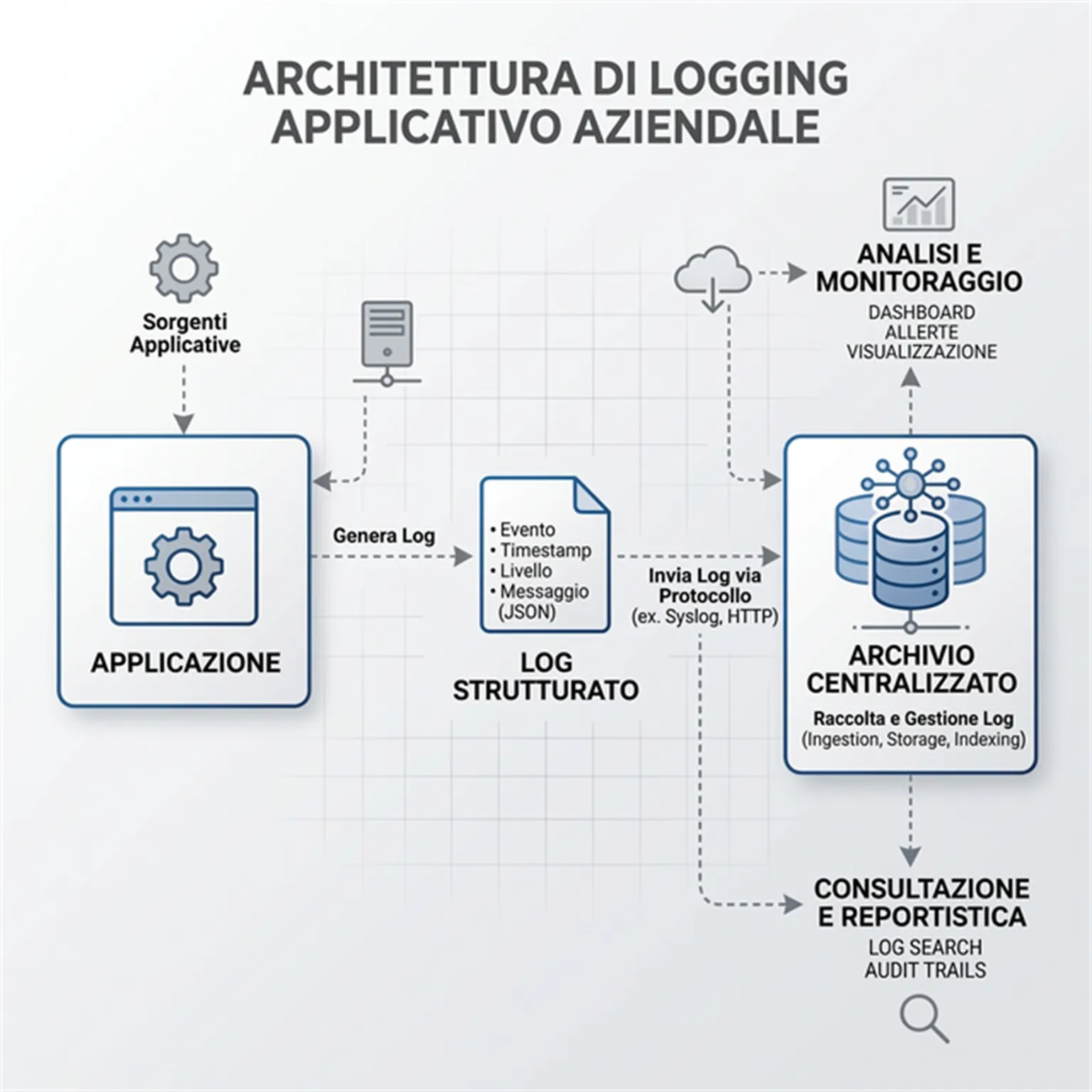
If you have implemented robust exceptions and preserved the stack trace, the third supporting pillar is entirely about where this information ends up.
Logging the exception by formatting its Message with a simple `Console.WriteLine` will get neither you nor your team anywhere when customers demand answers on Monday morning following a thousand simultaneous database errors.
In modern cloud-native architecture you need to embrace frameworks like Serilog and patterns such as aggregated logging (Seq, Application Insights, ElasticSearch) from the very start. The driving force is adopting Structured Logging:
catch (UnauthorizedAccessException ex)
{
    // NO:
    // _logger.LogError($"Error for user {UserId}: " + ex.ToString());

    // YES: Interpolated parameters in placeholders
    _logger.LogError(ex, "Missing permissions for operation {OperationName} by user {UserId}",
        operationName,
        user.Id);
}
In this way, the logging platform will instantly index the "OperationName" and "UserId" fields. From that point on you will be able to run high-fidelity queries:
- You can create analytical queries in Application Insights or Kibana asking: "Show me all UnauthorizedAccessExceptions related to the 'DeleteCustomer' operation".
- You will build a robust metrics picture, aggregating errors by user, by server, or by time range.
The power of structured telemetry becomes evident in cases of short-lived anomalies, such as spikes of SqlException caused by database deadlocks.
Having the query parameters extracted asynchronously, you will be able to measure the frequency of the problem and identify the root blocking cause without having to access the database directly in a panic and without consuming extra bandwidth on massive raw log exports.
Handling async exceptions in C#
The reckless and confused adoption of asynchrony practices in C# (async - await) produces monstrous artifacts when combined with error handling.
An async Task method captures its own exceptions inside the returned task, ensuring that a try-catch block in the calling code is correctly triggered at the moment you await the task.
The true silent cancer is delegate methods or methods written as async void.
Trying to wrap an async void method in a try-catch on the caller side is wasted effort: the exception slips sideways onto the primary synchronization context and takes down the entire process without appeal, because the caller cannot remain bound to awaiting the failure, since it is "void" and "fire and forget".
Get in the habit of returning Task and delegate your logical blocks to the framework rather than resorting to complex workarounds. Use async void EXCLUSIVELY for UI event handlers.
The importance of exception handling in improving performance
While abusing `try/catch` to drive business flow is a well-known antipattern, what many forget is the enormous computational cost incurred every time an exception is thrown.
Every time throw comes into play, a heavy chain of events is triggered on the server:
- The runtime allocates a new memory fragment for the exception object.
- The framework captures the frames of the original call, taking "snapshots" of the executing code in order to generate the stack trace string.
- Execution jumps forcibly from one memory block to another until it finds a handler.
All of this is an enormously CPU-intensive process compared to a simple if-else branch.
That is why we prefer to adopt upfront checks for situations that are highly predictable (known as the Tester-Doer pattern).
// INAPPROPRIATE: Expensive check relying on repeated failure
try
{
    int year = int.Parse(yearInputString);
}
catch(FormatException) { ... }

// APPROPRIATE: Preventive check that avoids Exceptions for valid but out-of-range inputs.
if (int.TryParse(yearInputString, out int year))
{
    // Happy, performant execution.
}
The boundary is clearly drawn: an exception is exceptional, not a modern goto born out of laziness in validating input data.
Every time you rely on `.TryParse` instead of a `try { Parse } catch`, you triple the throughput of your application. This is an architectural micro-optimisation that makes a real difference in high-load systems where millions of events flow through queues in just a few minutes.
How to avoid unhandled exceptions in C#
In .NET 10, as in previous versions of the framework, globally catching anomalies is an essential task. In ASP.NET Core it is sufficient to configure an ExceptionHandler construct directly within the HTTP pipeline.
Many developers tend to scatter dozens of try-catch blocks inside Controllers or Minimal APIs. They often do this out of pure anxiety and defensive habit. At that level, however, there is objectively very little useful decision-making margin: the interface layer is not the right place to repair database failures.
Implementing a global "safety net" through middleware completely reverses the design logic, with two major benefits:
- The centralised component dynamically intercepts unexpected final errors and automatically sends a neutral HTTP failure response to the client browser (status code 500) in complete safety.
- It eliminates in one stroke the harmful leakage of system details in production.
Above all, it guarantees the entire development team a massive reduction in repeated boilerplate code in the presentation layer, fully aligning the web project with defensive architecture patterns.
Practical example: Handling exceptions in a C# application
It is no longer about "making the code run". That amateur phase must be left behind quickly and without looking back. It is about engineering applications with the assumption of a permanently hostile environment, in which code must protect itself in advance.
Governing exceptions in this sense is no longer a compilation ritual. It becomes a piece of the C# architecture: a component that shields against data inconsistency and exposes incredible insights into the health of the business logic.
If you have reached the point of wanting to make that definitive quality leap and stop restarting web applications and API services after every blocking error, we teach these and other best practices directly in live sessions.
Frequently asked questions
An exception is an abnormal event that occurs during program execution, interrupting its normal flow. It must be handled to prevent sudden application crashes.
The try block contains code that might generate an exception. The catch block catches and handles the error if it occurs. The finally block (optional) always executes at the end, useful for releasing resources.
Custom exceptions are classes that inherit from Exception. They are used when you need to handle errors specific to your business logic or to add detailed error information not provided by the base .NET framework.
The throw; statement re-throws the exception preserving the entire original stack trace, enabling complete debugging. Using throw ex;, the exception is treated as new from that point, zeroing out the original stack trace history (this is terrible practice).
Leave your details in the form below