

Do you know why developing code is so stressful?
The main reason is the amount of aspects to consider and skills that the developer must have.
Let me explain better.
It's not enough for you to write great code. It is not enough to "guess" the design and architecture of your system, nor even to write tests and have a tested Continuous Integration system. I'll tell you more: it's not even enough to know how to write applications with no or almost no bugs.
The maintenance and evolution of a system, if not treated and considered adequately, risks ruining all the efforts that your team will make to develop the best possible application. There is nothing more stressful than putting so much effort and dedication into something and not seeing your efforts pay off.
And you want to prevent that from happening, right?
Then listen to what I have to say. The way in which your system will evolve is a fundamental requirement that must be evaluated right from the design phase. If you don't take this into account, you run the big risk of breaking compatibility between your application clients and your backend APIs that expose your system's business logic with each release.
I'll give you a sneaky example.
Imagine having a product accessible to users via a WPF application and an IOS app, perhaps developed with Xamarin. Your team was good: the business functionality is written once for both client types and is exposed from your backend via REST API.
Your team is ready to release a new - fantastic - feature but it has required a change to some REST APIs that will make clients currently in production incompatible. It will be enough to release the new backend, the new WPF client and the IOS app at the same time, right? It would be if it weren't for the fact that the Apple Store guarantees that the app will be accepted within 5 working days of the request for publication of the new version.
What does it mean?
You cannot predict when the new version of the IOS app will be available to users.
So when do I organize the release of the software? You have two possibilities:
- Release the new backend, the new WPF client and at the same time request approval of the app
- Request app approval and wait to release the backend and WPF client once approved
Regardless of the choice you make there will be a period of time where the IOS app will not be compatible with the backend. In fact, in the first case you will be in the situation where you will have the old app incompatible with the new backend, in the second the new app will be incompatible with the old backend.
You have to choose which inevitable inconvenience some of your users will suffer. For those who play chess, it's like when you suffer check to the king and queen at the same time.
You should know that there are 4 solutions that allow you to solve all the maintenance and evolution scenarios that your team may face.
One of these solves the scenario I proposed in the example above, but before revealing which one, let's analyze the solutions one by one.
Are you ready?
Let's go!
Solution 2: Check compatibility between client and server
You know well that most of a company's applications connect to server APIs which - as a rule - at least take care of persisting the state of the application and its users.
If the application client is only one and of a web type, you are in luck. Similar to the scenario described in the previous solution, you do not have to take any special care. As you well know, the web client (html pages, javascript scripts and graphic assets) is distributed by the server with each http request and consequently, each release of the server will be enough to keep the client aligned with the server.

Even today, web clients offer a limited user experience compared to desktop applications, especially when compared to WPF. For this reason, we often favor a desktop client rather than a web one: a wise choice, but from the point of view of software evolution, it requires particular attention.
Let me explain further.
A desktop client, unlike a web client, must be installed on the user's PC before being launched. There are various solutions for distributing an application, but we will talk about this topic in depth in a dedicated article.
Once the application is installed on the PC it can be run without the need to install it again. This is the great advantage but at the same time the great flaw of a desktop client. Without any version control mechanism between client and server, the client cannot know when the client itself is no longer compatible due to a server update.
How to overcome this problem?
The simplest solution is to mark each client release with a version number (a practice you should already do to manage the lifecycle of your software). When the application starts, the client must call a server endpoint specifying its version. The server endpoint responds if the specified version number is compatible with its API.
Thanks to this small measure, in the event of a positive response from the server the client can continue without the risk of anomalies, otherwise it will have to inform the user that a new version of the software is available.
Solution 3: Automatically update clients
Although very practical and simple to implement, checking compatibility between client and server is not an optimal solution from the point of view of user experience since the user must interrupt their workflow to download the new version of the application.
The best solution to the problem of compatibility between the client and the server is undoubtedly to make the application capable of self-updating: when the application is started, the client checks its version and if this is not the latest available, it downloads and installs it; all without any user intervention.
Unlike a few years ago where introducing a mechanism of this type was complex and expensive, today there are libraries and tools that facilitate and almost eliminate the work. If the scenario you find yourself in is that of a desktop application that depends on API services, I recommend you consider this solution.
Not sure which desktop application packaging and updating tool to choose? We have been using Squirrel successfully and satisfactorily for years. Squirrel is an open source, free tool and is based on NuGet: this choice will make it easier for you because much of the knowledge you need to create packages is the same you already have.
Solution 4: multi-version server and rolling update
The three solutions that I have proposed so far are enough to manage 80% of the cases that you and your team will find yourself facing.
ALT!
I know you're still waiting for an answer. Let's take the initial example of the IOS application connected to some backend APIs. It's time to give you a solution to resolve this scenario.
If you can't control when your application will be available to users, the only solution is to develop the server to handle multiple versions at the same time.
I know what you're thinking.
But does the server have to handle all possible versions of the client?
Do I need to duplicate the server code for each version?
I want to reassure you: for both questions, the answer is no. Let's go in order.
If you need a multi-version server, just consider only the versions you decide to support: at least the current version and the new one. This way, when you release a new server release and request approval of the IOS application, users will be able to use the old version of the app until the new one is published.
How do I implement APIs?
What you need to do to support multiple versions is implement the code as if you only support the latest version of each endpoint and then implement a transformer of the endpoint parameters from version X, to the latest version.
Obviously there are details and subtleties to consider, but if you follow a few simple rules to define the structure of API messages, managing multiple versions is much easier by limiting the number of special cases to handle.
I'll tell you more: there are serialization frameworks such as Google's protobuf or Avro that carry out this transformation (up versioning or down versioning) for you.
My advice is: if you're not in a scenario where you really need to support multiple versions, don't do it. If you don't have a real need, you risk complicating the system; Furthermore, implementing this type of solution is not trivial.
Ultimately: what are the scenarios in which it is useful to implement a multi-version server?
We have already talked about the case of mobile clients.
Another scenario in which you need to manage multiple versions is represented by a microservices architecture. Think about it: microservices are single-function services that evolve autonomously and independently of the other services in your system. If they evolve independently, it is clear that they must support multiple versions at the same time.
Last aspect: the management of multiple versions simultaneously opens the doors to interesting test scenarios if combined with another practice called "rolling update".
I'll give you an example to explain what it is.
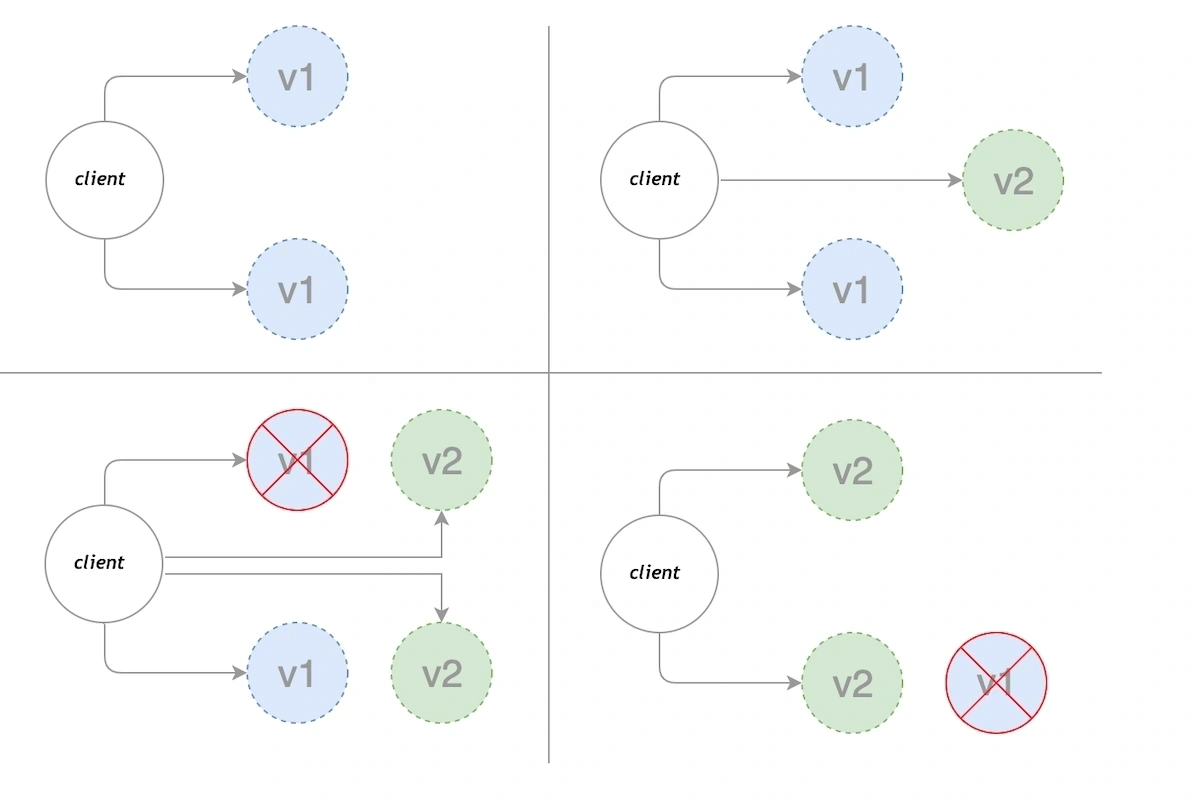
You know when a feature appears out of nowhere on the Instagram or Facebook app on your phone that only you have and your other colleagues don't have (yet)? Here, this is the result of a rolling update: a partial update of the application intended for only a part of your users.
If the release is approved, the update is extended to the entire user population.
The rolling update technique has three big advantages:
- It allows you to release the software without interrupting the service to users
- It allows a small portion of users to evaluate an application functionality and, if they like, extend it to the rest of the users
- It allows you to move part of the quality tests of a release to a part of the users so as to reduce Quality Assurance costs
To give you an example, StackOverflow uses rolling updates to have users test new features. Imagine that thanks to this practice they manage to release new versions into production several times a day!
With all these advantages, should I support rolling updates too?
You should know that this practice has great advantages but is very expensive to implement and has big impacts on the infrastructure, the way of developing software and the governance of your team.
It is essential to carefully evaluate the pros and cons of this choice.
To conclude
As I told you in this article, knowing how to write good code is only part of the skills necessary to be able to develop functional, maintainable applications that do not constantly put your team under stress.
We at Developer Migliore know this well, and that's why we created the first one WPF course in Italy which, in addition to teaching you how to develop maintainable and bug-free applications, teaches you how to manage all problems not strictly related to the code but which can have a big impact on the final result.
Hurry because we only block a few days every year for selected companies, because first of all we are developers working on real projects.
Leave your details in the form below