What actually decides whether maintenance software will work?
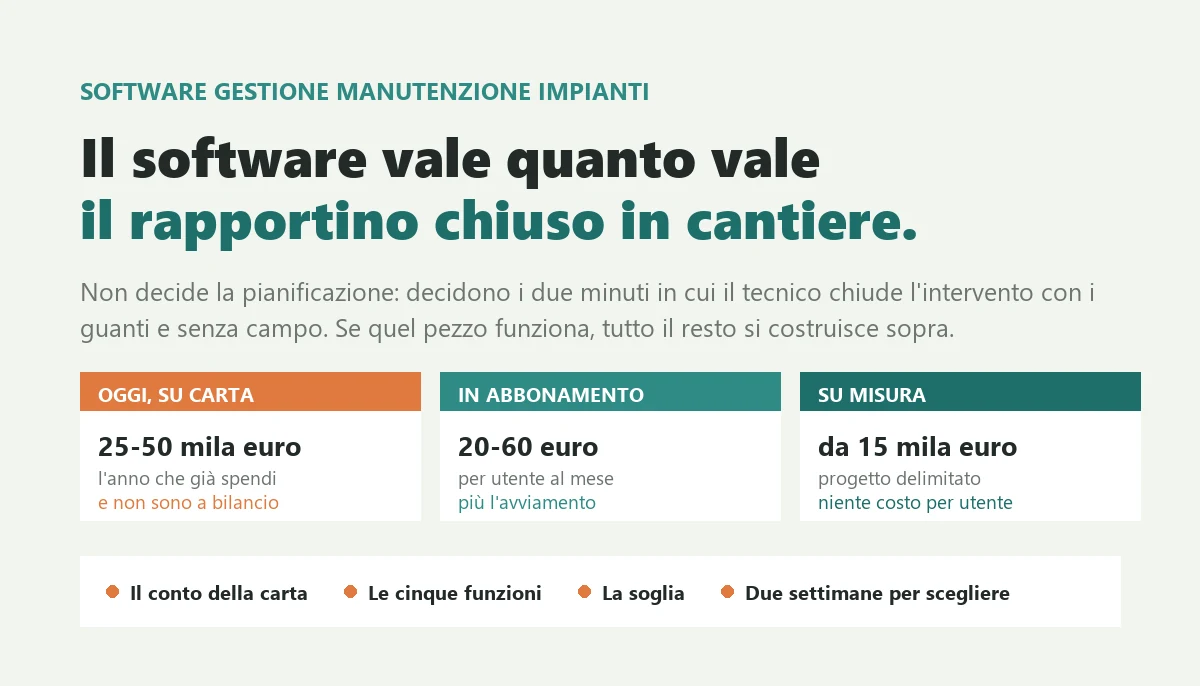
The numbers: running maintenance on paper costs twenty five to fifty thousand euros a year in a company with five to twenty technicians, between retyping, jobs never invoiced and wasted return visits. Subscription products run twenty to sixty euros per user per month; a well-scoped custom project starts at fifteen thousand euros. The practical threshold between the two routes sits around twenty five thousand euros a year of total spend.
The five features that matter are an asset register with history, a schedule that generates the work, an offline job sheet closed in two minutes, an automatic bridge to the invoice, and four numbers for the owner. Everything else stretches the rollout and sends technicians back to paper.

It is seven in the evening and there are twenty two job sheets on the desk, some on faded carbon paper, one stained with diesel, two nobody can read. Tomorrow morning someone will retype them into the accounting system to raise the invoices, and at the end of the month you will find that three jobs were never invoiced at all, because the sheet stayed in the van.
If you run a company that installs and maintains equipment, you know this scene. This article gives you the real cost of running maintenance that way, the five things maintenance management software has to do and the twenty it does not, the true price brackets between a subscription product and a custom system, and the threshold in euros where the arithmetic changes.
I have been writing software for twenty six years and a good part of that time has been spent where software meets hardware: plant supervision systems, integrations between machines and business systems, applications for people who work in the field wearing gloves. I have seen maintenance companies with forty technicians run everything on a shared spreadsheet, and companies with eight technicians buy a platform costing twenty thousand euros a year of which they used three screens.
The thing I have learned, and that no vendor will tell you, is this: in maintenance software the feature that decides success or failure is not scheduling, it is the job sheet the technician completes on site in two minutes, wearing gloves and with no signal. If that part works, everything else builds on top of it. If it does not, you have bought an archive that somebody will fill in by hand in the evening, which is precisely the problem you were trying to escape.
What maintenance management software is, and what it is not
Maintenance management software is the system that holds four things together: the register of the equipment you service, the schedule of what is due and when, the jobs with their outcome, and the link to the invoice. Everything else is an addition, useful or useless depending on how you work.
The market sells it under at least three names, and the confusion is deliberate because it helps to sell. The international term is CMMS, a computerised maintenance management system. Vendors also call it a service management system, a job management system, software for maintenance contractors. There is a neighbouring but different category, field service management, which puts the mobile technician at the centre rather than the asset.
How it differs from the system you already have
The accounting system you use for invoices, stock and bookkeeping answers one question: what did I sell and to whom. It answers none of these: which assets do I have under contract, when is the next mandatory inspection due on each one, which technician went last time and what did they find, how many hours have I burned on that contract against the hours I sold.
It is a difference of subject, not of features. The accounting system thinks in documents: order, delivery note, invoice. Maintenance software thinks in physical objects that have a history: that boiler, that panel, that extinguisher, that lift. The question to ask before looking at any product is whether your work revolves around documents or around objects. If your technician, arriving on site, needs to know what happened last time on that machine, you need a system that thinks in objects, and no add-on module of your accounting package will really give you that.
Three kinds of company look for this, and they want different things
Companies that maintain other people's equipment. Heating, electrical, fire safety, air conditioning, lifts, coffee machines, medical devices. The value sits in the contract: you sold so many inspections a year and you must deliver every one of them, because each one missed is a contractual and sometimes a regulatory risk.
Companies that maintain their own plant. A factory with an in-house maintenance department. Here the value is downtime avoided: knowing what breaks most often, having the right spare on the shelf, moving from repair after failure to replacement before it.
Manufacturers servicing what they sold. Here what counts is warranty, the installed base, and the fact that the same fault on twenty machines is a design problem, not twenty maintenance problems.
These are three different trades and the products on the market were almost always born for one of them. Buying the one built for a different trade than yours is the most frequent way these projects fail.
The calculation nobody does: what maintenance on paper costs you today
Before looking at vendor prices it pays to know what you are already spending, because that number is not zero and it is usually far higher than the cost of fixing it. It takes an afternoon and you already have the data.
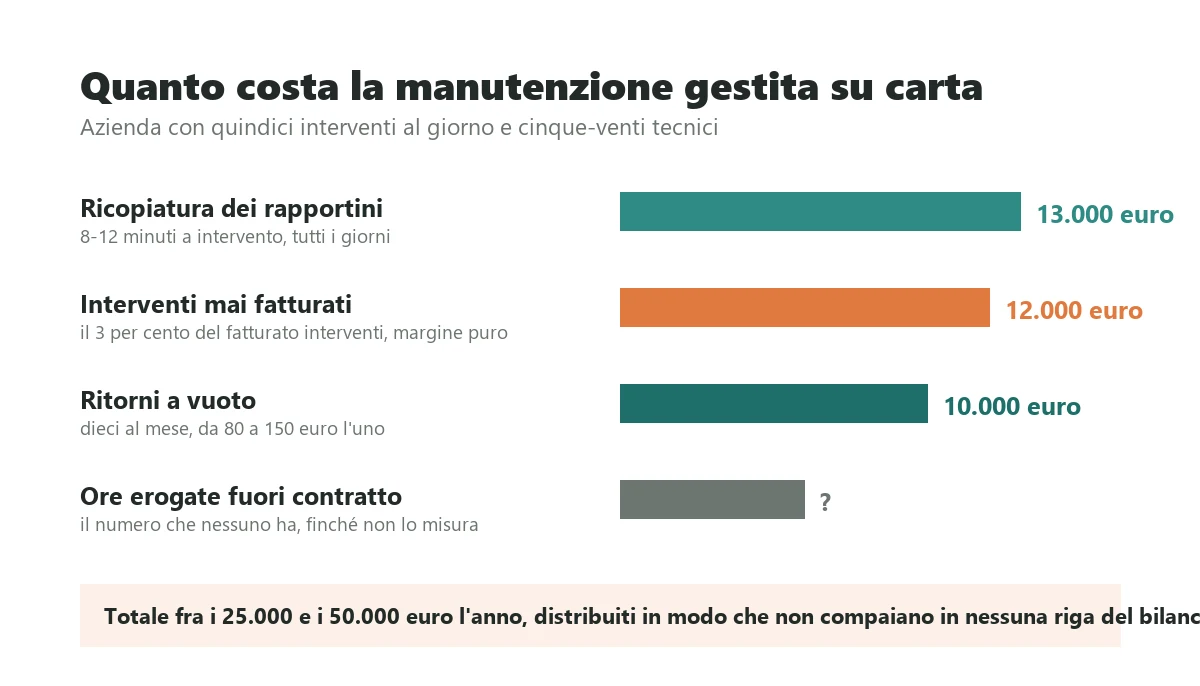
The four items that sit outside the accounts
Retyping. A paper job sheet, counting completion on site, transport to the office and manual entry, consumes eight to twelve minutes of total work, and the office part is the most expensive because it is repetitive and nobody enjoys it. At fifteen jobs a day that is roughly two and a half hours of administration, every day. At twenty five euros an hour of loaded cost, over two hundred and twenty days, that is about thirteen thousand euros a year spent retyping information somebody had already written once.
Jobs that never become invoices. This is the one that hurts, because it is pure margin. In companies running on paper the share of jobs lost along the way that I have seen runs between two and five per cent: sheets never handed in, hours forgotten, parts used and never charged. On four hundred thousand euros of service revenue, three per cent is twelve thousand euros you already paid for in wages and never collected.
Wasted return visits. The technician arrives, the part or the information is missing, they come back a second time. Each return costs travel time plus the hour on site plus fuel: eighty to a hundred and fifty euros, and it burns the customer's patience as well. Ten avoidable returns a month is over ten thousand euros a year.
Hours given away outside the contract. Without a system that compares the hours sold in a maintenance contract with the hours actually delivered, the only way to notice that a customer is being served at a loss is the owner's gut feeling. In companies where that comparison was finally made, the number of loss-making contracts was almost always higher than anyone expected.
How to run the numbers on your own company
Take four figures you already have: jobs per month, hours a week someone in the office spends retyping and chasing sheets, return visits per month for the same work, and maintenance contracts in force. Multiply as above and you get an annual figure.
In maintenance companies with five to twenty technicians, that figure is almost always between twenty five and fifty thousand euros a year. It is not a forecast, it is what you are spending now, spread in a way that appears on no line of the accounts. It is also why the cost per click on these searches in Italy, according to the Keyword Planner checked on 6 September 2026, reaches twenty four euros and seventy one for a single click: the vendors in this market know exactly what the problem is worth.
Five things maintenance software must do, and twenty it does not need
Product demonstrations last an hour and show forty features. The features that determine whether you will actually use it are five, and they usually get ten minutes of the demo because they are the least impressive.
1. An asset register with its history
Every object you maintain needs a record with serial number, model, precise location, installation date, the contract it belongs to and, above all, the list of everything that has happened to it. The value is not in the register, it is in the history. A technician who arrives and sees within ten seconds that the same valve has been touched three times in eight months does not reach the same diagnosis as one who arrives empty handed.
The practical test in a demo: ask them to open any asset and show you the last five jobs with photographs. If it takes more than three taps, nobody will look at it on site.
2. A schedule that generates the work by itself
The system must know that this asset needs an inspection every so many months, by contract or by regulation, and must produce the list of what is coming due on its own, with the lead time you choose. Not a reminder: the job ready to assign.
3. A job sheet that can be completed in two minutes
The technician must be able to close the job on a phone in two minutes: what was found, what was done, which parts were used, how many hours, a photograph, the customer signature. With no signal, because in plant rooms there never is any. This is the part that decides everything and it has its own section below.
4. The bridge to the invoice
A closed job must become a billable line in the accounting system you already use, with nobody retyping anything. If the maintenance software and the accounting system remain two islands, you have moved the retyping, not removed it.
5. The four numbers the owner looks at
Jobs closed against jobs planned, hours sold against hours delivered per contract, average time from call to closure, first time fix yes or no. Four numbers, one screen. The rest of the reporting, in my experience, gets looked at twice while buying and never again.
What they will sell you and you almost certainly will not use
Predictive maintenance from sensor data, if you do not already have the sensors and years of history. Augmented reality to guide the technician. Certified biometric signatures where a finger on a tablet is plenty for your case. A spare parts module identical to the one in the system you already have, which will leave you with two stock records that disagree. The internal chat, because technicians will use WhatsApp anyway. The customer portal, which does make sense, but only after the rest has worked for a year.
These are not bad features, they are the right features at the wrong time. The risk is not paying for them, it is that they stretch the rollout by six months and that meanwhile the technicians go back to paper, because on site people always go back to what works.
The job sheet is the part that decides everything
If you remember one thing from this article, remember this: maintenance software is worth exactly what the moment of closing the job is worth. Everything upstream and downstream depends on it, and that moment lasts two minutes in terrible conditions.
The real conditions in which it gets filled in
The technician is in a basement plant room with no signal. Gloves on, or dirty hands. Standing, one hand occupied. The customer is waiting alongside. There are three more jobs today and they are already late on the second. It is half past five.
Any screen designed by somebody who has never seen that scene will be abandoned within three weeks. The way it gets abandoned is always the same and it is not open rebellion: the technician fills in the bare minimum, ticks every box and writes "routine maintenance carried out". At that point the system is formally in use and substantially empty, and nobody notices for months.
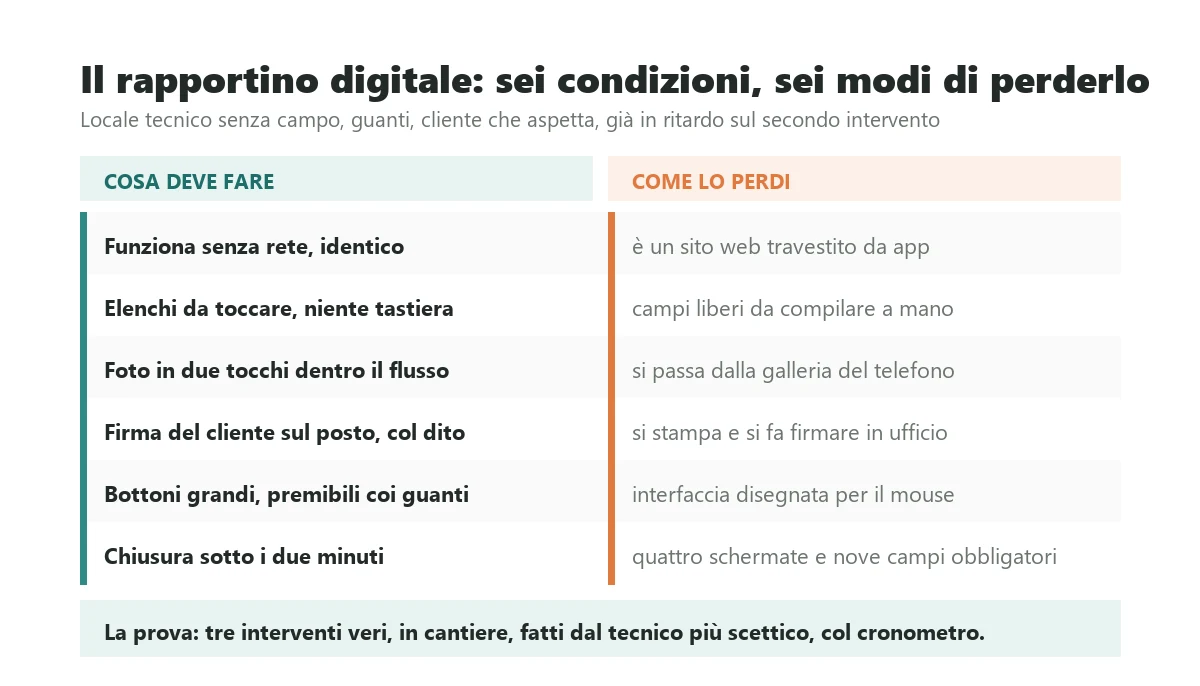
The six conditions that make a job sheet genuinely usable
It works with no connection. Not degraded: the same. It captures everything, saves on the phone and syncs by itself when signal returns. This is requirement number one and on its own it rules out a good share of the products on the market, which are web applications dressed as apps.
The technician types almost nothing. Standard operations are lists to tap, faults are a list of recurring cases, parts are chosen from what is on the van. The keyboard opens only for the free note, which must always exist because reality always exceeds the list.
The photograph is inside the flow. Two taps, not a trip through the gallery. A photograph is worth ten lines of text, takes three seconds and settles ninety per cent of the disputes that arrive six months later.
The signature is captured on site. On the phone, with a finger, in two seconds. That is what closes a dispute before it exists.
The buttons are large. It sounds trivial and it is the most frequent technical reason these tools get abandoned. With gloves on, a small button cannot be pressed.
Closing a job takes under two minutes. Time it for real, with your most sceptical technician and not the one who is best with a phone. Beyond two minutes, fifteen times a day becomes half an hour of extra work a day, and no argument about digitisation will survive that half hour.
The test worth more than ten demonstrations
Take the oldest, least phone-enthusiastic technician you have. Have them close three real jobs, on site, unaided. If they manage without calling you, you have found your product. If they do not, no amount of training will save it: you have already lost them, and with them the data you needed for everything else.
Planned maintenance: a schedule that creates work instead of chasing it
This is the feature with the highest and fastest economic return of all, and it gets five minutes in demonstrations because it is not showy. It does one thing: the system knows what is due and when, and produces the list of work to assign.
Why it changes the business model, not just the organisation
A company living on breakdown calls has revenue that depends on other people's failures, so it is unpredictable, seasonal, and with margins that compress every time a customer compares two quotes. A company living on planned maintenance contracts has recurring revenue, plannable weeks ahead, with technicians busy even in quiet months.
Moving from one to the other is not a sales question, it is an information system question. You cannot sell three hundred contracts with four inspections a year unless you have a reliable way of knowing, every Monday morning, what is due this week. A spreadsheet gets you to forty or fifty contracts, then it becomes unreliable and the worst phase begins, the one where the system formally exists but people have stopped trusting it.
Deadlines that are not yours to negotiate
In many sectors the frequency is set by regulation, not by you: fire safety systems, heating plant, pressure equipment, lifting gear, refrigerant gases, medical devices. Each area has its own rules on who inspects what, how often, and what documentation must be kept.
I am not listing the specific intervals here, and I would be wary of anyone who puts them in an article: they change, they depend on the type and rating of the equipment, and getting them wrong has consequences that are not commercial. The useful point is different: if you work in one of those areas, your software must let you define the frequency rules by asset type, produce the document the rule requires, and keep it findable for years. A product with the intervals hard-coded is a problem waiting for the next regulatory update.
How to build a schedule that holds up
The rule belongs to the asset type, not the asset. Define once that this type of equipment wants two inspections a year with that checklist, and it applies to the four hundred units you manage. Anyone who makes you set the frequency asset by asset is preparing three days of data entry and an archive nobody will maintain.
Generation is automatic and early. Every Monday, the list of what falls due in the next six weeks, already grouped by geographic area: that is how you fill the gaps in technician routes and cut travel time, which is the largest and least examined cost in this trade.
Slippage is handled. If the March inspection happens in May, the next one shifts accordingly or does not, depending on whether the frequency is contractual or regulatory. It sounds like a detail and over two years it is the difference between a real schedule and an archive of wrong dates.
The contract is linked. The system must know those due dates belong to that contract, with how many visits are included and the rate for extras. Without that link you will never know which customers make you money, and you will keep renewing the loss-making contracts blind.
Subscription product or custom system: where the threshold sits
The question always arrives here, and the honest answer is that for most maintenance companies the subscription product is the right choice. I say that while doing the opposite job, building custom software: if your work looks like everyone else's in your sector, paying to have it built is waste.
What the subscription product actually gives you
You start in weeks rather than months. You pay little up front and predictably. Updates arrive on their own. Somebody answers the phone. And above all the product contains decisions taken by hundreds of companies like yours before you, which is a body of choices you are not paying for.
Typical pricing in Italy runs from twenty to sixty euros per user per month, with big differences between counting only technicians and counting everyone who touches the system. The question to ask in the first meeting, before any other, is who counts as a user: if office staff and customers on the portal count too, the price you were quoted is not the price you will pay.
The threshold calculation, line by line
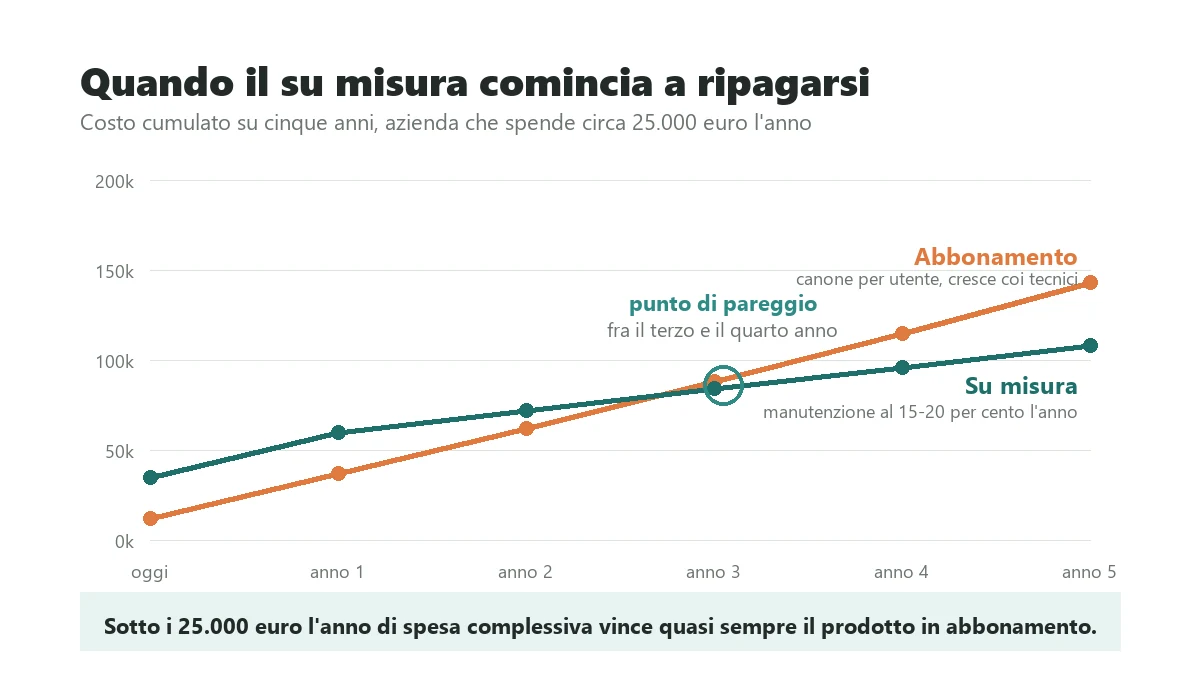
Set out four items over five years. The annual subscription with the number of users you will have in three years, not today. The onboarding, meaning configuration, loading the asset register and training: three to fifteen thousand euros once. Custom development to adapt the product to how you work, where possible, typically eight hundred to twelve hundred euros a day. And the hours you will still spend on manual work for what the product does not do.
Custom, on the other side, has a high concentrated cost up front, then annual maintenance that typically runs fifteen to twenty per cent of the initial project. It has no per-user fee: adding the twentieth technician costs nothing.
The practical threshold sits around twenty five thousand euros a year of total spend: below it the subscription product almost always wins, above it custom starts paying for itself within three or four years. It is a rule of thumb, not a law, and it comes from simple arithmetic: twenty five thousand a year over five years is a hundred and twenty five thousand euros, more than it costs to build a well-scoped maintenance system, evolutions included.
Three cases where custom wins even below the threshold
When your process is the product you sell. If customers choose you for how you run maintenance and not only for your hourly rate, that way of working is your competitive advantage. Putting it inside a standard product your competitors also have means throwing it away.
When there are many users and low value per user. Thirty technicians at forty euros a month is fourteen thousand four hundred euros a year in licences alone. Per-user pricing is a fair model for the seller and a poor one for a business with many people who use the system lightly.
When you must integrate with something of your own that nobody knows. Telemetry on your equipment, an in-house system built twenty years ago, a machine speaking a proprietary protocol. The cost of that integration inside a closed product can exceed the cost of building the part custom, and sometimes it is simply not possible.
What service management software costs: the real brackets
Here are explicit numbers with what moves them. These are orders of magnitude in the Italian market for a well-scoped custom project, the ones I use to work out on a phone call what size of project we are discussing.
Entry bracket, fifteen to thirty five thousand euros
Asset register with history, schedule with automatic generation, a technician app that works offline with photographs and signature, export to the accounting system for invoicing. Two to four months. This scope removes ninety per cent of the pain for a company up to ten technicians, and it is the one I recommend as a first step almost every time, because it goes live early and from there you learn what is really needed next.
Middle bracket, thirty five to eighty thousand euros
All of the above plus route planning optimised by area, van stock linked to the warehouse, contracts with hours sold against hours delivered, two-way integration with the accounting system, reporting for the owner. Four to eight months. This is the typical bracket for a company with ten to thirty technicians that wants to stop chasing.
Upper bracket, above eighty thousand euros
Multiple sites or group companies, a customer portal with the history of their own equipment, telemetry and alarms that raise jobs by themselves, integration with industrial customers' systems, document management with legal validity. Beyond eight months. At this level you are not buying software, you are changing how the company works, and the variable that decides the outcome is organisational rather than technical.
What moves the price inside each bracket
How much old data has to come in. Loading four thousand assets from a well-kept spreadsheet is three days. Reconstructing them from invoices and document folders is twenty days, and nobody quotes for it because nobody asks first.
How many integrations are needed. Each link to an existing system is worth three to fifteen days: a modern system with documented interfaces sits at the bottom, a twenty year old one whose tables you read directly sits at the top.
How complicated the field work is. One job sheet for everything is one thing. Fifteen different forms for fifteen equipment types, each with its mandatory checks and its own document to produce, is another: in regulated maintenance this is the heaviest part.
How many people will use it, and how comfortably. Five technicians under forty and twenty five technicians of mixed experience are two different projects at equal feature count, because in the second case part of the budget goes into making things obvious rather than possible.
Where these projects fail: the job sheet that never becomes an invoice
I have seen more than one company buy excellent maintenance software, get the technicians to adopt it, finally have clean data, and go on invoicing by hand exactly as before. It is the most frustrating failure of all because it is invisible: the project counts as a success, the technicians are happy, and the office does precisely the work it did before.
Why it almost always happens
Because integration with the accounting system is treated as the last item on the list, the one to sort out later, when it is in fact the main economic reason for the project. And because on subscription products this part is often sold as available while in practice it means a spreadsheet export somebody has to import by hand every week.
The difference between a job that becomes an invoice line automatically and one that becomes a file to import by hand is, on the retyping calculation above, the whole difference. It is the part that pays for the project.
Questions to ask the vendor before signing
Which accounting systems are already connected, and at which customers. Not whether it is possible: which ones, and ask to speak to a customer running it live. "We are open to integrating with anything" means the integration is at your expense.
Which way the data flows. Jobs to invoices only, or also customers and parts from the accounting system into the maintenance software? If the customer register has to be maintained in two places, within six months you will have two different registers and arguments about which is right.
What happens when something does not pass. A badly closed job, a customer that does not exist, a part not found. If the vendor cannot tell you where the rejects go and who notices, the integration will quietly produce missing data, which is worse than having none.
Who pays when the accounting system changes version. Put it in writing, because it will happen.
The pragmatic way to handle it
In most cases you do not need full real-time two-way integration, which is the most expensive and most fragile option. You need a one-way bridge that every night pushes closed and validated jobs into the accounting system as lines ready to invoice, with a reject log somebody reviews in the morning. It costs a fraction, takes a few days, and captures nearly all the value.
Is the data yours? Seven conditions to put in writing
After three years of use that system holds your asset register, the history of every job, the photographs, the customer signatures and the documents regulation obliges you to keep. It is the company's information capital, and it is worth more than the software holding it.
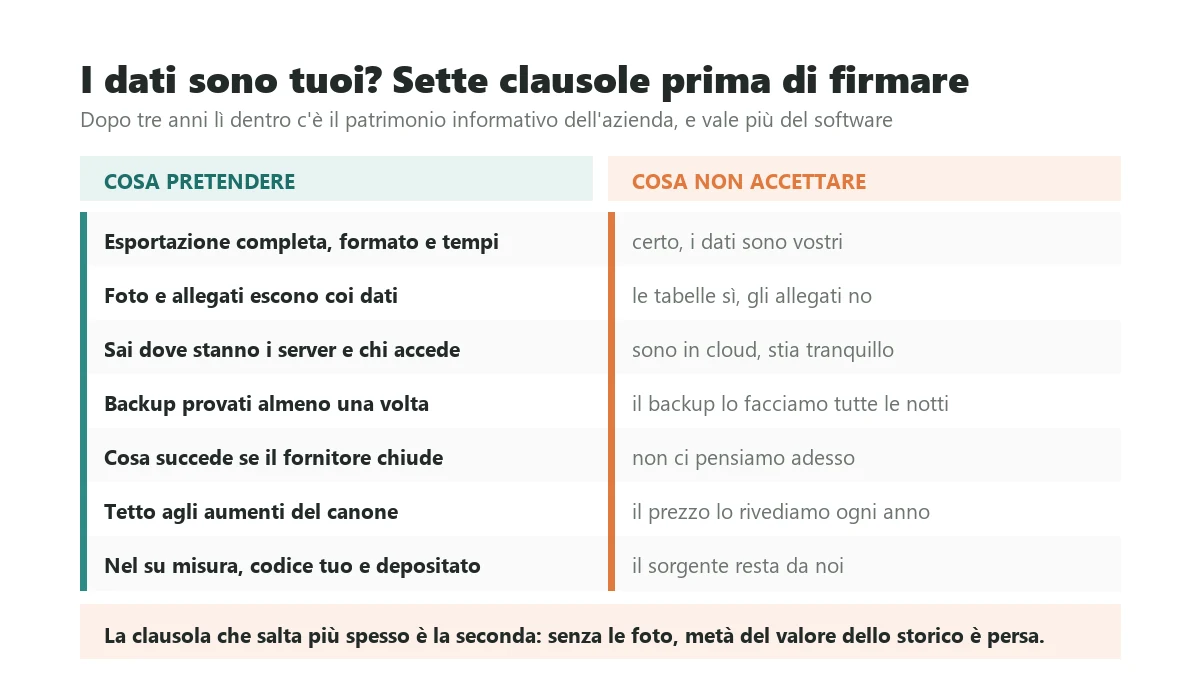
Full export is in the contract, with format and timescale. All the data, not a summary: assets, jobs, contracts, registers, in an open documented format. Written down with how many days it takes and what it costs. "Of course the data is yours" without a clause is worth nothing the day the relationship sours.
Photographs and attachments leave with the data. This is the clause that fails most often. The tabular data comes out, the twenty thousand image files stay in the vendor's system, and without them half the value of the history is gone. Ask explicitly that they come out linked to the job they belong to.
You know where it physically sits and who touches it. Which country the servers are in, who at the vendor can access your data and with what audit trail. If you maintain equipment for industrial or public customers they will ask you this, so it pays to have the answer ready.
Backups are somebody's job, and have been tested. How often, how long they are kept, and above all whether anyone has ever restored one for real. A backup never restored is not a backup, it is a file you hope is a backup.
You know what happens if the vendor closes. Vertical software is largely a market of small companies, and one where acquisitions are frequent. What happens to your data and your fee if the product is bought tomorrow by a group that decides to change it should be asked first.
Renewal pricing has a cap. A fee increase in year three, once your whole asset history is inside, is not a negotiation between equals. A clause tying increases to an index, or capping them, is easy to obtain before signature and impossible after.
In custom work, the code is yours and escrowed. Sources in your name, in a repository you can access, with the handover procedure described. That is the difference between having a supplier and depending on one.
How to choose in two weeks without calling five vendors
The method below costs two weeks of attention and no money, and in my experience it beats a round of quotations, because the problem for buyers in this market is not a shortage of offers: it is not knowing what to ask.
Week one: look at how you actually work
Day 1. Run the calculation above. Retyping hours, jobs lost, wasted returns. One annual number. That is your reasonable maximum budget and it also tells you whether the project makes sense: if the number is small, stop here and you have saved months.
Day 2. Get in a van. A full day with a technician, first job to last. Not to supervise: to see where the time really goes. It is almost never where you thought, and it is the most profitable half day of the whole project.
Day 3. Ask whoever does the retyping. The person entering job sheets knows exactly which forms are illegible, which technicians forget what, which information is always missing. That list is your functional specification, written free of charge by the person who understands the problem best.
Day 4. Count the objects. How many assets you manage, of how many types, with how many different frequencies. Those three numbers determine half the price of any solution, and everyone will ask for them.
Day 5. Write one page. Just one: what must happen when a technician finishes a job, from closure to invoice. If you cannot write it in a page, the process is not clear to you either, and no software makes a confused process clear: it makes it permanent.
Week two: test, do not watch demonstrations
Two candidates, not five. Beyond two, comparison stops being a decision and becomes a postponement.
The three real jobs test. Your most sceptical technician, on site, unaided, with a stopwatch. That is the test that decides.
The five questions for the vendor. Who counts as a user and what will it cost with twice the technicians. Which accounting systems are already connected, with the name of a customer I can speak to. How do we export everything, photographs included, and how long does it take. What happens if I change the frequencies in a year. Who answers the phone at six on a Friday when technicians cannot close their jobs.
The final question, which is the most useful. Ask both vendors which kind of company should not buy their product. A serious, specific answer means they know their trade. Answering that it suits everyone means they have not understood your problem, or do not care to.
At the end of those two weeks you have a page describing the process, a number saying what it costs you today, and two candidates tested in the field. With those three things you can decide alone in half an hour, and it will be the right decision far more often than it would have been after five presentations.
Frequently asked questions
There are two routes with two different economics. Subscription products in Italy typically run twenty to sixty euros per user per month, plus a one-off onboarding of three to fifteen thousand euros for configuration, loading the asset register and training: the decisive question to ask in the first meeting is who counts as a user, because if office staff and portal customers count too, the quoted price is not what you will pay. Custom software has three brackets: fifteen to thirty five thousand euros for asset register, schedule, offline technician app and export to invoicing, in two to four months; thirty five to eighty thousand with route planning, van stock, contracts and two-way integration; above eighty thousand for multiple sites, a customer portal and telemetry. Annual maintenance on a custom project runs fifteen to twenty per cent of the initial cost and carries no per-user fee.
For most maintenance companies the subscription product is the right choice, and that comes from someone who builds custom software: if your work looks like everyone else's in your sector, paying to have it built is waste. The practical threshold sits around twenty five thousand euros a year of total spend, counting subscriptions, onboarding, custom development and the hours still done by hand: below it the product almost always wins, above it custom pays for itself in three or four years. Three cases justify custom even below the threshold: when the way you run maintenance is why customers choose you, when many technicians use the system lightly and per-user pricing becomes disproportionate, and when you must integrate with something of your own, such as telemetry or an in-house system, that a closed product cannot reach.
It is a difference of subject, not of features. The accounting system thinks in documents, order, delivery note and invoice, and tells you what you sold and to whom. Maintenance software thinks in physical objects with a history: that boiler, that panel, that extinguisher, that lift. It tells you which assets you have under contract, when the next inspection falls due on each, who went last time and what they found, and how many hours you have burned on a contract against the hours you sold. None of that lives in the accounting system and no add-on module really provides it. The question to ask before looking at any product is whether your work revolves around documents or around objects: if the technician arriving on site needs to know what happened last time on that machine, you need a system built around objects.
Because it was designed by somebody who never saw the conditions it gets used in: a basement plant room with no signal, gloves on, standing with one hand occupied, the customer waiting, three more jobs today. Abandonment is never open rebellion: the technician ticks every box and writes routine maintenance carried out, so the system counts as in use and is substantially empty. Six conditions make a job sheet genuinely usable: it works with no connection in exactly the same way and syncs later, the technician types almost nothing because everything is a list to tap, the photograph is two taps inside the flow, the customer signature is captured on the phone, the buttons are large enough to press with gloves, and closing a job takes under two minutes when you actually time it.
Five things, and they are the least impressive part of the demo. First, an asset register with full history reachable in three taps: the value is not the list, it is the technician seeing the three previous jobs on the same valve. Second, a schedule that generates the work to assign by itself, not a reminder. Third, a digital job sheet that closes in two minutes with no signal. Fourth, the bridge to the invoice, because if the maintenance software and the accounting system stay two islands you have moved the retyping instead of removing it. Fifth, four numbers for the owner: jobs closed against planned, hours sold against delivered per contract, time from call to closure, first time fix. Predictive maintenance, augmented reality, internal chat and customer portals are the right features at the wrong time and stretch the rollout by months.
Far more than zero, spread so that it appears on no line of the accounts. There are four items. Retyping: a paper job sheet consumes eight to twelve minutes between completion, transport and data entry, which at fifteen jobs a day is roughly thirteen thousand euros a year at twenty five euros an hour. Jobs that never become invoices, two to five per cent in companies running on paper: on four hundred thousand euros of service revenue that is twelve thousand euros of pure margin lost. Wasted return visits for a missing part or a missing piece of information, eighty to a hundred and fifty euros each. And hours delivered outside the contract without noticing. In a company with five to twenty technicians the total is almost always between twenty five and fifty thousand euros a year.
In two weeks and without calling five vendors. Week one you look at how you work: run the calculation of what paper costs you today, spend a full day in a van with a technician to see where the time really goes, ask whoever retypes the job sheets which information is always missing because that list is your specification written free of charge, count how many assets you have and of how many types, and write a single page on what must happen from job closure to invoice. Week two you test: two candidates rather than five, the three real jobs test done on site by your most sceptical technician with a stopwatch, and five questions for the vendor about who counts as a user, which accounting systems are already connected with a customer you can call, how everything is exported including photographs, what happens if you change the frequencies, and who answers the phone at six on a Friday.
Leave your details in the form below