How do you modernize a legacy SCADA system from VB6 to .NET without stopping production?
The key steps are: audit of the existing system (tags, PLCs, protocols, COM/ActiveX dependencies), choice of migration strategy, building the new layer in C# with a layered architecture (Domain, Infrastructure, Presentation with WPF/MVVM), handling OPC Classic compatibility via OPC-UA wrapper, historical data migration, and shadow mode validation.
The real cost is not in the migration: it is in continuing to run a system nobody understands anymore, on an operating system that will lose support, with a dependency on a single technician who may not be available.


Every legacy SCADA modernization I have seen up close begins at the same place: a file with a .vbp extension sitting on a server, and nobody left in the company who can still open it.
You would need Visual Basic 6, a development environment Microsoft walked away from in 2008.
The person who wrote it has retired.
Or moved to another company.
Or, in some cases, is no longer with us.
The system, meanwhile, keeps running.
Every morning the operators switch on the dedicated PC, running Windows XP or Windows 7, and the screen fills with values, charts and alarms.
Everything works, in the sense that nothing has blown up in the past year.
But it is the kind of "works" you cannot build anything on: you can only hope it lasts another quarter.
Anyone who ends up holding this situation, an IT manager, a developer brought in as a consultant, a plant manager who received the problem like a gift nobody asked for, knows that feeling well.
The fear of touching something that works and that nobody understands any more.
Changing it might break it.
Not changing it means waiting for the day it breaks on its own, and you do not get to choose that day.
The real cost is not in the migration.
It is in staying where you are: a system nobody knows how to maintain, that you cannot extend, running on hardware and operating systems that are out of support, and holding production hostage by hanging it on a single person, still reachable if you are lucky.
This article is for anyone in exactly that position: C# developers and technical leads who need to understand how a SCADA system is moved from VB6 to .NET without stopping production and without trading old technical debt for a brand new pile of it.
The strategies exist, the patterns are settled, and manufacturers are looking for people who can apply them.
The question nobody answers for you is a different one: how much time do you really have, before the system makes the choice on your behalf.
Why legacy SCADA systems are a time bomb for your company

The control room PC breaks on a Tuesday morning.
The purchasing department does the most reasonable thing in the world: it orders a new machine.
And that is exactly the point at which the system that "has worked for twenty years" stops working for good.
A legacy SCADA system is not dangerous because it is old.
It is dangerous because it has not received a security patch in almost twenty years, it depends on components that are no longer distributed, and it runs only on the computer it was born on.
The day that computer dies, it takes the plant with it.
Let us start with the date, because it explains everything else.
Microsoft officially closed support for Visual Basic 6 in 2008.
Every vulnerability discovered after that day has never received an official fix, and never will.
In a plant connected to the corporate network, that is not a detail for a technical meeting: it is a door left open with a sign on it saying "do not touch, it works".
Then there is the part nobody puts in the minutes.
Almost every VB6 project of that era rested on third party COM and ActiveX libraries: the trend charts, the serial communication, the data access.
Those libraries are not updated, many are no longer distributed, and some belong to companies that no longer exist.
They are blind spots inside a system that governs production, and nobody in the company holds the list.
The problem, though, almost always reaches you as a compatibility issue rather than a security one.
Windows 11 has removed or limited support for some 32 bit components and for the VB6 runtime.
Installing a SCADA system written in VB6 on a new machine turns into an adventure: dependencies fail, drivers cannot be found, and the ActiveX controls behind the trend charts refuse to register.
The system that ran without complaining on that 2012 PC may simply not start on hardware bought today.
On the other side of the crossing there is .NET 10, the long term support release that arrived in November 2025: what you write today receives security updates for the next three years, and the day someone asks you for a cloud service, the domain layer and the communication layer move into a container while the WPF interface stays where it is, on Windows.
If your plant runs on Delphi or C++/MFC, the name changes and the story does not.
These are technologies that had their moment and now call for skills that grow rarer every year.
Finding an available, qualified Delphi developer in 2026 is hard.
Finding one who also knows the specific SCADA system you are running is close to impossible.
It is not a question of talent: it is demography, and demography does not negotiate.
With .NET 10 the demographic problem does not arise: people who write C# can be found today and in ten years, and someone else will open that code without having to call you back while you are retired.
One hour of production downtime at a medium sized manufacturing plant in the automotive or pharmaceutical sector costs between 10,000 and 80,000 euros.That is not a figure pulled out of the air: it is the range I have seen recur in the risk assessments companies use to justify investment in operational continuity, and it moves mostly with the value of the batch you are losing.
In pharmaceutical manufacturing, with FDA and GMP traceability obligations, the bill climbs higher still, because every interruption that is not documented correctly puts entire production batches at risk.
That is why "is migrating too expensive?" is the wrong question.
The right one is: what does it cost not to migrate, and for how many more years can you afford it?
The useful life window of a legacy SCADA system narrows with every year that passes.
The question is not whether it will become a critical problem, but when.
Those who arrive prepared have options; those who arrive in an emergency take whatever the market has left.
There is one last item, and it appears in no budget: company knowledge.
VB6 code written by one person, with no documentation, with tag names invented on the spot and production rules buried inside Form_Load and Timer_Tick, is technical debt in its purest form: company property written in a language nobody in the building speaks any more.
It has not disappeared.
It is unreadable, which in practice amounts to the same thing.
And here comes the step almost everyone skips, because it looks like the least urgent of all: before deciding how to migrate, you need to know exactly what you have.
In most cases, nobody does.
Where a legacy SCADA modernization really starts: the audit before you touch a line of code
Imagine having to renovate a house with no floor plans, where nobody knows where the pipes run and the only builder who worked on it cannot be reached.
Nobody would start knocking down walls.
In software, though, demolition is almost always where people start.
A legacy SCADA modernization starts with an audit of the existing system, not with Visual Studio: one week to one month of work to put five things down in writing, the tags, the PLCs and their protocols, the COM dependencies, the production logic hidden in the code and the real size of the job.
Skip the audit and you are gambling, not planning.
The first piece is the tag inventory, and it is worth explaining what we mean, because the term confuses anyone coming from business software who has never worked on a SCADA system written in C#.
A tag is a single measurement or command point: the temperature of a furnace, the pressure in a line, whether a valve is open or closed.
In legacy systems these points live wherever they happened to land: proprietary configuration files, an Access database forgotten in a shared folder, or written by hand inside the VB6 code.
All of them have to be listed, with name, data type, update rate and source device.
That list becomes the backbone of the new system, and nobody can hand it to you ready made.
As soon as the list is on the table, the next question opens up: where do those values actually come from?
This is where you map the PLCs and the protocols.
Siemens S7, Allen-Bradley ControlLogix, Modicon Quantum: every family speaks its own language.
The Siemens S7 protocol is not Modbus TCP, which is not EtherNet/IP.
And how does the old system talk to them, through OPC Classic or through proprietary drivers bought twenty years ago?
The answer to that question decides what the new communication layer will cost you, before you have written a single line.
Next come the COM and ActiveX dependencies, the ones that were blind spots in the previous section.
Here they stop being an abstract risk and become a list: the component for the trend charts, the one for the serial port, the one for data access.
For each of them the decision is binary, either a modern equivalent exists or it has to be rewritten.
There is no third option.
The fourth area is the one that changes the project, and it is not technical: it is the production logic.
In a VB6 system the logic is scattered everywhere, calculations inside forms, validation inside timers, alarm rules inside utility functions with names that tell you nothing.
It has to be extracted and documented before it is rewritten.
It is also the moment when the company finds out what its plant actually does, which does not always match what everyone believed it did.
I have watched meetings change direction in ten minutes because of an alarm rule found inside a Timer_Tick.
That leaves the estimate of the work, which is not about grading the legacy code: you already know the grade.
It is about counting.
How many forms, how many lines of code still alive, how many integrations facing the outside world.
Those are the numbers that determine how long the project will take and, above all, which of the migration strategies you can afford.
At the end of all this you are holding a single document, and it is the one you take into the meeting:
- The tags, one by one, with name, data type, update rate and source device;
- The PLCs and the protocols the old system uses to talk to them, from Siemens S7 to Modbus TCP to EtherNet/IP;
- The COM and ActiveX dependencies, each with the decision already written next to it: modern equivalent or rewrite;
- The production logic pulled out of the forms, the timers and the utility functions, written in a language a human can read;
- The numbers behind the job: how many forms, how many lines of code still alive, how many integrations facing the outside world.
A month of audit looks like time taken away from the project.
It is the only way I know of not paying for it three times over later, when you discover the mistake with the line stopped and the customer on the phone.
Every hour spent understanding the old system is an hour you will not spend patching the new one.
With those numbers in hand you walk into the meeting where the migration approach gets decided.
And that is where someone, without fail, proposes the shortcut.
You have just seen what is needed before writing a line of code.
Now the real question: who teaches you this?
Not university, which has never seen VB6.
Not a video, which shows you the clean case.
The C# Course starts where real projects start: from a system somebody else wrote and that you now have to understand.
Migration strategies: big bang, Strangler Fig and the incremental approach
In the meeting, somebody always suggests it.
"Let us shut everything down over the summer break, swap the system out, and start again in September with the new one."
On the whiteboard it looks like the best solution.
It is also the one that, chosen in the wrong context, costs you more than any other decision in the project.
There are three routes: the big bang, which replaces everything in one go; the Strangler Fig pattern, which grows the new system around the old one until there is nothing left inside; and the purely incremental approach, which puts new features alongside the existing system.
In the majority of SCADA migrations the answer is the second one, and it is worth understanding why the other two exist at all.
The big bang is simple to plan and brutal to execute: you stop the old system, start the new one, and in between there is no safety net.
It works only if all three of these conditions are true at the same time.
You can schedule a long plant shutdown, from a few days to a few weeks.
The new system has been tested exhaustively on an environment that faithfully replicates production.
And going back to the old system, if it comes to that, is quick and acceptable.
In practice I see it working where shutdowns are already in the calendar, the annual overhauls in pharmaceutical plants, the seasonal maintenance of certain food processing lines, and where the old system is so degraded that it cannot hold up even as a safety net.
When those conditions are not all in place, you need a different idea, and this one comes from botany.
The strangler fig grows around a host tree, wraps it, takes its place, and the original tree disappears without anyone cutting it down.
The Strangler Fig pattern does the same thing to your SCADA system: the new system does not replace the old one, it grows around it.
You start with the least critical modules, or the ones easiest to isolate, switch the new module on in parallel, validate it, and only when it is stable do you switch the old one off.
Then you repeat, module after module, area after area, until nothing is left of the old system but a shell to uninstall.
The Strangler Fig pattern does not remove risk: it spreads it over time and makes it manageable.Every step is a small risk, and above all it is a risk you can undo.
If a module misbehaves, the old one is still switched on right next to it.
You go back in minutes, not weeks, and nobody in management notices.
That leaves the case where the old system has no separation between modules; so there is nothing to strangle one piece at a time, but it still has operational life ahead of it.
That is where the purely incremental approach works: new features are born directly in the new system, the old one carries on handling what it has always handled, and the centre of gravity shifts a little at a time until the replacement happens without any recognizable moment of rupture.
Placed side by side, the three routes differ on three questions alone:
| Strategy | When it makes sense | What you put at stake in one go | How you go back |
|---|---|---|---|
| Big bang | The shutdown is already in the calendar, annual overhauls in pharmaceuticals or seasonal maintenance in food processing, and the old system is so degraded it cannot hold up even as a safety net | The entire plant, for a window ranging from a few days to a few weeks | Only if going back is quick and acceptable: in between there is no net |
| Strangler Fig | In the large majority of SCADA migrations, when modules can be isolated one at a time | One module at a time, starting with the least critical ones | The old module is still switched on right next to it: minutes, not weeks |
| Purely incremental | The old system has no separation between modules, but still has operational life ahead of it | Only the new features | The old system carries on handling what already exists throughout the transition |
Whichever route you choose, one thing is not optional: the plan for going back to the previous system, the one project documents call rollback, has to be written and rehearsed before the migration starts, not after the first incident.
In the industrial world "let us hope it works" is not a strategy, it is a prayer.
The threshold I use on the projects I follow is half an hour: the rollback has to be executable in less than 30 minutes, documented step by step and rehearsed in a staging environment.
It is not a round number picked at random.
At the hourly costs above, thirty minutes of stopped line is already a five figure bill that somebody has to explain, and beyond that threshold the rollback stops being a technical manoeuvre and becomes a management problem.
With the how settled, the what remains.
And this is where the game almost nobody budgets for is played: if you write the new system with the old mindset, all you have bought is an old system with newer syntax.
From VB6 to C#: what changes in the architecture and how to structure the new project
You open the legacy project and count the forms: twenty seven.
Inside each one there is everything, reading the data, the calculations, the graphics, the alarm handling.
If you plan to translate it line by line into C#, what you get is the same mess with more modern syntax.
Moving from VB6 to C# is not a transfer of code: it is a rewrite that forces you to make architectural choices, which is exactly what VB6 never asked of you.
The three decisions that matter concern how you separate interface from logic, how you talk to the database and how you talk to the PLCs.
The rest follows from those.
How to structure a .NET project for SCADA: the three layers
I start with separation, because that is the one that changes your working days.
In the legacy project the form is the system: it reads, processes, displays and reacts to clicks.
The MVVM model with WPF takes that single block and cuts it into three.
The View is only XAML, it describes how the window looks and knows nothing about how the plant works.
The ViewModel is a C# class that exposes the values through INotifyPropertyChanged; so the window updates itself when a value changes.
The Model is made of your domain entities: a Tag, an Alarm, a Setpoint.
It all sounds like theory until the first Thursday evening when you have to verify the alarm logic.
With the monolithic form, you open the application, wait for it to connect and try it by hand.
With the ViewModel separated, you write a test and verify the logic in two seconds, without opening a single window and without touching the plant.
On top of that you can change the graphics without going back into the rules, and two people can work in parallel on the View and the ViewModel without stepping on each other.
That is the practical difference between a system you can maintain and one you can only fear, and it is the reason it is worth seeing MVVM applied in full rather than halfway.
On the data side, you leave behind DAO and ADO, the database access mechanisms of the VB6 era, and move to Entity Framework Core or Dapper.
The rule of thumb I use is simple: for configuration and state data, Entity Framework Core with SQLite or SQL Server is the pragmatic choice; for the data arriving continuously from sensors, Dapper on TimescaleDB or a client for InfluxDB keeps up better.
On the field side, you abandon DCOM and OPC Classic for OPC-UA.
The starting point is the official OPC Foundation library for .NET Standard, available on NuGet as OPCFoundation.NetStandard.Opc.Ua: it reads tags, subscribes to value changes and writes setpoints, through a typed and testable interface.
It is the piece that turns your industrial project into an ordinary .NET 10 project, with everything that follows in terms of tooling and of people who can read it.
At that point the structure of the project almost writes itself, on three layers.
The domain layer holds entities such as Tag, Alarm and History, together with the service interfaces, and depends on nothing external: it is C# and nothing else.
The infrastructure layer holds the concrete implementations, the OPC-UA client, the repositories towards the database, the historization service.
The presentation layer holds the WPF application with its ViewModels and its Views, depends on the domain and not on the infrastructure, which reaches it already resolved through dependency injection.
The benefit shows up two years from now, not today.
You change the time-series database and touch only the infrastructure.
Somebody asks for a web dashboard on top of the control room interface and you add a presentation project without going back into the domain.
There is one part of this architecture, though, that in a real plant never works on the first attempt: communication with the PLCs.
Because almost always the PLCs do not speak OPC-UA yet.
How to handle the OPC Classic protocol during the migration
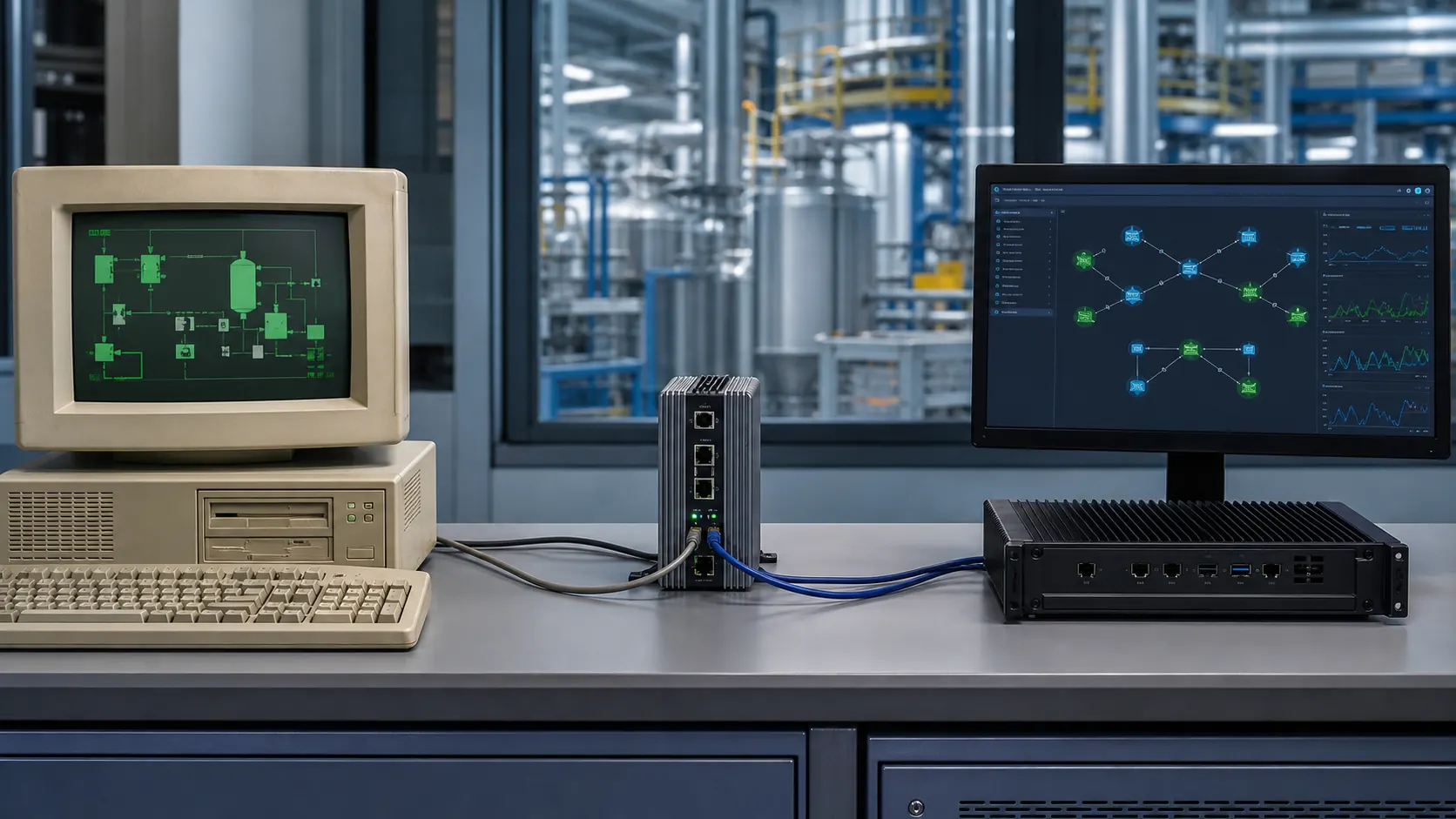
You have the .NET project ready, the OPC-UA client working perfectly against the test server, and you go on site.
On site you find an OPC server from fifteen years ago, on a machine nobody has the courage to restart.
Your modern code and that server have no intention of talking to each other.
The solution is not to touch the PLCs: it is to put a translator in the middle.
An OPC-UA wrapper is installed on the field network, downwards it speaks OPC Classic to the existing servers, upwards it exposes the same data as an ordinary OPC-UA server.
The .NET system sees only OPC-UA and knows nothing about the old protocol.
Which of its acronyms you are facing is not a glossary detail: it decides which translator you can buy and how much you pay for it.
OPC Classic is the previous generation of the protocol: OPC DA for real time data, OPC HDA for historical data, OPC A&E for alarms and events.
It rests on DCOM, the Windows technology for making programs on different machines talk to each other, and that explains its reputation: it works, but it is delicate to configure, it depends on the Windows version and it has no intention of leaving the Microsoft world, let alone heading towards the cloud.
In the plants I have seen, OPC Classic is the rule and not the exception.
With the translator in the middle, the PLCs are left alone, the field network stays as it is, and all the configuration work done over the years on the OPC Classic servers is not thrown away.
It is the difference between a project that asks the company to rebuild the plant and one that asks it to add a machine.
There are several products that do this job, and the picture that follows is the one from mid 2026: the choice is not a matter of taste, and price lists change faster than protocols.
Technosoftware offers both client and server components with good support for OPC DA and HDA.
Unified Automation offers a complete suite.
Prosys OPC is a solid alternative, widely used in academia and in mid sized installations.
Some SCADA vendors, such as Kepware, part of the PTC group, already include an OPC gateway in their offering.
Three numbers guide you: which version of OPC Classic you are using among DA, HDA and A&E, how many tags have to pass through the gateway, because free or entry level versions often have a ceiling, and whether you need a support contract with guaranteed response times.
On a plant in production, a vendor with commercial support almost always beats a solution with no continuity guarantees: not out of snobbery, but because at three in the morning you want a number to call.
There is one scenario in which the translator on its own is not enough.
The old OPC Classic server sits on a Windows XP or Windows 7 machine you cannot upgrade, because it also hosts other critical software that is just as old.
In that case the wrapper goes on a separate machine, virtual if you prefer, with DCOM configured to reach the remote OPC Classic server.
It can be done, but be ready to spend a few days on DCOM permissions, firewalls and service accounts.
Anyone who tells you it is a half hour configuration has never done it.
One note that matters more than all the rest: moving to OPC-UA is not only a technical choice, it is a positioning choice.
OPC-UA is the native protocol of new PLCs, from the Siemens S7-1500 to Beckhoff and Phoenix Contact, it is the entry point to the industrial cloud, from Azure IoT Hub to AWS IoT, and it is the direction set by Industry 4.0 regulations.
When you introduce it during the migration you are not only solving today's problem: you are putting the plant in a position to do things that are not even on the table yet.
Provided that you can demonstrate, before switching it on, that the new system reads exactly the same values as the old one.
You configure the wrapper in a day.
What you will not find in any documentation is the second day, the one with the DCOM permissions that do not add up, the firewall blocking the right port and the service account nobody can trace back to an owner.
At that point you either have somebody who has been through it before, or you lose a week.
Whoever runs the C# Course has already lost those weeks on other systems, and saves them for you.
Testing a legacy SCADA system without stopping production
In business software you release, look at the logs and fix.
On a plant you do not have that luxury: you cannot put an experimental version into production and watch what happens.
A mistake here means a stopped line, an alarm that does not sound, in the worst case an operator in danger.
There is a way to test without stopping anything, and it is made of three steps in sequence: first you simulate the PLCs, then you listen to the real plant in read only mode while the old system carries on working, and finally you compare the historical data produced by the two systems over the same period.
Only then do you switch something off.
The three steps of commissioning: simulator, shadow system, historical comparison
The first step is there so that you do not depend on the field.
Instead of connecting to the plant PLCs, you connect to a simulator that behaves like them and produces synthetic values.
Siemens provides PLCSIM for its S7 range.
On the OPC-UA side there are test servers such as the Prosys OPC UA Simulation Server or the Unified Automation demo server, which expose hundreds of nodes with values that move realistically.
With those in hand you develop and test the whole communication layer from your desk, without asking anyone for permission to walk onto the shop floor.
The OPC-UA client you wrote in C# cannot tell the simulator from the plant: it is the same code, only the server address in the configuration changes.
The second step is the one that separates the projects that end well from the rest, and it is called shadow mode.
When the new software is mature enough, you connect it to the same PLCs as the old one, but in read only mode.
The old system carries on governing the plant as it always has; the new one watches the same data in parallel and touches nothing.
Then you compare: different values, different update rates, tags that never reach the new system at all.
Every discrepancy you find here is a discrepancy you will not find with the line running.
The third step concerns the memory of the plant.
After migrating a module, you compare the time series produced by the two systems over the same overlapping period.
If the old one historized a tag once per second, the new one has to do the same.
Gaps or systematic differences are investigated and resolved before the old module is switched off, never after.
Rollback plan and acceptance criteria: what has to be verifiable
The rollback plan deserves a line of its own, because it is the thing everyone claims to have and almost nobody has rehearsed.
Every migration step needs its own: which operations are carried out to go back, how long they take, and who physically carries them out when the phone rings on a Saturday.
It has to be rehearsed in staging before every release into production.
"If it goes badly we will go back to the old system" is not a plan until you have timed it.
Then there is the part that makes all of this verifiable instead of debatable: the acceptance criteria, written module by module, which are the software version of what the shop floor calls commissioning.
Not "the module works", but something you can tick off line by line:
- It reads all 47 expected tags;
- At a rate no slower than 500 ms;
- With no connection errors lasting more than 2 consecutive seconds;
- Historizing the values with an accurate timestamp.
Written that way, they can be verified automatically: a handful of integration tests in xUnit that open the OPC-UA session, read the 47 tags and check the rate and the timestamps.
The same tests run first on your machine against the simulation server, then in staging against the replicated field network, and when something breaks they are the ones who tell you, not the plant manager on the phone.
Written the other way, they turn into an argument between you and the plant manager, and that argument you always lose.
There is one piece of the plant, though, that no acceptance criterion can rebuild if you lose it along the way: the years of data already recorded.
The problem with historical data: migrating years of trends and alarms
Ask around the company what the SCADA historical data is worth and nobody can answer.
Ask what happens if it disappears and the answer comes back at once, from the quality manager: it is twenty years of proof that the process has always been under control.
Historical data is the most valuable and most neglected asset in a plant, and migrating it means facing two separate problems: reading proprietary formats that are often undocumented, and pouring them into a modern time-series database without altering a single timestamp.
Losing it, or altering it, is not an option.
First you need to know who will come asking you about it: if it is the production manager, a ten minute gap in the history is an annoyance; if it is an inspector, it is a batch you can no longer defend.
Years or decades of sensor readings, alarm events and operator actions: they are the basis of performance analysis, of predictive maintenance, of compliance audits, especially in pharmaceuticals, and of debugging that one problem which comes back every three months and that nobody has ever understood.
The first obstacle is the format, and the picture is not encouraging.
Wonderware InSQL, today AVEVA System Platform, uses SQL Server as its engine but with a schema entirely of its own.
OSIsoft PI, today AVEVA PI, keeps the data in an optimized binary format.
Citect uses proprietary files.
And in older systems you find Access databases, or folders full of CSV files generated every night by a script nobody has read since.
Where SQL Server sits underneath, the road runs downhill: you study the schema, write the queries that pull out timestamp, value and tag name, and from there you build the import scripts towards the new database.
Where the format is closed, you go through the legacy system APIs to export to CSV or JSON and then import.
Slower, less elegant, but it works.
On the destination side the choice is between three worlds, and it depends on who will maintain the system after you.
InfluxDB is the most widely used in the IoT and open SCADA world, it has its own query language, first InfluxQL and then Flux, well supported .NET clients and good performance on time range queries.
TimescaleDB is an extension of PostgreSQL: time-series database performance with the convenience of carrying on writing SQL, which in a team used to business software is worth more than any benchmark.
SQL Server with partitioning is the pragmatic choice for those who stay inside the Microsoft ecosystem and already have the skills in house.
If you have to decide in thirty seconds: InfluxDB when the team comes from IoT, TimescaleDB when it already writes SQL, SQL Server when the company is Microsoft from top to bottom.
In detail, the choice closes like this:
| Database | Why you choose it | Who it suits |
|---|---|---|
| InfluxDB | The most widely used in the IoT and open SCADA world, well supported .NET clients, good performance on time range queries | Those coming from the IoT world who accept a dedicated query language, first InfluxQL and then Flux |
| TimescaleDB | An extension of PostgreSQL: time-series performance while carrying on writing SQL | The team used to business software, where familiarity with SQL is worth more than any benchmark |
| SQL Server with partitioning | You never leave the Microsoft ecosystem | The company that already has SQL Server skills in house |
The practice that works is to migrate the last 12 months first, validate them calmly, and bring the older history across in the background while the new system is already in production.
Then there is the detail that breaks validations: timestamps.
Legacy systems save using the clock of the local SCADA server, which can be offset from universal time, drift over the years and leave gaps at every restart.
Before importing they have to be normalized, the gaps have to be identified and they have to be documented as acquisition gaps.
Never fill them with interpolation: an invented value inside a time series is a lie that, on the day of the inspection, somebody will read as a real measurement.
In pharmaceuticals and other regulated sectors this becomes formal: you need an audit trail proving that the migrated data is identical to the original, with a digital signature or a cryptographic hash of the two sets.
It is an FDA 21 CFR Part 11 requirement, and ignoring it means losing the system validation, which means stopping the plant for a bureaucratic reason after modernizing it beautifully.
People who can handle this material are not ordinary technicians, and that is also why they are rare enough to count.
Some people spend their career keeping other people's systems alive, hoping they hold up another year.
Others arrive when those systems have to be replaced, and get the call before the investment is signed off.
The difference is not talent: it is the method you used to build your skills.
That method, applied to C# and .NET, is the C# Course.
Career opportunities in legacy SCADA modernization: why this market is worth it
One Friday not long ago, the engineering manager of a manufacturing company in northern Italy said something to me that sums the whole thing up: "I cannot find anyone who knows how to do this.
I have raised the offer twice and I have received three applications in total."
The SCADA modernization market has a supply problem, not a demand problem: companies have plants to rebuild and budgets already approved, but they cannot find C# developers willing to step into the industrial world.
Those who step in today find higher than average pay at the same level of seniority and far less competition.
The context explains why.
The market I know best is Italy, one of the largest manufacturing economies in Europe, and its shape will look familiar to anyone who lives in an industrial region: the automotive supply chain in the north, the pharmaceutical clusters around Milan and Rome, food and beverage in the north east, the textile and mechanical districts of the centre.
All of them have plants with SCADA systems, and a sizeable share of those plants still runs on technology from the nineties or the early 2000s.
Meanwhile the people who knew how to work on those systems are leaving the labour market on grounds of age, and nobody is replacing them.
The new generation has never seen VB6, does not know what Delphi is and has heard about industrial protocols at a trade fair at best.
Companies are caught in the middle: they have to modernize, they cannot find the people, and meanwhile the plant ages another year.
It is into that gap that the C# developer who agrees to get their hands dirty with somebody else's code steps, and the barrier to entry is lower than it looks.
You do not have to become an automation engineer.
You do not have to learn to program PLCs.
You have to be able to build solid .NET applications, to understand the basic concepts of the industrial world, what a tag is, how OPC-UA works, what historization means, to be able to read the code that was there before you, and to work in a context where tolerance for failure is far lower than in web development.
Now the numbers, because it is only right to talk about them openly.
And let me say straight away where they come from: not from a salary survey, but from the job ads circulating in 2026 for these positions and from the negotiations I happen to follow.
Take them for what they are, a snapshot from the field, not a statistic.
A junior C# developer joining a software company specialized in industrial SCADA starts at 28,000 to 35,000 euros gross per year.
A mid level profile with 3 to 5 years of experience, WPF and OPC-UA skills and at least one migration behind them sits between 45,000 and 65,000 euros gross per year.
A senior developer or a reference technician with documented experience on real plants goes beyond 70,000 euros, and those working as consultants reach 100 to 130 euros per hour.
These figures are noticeably higher than in traditional application development at the same number of years worked.
Demand concentrates in four sectors, each with a different way in:
- Pharmaceuticals: the most demanding on quality and compliance, but also the sector that pays the most and is in the greatest hurry, pushed by FDA and EMA regulations.
- Automotive: above all the supply chain feeding the large manufacturers, with an enormous number of plants to modernize and budgets available.
- Food and beverage: plants that are smaller on average but numerous and spread across the whole territory, which means work close to home almost wherever you live.
- Water and energy utilities: extreme continuity requirements and public budgets that are allocated on a regular basis.
The real advantage, though, is not in the starting salary.
It is in the fact that the barrier to entry is high not because of technical difficulty, but because of combination: it takes someone who writes good C# code, knows WPF, can read twenty year old VB6 without calling in an outside consultant and is not frightened by a production line.
Whoever puts those four things together becomes hard to replace, and in our trade "hard to replace" is the only form of security that really exists.
The good news is that those four things are built in a precise order, and the path is shorter than you imagine.
How to train to become the SCADA developer companies are looking for

"I would have to start again from scratch."
It is the sentence I hear most often when I describe this market to a C# developer who has spent five years on business software.
And it is false: they have already done most of the work, they simply do not know it.
If you start from a solid C# base, the path towards the industrial world takes 12 to 18 months and runs through five skills in sequence: C# done properly, WPF with MVVM, OPC-UA, time-series databases and the ability to read legacy code.
You do not need a degree in automation engineering, you need to build them in the right order.
It starts with C#, and that does not mean knowing every design pattern in existence.
It means writing clean code, knowing how memory behaves, using async and await with full awareness, which here is not a stylistic flourish, because a SCADA system handles hundreds of simultaneous connections and a block in the wrong place shows up as a chart freezing in the control room, and knowing the SOLID principles well enough to apply them without becoming their prisoner.
If you have doubts about these fundamentals, that is where the first month goes, nowhere else.
Then comes WPF with MVVM, and this is the point where many turn up their nose because "WPF is dead".
In the industrial desktop world it is the de facto standard for control room interfaces on Windows, and it will stay that way for as long as there are Windows based plants, which is to say for quite some time.
Being able to build an interface with data binding, templates and triggers, and to implement MVVM properly rather than halfway, is a skill in high demand and increasingly rare among those who grew up on the web alone.
It is also why competition in this market is so low: fashion went one way, the work stayed here.
The third step is OPC-UA, and it costs you less than you think.
You do not have to become a specialist in the protocol.
You have to be able to use the OPC Foundation library for .NET to connect a client to a server, read the nodes, subscribe to value changes and write a value.
With a test OPC-UA server you learn that in a few days of real practice; the deeper understanding of the node model and of subscriptions comes later, by working with it.
The fourth is the data side: InfluxDB or TimescaleDB, how high frequency values are inserted, how you query by time range, how long data is kept and how you throw the old data away without regrets.
Here too you learn by installing a local instance and writing code, not by reading the documentation from start to finish.
The fifth is the one no course puts on the syllabus and the one that gets you hired on a migration project: being able to read legacy code.
Not writing VB6, reading it.
Understanding what a form does, pulling out the production rule hidden inside a timer, working out where the old system talks to the PLCs.
You learn it only on real code, during a migration or on open VB6 projects found online, and whoever can do it walks into a room where very few people are standing.
Lined up in order, the five skills tick off like this:
| Skill | What you really have to be able to do | Where you learn it |
|---|---|---|
| Solid C# | Clean code, memory handling, async and await used with full awareness, SOLID principles applied without pedantry | This is where the first month goes, if you still have doubts about the fundamentals |
| WPF with MVVM | An interface with data binding, templates and triggers, and MVVM implemented in full rather than halfway | On the industrial desktop it is the de facto standard: you learn it by building real interfaces, not by watching them |
| OPC-UA | Connecting a client to a server, reading the nodes, subscribing to value changes, writing a value | A few days of practice on a test OPC-UA server |
| Time-series database | High frequency inserts, queries by time range, data retention and clearing out the old data | A local instance set up by hand and the code written yourself |
| Reading legacy code | Understanding what a form does, pulling out the rule hidden inside a timer, finding where the old system talks to the PLCs | Only on real code: a migration in progress or open VB6 projects found online |
How long it really takes: the 12 to 18 month path
If you are starting from C# and want to get there in a year and a half, the sequence that works is this: three months on advanced C# and WPF with MVVM, two months on OPC-UA and time-series databases, then a personal project that simulates a complete SCADA system, WPF interface, connection to a simulation OPC-UA server, historization on InfluxDB.
That project on GitHub, in an interview, is worth more than any certification: it proves that you can make things work together, which is the only question that counts.
What structured training saves you is not study time: it is the time lost building skills the wrong way.
Architectures that do not hold up beyond the prototype, dependencies that make the code impossible to test, OPC-UA communication patterns that run smoothly in the lab and stall on a real plant, with hundreds of tags and a network that drops out now and then.
Those are mistakes you discover on your own after months, and you discover them in front of the customer.
With somebody who has already walked that road, you discover them the same afternoon, on your own code.
Some people spend their career keeping alive systems written by others, hoping they hold up another year.
And some become the person who replaces those systems, the one companies call before they sign off the investment.
The difference is not talent: it is the method you use to build your skills and the guide you choose to do it with.
The plants you have read about here are real, many of them are within an hour's drive of where you live, and they are looking right now.
That guide has a name: the C# Course, where I do not tell you about the method, I have you build it on your own code.
The time you spend waiting, though, does not come back: plants get older, the colleagues who knew how it worked retire, and every year that passes the window narrows a little.
Frequently asked questions
The cost of a SCADA modernization depends on the system size (number of tags, PLCs, complexity of logic) and the chosen strategy. An incremental approach using the Strangler Fig pattern spreads the investment over time while reducing risk. However, the cost of NOT modernizing is often higher: one hour of production downtime at a medium-sized manufacturing plant costs between 10,000 and 80,000 euros, depending on the sector.
Yes, and it is the recommended approach. The Strangler Fig pattern allows the new .NET system to run alongside the legacy system, reading the same data in parallel. Modules are replaced one at a time, using short and controlled maintenance windows. The plant is never completely stopped: you proceed area by area or feature by feature, validating each increment before moving forward.
Old SCADA systems use OPC Classic (OPC DA/HDA), based on Windows DCOM technology. OPC-UA wrapper servers expose OPC Classic data as if they were OPC-UA servers, allowing the new .NET system to communicate using the modern protocol without touching the PLCs. Libraries such as Technosoftware OPC UA SDK and Unified Automation enable this setup. It is the most pragmatic solution for preserving the existing investment in PLCs.
The recommended architecture uses separate layers: a domain layer with entities and business rules (tags, alarms, setpoints), an infrastructure layer for OPC-UA communication and data persistence, and a presentation layer using WPF with the MVVM pattern. This separates concerns and makes the system testable and maintainable over time, unlike the monolithic forms typical of VB6.
Historical data migration requires dedicated scripts that read from the legacy Historian (WonderWare InSQL, OSIsoft PI, or proprietary databases) and write to the new time-series database (InfluxDB, TimescaleDB). Preserving original timestamps and validating data continuity before and after migration is essential. Data gaps must be documented, not fabricated.
The most sought-after profile is a C# developer with WPF experience and a basic understanding of industrial systems (OPC-UA protocols, the concept of tags, interaction with PLCs). You do not need to be an automation engineer: companies are looking for developers capable of writing solid .NET code and working alongside the OT world. Those who hold both skill sets are rare and well compensated, with packages that easily exceed 50,000 euros annually even at a mid level.
Leave your details in the form below