What is the number that decides which multi-tenant model to choose?
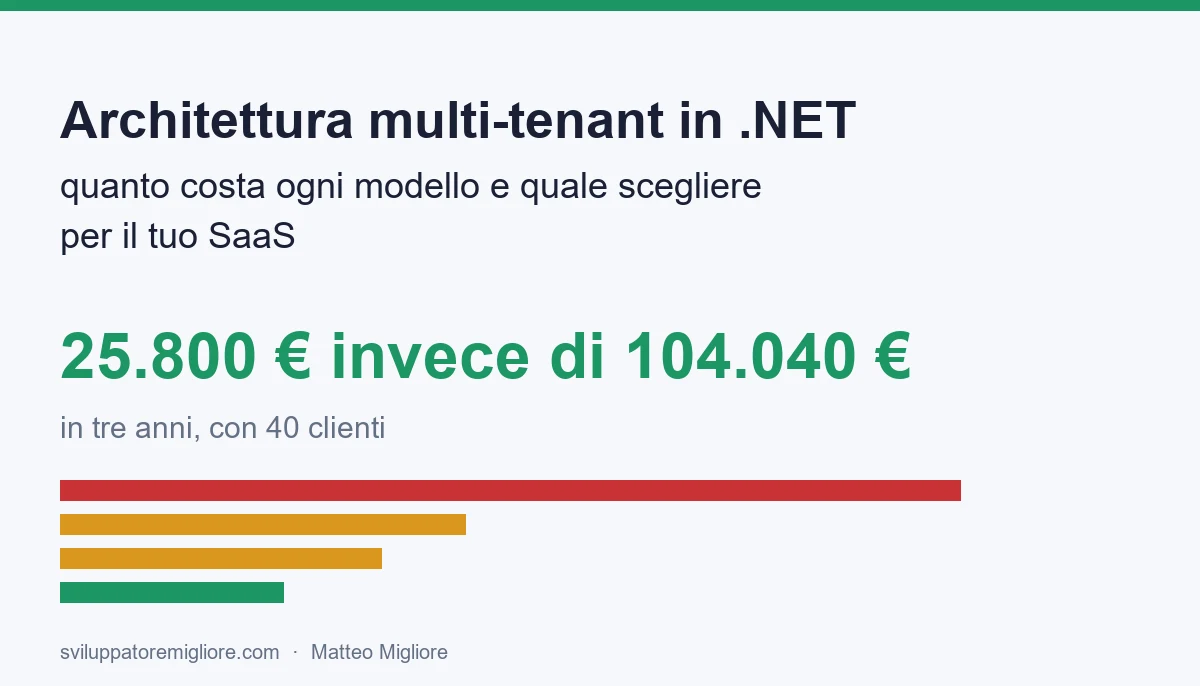
Up to 4 customers an instance per customer pays off; from 5 to 16 a database or a schema per customer; from 17 up a shared database. With 40 customers, shared cost about 25,800 euros over three years, against 104,040 euros for one instance each.

A software house in Verona has a practice-management product for professional firms, written in .NET, that has worked well for six years. Every customer has their own installation: a virtual machine, a database, an application, and an update package that someone has to carry on site or launch remotely. With five customers it was fine. Today there are twenty-two, and in January eight more will sign.
The owner wants to turn it into a subscription service, a SaaS, but has two quotes on the table that cannot be compared. One proposes "one instance per customer, but automated". The other proposes rewriting everything as "multi-tenant", and uses words nobody in the room can explain.
This article tells you what a multi-tenant architecture is, which models exist to keep customers' data apart, how much each one costs over three years with the numbers of a typical company, how to build in ASP.NET Core and Entity Framework Core the one that pays off in most cases, and how to stop one customer from seeing another's data.
You will find the cost of five models in euros, the number that decides which to choose, C# and SQL code that compiles, the test that protects you from the worst mistake, the list of things that are almost always forgotten (background jobs, cache, files, mail, search) and a forty-five-day plan to go from one installation per customer to a real service.
A premise. I built and sold LegalDesk, a multi-tenant legal SaaS, and I have designed software for companies for twenty-six years. I am not here to sell you a rewrite: I tell you when it pays, when it does not, and which is the smallest route that holds. The case I use is a typical company, built from orders of magnitude and industry averages. It is not a client, it is a method: you redo it with your own numbers in an afternoon.
What is a multi-tenant architecture and why does the choice stay with you for years?
A multi-tenant architecture is a way of building a program so that a single application serves several customers, called tenants in the jargon, keeping each one's data separate from the others. The customer does not know they share anything. They see their name, their data, their configuration. Behind it there is one program to update, monitor and run.
The alternative is the single-tenant model: a whole installation for each customer. It is what almost every company does when it starts as an "install it" product and later wants to sell by subscription.
The choice is not a technical detail you change halfway, for three reasons.
- It touches every table and every query. Where the customer's data lives, and how another customer is prevented from reading it, is written all over the code. Changing it after three years means redoing most of the data access.
- It decides the cost of every new customer. With one installation per customer, customer number fifty costs almost as much as number one. With a shared database, it costs a few euros a month.
- It decides the kind of mistake you can make. In the first case the typical mistake is forgetting to update a machine. In the second it is showing one customer another's data, which is the mistake that ends up in the news and in lawyers' letters.
That is why the right question is not "which model is the most modern", but "which mistake can I afford, and how much does each additional customer cost me". The rest of the article answers those two things.
One clarification that removes a lot of confusion. Multi-tenant does not mean microservices, it does not mean cloud and it does not mean Kubernetes. A monolith on a single server can be perfectly multi-tenant, and it is often the best shape. If that is also your doubt, I cover it in the guide on microservices or monolith.
What does the typical company look like and which numbers does it start from?
The typical company is a software house of 12 people selling a vertical practice-management product to professional firms. The product is in ASP.NET Core with SQL Server, six years old, and today it is installed customer by customer. The company decides to sell it as a service.
Here are the numbers you need, which you can collect in half a day by looking at contracts, cloud invoices and the team's activity log.
| Measure | Value | How to find it |
|---|---|---|
| Customers at full run in three years | 40 | Commercial plan: 10 in the first year, 25 in the second, 40 in the third (yearly average) |
| Customer-years in the period | 75 | 10 plus 25 plus 40: it is the sum that the infrastructure bills |
| Releases per year | 12, one a month | History of the last twelve months |
| Customers with a contractual duty of physical separation | 4 out of 40 | Contract clauses: banks, public bodies, a few large firms |
| Cost of an hour of in-house developer | 60 euros | Labour cost divided by hours worked |
| Cost of a development day | 480 euros | 8 hours at 60 euros |
| Subscription price | 350 euros a month per customer | Planned price list |
The subscription price is there to keep your feet on the ground. At 350 euros a month, 40 customers make 14,000 euros a month in revenue, 168,000 euros a year. If infrastructure cost 60 euros a month per customer, it would eat 17 per cent of revenue before paying a single person. If it cost 3 euros, 1 per cent. That, not fashion, is why the shape of the architecture matters.
Two notes on the numbers. The first: the 40 customers are a target, not a fact. The model you choose must hold if 15 arrive, and it must hold if 120 arrive. The second: the four customers with a duty of physical separation are a real and frequent case. Anyone who works with banks, insurers and public bodies hears it in the first meeting. You do not choose a model against them, you choose a model that can host them.
Which isolation models exist?
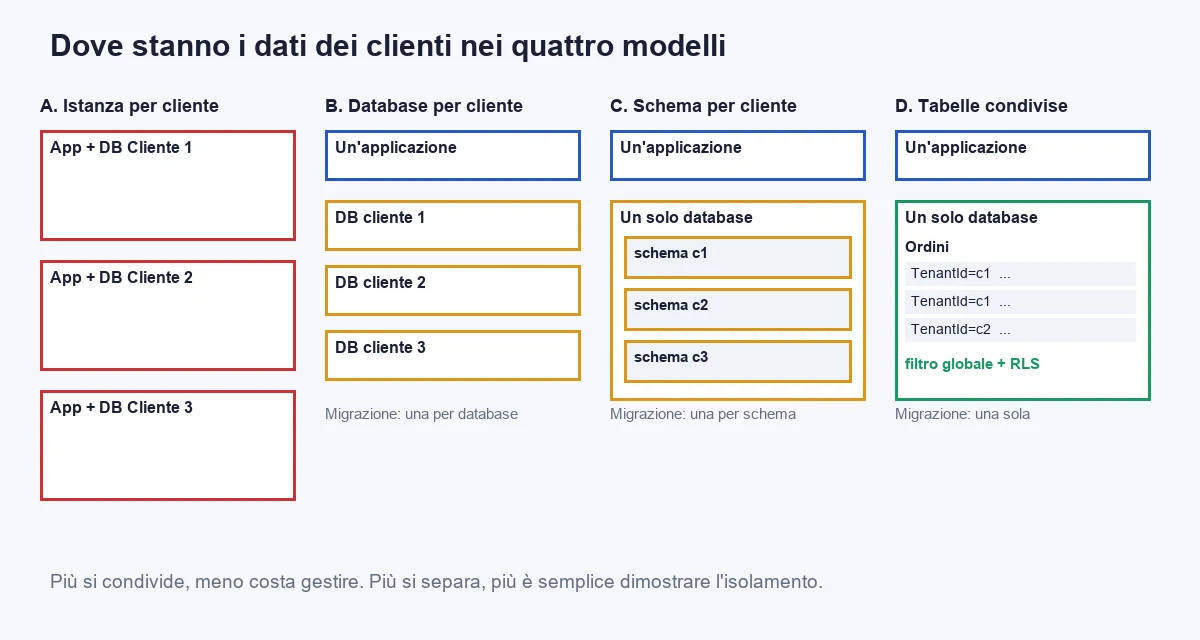
There are four real routes, plus a variant that combines them. I label them with a letter so they can be compared.
A. A complete instance for each customer
Each customer has their own application and database, in a container or a machine of their own. It is the simplest model to understand and build: the code is what you already have, it does not change a line, and a customer cannot possibly see another's data because they share nothing.
The price comes later. Every extra customer is one more installation to update, monitor and restart when it stops. With ten customers it is manageable. With forty, someone on the team does nothing but keep them aligned.
B. A database for each customer, one application
There is one application, and on every request it chooses which database to connect to based on the customer. The data is physically separate, so you can back up, restore and delete a single customer with a simple operation. It is a form much loved by those who sell to regulated customers.
The effort is in migrations. Every time you change a table, you must apply the change to all the databases, and decide what to do if it fails on one of the forty. With Azure SQL, elastic pools share resources among many databases and make the cost reasonable, but the management is still that of forty objects.
C. A schema for each customer, inside one database
One database, and inside it many "folders" (SQL Server schemas), one per customer, with the same tables repeated. It costs less than model B because there is only one database to pay for. But migrations are still one per schema, and with hundreds of customers the tables become tens of thousands and the tools start to slow down. It is a middle road that is rarely the best, and I meet it mostly in products written without a plan.
D. Shared tables, with a column that says whose row it is
One database, one set of tables. Every table has a column with the customer's identifier, and every query is forced to filter on that column. It is the cheapest model and the easiest to evolve, because there is a single migration for everyone. It is also the one where the mistake, if it happens, costs the most: a forgotten filter exposes everyone's data.
The rest of the article shows how to make this mistake very hard to make, with three independent defences. With those, model D is, at 40 customers, the most convenient for a product like ours.
E. The variant: shared for everyone, dedicated for those who require it
It is model D with a declared exception: the customers who contractually require physical separation get a database of their own, with the same application. You build it once and use it when needed. For the typical company, with four customers out of forty in this situation, it is the realistic choice.
A note on where these models sit among the bigger architecture choices: it is the same family of decisions I cover in the guide on Clean Architecture and over-engineering. You choose the simplest shape that holds the real constraints, not the most elegant one.
How much does each model cost over three years?
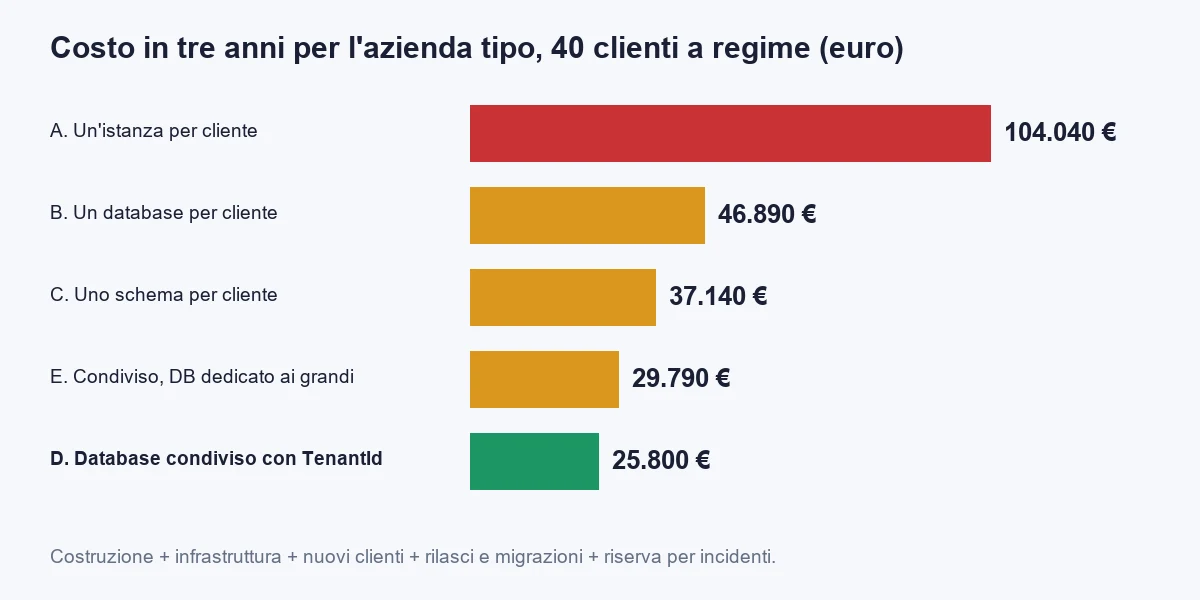
The calculation has five items for each route. Four are costs you pay every time, the fifth is a reserve.
- Build. The development days needed to make the model work, at 480 euros.
- Infrastructure. What it costs to keep a customer running: containers, database, storage. Multiplied by the 900 customer-months of the period (75 customer-years times twelve).
- New customers. The hours needed to activate a new customer, for 40 customers, at 60 euros.
- Releases and migrations. The hours to bring each release to each customer, over the 75 customer-years.
- Incident reserve. A prudent amount for the expected cost of an isolation problem or a failed migration: hours of repair, communication to customers, some refunds.
Here are the numbers for each route, for the typical company.
| Route | Build | Infrastructure | New customers | Releases and migrations | Reserve | Total over 3 years |
|---|---|---|---|---|---|---|
| A. Instance per customer | 3,840 (8 days) | 54,000 (60 euros per customer a month) | 19,200 (8 hours each) | 27,000 (6 hours per customer a year) | 0 | 104,040 |
| B. Database per customer | 9,600 (20 days) | 19,800 (22 euros, with elastic pool) | 4,800 (2 hours) | 11,250 (2.5 hours) | 1,440 | 46,890 |
| C. Schema per customer | 10,560 (22 days) | 5,400 (6 euros) | 4,800 (2 hours) | 13,500 (3 hours) | 2,880 | 37,140 |
| D. Shared with filter | 14,400 (30 days) | 2,700 (3 euros) | 600 (a quarter of an hour) | 900 (12 minutes) | 7,200 | 25,800 |
| E. Shared plus dedicated for the large ones | 18,240 (38 days) | 4,500 (5 euros on average) | 1,200 (half an hour) | 2,250 (30 minutes) | 3,600 | 29,790 |
How to read the table. One instance per customer costs four times the shared model. The difference, 78,240 euros over three years, is almost all infrastructure and repeated work: there is nothing technically brilliant about it, it is just the cost of doing the same thing forty times.
Model D is the cheapest, but it has the highest reserve, 7,200 euros, because it is the one where a mistake weighs most. I put fifteen days a year for each expected incident, between repair, explanations to customers and refunds. If the three defences of model D are built well, as we will see, the reserve is never used. But I do not take it out of the calculation: whoever removes it is cheating.
Model E costs 3,990 euros more than D. It is the price of being able to say "yes" to four customers who ask for physical separation. If you had said "yes" to them with model B for everyone, you would have spent 21,090 euros more than D. This is the thing to remember: separation for those who require it costs a few thousand euros, not tens of thousands, if you plan for it from the start.
Three warnings on the numbers.
- The per-customer monthly figures are orders of magnitude I have at hand from real projects on Azure. Price lists change: redo the calculation with your own quotes.
- The build days are estimates for a team that knows the product. If your code is full of hand-written queries, model D costs more, because they have to be touched one by one. In the forty-five-day plan further on I show how to count them.
- I did not include the cost of support, because it is similar in all models. I did include, for prudence, the incident reserve: in models A and B it is low because the data is physically separate, and high in D because it is not.
Which number decides which one to choose?
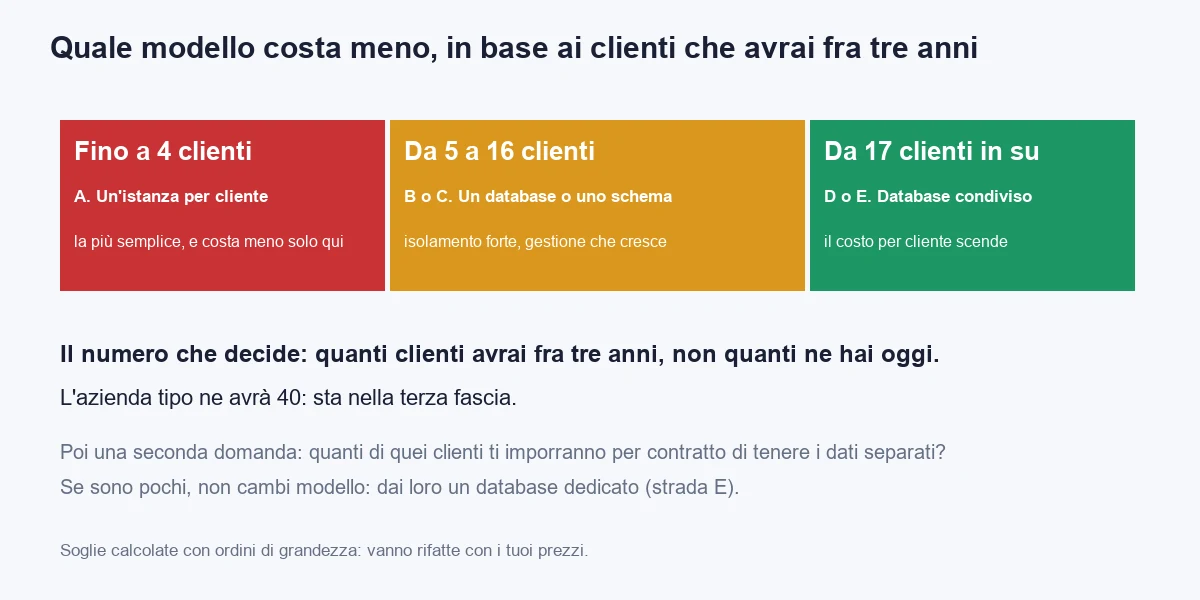
The deciding number is one: how many customers you will have in three years. Not how many you have today. Whoever decides on today's customers chooses the simplest model, and in three years pays dearly for it.
Redoing the calculation for different final customer counts, the routes cross at precise points.
| Customers in three years | Cheapest route | Why |
|---|---|---|
| Up to 4 | A. One instance per customer | The code does not change, and the repetitions are still few. At 4 customers the instance costs about 14,800 euros, against 15,600 for a database per customer |
| 5 to 16 | B or C. A database or a schema per customer | The build effort is repaid by low costs per customer. B and C are equal at around 7 customers |
| 17 and above | D or E. Shared | The cost per customer falls and the migration effort almost disappears. At 17 customers shared overtakes a schema per customer |
So for the typical company's 40 customers the answer is shared, with the variant for the four large ones. If the expected customers were 8, the answer would be a database per customer. If they were 3, staying with one instance each would be perfectly fine, and I would advise you not to rewrite anything.
There is a second number, which does not change the model but changes the variant: how many of the customers will contractually require physical separation. If few, model E is enough. If all, because you sell only to banks or public bodies, the right model is B and that is it, and there is no point in straining to share.
A check that takes twenty minutes. Take your last ten contracts, or the next ten you hope to sign, and look for three words: "data location", "segregation", "audit". If they appear in more than two contracts out of ten, your market asks for separation and the calculation changes.
One last observation, which the table does not say but which weighs. The cost of the wrong choice is not symmetric. If you choose shared and need separation, you move to model E with a few weeks of work. If you choose the instance per customer and you need forty customers, you have to rewrite the data access of the whole product. When in doubt, choose the route from which it is easier to go back: shared with the door open to dedicated.
How do you build the shared model in ASP.NET Core?
The shared model rests on three pieces: recognising the customer on every request, filtering every read without having to write it each time, and stamping every write with the right customer. I build them one at a time. The code compiles with .NET 10 after installing the Microsoft.EntityFrameworkCore.SqlServer package.
First piece: the customer context
An object with the lifetime of a request that knows which customer is working. The rest of the program reads it from there, and only the code that recognises the customer can write it.
namespace Gestionale.Clienti;

public interface IContestoCliente
{
    Guid? ClienteId { get; }
}

public sealed class ContestoCliente : IContestoCliente
{
    public Guid? ClienteId { get; set; }
}

public sealed record ClienteCatalogo(Guid Id, string Sottodominio, bool Attivo);

public interface ICatalogoClienti
{
    Task<ClienteCatalogo?> TrovaPerSottodominioAsync(string sottodominio, CancellationToken token);
}
The catalogue is the list of customers: it lives in a separate, small database, and should be kept in memory for a few minutes, because it is queried on every request. Note the choice of the Guid? type: if the customer has not been recognised, the value is empty, and we will see that with an empty value the system returns nothing. A mistake must produce less data, not more data.
Second piece: recognition, in a middleware
The customer is recognised differently depending on the product: from the subdomain (acme.yourproduct.com), from a header, from information inside the access token. The subdomain is the most common and most understandable form for users.
namespace Gestionale.Clienti;

public sealed class RiconoscimentoCliente(RequestDelegate successivo)
{
    public async Task InvokeAsync(
        HttpContext http,
        ContestoCliente contesto,
        ICatalogoClienti catalogo)
    {
        var host = http.Request.Host.Host;
        var sottodominio = host.Split('.')[0];

        var cliente = await catalogo.TrovaPerSottodominioAsync(sottodominio, http.RequestAborted);
        if (cliente is null || !cliente.Attivo)
        {
            http.Response.StatusCode = StatusCodes.Status404NotFound;
            return;
        }

        contesto.ClienteId = cliente.Id;
        await successivo(http);
    }
}
Two details that make the difference. The first: if the customer does not exist or is disabled, the response is a 404 and the rest of the application is not executed. There is no path where the request goes on "without a customer". The second: the response does not distinguish "the customer does not exist" from "the customer is suspended", so anyone trying to guess subdomains learns nothing.
A security warning. The subdomain alone says which customer you want to reach, it does not say the user belongs to it. Authentication must then verify that the user belongs to that customer, and the check must be done on the server side. Someone with an account in customer A who changes the subdomain by hand to customer B must not get in. It is covered with a rule in authorisation: the customer identifier written in the token must match the one in the context.
Third piece: the filter you cannot forget
Entity Framework Core offers a function made for this, the global query filter: a condition that is automatically added to every read of a given entity. It is the first defence, and the most important one.
using Gestionale.Clienti;
using Microsoft.EntityFrameworkCore;

namespace Gestionale.Dati;

public interface IDelCliente
{
    Guid ClienteId { get; set; }
}

public class Ordine : IDelCliente
{
    public int Id { get; set; }
    public Guid ClienteId { get; set; }
    public string Numero { get; set; } = "";
    public decimal Totale { get; set; }
}

public class GestionaleDb(DbContextOptions<GestionaleDb> opzioni, IContestoCliente contesto)
    : DbContext(opzioni)
{
    public DbSet<Ordine> Ordini => Set<Ordine>();

    private Guid? ClienteCorrente => contesto.ClienteId;

    protected override void OnModelCreating(ModelBuilder modello)
    {
        modello.Entity<Ordine>(e =>
        {
            e.HasQueryFilter(o => o.ClienteId == ClienteCorrente);
            e.HasIndex(o => new { o.ClienteId, o.Numero }).IsUnique();
            e.Property(o => o.Totale).HasPrecision(18, 2);
        });
    }

    public override int SaveChanges(bool accettaTutteLeModifiche)
    {
        ControllaEMarca();
        return base.SaveChanges(accettaTutteLeModifiche);
    }

    public override Task<int> SaveChangesAsync(bool accettaTutteLeModifiche, CancellationToken token = default)
    {
        ControllaEMarca();
        return base.SaveChangesAsync(accettaTutteLeModifiche, token);
    }

    private void ControllaEMarca()
    {
        var cliente = contesto.ClienteId
            ?? throw new InvalidOperationException("Nessun cliente nel contesto: scrittura rifiutata.");

        foreach (var voce in ChangeTracker.Entries<IDelCliente>())
        {
            if (voce.State == EntityState.Added)
            {
                voce.Entity.ClienteId = cliente;
            }
            else if (voce.State == EntityState.Modified && voce.Property(x => x.ClienteId).IsModified)
            {
                throw new InvalidOperationException("Non si può spostare una riga a un altro cliente.");
            }
        }
    }
}
What this code does, line by line, in plain words.
- Every read of
Ordinigets the condition by itself: "the row's customer is the one in the context". Whoever writesdb.Ordini.ToList()does not have to remember it. - If the customer in the context is empty, the condition is never true and the read returns zero rows. It is the right behaviour: when in doubt, no data.
- Every write is stamped by the system. An added row receives the context's customer, so no developer can forget to set it, or set it wrong.
- A write without a customer is an error, not an omission. The save fails with a clear message.
- A row cannot be moved to another customer. If someone tries to change
ClienteIdon an existing row, the save refuses. - The unique index includes the customer. Order number "A-1" can exist once per customer, not once in the whole system, which is exactly what customers expect.
Now everything is registered at application start.
using Gestionale.Clienti;
using Gestionale.Dati;
using Microsoft.EntityFrameworkCore;

var builder = WebApplication.CreateBuilder(args);

builder.Services.AddScoped<ContestoCliente>();
builder.Services.AddScoped<IContestoCliente>(sp => sp.GetRequiredService<ContestoCliente>());
builder.Services.AddSingleton<ICatalogoClienti, CatalogoClientiInMemoria>();

builder.Services.AddDbContext<GestionaleDb>(opzioni =>
    opzioni.UseSqlServer(builder.Configuration.GetConnectionString("Gestionale")));

var app = builder.Build();

app.UseMiddleware<RiconoscimentoCliente>();

app.MapGet("/ordini", async (GestionaleDb db) =>
    await db.Ordini.OrderBy(o => o.Numero).Select(o => new { o.Numero, o.Totale }).ToListAsync());

app.Run();

public sealed class CatalogoClientiInMemoria : ICatalogoClienti
{
    private static readonly ClienteCatalogo[] Clienti =
    [
        new(Guid.Parse("11111111-1111-1111-1111-111111111111"), "acme", true),
        new(Guid.Parse("22222222-2222-2222-2222-222222222222"), "beta", true),
    ];

    public Task<ClienteCatalogo?> TrovaPerSottodominioAsync(string sottodominio, CancellationToken token) =>
        Task.FromResult(Clienti.FirstOrDefault(c => c.Sottodominio == sottodominio));
}
The catalogue here is fixed, to make the example run. In production it reads from a table and keeps the answer in memory for five minutes.
The point to notice is the /ordini endpoint: it never names the customer. Whoever writes it cannot get it wrong, because there is nothing to remember. That is the goal of the whole model: security must not depend on the memory of whoever writes the code.
How do you stop data from leaving for the wrong customer?
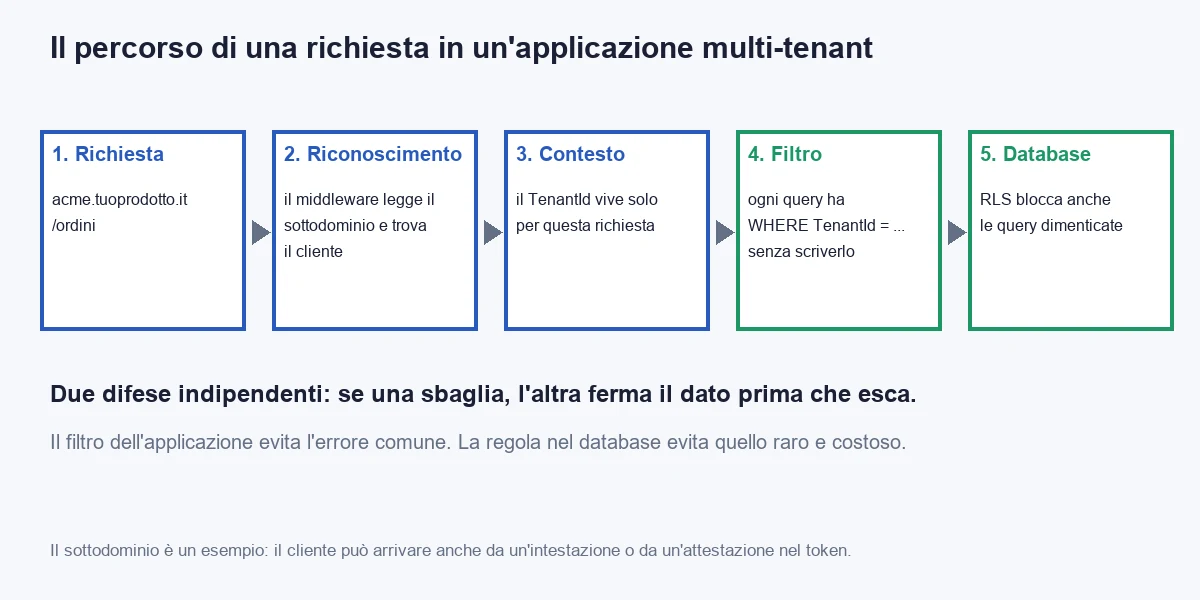
The global filter is a good defence, but it is only one. There are at least three ways in which data can still get out: a developer uses IgnoreQueryFilters() for an administrative search and forgets it in the wrong place; a query written by hand in SQL bypasses Entity Framework; another application (a report, an export, a BI tool) connects directly to the database.
That is why one is not enough. The shared model holds only with three independent defences: one in the code, one in the database, one in the tests.
Second defence: row-level security in the database
SQL Server and Azure SQL offer Row-Level Security: a rule written in the database that filters rows based on a value the application sets when it opens the connection. If the application, by mistake, forgets the filter, the database applies it anyway.
CREATE SCHEMA Sicurezza;
GO

CREATE FUNCTION Sicurezza.FiltroCliente(@ClienteId uniqueidentifier)
RETURNS TABLE
WITH SCHEMABINDING
AS
RETURN
    SELECT 1 AS Consentito
    WHERE @ClienteId = CAST(SESSION_CONTEXT(N'ClienteId') AS uniqueidentifier);
GO

CREATE SECURITY POLICY Sicurezza.PoliticaCliente
    ADD FILTER PREDICATE Sicurezza.FiltroCliente(ClienteId) ON dbo.Ordini,
    ADD BLOCK PREDICATE Sicurezza.FiltroCliente(ClienteId) ON dbo.Ordini AFTER INSERT
WITH (STATE = ON);
GO
The filter predicate hides other customers' rows on read, update and delete. The block predicate prevents inserting a row with the wrong customer. The ClienteId value is written by the application in the session context as soon as it opens the connection. In Entity Framework this is done with an interceptor, which you insert once and which applies to all queries.
using System.Data.Common;
using Gestionale.Clienti;
using Microsoft.EntityFrameworkCore.Diagnostics;

namespace Gestionale.Dati;

public sealed class ContestoSessioneInterceptor(IContestoCliente contesto) : DbConnectionInterceptor
{
    private const string Comando =
        "EXEC sp_set_session_context @key = N'ClienteId', @value = @valore, @read_only = 1;";

    public override void ConnectionOpened(DbConnection connessione, ConnectionEndEventData dati)
    {
        using var comando = Prepara(connessione);
        comando.ExecuteNonQuery();
    }

    public override async Task ConnectionOpenedAsync(
        DbConnection connessione, ConnectionEndEventData dati, CancellationToken token = default)
    {
        await using var comando = Prepara(connessione);
        await comando.ExecuteNonQueryAsync(token);
    }

    private DbCommand Prepara(DbConnection connessione)
    {
        var comando = connessione.CreateCommand();
        comando.CommandText = Comando;

        var parametro = comando.CreateParameter();
        parametro.ParameterName = "@valore";
        parametro.Value = contesto.ClienteId is { } id ? id : DBNull.Value;
        comando.Parameters.Add(parametro);

        return comando;
    }
}
It is registered together with the context: services.AddScoped<ContestoSessioneInterceptor>() and, in AddDbContext, .AddInterceptors(sp.GetRequiredService<ContestoSessioneInterceptor>()). The @read_only = 1 parameter prevents an injected statement from changing the value during the session. When the connection goes back to the pool (.NET pooling), SQL Server resets the context, so a customer does not inherit another's.
Three warnings on row-level security, which I see done wrong in projects.
- The application's database user must not be an owner. Whoever can change the policy can switch it off. The application connects with a user that has only read and write permissions on the tables. Migrations run with another user.
- The cost in performance is low, but not zero. On large tables you need an index that starts with the customer column, like the one in the example. Test it on your biggest tables, with real data, before going to production.
- It must be enabled on every customer table, and verified. A new table without a policy is an open table. In the pipeline a check compares the list of tables with the
ClienteIdcolumn and the list of tables with a policy, and stops if they do not match.
Third defence: the test that stops you before it is too late
The first two defences work until someone breaks them. The test is what notices they have been broken. It costs half an hour once and runs on every release. The test uses in-memory SQLite, which needs no server, and verifies the two rules that must never give way.
using Gestionale.Clienti;
using Gestionale.Dati;
using Microsoft.Data.Sqlite;
using Microsoft.EntityFrameworkCore;
using Xunit;

namespace Gestionale.Test;

public class IsolamentoClientiTest
{
    private static (SqliteConnection Connessione, DbContextOptions<GestionaleDb> Opzioni) Prepara()
    {
        var connessione = new SqliteConnection("DataSource=:memory:");
        connessione.Open();
        var opzioni = new DbContextOptionsBuilder<GestionaleDb>().UseSqlite(connessione).Options;
        return (connessione, opzioni);
    }

    private static GestionaleDb Apri(DbContextOptions<GestionaleDb> opzioni, Guid? cliente) =>
        new(opzioni, new ContestoCliente { ClienteId = cliente });

    [Fact]
    public async Task Un_cliente_non_vede_i_dati_di_un_altro()
    {
        var (connessione, opzioni) = Prepara();
        using var _ = connessione;
        var acme = Guid.NewGuid();
        var beta = Guid.NewGuid();

        using (var db = Apri(opzioni, acme))
        {
            await db.Database.EnsureCreatedAsync();
            db.Ordini.Add(new Ordine { Numero = "A-1", Totale = 100m });
            await db.SaveChangesAsync();
        }

        using (var db = Apri(opzioni, beta))
        {
            db.Ordini.Add(new Ordine { Numero = "B-1", Totale = 250m });
            await db.SaveChangesAsync();
        }

        using (var db = Apri(opzioni, acme))
        {
            var visibili = await db.Ordini.ToListAsync();
            Assert.Single(visibili);
            Assert.Equal("A-1", visibili[0].Numero);
        }
    }

    [Fact]
    public async Task Senza_cliente_non_si_legge_e_non_si_scrive()
    {
        var (connessione, opzioni) = Prepara();
        using var _ = connessione;

        using (var db = Apri(opzioni, Guid.NewGuid()))
        {
            await db.Database.EnsureCreatedAsync();
            db.Ordini.Add(new Ordine { Numero = "A-1", Totale = 100m });
            await db.SaveChangesAsync();
        }

        using var senzaCliente = Apri(opzioni, null);
        Assert.Empty(await senzaCliente.Ordini.ToListAsync());

        senzaCliente.Ordini.Add(new Ordine { Numero = "X-1", Totale = 1m });
        await Assert.ThrowsAsync<InvalidOperationException>(() => senzaCliente.SaveChangesAsync());
    }

    [Fact]
    public void Ogni_lettura_porta_la_condizione_sul_cliente()
    {
        var (connessione, opzioni) = Prepara();
        using var _ = connessione;
        using var db = Apri(opzioni, Guid.NewGuid());

        var sql = db.Ordini.ToQueryString();

        Assert.Contains("WHERE", sql);
    }
}
The first test says: "customer Acme has one order, Beta has another, and Acme sees only its own". The second says: "without a recognised customer nothing is read and nothing is written". The third is a guard: if someone removes the global filter, the query loses the condition and the test breaks.
For entities added in the future a test that scans them all would be good, but it requires some care with the names of Entity Framework functions, which change between versions. Simpler and more robust: in the pipeline, a search in the code that flags every use of IgnoreQueryFilters and blocks the release if the line has no approval comment. A few lines, and the function that most often causes problems becomes a conscious decision.
All together: the filter in the code protects from the common mistake, the rule in the database from hand-written queries and from tools connected from outside, the test from whoever one day breaks the first two. None is enough alone. Together they cost the thirty days in the table, and they are what lets you sleep.
What is almost always forgotten?
The part that makes the news is the filter on queries. The part that causes the incidents, in my experience, is everything outside the queries. There are nine points, and I go through them one by one because each has already cost someone money.
- Background jobs. A nightly job has no web request, so it has no subdomain and no context. If you write it to run "on all customers", it must enter each customer explicitly, set the context and work inside it. A job that runs without a context, with the filter returning zero rows, does nothing and reports nothing: the quietest failure there is. The job must fail loudly if the context is missing.
- The cache. A key like
"listino"in a shared cache serves everyone the price list of the first customer who asked for it. Every cache key includes the customer identifier:$"{cliente}:listino". It is the simplest mistake to make and one of the most serious. - Files. Documents uploaded by users go in a path that starts with the customer identifier, and the download checks that the request comes from that customer. An address like
/documenti/48213with a sequential number can be guessed in ten minutes. - Outgoing mail. Emails leave with the right customer name, the right template and the right reply address. A message sent to one customer with another's logo is not a security incident, but it ends up in the reviews.
- Search and indexes. If you use an external search engine, every indexed document carries the customer, and every search filters on that field. The Entity Framework filter protects nothing that does not go through Entity Framework.
- Reports and exports. A report written by hand in SQL is the most common path to an exposure. Write it on the same protected objects, or run it with a connection that sets the context, so the database rule covers it.
- Logs. Every log line carries the customer identifier. Without it, you cannot answer the question "what happened to this customer at 14:20", and the customer will ask. In ASP.NET Core you get it with a logging scope opened in the middleware.
- Performance between customers. A customer who launches a huge export slows down everyone else. You need limits per customer: requests per minute, maximum export size, maximum query time. ASP.NET Core has a rate limiter that accepts a partition key, and the right key is the customer.
- Foreign keys between customers. A row of customer A may point, by mistake, to a master record of customer B if the foreign key includes only the sequential number. Composite keys, or a check on write, close the hole.
The thread that joins the nine points is the same as in the first part: what depends on a person's memory sooner or later breaks. Every time you find a point where the customer has to be "remembered", make sure an automatic check is missing, not a reminder in the documentation.
How do you handle migrations, backups and deleting a customer?
These are the three operations you do rarely and that go badly when they happen. The shared model simplifies or complicates them, depending on the case.
Schema migrations
In model D there is one database and one migration per release. It is the biggest advantage and the reason why the cost of releases and migrations falls from 27,000 to 900 euros. In models B and C, the migration is a loop.
using Gestionale.Clienti;
using Gestionale.Dati;
using Microsoft.EntityFrameworkCore;

namespace Gestionale.Operazioni;

public sealed record ClienteConnessione(Guid Id, string StringaConnessione);

public static class MigrazioniClienti
{
    public static async Task<IReadOnlyList<Guid>> ApplicaATuttiAsync(
        IEnumerable<ClienteConnessione> clienti, CancellationToken token)
    {
        var falliti = new List<Guid>();

        foreach (var cliente in clienti)
        {
            try
            {
                var opzioni = new DbContextOptionsBuilder<GestionaleDb>()
                    .UseSqlServer(cliente.StringaConnessione)
                    .Options;

                await using var db = new GestionaleDb(opzioni, new ContestoCliente { ClienteId = cliente.Id });
                await db.Database.MigrateAsync(token);
            }
            catch (Exception)
            {
                falliti.Add(cliente.Id);
            }
        }

        return falliti;
    }
}
The loop is simple, but the list of failures is the important part. With 40 databases, sooner or later one in forty has data that does not accept the new rule. If the loop stops at the first error, you have 17 customers updated and 23 not, and the new application does not work with the old schema. The rules I use: always backward-compatible migrations (you add, you do not remove, and you remove only in the next release), a list of failures that blocks the release, and a pilot customer who receives them first.
Backing up and restoring a single customer
In models A and B, restoring one customer is a simple operation: you restore their database, usually in under an hour. In model D there is no backup "of one customer". There is the backup of everything, and to recover a customer who deleted a month of data by mistake you restore the database somewhere else and copy that customer's rows. It can be done, but it is half a day's work and should be tried before it is needed.
This is one of the reasons why, for the largest or most demanding customers, model E is a good idea: their separate database restores on its own, without touching the others.
The rule I recommend: try a timed restore, once a quarter. Take a customer, simulate a mistake, restore and measure how long it takes. A backup you have never restored is a hypothesis.
Deleting a customer
When a contract ends, the customer may ask you to return the data and delete it. If the data is personal, you are usually the processor on the customer's behalf, and you must be able to do it, and demonstrate you did (check the details with your legal adviser).
In model B you delete the database: one command, a few tens of seconds. In model D you need a list of all the tables with the customer column and an ordered deletion that respects foreign keys, plus files, cache and search indexes. If you have never written it, the first time you need it you write it in a hurry, under pressure, and you forget a place.
The solution is to write the deletion procedure before the first customer, try it on dummy data and put it in the pipeline as a test: create a fictitious customer with data in every table, delete it, and verify that nothing is left with its identifier, neither in the database nor in the files. It is the same check as the filter, applied at the end of the customer's life.
How do you go from one installation per customer to a real service?
A total rewrite is almost always a terrible idea. Today's program works, and has six years of rules nobody remembers. The move is made in steps, and at each step you already have something that works. For the typical company, with a team of four, the plan is forty-five working days.
- Days 1-3: the count. Count the tables with customer data, the hand-written queries, the places where the code opens a connection directly, the night jobs, the exports. It is the number that moves the estimate: if the hand-written queries are 15, model D costs the days in the table, if they are 150 it costs double.
- Days 4-8: the customer catalogue. A small database with the list, the subdomain, the status and, for model E, the connection string of customers with a dedicated database. Even without multi-tenant, it serves everything else.
- Days 9-14: the customer column. Add
ClienteIdto every table, with a value for existing data (each installation already has a single customer), an index and the correct unique key. Backward-compatible migrations. - Days 15-20: the context and the filter. The middleware, the context, the global filter, the stamping of writes. Everything is tried with two dummy customers.
- Days 21-26: hand-written queries. Every hand-written SQL is rewritten on the protected objects, or run on a connection that sets the context. It is the longest and most boring part. Take it calmly.
- Days 27-31: the database rule. The row-level security policy, the interceptor, the user with only read and write permissions. Performance is tried on the largest tables with real data.
- Days 32-36: everything outside the queries. The nine points of the list: night jobs, cache, files, mail, search, reports, logs, limits, keys.
- Days 37-40: the tests and the deletion procedure. The three isolation tests, the dummy-customer deletion test, the check on tables with the policy.
- Days 41-45: the pilot. One real customer, the most tolerant, moves from the old to the new in one evening. The others stay where they were. You watch for two weeks. Then, one customer at a time, you migrate the others.
The rollback plan costs little as long as customers have not been migrated: the old program still runs, with the added column that does not disturb it. You drop the old one only when the last customer has been on the new one for a month.
A note on people, which weighs more than the code. The day the program becomes a service, the team stops "delivering an installation" and starts "running a live service": on-call, monitoring, communication to customers when something goes wrong, maintenance windows. It is not a technical change, it is a change of trade. Prepare it in advance, because that is where moves to SaaS stall most often.
Which mistakes should you avoid when building a multi-tenant product?
The mistakes I see most often, and that cost the most, are eight.
- Relying on a single defence. The filter in the code without the rule in the database works while the team is small and careful. Five years later, with a new developer and a deadline, it is no longer enough.
- Choosing based on today's customers. With eight customers one instance each seems reasonable. The product will have to hold forty.
- Forgetting background jobs. They run without a context, and the filter, correctly, returns nothing. The failure is discovered when a customer asks why the automatic invoices did not go out.
- Using
IgnoreQueryFilterswithout a check. It is the most convenient shortcut and the most dangerous. Every use is a decision, and decisions should be written down. - Not trying the restore. The backup exists, restoring a single customer has never been tried by anyone. You find out the first time it is needed.
- Putting the customer in the address and trusting it. The subdomain says which customer you want to reach. Who the user is and which customer they belong to is said by the token, and the server must check it.
- Promising physical separation to everyone. A database for each is a management commitment for years. You offer it to those who pay for it, with a different price list, not to whoever asks.
- Building the optimisation before the need. Sharding, databases per customer tier, different regions. With 40 customers they are not needed. You design the doors, you do not build the rooms.
The rule that sums them up: a multi-tenant architecture is made of automatic barriers, not good intentions. If a mistake is possible through distraction, sooner or later it happens. Your job is to make distraction harmless.
When is it better not to build a multi-tenant product?
It happens often, and it is good news. There are four situations where the instance per customer is the right choice, and I will tell you plainly.
- You have few customers and will have few. Up to 4 customers the instance costs less, and every euro spent on architecture is taken from the product. If you sell to four large companies, with contracts worth a hundred thousand euros, the dedicated installation is a feature, not a defect.
- Customers want deep customisation. If each has their own rules, fields and flows, the code is already different for each. A single application with forty variants becomes a tangle. Here you are closer to custom software than to a product, and it should be handled as such: I cover it on the page about custom software.
- Regulatory constraints require separation for everyone. If your market is made only of banks, public bodies or healthcare with strict rules, model B is the answer, and it is perfectly fine.
- The product is not yet a product. If you have one customer and hope to have more, building an architecture for forty is the most expensive form of optimism there is. First you sell the second, then the third, then you decide.
In each of these cases there is a minimum worth doing anyway, and it costs a few days: a customer catalogue, an automatic procedure to activate a new installation and a single way to update them all. It is eight days, and it keeps the door open to the shared model when there are enough customers.
If you have read this far, you probably have two quotes on the table, or a customer asking you to "have the data separate" and you do not know what to answer. Before deciding, take your numbers: customers expected in three years, how many require separation, how many hand-written queries are in the code. Half a day, and you know which band you are in.
If you want a second opinion on your case, the route is software consulting. If the question is whether a subscription product or a management system built around your way of working pays off, the answer is in the guide to business management software: off the shelf or custom. And if cloud cost is your worry, there is the guide on how to reduce Azure App Service costs.
Frequently asked questions
It is a way of building a program so that a single application serves several customers, called tenants, keeping each one's data separate from the others. The customer sees only their own data and configuration, while behind it there is one program to update, monitor and run.
For a company with 40 customers at full run in three years, one instance per customer costs about 104,040 euros, one database per customer about 46,890, one schema per customer about 37,140 and a shared database with a filter about 25,800. The difference is almost all infrastructure and work repeated at every release.
It depends on how many customers you will have in three years: up to 4 an instance per customer pays off, from 5 to 16 a database or a schema per customer, from 17 up a shared database. If some customers contractually require physical separation, only they get a dedicated database.
With three independent defences: a global query filter that adds the customer to every read, Row-Level Security in the database that filters rows even for forgotten queries, and automated tests that break if someone removes the first two.
Background jobs that run without a customer in the context, cache keys without the customer identifier, files reachable at guessable addresses, hand-written SQL reports, logs without the customer, per-customer usage limits and foreign keys that can point to another customer.
When customers will be few (up to 4), when they want deep customisation, when the market requires physical separation for everyone or when the product is not yet a product. In these cases a customer catalogue and an automatic procedure to activate and update installations are enough.
Leave your details in the form below