What is the number that decides whether project management software will really make you money?
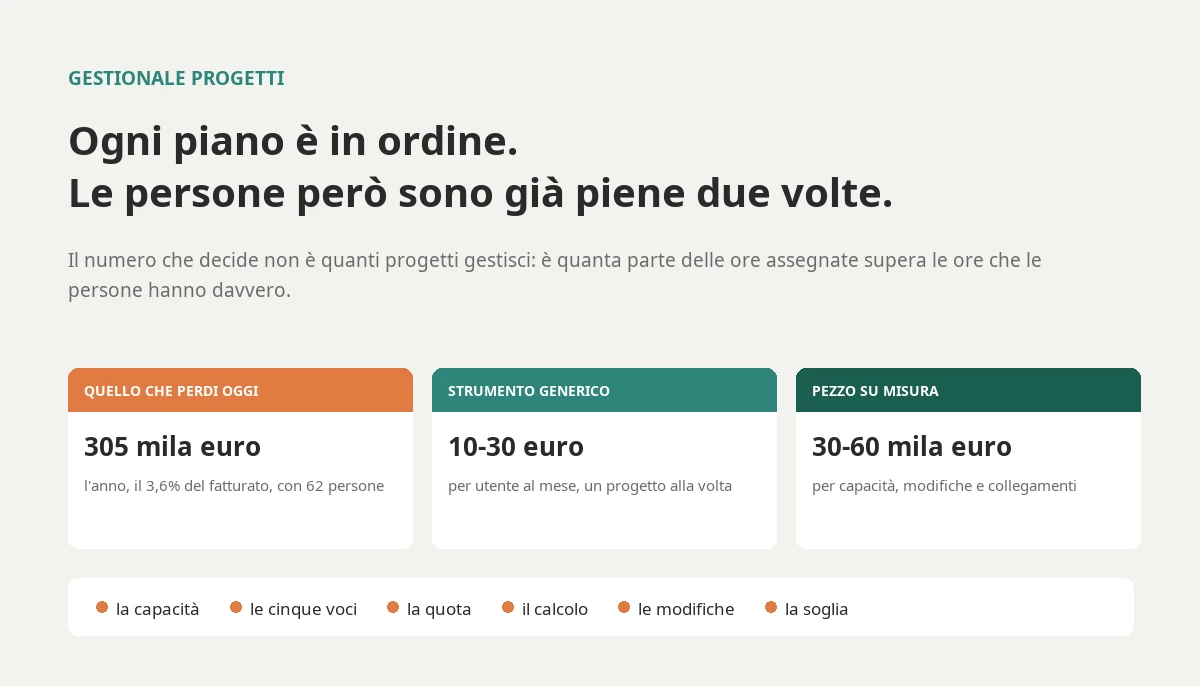
Below five per cent planning is healthy and a generic tool is enough; above fifteen a capacity calculation across all projects pays for itself. In an automation company with 62 people the share was 27 per cent, and the five costs of projects coordinated through Excel and meetings came to about 305,000 euros a year, 3.6 per cent of turnover. A generic tool costs between ten and thirty euros per user per month, the custom piece that calculates capacity and manages changes between thirty and sixty thousand euros. Counting time alone the two roads cross at around twenty-two people shared across several projects, and with overtime, penalties and changes in the sum the threshold drops.

The technical director of an industrial automation company near Vicenza, sixty-two people and around forty projects open at any given time, has been doing the same thing every Monday morning for years. He opens the Excel file with each project's Gantt chart, compares it with the travel calendar, calls three project managers and moves two technicians from one site to another by hand. Each plan, taken on its own, is in order. Put together, they promise the same people more hours than they have. If you are looking for project management software, in this article you will find a way to understand what you really need, how much not having it costs you today and how much it will give back, with a number instead of a feeling.
You will find the difference between a task board, a scheduling tool and real project management software, the reason projects slip even when every Gantt chart is perfect, the bill for what projects run across Excel, meetings and disconnected tools cost today, the single number that tells you whether software will make you money or just give you prettier charts, the capacity calculation written in code, the point where money is lost through change requests, the real price ranges between a generic tool, an industry product and a custom system, and the threshold beyond which the maths changes.
What project management software is, and what it is not
The term is used for three very different things, and the confusion is expensive, because whoever buys the wrong one finds out six months later, when everyone has learnt to use it and nobody wants to start again.
Project management software, in the sense that matters to a company that lives on projects, is the system that holds four things together: what needs to be done and in what order, who does it and how much time they really have, how much it costs compared with what was sold, and what has changed compared with what was promised to the customer. A tool that covers only the first of the four is useful, but it is not project management software: it is a to-do list with dates.
Three tools everyone calls project management software
The first is the task board: columns, cards, assigned people, deadlines. Tools such as Trello, Asana, Monday or ClickUp were born here. They are excellent for showing a team what needs doing this week, they cost little and can be learnt in an afternoon. They know almost nothing about how many hours a person has, how much a project is worth or what the customer has signed.
The second is the scheduling tool: the Gantt chart with dependencies between tasks, the critical path, the baselines. Microsoft Project is the name everyone knows, along with its successor Planner and many similar tools. They are built to plan one project at a time, very well. The limit is exactly that: one project at a time. When ten projects use the same fifteen people, each plan is correct and the sum is impossible.
The third is what the English-speaking world calls professional services automation, and what in Italy often ends up under the name of job management or project management software: resource planning across multiple projects, timesheets, budget versus actuals, progress billing, change requests. This is the category a company that sells projects needs, and it is also the one where off-the-shelf products work least well, because every industry has its own way of planning, measuring progress and invoicing.
Who buys project management software, and why it matters to know
Searches for "project management software" come from two worlds. The first is people who need to coordinate an internal team: a marketing department, an IT department, a small agency. For them a task board is almost always the right answer, and this article concerns them very little.
The second is companies that sell projects: engineering and plant installation firms, systems and automation integrators, build-to-order machine manufacturers, software houses, technical consultancies, consulting firms. For them the project is not a way of organising work, it is the product they sell. When a project slips they do not just lose time: they lose margin, penalties, travel costs and sometimes the customer. The rest of this article is addressed to them.
The distinction matters because it changes the question. Whoever coordinates an internal team asks how to show everyone what to do. Whoever sells projects asks how to promise the customer a date they will be able to meet, with the people they have, without losing money along the way. They are two different problems, and a product that solves the first one well can make the second one worse, because it gives the impression of control without providing it.
Why projects slip even when every Gantt chart is perfect
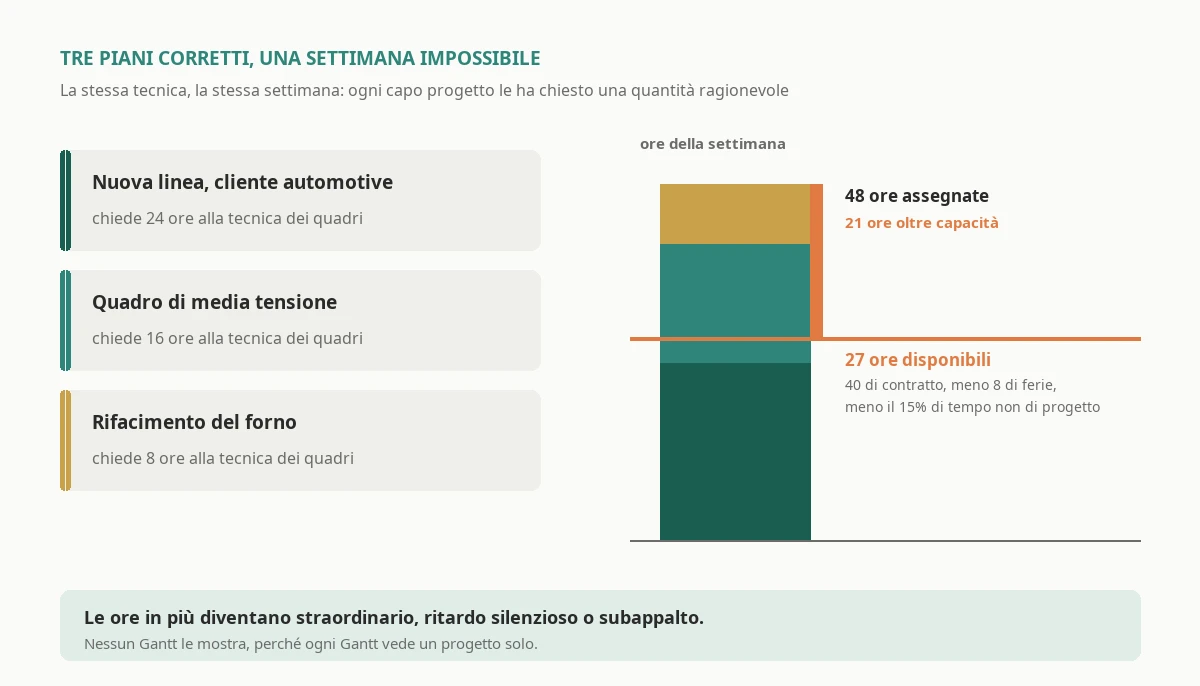
At the automation company in Vicenza the problem was not the quality of the plans. The project managers were good, the Gantt charts were well made, the dependencies were correct. The problem was that each plan was made as if the people belonged to it. In planning jargon this is called infinite capacity planning: each project assumes that the assigned technician is available when needed, and nobody adds up the requests of all projects on the same person in the same week.
The week I noticed it, a technician specialising in electrical panels had forty-eight hours assigned across three projects: twenty-four on a new line for an automotive customer, sixteen on a medium voltage switchboard and eight on the refurbishment of a furnace. She had a forty-hour contract, a day of holiday already approved and, like everyone, a share of her time that goes on meetings, training and customer support. The hours truly available for projects were twenty-seven. None of the three project managers had made a mistake: each had asked her for a reasonable amount.
The arithmetic of shared people
The phenomenon grows with the number of people working on several projects at the same time, not with the number of projects. A company with fifty projects and dedicated teams for each does not have this problem; a company with fifteen projects and ten specialists shared among all of them has it in full. That is why the most exposed companies are those with rare skills: the electrical designer, the control software developer, the certified commissioning engineer.
When capacity is infinite on paper, reality takes its revenge in three ways, always the same. First: someone works evenings and Saturdays, and unplanned overtime becomes the norm. Second: a project slips quietly, because whoever had been assigned worked on another one that was shouting louder. Third: at the last minute an outside contractor is called in, who costs more and knows the plant less. None of the three shows up in a Gantt chart, and all three show up in the profit and loss account.
There is also a less visible and more costly effect: the constant switching from one project to another. Someone working on three projects in the same week does not perform like someone following one, because every switch costs the time needed to remember where they had got to. In the companies I have worked with, people with four or more active projects in the same week completed about a fifth fewer tasks than those with two, for the same hours worked. Reducing fragmentation, even before adding people, is the first lever that well-built project management software puts in the hands of whoever decides.
The real bill: what projects run across Excel, meetings and disconnected tools cost you today
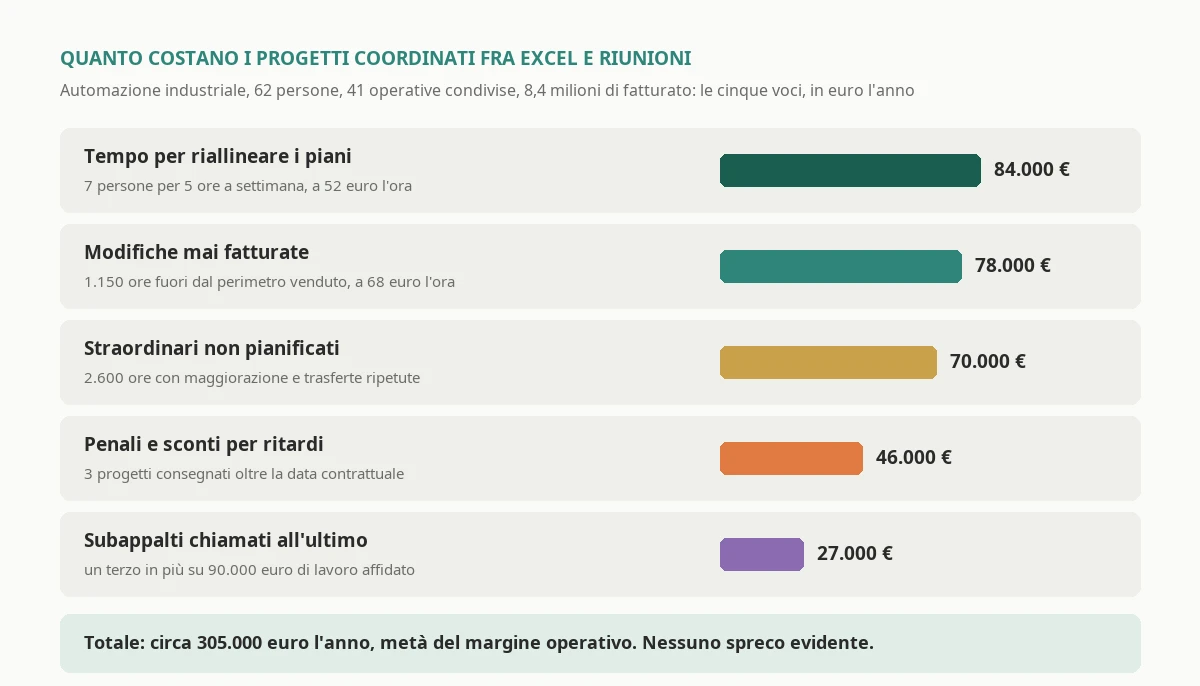
Before talking about software it is worth adding up what today's situation costs. At the Vicenza company, with around 8.4 million euros of turnover and forty-one operational people shared across projects, there were five items. I report them with the calculation method, so you can redo it with your own numbers.
Time spent realigning plans. Seven people between project managers and technical management spent on average five hours a week comparing spreadsheets, calling colleagues and moving people around. Five hours for forty-six weeks for seven people makes 1,610 hours, which at a company cost of 52 euros an hour comes to about 84,000 euros a year. It is the item everyone knows and nobody puts in the bill, because it seems part of the job.
Unplanned overtime. Overtime hours and repeated trips to recover delays came to around 2,600 a year. With just the overtime premium and extra expenses, about 27 euros an hour, that makes about 70,000 euros. The real cost is higher, because tired people make more mistakes and leave sooner, but this is the number you read on the payslip.
Last-minute subcontracting. Around 90,000 euros a year of work handed to outside firms with a week's notice, at a price a third higher than one negotiated calmly. The urgency premium is worth about 27,000 euros.
Penalties and discounts for delays. In one year, three projects had been delivered after the contractual date. Between penalties applied and discounts granted to avoid applying them, about 46,000 euros. It is the most irregular item: one year it is zero, the following year a single large project takes away a quarter's margin.
Changes never invoiced. It is the largest item and the least visible. The customer asks for a change during a progress meeting, the technician makes it because it is reasonable, nobody records it as a change. Reconstructing a year from meeting minutes and timesheets, the hours spent on changes never recognised were around 1,150, which at the average selling rate of 68 euros makes about 78,000 euros of missed revenue.
The total is around 305,000 euros a year, 3.6 per cent of turnover, in a company earning 7 per cent operating margin. Put another way: half the margin was going on the way projects were coordinated, not the way they were executed. There was no obvious waste, no sackable mistake. There was a system that did not add things up.
Your bill will be different, but the items are almost always these five. If you redo the calculation and the total is below one per cent of turnover, project management software is not your priority. If it is above two, it almost certainly is, even if nobody in the company calls it that.
The share of hours over capacity: the number that decides
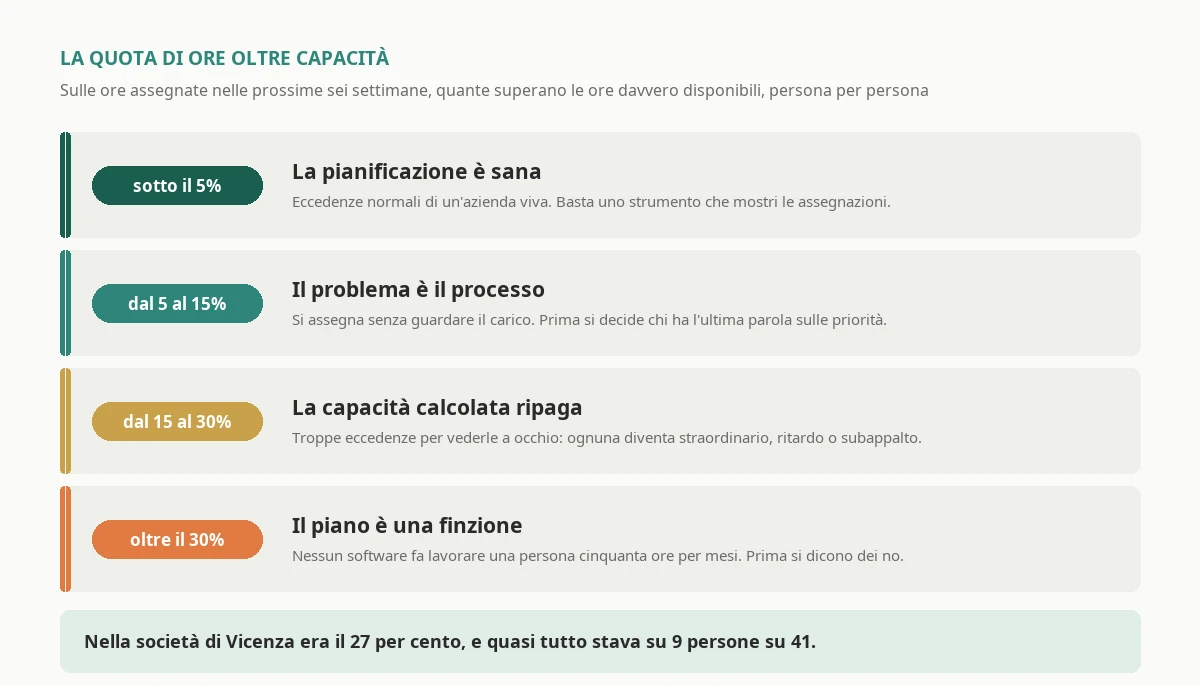
The five-item bill tells you how much you are losing. It does not tell you whether software will help you recover that money, because part of the losses depends on decisions no software takes for you. The number that tells you is a different one, and I call it the share of hours over capacity: of all the project hours assigned to people over the next six weeks, how many exceed the hours those people really have available.
The definition matters in the details. Available hours are not the contract hours: they are the contract hours, minus holidays, leave and absences already known, multiplied by the share of time the person devotes to projects rather than internal meetings, training, support and quotes. In most project-based companies that share sits between seventy and eighty-five per cent. And the excess is counted person by person and week by week: one person loaded at one hundred and twenty per cent is not offset by another at sixty, because skills are not interchangeable.
I use four thresholds. Below five per cent planning is healthy: the excesses are the normal ones of a living company, and a tool that shows assignments is enough. Between five and fifteen the problem is one of process: someone assigns without looking at the workload, or priorities between projects are decided by nobody. Software helps, but only if you first decide who has the final say. Between fifteen and thirty capacity calculated by the system pays for itself, because the excesses are too many to be spotted by eye and each one becomes overtime, delay or subcontracting. Above thirty the plan is a fiction: before any software you need to say no, postpone the start of some projects or hire, because no system can make a person work fifty hours a week for months.
At the Vicenza company the share was 27 per cent, in the band where the system pays for itself. And the most instructive thing was the distribution: almost all the excess sat on nine people out of forty-one, that is, on the rare skills. The other thirty-two had a reasonable workload, some even a light one. The problem was not the amount of work, it was where it ended up.
How to calculate it, with the data you have
You do not need software to take the first measurement. You need two lists that almost every company already has, albeit in different places: the hour assignments by person, project and week, which live in the Gantt charts or in the project managers' spreadsheets, and the availability, meaning contract, holidays and absences, which lives in the time and attendance system. Put into two tables, the calculation fits in one query.
-- Share of project hours assigned beyond real capacity,
-- person by person and week by week, over the next six weeks.
WITH Capacita AS (
    SELECT d.Persona,
           d.Settimana,
           CASE WHEN (d.OreContratto - d.OreAssenza) * (1 - d.QuotaNonProgetto) > 0
                THEN (d.OreContratto - d.OreAssenza) * (1 - d.QuotaNonProgetto)
                ELSE 0 END AS OreDisponibili
    FROM Disponibilita AS d
),
Carico AS (
    SELECT a.Persona,
           a.Settimana,
           SUM(a.Ore) AS OreAssegnate,
           COUNT(DISTINCT a.Progetto) AS Progetti
    FROM Assegnazioni AS a
    WHERE a.Settimana >= CAST(GETDATE() AS date)
      AND a.Settimana < DATEADD(week, 6, CAST(GETDATE() AS date))
    GROUP BY a.Persona, a.Settimana
)
SELECT c.Persona,
       SUM(c.OreAssegnate) AS OreAssegnate,
       SUM(CASE WHEN c.OreAssegnate > ISNULL(k.OreDisponibili, 0)
                THEN c.OreAssegnate - ISNULL(k.OreDisponibili, 0) ELSE 0 END) AS OreOltre,
       MAX(c.Progetti) AS MassimoProgettiInSettimana,
       CAST(100.0 * SUM(CASE WHEN c.OreAssegnate > ISNULL(k.OreDisponibili, 0)
                             THEN c.OreAssegnate - ISNULL(k.OreDisponibili, 0) ELSE 0 END)
            / NULLIF(SUM(c.OreAssegnate), 0) AS decimal(5, 1)) AS QuotaOltrePct
FROM Carico AS c
LEFT JOIN Capacita AS k
       ON k.Persona = c.Persona AND k.Settimana = c.Settimana
GROUP BY c.Persona
ORDER BY OreOltre DESC;
The query returns the share per person; the company share is the sum of hours over capacity divided by the sum of hours assigned. Two caveats. First: if the assignments live only in the project managers' heads, the measurement requires half an hour's interview with each of them, and it must be done anyway, because the measurement itself is what reveals the problem. Second: also look at the column with the maximum number of projects in the same week. Whoever has four or more is where productivity is lost to fragmentation, even when the hours add up.
The second number: how many times the end date changes
Alongside the share of hours over capacity I measure a second, simpler one: of all the projects closed in the last year, how many changed their expected end date more than twice. A date that changes once is normal: the customer asked for a change, a supplier delivered late. A date that changes three or four times means the first one was never calculated, but chosen.
At the Vicenza company the answer was 61 per cent. The figure comes from progress meeting minutes or, if there are none, from emails with the customer, and it is the one that convinces management more than any other: nobody enjoys discovering that more than half the dates given to customers were, when put to the test, a hope.
Planning on real capacity: the calculation no Gantt chart does
If the share of hours over capacity is above fifteen per cent, the first thing to build is not a nicer Gantt chart: it is the calculation that adds up the requests of all projects on the same person and compares them with the hours they really have. Scheduling tools have something similar, resource levelling, but it works within one project at a time, or requires all projects to sit in the same file, which in a company with forty projects and seven project managers never happens.
The calculation itself is small. What follows is the core of the version I wrote for the Vicenza company, simplified. It takes assignments and availability and returns, for each person and week, the hours over capacity and the projects asking for their time.
// How many hours have you promised beyond people's real capacity, week by week?
// The Gantt chart plans projects one at a time; this calculation adds them up on people.
public sealed record Assegnazione(string Persona, string Progetto, DateOnly Settimana, decimal Ore);

public sealed record Disponibilita(string Persona, DateOnly Settimana,
    decimal OreContratto, decimal OreAssenza, decimal QuotaNonProgetto);

public sealed record Eccedenza(string Persona, DateOnly Settimana,
    decimal OreAssegnate, decimal OreDisponibili, IReadOnlyList<string> Progetti)
{
    public decimal OreOltre => Math.Max(0, OreAssegnate - OreDisponibili);
}

public static class Capacita
{
    public static IReadOnlyList<Eccedenza> Calcola(
        IEnumerable<Assegnazione> assegnazioni,
        IEnumerable<Disponibilita> disponibilita)
    {
        var capacita = disponibilita.ToDictionary(
            d => (d.Persona, d.Settimana),
            d => Math.Max(0, (d.OreContratto - d.OreAssenza) * (1 - d.QuotaNonProgetto)));

        return assegnazioni
            .GroupBy(a => (a.Persona, a.Settimana))
            .Select(g => new Eccedenza(
                g.Key.Persona,
                g.Key.Settimana,
                g.Sum(a => a.Ore),
                capacita.GetValueOrDefault(g.Key, 0m),
                g.Select(a => a.Progetto).Distinct().Order().ToList()))
            .Where(e => e.OreOltre > 0)
            .OrderBy(e => e.Settimana).ThenByDescending(e => e.OreOltre)
            .ToList();
    }

    // The number that decides: hours over capacity out of hours assigned, over the chosen horizon.
    public static decimal QuotaOltreCapacita(
        IReadOnlyCollection<Assegnazione> assegnazioni,
        IEnumerable<Disponibilita> disponibilita)
    {
        var totale = assegnazioni.Sum(a => a.Ore);
        if (totale == 0) return 0;
        var oltre = Calcola(assegnazioni, disponibilita).Sum(e => e.OreOltre);
        return Math.Round(oltre / totale * 100, 1);
    }
}
With the numbers of the electrical panel technician, forty contract hours, eight of holiday and fifteen per cent of non-project time, the calculation returns twenty-seven hours and twenty minutes available against forty-eight assigned, that is almost twenty-one hours over capacity, and the three projects competing for them. There is nothing sophisticated about it, and that is precisely the point: the value does not lie in the algorithm, it lies in the fact that the calculation exists, runs every day on real data and that the result reaches whoever decides before the problem turns into a working Saturday.
The three rules that keep the calculation honest
A capacity calculation is only useful if people believe it, and they believe it only if it respects three rules.
Availability comes from the time and attendance system, not from whoever plans. Holidays, leave, sickness and trips already approved must enter the calculation on their own. If it is up to the project manager to remember that someone will be on holiday, sooner or later they will forget. The link between attendance and projects is one of the pieces with the fastest return, and I have written about it from the attendance side in time and attendance software.
The share of non-project time is measured, not estimated. Those who plan tend to treat people as one hundred per cent available, and those being planned know it is not true. The right share comes from the timesheets of the last six months: how many hours went on billable projects and how many on everything else. At the Vicenza company the average was seventy-eight per cent, dropping to fifty-five for the managers who also handled quotes.
People are planned by skill, not by name, for as long as possible. In the first weeks of a project the project manager asks for "an electrical designer", not "Giulia". Keeping the request by skill until the person is really decided allows the system to say whether that skill, overall, has enough capacity. It is the difference between discovering a problem three months ahead, when you can still hire or subcontract calmly, and discovering it three days ahead.
Change requests: where projects lose margin without running late
A project can meet its date and still lose money. It happens when the work done is more than the work sold, and the difference is recognised by nobody. At the Vicenza company it was the largest item, seventy-eight thousand euros a year, and it appeared in no report, because the hours were properly booked to the right project: it was just that the project, in the meantime, had grown.
The mechanism is always the same. During a progress meeting the customer says: "while you are at it, could you add a signal on the panel?". The technician thinks it is two hours, and is being kind. The two hours become twelve, because the signal has to be wired, tested and documented. Nobody records it, because the request was small and the relationship with the customer is good. Multiplied by forty projects and a year, the small favour becomes a thousand hours.
Project management software that works treats the change request as an object, with a life of its own: it is born when someone records it, even in thirty seconds from a phone, it has an estimate of hours, an impact on the date and a decision, that is invoiced, included in the quote or given away knowingly. Giving a change away is perfectly fine, it is a commercial choice. What is not fine is giving it away without knowing.
The figure that matters is the share of hours spent outside the scope sold. If the system holds the phases of the quote and timesheets are booked against those phases, the calculation is immediate: hours booked on tasks that did not exist in the quote, divided by the project's total hours. At the Vicenza company, in the first month of measurement, the share was nine per cent. After a year of recording requests it had fallen to three, and half the difference had become revenue. The other half had been given away, but knowingly, and the customers had noticed, because declared gifts are remembered.
The financial side of the job, meaning the comparison between budget and actuals and the margin lost phase by phase, is a subject that deserves its own discussion, and I covered it in job costing software. Here only one thing matters: the change request is the point where planning and margin meet, and a system that keeps them apart loses both.
From quote to invoice: the flow that connects project management software to everything else
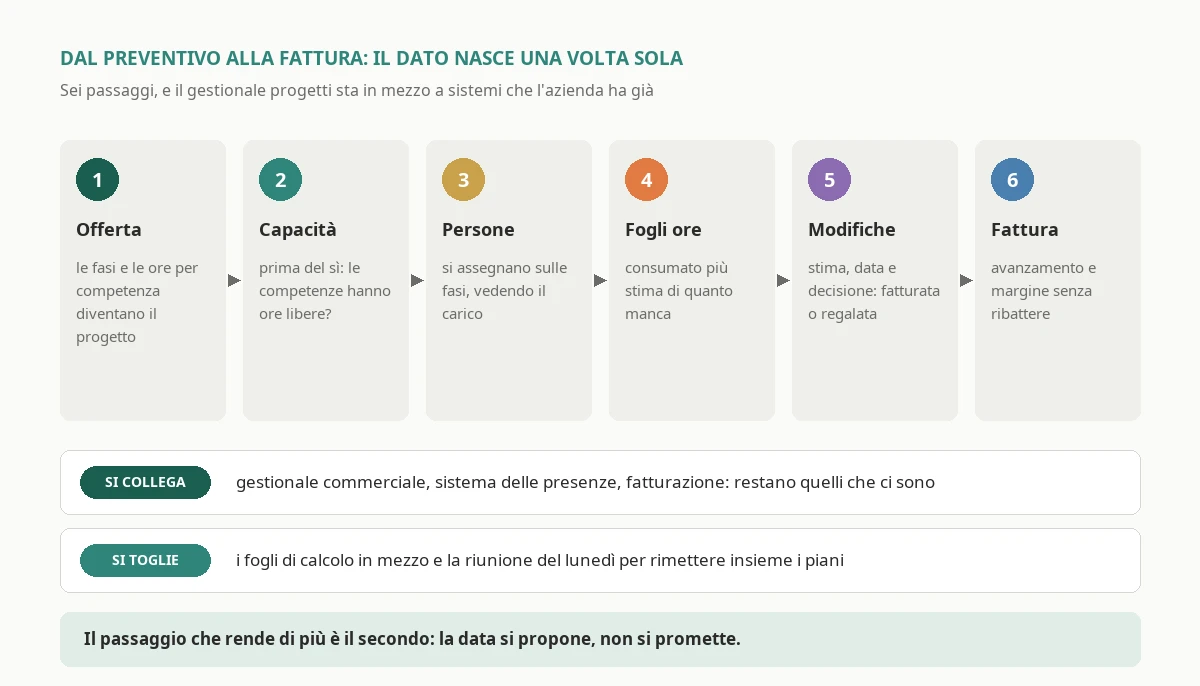
Project management software does not live alone. The value arrives when it stops being an island where someone copies data that exists elsewhere, and becomes the crossing point between the things the company already does. The flow that works has six steps, and in each one the data is created only once.
The project is born from the quote. When a quote is accepted, its phases, the hours estimated by skill and the promised dates become the structure of the project. Nobody copies them: if the quote lives in the sales system or in a structured spreadsheet, the project is created from there. It is also the moment when the quote's estimate becomes the baseline against which everything else will be measured.
Capacity is calculated before saying yes. The most useful step of all comes even before the signature: when a quote is about to be accepted, the system says whether the required skills have capacity in the planned weeks. At the Vicenza company this changed the way they sold: the salespeople stopped promising dates and started proposing them, with a week's margin on the first free date instead of the date the customer wanted to hear.
People are assigned to phases. The project manager turns skills into people when needed, and the system shows the existing workload for each of them. Excesses are visible at the moment of assignment, not the following Monday.
Timesheets update progress. Hours booked against phases say how much has been consumed. Alongside that you need an estimate of how much is left, made by whoever does the work, because hours consumed on their own say nothing: a project at ninety per cent of budget may be at fifty per cent of the work.
Changes go through a decision. Every recorded request, if accepted, updates phases, hours and dates. If it is invoiced, it goes into invoicing; if it is given away, it goes into the tally of gifts.
Everything reaches invoicing and management control. Progress stages, milestones reached and accepted changes become invoice lines without being retyped, and the margin per project reaches whoever looks at the company's accounts. How that part is built, from the side of whoever has to read the numbers, I described in management control software.
None of these steps requires throwing away what you have. At the Vicenza company the sales system, the time and attendance system and the invoicing program stayed the same. What changed was what sat in between: the spreadsheets and the Monday meetings were replaced by a piece of software that talked to all three.
How much project management software costs: generic tool, industry product or custom
There are three roads, and the prices that follow are the ones I see in 2026 for Italian companies of between twenty and two hundred people.
The generic tool. Subscription task boards and scheduling tools cost between ten and thirty euros per user per month. For sixty people that is between seven thousand and twenty thousand euros a year, with almost no setup. They are the right choice when the share of hours over capacity is low and projects are independent. They become a hidden cost when each project manager uses a different one, because the sum across people goes back to being done by hand by someone.
The industry product. Professional services automation software, and job management systems designed for a specific industry, cost between thirty and seventy euros per user per month, plus a setup of between ten thousand and thirty thousand euros for configuration, data import and training. For sixty people that is between twenty and fifty thousand euros a year. They work well when the company's way of working resembles the one they were designed for: a consulting firm that sells days almost always finds a product that suits it. They work less well when the project mixes office work, production, site work and travel, as in plant installation and build-to-order machinery.
The custom system. Here there are two figures, and the difference is important. A custom piece that sits alongside what you have, meaning capacity calculation, change requests and links with attendance, quotes and invoicing, costs between thirty and sixty thousand euros, plus fifteen or twenty per cent a year for maintenance. A complete custom project management system, which also replaces the scheduling tools, costs between ninety and two hundred thousand euros, and is justified only when the way projects are managed is the company's competitive advantage.
The threshold, with numbers
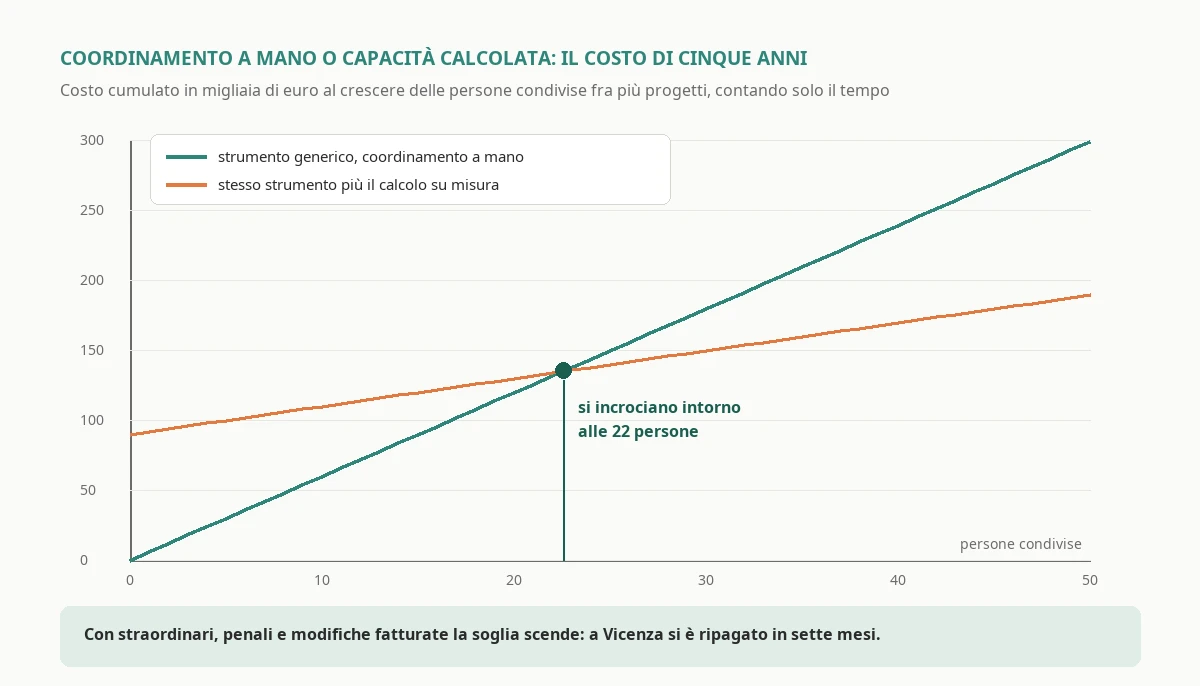
The most useful comparison is between the generic tool with coordination done by hand, and the same tool alongside a custom piece that calculates capacity. The cost of the tool is the same in both cases, so two things are compared: coordination time, which grows with the number of people shared across several projects, and the cost of the custom piece, which is fixed.
With the Vicenza company's numbers, coordination by hand cost about half an hour a week for each shared person, between meetings, phone calls and reshuffles. With the automatic calculation it dropped to ten minutes. Over five years, counting the custom piece at forty-five thousand euros plus its maintenance, the two lines cross at around twenty-two shared people. Below that, the generic tool with a bit of discipline is better value; above it, the custom piece pays for itself on time saved alone.
And time alone is the smallest part of the bill. Adding overtime, urgent subcontracting, penalties and invoiced changes, at the Vicenza company the custom piece, which cost fifty-two thousand euros including the integrations, paid for itself in seven months. The share of hours over capacity fell from 27 to 8 per cent, unplanned overtime more than halved and in the second half of the year there was not a single penalty. It is not the software's doing: it is because decisions on priorities were being taken on Thursday, looking at a number, instead of on Monday, under pressure.
The road I recommend in the great majority of cases is therefore a mixed one: the tool the project managers already use for tasks, plus a custom piece for capacity, changes and integrations. People do not change their habits, data stops being copied around and the part that makes money, namely the sum across people and invoiced changes, is built on the way the company really works. If you want to talk through how to choose between a product and a system built to measure in your own case, and what to ask whoever builds it, get in touch.
The questions to ask whoever offers you a product
If you are evaluating a product, five questions separate those that solve the problem from those that move it elsewhere.
Is the workload added up across all projects or one at a time? Ask to see the same person assigned to three different projects, run by three different project managers, and the system flagging the excess. If the demo uses a single project, you already have your answer.
Where do holidays and absences come from? If the answer is "the project manager enters them", the capacity calculation will be wrong within a month.
How is a change request recorded, and what happens next? It must be an object with an estimate, a decision and a link to the invoice, not a comment at the bottom of a task.
Can you plan by skill before planning by person? If the product forces you to choose a name from day one, forecasts three months out will be unreliable.
How does the data get out? Project management software that does not expose its data through a documented interface becomes another island. It is the question that protects the investment, because sooner or later that data will be needed for management control, invoicing or an analysis you cannot imagine today.
Artificial intelligence in projects: where it really helps and where it does not
Almost every 2026 product promises an assistant based on artificial intelligence, and it is worth separating what works from what is a demo. I have used language models every day in my work since 2023, and on projects I have seen three uses that pay off and two that do not.
Estimating from past jobs. A company with a few years of timesheets booked against phases has an asset that almost nobody uses: it knows how long every phase of every similar project really took. A model that compares the new quote with the ten most similar ones from the past and says "the last eight times commissioning took forty per cent longer than estimated" is more useful than any expert, because it does not have the selective memory we all have. It only works if timesheets are booked against phases, which is one more reason to do so.
Project status from text. Minutes, emails with the customer, comments on tasks: a model summarises them well, and above all it can find the sentences that contain an unrecorded request. "While you are at it" and "it would be handy if" are signals a model recognises with good reliability, and turning them into a draft change request, to be confirmed by hand, recovers part of the hours given away without knowing.
The progress report for the customer. The first draft of the weekly report, built from the system's data and reviewed by the project manager, saves an hour a week per project. It is the least interesting gain and the easiest to obtain.
What does not pay off, on the other hand, is asking the model to decide priorities between projects: it is a commercial decision, which depends on customers, relationships and strategy, and must be taken by a person who takes responsibility for it. Nor does fully automatic scheduling pay off, with the model moving people and dates on its own: when the plan changes without anyone having decided it, people stop trusting the plan, and a plan nobody trusts is worth less than the Excel file it replaced.
The rule I apply is simple: artificial intelligence prepares, the person decides. The model proposes the estimate, the draft change and the report; the project manager confirms, corrects or discards them. That way the system learns from the corrections and people remain in charge of the plan.
Where to start: the first release in ninety days
Whether you choose a tool, a product, a custom piece or a combination, the order in which things are done matters more than the choice. What follows is the plan I use for a project-based company, and it fits in ninety days.
The first two weeks: measurement. Collect the assignments for the next six weeks and the availability from the time and attendance system, and calculate the share of hours over capacity. Count the projects of the last year that changed their end date more than twice, and estimate from the timesheets the share of work outside the scope sold. It costs little and decides everything else, including whether to go ahead.
From the third to the sixth week: capacity. Connect attendance and build the capacity calculation across all projects, with the view that every project manager and technical management look at on Thursday. Decide who has the final say on priorities, because the system will show the conflicts and someone will have to resolve them. By the end of this phase, the Monday meetings get shorter or disappear.
From the seventh to the tenth week: changes. Introduce the change request as an object, recordable in thirty seconds even from a phone, with its estimate and decision. Get technicians used to recording it when they receive it, not when they remember. This is the phase in which you see the first recovered revenue.
The last three weeks: quote and invoice. Link project creation to the accepted quote and progress stages to invoicing. From here on data is created only once, and the margin per project reaches whoever looks at the accounts without anyone reconstructing it at the end of the quarter.
The rest, from estimates assisted by past jobs to the customer report, comes later, when the data is there and reliable. If your projects involve travelling teams or site shifts, it is also worth looking at how shifts are built, and I discuss that in shift scheduling software.
If the number says it is not your problem
It may be that, once measured, the share of hours over capacity is low, end dates change little and changes are already recorded. That is good news, and it is worth saying clearly: in that case custom project management software will not give you much money back. A generic tool used well will give you order and visibility, and is worth the price of a subscription, not of a project.
In that case the bottleneck, if there is one, is almost always elsewhere. If projects meet their dates but the margin does not add up, the problem lies in how quotes are estimated or in cost control, and the starting point is the job, not the plan. If the problem is a lack of the right people, no software creates them: you need a hiring or partnership plan, and the system can at most tell you three months in advance which skills will be missing. And if the delays come from suppliers, the problem lies in purchasing, not in internal planning.
And there is one case in which software is not the answer even when the numbers are bad: when nobody has the authority to say no to a project. If the share of hours over capacity exceeds thirty per cent, the system will show it every day with great precision, and nothing will change until someone decides which project to postpone. It is a decision for the owners, not the technical department, and it must be taken before spending a single euro on software.
If you have read this far, you probably have in mind the technical director's Monday morning, with the Gantt charts open side by side and the phone in hand. Before looking at any demo, take the assignments for the next six weeks and add them up person by person: it is two hours of work, it costs nothing, and it tells you whether you are buying a tidier plan or a higher margin. If the numbers tell you it is worth discussing, you can tell me about your situation through the contact page: from there on decisions become much simpler, and you take them yourself instead of leaving them to Monday's emergencies.
Frequently asked questions
It depends on the road. A generic subscription tool, task board or scheduling tool, costs between ten and thirty euros per user per month, with almost no setup. An industry product for companies that sell projects costs between thirty and seventy euros per user per month, plus a setup of between ten thousand and thirty thousand euros. A custom piece that sits alongside existing tools, with capacity calculation, change requests and links with attendance, quotes and invoicing, costs between thirty and sixty thousand euros, plus fifteen or twenty per cent a year for maintenance. A complete custom project management system sits between ninety and two hundred thousand euros.
You calculate the share of hours over capacity: of all the project hours assigned to people over the next six weeks, how many exceed the hours really available, meaning contract minus absences, multiplied by the share of time devoted to projects. The excess is counted person by person and week by week. Below five per cent a tool is enough, between five and fifteen the problem is one of process, between fifteen and thirty an automatic capacity calculation pays for itself, above thirty you need to postpone some projects before any software. Alongside that, measure the share of projects that changed their end date more than twice.
A task board such as Trello or Asana says what needs doing and by whom, but knows little about available hours, the value of the project or what the customer has signed. A scheduling tool such as Microsoft Project calculates dependencies and the critical path well, but one project at a time. Project management software for a company that sells projects adds up the workload of all projects on the same people, keeps track of change requests, compares budget with actuals and links progress to invoicing.
Because each plan is made as if the people belonged to it, that is at infinite capacity. If ten projects use the same specialists, each plan is correct and the sum is impossible: one person ends up with forty-eight hours assigned against twenty-seven available. Reality takes back the difference through overtime, silent delays and last-minute subcontracting. The remedy is to add up the requests of all projects on the same person and the same week, with absences taken from the time and attendance system.
By treating them as an object with a life of its own, not as a comment: the request is born when someone records it, even in thirty seconds from a phone, and it has an estimate of hours, an impact on the date and a decision, that is invoiced, included in the quote or given away knowingly. The figure to track is the share of hours spent outside the scope sold. In a plant installation company with 62 people it was nine per cent, about 78,000 euros a year of missed revenue, and it fell to three after a year of recording.
In most cases a mixed road: the tool the project managers already use for tasks and a custom piece for capacity, change requests and links with attendance, quotes and invoicing. Counting coordination time alone, the custom piece pays for itself above twenty-two people shared across several projects; with overtime, subcontracting, penalties and invoiced changes the threshold drops. A consulting firm that sells days often finds a suitable product; plant installation, automation and build-to-order machinery much less so.
Leave your details in the form below