What is the number that decides between Razor Pages, MVC and Blazor?
Out of 60 screens: up to 7 interactive Razor Pages pays off; from 8 to 40 Razor Pages for the pages and Blazor for the tools; from 41 up Blazor. With 18 interactive screens the combination cost about 109,044 euros over three years, against 132,648 euros for MVC.


A logistics company in Padua has a web system for managing shipments, written in ASP.NET Web Forms in 2011. It works. Sixty screens, thirty internal users, a server that nobody wants to switch off. The IT manager has a task that looks simple: move it to modern .NET before the server's operating system goes out of support.
Then he opens the documentation and finds three names for the same thing. Razor Pages, MVC, Blazor. One supplier proposes Blazor because "it's the future". Another proposes MVC because "we know it". A colleague, who has read an article, says Razor Pages is the right choice for page-based applications. Nobody tells him what a wrong choice costs, and nobody gives him a number to decide with.
This article tells you what Razor Pages is and how it differs from MVC and Blazor, what each route costs over three years for a typical company with sixty screens, which number decides the choice, how to build a real page with code that compiles, how to add interactivity without changing technology, and how to move from Web Forms or MVC 5 to Razor Pages one page at a time, without stopping the business.
You will find the cost of the four routes in euros, the threshold in interactive screens beyond which it pays to change, the C# and Razor code for an entire order edit page, the test that warns you if a page is left unprotected, the configuration that lets the old and the new live side by side, and a sixty-day plan.
A word first. Since 1999 I have been designing software for companies, and I have taken Web Forms, MVC and Razor Pages applications into production. I am not selling you a technology. The case I use is a typical company, built from orders of magnitude and industry averages: it is not a client, it is a method. You can redo it with your own numbers in an hour.
What is Razor Pages, and how does it differ from MVC and Blazor?
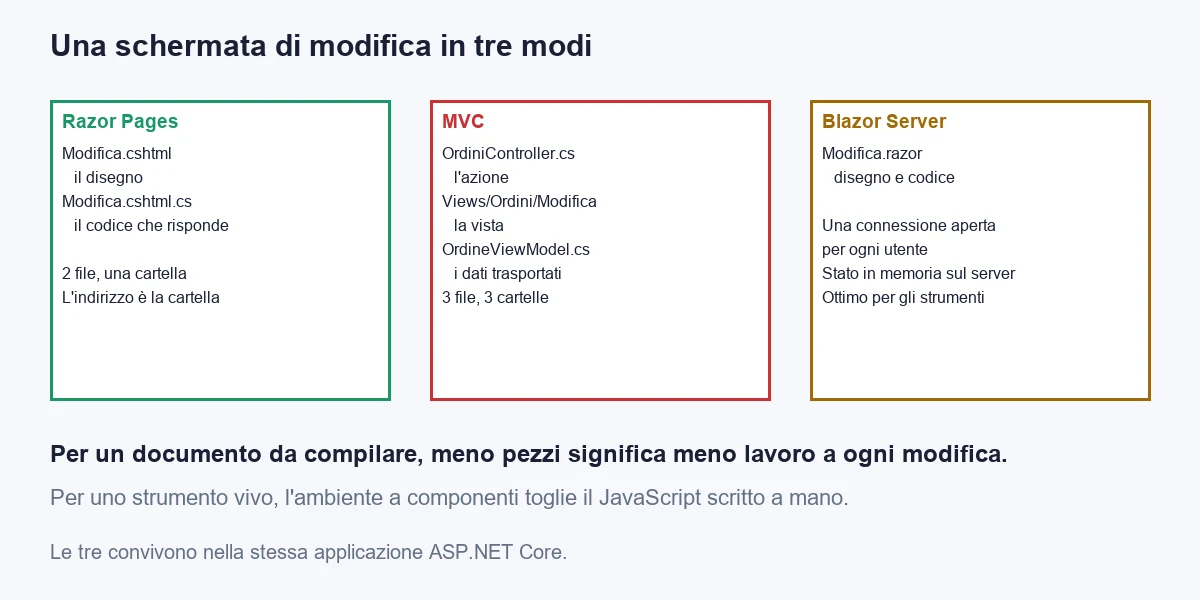
Razor Pages is the ASP.NET Core way of building web applications in which every screen is a page. A page is two files sitting side by side: a file with the layout (the HTML part) and a file with the C# code that answers requests. The address of the page is decided by the folder the file is in. No list of routes to maintain, no controller to hunt for.
MVC, the older technology, splits the same things across three places. The controller receives the request, the model holds the data, the view draws it. For an order edit screen you need at least three files in three different folders, plus an object that carries the data from the controller to the view. It is excellent when the same code has to serve several different clients, for example a website and a mobile app. It is more work when you need only one thing: showing and editing a record.
Blazor is a different family. Here the page is not a document that arrives from the server: it is a set of components with state, which react to clicks without reloading the page. In the version that runs on the server, the browser keeps a continuous connection open and the server updates the screen piece by piece. It is the right approach for very lively screens: grids with in-cell editing, dashboards that refresh themselves, editors with a preview. It costs more for simple screens, because it brings a structure that a customer record does not need.
The difference that matters to the person deciding is not technical, it is one of shape. In Razor Pages the work repeats in a predictable way: one screen, two files, one place to look. In MVC it repeats in three places. In Blazor it repeats in components, but with different rules about state, connection and server memory.
One clarification that removes confusion. All three are ASP.NET Core, run on the same server, use the same data access (Entity Framework Core), the same sign-in and protection system, the same way of publishing. Choosing one is not a marriage: in the same application you can have Razor Pages, MVC actions and Blazor components together. We will see it, because it is the route that comes out cheapest in the calculation.
The wrong question is "which is the best technology". The right one is: how many of my screens are documents to fill in, and how many are tools to work with? I will show you how to count them.
What does the typical company look like, and what numbers does it start from?
So that we do not talk in the abstract, I use a case. It is an internal management system for a medium-sized company, to be rebuilt in ASP.NET Core. The figures are industry orders of magnitude, written so that you can replace them with your own.
| Measure | Value | How to find it |
|---|---|---|
| Screens to build | 60 | Count the .aspx files, or the views, or the menu items of the current program |
| Interactive screens | 18 (30%) | Those where the user works on a grid, drags, recalculates without reloading. The rest are forms, lists with filters, data entry, reports |
| Changes requested each year | 120 | Requests handled in the last twelve months: a field, a rule, a filter |
| Concurrent users | about 80 | Daily peak: it matters for Blazor connections |
| Cost of one developer hour | 60 euros | Labour cost divided by hours worked |
| Cost of one day | 480 euros | 8 hours at 60 euros |
| Horizon of the calculation | 3 years | Build and maintenance, without the value of the work afterwards |
The row that weighs most is the second. A screen is interactive if the user uses it as a tool: they edit several rows and the total updates, drag a card from one column to another, watch the data change while a colleague edits it. If instead they open it, read, fill in a form and save, it is a page. The great majority of business applications are made of pages. In a business application the share of interactive screens is usually low, often under a third.
A practical way to count them: take the menu list and, for each item, ask yourself whether the user, when finished, pressed "Save" once or carried out twenty operations without ever leaving the screen. If they pressed Save once, it is a page.
Which routes exist for building the sixty screens?
There are four real routes. I have not included "stay where you are": it is a choice with a different cost, which I discuss further on, and it cannot be compared on equal terms with a new build.
A. Everything in Razor Pages
Every screen is a page. Interactive screens are achieved with a little JavaScript and with small requests that update a piece of the page. It is the route with the fewest concepts to learn and the fewest files per screen. It holds up well as long as interactive screens stay few, because the JavaScript written by hand to rebuild a complex tool grows in a disorderly way.
B. Everything in MVC
Controllers, models, views. Every screen has its own controller or an action inside a larger controller, its own view and its own data object. It is the route that almost every .NET developer has known for fifteen years, and that is its real advantage: finding people who can do it is easy. It costs a little more than Razor Pages for each screen, because there are more files to keep aligned. It becomes the right choice in one precise case: when the same operations must also serve a mobile app or another program, and then the controllers also become the interface to the outside world.
C. Everything in Blazor Server
Every screen is a component, simple pages included. The advantage is uniformity: a single way of building, even for the liveliest screens. There are two disadvantages. Simple screens cost more because they carry the component structure. And the server has to keep in memory the state of every connected user and one open connection for each: with eighty users it is not a problem, with eight thousand it becomes a design issue.
D. Razor Pages for pages, Blazor for live screens
One application. Screens that are documents stay pages, those that are tools become Blazor components with their own address. Sign-in, protection, data and business rules are shared. You pay the complexity of knowing two ways of working, and a small cost to make the two halves coexist, but you avoid both the cost of simple pages built as components and the cost of JavaScript rebuilding a tool by hand.
The point worth fixing in mind: the fourth is not a compromise, it is the composition of the first ones. It exists because ASP.NET Core allows mixing, and the calculation I turn to now shows when mixing pays.
How much does each route cost over three years?
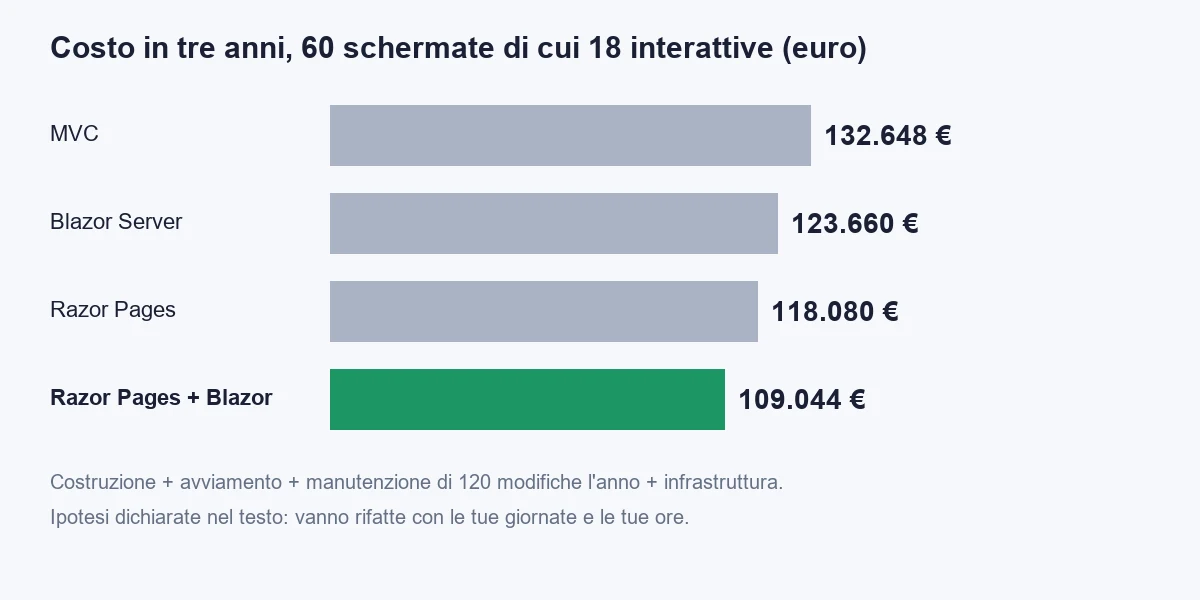
The calculation has four items for each route, and a stated assumption for each. The assumptions are the days to build a simple screen and an interactive one, the hours to make a change, the days of start-up and the extra infrastructure cost.
- Build. Days per screen, by type. Razor Pages: 1.5 days for a simple screen and 3.5 for an interactive one. MVC: 1.8 and 3.5. Blazor: 2.0 and 2.3. Razor Pages plus Blazor: 1.55 and 2.6.
- Start-up. Days to decide the structure, prepare the skeleton, train the team. Razor Pages 3, MVC 5, Blazor 12, the combination 8.
- Maintenance. 120 changes a year for three years. Hours per change, by screen type: Razor Pages 2.0 and 4.0; MVC 2.5 and 4.0; Blazor 2.6 and 2.7; combination 2.1 and 3.0.
- Infrastructure. Blazor Server keeps one open connection per user: 25 euros a month extra for a server sized for eighty users, 900 euros over three years. The combination uses a part of it: 300 euros.
These hours and days are the weak point of any comparison, and I will tell you why I chose them. A card in Razor Pages is two files and an action: the estimate I use is a day and a half, tests and review included. In MVC the action sits in a controller, there is a view and an object that carries the data: slightly more work. An interactive screen in Razor Pages costs double because the JavaScript has to be written and tested by hand. In Blazor the simple screen costs more because of the structure, and the interactive one costs less because the tool is the natural environment of the component.
| Route | Build | Start-up | Maintenance (3 years) | Infrastructure | Total over 3 years |
|---|---|---|---|---|---|
| A. Razor Pages | 60,480 | 1,440 | 56,160 | 0 | 118,080 |
| B. MVC | 66,528 | 2,400 | 63,720 | 0 | 132,648 |
| C. Blazor Server | 60,192 | 5,760 | 56,808 | 900 | 123,660 |
| D. Razor Pages plus Blazor | 53,712 | 3,840 | 51,192 | 300 | 109,044 |
With eighteen interactive screens out of sixty, route D costs about 109,000 euros. Razor Pages alone about 118,000, Blazor alone about 124,000, MVC about 133,000. Between the cheapest and the dearest there are 23,600 euros, or about forty-nine days of work. It is not a figure that decides a company's budget, but it is the difference between two more or fewer months of work for one person, and it repeats with every project.
Look at where the difference comes from. It is not in the cost of a page, it is in the product of the number of screens and the hours per change. One extra hour on every change, multiplied by one hundred and twenty changes a year over three years, is 360 hours, or 21,600 euros: it is the heaviest number in the calculation. Maintenance costs almost as much as the build, and that is why the shape of the code weighs more than the tool.
A warning I owe you. These numbers are not to be taken as rates. A team with ten years of MVC behind it will have lower hours per change in MVC. A team that has never seen Blazor will pay double for the start-up. They are my average numbers: the value lies in the method, which lets you change the assumptions and see whether the conclusion still stands.
Which number decides which route to choose?
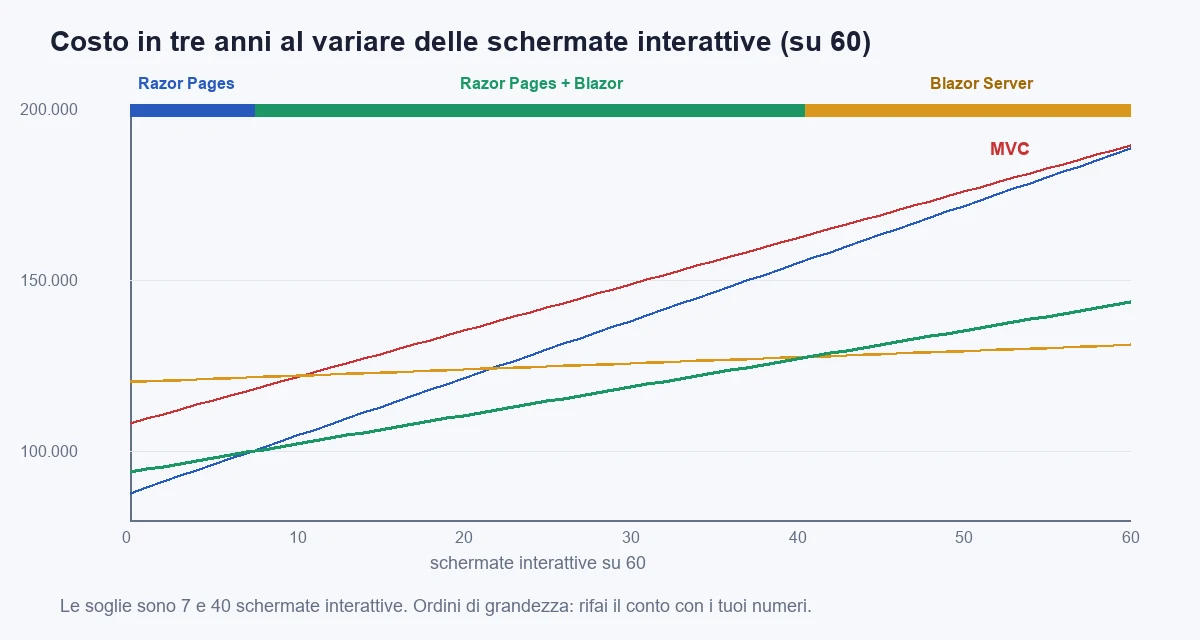
There is only one number: how many of your screens are interactive. I repeated the calculation with every share, from zero to sixty interactive screens out of sixty. Here is where the cheapest route changes.
| Interactive screens out of 60 | Cheapest route | Why |
|---|---|---|
| 0 to 7 | A. Razor Pages only | The few live screens are done with a little JavaScript, and it is not worth starting a second way of working. At 6 interactive screens: 97,920 euros, against 99,108 for the combination |
| 8 to 40 | D. Razor Pages plus Blazor | The live screens are numerous enough to pay for the Blazor start-up, and the pages stay cheap. At 18: 109,044 euros, against 118,080 for Razor Pages alone |
| 41 and above | C. Blazor only | Simple screens have become a minority: keeping two ways of working costs more than unifying them. At 45: 128,520 euros, against 131,400 for the combination |
MVC never wins in the calculation. That does not mean it is wrong: it means that, for a business application with a single interface, it costs more than Razor Pages for the same result. MVC pays off in two cases the calculation does not see. The first is when you already have a lot of MVC 5 code to port, because the porting work is smaller. The second is when the same actions must also serve a mobile app, and the controller becomes a shared interface.
The thresholds are an indication, not a law. At 7 interactive screens Razor Pages is ahead by 336 euros, at 8 the combination moves ahead by 516: differences of half a day over three years, and at that point the team you have decides. If your developers already know Blazor, use it even from 4 screens. If they do not know it and have a delivery coming up, use Razor Pages even at 15.
A second question settles the cases close to the threshold: how much will the interactive screens change? A tool that changes every month, with new rules and new columns, is far better as a component. A tool that has been still for five years and will stay still is far better as a page with a hundred lines of JavaScript, and you leave it alone.
How do you build a real page with Razor Pages?
Take the most common screen of a business application: editing an order. A customer, an amount, a button to save, and below it the order lines. I compiled the code in this chapter on .NET 10 with a small test project: if you copy it, it works.
The layout of the page
The layout file is called Modifica.cshtml and sits in the Pages/Ordini folder. The first line declares that it is a page and that the address accepts a number, which is the order identifier. The address will therefore be /Ordini/Modifica/42, without you writing a routing rule anywhere.
@page "{id:int}"
@model Gestionale.Pages.Ordini.ModificaModel
@{
    ViewData["Title"] = "Modifica ordine";
}

<h1>Modifica ordine</h1>

<form method="post">
    <div asp-validation-summary="ModelOnly"></div>

    <label asp-for="Input.Cliente"></label>
    <input asp-for="Input.Cliente" />
    <span asp-validation-for="Input.Cliente"></span>

    <label asp-for="Input.Importo"></label>
    <input asp-for="Input.Importo" />
    <span asp-validation-for="Input.Importo"></span>

    <button type="submit">Salva</button>
</form>
The asp-for instructions are helpers of the engine: they link the field to the data, write the right name, show the validation errors. There is not a single field name written by hand, and so not a single typing mistake is possible.
The code that answers
The file next to it, Modifica.cshtml.cs, contains the class that answers requests. Each verb has its own method: OnGetAsync when the page is opened, OnPostAsync when the user presses Save. There is no controller choosing which action to call: the method name is enough.
using System.ComponentModel.DataAnnotations;
using Microsoft.AspNetCore.Authorization;
using Microsoft.AspNetCore.Mvc;
using Microsoft.AspNetCore.Mvc.RazorPages;
using Microsoft.EntityFrameworkCore;

namespace Gestionale.Pages.Ordini;

[Authorize(Policy = "GestioneOrdini")]
public class ModificaModel(GestionaleDb db) : PageModel
{
    [BindProperty]
    public OrdineInput Input { get; set; } = new();

    public List<Riga> Righe { get; private set; } = [];

    public async Task<IActionResult> OnGetAsync(int id, CancellationToken token)
    {
        var ordine = await db.Ordini.AsNoTracking()
            .Where(o => o.Id == id)
            .Select(o => new OrdineInput { Cliente = o.Cliente, Importo = o.Importo })
            .FirstOrDefaultAsync(token);

        if (ordine is null) return NotFound();

        Input = ordine;
        Righe = await CaricaRigheAsync(id, null, token);
        return Page();
    }

    public async Task<IActionResult> OnPostAsync(int id, CancellationToken token)
    {
        if (!ModelState.IsValid)
        {
            Righe = await CaricaRigheAsync(id, null, token);
            return Page();
        }

        var ordine = await db.Ordini.FindAsync([id], token);
        if (ordine is null) return NotFound();

        ordine.Cliente = Input.Cliente;
        ordine.Importo = Input.Importo;
        await db.SaveChangesAsync(token);

        return RedirectToPage("Elenco");
    }

    public async Task<PartialViewResult> OnGetRigheAsync(int id, string? filtro, CancellationToken token)
        => Partial("_Righe", await CaricaRigheAsync(id, filtro, token));

    private Task<List<Riga>> CaricaRigheAsync(int id, string? filtro, CancellationToken token)
    {
        var query = db.Righe.AsNoTracking().Where(r => r.OrdineId == id);
        if (!string.IsNullOrWhiteSpace(filtro))
            query = query.Where(r => r.Descrizione.Contains(filtro));
        return query.OrderBy(r => r.Id).ToListAsync(token);
    }
}

public class OrdineInput
{
    [Required, StringLength(100)]
    public string Cliente { get; set; } = "";

    [Range(typeof(decimal), "0.01", "1000000")]
    public decimal Importo { get; set; }
}
Three choices in this code are worth spelling out, because they are the three that are most often got wrong.
The first: the page does not receive the database entity but a class of its own, OrdineInput, with only two fields. It is the defence against a classic mistake, called overposting: if you bind the form directly to the entity, a curious user can add to the request a field that you do not see on the page (for example the payment status) and the program would save it. With an input class, the fields that do not exist are not saved.
The second: on reading we use AsNoTracking and project only the columns we need. For a single record it is a small matter; for a list of five thousand rows it is the difference between half a second and four. The same rule I apply to every query holds here: never read more columns than you show.
The third: after saving, the page redirects instead of displaying itself again. That way the browser's "reload" button does not repeat the save and the "resubmit the form?" warning does not appear, which frightens a non-technical user.
Registration in the program
The start-up file tells ASP.NET Core which services to use. Here we also decide the default protection rule.
using Gestionale;
using Microsoft.AspNetCore.Authentication.Cookies;
using Microsoft.EntityFrameworkCore;

var builder = WebApplication.CreateBuilder(args);

builder.Services.AddRazorPages(options =>
{
    options.Conventions.AuthorizeFolder("/");
    options.Conventions.AllowAnonymousToPage("/Accesso");
});

builder.Services.AddAuthentication(CookieAuthenticationDefaults.AuthenticationScheme)
    .AddCookie(o => o.LoginPath = "/Accesso");

builder.Services.AddAuthorization(options =>
{
    options.AddPolicy("GestioneOrdini", p => p.RequireRole("Ordini", "Amministrazione"));
});

builder.Services.AddDbContext<GestionaleDb>(o =>
    o.UseSqlServer(builder.Configuration.GetConnectionString("Gestionale")));

builder.Services.AddReverseProxy()
    .LoadFromConfig(builder.Configuration.GetSection("ReverseProxy"));

var app = builder.Build();

app.UseStaticFiles();
app.UseRouting();
app.UseAuthentication();
app.UseAuthorization();

app.MapRazorPages();
app.MapReverseProxy();

app.Run();
The AuthorizeFolder("/") line is the one that makes the difference. It says: all pages require sign-in, except those I explicitly allow. You start from closed and open up, not from open and close down. The reason is simple: the worst oversight is the new page with no protection, and with this rule that oversight cannot exist. Further down you will see the test that checks it.
The GestioneOrdini policy gives a name to the rule "who can edit orders". The name appears on the page with the authorisation attribute, and the day the answer to who can edit orders changes, you change one line in one place.
How do you add interactivity without moving to Blazor?
Back to editing the order. Below the form there are the lines, and the user wants to filter them as they type, without reloading the page. It is the smallest screen you could call interactive, and it is solved without changing technology.
The Razor Pages trick is called a named handler. A page can have several methods that respond, besides the one for the normal request. The OnGetRigheAsync method you saw in the code above responds at the address ?handler=Righe and returns not a whole page but a fragment: just the lines, already filtered.
// Nel file Modifica.cshtml.cs
    public async Task<PartialViewResult> OnGetRigheAsync(int id, string? filtro, CancellationToken token)
        => Partial("_Righe", await CaricaRigheAsync(id, filtro, token));

<!-- Nel file Modifica.cshtml -->
<input id="filtro" type="search" placeholder="Filtra le righe" />
<table>
    <tbody id="righe">
        <partial name="_Righe" model="Model.Righe" />
    </tbody>
</table>

<script>
    const filtro = document.getElementById('filtro');
    const ordineId = @RouteData.Values["id"];
    let attesa;
    filtro.addEventListener('input', () => {
        clearTimeout(attesa);
        attesa = setTimeout(async () => {
            const url = `?handler=Righe&id=${ordineId}&filtro=${encodeURIComponent(filtro.value)}`;
            const risposta = await fetch(url);
            document.getElementById('righe').innerHTML = await risposta.text();
        }, 300);
    });
</script>
The fragment is a separate file, _Righe.cshtml, which draws the lines and nothing else. The same fragment is used both on first load and by later requests: a single place where it is defined how a line looks. The JavaScript does just one thing: it waits for the user to stop typing for three hundred milliseconds, asks for the fragment and replaces the lines.
That is fifteen lines of JavaScript, no library, no build step. And here you see the limit of this way of working, which is also the reason the threshold of 7 and 8 cases exists. With a filter, it works very well. With a grid in which every cell is editable, totals are recalculated, rows are reordered and two users must not trample on each other, those fifteen lines become three hundred, then a thousand, and nobody can read them any more. At that point you are rebuilding Blazor by hand, with fewer tools.
The practical rule I use: if the screen needs more than one handler returning a fragment and more than about fifty lines of JavaScript, it is asking to be a component.
How to put the two halves together
In route D the same application hosts the pages and the components. In .NET 10 components with their own address are added by registering the Razor component services and enabling interactive server mode, and then mapping them next to the pages. Sign-in, protection and the data context are already those of the application. A Blazor screen asks the services for the same data access class that the edit page uses, without going through an extra interface.
The thing to decide at the start is the boundary: you set one folder for pages and one for components, and each screen lives on one side only. They are not mixed within the same screen, because that is where the state becomes two and the bugs become subtle. If a page has to host a live piece, the honest alternative is to build the piece with a fragment as above, or to build the whole screen in Blazor.
How do you protect every page, and how do you prove none has been left open?
Page protection is the most expensive mistake in a web application. A list page that shows all customers without asking who you are is a security incident, and under data protection law it also means a report to the regulator within seventy-two hours. Forgetting is not a hypothesis: it happens, because sixty screens are added by different people in different years.
Two defences. The first you have already seen: the whole folder is protected by default. The second is an automated test that does not trust the first. The test lists every page registered in the application, requests each one without having signed in, and fails if any responds with anything other than a redirect to the sign-in page or a refusal.
// In fondo a Program.cs serve questa riga, perché il test possa avviare l'applicazione:
// public partial class Program;

using System.Net;
using System.Text.RegularExpressions;
using Microsoft.AspNetCore.Mvc.RazorPages;
using Microsoft.AspNetCore.Mvc.Testing;
using Microsoft.AspNetCore.Routing;
using Microsoft.Extensions.DependencyInjection;
using Xunit;

namespace Gestionale.Test;

public class AutorizzazioneTests(WebApplicationFactory<Program> factory)
    : IClassFixture<WebApplicationFactory<Program>>
{
    private static readonly string[] Pubbliche = ["/Accesso"];

    [Fact]
    public async Task Ogni_pagina_senza_accesso_rimanda_alla_pagina_di_accesso()
    {
        var client = factory.CreateClient(new WebApplicationFactoryClientOptions { AllowAutoRedirect = false });

        var percorsi = factory.Services.GetRequiredService<EndpointDataSource>().Endpoints
            .OfType<RouteEndpoint>()
            .Where(e => e.Metadata.GetMetadata<PageActionDescriptor>() is not null)
            .Select(e => "/" + Regex.Replace(e.RoutePattern.RawText ?? "", @"\{[^}]*\}", "1").Trim('/'))
            .Where(p => !Pubbliche.Contains(p))
            .Distinct()
            .ToList();

        Assert.NotEmpty(percorsi);

        foreach (var percorso in percorsi)
        {
            var risposta = await client.GetAsync(percorso);

            Assert.True(
                risposta.StatusCode is HttpStatusCode.Redirect or HttpStatusCode.Unauthorized,
                $"La pagina {percorso} risponde {(int)risposta.StatusCode} a chi non ha fatto l'accesso.");
        }
    }
}
The test has three qualities. It is written once and protects for ever, because it enumerates the pages instead of listing them. It does not depend on the database, because it stops at the sign-in barrier. And it gives a clear message: it says which page responds and with what code, so whoever sees it red in a release knows where to go.
The Pubbliche list is the only place where you declare that a page may be open to everyone. Every new addition to the list goes through code review, and becomes a visible choice, not an oversight. In a company with several development teams, this list is the place to look at in a quarterly security review.
A note on access. Protection says that the user has signed in; it does not say that they may see that record. The typical case is the number in the address: /Ordini/Modifica/42 must show order 42 only to whoever has the right to see it. Someone who has signed in and tries 43, 44 and 45 must not see the orders of another department or another customer. In the code above, loading filters only by identifier: if the application has several customers or departments, that filter must be extended. I cover it at length in the guide to multi-tenant architecture, where the global filter and row-level security are built precisely so as not to depend on the memory of whoever writes the page.
How do you move from Web Forms or MVC 5 to Razor Pages without stopping the business?
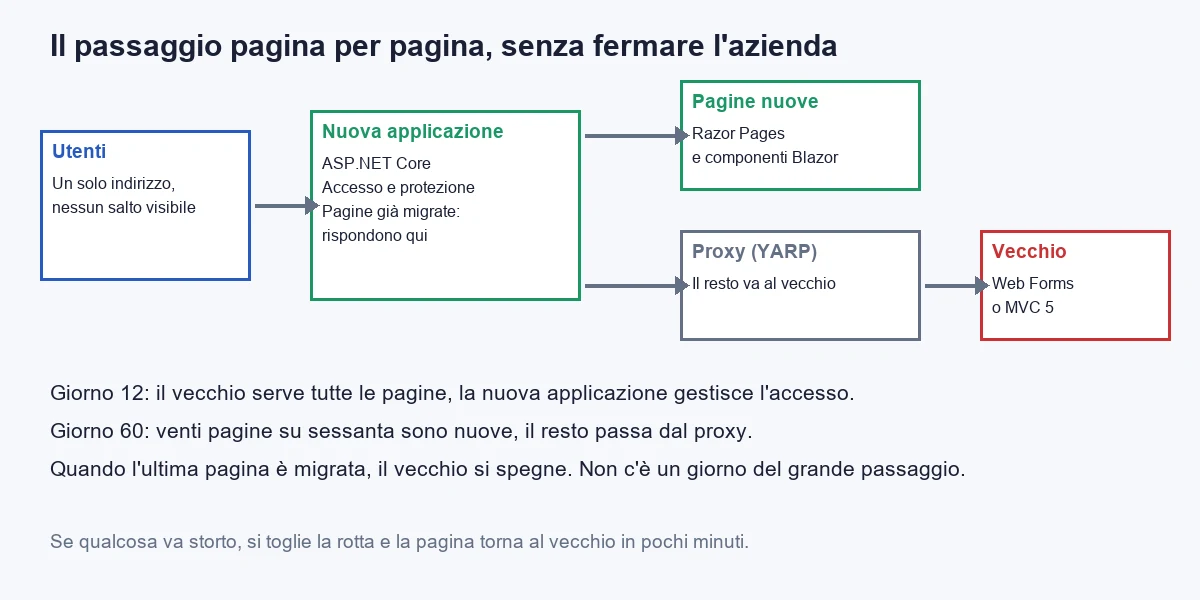
This is the case of the Padua company at the start. The worst choice is the total rewrite: eighteen months delivering nothing, the company still asking for changes to the old program, and a cut-over day on which you hope everything goes well. The best choice is the page-by-page move, which has a name from the architecture books (strangler) and a very concrete shape.
The idea: you put a new ASP.NET Core application in front of the old program. Every request reaches the new one. If the new one has the matching page, it answers. If it does not, the request is passed on to the old program, which answers as it always has. Users see no jump. The day the last page has been migrated, the old one is switched off.
The tool is YARP, a reverse proxy made by Microsoft as a library for ASP.NET Core. The configuration is this:
{
  "ReverseProxy": {
    "Routes": {
      "vecchio-sito": {
        "ClusterId": "webforms",
        "Match": { "Path": "{**tutto}" }
      }
    },
    "Clusters": {
      "webforms": {
        "Destinations": {
          "server-vecchio": { "Address": "http://server-vecchio:8080/" }
        }
      }
    }
  }
}
The {**tutto} route takes every request that no new page has taken. Razor Pages registered with MapRazorPages always win, because a precise address takes precedence over a generic one. In the start-up file you saw above, the two lines you need are already there: AddReverseProxy().LoadFromConfig(...) and MapReverseProxy().
Two problems that the gradual move brings with it
The first is shared sign-in. If the user enters on the old page and then moves to a new one, the new one must recognise them, otherwise it asks for the password again halfway through their work. The solution depends on how the old program manages users: the cleanest route is to move sign-in into the new application first, and let the old one know that the user is already authenticated through a header that only the proxy can add. It is the first piece to build, and it is why the plan starts there.
The second is shared state. Web Forms keeps many things in the server session: the basket, the filters, the page the user had come from. A new page does not see them. For each piece of session data you decide whether it is really needed (often it is not), or you move it to a place that both applications read, usually the database.
A sixty-day plan for the first twenty pages
- Days 1-5: the census. A sheet with all the screens: how often they are used each month, how complex they are, which others they depend on. You get it from the server logs and an hour with the people who use them. The ten most used and the ten easiest will guide the order.
- Days 6-12: the skeleton and sign-in. The new application with the default protection rule, the proxy to the old one and shared sign-in. You publish, and for users nothing changes. This is the moment to prove that the loop works.
- Days 13-20: the first page, the simplest. Not the most important: the simplest. It serves to find the problems of sign-in, style and publishing with small damage.
- Days 21-45: the read pages. Lists, record views, searches. You migrate them in groups of five and publish every week. They are the pages with the least risk, because they read and do not write.
- Days 46-60: the first write pages. The entry and edit forms, with tests that compare old and new results on the same data. You start with the forms that have the fewest rules.
On the sixtieth day the twenty most used pages are new, and the company already has proof that the move works. The old program carries on serving forty rarely used screens, which are migrated at the pace the budget allows. This too is a cost choice: a screen used twice a year can stay in the old program for years, if the old program runs without risk.
If this is exactly your case, what is worth reading alongside is the guide to the cost of legacy software, which works out what standing still costs, and the one on ASP.NET Core compared with other web frameworks.
What is almost always forgotten?
In a migration, the list of things discovered late is almost always the same. I put it here because it is the part that saves you the most days.
- Printouts and reports. Web Forms often had a report component (Crystal Reports, ReportViewer) that does not exist in ASP.NET Core. The replacement must be decided before starting, because it is the work that most often overruns: printouts are contractual for the end customer.
- Excel exports. Almost every list screen has an "Export" button. It must be rebuilt with a modern library and checked column by column: date and number formats are where the sums break.
- Third-party controls. The grids and calendars of old commercial suites have no identical equivalents. Every control must be catalogued at the start, with a note on where it is used.
- The pages nobody remembers. In every business application there are four or five pages used once a quarter by a single person: the year-end close, the alignment of a price list. They are discovered when that person looks for them, in January. The census from the server logs finds them.
- Error handling. The old program showed an error page with a text the company had learned to read. The new one must write errors to a place where you read them, with the user and the page. A business application without an error log is a program whose problems you are the last to know.
- File uploads. Maximum sizes, allowed types, where they are written. The new server has a default limit of about thirty megabytes per request: if the old one accepted more, the limit must be declared and decided.
- Night jobs. The processing the old program did at night, sometimes inside the web application itself. They must be found, and moved to a separate service that does not depend on an open page.
Which mistakes should you avoid when choosing and building?
- Choosing Blazor because "it's the future". The future is not a criterion. The criterion is the share of interactive screens. With 4 interactive screens out of 60, Blazor alone costs you about 26,600 euros more than Razor Pages (121,140 against 94,560), and gives you nothing you will notice.
- Choosing MVC out of habit. If the team knows only MVC, the cost of training on Razor Pages is a few days, because they use the same rendering engine and the same conventions. A few days, against a recurring cost on every screen.
- Binding the form to the database entity. The overposting risk. An input class for every form, always.
- Putting business logic inside the page. A page method should read the request, call a service, choose the response. The price calculation or the discount rule belongs in a separate class, which you test without starting a server. If the rule lives in the page, you rewrite it every time you change technology.
- Redoing the look and the rules at the same time. A migration that also changes how users work loses the most important proof: "the new one does what the old one did". First you port, then you improve.
- Not measuring. Before the migration, note the response times of the ten most used pages. Afterwards, compare them. Without the before, you have no way to say it went better, and you will find yourself arguing on feelings.
- Forgetting the protection test. Of all the tests in this article, it is the one I would put before all the others.
When is it better to choose none of these routes?
It happens, and saying so is part of the job. Three cases.
- The old program works and there is no deadline. If the server is supported, the data is safe and the changes requested are few, the cost of standing still can be lower than the cost of migrating. The number to look at is the cost of the risks: the lack of staff who know the technology, the operating system's end of support, vulnerabilities. When the risk costs more than the intervention, you migrate. Not before.
- The system is in fact a ready-made product you could buy. If sixty screens do what software you can buy on subscription would do, building custom does not pay. It is worth asking yourself before spending 110,000 euros.
- The screens are almost all tools. If more than two thirds are interactive, the reasoning of the third band applies: a single technology, Blazor, and do not pay for two ways of working.
If you want a second opinion on your case, the way forward is software consulting. If the question is whether to build custom or buy, ask yourself that before committing a budget. And if you are weighing up splitting the system into separate services, think twice before doing it: most business applications with sixty screens are perfectly fine as one well-made program.
To sum up, in five lines. Count the screens that are tools, not those that are documents. If there are fewer than eight out of sixty, Razor Pages and nothing more. If there are between eight and forty, Razor Pages for pages and Blazor for tools, in the same application. If there are more, Blazor. Protect everything by default and prove with a test that no page has been left open. Migrate one page at a time, with the old program behind, until the last one has moved.
Frequently asked questions
It is the ASP.NET Core way of building web applications where every screen is a page made of two files: one with the layout and one with the C# code that answers. The page address is decided by the folder the file sits in, with no route lists to maintain.
Razor Pages uses two files per screen, MVC uses at least three in different folders (controller, view, data object), Blazor builds the screen from components that react to clicks and keep an open connection with the server. All are ASP.NET Core and can live in the same application.
For a management system of 60 screens, 18 of them interactive, over three years: Razor Pages plus Blazor about 109,044 euros, Razor Pages alone 118,080, Blazor Server 123,660 and MVC 132,648. The gap between the dearest and the cheapest is about 23,600 euros.
How many screens are interactive, that is used as tools rather than as forms to fill in. Out of 60 screens: up to 7 Razor Pages pays off, from 8 to 40 Razor Pages for the pages and Blazor for the tools, from 41 up Blazor.
You put a new ASP.NET Core application in front of the old program with a reverse proxy (YARP). Pages already migrated answer from the new one, everything else is passed to the old one. You migrate one page at a time and switch the old one off when the last page has moved.
You protect the whole pages folder by default and open only the pages declared public. Then an automated test lists every page in the application, requests it without logging in and fails if one answers with anything other than a redirect to the login or a refusal.
Leave your details in the form below