When does it pay to replace Excel with a management system?
With 18 hours a week the file costs 51,472 euros a year. At eight years: 509,442 euros staying, 280,084 euros with a subscription system, 297,921 euros with a custom program. If the process is yours, a system that does not fit costs more than a tidy Excel.

An electrical materials distributor in Brescia runs orders, warehouse and invoicing on an Excel file born in 2014. Today it has forty-one sheets, six people who touch it every day and two macros written by an accountant who has since retired. It works. Then, in a single quarter, three things happen. A 14,000 euro order goes out with the wrong discount because someone dragged a formula down one row too far. The file, now too heavy, gets corrupted on a Monday morning and Friday's backup loses two days of work. And a large customer asks to see in real time how much stock there is, which the file, open to one person at a time, cannot give.
The owner searches for "replace Excel with a management system" and finds two kinds of pages. The ones from software vendors, who promise to solve everything with a subscription. And the ones from IT people, who say to write a custom program. Neither shows the bill, and neither admits that for many companies the right answer is to leave Excel where it is, with a few precautions.
This article tells you when Excel has stopped being enough, which four routes you really have (stay, tidy the file, buy a management system, build a custom one) and what each costs over three, five and eight years for a typical company. You get one number that decides almost everything, the hours per week people lose inside the file, and a second question that decides between buying and building: is your process standard, or is it yours?
Inside you will find the calculation in euros with every assumption in plain sight, the C# code that I compiled and tested for real (an automatic census of the Excel file and the discount rule moved out of a macro into a class with its tests), a way to decide what to do with the VBA macros, and the steps to change tool without stopping orders for even one day.
An honest premise. Since 1999 I have designed software for companies, and I built and sold a multi-tenant legal management system. I am not selling you a tool: the case I use is a typical company, built with sector orders of magnitude and not the case of a real customer. The numbers are assumptions in plain sight, meant to let you redo the calculation with yours.
Why is Excel fine until it is not?
Excel is the best software development tool in existence for people who are not developers. It lets a warehouse manager build in one evening a program that a software company would take three weeks to write. There is no installation, no supplier, no quote. The data goes in, the formula calculates it, the chart shows it. That is why the whole world of small and medium businesses runs on it, and why it should not be treated with contempt.
The problem is not Excel. The problem is that an Excel file becomes a program without anyone deciding that it is one. It has data, rules, people who use it, deadlines that depend on it. But it lacks what a program has: nobody checks who changes what, nobody tests the formulas before using them, two people cannot work on it together without stepping on each other, and when the person who built it leaves, the knowledge leaves with them.
Companies always find out the same way: not through reasoning, but through an incident. The wrong discount, the corrupted file, the figure that does not match between two sheets. The incident is not the cause, it is the moment when a cost that was already there becomes visible. That is why the first useful question is not "which system do I buy?" but "how much does this file already cost me today?". Until you answer that, any quote will look too high or too low, because you have nothing to compare it with.
There is also a fact that software vendors will not tell you: an Excel file well tidied, with real tables, validation on the fields, a single shared copy and a few written rules, holds up for a long time. In this article you will see that there is a threshold below which staying is the right choice, and that many companies cross it without noticing.
What are the symptoms of a file that has outgrown its job?
You do not need a specialist to notice. Seven questions are enough, and if you answer yes to three or more, the file is already doing the work of a program.
- More than one person edits it every day. When it is two or three people, the unwritten rule "ask if it is free before you open it" appears. When it is six, copies appear: "orders_FINAL_def2.xlsx". The truth splits across different files.
- There are sheets nobody remembers the purpose of. A sheet called "Backup2019" or "Test" that feeds other formulas is a closed box. Nobody deletes it because nobody knows what breaks.
- Formulas contain numbers typed by hand. A 0.92 inside a formula is a hidden commercial rule. When the discount changes, you have to find every formula where it appears, and if you find nine out of ten, the tenth is an error that surfaces at month end.
- There are links to other files. A formula that reads a value from another file on a computer or network folder stops working when the file moves, without warning: it keeps showing the last value it had.
- There are macros that only one person understands. VBA is a real language. A four hundred line module written by someone who is no longer there is software to maintain without documentation and without tests.
- Reconciliation is done by hand. Someone copies data from the accounting system into the file, or from the file into the system, and then checks that the totals match. Every copy is a chance of error and every check is time.
- Someone has asked to "see the data from outside". A customer, an agent, a colleague on the road. An Excel file open on one computer cannot be seen from outside, and when you send it by email a second copy is born the moment you send it.
The number of yes answers is not the number that decides, but it tells you where you stand. With one or two the file is healthy and tidying it is enough. With three or four it is time to do the calculation. With five or more you are already paying the bill, and the only point is how much.
How much does an Excel that does the work of a management system cost each year?
It costs in four ways, and only one appears on an invoice. The other three sit in people's time, in errors and in risk.
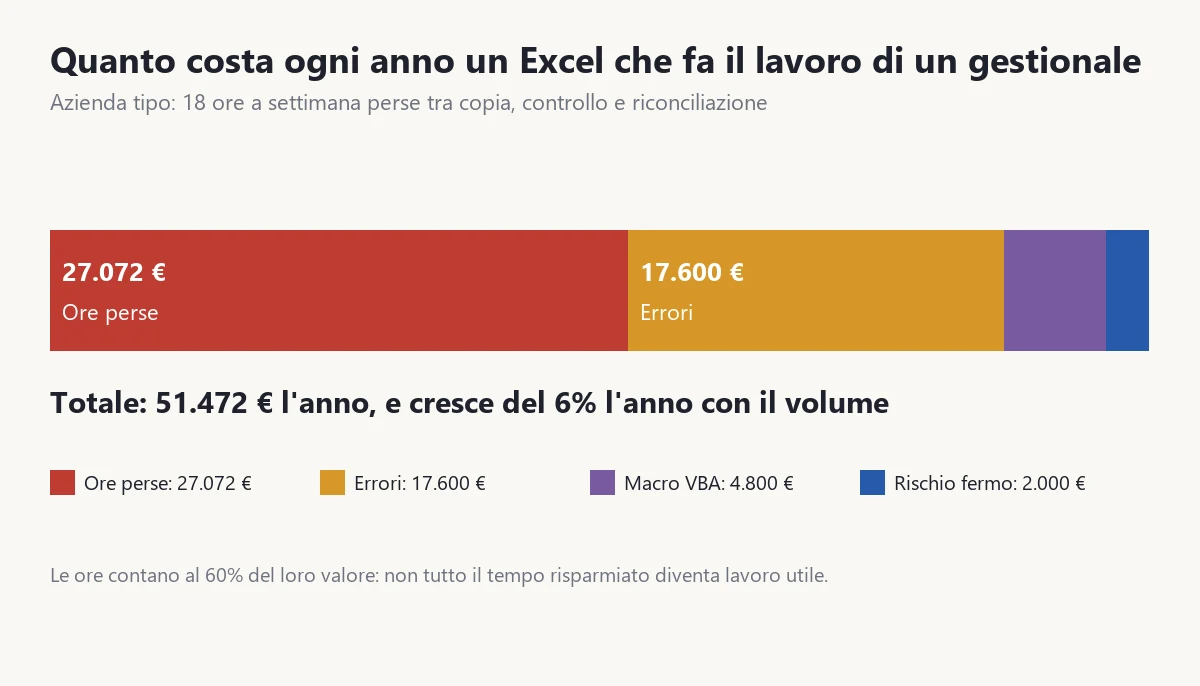
I show you the calculation for a typical company, and tell you right away how to redo it with your data. The typical company has six people working in the file, an internal hourly cost of 32 euros (gross salary plus contributions, divided by the hours actually worked), and an amount of lost time that I call "friction hours": those spent copying a figure from one place to another, checking that a total matches, looking for the latest version, redoing a formula that broke. For this company it is 18 hours a week in total, three each.
| Item | Assumption | Annual cost |
|---|---|---|
| Friction hours | 18 hours a week, 47 weeks, 32 euros an hour | 27,072 euros |
| Errors | 16 errors a year costing 1,100 euros on average (wrong discount, duplicated order, wrong shipment) | 17,600 euros |
| VBA macro maintenance | 8 working days a year at 600 euros | 4,800 euros |
| Downtime risk | 8% yearly chance of a stoppage costing 25,000 euros | 2,000 euros |
| Total | the cost that today nobody sees as a line in the accounts | 51,472 euros |
Three notes on the calculation, because each is a point where a seller deceives you and a point where you can deceive yourself.
The first. The cost of errors is the hardest item to estimate and the most useful to measure. To get it, open the mail and the accounting system for the last twelve months and look for credit notes, redone shipments, corrected invoices. For each case ask: did the error come from a figure copied by hand or from a wrong rule in the file? If yes, it is an Excel error. In many companies the real number is higher than people remember, because small errors are fixed over the phone and leave no trace.
The second. Friction hours are not all worth 32 euros. If a person saves ten minutes a day, those ten minutes do not become an hour of sellable work, they become three more coffee breaks. In the calculations that follow, saved hours are worth 60% of their cost, because almost half of the freed time is lost in work that would have been finished anyway and nobody puts it to use. If your company is full of backlog and every free hour turns straight into finished work, use 100% and the calculation improves for the new routes. It is a number to declare, not to hide.
The third. Downtime risk sounds like an insurer's item, and it is the most underestimated. A file that lives on a single computer, or on a shared folder without versioned copies, is a single point of failure. It is not rare: a very heavy Excel file with many linked formulas gets corrupted and opens only in recovery mode. What is lost depends on the last good save, and good saves are often missing.
One last point before moving on: this cost does not stand still. The more the company grows, the more orders pass through the file, the more people work on it, the more errors come out. In the calculations that follow I make it grow by 6% a year, a prudent value for a company that sells more than it did two years ago.
What are the four routes you really have?
Faced with a file that does not hold, there are four routes. There is no fifth, however a seller describes it under another name.
Route A: stay where you are
Nothing is touched. The file keeps living, with today's macros and errors. It costs nothing new and it is the route against which all the others must be compared. It makes sense when the annual cost of Excel is small, or when the company has a short horizon (it is sold, the department closes, the model changes within two or three years).
Route B: tidy Excel
You stay in Excel, but you make it work like a serious program. Ranges become real tables, validation goes on the fields (a customer must exist, a price cannot be negative), the file is centralised on a shared folder with versions (SharePoint or OneDrive), what repeats is moved out with Power Query, dead sheets are deleted and the numbers of the rules go in a parameters sheet instead of inside the formulas. It costs about 6,000 euros once, plus 1,200 euros a year of care, and cuts lost time by 35% and errors by 40%. It does not remove the macros: it leaves them, but documents them.
Route C: buy a subscription management system
You adopt a product that exists (a warehouse and orders system, an ERP for small companies) and put your own process inside it. For the typical company it costs about 24,000 euros up front (configuration 9,000, data migration 6,000, training 3,000, internal staff time 6,000) and 4,800 euros a year (twelve users at 400 euros a year). It cuts lost time by 65%, errors by 70%, and removes the macros and almost all downtime risk. But it works like this only if the company's process is substantially the one the product expects. Further on you will see what happens when it is not.
Route D: build a custom program
You write a program that does what the company does, the way it does it. For the typical company it costs about 79,000 euros up front (build 62,000, start-up 9,000, internal time 8,000) plus 12% of the build every year for maintenance and small changes, that is 7,440 euros. It cuts lost time by 85% and errors by 85%. It has the advantage of adapting to the process and not the other way round, and the drawback of starting from a high investment and needing a supplier or internal team to maintain it over the years. For a detailed comparison of when custom makes sense and when it does not, see the guide on custom software for companies.
One thing that matters and that comparisons overlook: routes B, C and D differ not only in price, they differ in nature. B does not change tool, it changes discipline. C changes tool and asks you to change a little how you work. D changes tool and lets you keep working as before. That is why the question "which is cheapest?" has an answer that depends on how much you are willing to change.
What does each route cost over three, five and eight years?
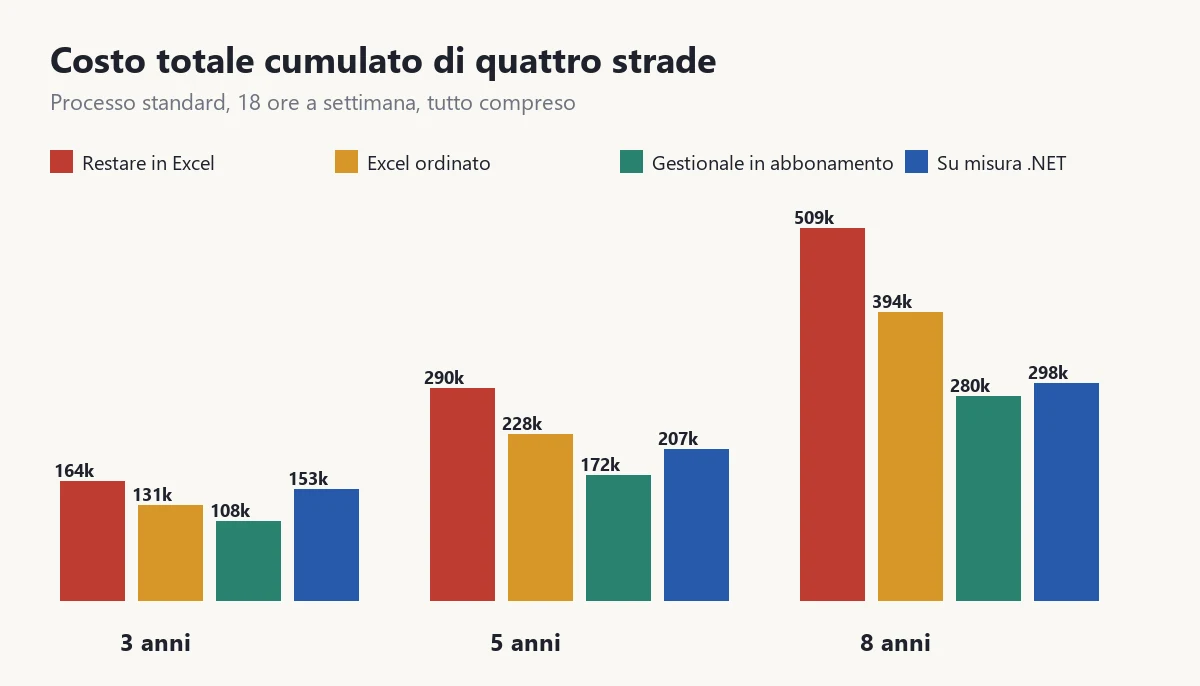
I put all the numbers together. The total cost over a horizon is: the initial cost, plus for every year the fee or maintenance, plus the residual cost of lost time, errors, macros and risk, which grows by 6% a year. For the typical company, with 18 friction hours a week and a process that the subscription system covers without strain:
| Route | Initial cost | 3 years | 5 years | 8 years |
|---|---|---|---|---|
| A. Stay in Excel | 0 | 163,866 euros | 290,152 euros | 509,442 euros |
| B. Tidy Excel | 6,000 euros | 131,363 euros | 227,601 euros | 394,147 euros |
| C. Subscription system | 24,000 euros | 108,420 euros | 171,982 euros | 280,084 euros |
| D. Custom | 79,000 euros | 152,593 euros | 206,987 euros | 297,921 euros |
Read the table by horizon row, not by column. At three years the cheapest route is the subscription system, and the most expensive after staying is custom, which still has to amortise its 79,000 euros up front. At five years custom has already passed tidy Excel and is closing in on the subscription. At eight years custom and subscription are less than 18,000 euros apart, and at ten years they touch: 361,897 euros against 365,680.
The most important reading is another. Staying in Excel is the most expensive route at every horizon, in this case. Not because Excel is a bad tool, but because at 51,472 euros a year of friction, risk and errors the file is already costing more than a way out would cost. This is not true for every company: it holds for those that lose 18 hours a week. Shortly you will see from how many hours down staying pays.
The assumptions, all together, so they can be argued with. Internal hourly cost 32 euros. Growth of the friction cost 6% a year. Value of saved hours: 60%. An error costs 1,100 euros on average. Downtime risk 8% a year on 25,000 euros. Macro maintenance 4,800 euros a year, removed by C and D. The reductions are: B time 35%, errors 40%, risk 25%; C time 65%, errors 70%, risk 90%; D time 85%, errors 85%, risk 90%. Change one number and the calculation moves: that is the point.
What is the number that decides?
It is the friction hours per week. Not turnover, not the number of employees, not the age of the file. Because they are the biggest recurring cost and because they can be measured in a week.
To measure them, for five days ask each person who works in the file to note down each time they: copy a figure from one place to another, check a total, look for a version, repair a formula, wait for someone to free the file. One mark each time, with the minutes. At the end of the week add up. Do not look for precision: you only need to know whether it is three hours or thirty.
Here is how the five-year calculation changes as the hours change, with the same standard process as the typical company:
| Friction hours per week | Annual cost of Excel today | A. Stay | B. Tidy | C. Subscription | D. Custom |
|---|---|---|---|---|---|
| 3 | 14,612 euros | 82,369 | 78,768 | 70,223 | 132,581 |
| 6 | 21,324 euros | 120,205 | 106,303 | 89,459 | 146,904 |
| 12 | 36,948 euros | 208,279 | 168,812 | 131,650 | 177,410 |
| 18 | 51,472 euros | 290,152 | 227,601 | 171,982 | 206,987 |
| 30 | 81,620 euros | 460,100 | 348,900 | 254,505 | 267,070 |
The crossing points, calculated on the same model, are these. At five years, tidying Excel pays against staying from 2.5 hours a week upward. The subscription system beats staying from 1.75 hours, and below that it is not worth changing anything. Custom beats staying from 8.75 hours, but beats tidy Excel only above 14 hours. These are low numbers, and it is worth understanding why.
They are low because the hidden-cost sums are only apparently small. Two and a half hours a week is 3,760 euros a year of hours, plus the errors that go with them. And if a management system costs you 4,800 euros a year in fees and 24,000 euros once, the break-even arrives early. What the model does not include is how much it costs you to change habits, and you see that in the section on the process.
A rule to remember: under three hours a week stay and tidy the file, between three and fifteen hours buy a management system if your process is standard, above fifteen build custom if the process is yours. The exact thresholds depend on your assumptions, but the order of the routes is robust: on the numbers of this model it never inverts, and when you change the assumptions it shifts.
How do you census the file in ten minutes?
Before asking for a quote, you need to know what you have. A census of the file, done by someone who did not build it, brings out in ten minutes the things nobody remembers: hidden sheets, links to external files, formulas with numbers typed inside, cells in error. A forty line program does it. I used the ClosedXML library, which reads .xlsx files without needing Excel installed.
The project is a console with a single package, ClosedXML. This is the core, which I compiled and ran on a test file with hidden sheets, external references and constants in the formulas:
using System.Text.RegularExpressions;
using ClosedXML.Excel;

var percorso = args.Length > 0 ? args[0] : "ordini.xlsx";

using var cartella = new XLWorkbook(percorso);
var costante = new Regex(@"(?<![A-Z$\d.])\d+[.,]\d+|(?<![A-Z$\d])\d{3,}(?![\d:])");
var esterno = new Regex(@"\[[^\]]+\.xls[xm]?\]|'?[A-Za-z]:\\");
int formuleTotali = 0, costantiNelleFormule = 0, riferimentiEsterni = 0, errori = 0;

foreach (var foglio in cartella.Worksheets)
{
    int formule = 0, costanti = 0, esterni = 0, err = 0;
    foreach (var cella in foglio.CellsUsed())
    {
        if (cella.HasFormula)
        {
            formule++;
            var testo = cella.FormulaA1;
            if (costante.IsMatch(testo)) costanti++;
            if (esterno.IsMatch(testo)) esterni++;
        }
        if (cella.DataType == XLDataType.Error || cella.CachedValue.IsError) err++;
    }
    Console.WriteLine($"{foglio.Name,-18} " +
        $"{(foglio.Visibility == XLWorksheetVisibility.Visible ? "visibile" : "NASCOSTO"),-9} " +
        $"formule {formule,4}  costanti nelle formule {costanti,3}  file esterni {esterni,2}  errori {err,2}");
    formuleTotali += formule; costantiNelleFormule += costanti;
    riferimentiEsterni += esterni; errori += err;
}

Console.WriteLine();
Console.WriteLine($"Fogli: {cartella.Worksheets.Count}  Formule: {formuleTotali}  " +
    $"Costanti dentro le formule: {costantiNelleFormule}  " +
    $"Collegamenti a file esterni: {riferimentiEsterni}  Errori: {errori}");
On the test file it prints this (the labels are in Italian, as in the program):
Ordini             visibile  formule    5  costanti nelle formule   5  file esterni  0  errori  0
Magazzino          visibile  formule    1  costanti nelle formule   1  file esterni  1  errori  0
Appoggio2019       NASCOSTO  formule    1  costanti nelle formule   1  file esterni  0  errori  0

Fogli: 3  Formule: 7  Costanti dentro le formule: 7  Collegamenti a file esterni: 1  Errori: 0
How to read it. Every hidden sheet with formulas that feed other sheets is a debt: someone put it there and nobody knows why. Every link to an external file is a point that breaks silently. Every constant inside a formula is a commercial rule that sits nowhere it can be changed. On a real file with forty sheets, the census usually finds dozens of constants and a few links nobody knew about. They are not a judgment on the work of whoever built the file: they are the list of what needs deciding before touching anything.
Two limits, to declare. The census does not read the VBA macros, which sit in another part of the file and are counted with a different tool (or by eye: Alt+F11 and count the modules). And the search for constants is approximate: it finds 0.92 and 5000, but it also finds the 100 inside a percentage written as 100%, so the number is an upper bound, to be looked at row by row. It tells you where to look, not how to judge.
Subscription or custom: how do you tell whether the process is yours?
It is the second question that decides, and the first on which sellers go wrong. A subscription management system costs little and works well when your process is the one it expects: orders, warehouse, invoices, a price list, a few discounts. If instead your process has something particular (a bill of materials that changes by customer, a discount that depends on a commercial rule only you have, a three-level approval for orders above a threshold), the system bends badly, and the company bends in its place or pays for customisations that cost as much as a custom program.
To find out where you are, write on a sheet the ten rules by which your company decides a price, accepts an order, prepares it and invoices it. For each, answer: would I find it written in the manual of a market management system, just as it is? If eight or more out of ten yes, the process is standard. If six or fewer, the process is yours. If seven, it is a borderline case and it is worth looking at which three rules do not fit: if two are details you can change, you are standard; if they are the rules that set you apart from competitors, you are yours.
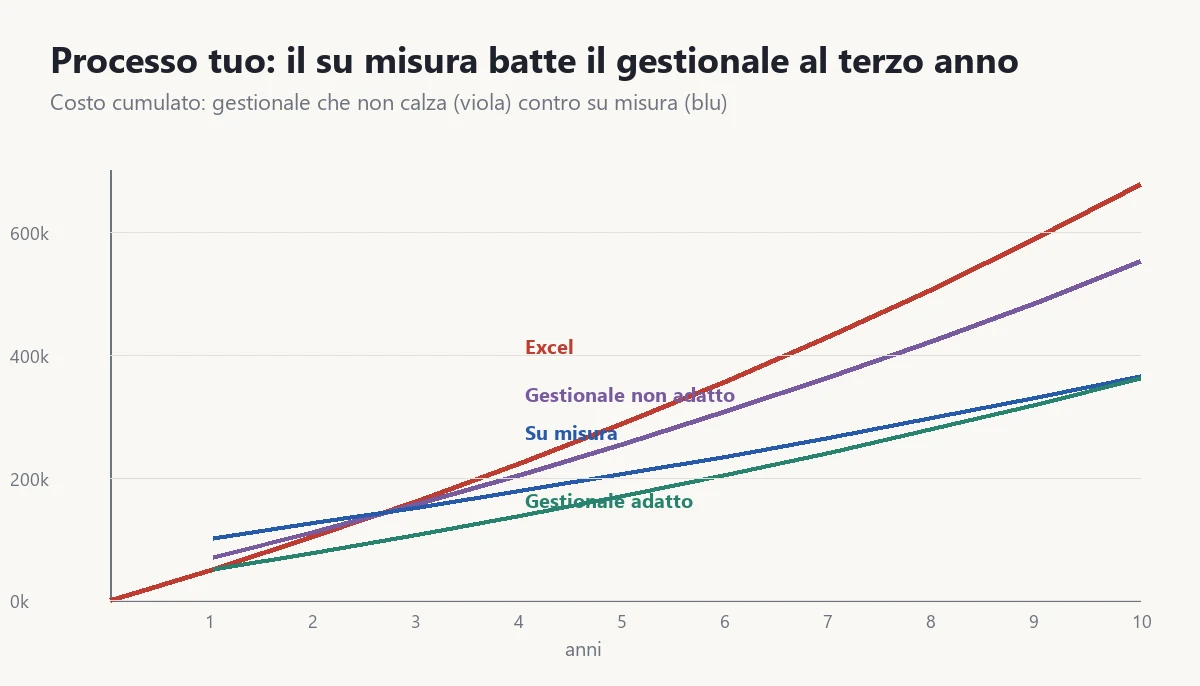
When the process does not fit, the subscription system delivers much less. In the calculation that follows, for a system that does not adapt the cut in lost time falls from 65% to 30%, that of errors from 70% to 40%, half the macros remain and the initial cost rises to 30,000 euros for customisations. The result, for the typical company:
| Route | 3 years | 5 years | 8 years |
|---|---|---|---|
| A. Stay in Excel | 163,866 euros | 290,152 euros | 509,442 euros |
| B. Tidy Excel | 131,363 euros | 227,601 euros | 394,147 euros |
| C. System that does not fit | 158,879 euros | 256,704 euros | 424,303 euros |
| D. Custom | 152,593 euros | 206,987 euros | 297,921 euros |
Here the reading changes. The system that does not fit costs more than tidy Excel at every horizon: it is the worst route, because you pay for a change of tool and do not get the benefit. Custom crosses the system in the third year (152,593 against 158,879) and at eight years saves 126,382 euros. And the rule changes: when the process is yours, at five years below 14 hours a week the right route is to tidy Excel, above 14 it is custom.
A common mistake is deciding on the demo. The seller shows you the product with the prettiest case: one order, one customer, a simple discount. The question to ask is another: "show me my worst case". Bring three real orders, the odd ones that waste time, and ask to see them inside the product, without programming and without a consultant. If it cannot do it, you have your number.
If the system is fine but you only need something very much your own, there is a middle way: keep the product for everything standard and build around it only the piece that sets you apart, connected through its interfaces. It costs far less than a complete program, but it requires a product with serious interfaces. Before choosing, ask: if the system cannot be connected, that route does not exist.
What do you do with the VBA macros?
Macros are the most delicate part, because they are code written without being called code. Inside they hold commercial rules, calculations, shortcuts that people take for granted. Before changing tool, it must be decided, macro by macro, what happens to it. There are three routes.
- Throw it away. The macro did something the new tool does by itself: an export, a print, a total. You prove that the new tool gives the same result and delete it.
- Rewrite it. The macro contains a rule that is still needed. The rule is taken out of the file and written somewhere it can be tested.
- Leave it, with a date. A macro that works, serves one person and cannot be replaced now stays as it is, with a note of who uses it and when it is reviewed. It is not a solution, it is a declared debt.
The most frequent case, and the one that costs most when it goes wrong, is the commercial rule written inside the macro. Here is an example true in form, invented in numbers: the discount on orders. In the file it looks like this:
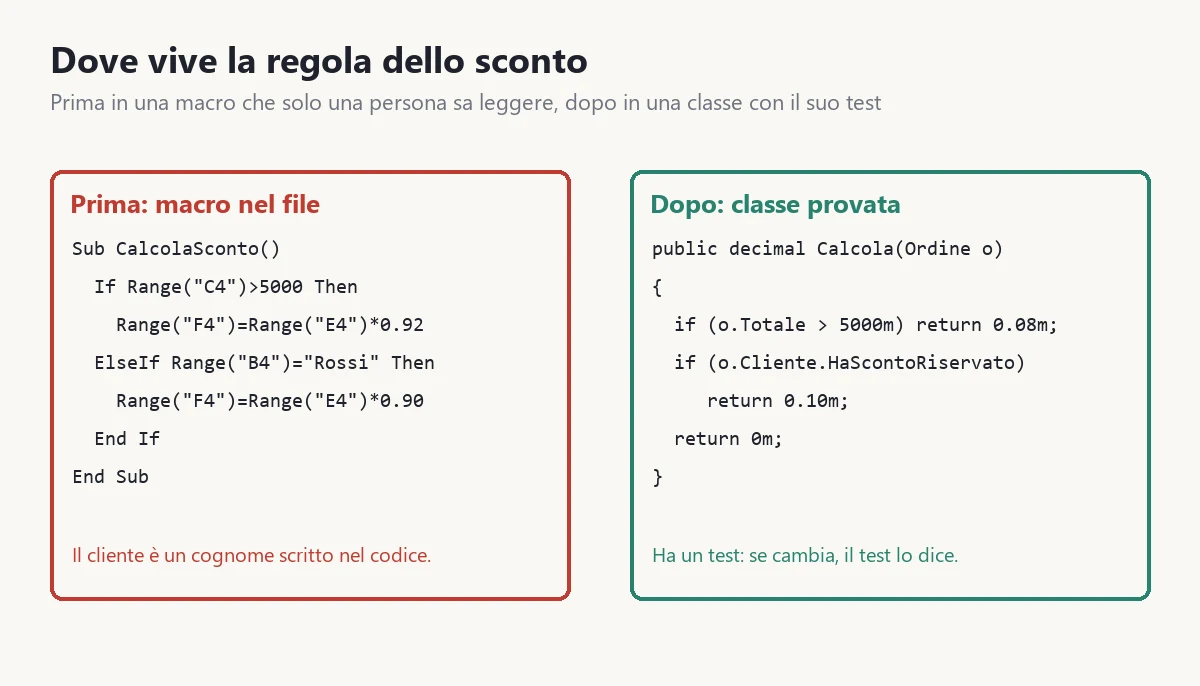
Sub CalcolaSconto()
    If Range("C4") > 5000 Then
        Range("F4") = Range("E4") * 0.92
    ElseIf Range("B4") = "Rossi" Then
        Range("F4") = Range("E4") * 0.90
    End If
End Sub
Look at what is inside. The 5000 threshold is typed by hand. The customer "Rossi" is a surname in the code: if Rossi changes company name, or another customer gets the same treatment, someone has to open the macro and edit it. Cells C4, E4 and F4 are positions, not meanings: if someone inserts a column, the macro writes into the wrong cell and raises no error. And there is no test: nobody knows the rule does what it should until an order goes out wrong.
Taken out, the same rule becomes a class that knows nothing about Excel. The customer has a property that says whether they have the reserved discount, and the threshold is a constant with a name:
namespace Regole;

public sealed record Cliente(string Nome, bool HaScontoRiservato);

public sealed record Ordine(Cliente Cliente, decimal Totale);

public sealed class ScontiOrdine
{
    private const decimal SogliaVolume = 5000m;

    public decimal Percentuale(Ordine ordine)
    {
        if (ordine.Totale > SogliaVolume) return 0.08m;
        if (ordine.Cliente.HaScontoRiservato) return 0.10m;
        return 0m;
    }

    public decimal Netto(Ordine ordine) =>
        decimal.Round(ordine.Totale * (1 - Percentuale(ordine)), 2);
}
And the test that defends it, four rows of data and one check. I ran these tests: all five pass.
using Xunit;

namespace Regole;

public class ScontiTest
{
    private static readonly ScontiOrdine Sconti = new();

    [Theory]
    [InlineData(5001, false, 0.08)]
    [InlineData(5000, false, 0)]
    [InlineData(1200, true, 0.10)]
    [InlineData(9000, true, 0.08)]
    public void La_percentuale_segue_la_regola(decimal totale, bool riservato, decimal atteso)
    {
        var ordine = new Ordine(new Cliente("Rossi", riservato), totale);

        Assert.Equal(atteso, Sconti.Percentuale(ordine));
    }

    [Fact]
    public void Il_netto_e_arrotondato_a_due_decimali()
    {
        var ordine = new Ordine(new Cliente("Bianchi", false), 5001.01m);

        Assert.Equal(4600.93m, Sconti.Netto(ordine));
    }
}
Note the second case, 5000 with no discount. It is the one nobody had decided in the macro: does "above 5000" mean that exactly 5000 has no discount? The macro says no, and the class puts it in writing in a test. When that rule changes, the test fails and says where. It is the move from a rule that lives in one person's head to a rule that lives somewhere it can be checked.
Why this matters for choosing the tool. If you choose route C, you do not need the class: you configure the rules inside the system, but the exercise stays the same, because you have to write each rule so that someone can check it, and the list of rules that comes out of this work is the most valuable part of the project. If you choose D, the class is the start of the program. In both cases the rule is extracted before deciding, not after.
How do you change tool without stopping orders?
With a condition that seems obvious and that many projects forget: for a period, the old and the new live together. There is no switchover day when one is turned off and the other turned on, unless the company can afford to stop and to be wrong. Here are the steps, in the order I follow them.
1. Census and measurement (one week). The census of the file with the program above, and the measurement of friction hours. They are needed to tell whoever quotes "this is the starting point" and to be able to say at the end "it went better" with a number and not a feeling.
2. The ten rules and the three worst cases (two days). The ten rules that decide price, acceptance, preparation and invoice, written in sentences. And three real orders, the odd ones, kept for tests. These three orders will be the acceptance test of any route: if the new tool handles them well, the rest is easy.
3. Tidy anyway (two weeks). Even if you have already decided to change, tidy the file: delete the dead sheets, take the constants out of the formulas and put them in a parameters sheet, and fix a single copy. It looks like wasted time, since the file will die. It is not: a tidy file migrates in half the time and with half the errors, and in the meantime you stop losing data.
4. Migrate master data (one or two weeks). Customers, items, price lists. They are the data that change little, they migrate first, and you do the cleaning work (two customers with the same name, one item with three codes) on still data. Cleaning is always the longest part, and if you leave it for last it blocks everything.
5. Work in parallel with a few people (two to four weeks). Two people work in the new one, the others in the old. Real orders go through the new one and, for the first weeks, are checked by hand against the old. When the results match for a month, you widen.
6. Move everyone, keeping the old one (one week). On switchover day the old file stays, read-only, for at least three months. If in an odd case the new one gets it wrong, you look at how the old one would have done it.
7. Measure and switch off. After two months, repeat the friction week measurement. If the hours have dropped as expected, archive the old file. If they have not, understand why before going on: often it is a function of the old one that people still do by hand because nobody explained how it is done in the new one.
The overall duration, for the typical company, goes from two to four months, depending on the route. It is longer than the "one weekend" version that someone promises and shorter than the "one year" version that someone fears. The mistake is compressing it by removing the parallel run, which is exactly the piece that protects you from the 14,000 euro error this article began with.
Which mistakes should you avoid?
- Changing tool without having measured the file. If you do not have today's hours and errors, you cannot say whether the new one is better. The census and the measurement week cost two days of work and protect you from everything else.
- Choosing on the best-case demo. Bring the three odd orders and see whether the product handles them without programming.
- Buying a management system and customising it until it becomes custom. It is the most expensive route: you pay the fee of a standard product and the cost of a custom program, with a supplier who is not yours. If customisation exceeds 30% of the initial cost, the calculation is telling you that the process is yours.
- Rewriting everything "because Excel is old". The criterion is not the age of the tool, it is the friction hours and the process. A company with six hours a week of friction and a process of its own is better off with a tidy Excel than with a 79,000 euro program.
- Forgetting whoever built the file. The person who wrote the formulas is the only one who knows why they are that way. Involve them from the census: if they feel bypassed, they take the knowledge away and the project loses two months.
- Migrating dirty data. If two customers are the same customer in the file, they will be the same customer twice in the system, with split invoices. Cleaning is done before migration.
- Not keeping the old one. The original file must be kept read-only, dated. At the first doubt about an order it is the only way to know who was right.
- Forgetting the people. A system that the workers find slower than Excel gets bypassed: an "auxiliary" Excel file reappears within a week. Training is not an optional cost, it is in the 3,000 euro line, and it must be done on real cases and not from the manual.
When is it better to do none of this?
It happens, and saying so is part of the job. Three cases.
- The file is small and one person uses it. If friction hours are under three a week and the person is one, a tidy Excel (route B) is proportionate to the problem. Nothing else is needed, and tidying costs a couple of days.
- The company has a short horizon. If within two years it is sold, changes model or closes the department, the calculation says A or B. An investment that pays back in three years makes no sense in a company that will not exist in two.
- The real problem is not the tool. Sometimes errors come from a process nobody ever decided: two departments using two definitions of "confirmed order". A new management system does not fix it, it fixes it into the code. First you decide the process, then the tool.
If you want a second opinion on your case, the way is the software consulting. For the full calculation of what it costs to keep an old system there is the guide to the cost of legacy software. If your program is not a file but a management system written years ago in Windows Forms, there is the comparison between keeping it, porting it to .NET 10 or rewriting it. If the choice has already fallen on the web, there is the guide to Razor Pages, MVC and Blazor, and if the program must serve several companies together, the one on multi-tenant architecture.
In five lines. Measure the friction hours per week over five days. Under three, tidy Excel and that is it. Over three, write the ten rules and check whether they fit a market management system: eight out of ten or more, buy the subscription, and from 1.75 hours a week up the five-year calculation proves you right. If the process is yours, tidy Excel up to 14 hours and build custom above. In every case, take the rules out of the macros before touching anything, and keep the old file for three months.
Frequently asked questions
When the hours lost inside the file exceed about three a week. At five years a subscription management system beats staying from 1.75 hours a week, while tidying Excel pays from 2.5 hours. For a company with 18 hours a week the file costs about 51,472 euros a year in lost time, errors, macros and downtime risk.
For a typical company of six people a subscription system costs about 24,000 euros up front (configuration, data migration, training, internal time) and 4,800 euros a year. A custom program costs about 79,000 euros up front plus 7,440 euros a year. Tidying Excel costs about 6,000 euros once.
It depends on how standard the process is. If eight rules out of ten are in the manual of a market system, the subscription is the cheapest route at every horizon. If the process is yours, a system that does not fit costs more than a tidy Excel, and custom overtakes it from the third year: at eight years it saves about 126,000 euros.
You decide macro by macro: throw away the one the new tool makes useless, rewrite the one that holds a rule still valid by taking it out of the file into a class with its tests, leave with a review date the one that cannot be replaced at once. The commercial rule written inside a macro is the case that costs most when it goes wrong.
For five days each person who works in the file notes each time they copy a figure, check a total, look for a version, repair a formula or wait for the file to be free, with the minutes. At the end of the week you add up. You do not need precision: you need to know whether it is three hours or thirty.
By letting old and new live together: tidy the file, migrate master data first, work in parallel with two people for two to four weeks checking orders by hand, then move everyone keeping the old file read-only for at least three months. For the typical company the duration runs from two to four months.
Leave your details in the form below