Is it worth learning to develop SCADA systems in C#?
Building a SCADA in .NET means mastering OPC-UA for PLC communication, WPF for operator interfaces, a time-series database for data historization, and cloud integration for Industry 4.0. It is not a simple path, but it is one of the most differentiating for a C# developer in 2026.
An industrial plant stopped costs thousands of euros per hour. Those who can build and maintain the software that keeps it running are valued accordingly.


It is the middle of the night at a chemical plant.
Reactors are running. Valves open and close. Sensors measure temperature and pressure every second.
No worker is walking the floor. Nobody is touching anything.
And yet, someone is watching.
In the control room, a screen shows the entire facility. Every pipe is colour-coded, every reading is live, every anomaly highlighted in red.
An operator takes a sip of coffee and keeps an eye on that temperature, rising slowly past the limit.
Three clicks. A command sent. Process corrected.
That is SCADA.
It is not science fiction. It is the software that governs the physical world: the one made of motors, pumps, furnaces and reactors.
It is the difference between a plant that keeps producing and one that stops. And it always stops at the worst possible moment: at night, during a holiday weekend, when the floor is empty.
The developers who build these systems do something different from everyone else.
They do not create features for users tapping on an app. They build the foundations on which entire production lines depend.
A bug does not generate a support ticket. It generates a plant shutdown. And a shutdown has a cost.
From a few thousand to tens of thousands of euros an hour, depending on what is being produced.
.NET, also known as dotnet, is the Microsoft development platform used today to build virtually any type of application: websites, cloud services, desktop applications, command-line tools.
In the industrial world, .NET has established itself as a solid choice for supervisory systems.
It holds up for years, often for decades.
An industrial plant does not swap software every two years like a startup. What you deploy today must still work fifteen years from now, with zero downtime tolerated.
In this article we look at how a SCADA system written in .NET actually works: the architecture, the components, the problems nobody tells you about until you run into them.
And why understanding all of this, in 2026, is one of the most powerful differentiators a C# developer can have.
What is SCADA and how is it different from a PLC?
SCADA refers to a software system that collects data from field devices, displays it in real time to operators and allows supervisory commands to be sent.
It is not a PLC and it is not a MES: it sits in the middle of the industrial automation hierarchy, with a distinct role from both.
The technical definition, though, does not capture what it feels like in practice.
Think about everything in daily life that works without you noticing. Water from a tap. Electricity reaching your home. A train departing on time. Fuel arriving at a filling station.
Behind each of these things is a physical plant. Behind almost every physical plant, there is a SCADA system supervising it.
The difference between SCADA and PLC is fundamental, and it comes down to three key points:
- The PLC controls locally, because it sits close to the machine and executes the immediate logic of the process.
- The SCADA supervises from above, because it reads the data, presents it to operators and builds a comprehensive view of the plant.
- The PLC keeps control alive, while the SCADA makes the process visible, understandable and manageable.
A PLC is a hardware device installed close to the machines. It executes local control logic in microseconds, without relying on the network, without a screen, without operators in front of it.
A SCADA is not a pure automation system. It is a system of visibility and decision-making.
Between the operator's screen and the motor there is always an intermediate layer, the PLC, which executes local logic at very high speed.
The SCADA sits above: it reads data from the PLC, presents it to operators, tracks process parameters over time, manages alarms.
PLC and SCADA are not in competition. They work together at different levels of the same automation hierarchy.
If the PLC stops working, the machines stop. If the SCADA stops working, the machines keep running but nobody can see them anymore.
In critical environments, incorrect data leads to incorrect decisions.
Incorrect decisions at a chemical plant, a power station or a water treatment facility have physical consequences. Real. Documented. Sometimes catastrophic.
This is why those who develop these systems carry a different kind of responsibility from other developers. And why companies looking for these profiles pay accordingly.
SCADA system architecture: the five layers, PLC and the difference with MES
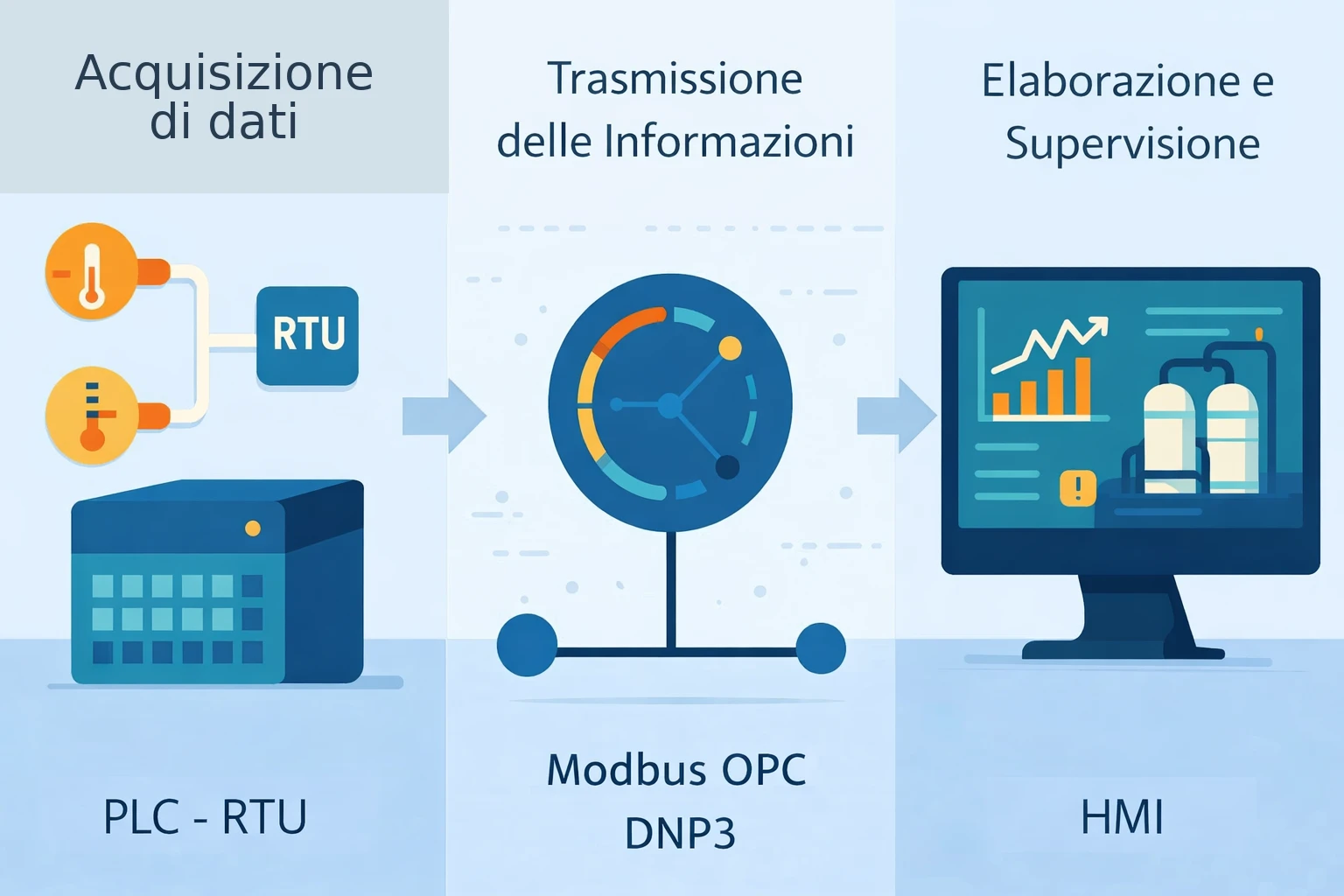
A SCADA system is organised in five hierarchical layers. It is not a monolithic application. It is a layered system.
Each layer has a precise role, communicates with adjacent layers and should never encroach on the domain of the others.
Sensors and actuators sit at the bottom. PLCs govern the field. The SCADA supervises the process. The MES manages production orders. The enterprise ERP sits at the top.
Each layer has a defined area of responsibility and does not replace the others.
The five layers
The first layer is the field: sensors, actuators, motors, valves. Everything that physically touches the production process.
The second layer is the PLCs and controllers: small computers engineered to withstand vibration, extreme temperatures and years of continuous operation without maintenance.
They collect signals from the field, execute local control logic and make data available to the layer above. Their latency is in the order of milliseconds.
They are the guarantee of continuity even when the network drops and the SCADA stops responding.
The third layer is the SCADA.
This is where the .NET code lives. It reads data from the PLCs, presents it to operators, manages alarms, records history and executes high-level supervisory logic.
Its time horizon is seconds and minutes, not the microseconds of a PLC.
The fourth layer is the MES, the manufacturing execution system. Work orders, recipes, traceability, shift efficiency.
The MES talks to the SCADA to receive aggregated production data.
The fifth layer is the enterprise ERP: SAP, Microsoft Dynamics or any other management system. Only consolidated figures reach this level.
The difference between a MES and a SCADA lies in focus and frequency.
The SCADA supervises the physical process in real time: temperatures, pressures, valve states, active alarms.
The MES manages production as a set of orders, batches and recipes.
The SCADA answers the question "what is happening right now in my plant?".
The MES answers "how many units did we produce today, with which recipe, on which shift?".
The two systems integrate and share data, but have clearly distinct domains. Confusing them at design time creates systems that do everything and nothing well.
The protocol that connects everything
Historically, the industrial world had a tower-of-Babel problem with protocols.
Every PLC manufacturer had its own proprietary language.
Integrating machines from different vendors meant writing custom drivers for each one. An enormous amount of work, repeated from scratch every time.
The modern standard protocol solved this problem. It defines a common interface that any device can implement.
The SCADA speaks one language. Controllers from different manufacturers, from German to American to Japanese, all implement it.
For a .NET developer, this translates into a NuGet package.
Install the package, configure the connection, read the variables.
The same application connects to one manufacturer's PLC, then to another's, then to a test simulator, without changing a single line of application code.
In a world where plants last decades and machines are replaced over time, this portability is worth a great deal.
The protocol also supports subscriptions.
You do not poll for a value every second blindly. You tell the server: "notify me when this value changes by at least two degrees".
The server sends the notification only when the condition is met. Less traffic. Less load. More responsiveness.
In large plants, this difference matters considerably: it reduces bandwidth consumption, lightens the network and keeps the system more stable as the number of variables grows.
Understanding the protocol is the first step. Knowing how to use it well inside a real system is the point at which you stop studying theory and start building something that actually serves a plant.
If you want to work on this in a structured way, our PLC Programming Course covers exactly this bridge between software and automation, without getting lost in abstract concepts.
.NET SCADA software: how to read real-time data from the field
What is .NET for in SCADA software? It serves to write the data collection server, the historization service and the graphical interface, all within the same ecosystem.
With modern .NET you can build custom SCADA systems with performance, portability and a mature ecosystem of industrial libraries.
Reading a value from an industrial sensor sounds straightforward. It is not.
Behind this apparent simplicity lie three problems that a serious SCADA must address immediately:
- The connection, because the link to the field must survive network outages, restarts and instability.
- Data volume, because a medium-sized plant produces far more updates than it appears from the outside.
- Data quality, because an industrial value must not only be read, but also interpreted in its actual state.
The first of these problems is the connection. A supervisory application connects to one or more data collection servers.
This connection must survive network drops, server restarts and firmware updates. If it drops, it must reconnect automatically. If it reconnects too quickly, it generates unnecessary traffic. If it waits too long, it loses data.
The correct pattern is exponential backoff reconnection.
Retry after one second. Then after two. Then after four. Up to a sensible maximum.
When the network returns, reconnect. When it is unstable, do not flood it with attempts.
The second problem is volume.
A medium-sized plant has hundreds of variables. A large one has thousands. Each variable changes at different frequencies.
A furnace temperature changes slowly.
A fast valve position changes dozens of times per second.
The code must handle these streams without blocking, without dropping updates and without saturating memory.
The solution is reactive programming. Instead of polling values in a loop, you subscribe to streams of changes.
When a new value arrives, the event is published to an internal channel. The historization service listens to that channel and writes. The graphical interface listens to another channel and updates the screen. The two consumers do not block each other.
The third problem is data quality.
In the industrial world, every value carries a quality indicator: Good, Bad, Uncertain.
A broken sensor does not send zero: it sends its last value with degraded quality. An application that does not handle quality displays false numbers. And false numbers in a supervisory system lead to wrong decisions on real plants.
Developers coming from the web world need to make a mental shift.
Data is never reliable by assumption. It must always be validated, quality checked and anomalies flagged.
This is not an edge case. It is the normal case in industrial environments.
The operator interface: the window onto the plant
A SCADA operator is not a typical user.
They work eight-hour shifts staring at screens. They must understand the state of the plant in three seconds. They must know where to look when an alarm fires.
They must act quickly, without errors, even at three in the morning after six hours on shift.
Designing an interface for this context is different from designing a web application. The aesthetic conventions of consumer design do not apply.
The cognitive principles of attention management, however, apply more than ever.
The framework that holds everything together
WPF is the reference framework for supervisory interfaces on Windows.
It is not new. It is stable, performant and has a mature ecosystem of industrial components that other frameworks have not yet matched.
The structure that works separates logic from presentation clearly.
The logic lives in an object that exposes observable properties. The graphical view binds to those properties using declarative binding.
When data arrives from the field, the property is updated. The update propagates automatically to the screen.
The code never manipulates graphical elements directly.
This approach has a critical advantage for testing.
It means you can verify logic without depending on the screen.
You simulate a signal, check that the state changes correctly, and verify that the expected alarm or update actually fires.
Supervisory logic can be tested without starting the graphical interface. Inject a simulated signal, verify that the property changes correctly, verify that the alarm fires.
The test is fast, repeatable and automatable. In a system that must run for years without regressions, automated tests are not a luxury.
Synoptic displays that speak clearly
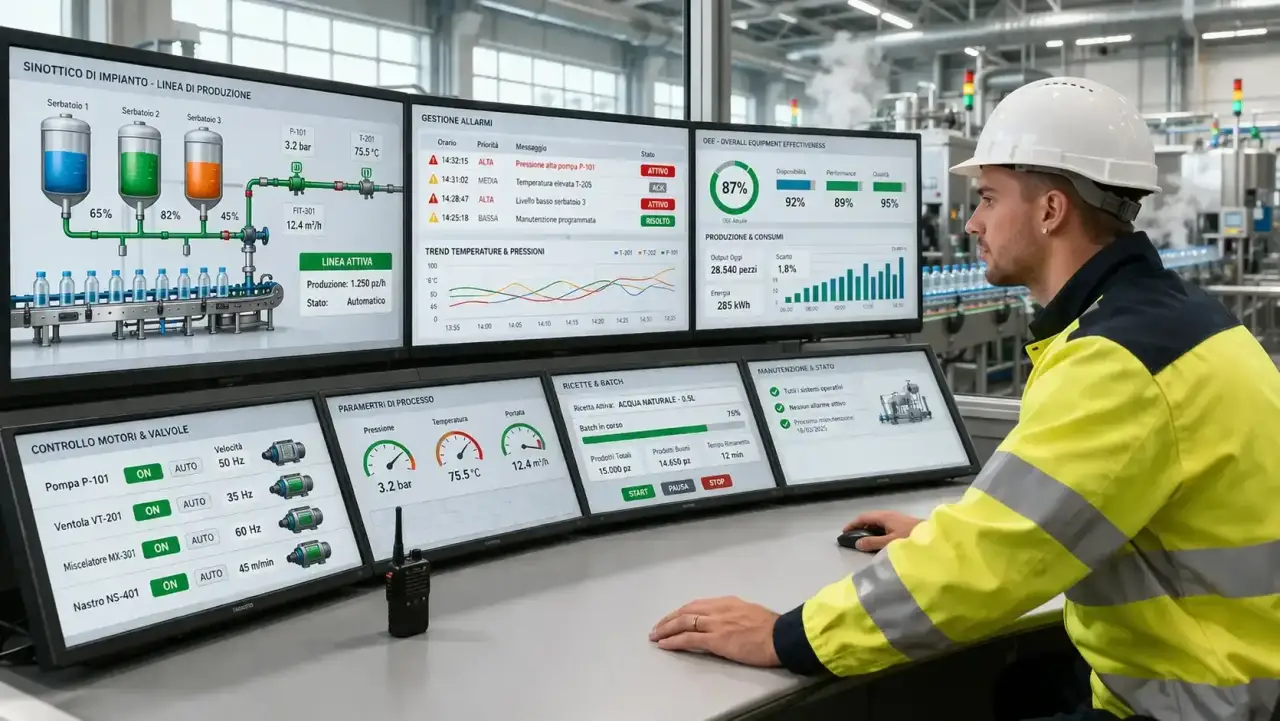
The synoptic display is the heart of the SCADA interface.
It is the graphical representation of the plant: pipes, tanks, valves, motors, all drawn as they appear physically.
Real-time values appear above or alongside components. Colours change according to state.
A well-designed synoptic lets an operator understand the overall state of the plant at a glance.
Green means normal. Yellow means caution. Red means alarm. If the whole panel is green, the operator can relax.
The temptation for those coming from the web is to make synoptics look attractive.
| Aspect | Interface designed as a consumer app | Interface designed for a SCADA |
|---|---|---|
| Primary objective | Visual appeal and familiarity | Immediate clarity and fast reading |
| Required user response | Browse at leisure | Understand and act within seconds |
| Use of colour | Aesthetic and brand-driven | Semantic and operational |
| Graphics | Rich in effects | Essential and readable |
| Priority | Pleasant experience | Reducing operational error |
| Real value | Engaging the user | Making the plant unambiguous |
For this reason, gradients, shadows and decorative animations become a mistake, not a selling point.
Industrial synoptics are deliberately plain.
Flat colours, simple shapes, maximum legibility even in low light, even from three metres away.
Aesthetics take a back seat to informational clarity. A SCADA interface that looks beautiful but reads poorly is an operational risk.
An interface that is plain but unambiguous saves shifts.
When machines start screaming: alarm management in SCADA systems
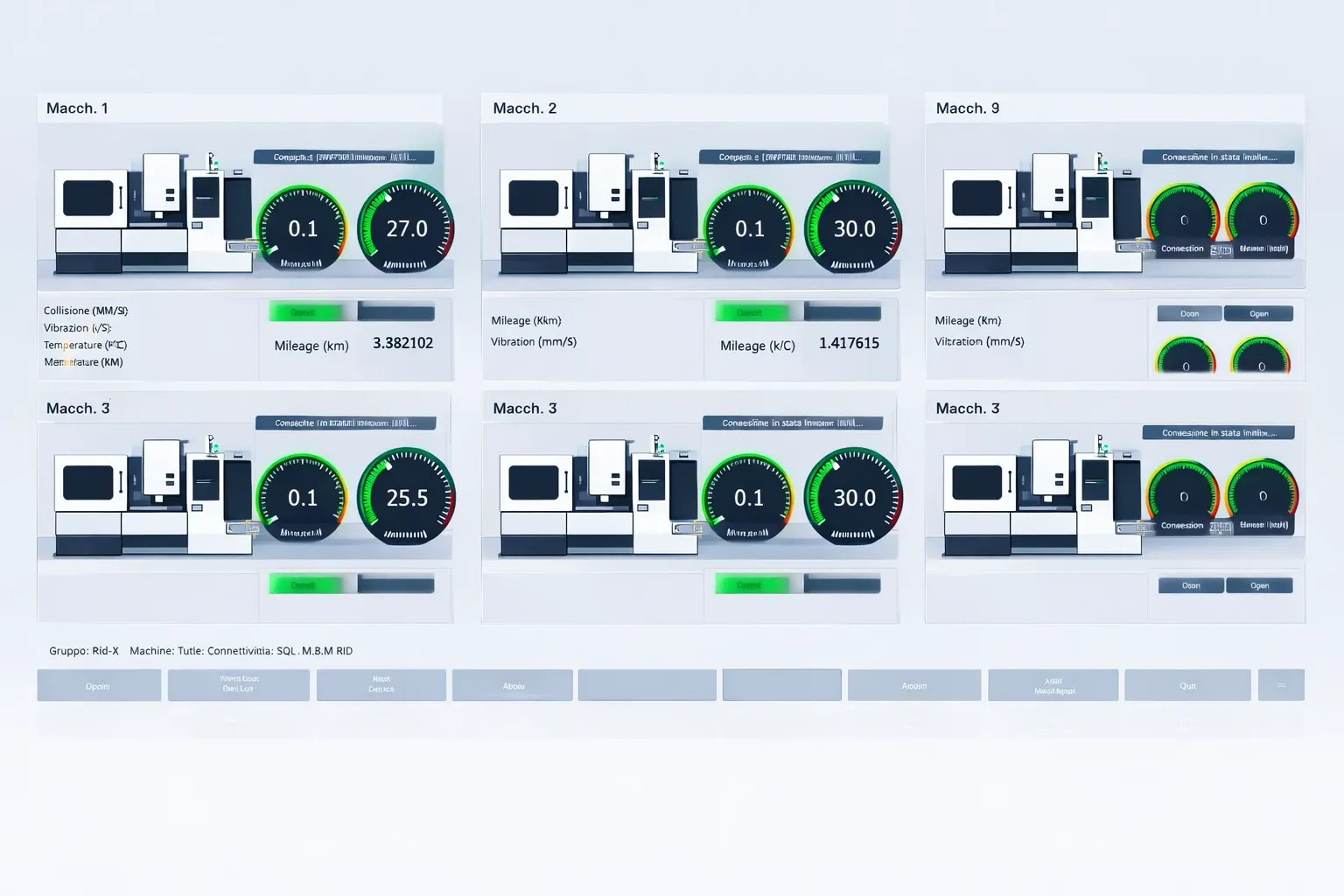
A plant is running. Then something changes.
Temperature exceeds the threshold. Pressure drops below the minimum. A motor stops unexpectedly. The machines do not scream.
But the SCADA does.
Alarm management is one of the most critical and most underestimated components of a supervisory system. It is not a list of notifications.
It is a system that must help the operator understand what is happening, establish priorities and act in the right order.
The alarm lifecycle
An alarm does not exist in two states: active or not.
It has four.
It appears when the condition occurs. The operator sees it and acknowledges it: they are now aware of the problem.
The condition may clear even before the operator acts. And finally the alarm is closed, only when both the condition and the acknowledgement have been resolved.
This lifecycle is not bureaucratic complexity. It is the way a SCADA system ensures that no problem goes unnoticed.
An alarm that clears by itself, without anyone having seen it, remains in the log as "unacknowledged".
That record is an audit trail: if something goes wrong, you can reconstruct exactly what the operator knew and when.
The correct implementation keeps the state of every alarm in memory using a dedicated data structure.
Every state transition is recorded with a precise timestamp. Priorities are rigid: a critical alarm is never buried under dozens of minor ones.
The alarm nobody listens to anymore
There is a well-known phenomenon in the industry called alarm flooding. It happens when the system generates too many alarms in a short time.
The operator stops reading them. They acknowledge them in bulk without understanding them. They ignore them.
| Aspect | Well-designed alarm system | Poorly designed alarm system |
|---|---|---|
| Number of notifications | Contained and manageable | Excessive and continuous |
| Priorities | Clear and readable | Confused or all the same |
| Effect on the operator | Helps decisions | Causes saturation |
| Cause and effect | More understandable | Hidden in the noise |
| Trust in the system | Grows over time | Erodes progressively |
| Operational risk | Reduced | Much higher |
In a poorly configured plant, hundreds of alarms can fire within minutes during an abnormal event.
The operator is overwhelmed. They cannot find the critical one amid the avalanche.
That is not the operator's fault. It is the fault of a system that was not designed with human cognitive limits in mind.
Industry guidelines point in the same direction: the number of alarms must remain within manageable thresholds, otherwise the system stops helping and starts confusing.
This requires designers to choose carefully what actually deserves to be reported.
Designing a good alarm system means working on intelligent suppression: an alarm that is a consequence of another is not shown separately.
Thresholds are set carefully, after observing the actual behaviour of the plant. The system is reviewed periodically to remove alarms that carry no useful information.
An operator who stops trusting alarms is a real operational risk.
More real than many software bugs. And the responsibility for preventing it lies with the developer, not the operator.
The data that accumulates: historization in SCADA systems
Every second, tens or hundreds of values change. Every change is recorded. Over time, a plant produces enormous volumes of historical data.
This data serves a purpose. At least four very concrete ones:
- Trend analysis, to understand whether a value is drifting slowly before it becomes a problem.
- Fault reconstruction, to see exactly what happened in the minutes or hours before a failure.
- Process optimisation, because without history there is no meaningful before-and-after comparison.
- Meeting traceability obligations, when regulations require a record of what the plant has done over time.
The wrong way to historize is to write one database record for every single variable change. With hundreds of variables changing continuously, this generates millions of writes per day.
No conventional relational database can sustain that load without specific architectural design.
The correct way is to buffer. Values arrive in memory. Every few seconds, or whenever the buffer reaches a certain size, all values are written together in a single batch operation.
This reduces the number of transactions by one or two orders of magnitude, while preserving the same historical completeness.
The choice of database depends on context.
Databases designed for time series are optimised for this pattern: massive ingestion, queries over time windows, automatic compression of older data.
Teams that prefer to stay within the Microsoft ecosystem use SQL Server with partitioning: a well-established approach that is supported and thoroughly documented.
But historization is not just about writing.
It is also about reading efficiently. A query over six months of values for a single variable, on a poorly designed database, can take minutes.
On a well-designed one, seconds.
The difference is felt by the operator waiting for a report and by the maintenance team analysing a fault. When a plant is stopped, every minute counts.
Many developers stop here.
Because reading a value is simple. Designing a historization system that holds up over time, without becoming a bottleneck, is a different skill altogether.
If you want to build the expertise to work on real plants without improvising on the most delicate parts, our PLC Programming Course is the right starting point.
Is .NET secure for industrial systems? Cybersecurity in SCADA
.NET is secure for industrial systems when used with the right architectural practices.
The framework provides solid cryptographic tools, certificate-based authentication and process isolation. The risk does not come from the language: it comes from deployment choices and network topology.
In 2010, a supervisory system at an Iranian nuclear facility was compromised by sophisticated malware.
The values the SCADA showed operators were normal. The actual values the machines were receiving were different.
The centrifuges were degrading slowly, invisibly, while the system displayed everything as green. It remains the most documented case of an attack on an industrial supervisory system.
It was not the last.
Industrial plants were historically designed as closed systems.
| Aspect | Closed industrial plant | Connected industrial plant |
|---|---|---|
| Defence perimeter | Primarily physical | Physical and digital |
| Main risk | Unauthorised on-site access | Remote access, lateral movement, network exposure |
| Dominant security | Fencing, keys, local control | Segmentation, authentication, updates, logging |
| Attack surface | Limited | Much broader |
| Typical mistake | Underestimating physical access | Treating the plant like a standard IT network |
| Consequence | Local interference | Extended operational impact, less visible |
In that model, security was primarily physical: perimeter fencing, guards, padlocks.
Then came connectivity, bringing with it a completely different risk surface. First with internal networks, then with remote access for maintenance, then with cloud integrations.
Every open connection is a potential entry point. Network segmentation is the foundational principle.
The network of PLCs and field devices must never be directly reachable from the corporate network, let alone from the internet.
Between the two there must be a controlled zone, where traffic is filtered and explicitly authorised.
Legacy versions of Microsoft .NET Framework had documented vulnerabilities over the years.
Modern .NET, from version 5 onwards, is open source, receives regular security updates and follows a transparent disclosure process.
For industrial applications, using supported versions and keeping them updated is the minimum requirement.
In an industrial plant, however, updating does not mean pressing a button and hoping for the best. Every serious update is tested first in a staging environment that replicates the behaviour of the real plant as closely as possible.
Only then, within a planned maintenance window, is it moved to production.
A SCADA application written on .NET Framework 4.5 in 2013, never updated, is a vulnerability. Not because of the framework: because of how it has been managed.
Security in an industrial system is not a module to bolt on at the end. It is a design dimension that enters architectural decisions from the very beginning. Those who do not include it from the start pay for it twice later.
Solar SCADA and connected industry: when SCADA meets the cloud
Solar SCADA is one of the fastest-growing areas in industrial automation.
A solar installation with tens or hundreds of inverters spread across multiple sites is the perfect use case for a remote supervisory system.
Each inverter reports its production, its temperature, its alarms.
The aggregated SCADA shows the complete installation in a single view: how much it is producing, where there is a loss, which section is offline. All in real time, from any device.
But the model goes beyond solar. It applies to any distributed plant: water networks, pumping stations, gas distribution networks.
SCADA and cloud become the natural combination wherever physical assets are geographically dispersed and need to be seen as a single entity.
The pattern that works is not to connect the SCADA directly to the cloud. It is to place an intermediate component between them: a dedicated application installed in the boundary zone between the industrial network and the corporate network.
This component reads data from the supervisory system, filters it, aggregates it and publishes it to cloud services using standard internet protocols.
The advantage is separation of concerns. The SCADA continues to do its job even if the cloud connection drops.
Data is buffered locally and sent as soon as connectivity is restored.
The cloud has no direct access to the plant: it can receive data, but it cannot send commands to machines without passing through the industrial security layers.
The first level of value is remote visibility: seeing plant data from anywhere.
The second is aggregated historical analysis: comparing performance across different plants, identifying degradation patterns.
The third is predictive maintenance: instead of waiting for a component to break, historical data is analysed to detect when it is beginning to degrade. You intervene before the failure. You avoid the unplanned shutdown.
This is not science fiction. It is technology already applied in production at industrial companies around the world. The gap between those who use it and those who do not widens every year.
And it is precisely here that the developer's professional profile changes.
Because you are no longer talking only about screens or variables, but about connected systems, analytics, operational continuity and architectural decisions with real impact.
If you want to enter this space on solid foundations, our PLC Programming Course helps you build expertise that brings together software skills and the industrial world in a concrete way.
Which SCADA software platforms exist: from Rapid SCADA to custom .NET
The most widely used SCADA platforms include commercial solutions such as Siemens WinCC, Wonderware AVEVA and Ignition by Inductive Automation.
In practice, when talking about SCADA software, the options fall into three groups:
- Full commercial platforms, designed for structured plants and standardised environments.
- Open-source solutions, useful for learning, prototyping or covering less critical scenarios with greater flexibility.
- Custom .NET systems, appropriate when integration, interface or supervisory logic requirements demand complete control.
In the open-source group, Rapid SCADA is the most notable solution written in C# and .NET. With plain .NET it is also possible to build fully custom systems for cases where no off-the-shelf solution fits.
The choice depends on context.
A small company that needs to monitor a plant of moderate complexity does not need to build a SCADA from scratch.
Complete platforms exist, some with commercial licences, some free. Rapid SCADA is an open-source platform written entirely in C# and .NET.
It is free, has documentation available in multiple languages and lets you learn the concepts of supervisory systems without the investment of a commercial licence.
It is not designed for large-scale critical plants, but for prototyping, training and non-critical installations it is a practical starting point.
For anyone who wants to understand how a free SCADA software works before building a custom one, Rapid SCADA is the practical answer.
Ignition, by contrast, is a commercial platform widely used in North America and increasingly common in Europe.
It runs on Java and has an interesting licensing model for large installations.
WinCC is the Siemens solution, deeply integrated with that manufacturer's controller ecosystem.
The decision to build a custom SCADA in .NET makes sense when integration, performance or user interface requirements are not met by any available platform.
In these cases, choosing a technology is not enough.
You also need to understand how to separate responsibilities cleanly, which components to keep independent and which tools to use to prevent supervisory logic, historization and the interface from getting in each other's way.
Or when the plant has supervisory logic so specific that any general-purpose framework becomes a constraint rather than a help.
What .NET does: the runtime, the framework and the installed version
Microsoft .NET Framework is the legacy version of the .NET platform, introduced in the early 2000s and bundled with Windows.
What does .NET Framework do? It runs .NET applications on Windows without requiring additional components to be installed.
Many legacy industrial SCADA systems still run on .NET Framework 4.x.
These are stable, well-tested applications, but they are built on a platform that Microsoft will not update in any substantial way.
Modern .NET, from version 5 onwards, is the current platform. It is cross-platform (it runs on Windows, Linux and macOS), open source and receives regular updates.
What does dotnet do in this context?
It makes it possible to build modern industrial applications that run on embedded Linux hardware, industrial gateways and cloud servers. The flexibility is real.
Every .NET application compiled on Windows produces an executable. The dotnet.exe host is the platform runtime: it is the process that loads the application, manages memory and interfaces with the operating system.
In production on Windows, a .NET supervisory service typically runs as a Windows Service, started automatically at boot, independent of any logged-in user.
No window. No manual interaction.
To check which version of dotnet is installed on a machine, open a terminal and type: dotnet --version. The command returns the version of the active runtime.
In industrial environments, checking the version before any deployment is good practice: some libraries require specific minimum versions and a mismatch in production is one of the most frustrating problems to diagnose on site.
The patterns that make the difference
At this point, the practical question is no longer just how a SCADA works, but what is actually needed to build one that holds up in production.
The answer does not lie in a single library or a miraculous framework.
It lies in certain architectural choices that are invisible when everything goes well, but become decisive when the system grows, gets complicated and starts living in the real world.
Service separation
The first pattern is service separation.
A supervisory system has at least three distinct responsibilities: collecting data, displaying it and recording history.
These responsibilities must not reside in the same component.
If the historization service slows down due to a peak in write operations, it must not slow down the graphical interface as well.
If the interface blocks because the user is scrolling through a long historical trend, it must not interrupt data collection.
Separation is achieved with internal communication channels.
One service produces data, publishes it to a channel. Other services consume from the channel independently.
The channel acts as a buffer: if one consumer is slow, data accumulates without the producer blocking.
Externalised configuration
The second pattern is externalised configuration.
Alarm thresholds, server addresses, variable limits: these must not live in the code.
They must be in configuration files readable by a technical operator without recompiling.
In production, the difference is between a threshold change that takes ten minutes and one that requires a two-week release cycle.
Graceful shutdown
The third pattern is graceful shutdown.
This matters even more in industrial contexts, where an abrupt shutdown leaves not just an error, but potentially missing data, dirty connections and operational uncertainty for the next shift.
When a supervisory system is shut down, pending writes must be completed, connections closed cleanly and operators notified.
A hard interrupt can leave the database in an inconsistent state or lose the last recorded data points.
Tool selection must be read in the same way.
For communication with controllers, you need a stable and well-maintained library.
For the interface, you need a framework that handles frequent updates without turning every refresh into a problem.
For historization, you need a technology capable of absorbing large data volumes and returning them quickly when someone needs to analyse a fault or a process drift.
There is no single answer for all plants, but there is one constant rule: every choice must reduce operational friction, not add it.
Industrial systems are maintained for years by teams who were not there when the software was written.
A well-structured operational log is the memory of the system.
For this reason, operational logging should not be treated as a debugging detail. It must tell what actually happened in the field.
Every connection opened or lost. Every alarm generated. Every command sent. Every failed write. Every reconnection attempt.
With clear timestamps, readable context and files that do not explode after a few days of operation.
An absent log is a debt that eventually comes due. Usually at night, on a weekend, with a plant stopped.
The market does not wait for those still thinking it over
Manufacturing is one of the largest sectors of the global economy. Thousands of plants, from small food processing facilities to large-scale chemicals, from packaging to automotive.
All of them with automation systems.
Many with supervisory systems that have aged, written in obsolete technologies, increasingly difficult to maintain.
Who modernises them? Who integrates them with the cloud? Who secures them?
Developers who can navigate this world are rare. Not by accident.
This expertise comes from the intersection of two distant worlds: modern software on one side, the industrial world on the other.
Most C# developers have never seen a PLC.
Most industrial automation engineers do not know what declarative binding is.
Those who operate in the middle are rare. And sought after.
Not because the subject is exotic, but because it genuinely requires the combination of two skill sets that rarely grow together: modern software development and real industrial domain knowledge.
Open positions in this space stay unfilled for months.
Companies that find a developer capable on both sides hold on to them.
The path is not quick. It requires solid foundations in C# and .NET, an understanding of industrial automation and the ability to work with critical systems.
But for those who already have the C# foundations, the step is not impossible. It is structured.
You do not need a generic dotnet tutorial on YouTube.
You need a programme that combines solid language foundations with the patterns specific to the SCADA world, guided by someone who knows both sides.
The market does not wait for those still thinking it over. It is looking for those who are already ready.
If you have read this far, you have already understood what this is about.
This is not the usual technical article to skim, nod at and forget twenty minutes later.
This is about a world where software does not just live inside a screen. It lives inside real plants, real processes, real responsibilities.
A world where a developer does not just write code, but builds systems that must hold together when it truly matters.
And it is precisely here that the distance is created between those who remain generic developers and those who become rare, hard-to-replace professionals that organisations are actively looking for.
Because reading two lines of documentation is not enough.
Knowing that PLCs, SCADAs, alarms, historization, cloud and industrial protocols exist is not enough.
What changes your trajectory is learning to hold these pieces together with real logic, with method, with technical vision, guided by someone who already knows the path and saves you months, sometimes years, of unnecessary mistakes.
If you want to enter this space properly and build expertise that carries real weight in the industrial world, the right step is not to keep collecting scattered information.
The right step is to start a structured programme, like our PLC Programming Course.
Because the market does not reward the curious. It rewards the prepared.
Frequently asked questions
SCADA (Supervisory Control and Data Acquisition) is a software system that collects real-time data from sensors and PLCs installed on industrial plants, displays it to operators through graphical interfaces (HMI), and allows control commands to be sent. It is the supervisory software for factories, electrical grids, water treatment plants, and critical infrastructure.
.NET offers a mature ecosystem for long-lived applications (a SCADA plant lasts 10-20 years), native support for OPC-UA through the official OPC Foundation library, WPF for high-performance HMIs, and integration with Azure IoT Hub for Industry 4.0. It is also the choice of major commercial SCADA vendors like Inductive Automation (Ignition) for their plugin SDKs.
OPC-UA (OPC Unified Architecture) is the industrial standard protocol that allows software like a SCADA written in C# to communicate with PLCs from any manufacturer (Siemens, Allen-Bradley, Schneider, Omron) in a uniform way. It replaces old proprietary protocols with a secure, platform-independent and scalable interface. The official OPC Foundation .NET Standard library is available on NuGet.
SCADA data is stored in time-series databases optimized for high-frequency time series: InfluxDB is the most widespread in the IoT/SCADA world, TimescaleDB (a PostgreSQL extension) is ideal for teams familiar with SQL, and SQL Server with partitioning is the pragmatic choice for staying in the Microsoft ecosystem. The correct pattern is to buffer data in memory and write in batches, never single records per value change.
A SCADA HMI with WPF uses the MVVM pattern: the ViewModel receives data from the OPC-UA service through events or callbacks, implements INotifyPropertyChanged, and updates the properties bound to the View. For real-time charts, libraries like ScottPlot or LiveCharts2 are used. Interactive elements (machine commands) must have explicit confirmations and mandatory audit logs.
SCADA security relies on network segmentation (separating the OT network from the IT network with a DMZ), X.509 certificate authentication on OPC-UA, the principle of least privilege for users, audit logs of all actions, and a rigorous update and patching process tested in staging before applying to the live plant.
The standard pattern is an industrial gateway: a C# application installed in the DMZ reads data from OPC-UA and publishes it to Azure IoT Hub via MQTT or AMQP using the official Microsoft.Azure.Devices.Client SDK. From IoT Hub, data reaches Azure Stream Analytics for real-time processing, Azure Data Lake for storage, and Azure Machine Learning for predictive maintenance.
Leave your details in the form below