

Build 2024, Microsoft's annual developer conference, recently ended. Ample space was given to innovations in the field of desktop application development.
In this article I will tell you how you can take advantage of the most important innovations announced at Build 2024 and above all which path to take to adopt them without upsetting the applications you have already developed and the way you and your team are used to working.
The state of the art of desktop application development
Today (like yesterday) if you want to develop a Windows desktop application you have only one platform available: the Microsoft .NET, perhaps using Windows Presentation Foundation (WPF).
I have good news for you: .NET 9.0 was released recently and represents the latest evolution of the framework. While support for .NET Framework 4.8 continues, Microsoft is increasingly focusing on .NET 9.0 and beyond. Don't despair though: thanks to Microsoft's support policies you can continue to maintain your existing applications without problems.
If you don't want to improve your applications, stop reading this article now and continue doing what you've always done. Otherwise, read to the end because I'm about to show you how to take your old and new applications to a level never achieved before.
The advent of .NET Core and .NET 9.0
You've probably already heard of .NET Core.
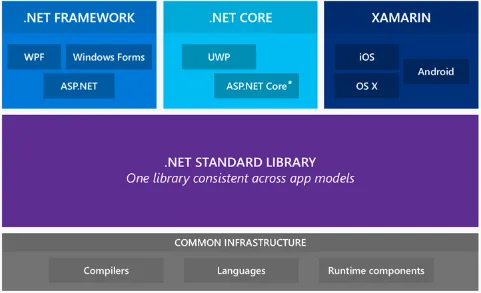
If this is not the case, know that it is a new implementation of the .NET runtime (CoreCLR) called CLR and has the prerogative of being born open source and cross platform. .NET Core joins the existing .NET Framework and Xamarin (the runtime intended for mobile applications) implementations. The languages supported by .NET Core are mainly C#, F#.
.NET Core is not compatible with the .NET Framework and Xamarin but there is a subset of common APIs called .NET Standard that are shared by all implementations.
Let me explain with an example:
- Packages targeting .NET Core are NOT usable by .NET Framework and Xamarin code
- Packages targeting .NET Framework are NOT usable by .NET Core and Xamarin code
- Packages targeting Xamarin are NOT usable by .NET Core and .NET Framework code
- Packages targeting .NET Standard can be used both by .NET Core code and by .NET Framework and Xamarin code
Was there a need for a new runtime?
Yes, considering that .NET 9.0 is the CLR implementation that Microsoft will evolve in the future. The first big step towards this transition was made with .NET Core 3, and now with .NET 9.0 we have reached another milestone.
In these terms it seems that the transition to .NET 9.0 is a necessary evil. I want to tell you right away that this is not the case: .NET 9.0 has numerous advantages which I will tell you about later.
Taking it for granted that you will soon have to face this step, before talking about the positive aspects there are still two doubts that I want to focus on.
If I switch to .NET 9.0 will I lose all the skills acquired so far?
This is the first good news. The programming paradigm has not changed. All your investments in C#, XAML, WPF and MVVM will serve you: you won't throw anything away.
.NET 9.0 mainly introduces changes to the runtime, limiting friction for the developer as much as possible.
Already today, some advantages of .NET 9.0 compared to .NET Framework are:
- Multi platform. The runtime can run on macOS, Linux, and Windows.
- Performance: For example, ASP.NET Core has higher performance than ASP.NET Framework.
- You can have multiple versions of .NET 9.0 on your machine at the same time, and choose for each application which version of the runtime to use.
- New APIs
- Natively Open Source
How do I start migrating to .NET 9.0 without rewriting everything in one fell swoop?
Earlier I mentioned .NET Standard. Know that it is your trump card to facilitate the migration to .NET 9.0.
Let me explain better. Today your applications probably target the .NET Framework. This means that a lot of code you have written can already be compiled with .NET Standard targets simply by reorganizing your projects without changing a line of code. Obviously not all code can be converted to .NET Standard.
What can I migrate to .NET Standard?
You can do two things right away.
With a few exceptions, you can migrate all code that does not directly depend on Windows primitives to .NET Standard. For example, you can easily compile with .NET Standard all domain model classes, business logic, unit tests, a lot of support infrastructure such as logging, dependency injection. If you have divided the responsibilities of the classes well within your code, you will have already done most of the work.
Furthermore, all the NuGet packages you use in your applications today are likely already available with .NET Standard targets as well. In this case you just need to update the packages and reference the .NET Standard version instead of the .NET Framework version.
If you follow these small precautions you will be able to take advantage of some advantages of the new platform, making the transition to .NET 9.0 much smoother and less invasive.
Microsoft recommends choosing .NET 9.0 for new applications. From this perspective, it is increasingly strategic to migrate as much code as possible to .NET Standard to increase sharing between new and old applications.
.NET 9.0, WPF and WinForm
One of the most anticipated new features of .NET 9.0 is undoubtedly the possibility of enjoying the benefits of .NET also in desktop applications (WinForm and WPF).
Are you telling me that .NET desktop applications will be cross-platform and run on Unix and macOS?
Yes, exactly like that.
.NET 9.0 for Desktop Applications takes another step toward a single runtime for all platforms. If you think about it, it is not a secondary aspect: .NET 9.0 allows you to also have all the performance advantages of the new runtime on the desktop, side by side installation of multiple versions of the framework and above all also exploit in your WPF or WinForm applications the entire ecosystem of libraries that Microsoft and the Open Source community are creating, such as Entity Framework Core and ML.NET.
Everyone knows Entity Framework: the Core version is the porting of the ORM (Object Relationship Mapper) of the same name for .NET Framework which, in addition to being cross platform and bringing a significant improvement in performance, supports a large number of database providers compared to Entity Framework 6.
Artificial intelligence in your desktop applications
What would you think if I told you that today you can easily integrate sales prediction and estimation functions, sentiment analysis, user segmentation or identification of anomalies typical of machine learning into an application?
You know it very well: artificial intelligence allows applications to drastically improve the user experience by anticipating their needs and refining precision with use. All fantastic, but what has held back intensive use - until now - has always been one aspect: artificial intelligence algorithms are based on complex mathematical and statistical models and require time, effort and skills that are rarely among those of the average developer. To make matters worse, most tools for building predictive models are in languages other than C#.
Until today.
ML.NET is an Open Source framework based on .NET that allows a .NET developer without specific Artificial Intelligence skills, using C# (or F#) to build customized predictive models offline without the need to rely on online (and paid) services.
Not only that.
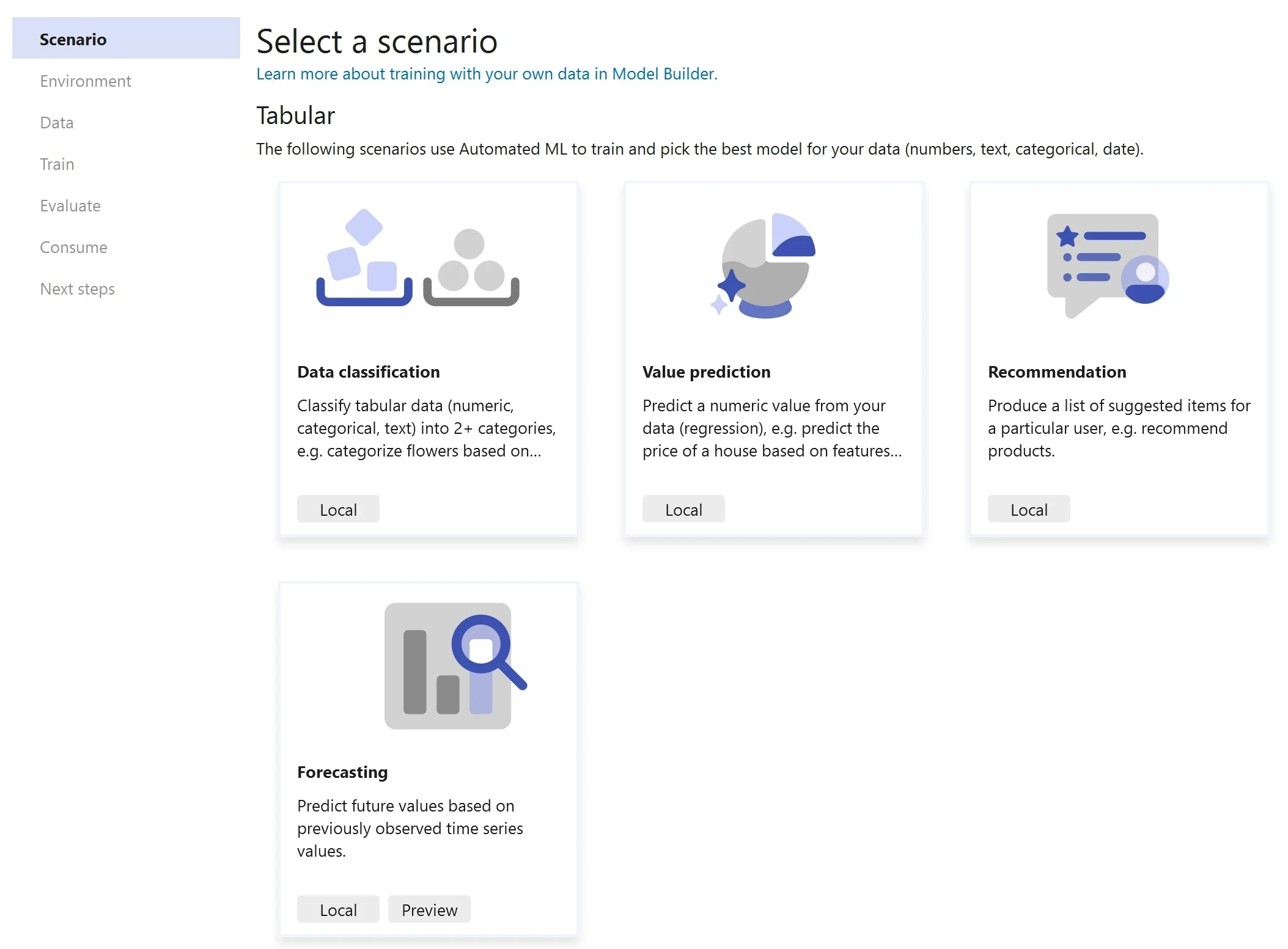
Thanks to ML.NET Model Builder, you can create artificial intelligence models visually directly from Visual Studio 2024, without writing a line of code.
Although recently available, ML.NET is a very mature technology: it was developed by the Microsoft Research team and is part of many Microsoft business products such as Bing, Power Point and Excel.
.NET 9.0, the final step towards a unified runtime for all platforms
As I told you, .NET 9.0 takes a step forward towards a unified platform by adding desktop applications to the .NET ecosystem. This transition was completed with .NET 9.0.
.NET 9.0 combines .NET Core, .NET Framework, Xamarin, and Mono (the current cross platform .NET implementations) into a single runtime for Windows, macOS, Linux, iOS, Android, tvOS, watchOS, and WebAssembly.
Not only that. In addition to supporting many platforms, .NET 9.0 is interoperable.
I told you about the present and future news of desktop applications in .NET, what will change with .NET 9.0 and how to prepare for the transition to this new platform.
How much time do you have available?
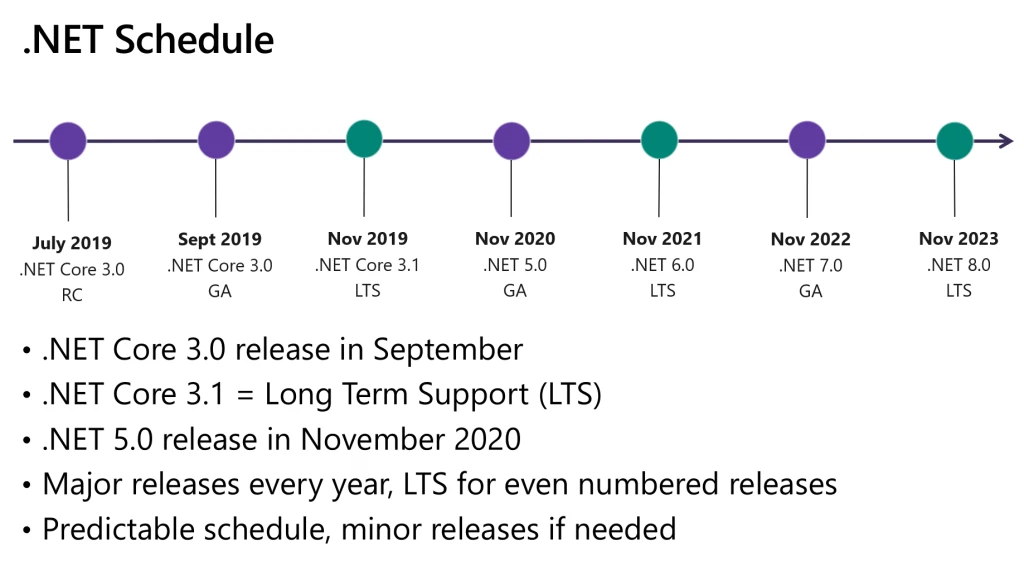
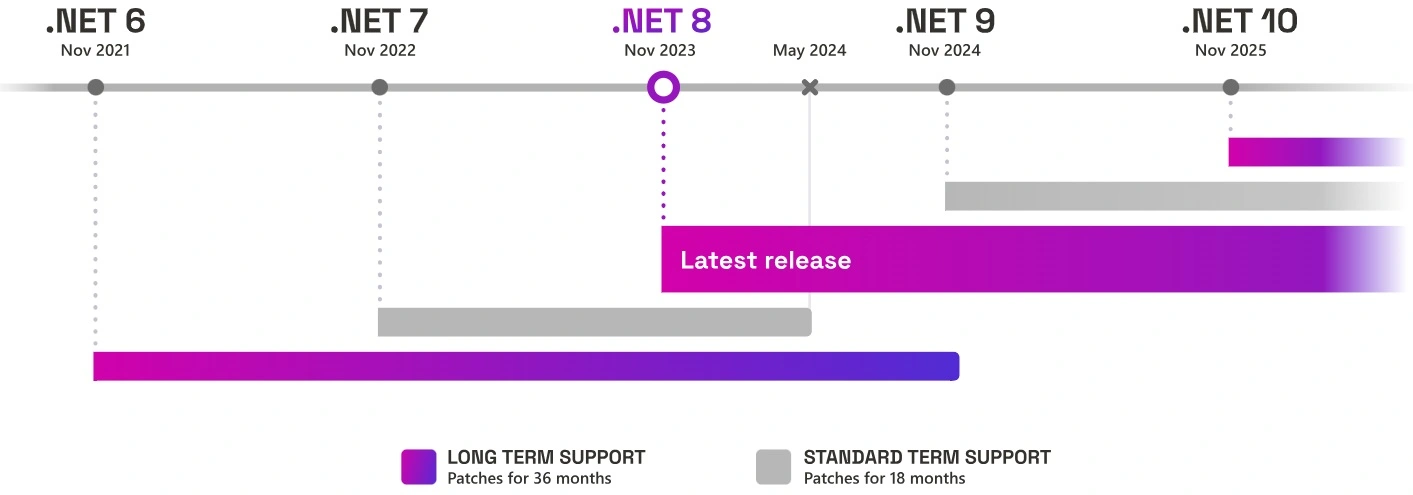
Formally, the transition to .NET 9.0 has already begun and it is essential not to waste time: arriving late to this date could be lethal in terms of maintenance costs and evolution of your applications. For this reason, starting today it is strategic to face a continuous and non-invasive migration path, developing and evolving your applications with the most modern and consolidated techniques and patterns of desktop application development.
If you don't want to risk paying a high price for this fundamental step, contact us to build the best training path for the development of WPF and .NET applications best suited to your team.
Leave your details in the form below