When is it worth porting a Windows Forms system to .NET 10?
With 80 forms and 120 changes a year staying costs less up to the fifth year; from the sixth porting to .NET 10 pays. At eight years: 254,547 euros staying against 202,895 euros porting and extracting the logic from the forms.


A mechanical components company in Vicenza has a management system written in Windows Forms in 2012. Twenty-five people use it every day: orders, warehouse, bills of materials, shipping. It works, the database is in order, nobody complains. Then the head of IT finds out three things in the same month. The developer who knows the program has resigned. The vendor of the grid components has stopped releasing updates for the version they use. And a big customer asks, in a security questionnaire, which version of .NET runs on their computers.
They search for "Windows Forms" and find opposite opinions. Some say it has been dead for twenty years, others say it is the only serious tool for a desktop program. One supplier proposes rewriting everything for the web. Another proposes to "update" without saying to what. The lowest quote and the highest are separated by a factor of three, and neither explains the calculation.
This article tells you what "Windows Forms" really means in 2026, which four routes exist, what each costs over three, five and eight years for a typical company, and which number decides the choice. The result has one feature I will give away now: for a short horizon the cheapest route is to touch nothing. For a long horizon it no longer is. The point where the two lines cross can be calculated, and it depends on two numbers you already have in the company.
You will find the calculation in euros with every assumption declared, the C# code that I compiled and tested for real (the project file for .NET 10, the class that moves the logic out of the forms, the tests, and the automatic check that stops forms from talking to the database again), a way to measure in ten minutes how much logic sits in your forms, and the steps to migrate the program without stopping the company.
A premise. Since 1999 I have designed software for companies and I have put Windows Forms, WPF and web programs into production. I am not selling you a technology. The case I use is a typical company, built from industry orders of magnitude, not the case of a real client. The numbers are assumptions written in plain sight: they are there so you can redo the calculation with yours.
What does "Windows Forms" mean in 2026?
When someone says "our program is in Windows Forms" they can mean two very different things, and the difference is worth tens of thousands of euros.
The first is Windows Forms on .NET Framework. It is the historic version, the one released in 2002 with Visual Studio .NET and which reached 4.8. It is the case of most management systems written between 2005 and 2018. The .NET Framework 4.8 has not disappeared: Microsoft keeps it as a component of Windows and supports it as long as the operating system it runs on is supported. But it gets no new features. The C# language you can use is stuck at a version from years ago, modern libraries are seen less and less, and those who know it well are retiring.
The second is Windows Forms on modern .NET. Since 2019 Microsoft has brought Windows Forms into the .NET platform that continues (first .NET Core, then .NET 5, 6, 8 and so on). Today, in October 2026, the long-term support version is .NET 10, released in November 2025 and supported for three years, until November 2028. Version 8 goes out of support in November 2026, in a few weeks. Windows Forms on .NET 10 is a living product: it gets fixes, improvements to high-resolution screen handling, a visual designer that was rewritten to work in the new platform. It remains a Windows-only technology, and it was not born to change the way interfaces are drawn. It was born to let the work already done keep living.
This distinction removes half the confusion. Those who say "Windows Forms is dead" almost always speak about the first. Those who say "it works perfectly" often speak about the second, or about a program of the first kind that has not yet presented the bill. They are not the same thing and should not be compared as if they were.
One more clarification. In this article I do not talk about ClickOnce, installers or how you distribute the program to the twenty-five computers: it is a separate topic, and I touch it only where it changes the cost. I do not talk about WPF either, the sister technology with a different drawing model: if you are interested, there is the guide on WPF in 2026.
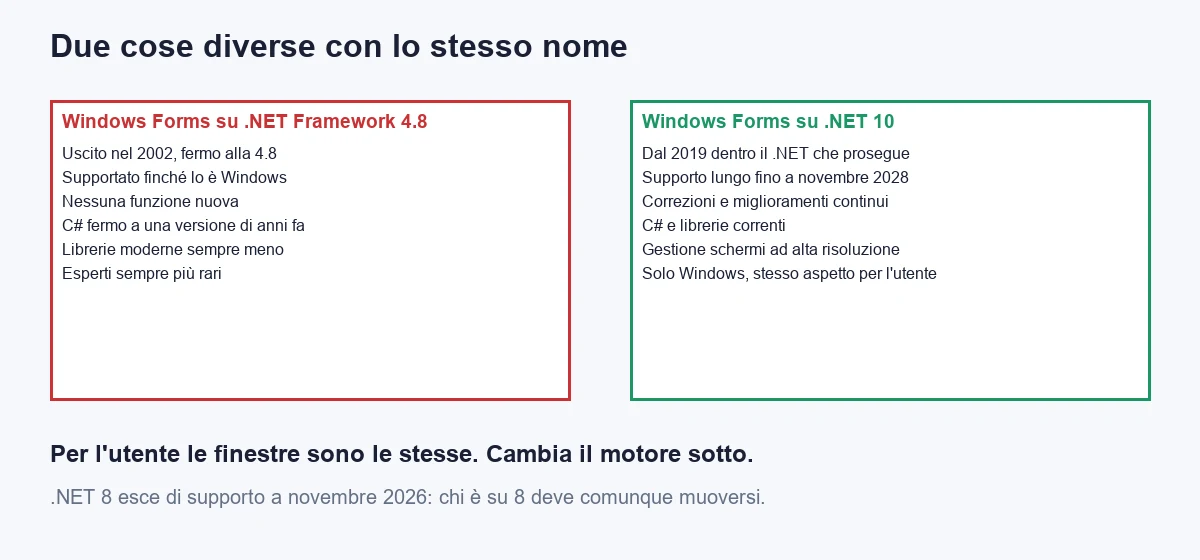
For whoever runs the company, then, the question changes. It is not "Windows Forms yes or no". It is: does my program run on the frozen engine or the living one, and how much longer am I asking it to live?
What does the typical company look like and which numbers does it start from?
To avoid talking in the abstract I use a case. It is an internal management system of a medium-sized company, written in Windows Forms on .NET Framework 4.8. The measures are industry orders of magnitude, written so that you can replace them.
| Measure | Value | How to find it |
|---|---|---|
| Forms (windows) in the program | 80 | Count the files with the window layout, the ones ending in .Designer.cs |
| Share of logic inside the forms | 60% | How much code sits in the form files and not in separate classes (I will make you measure it further on) |
| Changes requested each year | 120 | Requests handled in the last twelve months: a field, a rule, a filter, a print-out |
| Users | 25 | People who open the program every day |
| Cost of a programmer hour | 60 euros | Labour cost divided by hours worked |
| Cost of a day | 480 euros | 8 hours at 60 euros |
| Third-party components | 1 grid suite and one reporting suite | Look at the project references: they are the libraries with a vendor name |
The second row is the one that surprises most. The share of logic inside the forms says how much of the real work (the discount rules, the stock calculations, the validations) is written inside the code that answers clicks on windows. When it is high, every step you want to take with that program, porting it, testing it, changing it, costs more, because to touch a rule you have to touch a window. It is not a defect of Windows Forms. It is the way the tool taught you to work: you double-click a button, and Visual Studio opens the place where you write the code. It works wonderfully for a hundred lines. At a hundred thousand it becomes a debt.
A practical way to know where you stand: if your developer, asked "where is the discount rule?", answers "it depends which window", you are above 50%. If they answer with the name of a class, you are below 30%.
Which routes exist?
There are four real routes. I left out one that is not a route: "let's see what happens". It has a cost, and it is inside the first.
A. Stay where you are: .NET Framework 4.8, as it is
The architecture is not touched. You keep doing the 120 changes a year and fixing what breaks. Build cost zero, start-up cost zero. The cost is all in maintenance and grows over time, for three reasons that I explain further on: every change takes a few more hours (old tools, libraries that are not updated), every year some "upkeep" days are needed to keep standing what ages, and the risk of being forced to migrate in a hurry, which is the most expensive of all, does not appear in the calculation but exists.
B. Port to .NET 10 and stay in Windows Forms
The program stays the same, with the same windows and the same look. The engine changes: the project moves from .NET Framework 4.8 to .NET 10. Packages are updated, components that no longer exist are replaced, the installation is rebuilt. The work is proportional to the number of forms and to how much code sits inside, because every window has to be opened, compiled and tested. Afterwards, the program can use modern C#, current libraries and today's analysis tools.
C. Port to .NET 10 and move the logic out
Like B, with one extra step: while the program is ported, the business logic leaves the forms and goes into separate classes, which know nothing about windows and are tested with automated tests. It costs more at the start. It makes every later change cheaper, and it opens a door the others do not open: the same logic can tomorrow serve a web page, a mobile app, an integration, without being rewritten.
D. Rewrite everything for the web
The interface is thrown away and rebuilt with a web technology (Blazor, Razor Pages, a page-based application). It makes sense when users are off site, when customers or suppliers have to get in, when the program has to work from a tablet. It costs more than all the others: the eighty windows are redone one by one, the users are trained, the working experience changes. For a closer comparison among web technologies there is the guide on Razor Pages, MVC and Blazor.
The point to fix in mind: C is not a compromise between B and D. It is B done well, with the extra possibility of reaching D one piece at a time, if and when it is needed.
What does each route cost over three, five and eight years?
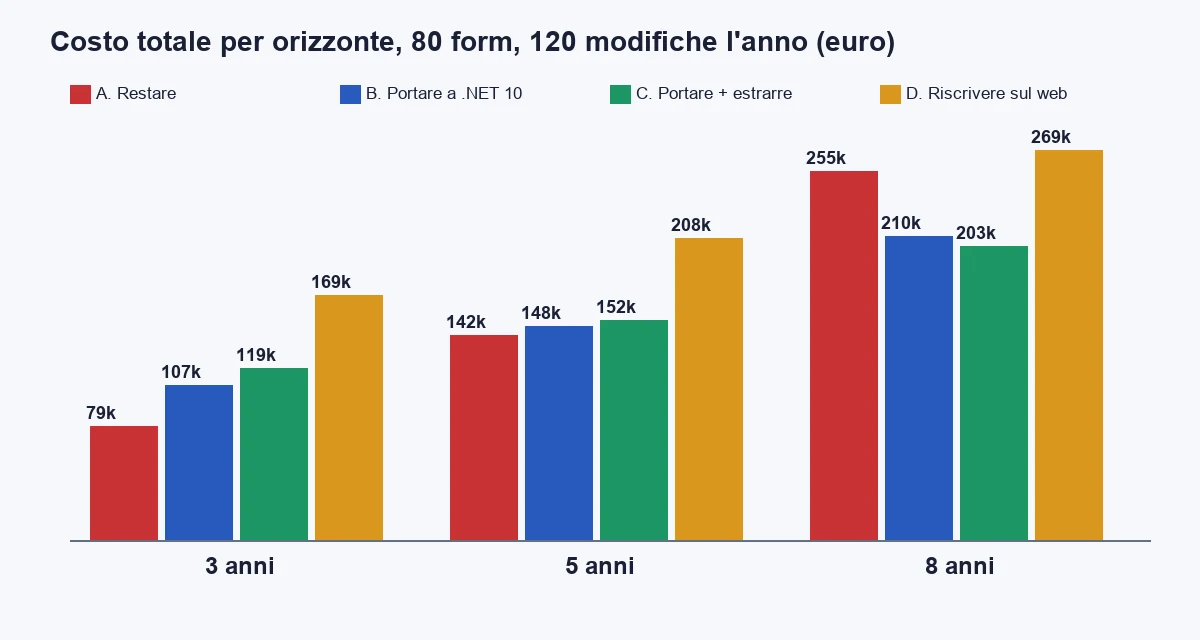
The calculation has four items for each route. I declare the assumptions one by one, because they are the weak point of every comparison of this kind.
- Build. For B, 0.25 days per form plus 1.25 days multiplied by the share of logic in the forms. At 60% that is 1.0 day per form, that is 80 days, 38,400 euros. For C, the same figure plus 0.9 days for each form that contains logic to extract (60% of 80 forms, so 43.2 days), that is 59,136 euros in all. For D, 2.4 days per form: 92,160 euros. For A, zero.
- Start-up. Analysis, skeleton, training. B: 6 days plus 6,000 euros to update or replace third-party components. C: 10 days plus the same 6,000. D: 18 days, 4,800 euros for access and hosting set-up, and half a day of training for each of the 25 users. A: zero.
- Maintenance. 120 changes a year. Hours per change: A 3.0 in the first year, rising 7% every year; B 2.6 with +1% a year; C 2.1 with +1%; D 2.4 with +1%. The 7% weighing on A is the most debatable assumption, and I say so straight away: it is the cost of ageing tools, libraries that are not updated, experts who are hard to find.
- Upkeep. The days a year spent keeping things standing, without adding anything. A: 6 days in the first year, rising 10% a year (certificates, network protocols that change, Windows versions, a component that stops working). B and C: 2 days a year. D: 3 days plus 300 euros of hosting.
The result, for the three horizons:
| Route | 3 years | 5 years | 8 years |
|---|---|---|---|
| A. Stay on .NET Framework | 78,975 | 141,799 | 254,547 |
| B. Port to .NET 10 | 106,883 | 147,571 | 210,068 |
| C. Port and extract the logic | 118,631 | 151,863 | 202,895 |
| D. Rewrite for the web | 169,180 | 208,445 | 268,696 |
Read the table slowly, because it says something uncomfortable. At three years the cheapest route is to do nothing: 78,975 euros against 106,883 for porting the program. At five years they are almost level, with A still costing a little less (141,799 against 147,571). At eight years the situation reverses: staying costs 254,547 euros, porting and extracting the logic 202,895. The difference is over 50,000 euros, and it keeps widening.
This is why the quote alone is not enough. If the supplier tells you "migrating costs 40,000 euros", the number is true and tells you nothing: you need the comparison with what staying costs over the same period. And the cost of staying has a curved shape, not a flat line.
Look at where the difference comes from at eight years. For A, maintenance weighs 221,612 euros and upkeep 32,935: all the cost is a flow that does not stop. For C, the build is 59,136 euros and the start-up 10,800, which are paid once; maintenance is 125,279 and upkeep 7,680. C costs more on the first day and much less on every day after.
D is the most expensive at every horizon. That does not mean it is wrong: it means it is chosen for reasons this calculation does not measure (off-site users, access from different devices, customers who must get in), not to save money.
A warning I owe you. These numbers are not rates. A team that has already ported other programs will have lower day counts. A program with many unmaintained third-party components will have a start-up far higher than the 6,000 euros I used. I use these values to show the shape of the calculation, not to replace it. The value of the calculation is in the shape: A grows, the others rise once and then grow little.
Which number decides how long to wait?
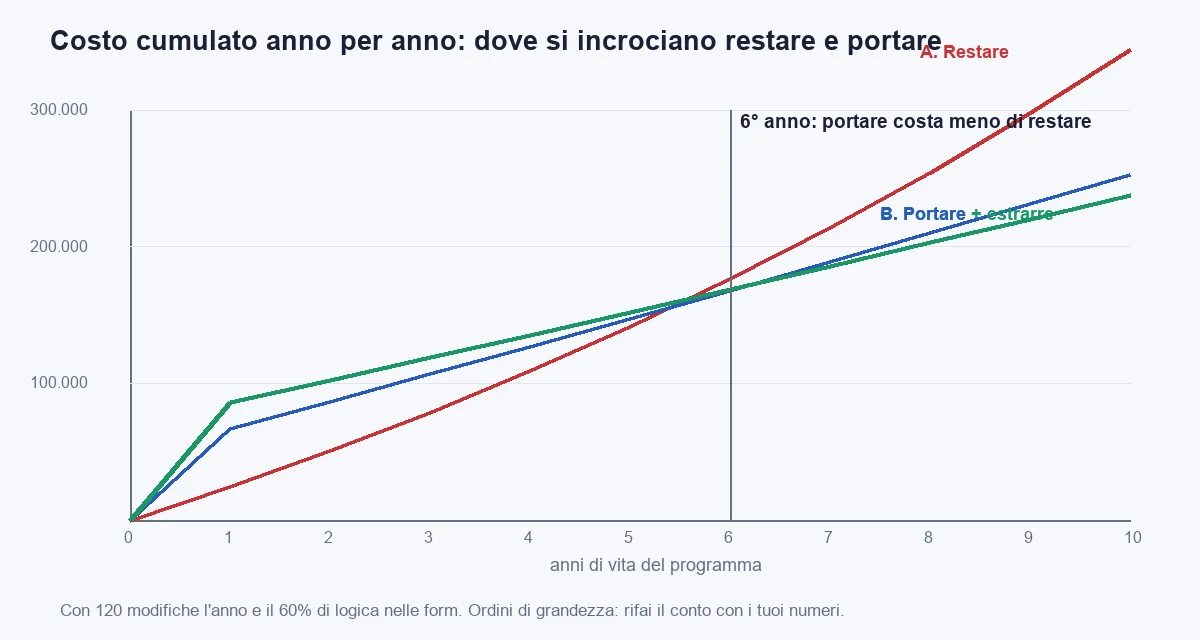
The number is only one, even though it has two faces: how many years the program still has to live, read together with how many changes you ask of it every year. I redid the calculation year by year and look for the first year in which porting the program costs less than staying.
With 120 changes a year and 60% of logic in the forms, the first year is the sixth. Before it, staying pays; from then on it does not. What moves the sixth year is the number of changes:
| Changes a year | First year in which porting costs less than staying | How to read it |
|---|---|---|
| 30 | 9 | An almost frozen program: staying is reasonable for a long time |
| 60 | 8 | One change every six working days: it depends on how long it will live |
| 120 | 6 | One change every two and a half days: the typical case of a live management system |
| 240 | 4 | A program where something changes every day: better to move early |
The second number is the share of logic in the forms, and it says how much porting costs:
| Logic in the forms | First year in which porting costs less than staying | Year from which C costs less than B |
|---|---|---|
| 20% | 4 | 3 |
| 40% | 5 | 5 |
| 60% | 6 | 7 |
| 80% | 7 | 8 |
Two things show. The first: the more logic sits inside the forms, the longer it takes for porting to pay, but it pays all the same. The second, which interests me more: C beats B only after several years, and the more the logic is scattered across the forms the later. If your logic is at 20%, extracting the rest costs little and pays back already in the third year. If it is at 80%, extracting is an enormous job and pays back in the eighth.
The practical reading, in three lines. If the program will live less than four more years and changes little, stay where you are and set the budget aside. If it will live more than six years and is changed often (120 changes a year or more), port it now, not in three years, because every year of waiting is a year of the more expensive cost. If it is in between, port to .NET 10 without extracting everything and decide afterwards, looking at the real numbers.
A direct way to use these tables: multiply the changes per year by the years of life you expect. Under 500 changes in total, staying almost always costs less. Over 1,000, porting almost always pays. In between, the share of logic in the forms decides.
How do you measure how much logic is in the forms?
The number that really matters is the share of code that sits in the form files (the ones with the code that answers clicks) compared with all the hand-written code. It is not a perfect measure: inside a form there are also lines that rightly belong to the interface. But it is a good indicator, and it is calculated in one minute with a script. You run it from the solution folder:
$tutti = Get-ChildItem -Recurse -Filter *.cs |
    Where-Object { $_.Name -notlike '*.Designer.cs' -and $_.FullName -notmatch '\\(obj|bin)\\' }

$righe = { param($f) ($f | ForEach-Object { (Get-Content $_.FullName | Measure-Object -Line).Lines } | Measure-Object -Sum).Sum }

$form = $tutti | Where-Object { Select-String -Path $_.FullName -Pattern ': Form\b|: UserControl\b' -Quiet }

$totale = & $righe $tutti
$nelleForm = & $righe $form

'{0} lines in all, {1} in the forms: {2:P0}' -f $totale, $nelleForm, ($nelleForm / $totale)
The script excludes the files generated by the designer and the build folders, then counts the lines of the files that contain a class derived from Form or UserControl. The result is your 60%, or 25%, or 85%. If you want a more precise check, add a second count: how many form files contain words such as SqlConnection, SqlCommand or DbContext. Every file that contains them is a window that talks directly to the database, that is a window that cannot be tested on its own.
I always look at it first, before even talking about quotes. The reason is simple: that number decides how much every later job will cost, not just the migration. With 25% you know the program is already fairly tidy and that porting it is an updating job. With 85% you know you are about to do two jobs at the same time, and that it would be better to say so.
How do you port a Windows Forms program to .NET 10?
The move from .NET Framework to .NET 10 is not a leap in the dark, but it has a sequence that is worth respecting. Mine, in six steps.
1. First you measure, and you keep the program as it is
Before touching anything, you record the opening times of the ten most used windows and of three long operations (a print-out, a processing run, an export). You save these measures. Then you keep the current program installable somewhere: if something goes wrong, there must be a way back in a few minutes, and recompiling the old code is not it.
2. You take a census of what does not port by itself
Some things in the .NET Framework no longer exist in the modern platform, or exist in a different form. The most common in management systems:
- Third-party components. A vendor's grids and reports are the biggest risk. Check each one: is there a version for modern .NET? At what price? If the vendor has not produced it, that window is a replacement job, not a porting job.
- Data access with System.Data.SqlClient. It must be replaced with Microsoft.Data.SqlClient, the version that receives updates. The change is almost always mechanical, but beware: the new version requires an encrypted connection by default, and a server with an invalid certificate, which used to pass, now gives an error.
- WCF services. A WCF client is ported with the System.ServiceModel packages. A WCF server is not ported: it is replaced with CoreWCF, a web API, or gRPC. If your program calls a service you wrote yourself and there is no time, it is better to leave it where it is and port the client first.
- .NET Remoting and AppDomain creation. They no longer exist. They are rare in recent management systems, common in the ones from 2008.
- Reports with Crystal Reports or ReportViewer. Each has a different route, to be checked case by case. It is often the item that moves the quote the most.
- References to 32-bit libraries or ActiveX controls. An ActiveX control in forms can still be used, with limits. A native 32-bit library requires compiling everything at 32 bits, and that must be decided knowingly.
The census is the part of the work that separates serious quotes from made-up ones. If a supplier gives you a price without having done it, the price is a bet.
3. You port first the code that has no windows
The data access and rules libraries, if already separate from the forms, are ported first, and it is best to build them for both worlds at once. A library targeting netstandard2.0 is used by both the old .NET Framework 4.8 and .NET 10. It is the device that lets you stop nothing: for months the old program and the new one use the same rules code, compiled once.
4. You convert the executable project
The project file changes style: from the long one full of file lists, typical of .NET Framework, to the short "SDK style" one. Microsoft's assisted upgrade tool does most of the work and leaves a list of what it could not convert. The result, for a Windows Forms program on .NET 10, is this:
<Project Sdk="Microsoft.NET.Sdk">
  <PropertyGroup>
    <OutputType>WinExe</OutputType>
    <TargetFramework>net10.0-windows</TargetFramework>
    <UseWindowsForms>true</UseWindowsForms>
    <Nullable>enable</Nullable>
    <ImplicitUsings>enable</ImplicitUsings>
    <ApplicationHighDpiMode>PerMonitorV2</ApplicationHighDpiMode>
    <ApplicationVisualStyles>true</ApplicationVisualStyles>
  </PropertyGroup>
  <ItemGroup>
    <ProjectReference Include="..\Gestionale.Domain\Gestionale.Domain.csproj" />
  </ItemGroup>
</Project>
Fourteen lines against the hundreds of the old file. The two properties ApplicationHighDpiMode and ApplicationVisualStyles replace lines that used to live in a manifest and in hand-written code: they tell the program to handle correctly screens with a different scale from one monitor to another (the classic problem of laptops connected to a second screen, where windows came out blurred or tiny). The entry point becomes:
using Gestionale.App.Forms;
using Gestionale.Domain;

namespace Gestionale.App;

internal static class Program
{
    [STAThread]
    private static void Main()
    {
        ApplicationConfiguration.Initialize();
        Application.Run(new OrdineForm(new CalcolatoreSconto()));
    }
}
The line ApplicationConfiguration.Initialize() applies the settings declared in the project file. The rest is what you already know.
5. You open every window, one by one
Here the work is slow and there are no shortcuts. Every form is opened in the .NET 10 designer, compiled, tried with real data. The most frequent differences are small: a character that looks different, a control that resizes differently, a property that no longer exists. I put 1.0 day per form in the estimate, with logic at 60%, and it is rarely less: the fast part is compiling, the slow part is redoing the test of each window with a person who really uses it.
6. You release alongside, not instead
The new program is installed next to the old one, for a small group of two or three users, for two weeks. With the same database, the same sign-in, the same files. If a defect appears, those users go back to the old program with a click. When two weeks pass without reports, it is extended to everyone. The last step is switching off the old one. There is never a "big switchover day" to fear.
How do you move the logic out of the forms?
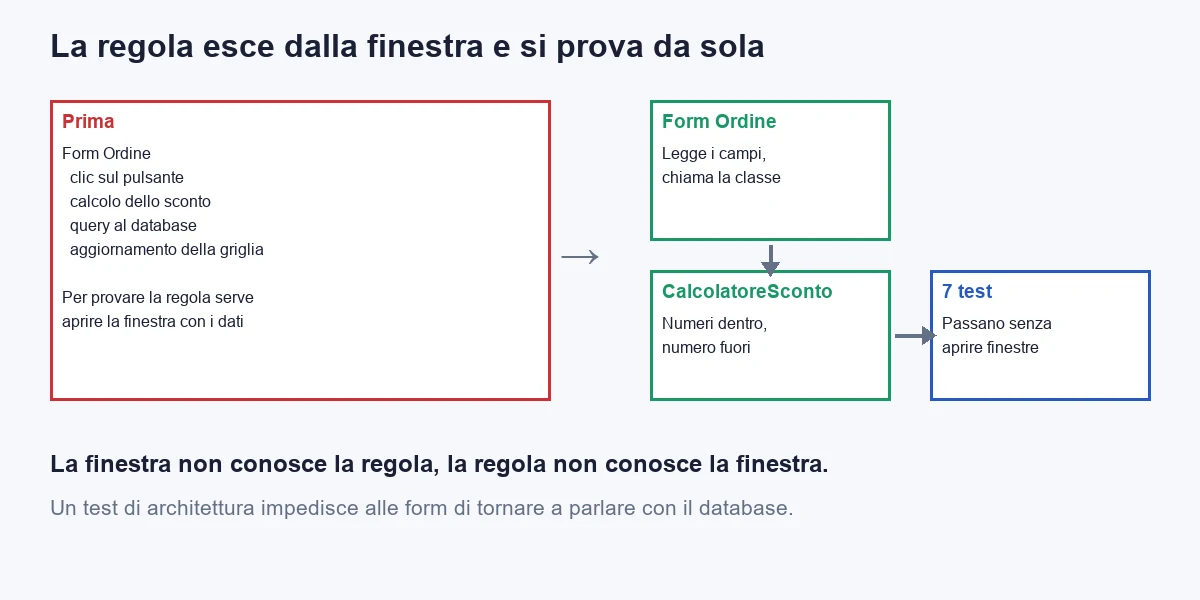
This is the difference between route B and route C. I show the most common case: the rule that calculates an order's discount, written in the code of a button or field in a window. It happens because the tool takes you there: double-click the button and you write. Every rule ends up in the place where it was first written.
The class that holds it, after the extraction, knows nothing about windows. It takes numbers and returns a number:
using System;

namespace Gestionale.Domain;

public sealed class CalcolatoreSconto
{
    // Sconto per fascia di importo, più un punto in più per i clienti con più di cinque anni.
    public decimal Calcola(decimal importo, int anniCliente)
    {
        if (importo < 0) throw new ArgumentOutOfRangeException(nameof(importo));

        decimal percentuale = importo switch
        {
            >= 10_000m => 0.08m,
            >= 5_000m => 0.05m,
            >= 1_000m => 0.02m,
            _ => 0m
        };

        if (anniCliente > 5 && percentuale > 0) percentuale += 0.01m;

        return Math.Round(importo * percentuale, 2, MidpointRounding.AwayFromZero);
    }
}
Two details worth stopping on. The first: the class sits in a library targeting netstandard2.0, so the old program and the new one both use it. The second: the rounding is declared, MidpointRounding.AwayFromZero, that is the way you round at school and in accounting. The .NET default rounds to the nearest even number, and if your old rule inside the form used the default, the new result can differ by one cent on an order every now and then. These are the things you discover by writing a test, and that you would otherwise discover from the customer.
The window, afterwards, just calls the class:
using Gestionale.Domain;

namespace Gestionale.App.Forms;

public sealed class OrdineForm : Form
{
    private readonly CalcolatoreSconto _sconto;
    private readonly TextBox _importo = new() { Left = 12, Top = 12, Width = 120 };
    private readonly Label _risultato = new() { Left = 12, Top = 48, Width = 240 };

    public OrdineForm(CalcolatoreSconto sconto)
    {
        _sconto = sconto;
        Text = "Ordine";
        Controls.AddRange(new Control[] { _importo, _risultato });
        _importo.TextChanged += (_, _) => Aggiorna();
    }

    private void Aggiorna()
    {
        if (decimal.TryParse(_importo.Text, out var importo) && importo >= 0)
            _risultato.Text = $"Sconto: {_sconto.Calcola(importo, anniCliente: 6):N2}";
        else
            _risultato.Text = "Importo non valido";
    }
}
The window receives the class from outside (it does not create it itself), and this allows another one to be handed to it in a test. It is the small architectural gesture that makes everything else possible. Now the rule is tested without opening a window:
using Gestionale.Domain;
using Xunit;

namespace Gestionale.Tests;

public class ScontoTests
{
    private readonly CalcolatoreSconto _sconto = new();

    [Theory]
    [InlineData(500, 1, 0)]
    [InlineData(1_000, 1, 20)]
    [InlineData(5_000, 1, 250)]
    [InlineData(5_000, 6, 300)]
    [InlineData(10_000, 6, 900)]
    public void Applica_la_fascia_giusta(decimal importo, int anni, decimal atteso)
        => Assert.Equal(atteso, _sconto.Calcola(importo, anni));

    [Fact]
    public void Rifiuta_gli_importi_negativi()
        => Assert.Throws<ArgumentOutOfRangeException>(() => _sconto.Calcola(-1, 1));
}
I compiled this code and ran the seven tests: they all pass. They are not many, but each one is a statement about the rule that the old program had never put in writing. And it is the statement you compare with the old one when you port: if the old one, with 5,000 euros and a six-year customer, gave 300, the new one must give 300 too.
A practical tip. Do not extract all the rules before porting. Extract the ones you are about to touch: the rule that changes every month, the one that had an error last year, the one the new colleague does not understand. The others come with time, one at a time, every time you touch them. In a year you have done half the work without ever having stopped anything, and without a "big" project.
How do you stop forms from talking to the database again?
Extracting the logic is half the work. The other half is preventing a programmer in a hurry from writing a query inside a button's code two years from now. You do not need a rule written in a document nobody rereads. You need a test that fails.
using Xunit;

namespace Gestionale.Tests;

public class ArchitetturaTests
{
    private static readonly string[] Vietati = { "SqlConnection", "SqlCommand", "DbContext" };

    [Fact]
    public void Le_form_non_parlano_con_il_database()
    {
        var radice = TrovaRadice();
        var cartellaForm = Path.Combine(radice, "Gestionale.App", "Forms");

        var colpevoli = Directory.EnumerateFiles(cartellaForm, "*.cs", SearchOption.AllDirectories)
            .Where(f => Vietati.Any(v => File.ReadAllText(f).Contains(v)))
            .Select(Path.GetFileName)
            .ToList();

        Assert.True(colpevoli.Count == 0,
            "Queste form toccano il database direttamente: " + string.Join(", ", colpevoli));
    }

    private static string TrovaRadice()
    {
        var dir = new DirectoryInfo(AppContext.BaseDirectory);
        while (dir is not null && !Directory.Exists(Path.Combine(dir.FullName, "Gestionale.App")))
            dir = dir.Parent;
        return dir?.FullName ?? throw new DirectoryNotFoundException("Radice della soluzione non trovata");
    }
}
The test looks in the form files for the words that indicate direct database access, and fails listing the names of the guilty files. It is crude: it does not understand code, it looks for text. But it is effective, it costs twenty lines, and it runs at every build. If you run it in the release pipeline, no form with a query inside reaches the customer any more. In my use I pair it with a finer analysis tool only when the team grows.
You add it the day you finish the first extraction. If you add it earlier, it fails at once on eighty files, and nobody will look at it again. If you add it later, it has a clean folder to defend already. The right moment is when the forms folder has just been cleaned.
When is the web route really worth it?
D, the rewrite for the web, is the most expensive at every horizon. But there are cases in which it is the right answer, and I tell you because knowing how to say "no" to a migration is part of the trade as well.
- Users are no longer on site. If salespeople use the program from the customer's home, or technicians from the van, a desktop program forces remote-access solutions that cost money and break. Here the web is not a fashion: it removes a problem.
- Outside people come in. Customers checking an order, suppliers uploading a document, consultants reading a report. Every external user on a Windows program means installing, supporting, updating.
- The number of sites has grown. With five sites to update, an installation on twenty-five computers becomes an installation on a hundred and fifty.
- You need to work from a tablet or phone. Windows Forms does not get there.
And the cases in which the web is a waste, which are the most frequent. A program for fast keyboard data entry: someone who types six hundred rows a day wants the shortcuts and the response times of an application running on their own computer, and a web interface, even a well-made one, is often slower in its most intensive use. A program that talks to peripherals (a scale on the serial port, a label printer, a barcode reader): it can be done on the web too, with more effort. A program used only by twenty-five people, at the same site, on computers the company controls: the convenience of the web brings nothing.
There is a middle way that for many companies is the best, and it is the reason I made C a route of its own. You port the program to .NET 10 and extract the logic. Then, if access from outside is needed for just three functions (the customer checking an order's status, the salesperson opening a quote, the technician closing a job), you build those three web pages using the classes already extracted. You have paid for the rewrite of three screens, not of eighty. The rest of the program keeps being a desktop program, which is what your users want.
It is the same reasoning as the guide on the migration of business programs to Blazor: you move to the web what has to be on the web, not everything.
What happens if you wait too long?
The calculation I showed assigns an average cost to staying. It does not account for the worst case, which is the one that scares whoever runs a company: the day you are forced to migrate in a hurry. It happens in three ways.
The first is the person. The programmer who knows the management system leaves, and the person who replaces them does not want to, or cannot, work with tools from fifteen years ago. One is found, but at a different cost and with a longer learning curve. It often happens that a company pays months of consulting just to make a successor understand the program: a cost that, added up, exceeds that of porting it while there was still time.
The second is the component. The vendor of the grid or report suite stops supporting the version you use. At first nothing happens. Then a Windows update arrives, or a new certificate, and a window stops working. In the world of third-party libraries, the day they stop working is always a day close to a deadline.
The third is the customer. A big customer, or an insurer, or a tender, asks for a statement on the software version in use and its vulnerabilities. A program on a platform without evolution is not automatically insecure, but the answer becomes hard to give, and sometimes the contract depends on that answer.
In the calculation, a migration done in an emergency typically costs between one and a half and two times the planned one: overtime days, no time to run the checks, supplier prices that rise when you are in a hurry, and the real downtime, which is not in the table. For your typical company it means, depending on how much logic sits in the forms, between 71,000 and 95,000 euros for B instead of 47,280 (38,400 of build plus 8,880 of start-up). I do not put it in the tables because it is a risk and not a certain cost, but it is the reason I never recommend staying as a strategy: it is a choice to make with an expiry date.
If you choose A, declare it as such. Write on the calendar the year by which you will redo the calculation, and a trigger that forces you to look at it earlier: the programmer leaving, the end of support of a component, a customer's request. A decision to postpone with a date is an excellent decision. One to postpone without a date is the most expensive route.
How much does artificial intelligence matter in all this?
It matters, and it changes the numbers at one precise point. Today's programming assistants are very good at two jobs that weigh in our estimate: the mechanical conversion of code (changing references, updating packages, adapting calls to new libraries) and the writing of tests for code that already exists and whose rules nobody knows any more.
The first part reduces the build. As a prudent assumption, not as a measure, count on saving a fifth of the conversion of the 80 forms when there is a team that knows how to review what the assistant produces, and almost nothing when there is nobody able to recognise a mistake. The second part is the one that interests me most. Writing the characterisation tests of a rule that exists only in a button's code is a tedious and conscientious job, to be done before touching the rule. An assistant does it well, provided you check the expected values against the real behaviour of the old program.
It does not change the underlying calculation: you always need someone to open every window and test it with a person who uses it. It does not change the share of logic in the forms, nor the year in which moving pays. It changes the slope of the build. If you want to understand how AI fits into the work of a development team without losing control, there is the guide on AI adoption in development teams.
Which mistakes should you avoid?
- Rewriting for the web "because Windows Forms is old". The criterion is not age, it is where the users work and what they have to do. A desktop program for twenty-five people at the same site is ported, not rewritten. Rewriting costs you about 60,000 euros more than B at every horizon, for an advantage you will not use.
- Asking for a price without the census. If nobody has opened the project and counted the third-party components, the price is an estimate on a closed box. The census takes two or three days and pays for itself.
- Porting and changing the look at the same time. A migration that also changes how users work loses the most important proof: "the new one does what the old one did". First you port, then you improve.
- Extracting the logic before porting. It is the temptation of good programmers: tidy everything and then port. That way the project lasts twice as long and has no point at which it is usable. You port, you release, and then you extract one piece at a time, starting from the rules you touch most often.
- Forgetting distribution. The new program has to reach the twenty-five computers. If the old one was installed from a network folder and the new one requires another procedure, that procedure must be decided at the beginning, not in the last week. The .NET runtime can be bundled with the program, and installation stays a simple operation.
- Not measuring. The opening times of the ten most used windows, before and after. Without the "before" there is no way to say it went better, and you end up discussing feelings with people used to the old one.
- Forgetting the fallback. The old program stays installable until the day the new one has lived a month without problems.
When is it better to choose none of these routes?
It happens, and saying so is part of the job. Three cases.
- The program is almost frozen and will live a few years. If it changes fewer than thirty times a year and has three or four years ahead of it, the table says A. The only things to do are the restorable backup, the program installable somewhere, and a name on the calendar. It is not laziness, it is a calculation.
- What the program does is also done by a product you can buy. If eighty windows do what a subscription management system would do, building custom does not pay, and it is worth asking whether that is the case before spending 150,000 euros. Ask yourself that before committing a budget.
- The real problem is not the technology. Sometimes the system is slow because the database lacks an index, or because a query reads a million rows to show ten. An hour of analysis can remove the reason why you thought of migrating. Before spending, measure where the time goes.
If you want a second opinion on your case, the way forward is software consulting. For the full calculation of what it costs to stand still with an old program there is the guide to the cost of legacy software, and for the migration of the whole platform the one on the move from .NET Framework to .NET 10.
In five lines. Count the changes per year and the years the program still has to live. Measure how much logic sits inside the forms. Under 500 changes in total, stay where you are, with a review date written down. Over 1,000, port it to .NET 10 and take the logic out of the forms one piece at a time, with a test defending it. Take to the web only the functions that have to be off site, not the whole program.
Frequently asked questions
Yes, in two forms. On .NET Framework 4.8 it is supported as long as the Windows operating system is, but it gets no new features. On .NET 10, the long-term support version released in November 2025 and supported until November 2028, it is a living product that receives fixes and improvements. It remains a Windows-only technology.
It depends on how many years it still has to live and how many changes it receives. For a system of 80 forms with 120 changes a year, staying on .NET Framework costs less up to the fifth year and porting to .NET 10 costs less from the sixth: at eight years it is about 254,547 euros against 202,895 when porting and extracting the logic.
For a typical company with 80 forms and 60% of the logic inside the forms, about 47,280 euros between build (38,400) and start-up (8,880), plus maintenance. Also extracting the logic from the forms adds about 20,700 euros and makes every later change cheaper. Third-party components are the item that moves the quote the most.
Almost never for a program used by a few dozen people at the same site: the web rewrite costs about 60,000 euros more than porting at every horizon. It makes sense when users are off site, when customers or suppliers come in, or when it is needed from a tablet or phone. The middle way is to port the program and expose on the web only the functions needed off site.
You count the share of code lines in the form files compared with all the hand-written code, excluding the designer files and the build folders. A second check counts the forms that contain SqlConnection, SqlCommand or DbContext: they are windows that talk directly to the database and cannot be tested on their own.
You port first the code without windows into a library that builds for both .NET Framework 4.8 and .NET 10, then you convert the executable project, test every window with a person who uses it, and release the new program alongside the old one to two or three users for two weeks. The old one stays installable until the new one has lived a month without problems.
Leave your details in the form below