WPF or Blazor for building an industrial SCADA HMI in .NET?
In many professional SCADA projects both are used: WPF for the physical panel installed on the line, Blazor for the web portal that managers consult from the office or remotely.
Someone who can build both interfaces, and understands when to choose one over the other, is the most sought-after profile in the industrial HMI market in 2026.


You design a SCADA HMI for the line operator, not for yourself: WPF or Blazor?
The choice starts with that person.
And that person is not an ordinary user.
They work in a noisy environment, sometimes wearing work gloves, looking at a screen mounted two metres away, with a few seconds to work out what is going on.
A valve closing when it should not, a temperature alarm crossing its limit, a motor running flat out: every signal means something specific, and every delay has a price.
The short answer is this: WPF for the line operator panel, Blazor for the supervision dashboard.
It holds for the large majority of SCADA projects, and in the projects done properly both live side by side in the same .NET solution.
The rest of this article is about the cases where that answer stops holding, because that is where the money goes.
Building an interface for a line operator is unlike anything else in software development.
It is not a question of colour palettes or polished animations.
A button too small for a gloved finger, a critical alarm that looks much like a warning, a chart that arrives half a second late.
These are not user experience flaws, they are operational risks with consequences you can measure in output, downtime and, in some sectors, injuries.
Then there is the other user, the one who almost never sets foot on the shop floor.
The production manager wants the numbers from the office, from a tablet in the meeting room, from a phone on Sunday evening when the line stops.
They need a different interface, more analytical, one that opens in a browser with nothing installed on any machine.
Two people, two different needs, one development team.
This is where the choice of framework stops being a technical preference: an operator panel is installed, configured and then sits there for years, often without updates, until the machine itself is replaced.
Getting it wrong means living for a long time with operators who work around the interface, process engineers asking for impossible changes and maintenance costs nobody budgeted for.
What follows is the comparison between WPF and Blazor on concrete use cases, the MVVM pattern applied to a real SCADA scenario, the charting libraries that survive production, and the professional profile the industrial market is looking for and cannot find.
We start with the part almost everyone skips: what makes this category of interface different from any application you have written so far.
What makes a SCADA HMI different from any other application
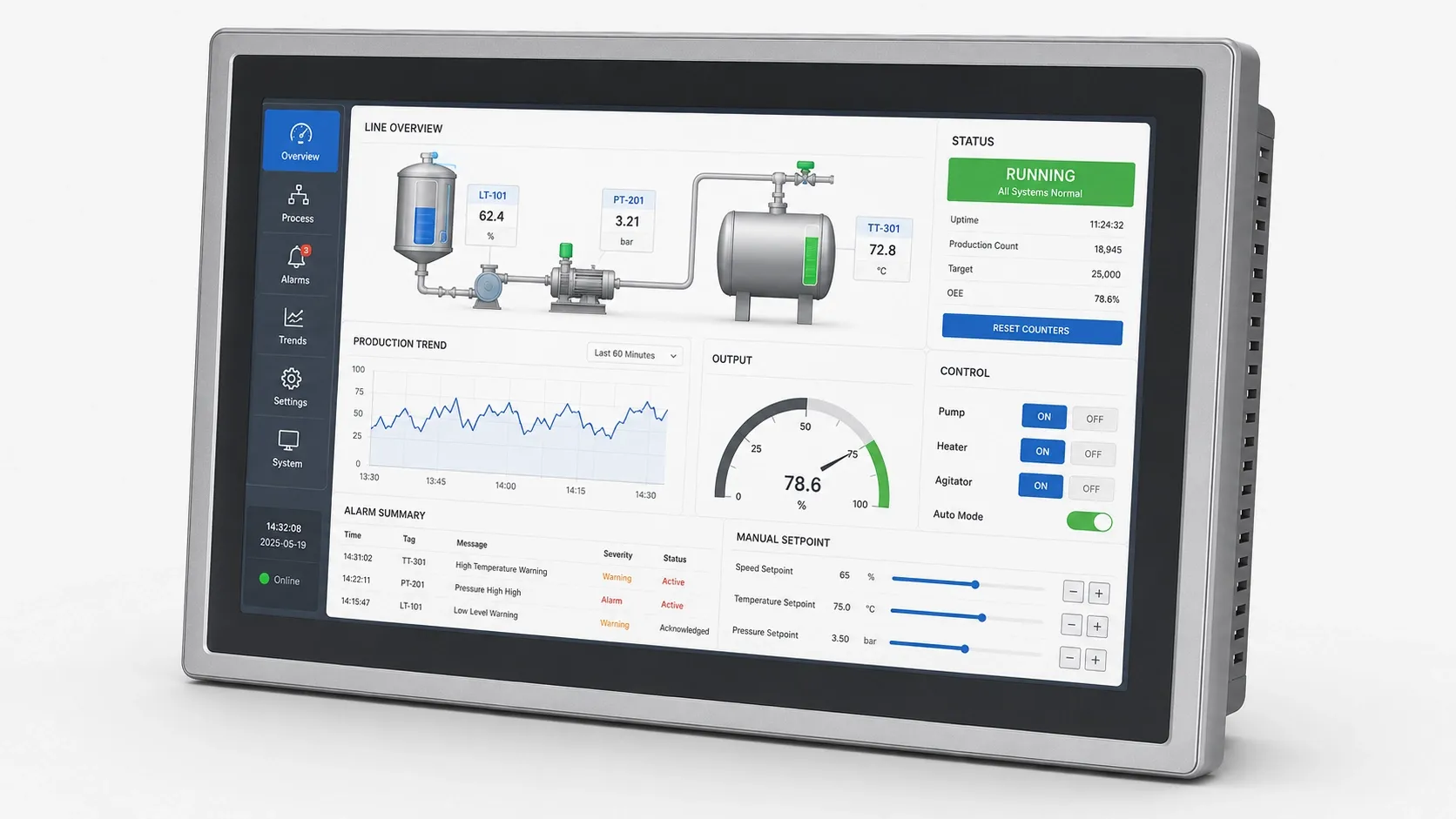
Night shift, bottling department.
The operator has just taken over the line, gloves on, and the screen in front of them shows eighty numbers at once.
Over the next eight minutes they will look at two of them.
A SCADA HMI differs from any other interface because of five requirements that no business application has:
- High-frequency updates.
- Symbolic plant graphics.
- Alarms ranked by priority.
- Explicit confirmation of commands.
- An immutable record of every action.
HMI stands for Human-Machine Interface, the dashboard through which a person sees and commands a plant that the SCADA system, the supervisory control and data acquisition layer, monitors as a whole.
The fastest way to understand what those five requirements really mean is to stand next to that operator for a full shift.
The first thing they look at is the mimic diagram, the plant drawn the way the plant actually is: tanks, pumps, valves, pipework, each in its place.
It is not an illustration: every element changes state while they watch, the valve opens, the tank fills, the motor changes colour when it goes into alarm.
This kind of graphic does not exist as a ready-made component in any general-purpose framework: commercial libraries stop at the instrument, the pressure gauge or the indicator lamp, they do not reach your plant.
That is the first obstacle.
Then there is speed.
A plant generates tens, hundreds, in some cases thousands of measurements per second across temperatures, pressures, flow rates, speeds and digital states.
The interface has to absorb all of them and never stall, and neither of the two .NET frameworks we are about to compare handles that rhythm in the same way.
A two-second freeze, which in a business application is an annoyance, here is the window in which a critical alarm appears and disappears without anyone seeing it.
At ten past three the alarm goes off.
Four go off together, to be precise, because in a plant alarms arrive in clusters: one is critical, three are consequences.
A professional SCADA system manages hundreds of conditions classified by severity, with acknowledgement logic, temporary suppression and escalation, and the job of the interface is to pull the operator's eye onto the one alarm that matters, not to show all of them in order of arrival.
They understand, and click "Open valve V-101".
The interface does not execute.
It asks for confirmation: "You are about to open valve V-101 on the cooling circuit. Confirm?".
That dialog is not just a precaution: it can count among the measures taken to reduce the risk of unintended commands, following functional safety principles defined by standards such as IEC 62061 and ISO 13849-1.
The next morning, at nine, somebody will ask who opened that valve and why.
And that is the fifth requirement: every action, every command, every parameter changed ends up in an immutable log with user, workstation, timestamp, previous value and new value.
In pharmaceuticals and food production this is not an extra feature, it is a legal obligation.
The end user of a SCADA HMI is not a developer: it is an operator with decades of experience on that specific machine, working in difficult conditions, with no time to figure out a badly designed interface.
If that is not clear from day one, the project does not fail with an error: it fails quietly, because within three months the operators find a way around the interface and go back to working the way they did before.
And the choice between WPF and Blazor decides how hard it will be to avoid that.
You have just read the five requirements that no business application has.
Stop for a second and count how many of them the last interface you delivered actually meets.
On the PLC Programming Course you work one to one with an architect who has put those interfaces on real shop floors, on your code, not on slides.
WPF for SCADA HMI: the strengths and when to choose it
At a food processing company in northern Italy I saw a WPF panel that had been running without interruption since 2016, updated twice in nine years, on a PC that had passed through the hands of four shift supervisors.
Nobody there calls it "software": they call it "the machine".
WPF remains the right choice for the line operator panel, and the reason is not habit: it is that in 2026 no alternative in the .NET world has beaten the combination of graphics card accelerated rendering, MVVM binding, unlimited custom graphics, native touch support and integration with the Windows ecosystem.
Microsoft introduced it in 2006 and it has been the reference technology for industrial interfaces on Windows ever since.
Each strength makes more sense once you look at the problem it solves.
Start with the moment the interface ought to buckle under load and does not: a plant diagram with two hundred animated elements and a trend chart with ten thousand points, all updating together.
With the older Windows Forms applications the CPU would jump to 100%, because drawing goes through GDI+.
WPF instead pushes rendering onto DirectX: the heavy lifting is done by the graphics card, and the CPU stays free for the task that matters, which is reading data from the field.
The second problem arrives right afterwards, when the number of tags on screen reaches four hundred.
Updating four hundred fields by hand is the fastest way to write an application nobody will ever be able to modify.
WPF was built for MVVM: the ViewModel signals a change through INotifyPropertyChanged and the View updates itself, without a single line of code written by you for that step.
On an industrial HMI this is not convenience, it is the difference between a maintainable project and four thousand lines of code-behind that nobody wants to open again.
The third problem is the valve.
Nobody has ever published a "butterfly valve that rotates ninety degrees and turns red in alarm" control, because every plant has its own symbols.
With WPF you draw that valve yourself, exactly the way the client wants it, animation included, without depending on an external library.
It is the reason why P&ID drawings, the piping and instrumentation diagrams, are still built here in the .NET world.
The fourth problem is the gloves.
Modern industrial panels are almost all touch, and WPF has supported multitouch gestures natively since 2010, through dedicated APIs.
You do not need to add anything to make an HMI fully usable with a finger inside a work glove.
The fifth problem is the one nobody writes into the requirements and everybody assumes: the operator must not need a second password.
On Windows the HMI recognises whoever has already signed in to the corporate network and asks for nothing more.
From there it reads the machine configuration, talks to the other programs on the same workstation and, where necessary, reaches down to the operating system.
All of it has been documented for twenty years and it works.
On the charting side you do not have to build anything from scratch: for dense trends, for visually polished ones and for instruments that imitate pressure gauges and indicator lamps, proven libraries already exist.
Which one to choose and why comes later, with the numbers in hand.
The working rule is blunt: choose WPF when the panel is a dedicated Windows PC on the shop floor, when updates exceed five tags per second, when the plant graphics are complex and bespoke, and when the interface has to keep working even if the corporate network goes down.
All solid, all true.
Right up to the Monday morning when the plant manager asks to see how the line is running from a phone, in an airport.
Blazor for SCADA HMI: the web arrives on the factory floor
In a factory, that question puts an entire IT department in difficulty.
Not because it is hard: because the panel that ought to answer it is bolted to a wall and runs on a PC that never leaves the plant network.
Blazor does not replace WPF on the line panel: it opens a chapter that previously required JavaScript and a separate front-end team, the chapter of supervision dashboards you can open in a browser.
For SCADA the correct variant is almost always Blazor Server, and the constraint to know before you start is frequency: up to two updates per second it works well, above that threshold it does not.
The two variants of Blazor behave very differently in a factory.
Blazor Server keeps all the logic on the ASP.NET Core server and talks to the browser through a WebSocket connection managed by SignalR: when a value changes, the server works out what changed in the interface and sends the browser only that fragment.
Blazor WebAssembly does the opposite, downloading the .NET application into the browser and running it there.
For an industrial dashboard the second route almost always loses, and the reason is mundane: the data lives where the back end lives, next to the OPC UA server, the PLCs and the historian database.
With Blazor Server the service that reads the data and the code that updates the interface live in the same process, and there is no network between them.
With WebAssembly you have to build a REST or gRPC API layer in between, expose it, secure it and maintain it, and in return you get more latency and more surface to defend.
The real gain with Blazor is that the workstation disappears.
The manager opens a browser, signs in, sees the plant.
No client to install, no workstation to configure, no update to roll out across fifty machines.
In a distributed supervision scenario this advantage over WPF is not marginal, it is in a different category.
The limit lies in the journey every single update has to make: it is born on the server, crosses the network, reaches the browser and only there becomes a number changing on screen.
On a local corporate network that round trip typically costs between 50 and 200 milliseconds.
For a manager checking indicators every five seconds it is invisible.
For an operator following a process that varies at 10 Hz it is unusable, and no optimisation will save you, because the delay is in the model, not in the code.
There is also an advantage that only shows up in the team's accounts: anyone who already knows ASP.NET Core is productive on Blazor Server within days, and the business logic written for the dashboard is the same logic the APIs need.
You are not learning a new framework, you are using the one you already have.
Two tools, two contexts, and the familiar temptation to pick one forever and close the discussion.
That is exactly the decision that, in front of a client, has to be taken apart criterion by criterion, because the winner changes with every criterion.
WPF vs Blazor for industrial HMIs: the decision table

Meeting room, twenty minutes, a client who wants a single answer and has six questions loaded.
They always come in the same order, and with each one the right answer bounces from one side of the table to the other.
There is no outright winner between WPF and Blazor for industrial HMIs: there are six criteria, each with a different winner, and the correct choice depends on which criterion carries the most weight in your plant.
"How often does the data update?" is the first.
WPF updates dozens of times per second without breaking a sweat, with the practical limit set by the 60 Hz of the monitor.
Blazor Server stops at one or two updates per second because of SignalR latency.
On a line panel it is no contest, WPF wins.
Then the client explains that three people look at the line panel, and thirty look at the dashboard.
"Can you see it from outside?" is the second, and it turns the table over.
WPF runs on Windows desktop and nowhere else.
Blazor runs in any browser, on any operating system, on any device, including the plant manager's phone in an airport.
For remote supervision, within the .NET world, it has no rival.
"We need our own plant symbols" is the third, and the table swings back.
WPF draws anything natively.
With Blazor it can be done, at a price: either you step outside .NET and bring in a JavaScript library, or you buy a component package.
On complex P&ID diagrams WPF is still well ahead.
"Who updates the panels?" is the fourth, and it is the question developers underestimate and maintenance managers do not.
With Blazor Server you update the server and every client has the new version at their next visit.
With WPF each workstation has to be updated individually, and in a plant with fifty workstations that is a project in its own right, with its own schedule and its own risk.
"And if the network goes down?" is the fifth, and in a factory that is never hypothetical.
WPF keeps working, because the data comes from the local SCADA server on the same shop floor network.
Blazor Server without a connection to the server stops, and the operator is left in front of an unresponsive page at exactly the worst moment.
"How much does the hardware cost?" is the last, and it is always asked by whoever signs.
A WPF panel wants Windows, adequate memory and a serious processor.
A Blazor client runs on a cheap network terminal, on an Android tablet, on a second-hand iPad: an up-to-date browser is enough.
Across twenty view-only workstations, the difference shows up in the accounts.
Six questions, six different answers, and it helps to see them one under the other before drawing the line:
| Criterion | WPF | Blazor Server | Winner |
|---|---|---|---|
| Update frequency | Dozens of updates per second, with the practical limit of the monitor's 60 Hz | One or two per second, beyond that threshold SignalR latency accumulates | WPF |
| Remote access | Windows workstations on the plant network only | Any browser, any operating system, phones included | Blazor |
| Custom plant graphics | Native, with Path, Geometry and animations in XAML | Interop with Chart.js or D3.js, or commercial components | WPF |
| Rolling out updates | One workstation at a time, and fifty workstations are a project in themselves | Update the server, every client is aligned at the next visit | Blazor |
| Continuity if the network fails | Keeps working with the local SCADA server | Without a connection the client stops | WPF |
| Cost per workstation | Windows PC with adequate processor and memory | Thin client, Android tablet or second-hand iPad | Blazor |
The practical rule that emerges from these comparisons is clear: WPF for the line operator panel, Blazor for the management dashboard and remote supervision. In a professional SCADA project, both are often used together.
Put that way it sounds like a compromise.
In reality it is the decision that costs you the most, because two interfaces mean two copies of the alarm logic, two copies of the access rules, two copies of the audit trail.
Unless you set the project up the right way from day one, and the right way starts with how you organise the code of the WPF panel.
The table above tells you what to choose.
It does not tell you how to hold the two together without doubling the work, and that is the part that separates a supplier who reacts from an engineer who decides.
The PLC Programming Course starts exactly there, on the project you have open right now.
What you build during the sessions ends up in production, not in an exercise folder.
Implementing the MVVM pattern in a WPF SCADA HMI: project structure
The file is called MainWindow.xaml.cs and it has four thousand lines.
Inside it are the field connection, the alarm logic, the colours, the number formatting and three comments saying "do not touch".
Whoever wrote it does not work here any more.
This is the natural end of every HMI written without a structure.
The MVVM pattern in a SCADA HMI splits the project into four layers:
- The layer that communicates with the field,
- The Model that describes the industrial domain,
- The ViewModel that exposes bindable properties,
- The View in XAML that displays them.
The benefit is not cosmetic: it lets you change the way you read data without touching the graphics, and rebuild the graphics without going back into the logic.
At the base sits the layer that talks to the plant.
It connects to the OPC UA server, subscribes to the tags it needs and receives notifications when values change, using the OPC Foundation library for .NET Standard available on NuGet.
This layer does not know WPF exists, and it must stay that way: that is the condition that will later let you reuse it unchanged in the Blazor dashboard.
Above it sits the Model, the vocabulary of your plant translated into classes.
A Tag with a name, a current value, a unit of measure, a sampling time and a data quality flag.
An Alarm with severity and acknowledgement state.
A Machine with its operating state.
The Model too is completely unaware that an interface exists.
Then comes the ViewModel, the heart of the HMI and also the point where industrial projects break.
It implements INotifyPropertyChanged, exposes the properties the View binds to and holds the presentation logic.
The catch is that the data arrives on a background thread, the one belonging to the OPC UA layer, while in WPF change notifications have to originate on the interface thread.
Ignoring this detail produces exceptions that surface in production three weeks after commissioning and never during commissioning.
The solution has a name, Dispatcher.InvokeAsync, and it is the compulsory crossing that carries the value from the thread that received it from the field to the thread that has to draw it.
Every notification arriving from the SCADA system passes through that gate before touching a property bound to the View, reactor temperature and last-update timestamp included.
It costs one extra line per update and it saves you from the worst category of bug an HMI can have: the one that never reproduces in the office and turns up reliably with the plant running.
For active alarms the ViewModel exposes an ObservableCollection that the View filters and sorts through a CollectionView.
The rule that holds in every plant I have seen is a single one: critical alarms stay at the top, always, regardless of the order in which they arrived.
A critical alarm pushed to the bottom of the list because forty others came in after it is a serious defect, even if the software behaves exactly as written.
The View, meaning the XAML, turns properties into things you can see.
WPF binding does not only bind values: it binds colours, visibility and animations.
The indicator that turns red when the temperature crosses the limit is not code, it is a binding with a Converter that turns a number into a colour.
And because it is a declared rule rather than a written procedure, the day the limit changes, you change a parameter and not a function.
Operator commands do not live inside the button: they are objects in their own right, which the View simply invokes.
The button does not know what happens when it is pressed, it only knows which command to run and whether it is enabled right now: this is how you build access levels without filling the interface code with permission checks.
Above all of this sits one prohibition that admits no exceptions: the interface thread never blocks.
Every input and output operation, reading from the database, sending a command to the PLC, writing the audit record, has to be done asynchronously.
Two hundred milliseconds of synchronous waiting is an HMI that stops updating, and an operator who for those two hundred milliseconds cannot see what is happening.
The structure holds.
The real test, though, is carried out by a single component, the one in the middle of the screen that everybody looks at first.
Real-time charts in WPF: ScottPlot and LiveCharts2 for SCADA trends
The maintenance technician does not look at the vibration value.
They look at its shape over the last thirty minutes, because that is where you can see whether a bearing is dying.
That chart is the most critical component in the whole interface, and it is also the one that brings down the most projects.
For real-time trends in WPF the choice is ScottPlot when the frequency exceeds 5 Hz or the points exceed ten thousand.
Below those thresholds LiveCharts2 comes in, and it looks better.
The criterion is quantitative, it is not a matter of taste.
The reason industrial charts seize up has a name nobody associates with graphics: the garbage collector.
Picture a cleaner who comes round whenever they decide to and, to do their rounds, switches off the lights for a few tens of milliseconds.
If every point on the chart is a separate .NET object, a trend receiving 100 points per second and keeping ten minutes of history has 60,000 of them in memory, all to be collected sooner or later.
The pauses are visible, and they are visible exactly when the chart is moving the most.
The fix is not to optimise the drawing: it is to not create the objects.
Circular arrays of primitive types, that is doubles allocated once and reused forever, instead of lists of objects born and destroyed with every sample.
ScottPlot exists precisely for this.
It is a library designed for high-frequency scientific and industrial charts in WPF and WinForms: internally it works with pre-allocated arrays of doubles and draws straight onto a bitmap.
The practical result is a chart that refreshes at 60 Hz with a hundred thousand points and no measurable CPU cost, and that accepts updates from background threads without blocking the interface.
It starts here: decide once how much history you want to keep and size the memory for that, 36,000 slots give you an hour of data sampled at 10 Hz, and they are two sequences of numbers, one for the timestamps and one for the values, allocated at startup and never again.
Then you move through them in a circle: the index advances with every measurement, when it reaches the end it starts again from zero and the oldest point is overwritten by the newest.
Nothing is created, nothing is thrown away, the cleaner has nothing to collect and the chart simply redraws what it finds.
Two sequences of numbers and a counter: that is the whole difference between a trend that survives a full shift and one that starts stuttering after twenty minutes.
LiveCharts2 plays a different game.
It has a richer object model, with series, points and axes with formatted labels, and it produces visually more polished charts, with smooth animations and interactive tooltips on hover.
The price is a more complex internal machine and lower performance on large datasets.
For a management dashboard in WPF, with updates below 5 Hz, it is the better choice.
For the trend of a reactor, no.
Syncfusion and Telerik solve a different problem from trends.
They offer circular gauges, linear indicators, digital displays and animated state machines, the components that reproduce the look of the physical instruments the operator has known for twenty years.
The advantage is close to zero learning time for whoever will use the interface, the cost is a commercial licence to budget for in advance, not afterwards.
Lined up, the three families answer three different needs:
| Library | What it is really for | When it pays off |
|---|---|---|
| ScottPlot | Scrolling trends with many points | Above 5 Hz or beyond ten thousand points, which is the trend of a reactor |
| LiveCharts2 | Polished, animated and interactive charts | Below 5 Hz, on a management dashboard where the visual result counts |
| Syncfusion and Telerik | Gauges, indicator lamps and displays that imitate physical instruments | When the operator needs to find on screen the instruments they already know |
Two numbers are worth keeping in mind: above 5 Hz or above ten thousand points you go to ScottPlot, below that you can choose on looks.
That same number, though, is not only needed by the operator on the shop floor: somebody outside the building is waiting for it too, and for them the route is a different one.
SCADA dashboards with Blazor Server and SignalR: architecture and implementation
Thursday morning, plant walk.
The plant manager walks along the line with a tablet in hand, watching the status lights on the machines as they go past.
This is not a scene from a sales presentation: it is the use case that justifies the entire architecture in this section.
A SCADA dashboard built with Blazor Server has three layers: a background service reads the industrial data, a SignalR Hub distributes it to the connected clients, and the Blazor components subscribe and redraw the interface.
For a supervision dashboard, publishing updates every two to five seconds is more than enough.
The background service is an IHostedService that lives as long as the ASP.NET Core application does.
It reads from OPC UA, from a time-series database or from the SCADA system's internal APIs, and publishes changes to the Hub.
The temptation to resist here is publishing everything that arrives: the field generates far more than any human being can look at, and a dashboard refreshing a number thirty times a second that nobody reads burns bandwidth and battery for nothing.
The SignalR Hub is the distribution point.
Blazor clients connect and receive strongly typed messages in C#, without you writing a line of JavaScript, and SignalR handles reconnection on its own when the network misbehaves, with configurable retry logic.
On the Blazor component the lifecycle has to be respected to the letter, otherwise the problem shows up in an unpleasant form: memory that grows slowly over days.
In OnInitializedAsync the component subscribes to the Hub and requests the initial data.
In the callback it updates its own properties and calls StateHasChanged to make the interface redraw.
And by implementing IAsyncDisposable it cancels the subscription when the client leaves.
The third step is the one that gets forgotten, and paid for the following week.
The dashboard that comes out of this is what the production manager wanted from the start: the status of every machine on the line at a glance, green in production, amber waiting, red in alarm, overall OEE updating while you watch, the last ten alarm events and the numbers for the day, units produced and rejects.
The same address opens from the laptop in the office, from the tablet on the shop floor and from home during a night-time stoppage, with nothing to configure.
Then there is the part almost everyone neglects, and it is the part that decides whether the user trusts the tool: what happens when the connection drops.
In Blazor Server the session stays alive on the server for a configurable period, typically three minutes, waiting for the client to come back.
If it returns in time, it receives the updated state and nobody notices anything.
If the time runs out, the session dies and the client has to reload the page.
In both cases the interface has to say so explicitly, with a connection status indicator that is always visible.
A frozen number that looks live is worse than a declared error: the first one you believe, the second one you check.
At this point, though, that dashboard is a page reachable from a browser.
Which brings the next question, the one that in a factory always comes from whoever has the power to stop the project: reachable by whom, exactly?
Who can do what in a SCADA HMI: access levels, roles and audit logs

Lunch break.
The panel stays on with the operator's session open, in a corridor where maintenance technicians, suppliers and the intern all walk past.
The software is working perfectly.
It is the organisation around it that has just stopped working.
A well-designed SCADA HMI gives every user a level, meaning only the operations their role allows, and records the relevant actions in a protected audit log.
In some sectors and for certain plants, access control and operation tracking are not merely good practice, they are compliance requirements.
That is the case with FDA 21 CFR Part 11 for pharmaceutical systems under United States regulation, with the IEC 62443 family for the security of industrial automation systems, and with the NERC CIP standards for certain North American electricity infrastructure.
The best way to understand the four levels is to follow a problem as it escalates.
The line halts in an abnormal condition.
The Operator, the base level, sees everything and commands whatever is needed to produce: starts the cycle, acknowledges alarms, closes the shift, selects the product.
What they cannot do is change process parameters, and right now that is exactly what would help.
They call the Supervisor.
The Supervisor can do everything the operator can, plus modify operating parameters within predefined ranges, such as a temperature setpoint or the line speed, silence a specific alarm while recording the reason, and clear deadlock situations.
Nine times out of ten the story ends here.
The tenth time you need the Process Engineer, the only one who can touch alarm thresholds, production recipes and the configuration of the control logic.
From this level upwards every action changes the behaviour of the system for every shift that follows, and it has to be traced so that six months later you can still tell who decided what.
The Administrator never appears during a shift.
They appear before it, when accounts are created and roles assigned, and after it, when somebody asks to read the full logs.
They are the only one who can create users or change permissions, and for exactly that reason it is the role to give to as few people as possible.
Seen side by side, the four levels differ less in what they can do and more in the boundary none of them can cross:
| Level | What they can do | Where they stop |
|---|---|---|
| Operator | Starts the cycle, acknowledges alarms, selects the product, closes the shift | Does not change process parameters |
| Supervisor | Modifies operating parameters within predefined ranges, silences an alarm while recording the reason, clears deadlocks | Does not touch alarm thresholds, recipes or control logic |
| Process Engineer | Changes alarm thresholds, production recipes and control logic configuration | Does not create users or assign roles |
| Administrator | Creates accounts, assigns roles, reads the full logs | Cannot alter the audit log, not even with maximum permissions |
On how to authenticate, in an industrial environment the answer changes with the framework.
On WPF the usual approach is integrated Windows authentication: the PC is on the domain, the operator authenticates at system login, the application obtains the identity through WindowsIdentity and roles map onto Active Directory groups, with no dedicated sign-in screen to maintain.
On Blazor Server you use ASP.NET Core Identity, with integrated authentication inside the corporate network and forms authentication for access from outside, protecting pages and components with the Authorize attribute and access policies.
The audit log is the requirement that cuts across all four levels, and it has to be designed before you write the first screen.
Every command sent to the machine generates a row with a precise timestamp and time zone, user name, workstation, action, target object, previous value, new value and outcome.
That log lives in a separate store, append-only, and it must not be modifiable from the HMI, not even by whoever holds maximum permissions.
If the administrator can correct the log, the log is worth nothing in an audit, and in pharmaceuticals that translates into a formal finding.
Back to the panel left on in the corridor: the measure that solves it costs half a day of work and it is a session timeout with re-authentication after a period of inactivity.
Simple, dull, and systematically postponed.
In the meantime, though, you have two interfaces to protect with the same rules: a WPF panel and a Blazor dashboard.
If you write those rules twice, sooner or later they will diverge, and what diverges will be precisely the part an inspector goes to check.
Rules written twice always diverge, and they diverge at the worst point: the one an inspector opens first.
This is not a theoretical risk, in pharmaceuticals and food production it is a formal finding with a written report attached.
On the PLC Programming Course you design the audit log before the first screen, the way it should be done.
You build roles, permissions and an immutable log once, and enforce them on both the WPF panel and the Blazor dashboard.
Combining WPF and Blazor in the same SCADA project: hybrid architecture
Two repositories, two teams, two alarm logics.
On the panel a critical alarm stays active until the operator acknowledges it, on the dashboard it clears itself when the value returns to range.
Neither is wrong: they are two decisions taken at different times by different people, and it is the most elegant way to lose a client's trust.
Yes, you can have both interfaces in the same project, and it is the recommended architecture for professional SCADA projects in 2026: the business logic lives in independent .NET libraries that know nothing about any interface framework, and it is consumed both by the WPF application and by the ASP.NET Core application hosting Blazor Server.
The separation has to be made at a precise point.
Everything to do with the plant, reading data from OPC UA, handling alarms, writing the audit log and applying the plant's operating rules, must not know whether it will be displayed in XAML or in HTML.
If it knows, you have already lost: that knowledge leaks everywhere and within six months the two interfaces become two different products.
In practice the Visual Studio solution is made up of four projects:
- Domain models: a library with Tag, Alarm, Machine and AuditEntry.
- Services: a library with OpcUaService, AlarmService, AuditLogService and HistoryService.
- Shop floor panel: a WPF project consuming those services.
- Web dashboard: an ASP.NET Core project with Blazor Server consuming the same services.
With this structure the code that communicates with the field is written once.
And more importantly the rule that a critical alarm stays active until it is acknowledged is written in one place, in the service layer; so the panel and the dashboard behave identically because they run literally the same code.
What remains is deciding how the two interfaces stay aligned.
The simple route is to share the database as the single source of truth: the panel writes the operator's action, the dashboard reads it back.
It works, it is trivial to explain to anyone, and it introduces a delay equal to the polling interval.
The more refined route uses an internal channel, System.Threading.Channels for example, or a lightweight queue, so that every state change is propagated immediately to all consumers, panel and dashboard included.
There is also a pattern worth knowing: the same domain ViewModel, the one representing the state of a machine, used by both sides.
In WPF it implements INotifyPropertyChanged and the View updates itself.
In Blazor Server the component watches the same properties and calls StateHasChanged when they change.
One mental model for two technologies, and a newcomer to the team learns one instead of two.
This architecture is not harder to maintain than a monolithic one: it is cheaper, because it removes duplication and guarantees that the two interfaces tell the same story.
It does have a side effect that deserves a straight look: you have just put a web page in front of an industrial plant, and somebody will go looking for that page.
Cyber security for SCADA HMIs: the real threats and how to defend against them
In 2021, in Oldsmar, Florida, somebody got into the control system of the water treatment plant and tried to change the sodium hydroxide dosage in the drinking water.
In 2015 an attack on the Ukrainian power grid left hundreds of thousands of people in the dark.
In both cases the entry point was a control interface, an object much like the one this article is about.
Industrial HMIs are defended on four fronts:
- Network segmentation,
- Strong authentication,
- The principle of least privilege
- An update process that actually exists.
None of the four is exotic technology, and that is exactly why their absence is hard to explain afterwards.
The underlying problem is generational.
These interfaces were designed when cyber security in a factory was not a topic, because the systems were physically isolated: no connection to the outside, no way to reach them.
With Industry 4.0, the cloud and remote monitoring that isolation is gone, but the defences have stayed where they were.
The first measure is segmentation.
The OT network, where the PLCs, SCADA servers and panels live, has to be separated from the corporate IT network, with a DMZ and a firewall in between that lets data out towards IT without letting anything in the other direction except through explicit controls.
It is tedious to design and it turns a successful attack into a contained one.
The second is serious authentication.
WPF HMIs use Windows authentication with Active Directory, not local usernames and passwords written into a configuration file.
Blazor dashboards exposed on the corporate network use mandatory HTTPS and multi-factor authentication.
OPC UA connections use SignAndEncrypt mode with X.509 certificates, which authenticates client and server and encrypts everything that passes between them.
The third is least privilege, and it applies to software no less than to people.
The service that reads data should have read permission on the tags it needs and nothing else.
The service that sends commands should be able to write only to the nodes the HMI has to command.
When an attacker takes control of a process, they inherit exactly the permissions that process had: the right question is not "how do I stop this happening", it is "how much damage can it do if it does".
The fourth is the least technical and the most neglected.
A panel in a factory receives no updates because of the unwritten rule that you do not touch what works.
After a few years that machine accumulates known vulnerabilities, with public and documented exploits, and it stays connected to the network.
The answer is not to update blindly: it is to have a test environment equivalent to production, validate updates first, and have a fast rollback procedure.
It costs far less than a plant stopped by a cyber incident, and this is one of those statements no director disputes until they have to sign off the budget for it.
All of this has to be done by one person, or a very small group of people.
Which brings the question you are probably asking by now: how many people do you know who can genuinely do everything described above?
The industrial HMI market: where the demand for .NET developers is
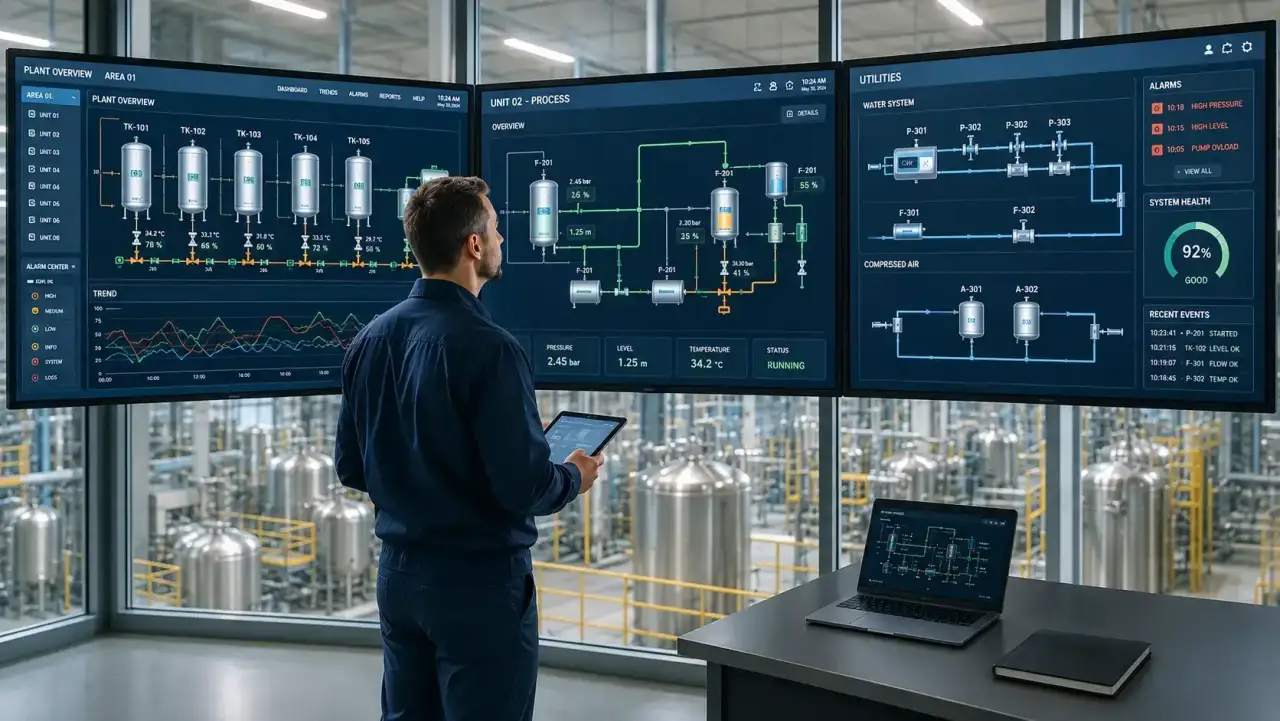
A system integrator in northern Italy told me they kept the advert open for seven months for a role like this.
They received applications from excellent developers.
None of them had ever seen a plant running, and in their trade that is not a detail on a CV.
The profile the manufacturing market is looking for and cannot find is not the generic .NET developer in industry: it is the person who designs control room interfaces, meaning someone who can put a WPF panel in front of an operator wearing gloves and a Blazor dashboard in front of a plant manager, knowing why those are two different jobs.
It is a specialisation, not a sector.
The context explains the demand.
Italian manufacturing is the second largest in the European Union by value added, after Germany (Eurostat data, 2025): automotive, food, pharmaceutical, petrochemical, precision engineering and utilities.
These are plants worth hundreds of millions of euros whose daily operation depends on supervisory software written and maintained by somebody, and that somebody has to know .NET and C#, industrial protocols such as OPC UA, Modbus and Profinet, how to build interfaces in WPF and in Blazor, and the operating context in which those interfaces will be used.
The four together are rare, and rarity here is not recruiter language.
The first door almost always opens on the side of system integrators specialising in automation, the certified Siemens or Rockwell partners, who build bespoke SCADA solutions for their clients.
You come in on a project, you see many different plants in a short time and you learn at the speed you are forced to learn when the client's line is running.
Many of those contracts turn into long relationships, because the ongoing development of a plant never ends.
The second door does not appear in job adverts, and it belongs to manufacturers with an in-house engineering department.
They look for someone to maintain and evolve their proprietary SCADA systems, often without publishing anything externally, through word of mouth.
Whoever comes in that way becomes, within two years, the technical reference point for production, a position with little visibility on the market and a great deal inside the company.
The third door belongs to SCADA software vendors, from Inductive Automation with Ignition to Aveva and Citect, and regional players such as Progea, who look for developers to extend their platforms with modules written in .NET or Java.
Here you work on a product rather than on contracts: fewer plants, more depth, and the code you write ends up in facilities you will never see.
The three doors lead to the same trade by very different routes:
- System integrators specialising in automation: you come in on a project, you see many different plants in a short time and ongoing development turns contracts into long relationships.
- Manufacturers with an in-house engineering department: positions that never appear in adverts, you arrive through word of mouth and within two years you are the technical reference point for production.
- SCADA software vendors: from Ignition to Aveva, Citect and Progea, you extend the platforms from the inside and work on a product rather than on contracts.
HMI and SCADA skills pay above the average for the software sector, and the highest premium goes to those who have worked on critical plants in pharmaceuticals or energy.
How much higher, and at what level of experience, is set out with figures in the article on modernising legacy SCADA systems.
The difference compared with a generic .NET developer is not in the difficulty of the code: it is that supply is scarce and the role is critical.
One hour of production downtime in a mid-sized manufacturing plant, in automotive or pharmaceuticals, costs between 10,000 and 80,000 euros, and production does not care whether the cause is mechanical or the supervisory software.
Whoever can get the plant running again, or better still stop it from halting, is paid in proportion to that number.
Building this profile takes a specific path, though, and knowing C# and WPF is only the starting point.
You need to understand how a PLC works, what a tag is and how to read it via OPC UA, how to structure an alarm system following the guidance of ISA-18.2, and how to design an interface that an operator with twenty years on that machine finds obvious at first glance.
The last one is the hardest, and you do not learn it by reading.
The concrete starting point costs nothing and sits entirely on your own machine: a small PLC simulator with an OPC UA client in C#, a WPF HMI with a real-time trend and a few fake alarms, a Blazor dashboard showing the same data in the browser.
You do not need industrial hardware, there are free OPC UA simulators you can use to develop and test all the communication logic.
It is the project that, in an interview, moves the conversation from theory questions to real ones.
From there on, what is missing is the part no video gives you: somebody who looks at your code and tells you where it will break on the shop floor, which is a different thing from telling you whether it compiles.
At Sviluppatore Migliore I follow people personally, so the places are few and I do not take everyone: if it turns out from our conversation that this path does not make sense for you, I would rather say so before than after.
The market is there, it is concrete and it is not moving: somebody has to design the control room interfaces of an entire manufacturing economy, and right now the companies looking for them far outnumber the people able to deliver them.
You can close this page and go back to writing business applications.
It works, it pays the bills, and in five years you will be doing exactly the same things with a different framework.
Or you take the narrow road, the one almost nobody walks because it requires leaving the office and setting foot on a shop floor.
HMI and SCADA skills pay above the average for the software sector, and the highest premium goes to those who have worked on critical plants.
The PLC Programming Course is the shortest route I know to get there.
The places are few.
This is not a trade for everyone: it is a trade for those who want their software to count for something when the line stops at three in the morning.
Frequently asked questions
WPF is the right choice when the HMI must run on a dedicated Windows operator panel, when the update frequency exceeds 5-10 tags per second, when complex custom graphics are needed (plant schematics, gauges, valve animations), and when network latency is not guaranteed. WPF uses hardware-accelerated rendering and does not depend on network connections to update the UI.
Blazor does not replace WPF for high-frequency operational HMIs, but it is superior for managerial supervision dashboards. Blazor Server with SignalR is ideal for browser-accessible interfaces, updated at frequencies below 2-5 Hz, on any device without installation. In many SCADA projects both are used: WPF for the line panel, Blazor for the web dashboard.
For high-frequency real-time charts in WPF the best choice is ScottPlot: it is the most performant, handles thousands of points without slowing the UI, updates from background threads, and has a simple API. LiveCharts2 is better suited for dashboards with animated charts at lower frequency. Syncfusion and Telerik offer specific industrial components like gauges and indicators not available in ScottPlot.
The MVVM pattern in a SCADA HMI splits the project into three layers: the Model contains data read from OPC UA (tag values, machine states, active alarms), the ViewModel implements INotifyPropertyChanged and transforms data into bindable properties for the View, the View is the XAML showing indicators, charts and controls. Data arrives from the OPC UA layer via events or callbacks and is dispatched to the UI thread with Dispatcher.InvokeAsync to avoid thread crossing exceptions.
In Blazor Server, disconnection is a real event that must be handled explicitly. The component should implement IAsyncDisposable to cancel SignalR Hub subscriptions when the client disconnects. The background service publishing data must handle connection exceptions and attempt automatic reconnection. The interface must clearly show the operator the connection status with a visual indicator.
A well-designed SCADA HMI has at least four access levels: Operator (visualization and standard commands like start/stop), Supervisor (alarm management, operational parameter changes), Engineer (system configuration, process threshold access), Administrator (user management, full configuration). Every command sent to the machine must be recorded in an audit log with timestamp, user, previous value and new value.
The cost depends on complexity: a WPF HMI for a single line with 50-100 tags starts at 15,000-30,000 euros for an experienced developer. Complex projects with detailed plant schematics, advanced alarm management and cloud integration can reach 80,000-150,000 euros. Costs are justified considering that commercial SCADA solutions like Wonderware or iFIX cost 20,000-50,000 euros in licenses alone, without customization.
Leave your details in the form below