Azure for .NET applications when deployment, observability, and cost control cannot be improvised
This category looks at Azure from the perspective of people shipping real software: cloud architecture, costs, security, deployment, monitoring, and the trade offs that decide whether a system remains governable.
Azure is not just hosting: it is an architectural platform
The way many teams use Azure is the most expensive and least effective: they take an application designed to run on-premises, put it on a VM in the cloud, and call it cloud migration.
The result is an on-premises application that costs more.
Azure is a platform that makes sense when you design for the cloud, not when you bring the old model into a new datacenter.
App Service, Azure Functions, Container Apps, Service Bus, Azure SQL, Cosmos DB, Key Vault, Application Insights: these are all managed services that eliminate infrastructure to maintain and add reliability, scalability, and observability that would be expensive to build from scratch.
The value of Azure for a .NET team is not immediate savings on servers.
It is the reduction of operational cost over time, scalability without manual provisioning, identity management integrated with Entra ID, and an ecosystem of services that integrate natively with the .NET SDK.
But this value is only realized when architectural choices are made to exploit it.
An application not designed for scale-out does not scale horizontally just because it is on Azure.
A system that does not use Application Insights does not become observable by magic.
Choosing the right Azure service for each scenario
Azure has hundreds of services.
Most .NET projects use about ten.
The problem is not choosing between hundreds of options: it is understanding which ten are the right ones for your specific case.
Compute: App Service for web apps and APIs with simple deployment; Azure Functions for event-driven logic and background jobs; Container Apps for containerized microservices with automatic scaling; AKS only when Kubernetes complexity is justified by the scale and control required.
Database: Azure SQL for traditional relational workloads with the advantage of not managing SQL Server; Cosmos DB for globally distributed data or flexible schemas; Azure Cache for Redis for distributed caching and sessions.
Messaging: Service Bus for enterprise messaging with delivery guarantees and dead-letter queue; Event Grid for system events and reactive integrations; Event Hubs for high-throughput streams and real-time analytics.
Observability: Application Insights for everything: logs, distributed traces, exceptions, custom metrics, dependency tracking. It has no competitor in the .NET ecosystem for the setup-to-value ratio.
| Scenario | Recommended service | When to avoid it |
|---|---|---|
| .NET REST API | App Service or Container Apps | Never on VM without specific reasons |
| Scheduled jobs | Azure Functions with timer trigger | If the job requires complex persistent state |
| Asynchronous communication | Service Bus | Event Grid if it is only notification, not a queue |
| Relational database | Azure SQL | Cosmos DB if the schema is truly flexible |
Azure costs: how to keep them under control without losing flexibility
Azure costs almost always surprise those who have not planned for them.
The flexibility of the cloud means it is easy to create resources and forget them, scale without limits, and receive an unexpected bill.
The first tool is Azure Cost Management: budget alerts, analysis by service and by tag, monthly projections.
It must be configured before going to production, not after the first surprising invoice.
The second tool is rightsizing: many services are oversized relative to actual traffic.
App Service Plan B2 where B1 would suffice, Azure SQL with excessive DTUs, Functions with Always On where it is not needed.
Application Insights helps understand the real load and guide rightsizing.
The third tool is choosing the pricing model: Reserved Instances for resources that run 24/7, consumption for everything that is genuinely event-driven, Dev/Test pricing for non-production environments.
The difference between consumption and reserved on an App Service that always runs can be 40-60% of the cost.
Architecture influences costs as much as pricing: a system that scales disproportionately relative to traffic has a design problem, not just a configuration problem.
Azure security: Managed Identity, Key Vault, and the Zero Trust principle
Cloud security is not a layer to add afterward: it is a property to design from the start.
Azure provides the tools to do it well, but they require conscious choices.
Managed Identity eliminates hardcoded credentials or those in configuration files.
An application on App Service with Managed Identity can access Azure SQL, Key Vault, Service Bus, and Storage without passwords in connection strings.
This is not only more secure: it is simpler to manage, because credentials rotate automatically.
Key Vault centralizes secrets, certificates, and cryptographic keys.
Access is controlled by RBAC and audit-logged.
No secrets in repositories, in committed configuration files, or in deployment logs.
The Zero Trust principle applied to Azure means: every resource authenticates every request, no implicit trust perimeter, minimum necessary access for every identity.
In practice: granular RBAC instead of broad roles, Private Endpoint instead of public connections where possible, network isolation with Virtual Network integration for critical services.
Analyses, cases, and articles on Azure, cloud architecture, and the .NET platform
4 articles found

If your app is growing, but your database isn't holding up... it's time to discover Cosmos DB
Cosmos DB for high performance, out-of-the-box consistency, and real-time global scalability, with an architecture natively designed for the cloud.
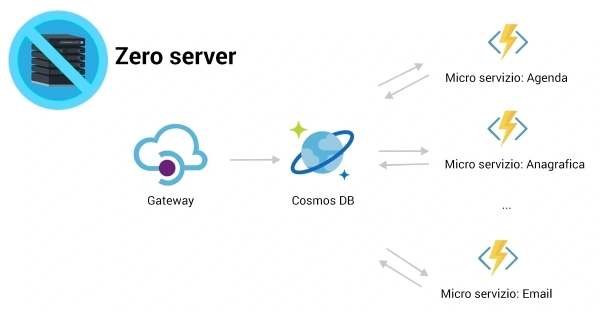
Serverless architecture on Azure with micro services
How to create a super-performing system with Azure Functions and reduce cloud infrastructure costs.

How to save 400% on an App Service with Azure
Find out how to save money with Azure and reduce cloud costs by up to 400% and a trick.
When cloud becomes a strategic decision
Cloud becomes a strategic decision when you do not just need to put an application online, but also manage growth, reliability, monitoring, and cost. At that point Azure stops being a logo on a slide and becomes part of software quality.
Related cloud technologies
What is Azure
Discover what Azure is: Microsoft's cloud computing platform for deploying, managing and scaling applications globally.
What is Docker
Discover what Docker is: the containerization platform for packaging, deploying and running applications consistently across environments.
What is Kubernetes
Discover what Kubernetes is: the container orchestration platform for deploying, scaling and managing applications in the cloud.
Frequently asked questions
The practical starting point is Azure App Service to deploy an existing ASP.NET Core application, Azure SQL for the database, and Azure DevOps or GitHub Actions for the CI/CD pipeline. These three services cover 90% of basic enterprise use cases. The AZ-900 certification provides a theoretical overview, but real understanding comes from practice on a development subscription.
The fundamental services are: App Service and AKS for hosting, Azure SQL and Cosmos DB for data, Service Bus for async messaging, Azure Key Vault for secrets, Application Insights for observability, and Azure DevOps or GitHub Actions for CI/CD. For AI architectures, Azure OpenAI Service and Azure AI Search are added.
Costs are governed with budget alerts on each subscription, resource tagging by department or project, conscious choice between pay-as-you-go and reserved instances for stable resources, and automatic shutdown of non-production environments outside working hours. The most common problem in junior teams is leaving unused development services running that accumulate invisible costs.
Azure Functions is ideal for event-driven logic, queue or event triggers, nightly batches, and short stateless processes. App Service is the right choice for stateful web applications, APIs with continuous traffic, or when you need control over the runtime and process lifecycle. For mixed workloads, App Service is often used as the host and Functions for satellite processes.