.NET MAUI Course with the SVILUPPATORE MIGLIORE method
Build native applications for Windows, macOS, Android and iOS from a single C# codebase. The successor to Xamarin, powered by .NET
1-on-1 Mentor On YOUR code Measurable results
Your team needs to build applications that run on multiple platforms. The temptation is real: Flutter, React Native, Kotlin Multiplatform, frameworks that promise cross-platform paradise but force you to abandon the C# and .NET skills you have built over the years.
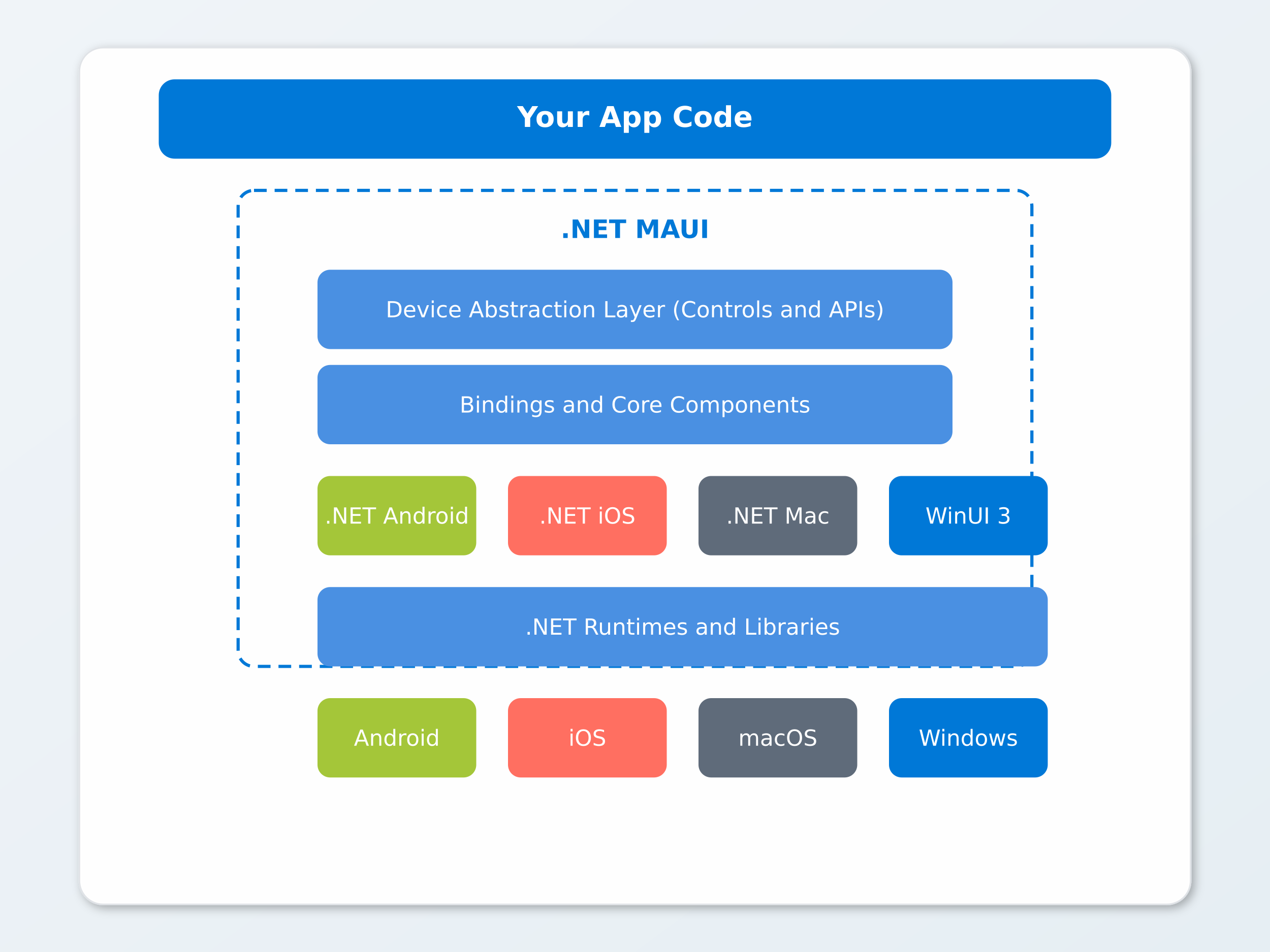
With .NET MAUI you do not have to choose. One language (C#), one codebase, native applications for Windows, macOS, Android and iOS. With the option to integrate Blazor for the UI and reuse web components.
If you are a CTO who needs to unify the mobile/desktop stack, a team leader with a C# team that must cover multiple platforms, or a senior developer who wants to master cross-platform in the .NET world, this programme is designed for you.
What you learn: the complete programme
2 phases, 8 modules of intensive training on YOUR code.
2 phases, 8 modules of intensive training on YOUR code.
PHASE 1: MAUI Foundations (Weeks 1-4)
- 1
MAUI Architecture: one project, every platform
Structuring an enterprise MAUI project seems straightforward until you need to support four different platforms. The temptation to use #if PLATFORM everywhere leads to unmanageable code within months. Here you learn the correct architecture to separate responsibilities without duplicating logic.
Programma
- Architecture and native DIHow to structure handlers and dependencies for each platform without if-platform in business logic
- Multi-targeting without duplicationHow to maintain a single codebase that compiles for Windows, macOS, Android and iOS
- Typed Shell navigationHow to navigate between screens with parameters and routing without string magic and fragile code
- Project structure for the teamHow to organise folders so every developer immediately finds what they need
- MauiProgram and service registrationHow to configure native DI identical to ASP.NET Core without additional libraries
- Platform-specific codeHow to access native APIs with custom handlers when MAUI Essentials is not enough
Risultato
MAUI project structured and running on all target platforms with a clear architecture that scales as the team grows.
- 2
Cross-Platform XAML: native UI with a single codebase
Building a layout that works well on a 5-inch phone and a 27-inch monitor is not straightforward. Without knowing the MAUI layout system you risk writing different code for each platform, negating the cross-platform advantage. Here you learn to build native UIs that truly adapt.
Programma
- Advanced Grid and FlexLayoutHow to build complex layouts that adapt to any screen, from 5 inches to 27 inches
- Custom cross-platform controlsHow to create components that render natively on each platform without rewriting the UI
- Centralised styles and themingHow to change the primary colour in one place and see it updated everywhere
- Adaptive UI with OnPlatform and OnIdiomHow to show different interfaces on phone, tablet and desktop without duplicating XAML
- CollectionView with virtualisationHow to handle lists of thousands of items on mobile without lag
- Animations and gesture recognisersHow to add native touch feedback for each platform in a consistent way
Risultato
Native interfaces on all platforms, responsive and with a professional look and feel. Users perceive the app as built specifically for their platform.
- 3
MVVM and Architecture: testable code on every platform
The MVVM pattern in MAUI with CommunityToolkit.Mvvm eliminates boilerplate and makes every ViewModel testable in isolation. Without MVVM, adding a feature on mobile means opening code-behind and hoping nothing breaks. Here we build the architecture that separates UI and logic definitively.
Programma
- CommunityToolkit.Mvvm and source generatorsHow to eliminate MVVM boilerplate reducing 20 lines to 3, already testable
- Native DI in MAUIHow to use the same configuration as ASP.NET Core without additional dependencies
- Shell navigationHow to manage page-based and modal navigation consistently across all platforms
- WeakReferenceMessengerHow to make ViewModels communicate without direct dependencies and without memory leaks on mobile
- ViewModel lifecycle on mobileHow to handle backgrounding so that data survives correctly
- Declarative form validationHow to show errors automatically without repetitive validation code
Risultato
Clean, testable and maintainable architecture. The team works on ViewModels without touching code-behind, on any target platform.
- 4
Blazor Hybrid: reuse your web UI on mobile and desktop
If your team already has Blazor components, rewriting them in XAML for MAUI is pure waste. Blazor Hybrid allows sharing the same UI between web, desktop and mobile without duplicating anything. Here you learn how to integrate BlazorWebView in MAUI the right way.
Programma
- BlazorWebView in MAUIHow to host Blazor components in the mobile app to make them work offline on desktop and mobile
- Shared Razor Class LibraryHow to write UI components once and use them both in the web app and in the MAUI app
- Hybrid JavaScript InteropHow to integrate existing JS libraries without rewriting them in C#
- Hybrid Shell and Blazor routingHow to manage the structure with MAUI Shell and content with Blazor without conflicts
- When to choose XAML vs BlazorHow to decide for each part of the app based on performance and maintainability
- Zero UI duplicationHow to share components between the website and the app without maintaining two UI codebases
Risultato
You reuse web components in mobile and desktop. One team knows Blazor and builds everything: website, desktop app, mobile app. A single UI codebase.
PHASE 2: Integration and Production (Weeks 5-10)
- 5
Platform Integration: full access to native APIs
Accessing the camera, GPS or push notifications from unified C# code is one of MAUI's greatest strengths. But doing it correctly requires understanding how MAUI Essentials abstracts native APIs and when you need to go down to the platform-specific level. Here you learn to leverage all device capabilities without if-platform in your code.
Programma
- MAUI EssentialsHow to integrate GPS, sensors and device state with geolocation, accelerometer and battery available directly in C#
- Photo and media captureHow to implement cross-platform selection and capture using the native camera on iOS, Android and Windows
- Push notificationsHow to implement notifications with Firebase and APNs that arrive even when the app is closed
- Security and storageHow to manage files, credentials and preferences using the native vault of each platform
- Runtime permissionsHow to manage permissions on iOS and Android without if-platform, requesting them only when necessary
- Custom platform-specific handlersHow to access any native API without abandoning the unified codebase
Risultato
Full access to native device APIs with unified C# code. Your apps leverage all platform capabilities.
- 6
Data and Offline-First: the app that works without a connection
A mobile app that stops working without a network is not a professional app. Offline-first architecture is what separates apps users tolerate from apps they use with pleasure. Here we build the sync strategy that keeps data consistent under any network condition.
Programma
- HttpClient on mobileHow to configure timeouts, retry and certificate pinning for unstable networks and slow connections
- OAuth2 and biometricsHow to implement authentication with MSAL, Face ID and fingerprint in 10 lines of code
- Local SQLiteHow to persist and read data without depending on the network, with automatic sync on reconnect
- Offline-first sync strategyHow to resolve conflicts between local and server data without losing anything
- Connectivity monitoringHow to adapt the app behaviour in real time based on network status
- Retry policy with PollyHow to automatically restart failed API calls without showing errors to the user
Risultato
Your applications work offline and sync automatically. Field users do not lose data because of the network.
- 7
Cross-Platform Testing: cover all platforms without a physical device
Manually testing on four platforms for every release is unsustainable. Without an automated test strategy, cross-platform becomes a bug multiplier, not a productivity multiplier. Here we build the test suite that covers all platforms in the CI pipeline.
Programma
- Unit tests on ViewModelsHow to test every ViewModel with xUnit without a physical device, in milliseconds
- Appium on MAUIHow to automate UI testing with bots that tap buttons and navigate screens like a real user
- Parallel suite on emulatorsHow to structure tests to run on Android, iOS and Windows simultaneously
- Mocking platform servicesHow to isolate GPS, camera and notifications in tests without physical devices
- Cross-platform snapshot testingHow to block visual regressions on every platform before release
- Realistic test strategyHow to balance automated and manual tests to maximise coverage with the available budget
Risultato
Test coverage on all platforms. Release with confidence on iOS, Android, Windows and macOS without touching every device manually.
- 8
Deploy and Store Publishing: from commit to stores automatically
Manually publishing to four different stores is a source of errors and delays with every release. A CI/CD pipeline for MAUI eliminates manual signing, manual submissions and manual rollouts. Here we automate everything: from commit to publication on all stores.
Programma
- CI/CD with GitHub ActionsHow to build pipelines that produce signed builds for all platforms on every commit
- Automated code signingHow to manage iOS certificates and Android keystores securely in the pipeline without manual builds
- App Store and Google PlayHow to automate submission, review and rollout without manual intervention
- Windows distribution with MSIXHow to guarantee clean installation, automatic updates and clean uninstall without residual files
- Cross-platform crash reportingHow to see errors before users report them, on all platforms
- Over-the-air updatesHow to distribute critical fixes without waiting for store review
Risultato
Automated releases on all stores. From commit to publication on iOS, Android and Windows with a single click.
The method: Progressive Mastery Architecture
We start from your objectives: which platforms do you need? What kind of application? Does it need Blazor Hybrid or native XAML? We define the architecture and then build together, session by session, on real code.
Who this programme is for
CTO who wants to unify mobile and desktop
You need applications on multiple platforms without maintaining separate codebases. Your team knows C# and you do not want to introduce Flutter or React Native.
Team migrating from Xamarin
Your Xamarin.Forms apps need to move to .NET MAUI. You want a safe migration that takes advantage of all platform improvements without rewriting from scratch.
C# developer who wants to do mobile
You want to build iOS and Android apps with the language you already know. MAUI lets you use C# and .NET to create native cross-platform apps.
Who is Matteo Migliore
What professionals who have followed the programme say
Investment and programme
Programmes are tailored to the number of participants, duration and project complexity.
Fill in the form to receive the complete programme and a personalised quote based on your specific needs.
Individual Programme
1 participant, personalised mentoring
- 8 complete modules
- Biweekly live 1-to-1 sessions
- Platform access for 12 months
- Continuous chat support
Team Programme
2-3 participants, department transformation
- 8 complete modules
- Work on the company codebase
- MAUI reference architecture
- Platform access for 12 months for all
Intensive Workshop
1-2 days on specific topics
- Focus on specific modules of your choice
- Up to 5 participants
- Complete training materials
- Follow-up session at 30 days
Ready to build cross-platform apps with .NET?
Fill in the form and receive all the information about the .NET MAUI programme. We analyse your scenario and the best path for you or your team.
Free analysis We assess the target platforms and project requirements
Talk to one of our tutors Not a salesperson, but a real expert who will guide you
Practical advice You receive useful guidance even if you decide not to continue